remote control TOYOTA LAND CRUISER 2016 J200 Owner's Manual
[x] Cancel search | Manufacturer: TOYOTA, Model Year: 2016, Model line: LAND CRUISER, Model: TOYOTA LAND CRUISER 2016 J200Pages: 608, PDF Size: 10.91 MB
Page 424 of 608
424
LC200_OM_OM60M88U_(U)
5-4. Using the other interior features
■Programming a rolling code system
If your device is rolling code equipped, follow the steps under the
heading “Programming HomeLink
” before proceeding with the
steps listed below.
Locate the learn button on the ceiling mounted garage door
opener motor. The exact location and color of the button may
vary by brand of garage door opener motor.
Refer to the operation manual supplied with the garage door opener
motor for the location of the learn button.
Press the learn button.
Following this step, you have 30 seconds in which to initiate below.
Press and hold the vehicle’s programmed HomeLink button for
2 seconds and release it. Repeat this step once again. The
garage door may open.
If the garage door opens, the programming process is complete. If the
door does not open, press and release the button a third time. This third
press and release will complete the programming process by opening
the garage door.
The ceiling mounted garage door opener motor should now recognize
the HomeLink
signal and operate the garage door.
Repeat the steps above to program another rolling code system
for any of the remaining HomeLink buttons.
■Programming an entry gate (for U.S.A. owners)/Programming
all devices in the Canadian market
Place your transmitter 1 to 3 in. (25 to 75 mm) away from the sur-
face of the HomeLink
.
Keep the HomeLink indicator light in view while programming.
Press and hold the selected HomeLink button.
Repeatedly press and release (cyc le) the device’s remote control
button for 2 seconds each until is completed.
When the indicator light on the HomeLink
compatible trans-
ceiver starts to flash rapidly, release the buttons.
Test the operation of the HomeLink
by pressing the newly pro-
grammed button. Check to see if the gate/device operates cor-
rectly.
Repeat the steps above to program another device for each of
the remaining HomeLink
buttons.
1
2
3
3
4
1
2
3
4
4
5
6
Page 426 of 608
426
LC200_OM_OM60M88U_(U)
5-4. Using the other interior features
■Before programming
●Install a new battery in the remote control transmitter.
● The battery side of the remote control transmitter must be pointed away
from the HomeLink
button.
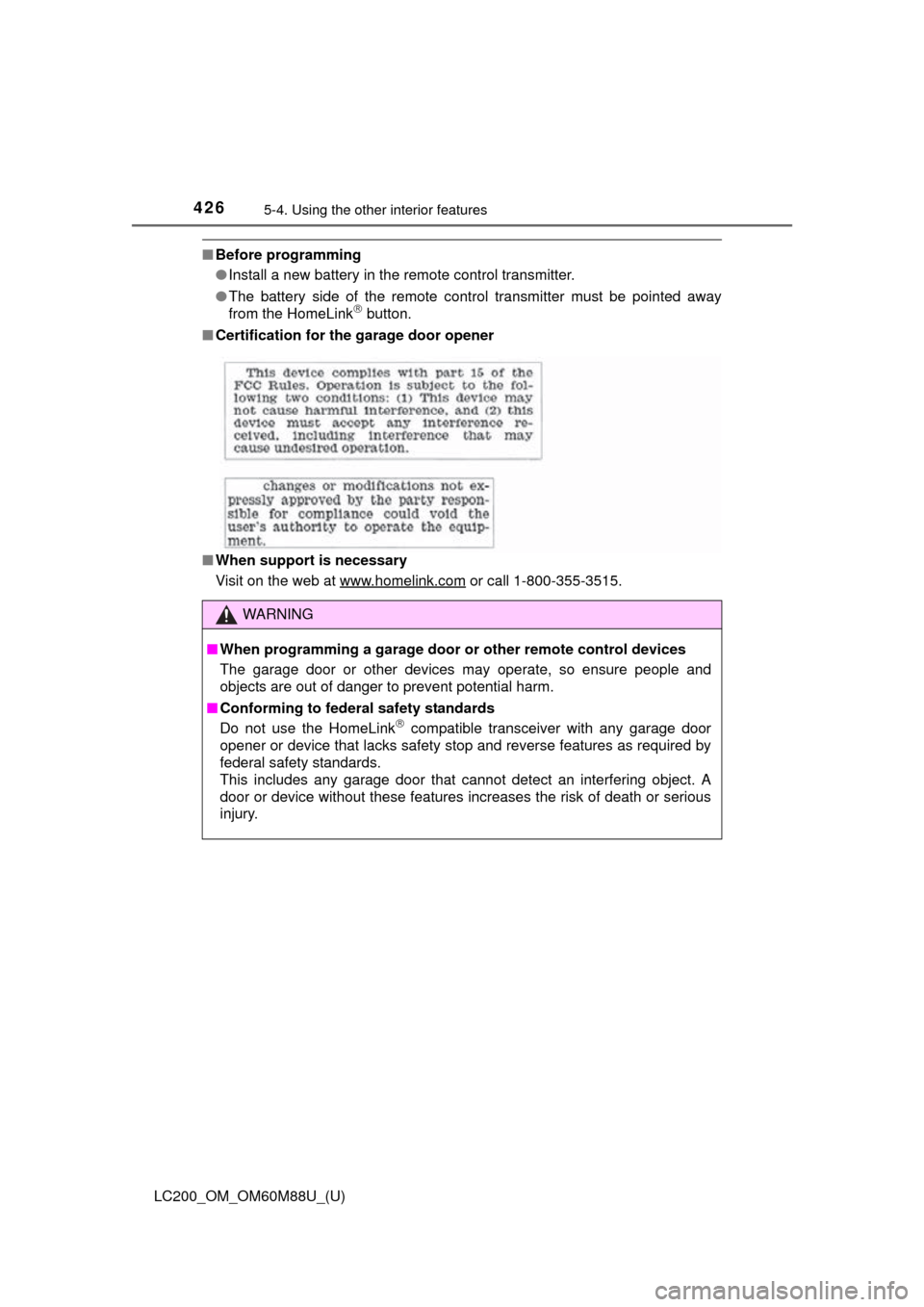
■ Certification for the garage door opener
■ When support is necessary
Visit on the web at www.homelink.com
or call 1-800-355-3515.
WARNING
■When programming a garage door or other remote control devices
The garage door or other devices may operate, so ensure people and
objects are out of danger to prevent potential harm.
■ Conforming to federal safety standards
Do not use the HomeLink
compatible transceiver with any garage door
opener or device that lacks safety stop and reverse features as required by
federal safety standards.
This includes any garage door that cannot detect an interfering object. A
door or device without these features increases the risk of death or ser\
ious
injury.
Page 460 of 608
460
LC200_OM_OM60M88U_(U)
6-3. Do-it-yourself maintenance
■Before recharging
When recharging, the battery produces hydrogen gas which is flammable and
explosive. Therefore, observe the following before recharging:
●If recharging with the battery installed on the vehicle, be sure to disconnect
the ground cable.
● Make sure the power switch on the charger is off when connecting and dis-
connecting the charger cables to the battery.
■ After recharging/reconnecting the battery
The engine may not start. Follow the procedure below to initialize the system.
Shift the shift lever to P
Open and close any of the doors.
Restart the engine.
● Unlocking the doors using the smart key system may not be possible imme-
diately after reconnecting the battery. If this happens, use the wireless
remote control or the mechanical key to lock/unlock the doors.
● Start the engine with the engine switch in ACCESSORY mode. The engine
may not start with the engine switch turned off. However, the engine will
operate normally from the second attempt.
● The engine switch mode is recorded by the vehicle. If the battery is recon-
nected, the vehicle will return the engine switch mode to the status it was in
before the battery was disconnected. Make sure to turn off the engine
before disconnect the battery. Take extra care when connecting the battery
if the engine switch mode prior to discharge is unknown.
If the engine will not start even after multiple attempts at both methods, con-
tact your Toyota dealer.
WARNING
■ Chemicals in the battery
Batteries contain poisonous and corrosive sulfuric acid and may produce
hydrogen gas which is flammable and explosive. To reduce the risk of death
or serious injury, take the following precautions while working on or near
battery:
●Do not cause sparks by touching the battery terminals with tools.
● Do not smoke or light a match near the battery.
● Avoid contact with eyes, skin and clothes.
● Never inhale or swallow electrolyte.
● Wear protective safety glasses when working near the battery.
● Keep children away from the battery.
■ Where to safely charge the battery
Always charge the battery in an open area. Do not charge the battery in a
garage or closed room where there is not sufficient ventilation.
1
2
3
Page 480 of 608
480
LC200_OM_OM60M88U_(U)
6-3. Do-it-yourself maintenance
■Use a CR2032 lithium battery
●Batteries can be purchased at your Toyota dealer, local electrical appliance
shops or camera stores.
● Replace only with the same or equivalent type recommended by the manu-
facturer.
● Dispose of used batteries according to the local laws.
■ If the electronic key battery is depleted
The following symptoms may occur:
●The smart key system and wireless remote control will not function properly.
● The operational range will be reduced.
WARNING
■ Removed battery and other parts
These parts are small and if swallowed by a child, they can cause choking.
Keep away from children. Failure to do so could result in death or serious
injury.
NOTICE
■For normal operation after replacing the battery
Observe the following precautions to prevent accidents:
●Always work with dry hands.
Moisture may cause the battery to rust.
● Do not touch or move any other component inside the remote control.
● Do not bend either of the battery terminals.
Page 540 of 608
540
LC200_OM_OM60M88U_(U)
7-2. Steps to take in an emergency
If the electronic key does not operate
properly
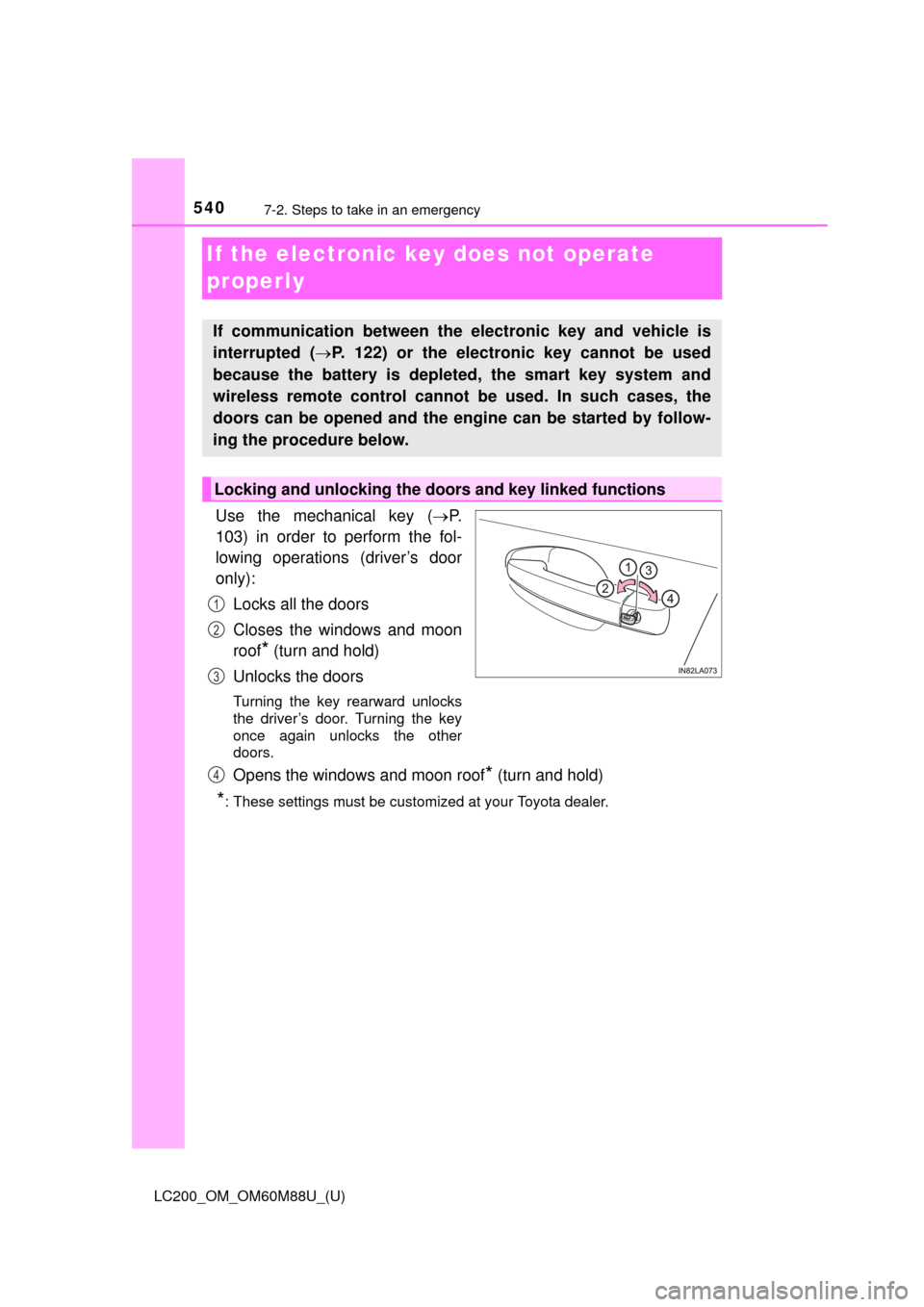
Use the mechanical key (P.
103) in order to perform the fol-
lowing operations (driver’s door
only):
Locks all the doors
Closes the windows and moon
roof
* (turn and hold)
Unlocks the doors
Turning the key rearward unlocks
the driver’s door. Turning the key
once again unlocks the other
doors.
Opens the windows and moon roof* (turn and hold)
*: These settings must be customized at your Toyota dealer.
If communication between the electronic key and vehicle is
interrupted ( P. 122) or the electronic key cannot be used
because the battery is depleted, the smart key system and
wireless remote control cannot be used. In such cases, the
doors can be opened and the engine can be started by follow-
ing the procedure below.
Locking and unlocking the doors and key linked functions
1
2
3
4
Page 575 of 608
LC200_OM_OM60M88U_(U)
5758-2. Customization
8
Vehicle specifications
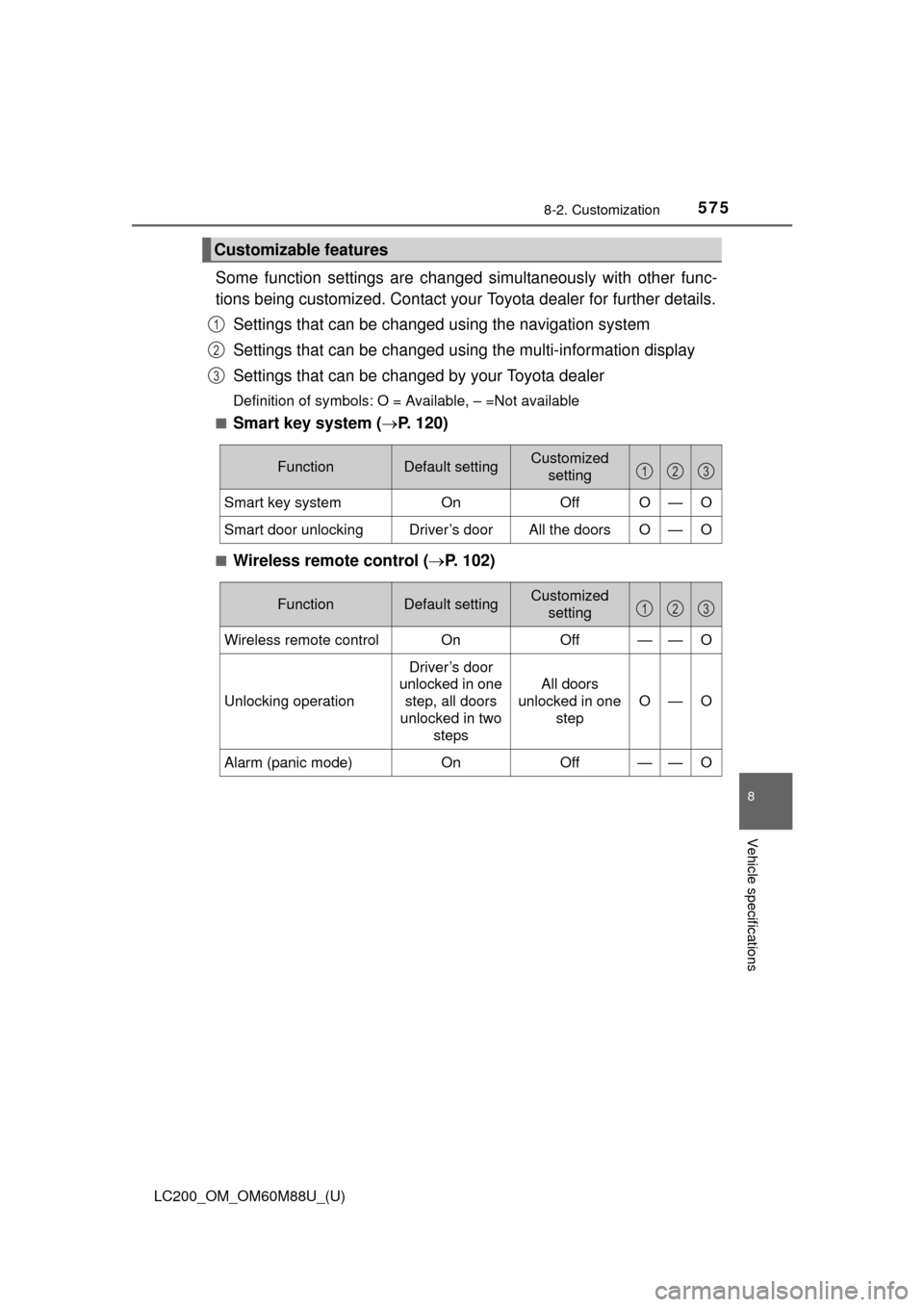
Some function settings are changed simultaneously with other func-
tions being customized. Contact your Toyota dealer for further details.
Settings that can be changed using the navigation system
Settings that can be changed using the multi-information display
Settings that can be changed by your Toyota dealer
Definition of symbols: O = Available, – =Not available
■
Smart key system ( P. 120)
■Wireless remote control ( P. 102)
Customizable features
1
2
3
FunctionDefault settingCustomized
setting
Smart key system OnOffO—O
Smart door unlockingDriver’s doorAll the doorsO—O
123
FunctionDefault settingCustomized
setting
Wireless remote control On Off——O
Unlocking operation
Driver’s door
unlocked in one
step, all doors
unlocked in two steps
All doors
unlocked in one step
O—O
Alarm (panic mode)OnOff——O
123
Page 576 of 608
576
LC200_OM_OM60M88U_(U)
8-2. Customization
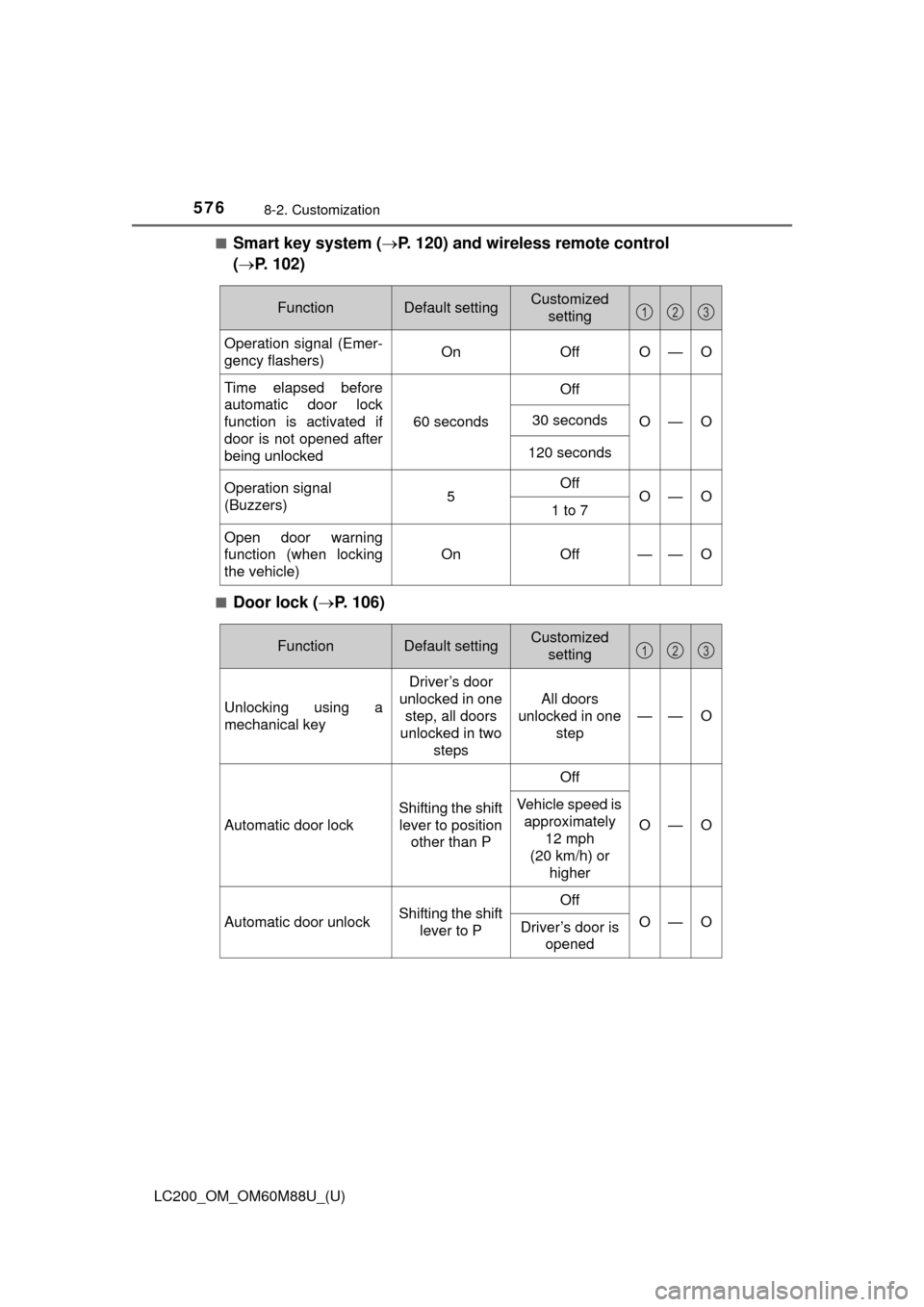
■Smart key system (P. 120) and wireless remote control
( P. 102)
■Door lock ( P. 106)
FunctionDefault settingCustomized
setting
Operation signal (Emer-
gency flashers) On OffO—O
Time elapsed before
automatic door lock
function is activated if
door is not opened after
being unlocked
60 secondsOffO—O30 seconds
120 seconds
Operation signal
(Buzzers)5OffO—O1 to 7
Open door warning
function (when locking
the vehicle)
On Off
——O
123
FunctionDefault settingCustomized
setting
Unlocking using a
mechanical key
Driver’s door
unlocked in one step, all doors
unlocked in two
steps
All doors
unlocked in one step
——O
Automatic door lock Shifting the shift
lever to position other than P OffO—O
Vehicle speed is
approximately
12 mph
(20 km/h) or higher
Automatic door unlock Shifting the shift
lever to P OffO—O
Driver’s door is
opened
123
Page 577 of 608
LC200_OM_OM60M88U_(U)
5778-2. Customization
8
Vehicle specifications
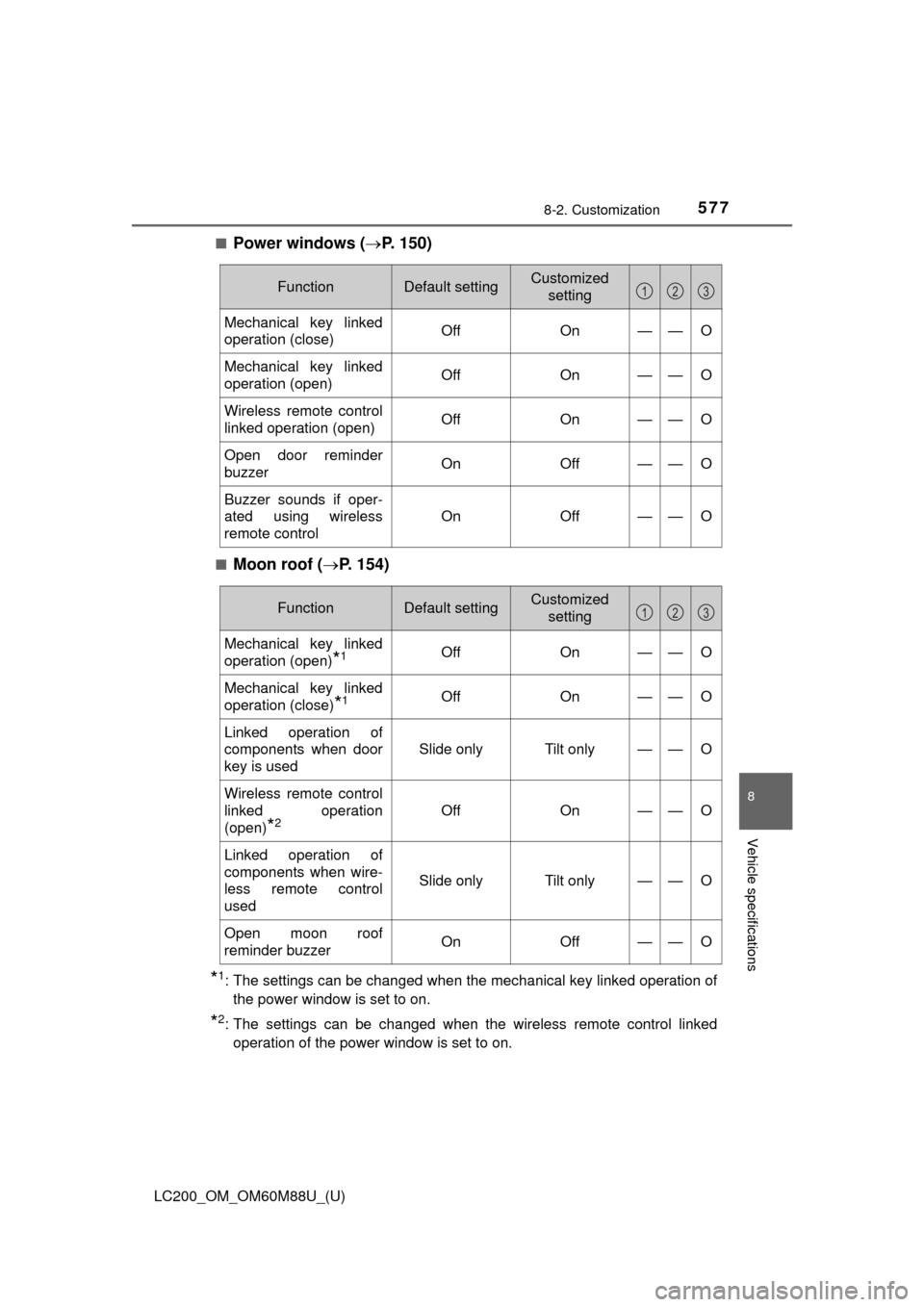
■Power windows (P. 150)
■Moon roof (P. 154)
*1: The settings can be changed when the mechanical key linked operation of
the power window is set to on.
*2: The settings can be changed when the wireless remote control linkedoperation of the power window is set to on.
FunctionDefault settingCustomized setting
Mechanical key linked
operation (close) Off On——O
Mechanical key linked
operation (open)Off On——O
Wireless remote control
linked operation (open)Off On——O
Open door reminder
buzzerOn Off——O
Buzzer sounds if oper-
ated using wireless
remote controlOn Off
——O
123
FunctionDefault settingCustomized
setting
Mechanical key linked
operation (open)
*1Off On——O
Mechanical key linked
operation (close)
*1OffOn——O
Linked operation of
components when door
key is used
Slide onlyTilt only——O
Wireless remote control
linked operation
(open)
*2OffOn——O
Linked operation of
components when wire-
less remote control
used
Slide onlyTilt only——O
Open moon roof
reminder buzzerOnOff——O
123
Page 593 of 608
593Alphabetical index
LC200_OM_OM60M88U_(U)
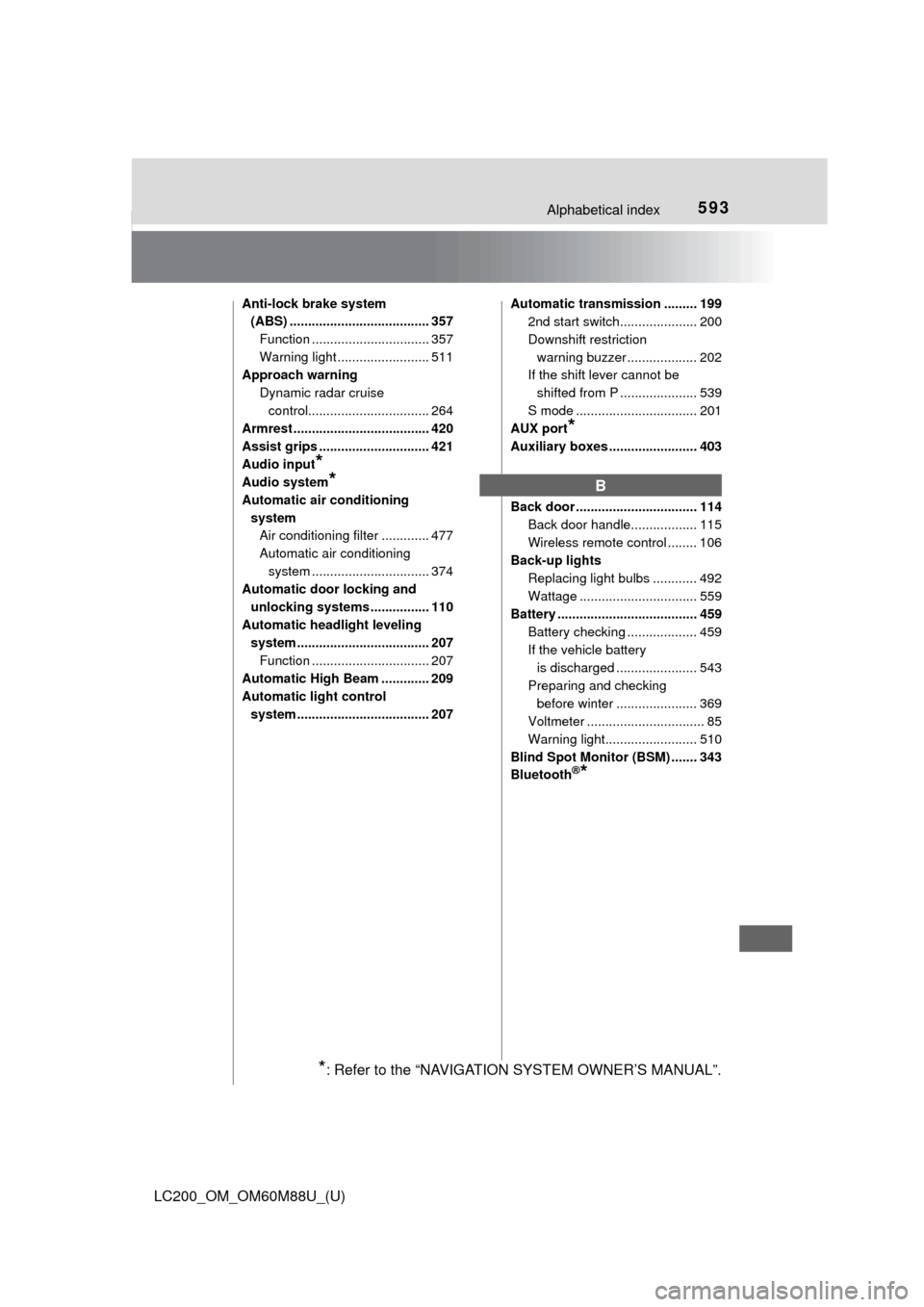
Anti-lock brake system (ABS) ...................................... 357
Function ................................ 357
Warning light ......................... 511
Approach warning
Dynamic radar cruise control................................. 264
Armrest ..................................... 420
Assist grips .............................. 421
Audio input
*
Audio system*
Automatic air conditioning
systemAir conditioning filter ............. 477
Automatic air conditioning
system ......... ....................... 374
Automatic door locking and
unlocking systems ................ 110
Automatic headli ght leveling
system .................................... 207
Function ................................ 207
Automatic High Beam ............. 209
Automatic light control system .................................... 207 Automatic transmission ......... 199
2nd start switch..................... 200
Downshift restriction
warning buzzer ................... 202
If the shift lever cannot be
shifted from P ..................... 539
S mode ................................. 201
AUX port
*
Auxiliary boxes ........................ 403
Back door ................................. 114
Back door handle.................. 115
Wireless remote control ........ 106
Back-up lights Replacing light bulbs ............ 492
Wattage ................................ 559
Battery ...................................... 459 Battery checking ................... 459
If the vehicle battery is discharged ...................... 543
Preparing and checking before winter ...................... 369
Voltmeter ................................ 85
Warning light......................... 510
Blind Spot Monitor (BSM) ....... 343
Bluetooth
®*
B
*: Refer to the “NAVIGATION SYSTEM OWNER’S MANUAL”.
Page 600 of 608
600Alphabetical index
LC200_OM_OM60M88U_(U)
KDSS (Kinetic Dynamic Suspension System) ............. 357
Keyless entry Smart key system ................. 120
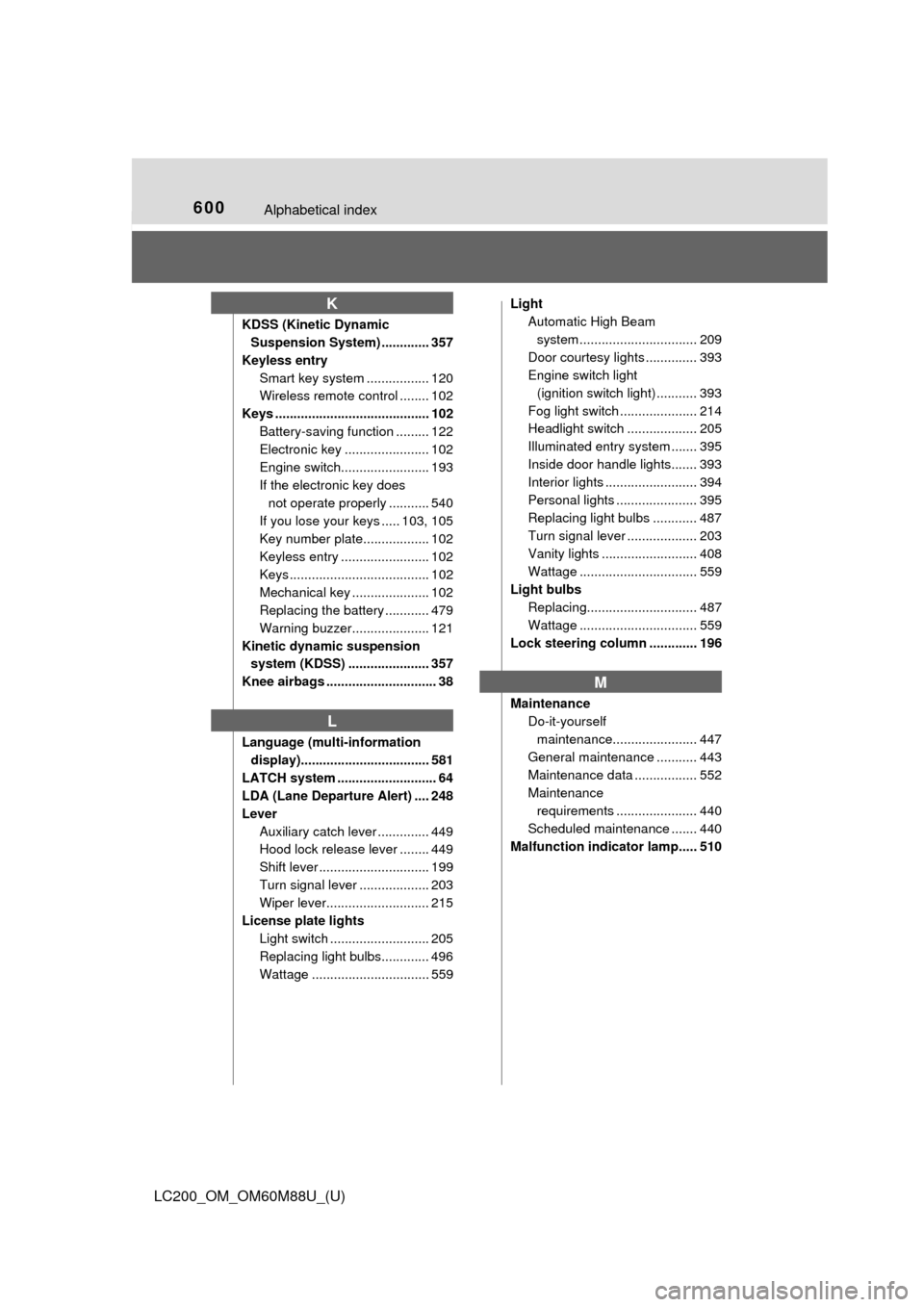
Wireless remote control ........ 102
Keys .......................................... 102 Battery-saving function ......... 122
Electronic key ....................... 102
Engine switch........................ 193
If the electronic key does not operate properly ........... 540
If you lose your keys ..... 103, 105
Key number plate.................. 102
Keyless entry ........................ 102
Keys ...................................... 102
Mechanical key ..................... 102
Replacing the battery ............ 479
Warning buzzer..................... 121
Kinetic dynamic suspension system (KDSS) ...................... 357
Knee airbags .............................. 38
Language (multi-information display)................................... 581
LATCH system ........................... 64
LDA (Lane Departure Alert) .... 248
Lever Auxiliary catch lever .............. 449
Hood lock release lever ........ 449
Shift lever .............................. 199
Turn signal lever ................... 203
Wiper lever............................ 215
License plate lights Light switch ........................... 205
Replacing light bulbs............. 496
Wattage ................................ 559 Light
Automatic High Beam
system .......... ...................... 209
Door courtesy lights .............. 393
Engine switch light (ignition switch light) ........... 393
Fog light switch ..................... 214
Headlight switch ................... 205
Illuminated entry system ....... 395
Inside door handle lights....... 393
Interior lights ......................... 394
Personal lights ...................... 395
Replacing light bulbs ............ 487
Turn signal lever ................... 203
Vanity lights .......................... 408
Wattage ................................ 559
Light bulbs
Replacing.............................. 487
Wattage ................................ 559
Lock steering column ............. 196
Maintenance
Do-it-yourself maintenance....................... 447
General maintenance ........... 443
Maintenance data ................. 552
Maintenance requirements ...................... 440
Scheduled maintenance ....... 440
Malfunction indicator lamp..... 510
K
L
M