battery TOYOTA LAND CRUISER 2016 J200 Workshop Manual
[x] Cancel search | Manufacturer: TOYOTA, Model Year: 2016, Model line: LAND CRUISER, Model: TOYOTA LAND CRUISER 2016 J200Pages: 608, PDF Size: 10.91 MB
Page 538 of 608
5387-2. Steps to take in an emergency
LC200_OM_OM60M88U_(U)
One of the following may be the cause of the problem:
●One or both of the battery terminals may be disconnected.
● The battery may be discharged. ( P. 543)
● There may be a malfunction in the steering lock system.
Contact your Toyota dealer if the problem cannot be repaired, or if repair
procedures are unknown.
When the engine does not start, the following steps can be used as an
interim measure to start the engine if the engine switch is functioning
normally.
Set the parking brake.
Put the shift lever in P.
Set the engine switch to the ACCESSORY mode.
Push and hold the engine switch for about 15 seconds while
depressing the brake pedal firmly.
Even if the engine can be started using the above steps, the system
may be malfunctioning. Have the v ehicle inspected by your Toyota
dealer.
The starter motor does not turn ov er, the interior lights and head-
lights do not turn on, or the horn does not sound.
Emergency start function
1
2
3
4
Page 540 of 608
540
LC200_OM_OM60M88U_(U)
7-2. Steps to take in an emergency
If the electronic key does not operate
properly
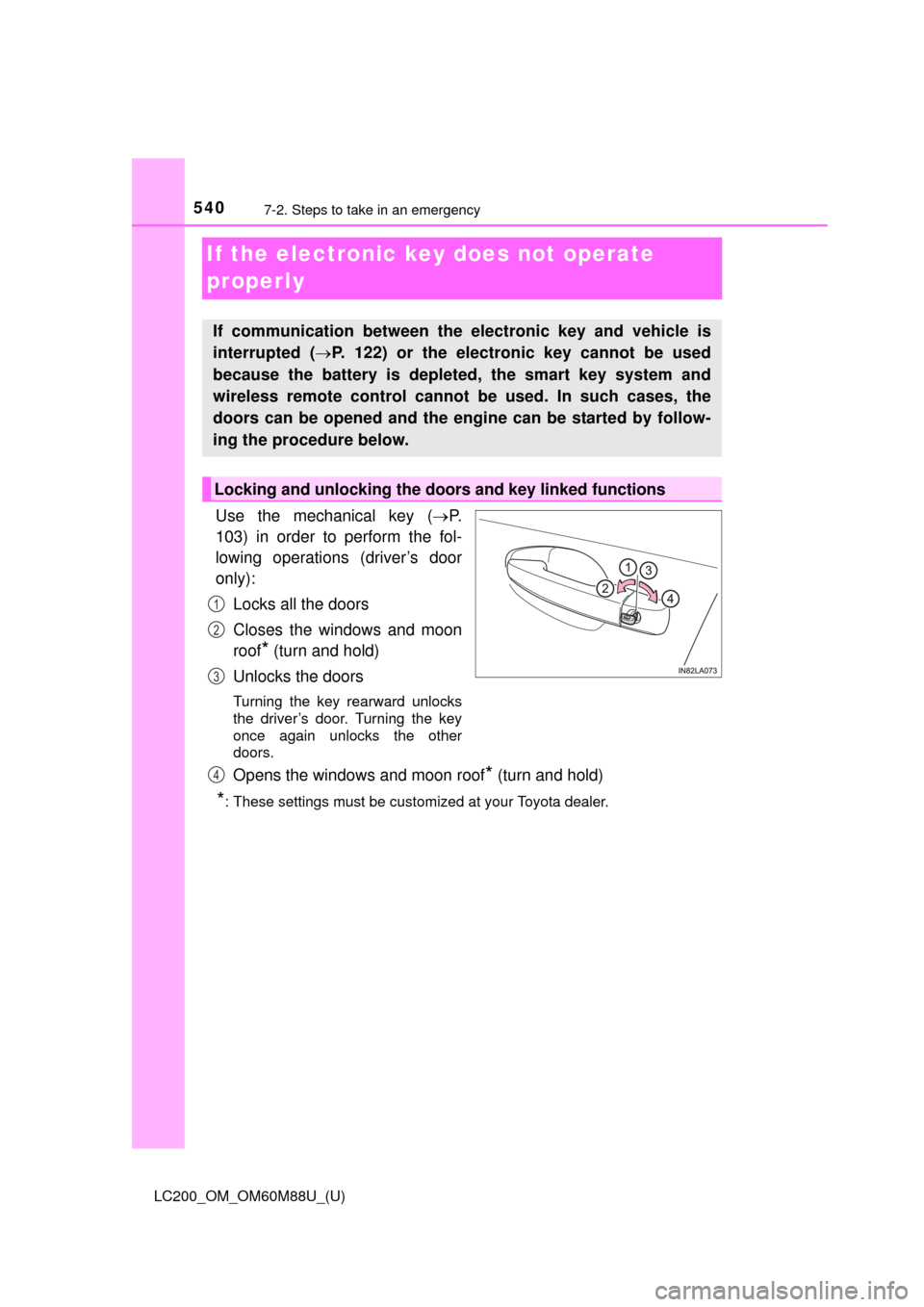
Use the mechanical key (P.
103) in order to perform the fol-
lowing operations (driver’s door
only):
Locks all the doors
Closes the windows and moon
roof
* (turn and hold)
Unlocks the doors
Turning the key rearward unlocks
the driver’s door. Turning the key
once again unlocks the other
doors.
Opens the windows and moon roof* (turn and hold)
*: These settings must be customized at your Toyota dealer.
If communication between the electronic key and vehicle is
interrupted ( P. 122) or the electronic key cannot be used
because the battery is depleted, the smart key system and
wireless remote control cannot be used. In such cases, the
doors can be opened and the engine can be started by follow-
ing the procedure below.
Locking and unlocking the doors and key linked functions
1
2
3
4
Page 541 of 608
5417-2. Steps to take in an emergency
LC200_OM_OM60M88U_(U)
7
When trouble arises
Ensure that the shift lever is in P and depress the brake pedal.
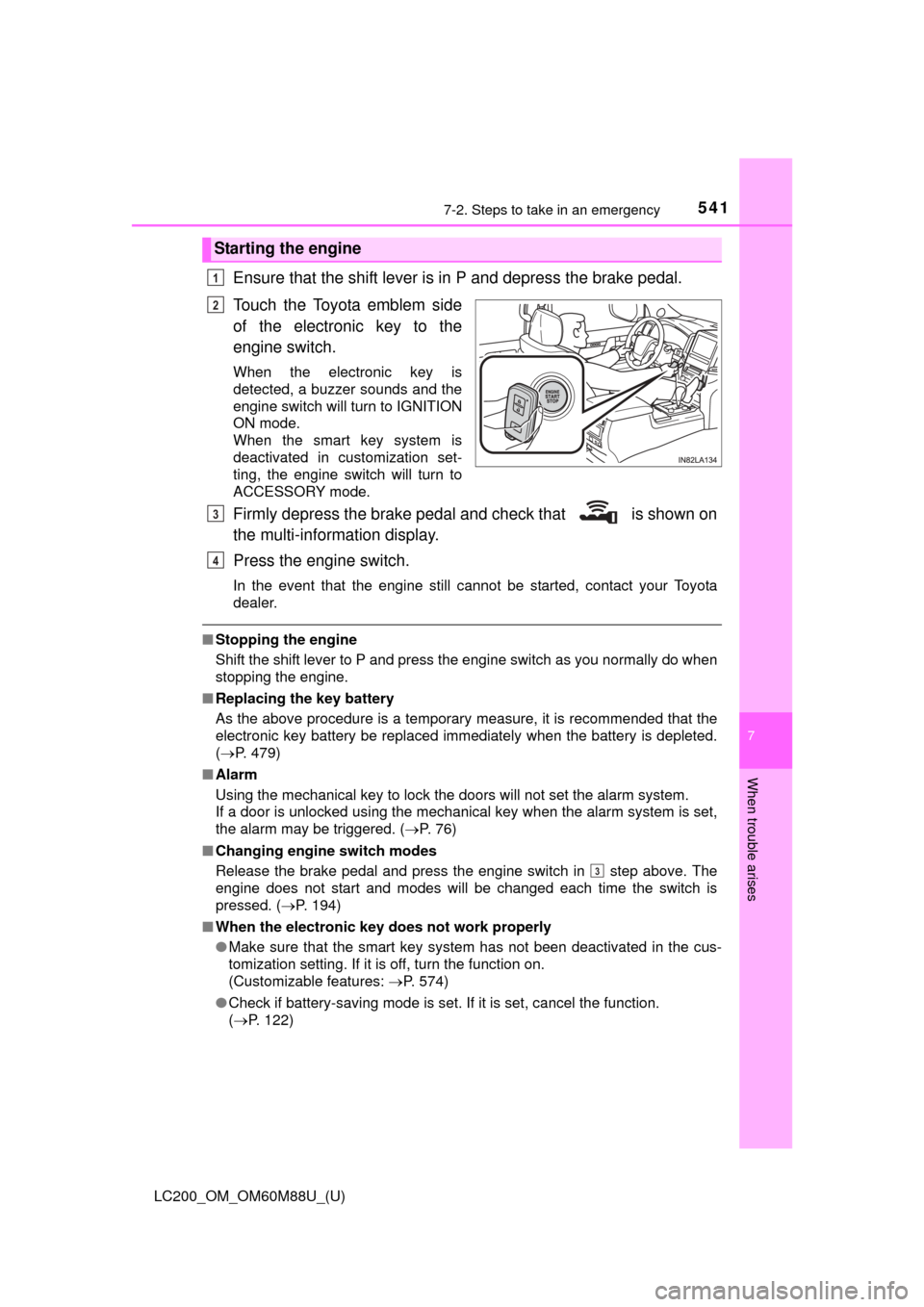
Touch the Toyota emblem side
of the electronic key to the
engine switch.
When the electronic key is
detected, a buzzer sounds and the
engine switch will turn to IGNITION
ON mode.
When the smart key system is
deactivated in customization set-
ting, the engine switch will turn to
ACCESSORY mode.
Firmly depress the brake pedal and check that is shown on
the multi-information display.
Press the engine switch.
In the event that the engine still cannot be started, contact your Toyota
dealer.
■Stopping the engine
Shift the shift lever to P and press the engine switch as you normally do when
stopping the engine.
■ Replacing the key battery
As the above procedure is a temporary measure, it is recommended that the
electronic key battery be replaced immediately when the battery is depleted.
( P. 479)
■ Alarm
Using the mechanical key to lock the doors will not set the alarm system.
If a door is unlocked using the mechanical key when the alarm system is set,
the alarm may be triggered. ( P. 76)
■ Changing engine switch modes
Release the brake pedal and press the engine switch in step above. The
engine does not start and modes will be changed each time the switch is
pressed. ( P. 194)
■ When the electronic key does not work properly
●Make sure that the smart key system has not been deactivated in the cus-
tomization setting. If it is off, turn the function on.
(Customizable features: P. 574)
● Check if battery-saving mode is set. If it is set, cancel the function.
(P. 122)
Starting the engine
1
2
3
4
3
Page 543 of 608
543
LC200_OM_OM60M88U_(U)
7
When trouble arises
7-2. Steps to take in an emergency
If the vehicle batter y is discharged
If you have a set of jumper (or booster) cables and a second vehicle
with a 12 volt battery, you can jump start your Toyota following the
steps below.
Confirm that the electronic key
is being carried.
When connecting the jumper
(or booster) cables, depending
on the situation, the alarm may
activate and doors locked.
( P. 78)
Open the hood.
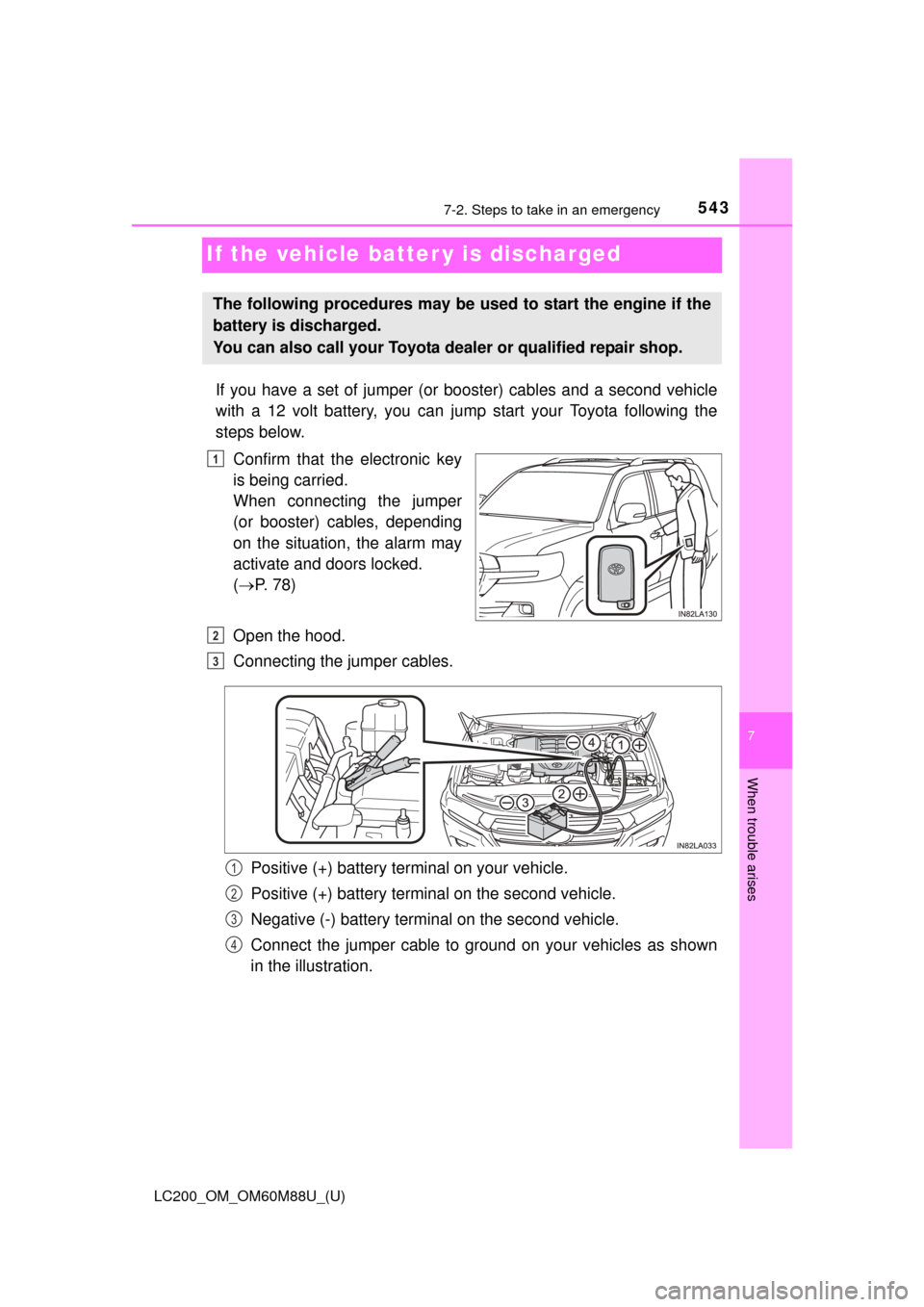
Connecting the jumper cables.
Positive (+) battery terminal on your vehicle.
Positive (+) battery terminal on the second vehicle.
Negative (-) battery terminal on the second vehicle.
Connect the jumper cable to ground on your vehicles as shown
in the illustration.
The following procedures may be used to start the engine if the
battery is discharged.
You can also call your Toyota dealer or qualified repair shop.
1
2
3
1
2
3
4
Page 544 of 608
5447-2. Steps to take in an emergency
LC200_OM_OM60M88U_(U)
Start the engine of the second vehicle. Increase the engine speed
slightly and maintain at that level for approximately 5 minutes to
recharge the batter y of your vehicle.
Open and close any of the doors with the “ENGINE START STOP”
switch off.
Maintain the engine speed of the second vehicle and start your
vehicle’s engine.
Once the vehicle’s engine has started, remove the jumper cables in
the exact reverse order in which they were connected.
Once the engine starts, have the vehicle checked at your Toyota
dealer as soon as possible.
■ Starting the engine when the battery is discharged
The engine cannot be started by push-starting.
■ Avoiding a discharged battery
●Turn off the headlights and the audio system while the engine is off.
● Turn off any unnecessary electrical components when the vehicle is running
at a low speed for an extended period, such as in heavy traffic, etc.
■ Charging the battery
The electricity stored in the battery will discharge gradually even when the
vehicle is not in use, due to natural discharge and the draining effects of cer-
tain electrical appliances. If the vehicle is left for a long time, the battery may
discharge, and the engine may be unable to start. (The battery recharges
automatically during driving.)
WARNING
■Avoiding battery fires or explosions
Observe the following precautions to prevent accidentally igniting the flam-
mable gas that may be emitted from the battery.
●Make sure the jumper cable is connected to the correct terminal and that it
is not unintentionally in contact with any part other than the intended termi-
nal.
● Do not allow the jumper cables to come into contact with the “+” and “-” ter-
minals.
● Do not allow open flame or use matches, cigarette lighters or smoke near
the battery.
4
5
6
7
Page 545 of 608
5457-2. Steps to take in an emergency
LC200_OM_OM60M88U_(U)
7
When trouble arises
WARNING
■Battery precautions
The battery contains poisonous and corrosive acidic electrolyte, while
related parts contain lead and lead compounds. Observe the following pre-
cautions when handling the battery:
●When working with the battery, always wear safety glasses and take care
not to allow any battery fluids (acid) to come into contact with skin, clothing
or the vehicle body.
● Do not lean over the battery.
● If the battery fluid comes into contact with the skin or eyes, immediately
wash the affected area with water and seek medical attention.
Place a wet sponge or cloth over the affected area until medical attention
can be received.
● Always wash your hands after handling the battery support, terminals, and
other battery-related parts.
● Do not allow children near the battery.
NOTICE
■When handling jumper cables
Be careful that the jumper cables do not become tangled in the cooling fan
or any of the belts when connecting or disconnecting them.
Page 556 of 608
556
LC200_OM_OM60M88U_(U)
8-1. Specifications
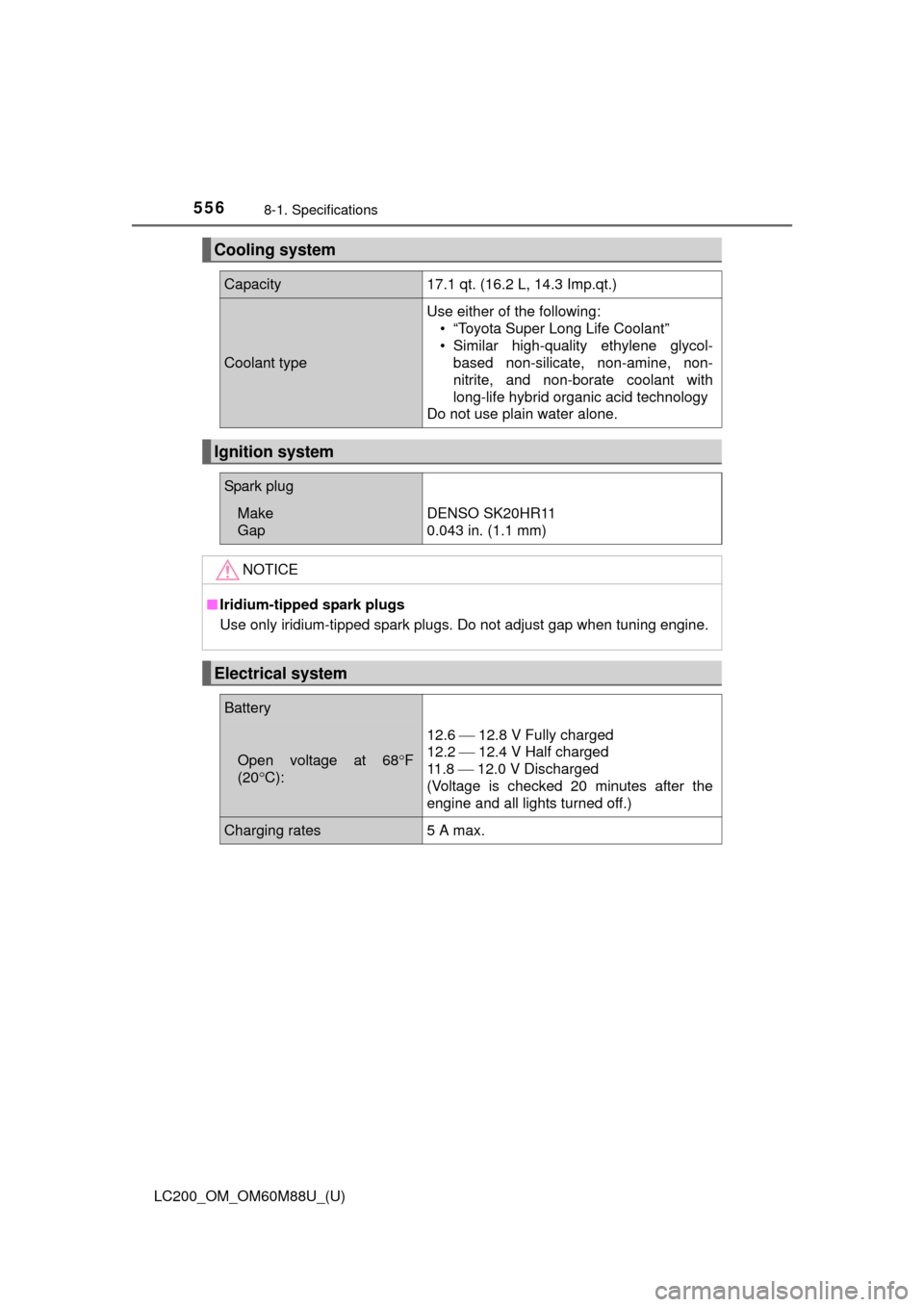
Cooling system
Capacity17.1 qt. (16.2 L, 14.3 Imp.qt.)
Coolant type
Use either of the following:• “Toyota Super Long Life Coolant”
• Similar high-quality ethylene glycol- based non-silicate, non-amine, non-
nitrite, and non-borate coolant with
long-life hybrid organic acid technology
Do not use plain water alone.
Ignition system
Spark plug
Make
GapDENSO SK20HR11
0.043 in. (1.1 mm)
NOTICE
■ Iridium-tipped spark plugs
Use only iridium-tipped spark plugs. Do not adjust gap when tuning engine.
Electrical system
Battery
Open voltage at 68 F
(20 C):
12.6 12.8 V Fully charged
12.2 12.4 V Half charged
11 . 8 12.0 V Discharged
(Voltage is checked 20 minutes after the
engine and all lights turned off.)
Charging rates5 A max.
Page 569 of 608
LC200_OM_OM60M88U_(U)
5698-1. Specifications
8
Vehicle specifications
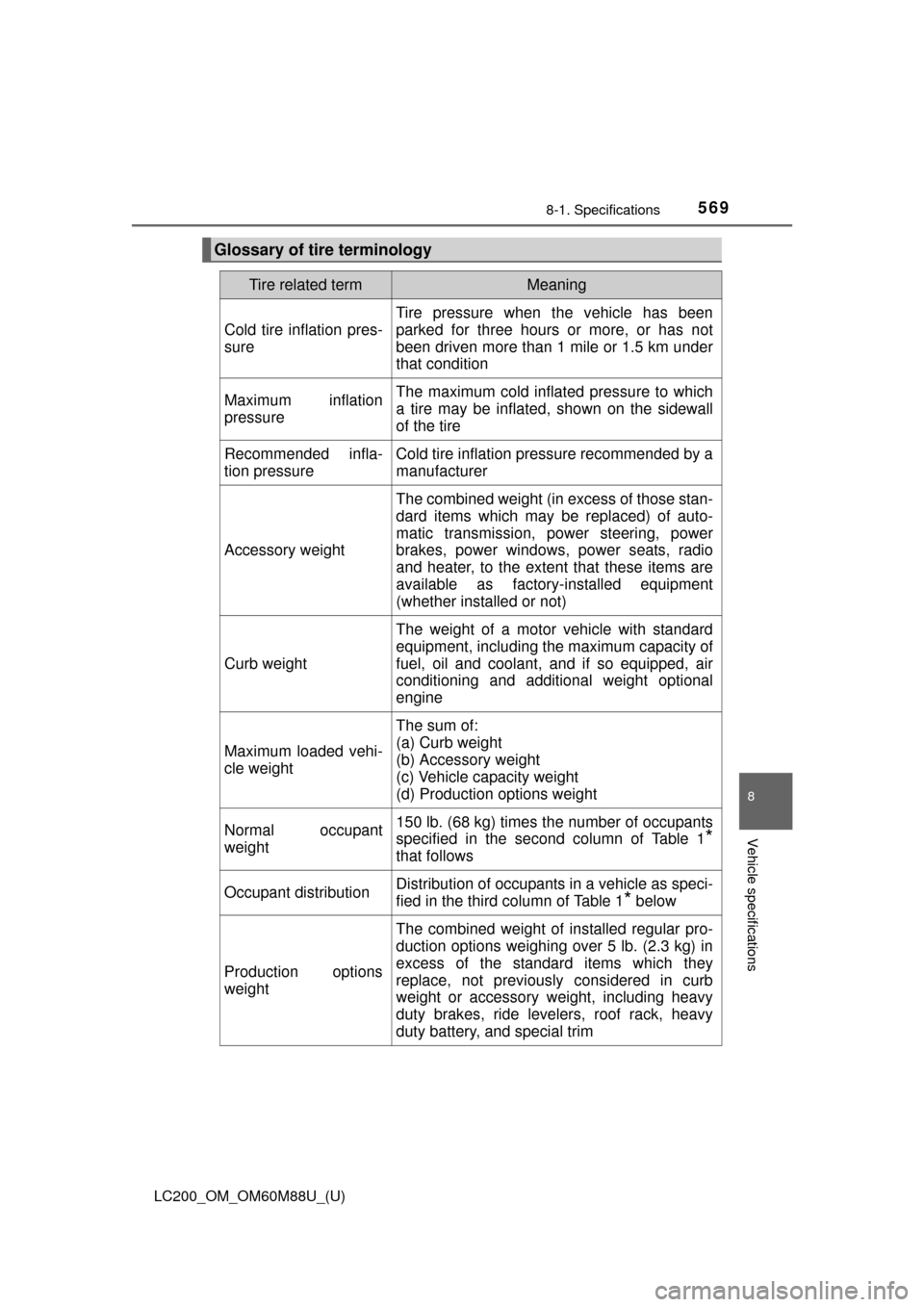
Glossary of tire terminology
Tire related termMeaning
Cold tire inflation pres-
sure
Tire pressure when the vehicle has been
parked for three hours or more, or has not
been driven more than 1 mile or 1.5 km under
that condition
Maximum inflation
pressureThe maximum cold inflated pressure to which
a tire may be inflated, shown on the sidewall
of the tire
Recommended infla-
tion pressureCold tire inflation pressure recommended by a
manufacturer
Accessory weight
The combined weight (in excess of those stan-
dard items which may be replaced) of auto-
matic transmission, power steering, power
brakes, power windows, power seats, radio
and heater, to the extent that these items are
available as factory-installed equipment
(whether installed or not)
Curb weight
The weight of a motor vehicle with standard
equipment, including the maximum capacity of
fuel, oil and coolant, and if so equipped, air
conditioning and additional weight optional
engine
Maximum loaded vehi-
cle weight
The sum of:
(a) Curb weight
(b) Accessory weight
(c) Vehicle capacity weight
(d) Production options weight
Normal occupant
weight150 lb. (68 kg) times the number of occupants
specified in the second column of Table 1
*
that follows
Occupant distributionDistribution of occupants in a vehicle as speci-
fied in the third column of Table 1
* below
Production options
weight
The combined weight of installed regular pro-
duction options weighing over 5 lb. (2.3 kg) in
excess of the standard items which they
replace, not previously considered in curb
weight or accessory weight, including heavy
duty brakes, ride levelers, roof rack, heavy
duty battery, and special trim
Page 583 of 608
LC200_OM_OM60M88U_(U)
5838-2. Customization
8
Vehicle specifications
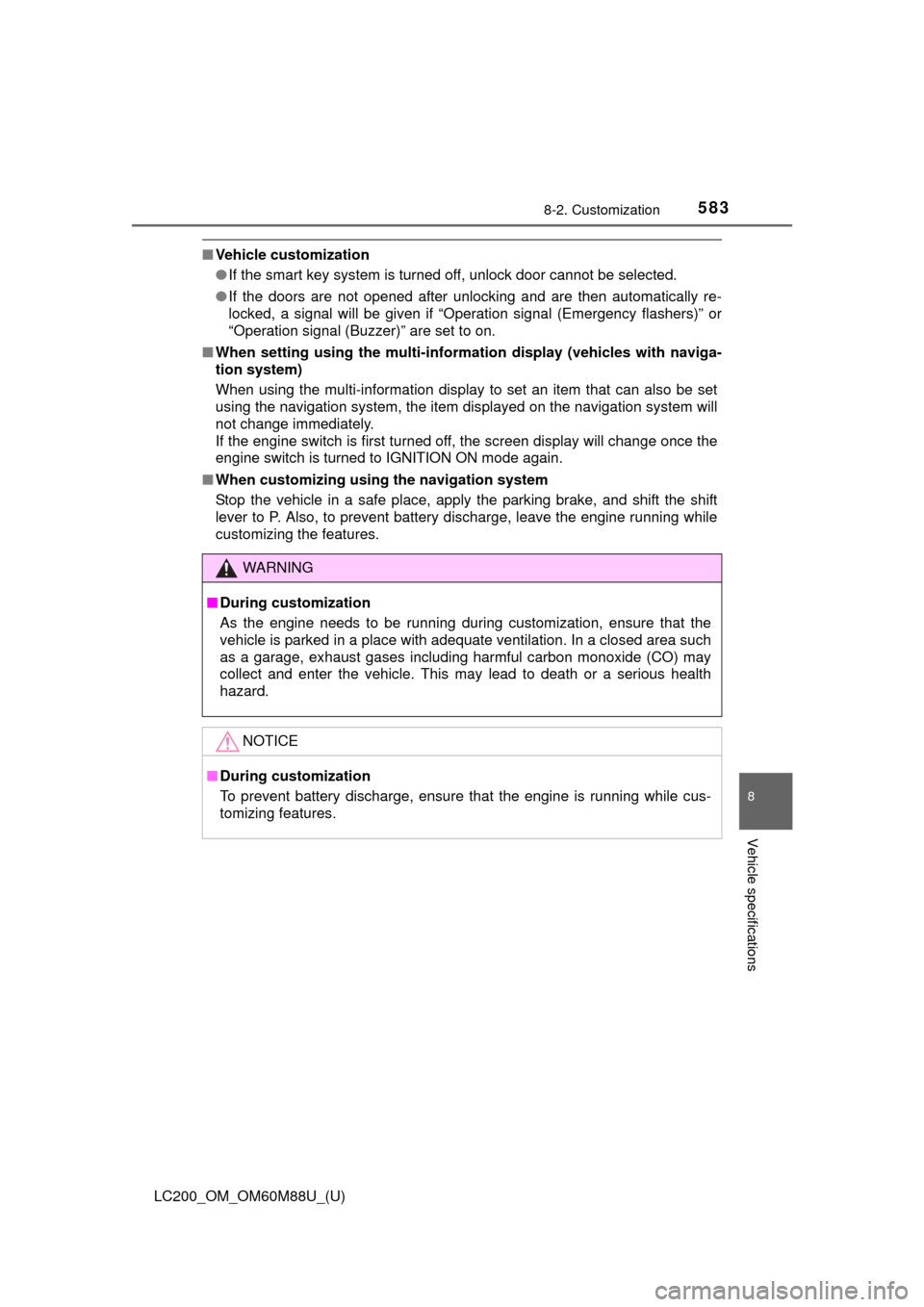
■Vehicle customization
●If the smart key system is turned off, unlock door cannot be selected.
● If the doors are not opened after unlocking and are then automatically re-
locked, a signal will be given if “Operation signal (Emergency flashers)” or
“Operation signal (Buzzer)” are set to on.
■ When setting using the mu lti-information display (vehicles with naviga-
tion system)
When using the multi-information display to set an item that can also be set
using the navigation system, the item displayed on the navigation system will
not change immediately.
If the engine switch is first turned off, the screen display will change once the
engine switch is turned to IGNITION ON mode again.
■ When customizing usi ng the navigation system
Stop the vehicle in a safe place, apply the parking brake, and shift the shift
lever to P. Also, to prevent battery discharge, leave the engine running while
customizing the features.
WARNING
■ During customization
As the engine needs to be running during customization, ensure that the
vehicle is parked in a place with adequate ventilation. In a closed area such
as a garage, exhaust gases including harmful carbon monoxide (CO) may
collect and enter the vehicle. This may lead to death or a serious health
hazard.
NOTICE
■During customization
To prevent battery discharge, ensure that the engine is running while cus-
tomizing features.
Page 584 of 608
584
LC200_OM_OM60M88U_(U)
8-3. Initialization
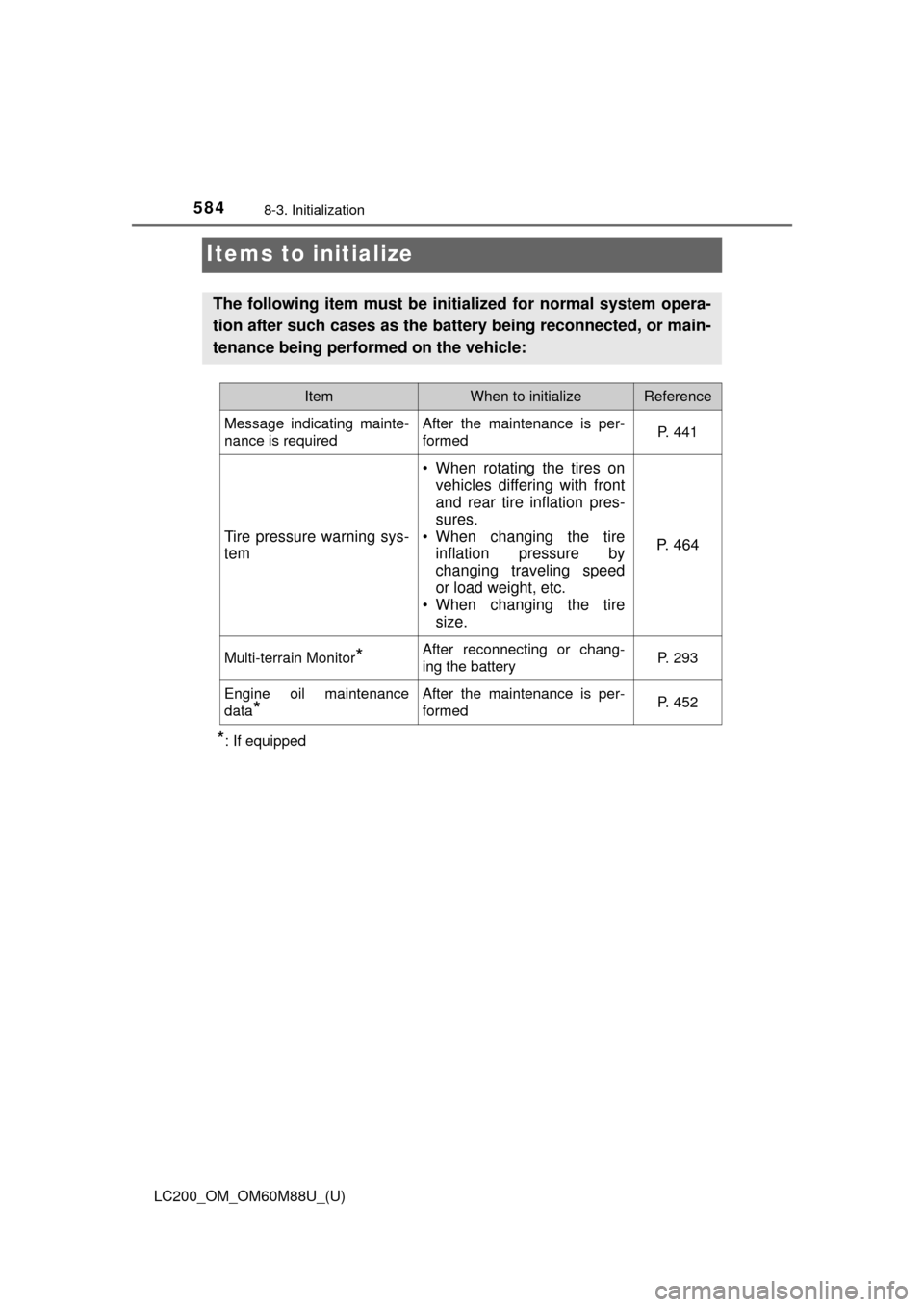
Items to initialize
*: If equipped
The following item must be initialized for normal system opera-
tion after such cases as the battery being reconnected, or main-
tenance being performed on the vehicle:
ItemWhen to initializeReference
Message indicating mainte-
nance is requiredAfter the maintenance is per-
formedP. 441
Tire pressure warning sys-
tem
• When rotating the tires on vehicles differing with front
and rear tire inflation pres-
sures.
• When changing the tire inflation pressure by
changing traveling speed
or load weight, etc.
• When changing the tire
size.
P. 4 6 4
Multi-terrain Monitor*After reconnecting or chang-
ing the batteryP. 293
Engine oil maintenance
data
*
After the maintenance is per-
formedP. 452