door lock TOYOTA LAND CRUISER 2016 J200 Workshop Manual
[x] Cancel search | Manufacturer: TOYOTA, Model Year: 2016, Model line: LAND CRUISER, Model: TOYOTA LAND CRUISER 2016 J200Pages: 608, PDF Size: 10.91 MB
Page 460 of 608
460
LC200_OM_OM60M88U_(U)
6-3. Do-it-yourself maintenance
■Before recharging
When recharging, the battery produces hydrogen gas which is flammable and
explosive. Therefore, observe the following before recharging:
●If recharging with the battery installed on the vehicle, be sure to disconnect
the ground cable.
● Make sure the power switch on the charger is off when connecting and dis-
connecting the charger cables to the battery.
■ After recharging/reconnecting the battery
The engine may not start. Follow the procedure below to initialize the system.
Shift the shift lever to P
Open and close any of the doors.
Restart the engine.
● Unlocking the doors using the smart key system may not be possible imme-
diately after reconnecting the battery. If this happens, use the wireless
remote control or the mechanical key to lock/unlock the doors.
● Start the engine with the engine switch in ACCESSORY mode. The engine
may not start with the engine switch turned off. However, the engine will
operate normally from the second attempt.
● The engine switch mode is recorded by the vehicle. If the battery is recon-
nected, the vehicle will return the engine switch mode to the status it was in
before the battery was disconnected. Make sure to turn off the engine
before disconnect the battery. Take extra care when connecting the battery
if the engine switch mode prior to discharge is unknown.
If the engine will not start even after multiple attempts at both methods, con-
tact your Toyota dealer.
WARNING
■ Chemicals in the battery
Batteries contain poisonous and corrosive sulfuric acid and may produce
hydrogen gas which is flammable and explosive. To reduce the risk of death
or serious injury, take the following precautions while working on or near
battery:
●Do not cause sparks by touching the battery terminals with tools.
● Do not smoke or light a match near the battery.
● Avoid contact with eyes, skin and clothes.
● Never inhale or swallow electrolyte.
● Wear protective safety glasses when working near the battery.
● Keep children away from the battery.
■ Where to safely charge the battery
Always charge the battery in an open area. Do not charge the battery in a
garage or closed room where there is not sufficient ventilation.
1
2
3
Page 492 of 608
492
LC200_OM_OM60M88U_(U)
6-3. Do-it-yourself maintenance
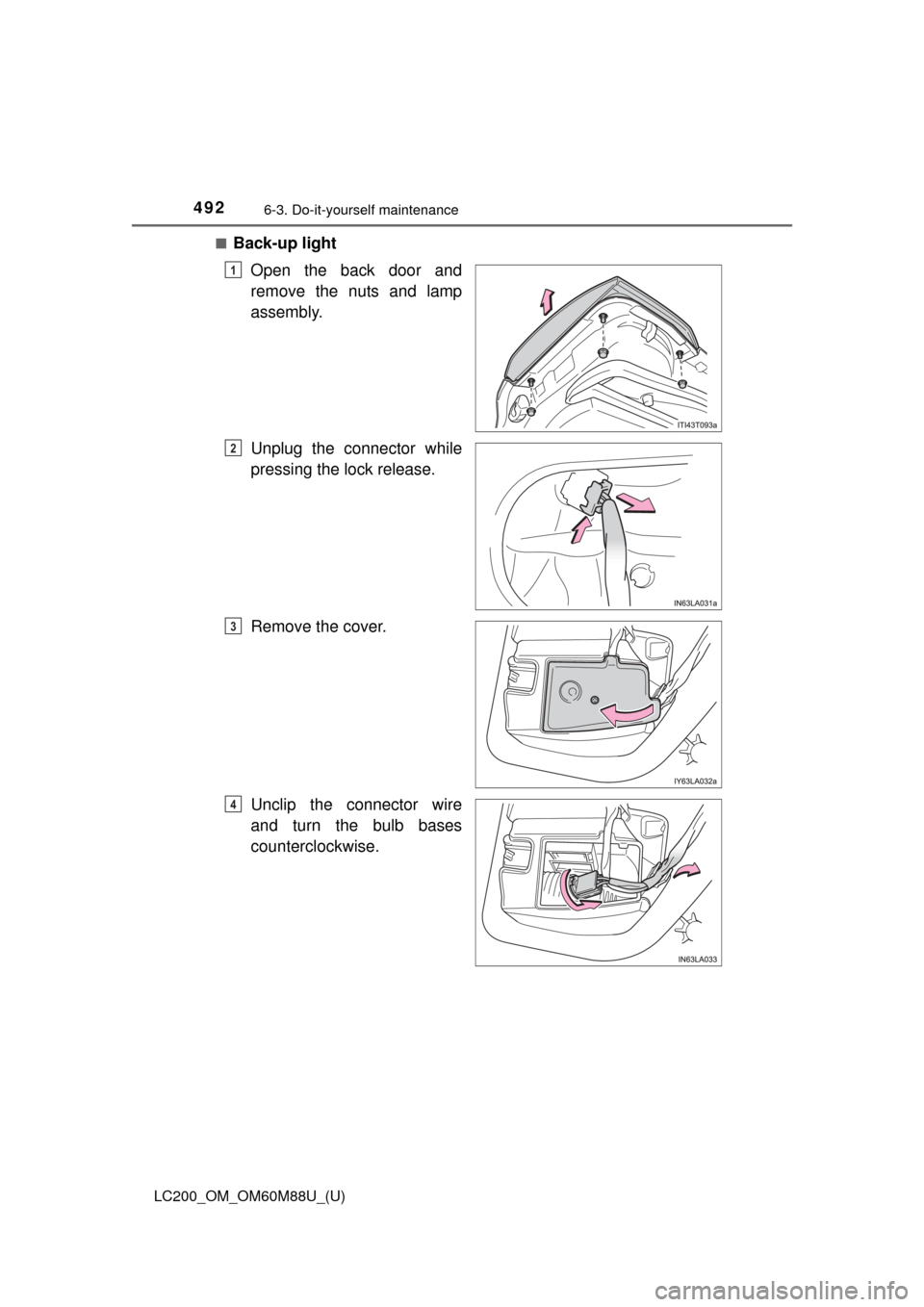
■Back-up lightOpen the back door and
remove the nuts and lamp
assembly.
Unplug the connector while
pressing the lock release.
Remove the cover.
Unclip the connector wire
and turn the bulb bases
counterclockwise.
1
2
3
4
Page 496 of 608
496
LC200_OM_OM60M88U_(U)
6-3. Do-it-yourself maintenance
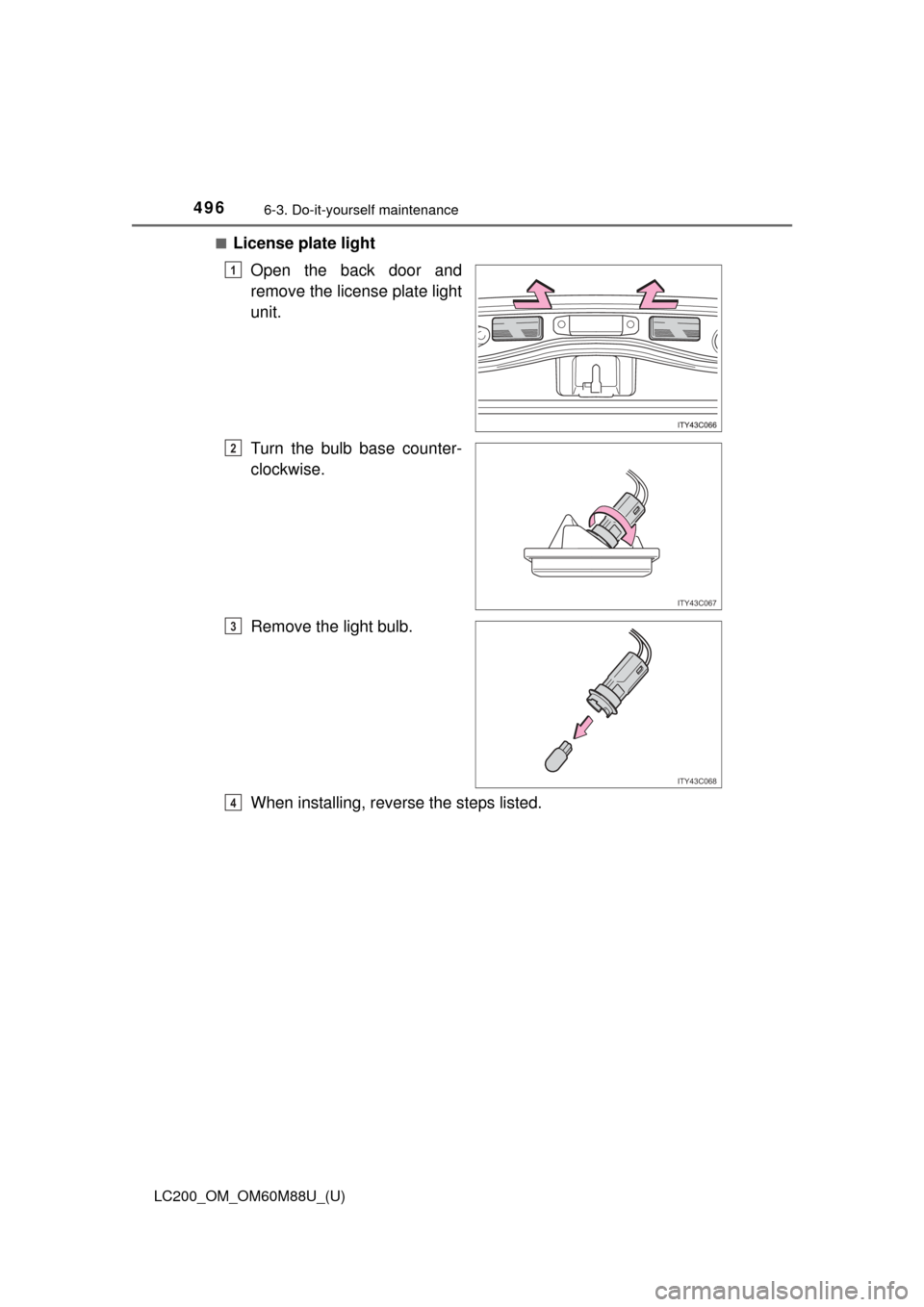
■License plate lightOpen the back door and
remove the license plate light
unit.
Turn the bulb base counter-
clockwise.
Remove the light bulb.
When installing, reverse the steps listed.
1
ITY43C067
2
ITY43C068
3
4
Page 514 of 608

5147-2. Steps to take in an emergency
LC200_OM_OM60M88U_(U)
■SRS warning light
This warning light system monitors the airbag sensor assembly, front impact
sensors, side impact sensors (rear), side impact sensors (front door), safing
sensor (rear), driver’s seat belt buckle switch, driver’s seat position sensor,
front passenger’s seat belt buckle switch, airbags, interconnecting wiring and
power sources, front passenger occupant classification system, “AIR BAG
ON” and “AIR BAG OFF” indicator light s, seat belt pretensioners, “RSCA
OFF” indicator light. ( P. 38)
■ Front passenger detection sensor, seat belt reminder and warning
buzzer
● If luggage is placed on the front passenger seat, the front passenger detec-
tion sensor may cause the warning light to flash and the warning buzzer to
sound even if a passenger is not sitting in the seat.
● If a cushion is placed on the seat, the sensor may not detect a passenger,
and the warning light may not operate properly.
■ If the malfunction indicator la mp comes on while driving
First check the following:
● Is the fuel tank empty?
If it is, fill the fuel tank immediately.
● Is the fuel tank cap loose?
If it is, tighten it securely.
The light will go off after several driving trips.
If the light does not go off even after several trips, contact your Toyota dealer
as soon as possible.
■ If the low speed four-wheel drive indi cator light or the center differential
lock indicator light blinks
Take the specified steps. ( P. 282)
If the brake system warning light or the malfunction indicator light also comes
on, or the low speed four-wheel drive indicator light or the center differential
lock indicator light continues to blink after taking the specified steps, there
may be a malfunction in the engine, the brake system or the four-wheel drive
system. In this case, you may not be able to transfer between “H4” and “L4”
modes, and the center differential lock may not be able to be locked or
unlocked. Have the vehicle inspected by your Toyota dealer immediately.
Page 540 of 608
540
LC200_OM_OM60M88U_(U)
7-2. Steps to take in an emergency
If the electronic key does not operate
properly
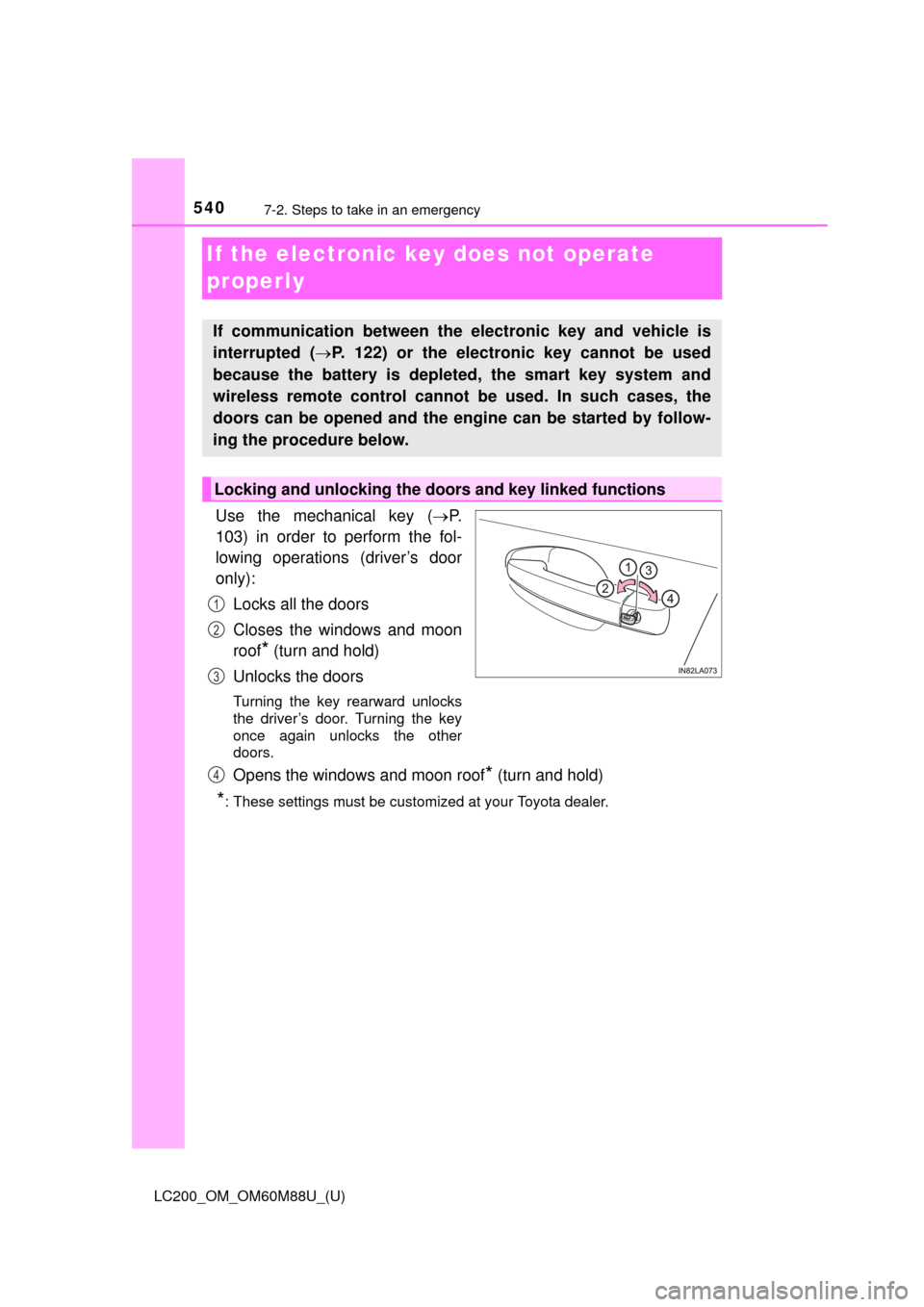
Use the mechanical key (P.
103) in order to perform the fol-
lowing operations (driver’s door
only):
Locks all the doors
Closes the windows and moon
roof
* (turn and hold)
Unlocks the doors
Turning the key rearward unlocks
the driver’s door. Turning the key
once again unlocks the other
doors.
Opens the windows and moon roof* (turn and hold)
*: These settings must be customized at your Toyota dealer.
If communication between the electronic key and vehicle is
interrupted ( P. 122) or the electronic key cannot be used
because the battery is depleted, the smart key system and
wireless remote control cannot be used. In such cases, the
doors can be opened and the engine can be started by follow-
ing the procedure below.
Locking and unlocking the doors and key linked functions
1
2
3
4
Page 541 of 608
5417-2. Steps to take in an emergency
LC200_OM_OM60M88U_(U)
7
When trouble arises
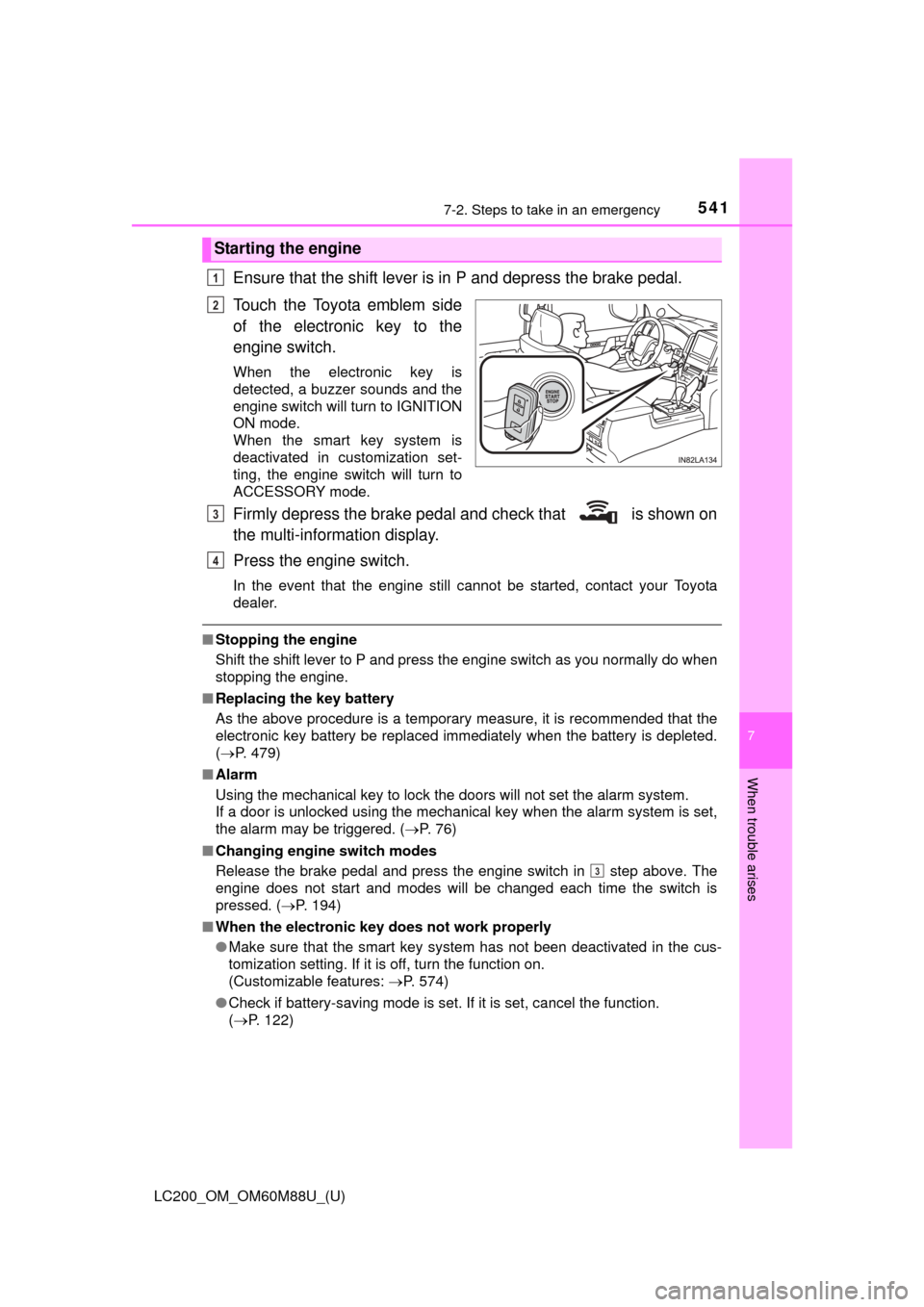
Ensure that the shift lever is in P and depress the brake pedal.
Touch the Toyota emblem side
of the electronic key to the
engine switch.
When the electronic key is
detected, a buzzer sounds and the
engine switch will turn to IGNITION
ON mode.
When the smart key system is
deactivated in customization set-
ting, the engine switch will turn to
ACCESSORY mode.
Firmly depress the brake pedal and check that is shown on
the multi-information display.
Press the engine switch.
In the event that the engine still cannot be started, contact your Toyota
dealer.
■Stopping the engine
Shift the shift lever to P and press the engine switch as you normally do when
stopping the engine.
■ Replacing the key battery
As the above procedure is a temporary measure, it is recommended that the
electronic key battery be replaced immediately when the battery is depleted.
( P. 479)
■ Alarm
Using the mechanical key to lock the doors will not set the alarm system.
If a door is unlocked using the mechanical key when the alarm system is set,
the alarm may be triggered. ( P. 76)
■ Changing engine switch modes
Release the brake pedal and press the engine switch in step above. The
engine does not start and modes will be changed each time the switch is
pressed. ( P. 194)
■ When the electronic key does not work properly
●Make sure that the smart key system has not been deactivated in the cus-
tomization setting. If it is off, turn the function on.
(Customizable features: P. 574)
● Check if battery-saving mode is set. If it is set, cancel the function.
(P. 122)
Starting the engine
1
2
3
4
3
Page 543 of 608
543
LC200_OM_OM60M88U_(U)
7
When trouble arises
7-2. Steps to take in an emergency
If the vehicle batter y is discharged
If you have a set of jumper (or booster) cables and a second vehicle
with a 12 volt battery, you can jump start your Toyota following the
steps below.
Confirm that the electronic key
is being carried.
When connecting the jumper
(or booster) cables, depending
on the situation, the alarm may
activate and doors locked.
( P. 78)
Open the hood.
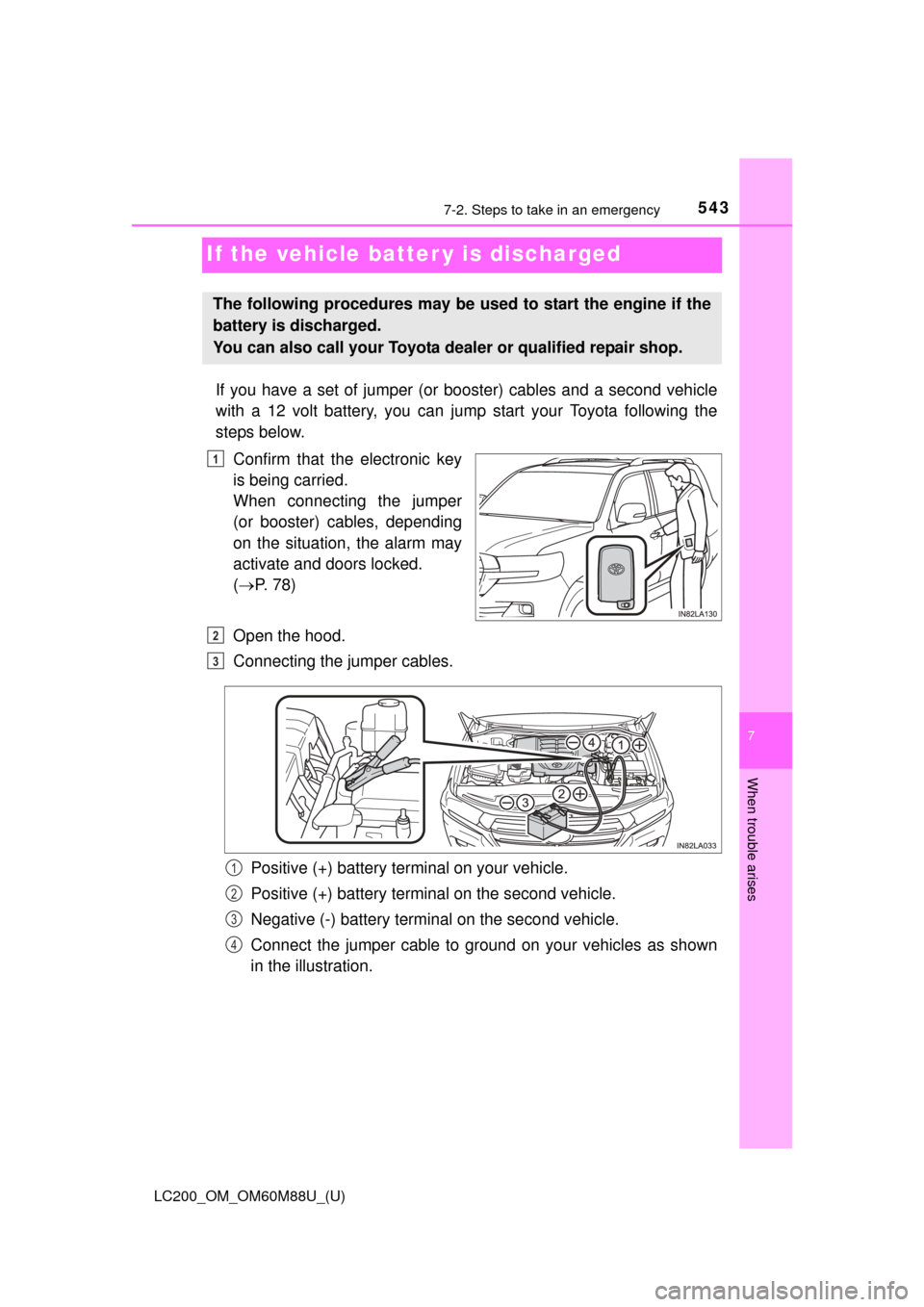
Connecting the jumper cables.
Positive (+) battery terminal on your vehicle.
Positive (+) battery terminal on the second vehicle.
Negative (-) battery terminal on the second vehicle.
Connect the jumper cable to ground on your vehicles as shown
in the illustration.
The following procedures may be used to start the engine if the
battery is discharged.
You can also call your Toyota dealer or qualified repair shop.
1
2
3
1
2
3
4
Page 575 of 608
LC200_OM_OM60M88U_(U)
5758-2. Customization
8
Vehicle specifications
Some function settings are changed simultaneously with other func-
tions being customized. Contact your Toyota dealer for further details.
Settings that can be changed using the navigation system
Settings that can be changed using the multi-information display
Settings that can be changed by your Toyota dealer
Definition of symbols: O = Available, – =Not available
■
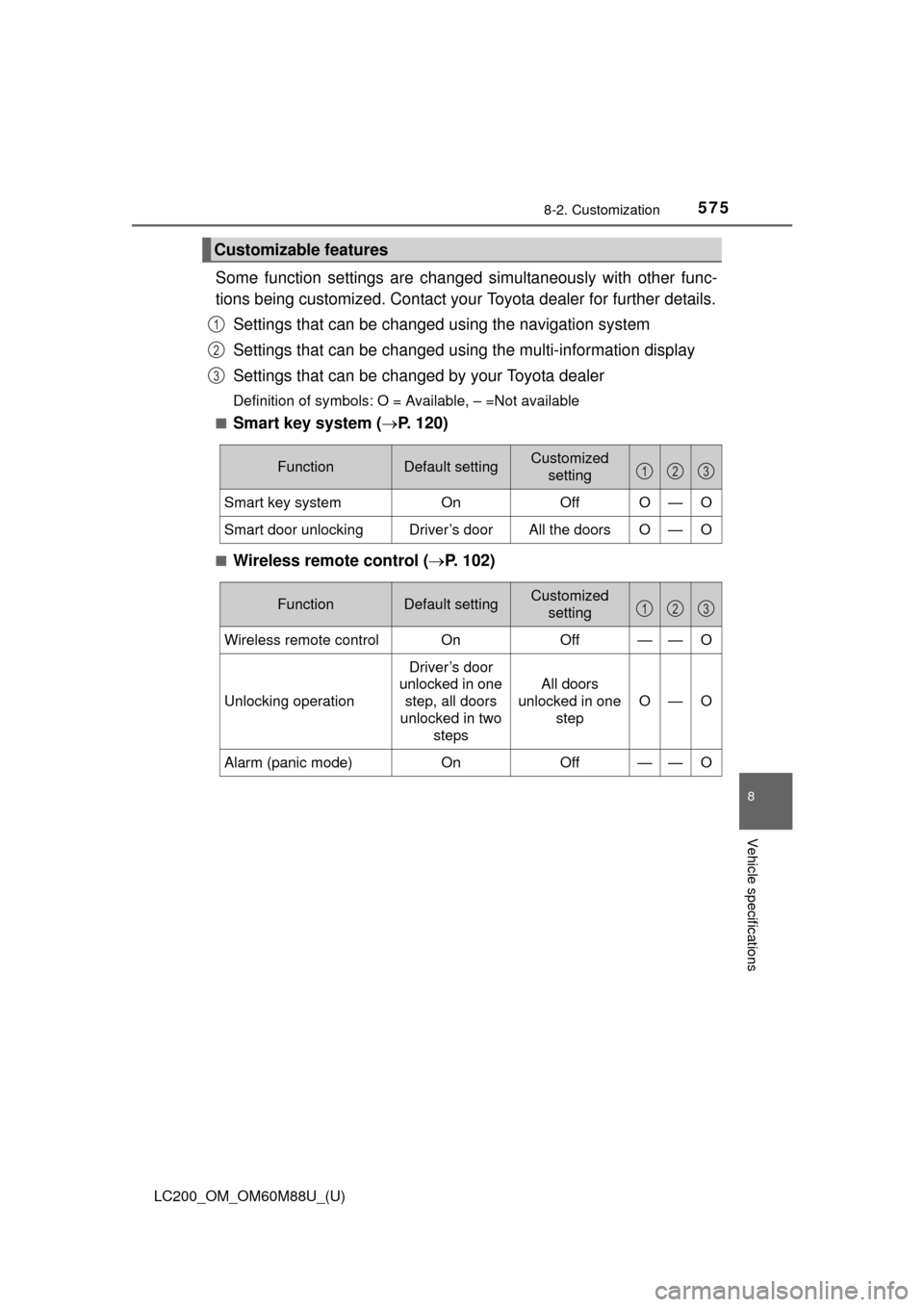
Smart key system ( P. 120)
■Wireless remote control ( P. 102)
Customizable features
1
2
3
FunctionDefault settingCustomized
setting
Smart key system OnOffO—O
Smart door unlockingDriver’s doorAll the doorsO—O
123
FunctionDefault settingCustomized
setting
Wireless remote control On Off——O
Unlocking operation
Driver’s door
unlocked in one
step, all doors
unlocked in two steps
All doors
unlocked in one step
O—O
Alarm (panic mode)OnOff——O
123
Page 576 of 608
576
LC200_OM_OM60M88U_(U)
8-2. Customization
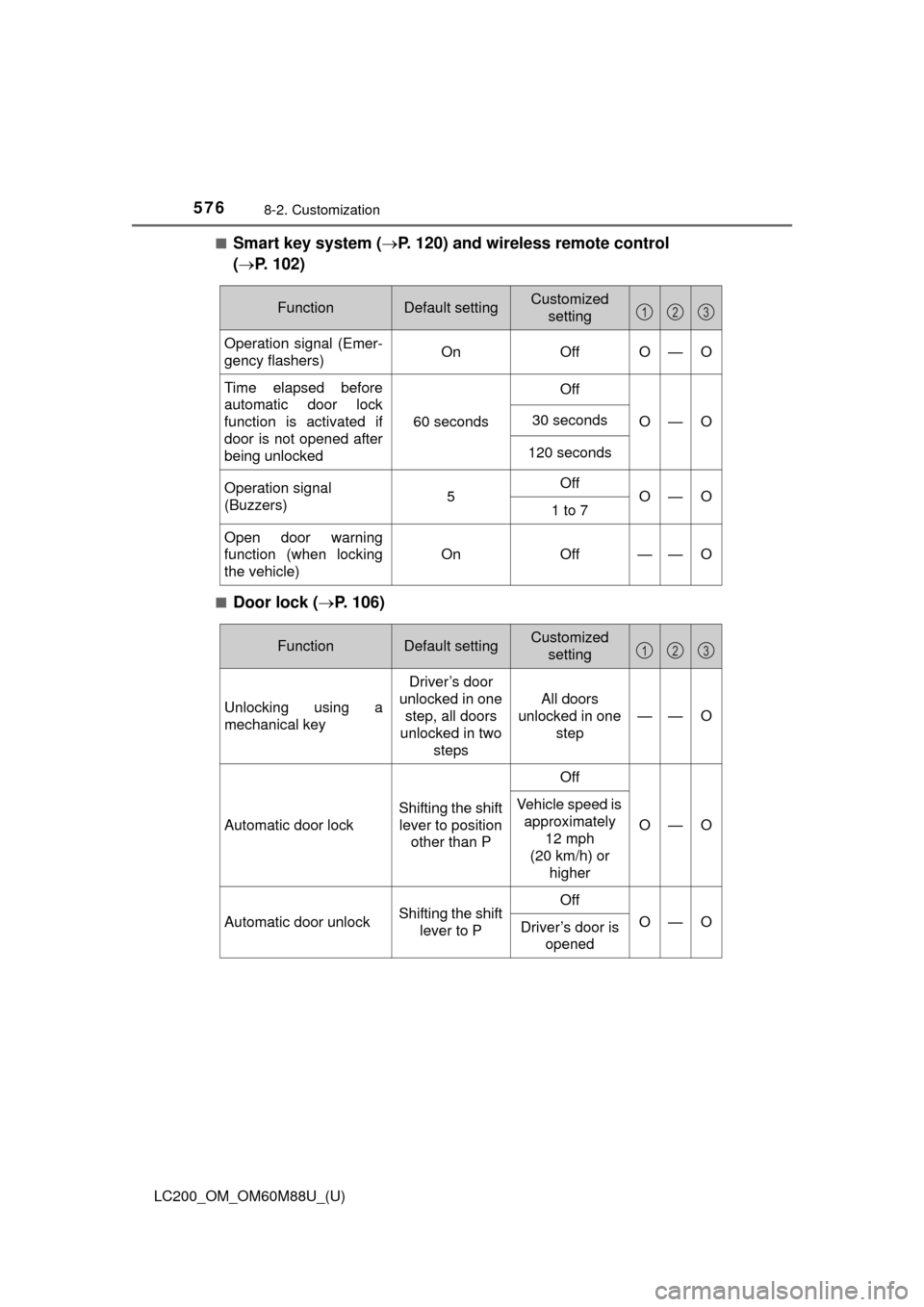
■Smart key system (P. 120) and wireless remote control
( P. 102)
■Door lock ( P. 106)
FunctionDefault settingCustomized
setting
Operation signal (Emer-
gency flashers) On OffO—O
Time elapsed before
automatic door lock
function is activated if
door is not opened after
being unlocked
60 secondsOffO—O30 seconds
120 seconds
Operation signal
(Buzzers)5OffO—O1 to 7
Open door warning
function (when locking
the vehicle)
On Off
——O
123
FunctionDefault settingCustomized
setting
Unlocking using a
mechanical key
Driver’s door
unlocked in one step, all doors
unlocked in two
steps
All doors
unlocked in one step
——O
Automatic door lock Shifting the shift
lever to position other than P OffO—O
Vehicle speed is
approximately
12 mph
(20 km/h) or higher
Automatic door unlock Shifting the shift
lever to P OffO—O
Driver’s door is
opened
123
Page 578 of 608
578
LC200_OM_OM60M88U_(U)
8-2. Customization
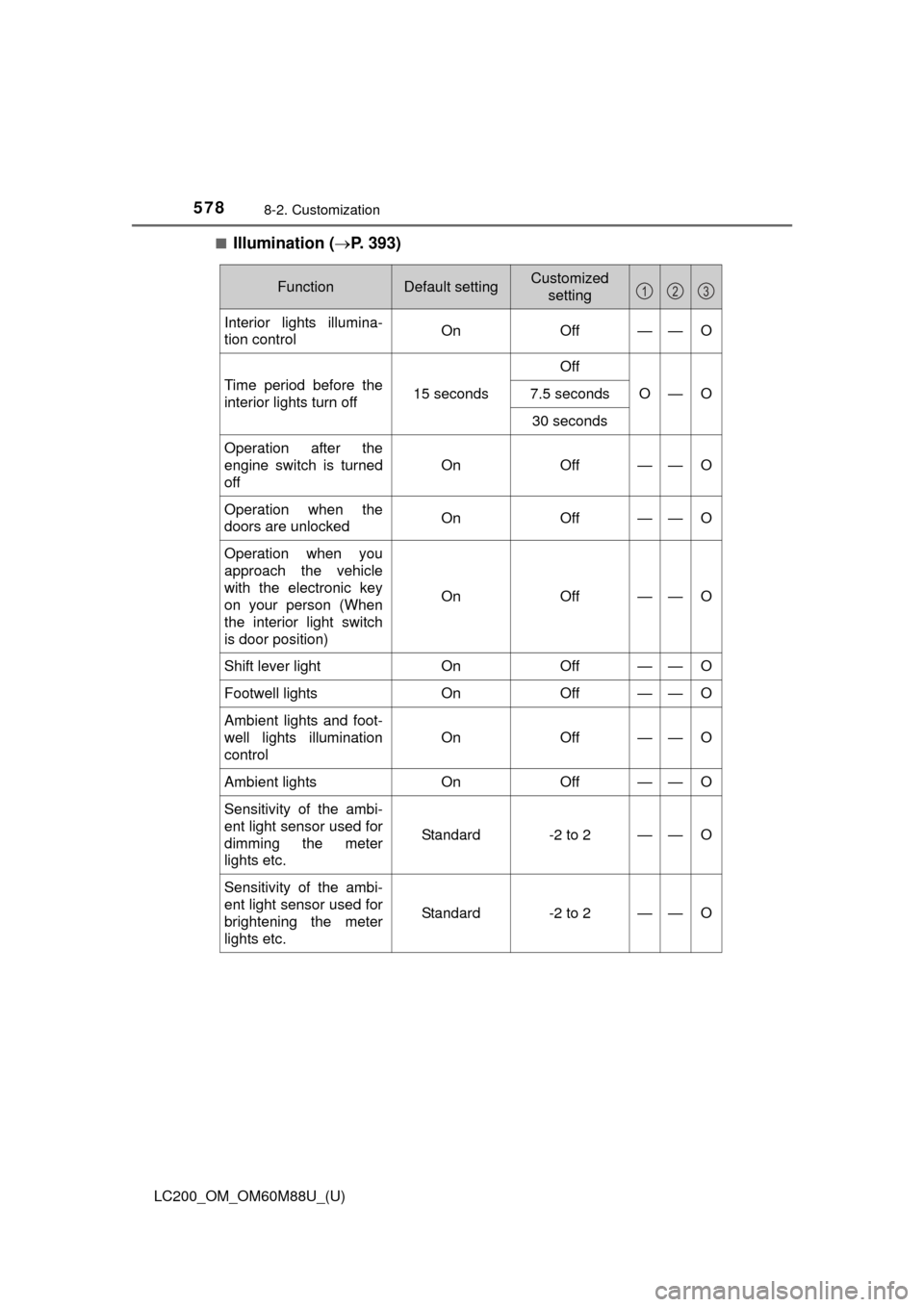
■Illumination (P. 393)
FunctionDefault settingCustomized
setting
Interior lights illumina-
tion control On Off——O
Time period before the
interior lights turn off 15 secondsOff
O—O
7.5 seconds
30 seconds
Operation after the
engine switch is turned
off On Off
——O
Operation when the
doors are unlocked
On Off——O
Operation when you
approach the vehicle
with the electronic key
on your person (When
the interior light switch
is door position)On Off
——O
Shift lever light
OnOff——O
Footwell lights OnOff——O
Ambient lights and foot-
well lights illumination
control On Off
——O
Ambient lights
OnOff——O
Sensitivity of the ambi-
ent light sensor used for
dimming the meter
lights etc.
Standard-2 to 2——O
Sensitivity of the ambi-
ent light sensor used for
brightening the meter
lights etc.
Standard-2 to 2——O
123