ABS TOYOTA LAND CRUISER 2016 J200 Owners Manual
[x] Cancel search | Manufacturer: TOYOTA, Model Year: 2016, Model line: LAND CRUISER, Model: TOYOTA LAND CRUISER 2016 J200Pages: 608, PDF Size: 10.91 MB
Page 32 of 608
321-1. For safe use
LC200_OM_OM60M88U_(U)
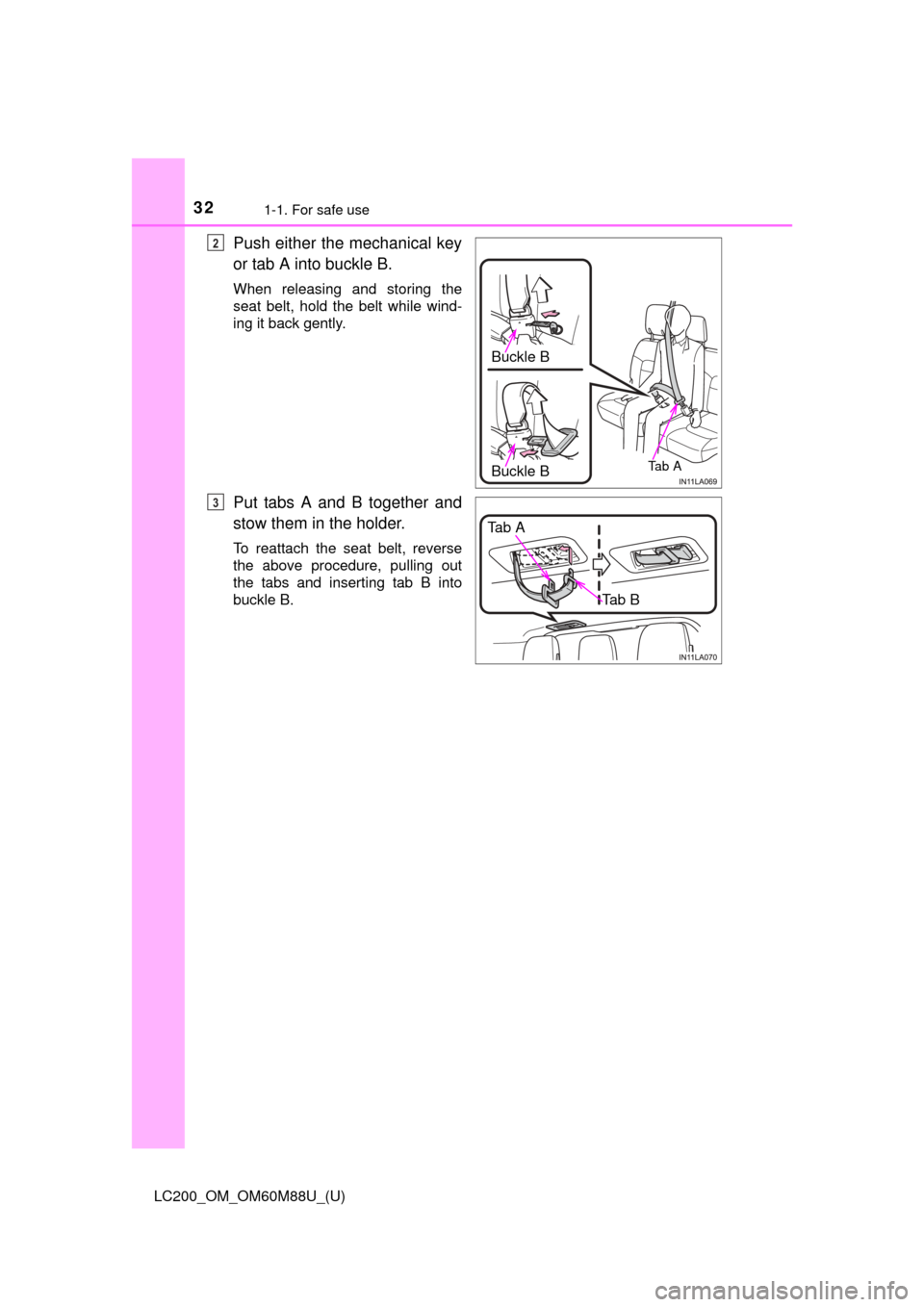
Push either the mechanical key
or tab A into buckle B.
When releasing and storing the
seat belt, hold the belt while wind-
ing it back gently.
Put tabs A and B together and
stow them in the holder.
To reattach the seat belt, reverse
the above procedure, pulling out
the tabs and inserting tab B into
buckle B.
Buckle B
Ta b ABuckle B
2
Tab A
Tab B
3
Page 74 of 608
741-2. Theft deterrent system
LC200_OM_OM60M88U_(U)
Engine immobilizer system
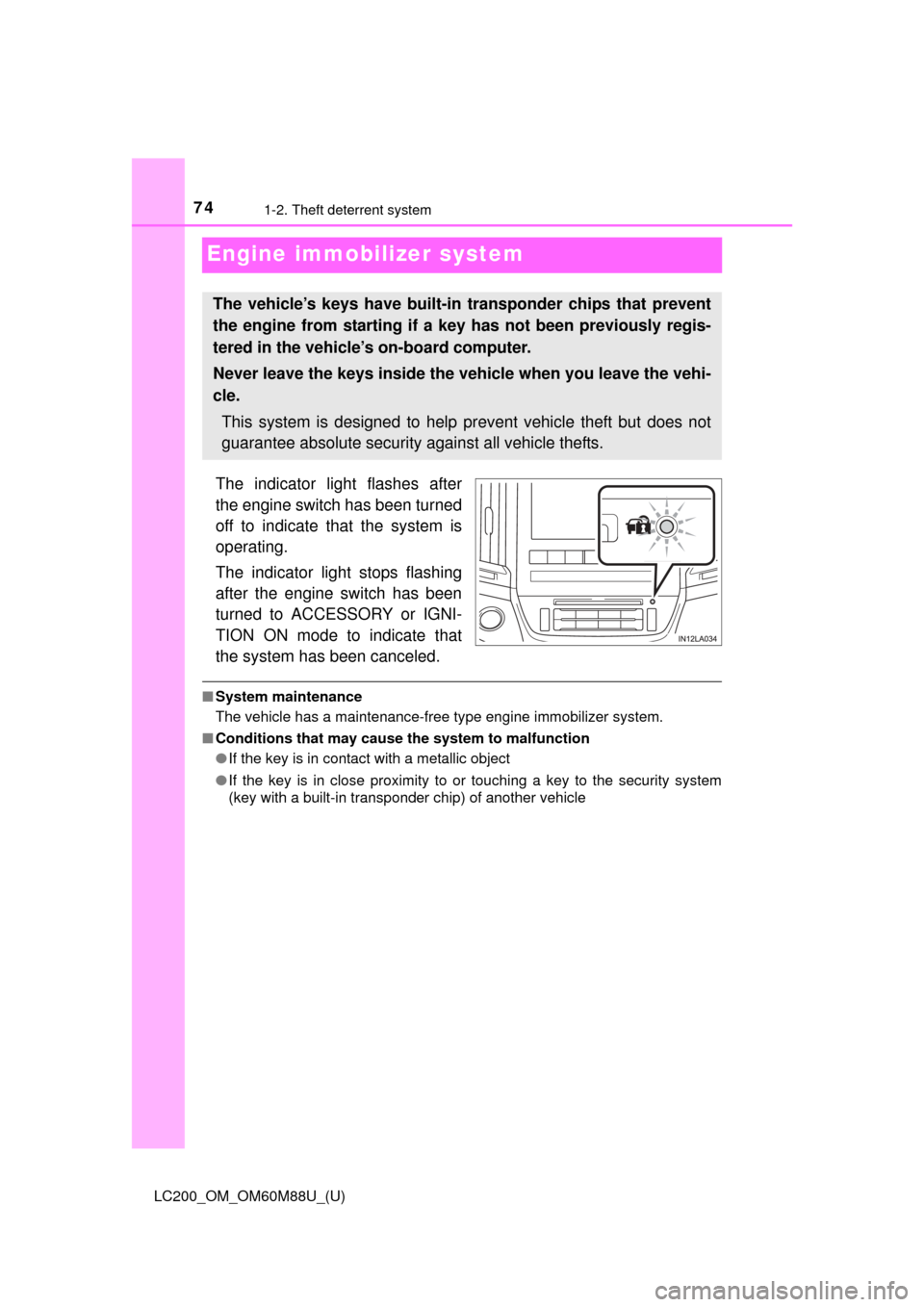
The indicator light flashes after
the engine switch has been turned
off to indicate that the system is
operating.
The indicator light stops flashing
after the engine switch has been
turned to ACCESSORY or IGNI-
TION ON mode to indicate that
the system has been canceled.
■System maintenance
The vehicle has a maintenance-free type engine immobilizer system.
■ Conditions that may cause the system to malfunction
●If the key is in contact with a metallic object
● If the key is in close proximity to or touching a key to the security system
(key with a built-in transponder chip) of another vehicle
The vehicle’s keys have built-in transponder chips that prevent
the engine from starting if a key has not been previously regis-
tered in the vehicle’s on-board computer.
Never leave the keys inside the vehicle when you leave the vehi-
cle.
This system is designed to help prevent vehicle theft but does not
guarantee absolute security against all vehicle thefts.
Page 81 of 608
LC200_OM_OM60M88U_(U)
812. Instrument cluster
2
Instrument cluster
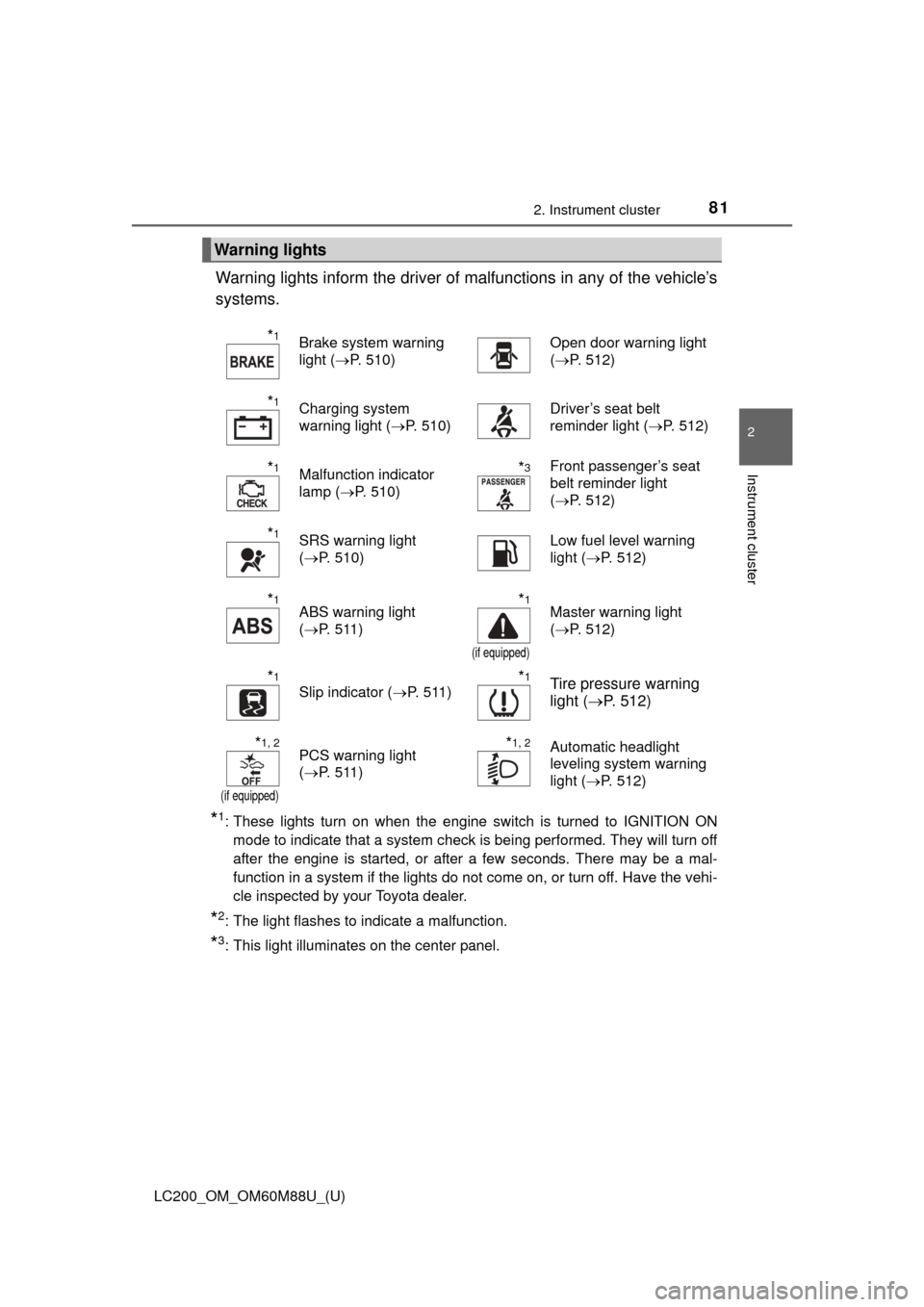
Warning lights inform the driver of malfunctions in any of the vehicle’s
systems.
*1: These lights turn on when the engine switch is turned to IGNITION ON mode to indicate that a system check is being performed. They will turn off
after the engine is started, or after a few seconds. There may be a mal-
function in a system if the lights do not come on, or turn off. Have the vehi-
cle inspected by your Toyota dealer.
*2: The light flashes to indicate a malfunction.
*3: This light illuminates on the center panel.
Warning lights
*1Brake system warning
light ( P. 510)Open door warning light
(P. 512)
*1Charging system
warning light ( P. 510)Driver’s seat belt
reminder light ( P. 512)
*1Malfunction indicator
lamp (P. 510)*3Front passenger’s seat
belt reminder light
(P. 512)
*1SRS warning light
(P. 510)Low fuel level warning
light ( P. 512)
*1ABS warning light
(P. 511)*1
(if equipped)
Master warning light
(P. 512)
*1
Slip indicator ( P. 511)*1Tire pressure warning
light (P. 512)
*1, 2
(if equipped)
PCS warning light
(P. 511)*1, 2Automatic headlight
leveling system warning
light ( P. 512)
Page 84 of 608
84
LC200_OM_OM60M88U_(U)
2. Instrument cluster
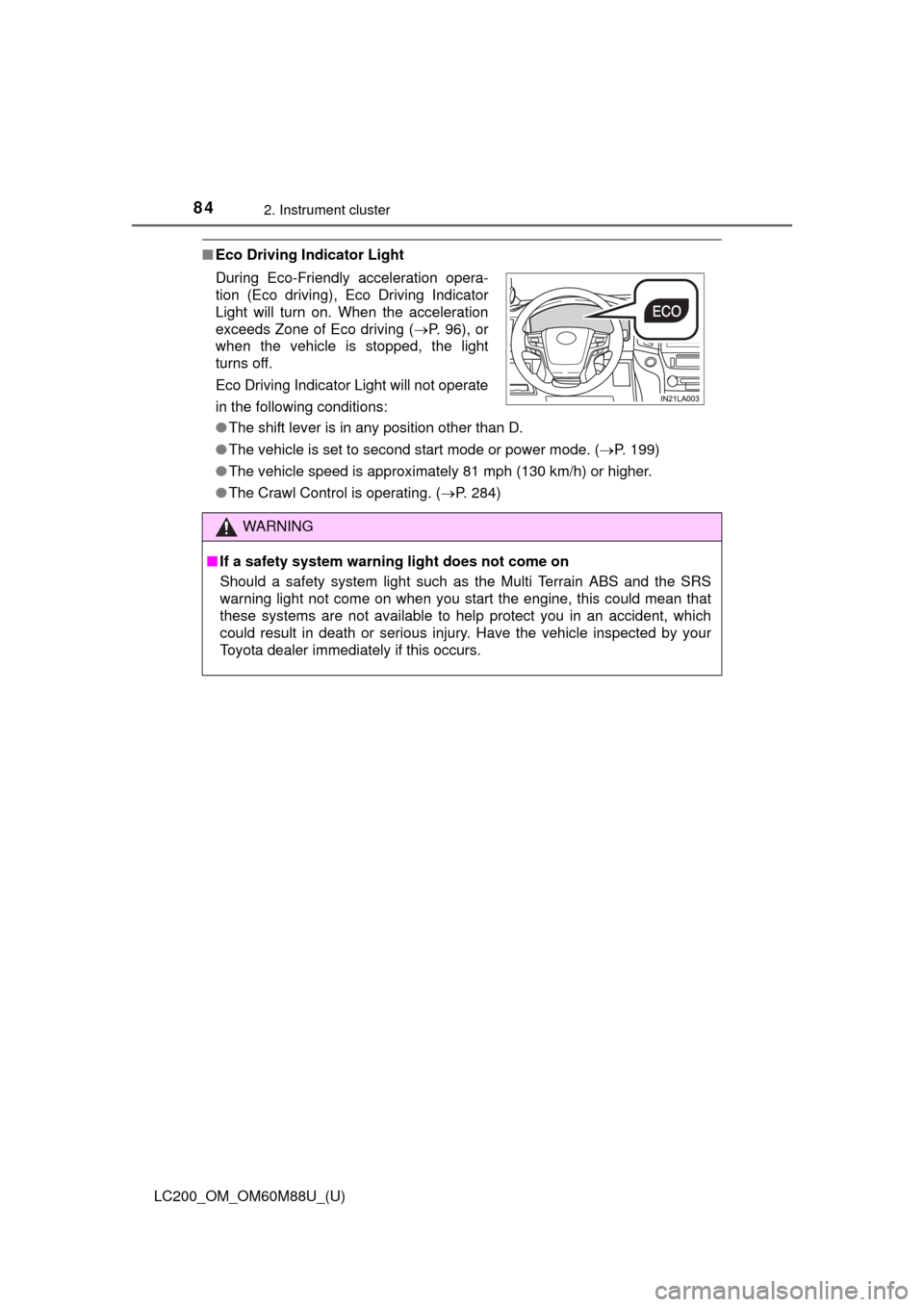
■Eco Driving Indicator Light
●The shift lever is in any position other than D.
● The vehicle is set to second start mode or power mode. ( P. 199)
● The vehicle speed is approximately 81 mph (130 km/h) or higher.
● The Crawl Control is operating. ( P. 284)
During Eco-Friendly acceleration opera-
tion (Eco driving), Eco Driving Indicator
Light will turn on. When the acceleration
exceeds Zone of Eco driving (
P. 96), or
when the vehicle is stopped, the light
turns off.
Eco Driving Indicator Light will not operate
in the following conditions:
WARNING
■ If a safety system warning light does not come on
Should a safety system light such as the Multi Terrain ABS and the SRS
warning light not come on when you start the engine, this could mean that
these systems are not available to help protect you in an accident, which
could result in death or serious injury. Have the vehicle inspected by your
Toyota dealer immediately if this occurs.
Page 132 of 608
132
LC200_OM_OM60M88U_(U)
3-3. Adjusting the seats
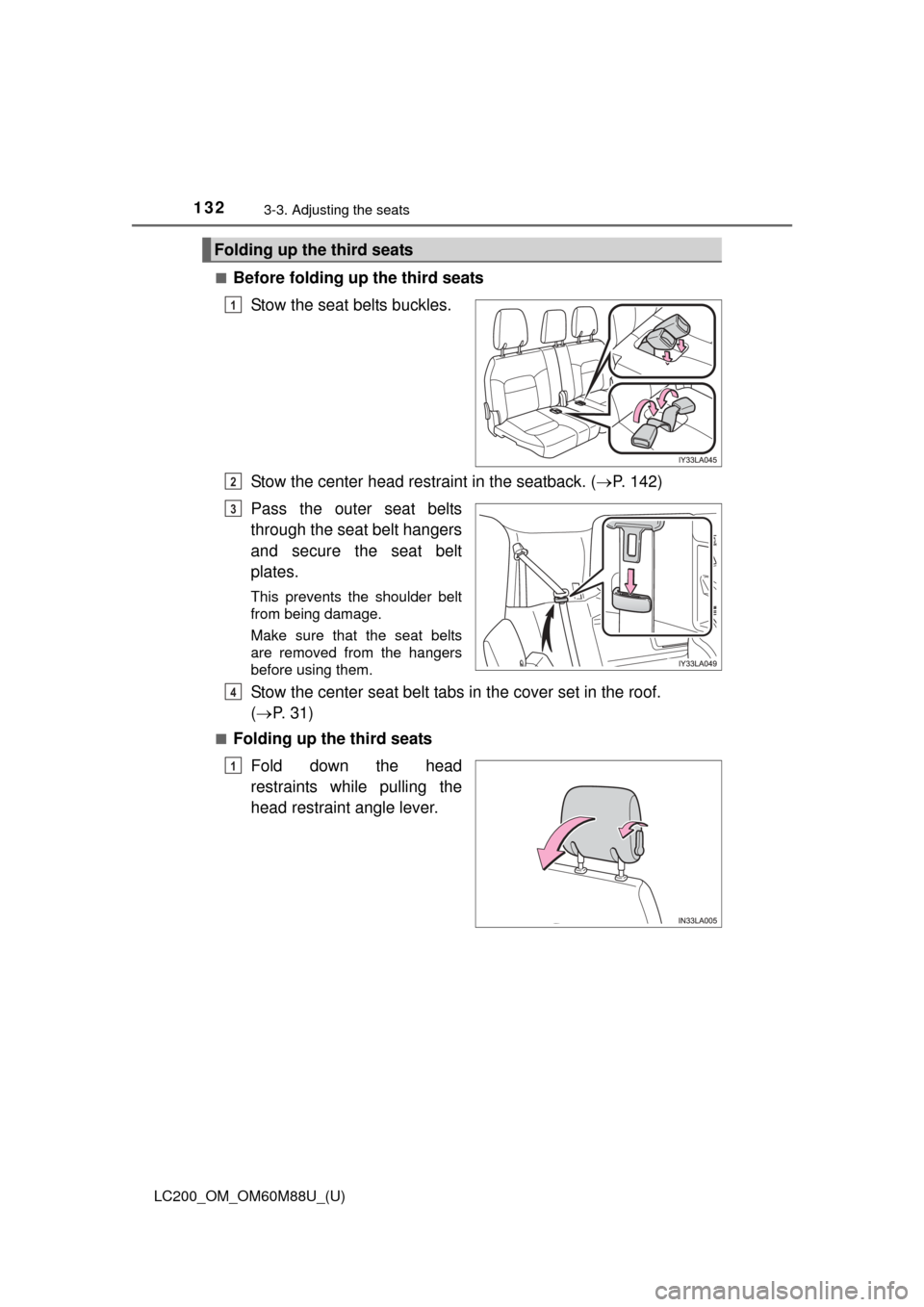
■Before folding up the third seatsStow the seat belts buckles.
Stow the center head rest raint in the seatback. (P. 142)
Pass the outer seat belts
through the seat belt hangers
and secure the seat belt
plates.
This prevents the shoulder belt
from being damage.
Make sure that the seat belts
are removed from the hangers
before using them.
Stow the center seat belt tabs in the cover set in the roof.
( P. 31)
■Folding up the third seats
Fold down the head
restraints while pulling the
head restraint angle lever.
Folding up the third seats
1
2
3
4
1
Page 187 of 608

LC200_OM_OM60M88U_(U)
1874-1. Before driving
4
Driving
●Always place wheel blocks under both the vehicle’s and the trailer’s
wheels when parking. Apply the pa rking brake firmly, and put the
transmission in P. Avoid parking on a slope, but if unavoidable, do
so only after performing the following:
Apply the brakes and keep them applied.
Have someone place wheel blocks under both the vehicle’s and
trailer’s wheels.
When the wheel blocks are in pl ace, release the brakes slowly
until the blocks absorb the load.
Apply the parking brake firmly.
Shift into P and turn off the engine.
● When restarting after parking on a slope:
With the transmission in P, start the engine. Be sure to keep the
brake pedal pressed.
Shift into a forward gear. If reversing, shift into R.
Release the parking brake and brake pedal, and slowly pull or
back away from the wheel blocks. Stop and apply the brakes.
Have someone retrieve the blocks.
1
2
3
4
5
1
2
3
4
Page 258 of 608

258
LC200_OM_OM60M88U_(U)
4-5. Using the driving support systems
WARNING
■Before using dynamic radar cruise control
Driving safely is the sole responsibility of the driver. Do not rely solely on the
system, and drive safely by always paying careful attention to your sur-
roundings.
The dynamic radar cruise control wi th full-speed range provides driving
assistance to reduce the driver’s burden. However, there are limitations to
the assistance provided.
Even when the system is functioning normally, the condition of the preced-
ing vehicle as detected by the system may differ from the condition
observed by the driver. Therefore, the driver must always remain alert,
assess the danger of each situation and drive safely. Relying on this system
or assuming the system ensures safety while driving can lead to an acci-
dent, resulting in death or serious injury.
■ Cautions regarding the driving assist systems
Observe the following precautions, as there are limitations to the assistance
provided by the system.
Failure to do so may cause an accident resulting in death or serious injury.
●Assisting the driver to measure following distance
The dynamic radar cruise control is only intended to help the driver in
determining the following distance between the driver’s own vehicle and a
designated vehicle traveling ahead. It is not a mechanism that allows care-
less or inattentive driving, and it is not a system that can assist the driver in
low-visibility conditions. It is still necessary for driver to pay close attention
to the vehicle’s surroundings.
● Assisting the driver to judge proper following distance
The dynamic radar cruise control determines whether the following dis-
tance between the driver’s own vehicle and a designated vehicle traveling
ahead is within a set range. It is not capable of making any other type of
judgement. Therefore, it is absolutely necessary for the driver to remain
vigilant and to determine whether or not there is a possibility of danger in
any given situation.
● Assisting the driver to operate the vehicle
The dynamic radar cruise control has limited capability to prevent or avoid
a collision with a vehicle traveling ahead. Therefore, if there is ever any
danger, the driver must take immediate and direct control of the vehicle
and act appropriately in order to ensure the safety of all involved.
■ To avoid inadvertent dynamic radar cruise control activation
Switch the dynamic radar cruise control off using the “ON/OFF” button when
not in use.
Page 278 of 608

278
LC200_OM_OM60M88U_(U)
4-5. Using the driving support systems
●The shape of the obstacle may prevent a sensor from detecting it. Pay par-
ticular attention to the following obstacles:
• Wires, fences, ropes, etc.
• Cotton, snow and other materials that absorb sound waves
• Sharply-angled objects
• Low obstacles
• Tall obstacles with upper sections projecting outwards in the direction of
your vehicle
● The following situations may occur during use.
• Depending on the shape of the obstacle and other factors, the detection
distance may shorten, or detection may be impossible.
• Obstacles may not be detected if they are too close to the sensor.
• There will be a short delay between obstacle detection and display. Even at slow speeds, there is a possibility that the obstacle will come within the
sensor’s detection areas before the display is shown and the buzzer
sounds.
• Thin posts or objects lower than the sensor may not be detected when
approached, even if they have been detected once.
• It might be difficult to hear beeps due to the volume of audio system or air flow noise of the air conditioning system.
■ If “Clean Parking Assist Sensor” is displayed on the multi-information
display
A sensor may be dirty or covered with snow or ice. In such cases, if it is
removed from the sensor, the system should return to normal.
Also, due to the sensor being frozen at low temperatures, a malfunction dis-
play may appear or an obstacle may not be detected. If the sensor thaws out,
the system should return to normal.
■ If “Parking Assist Malf unction” is displayed on the multi-information dis-
play
Depending on the malfunction of the sensor, the device may not be working
normally. Have the vehicle inspected by your Toyota dealer.
■ Customization
Settings (e.g. buzzer sounds volume) can be changed.
(Customizable features: P. 574)
Page 357 of 608
357
LC200_OM_OM60M88U_(U)
4-5. Using the driving support systems
4
Driving
Driving assist systems
◆Multi Terrain ABS (Anti-lock Brake System)
Helps to prevent wheel lock when the brakes are applied suddenly, or if the
brakes are applied while driving on a sl ippery road surface, or in off-road
conditions (such as rough roads, sand and mud)
◆Brake assist
Generates an increased level of braking force after the brake pedal is
depressed when the system detects a panic stop situation
◆VSC (Vehicle Stability Control)
Helps the driver to control skidding when swerving suddenly or turning on
slippery road surfaces
◆Active TRAC (Traction Control)
Helps to maintain drive power and prevent the 4 wheels from spinning
when starting the vehicle or accelera ting on slippery roads, or in off-road
conditions
◆Hill-start assist control
Helps to reduce the backward movement of the vehicle when starting on
an incline or slippery slope
◆KDSS (Kinetic Dynamic Suspension System)
KDSS helps to enhance ride comfort and handling response by using a
hydraulic control system to control the suspension stabilizer bars in
response to road surface and driving conditions during cornering or off-
road driving
To help enhance driving safety and performance, the following
systems operate automatically in response to various driving
situations. Be aware, however, that these systems are supple-
mentary and should not be relied upon too heavily when operat-
ing the vehicle.
Page 360 of 608

360
LC200_OM_OM60M88U_(U)
4-5. Using the driving support systems
■Automatic reactivation of Active TRAC, VSC and Trailer Sway Control
Turning the engine switch off after turning off the Active TRAC and VSC sys-
tems will automatically re-enable them.
■ Automatic Active TRAC reactivation
If only the Active TRAC system is turned off, the Active TRAC system will turn
on when vehicle speed increases.
■ Automatic Active TRAC, VSC and Tr ailer Sway Control reactivation
If the Active TRAC, VSC and Trailer Sway Control are turned off, the systems
will not turn on even when vehicle speed increases.
■ If the brake system overheats
The brake system may overheat. In this case, a buzzer will sound, and the
TRAC OFF indicator will flash, and Active TRAC and hill-start assist control
will be temporarily inoperable. In this event, stop the vehicle immediately in a
safe place, and allow the brake system to cool down sufficiently until the
TRAC OFF indicator go off. (There is no problem with continuing normal driv-
ing.)
■ Sounds and vibrations caused by th e Multi Terrain ABS, brake assist,
Active TRAC, VSC, Trailer Sway Control, hill-start assist control and
VGRS
● A sound may be heard from the engine compartment when the engine is
started or just after the vehicle begins to move. This sound does not indicate
that a malfunction has occurred in any of these systems.
● Any of the following conditions may occur when the above systems are
operating. None of these indicates that a malfunction has occurred.
• Vibrations may be felt through the vehicle body and steering.
• A motor sound may be heard after the vehicle comes to a stop.
• The brake pedal may pulsate slightly after the Multi Terrain ABS is acti-
vated.
• The brake pedal may move down slightly after the Multi Terrain ABS is activated.
■ Hill-start assist contro l is operational when
● The shift lever is in D or S.
● The brake pedal is not depressed.
■ VGRS is disabled in th e following situations
● During stopping or the steering wheel has been moved for a long time while
driving at lower speeds.
● After the engine is restarted at less than -22 F (-30 C).
● If you disconnect the battery with the steering wheel turned, the center\
posi-
tion of the steering wheel could be slightly and temporary hanged. To initial-
ize the VGRS, drive for a short while.