ad blue TOYOTA LAND CRUISER 2018 Accessories, Audio & Navigation (in English)
[x] Cancel search | Manufacturer: TOYOTA, Model Year: 2018, Model line: LAND CRUISER, Model: TOYOTA LAND CRUISER 2018Pages: 276, PDF Size: 7.11 MB
Page 35 of 276
LC200_Navi_OM60Q52U_(U)
17.06.14 14:20
Basic function
2
352. Bluetooth® settings
The Bluetooth® word mark and logos are registered trademarks owned by the
Bluetooth SIG, Inc. and any use of such marks by PIONEER CORPORATION is
under license. Other trademarks and trade names are those of their respective
owners.
INFORMATION
● If your cellular phone does not support HFP, registering the Bluetooth® phone or using
OPP, PBAP, MAP or SPP profiles individually will not be possible.
● If the connected Bluetooth
® device version is older than recommended or incompatible,
the Bluetooth® device function may not work properly.
● Refer to http://www.toyota.com/entune/
to find approved Bluetooth® phones for this sys-
tem.
Page 36 of 276
LC200_Navi_OM60Q52U_(U)
17.06.14 14:20
362. Bluetooth® settings
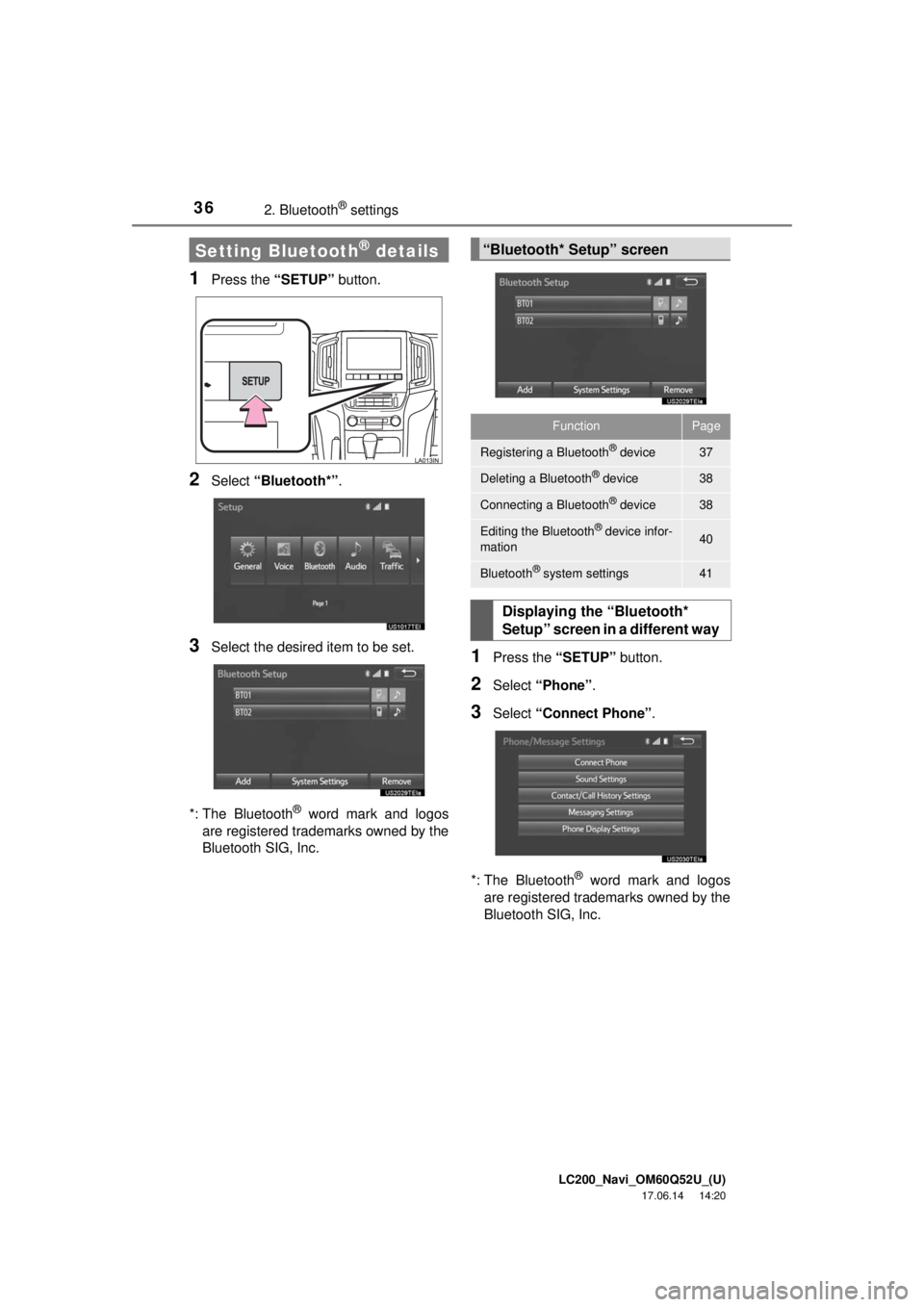
1Press the “SETUP” button.
2Select “Bluetooth*” .
3Select the desired item to be set.
*: The Bluetooth
® word mark and logos
are registered trademarks owned by the
Bluetooth SIG, Inc.
1Press the “SETUP” button.
2Select “Phone” .
3Select “Connect Phone” .
*: The Bluetooth
® word mark and logos
are registered trademarks owned by the
Bluetooth SIG, Inc.
Setting Bluetooth® details“Bluetooth* Setup” screen
FunctionPage
Registering a Bluetooth® device37
Deleting a Bluetooth® device38
Connecting a Bluetooth® device38
Editing the Bluetooth® device infor-
mation40
Bluetooth® system settings41
Displaying the “Bluetooth*
Setup” screen in a different way
Page 37 of 276
LC200_Navi_OM60Q52U_(U)
17.06.14 14:20
Basic function
2
372. Bluetooth® settings
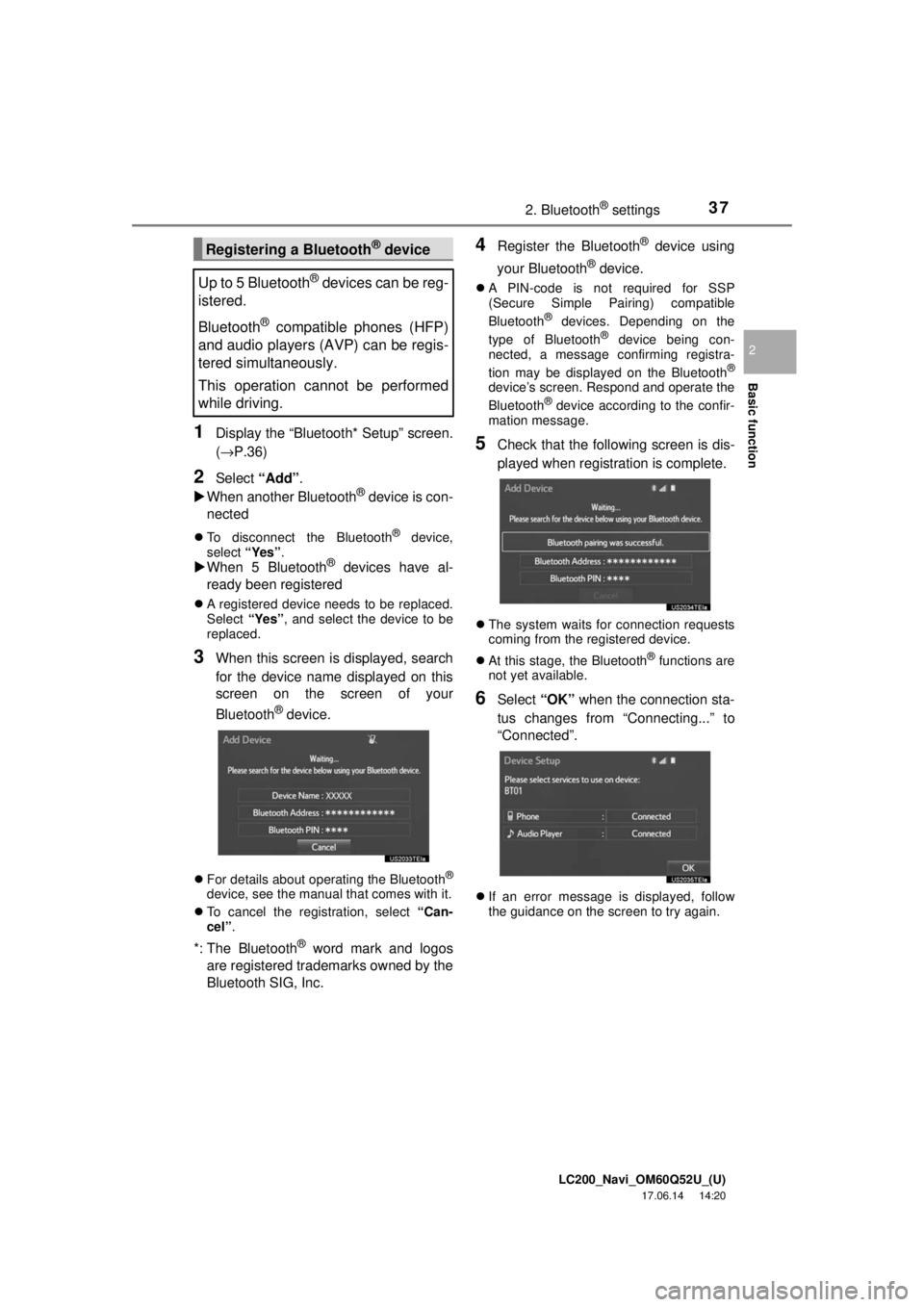
1Display the “Bluetooth* Setup” screen.
(→P.36)
2Select “Add”.
When another Bluetooth® device is con-
nected
To disconnect the Bluetooth® device,
select “Yes”.
When 5 Bluetooth® devices have al-
ready been registered
A registered device needs to be replaced.
Select “Yes”, and select the device to be
replaced.
3When this screen is displayed, search
for the device name displayed on this
screen on the screen of your
Bluetooth
® device.
For details about operating the Bluetooth®
device, see the manual that comes with it.
To cancel the registration, select “Can-
cel”.
*: The Bluetooth® word mark and logos
are registered trademarks owned by the
Bluetooth SIG, Inc.
4Register the Bluetooth® device using
your Bluetooth
® device.
A PIN-code is not required for SSP
(Secure Simple Pairing) compatible
Bluetooth
® devices. Depending on the
type of Bluetooth® device being con-
nected, a message confirming registra-
tion may be displayed on the Bluetooth
®
device’s screen. Respond and operate the
Bluetooth® device according to the confir-
mation message.
5Check that the following screen is dis-
played when registration is complete.
The system waits for connection requests
coming from the registered device.
At this stage, the Bluetooth
® functions are
not yet available.
6Select “OK” when the connection sta-
tus changes from “Connecting...” to
“Connected”.
If an error message is displayed, follow
the guidance on the screen to try again.
Registering a Bluetooth® device
Up to 5 Bluetooth
® devices can be reg-
istered.
Bluetooth
® compatible phones (HFP)
and audio players (AVP) can be regis-
tered simultaneously.
This operation cannot be performed
while driving.
Page 38 of 276
LC200_Navi_OM60Q52U_(U)
17.06.14 14:20
382. Bluetooth® settings
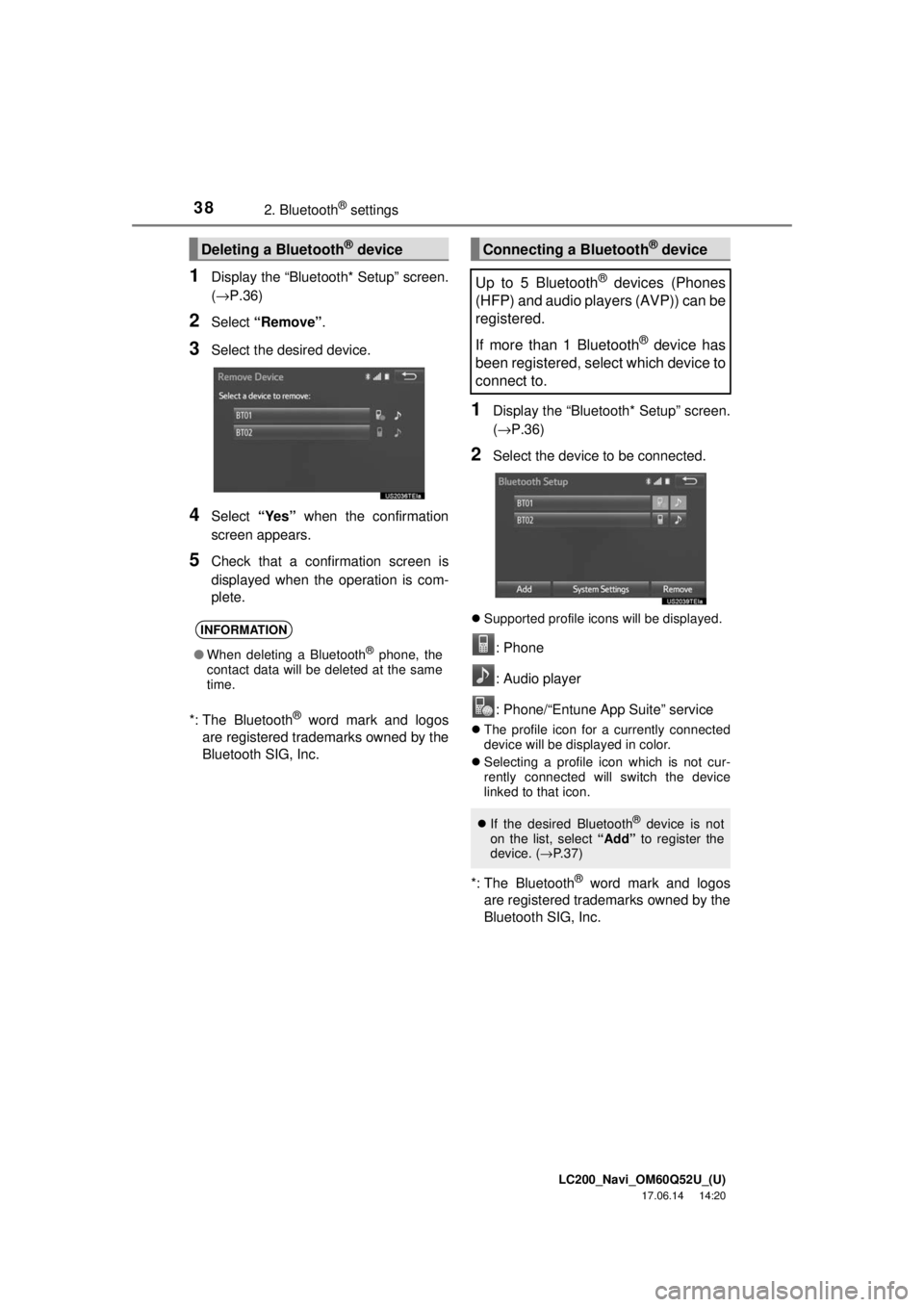
1Display the “Bluetooth* Setup” screen.
(→P.36)
2Select “Remove” .
3Select the desired device.
4Select “Yes” when the confirmation
screen appears.
5Check that a confirmation screen is
displayed when the operation is com-
plete.
*: The Bluetooth
® word mark and logos
are registered trademarks owned by the
Bluetooth SIG, Inc.
1Display the “Bluetooth* Setup” screen.
(→ P.36)
2Select the device to be connected.
Supported profile icons will be displayed.
: Phone
: Audio player
: Phone/“Entune App Suite” service
The profile icon for a currently connected
device will be displayed in color.
Selecting a profile icon which is not cur-
rently connected will switch the device
linked to that icon.
*: The Bluetooth® word mark and logos
are registered trademarks owned by the
Bluetooth SIG, Inc.
Deleting a Bluetooth® device
INFORMATION
● When deleting a Bluetooth® phone, the
contact data will be deleted at the same
time.
Connecting a Bluetooth® device
Up to 5 Bluetooth
® devices (Phones
(HFP) and audio players (AVP)) can be
registered.
If more than 1 Bluetooth
® device has
been registered, select which device to
connect to.
If the desired Bluetooth® device is not
on the list, select “Add” to register the
device. ( →P. 3 7 )
Page 39 of 276
LC200_Navi_OM60Q52U_(U)
17.06.14 14:20
Basic function
2
392. Bluetooth® settings
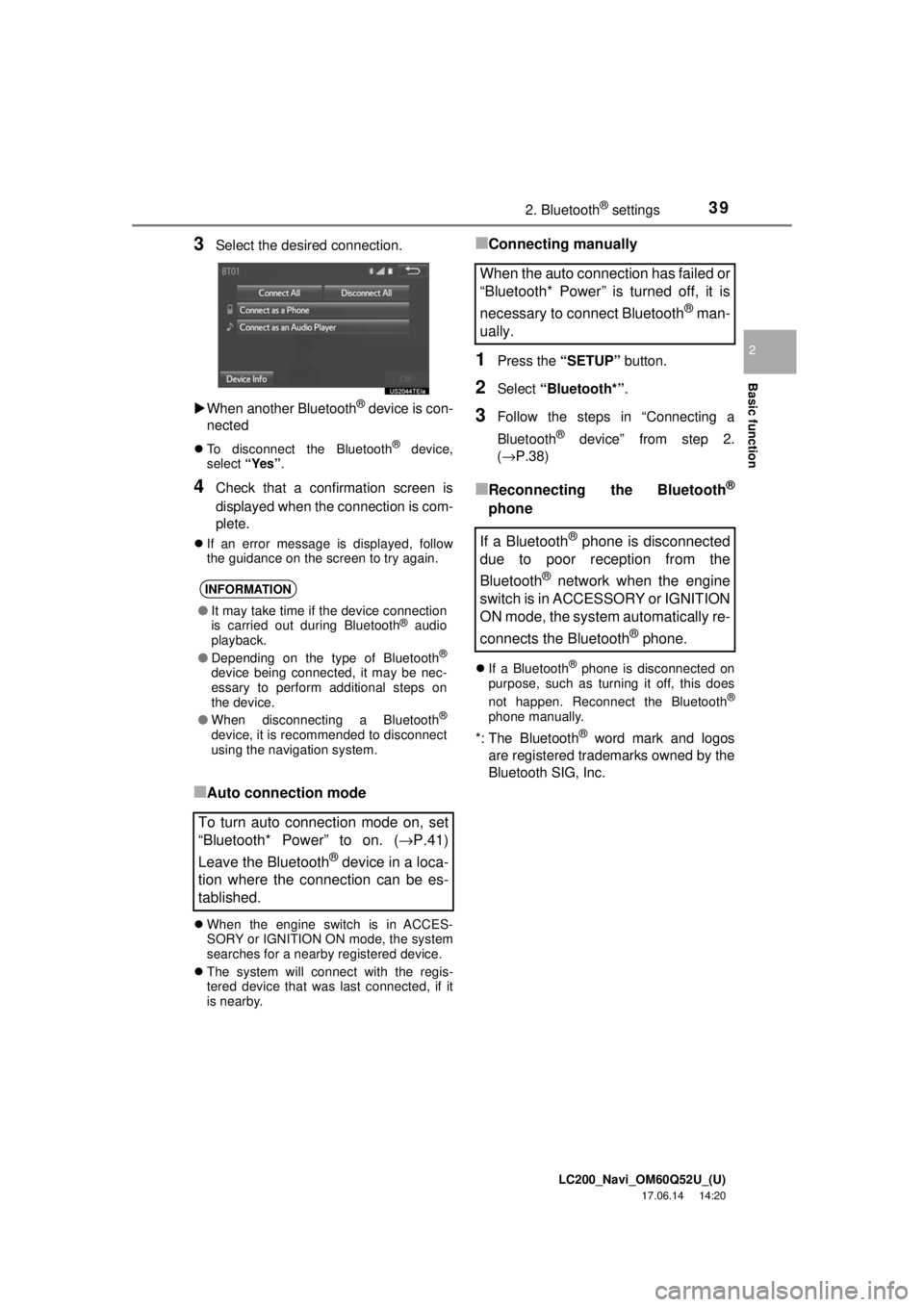
3Select the desired connection.
When another Bluetooth
® device is con-
nected
To disconnect the Bluetooth® device,
select “Yes”.
4Check that a confirmation screen is
displayed when the connection is com-
plete.
If an error message is displayed, follow
the guidance on the screen to try again.
■Auto connection mode
When the engine switch is in ACCES-
SORY or IGNITION ON mode, the system
searches for a nearby registered device.
The system will connect with the regis-
tered device that was last connected, if it
is nearby.
■Connecting manually
1Press the “SETUP” button.
2Select “Bluetooth*” .
3Follow the steps in “Connecting a
Bluetooth
® device” from step 2.
(→P.38)
■Reconnecting the Bluetooth®
phone
If a Bluetooth® phone is disconnected on
purpose, such as turning it off, this does
not happen. Reconnect the Bluetooth
®
phone manually.
*: The Bluetooth® word mark and logos
are registered trademarks owned by the
Bluetooth SIG, Inc.
INFORMATION
● It may take time if the device connection
is carried out during Bluetooth® audio
playback.
● Depending on the type of Bluetooth
®
device being connected, it may be nec-
essary to perform additional steps on
the device.
● When disconnecting a Bluetooth
®
device, it is recommended to disconnect
using the navigation system.
To turn auto connection mode on, set
“Bluetooth* Power” to on. ( →P.41)
Leave the Bluetooth
® device in a loca-
tion where the connection can be es-
tablished.
When the auto connection has failed or
“Bluetooth* Power” is turned off, it is
necessary to connect Bluetooth
® man-
ually.
If a Bluetooth
® phone is disconnected
due to poor reception from the
Bluetooth
® network when the engine
switch is in ACCESSORY or IGNITION
ON mode, the system automatically re-
connects the Bluetooth
® phone.
Page 40 of 276
LC200_Navi_OM60Q52U_(U)
17.06.14 14:20
402. Bluetooth® settings
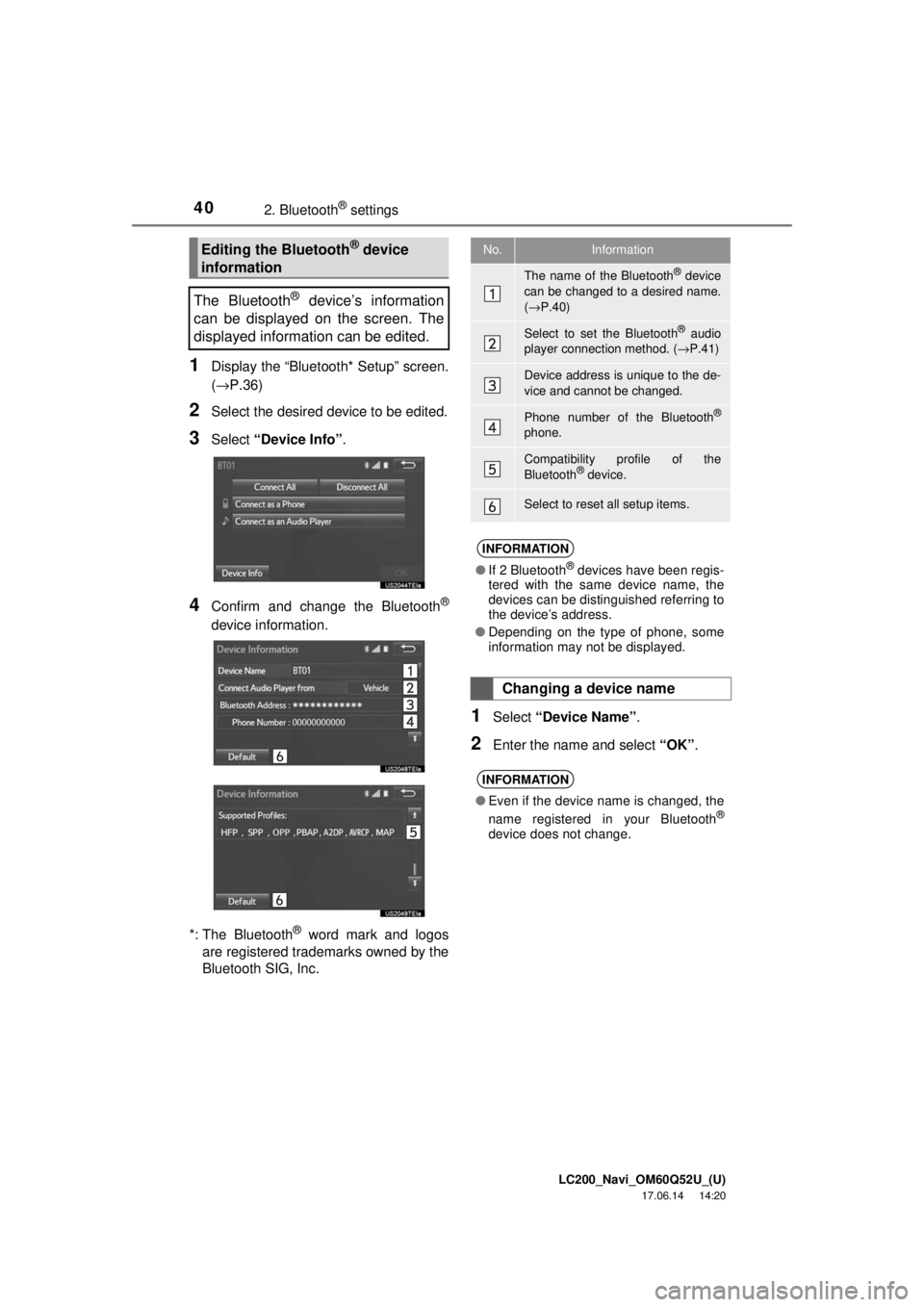
1Display the “Bluetooth* Setup” screen.
(→P.36)
2Select the desired device to be edited.
3Select “Device Info” .
4Confirm and change the Bluetooth®
device information.
*: The Bluetooth
® word mark and logos
are registered trademarks owned by the
Bluetooth SIG, Inc.
1Select “Device Name” .
2Enter the name and select “OK”.
Editing the Bluetooth® device
information
The Bluetooth
® device’s information
can be displayed on the screen. The
displayed information can be edited.
No.Information
The name of the Bluetooth® device
can be changed to a desired name.
( → P.40)
Select to set the Bluetooth® audio
player connection method. ( →P.41)
Device address is unique to the de-
vice and cannot be changed.
Phone number of the Bluetooth®
phone.
Compatibility profile of the
Bluetooth® device.
Select to reset all setup items.
INFORMATION
● If 2 Bluetooth® devices have been regis-
tered with the same device name, the
devices can be distinguished referring to
the device’s address.
● Depending on the type of phone, some
information may not be displayed.
Changing a device name
INFORMATION
●Even if the device name is changed, the
name registered in your Bluetooth®
device does not change.
Page 41 of 276
LC200_Navi_OM60Q52U_(U)
17.06.14 14:20
Basic function
2
412. Bluetooth® settings
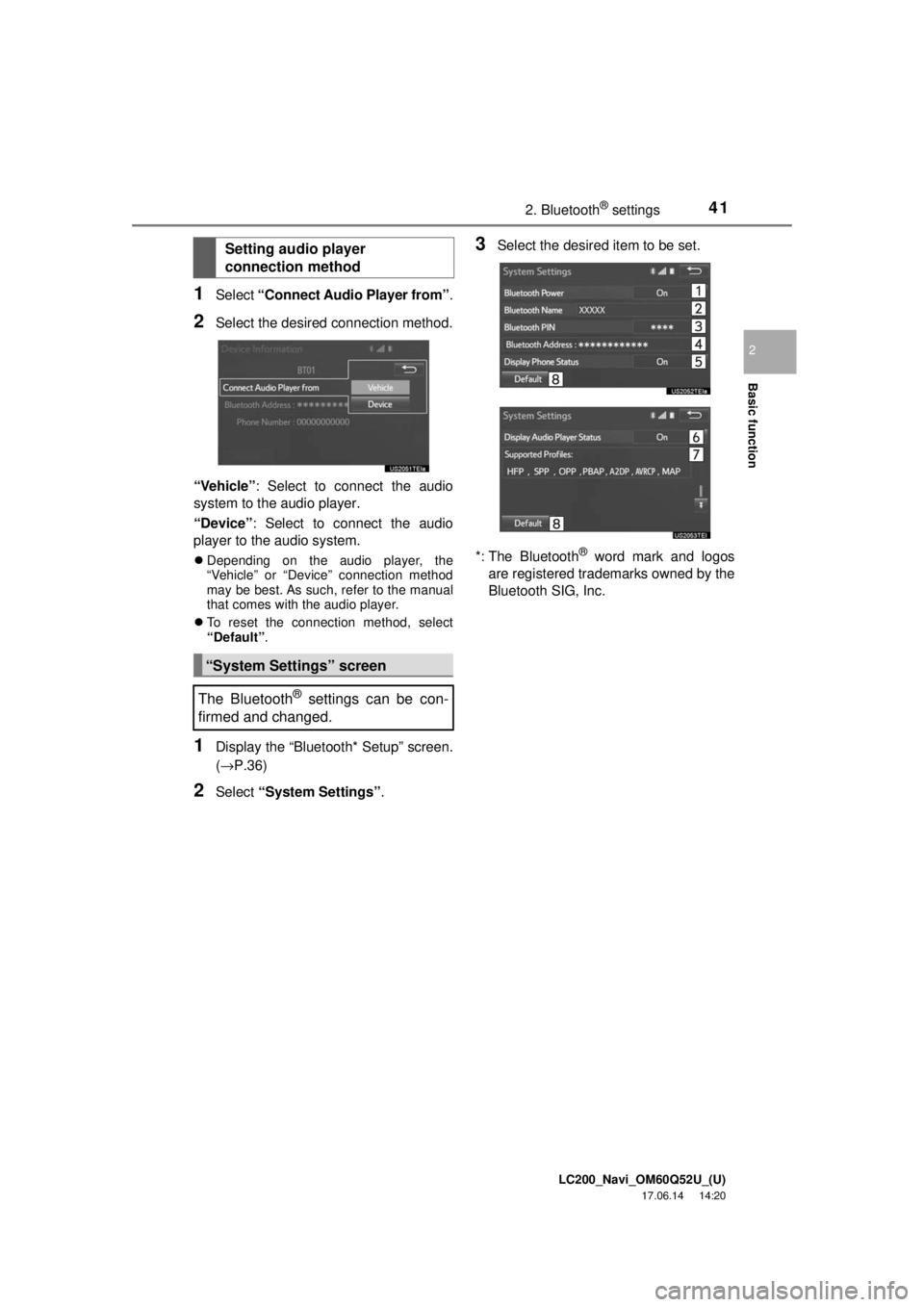
1Select “Connect Audio Player from” .
2Select the desired connection method.
“Vehicle” : Select to connect the audio
system to the audio player.
“Device” : Select to connect the audio
player to the audio system.
Depending on the audio player, the
“Vehicle” or “Device” connection method
may be best. As such, refer to the manual
that comes with the audio player.
To reset the connection method, select
“Default” .
1Display the “Bluetooth* Setup” screen.
(→P.36)
2Select “System Settings” .
3Select the desired item to be set.
*: The Bluetooth
® word mark and logos
are registered trademarks owned by the
Bluetooth SIG, Inc.
Setting audio player
connection method
“System Settings” screen
The Bluetooth
® settings can be con-
firmed and changed.
Page 42 of 276
LC200_Navi_OM60Q52U_(U)
17.06.14 14:20
422. Bluetooth® settings
1Select “Bluetooth* Power” .
When “Bluetooth* Power” is on :
The Bluetooth
® device is automatically
connected when the engine switch is in
ACCESSORY or IGNITION ON mode.
When “Bluetooth* Power” is off :
The Bluetooth
® device is disconnected,
and the system will not connect to it next
time.
1Select “Bluetooth* Name” .
2Enter a name and select “OK”.
1Select “Bluetooth* PIN” .
2Enter a PIN-code and select “OK”.
*: The Bluetooth
® word mark and logos
are registered trademarks owned by the
Bluetooth SIG, Inc.
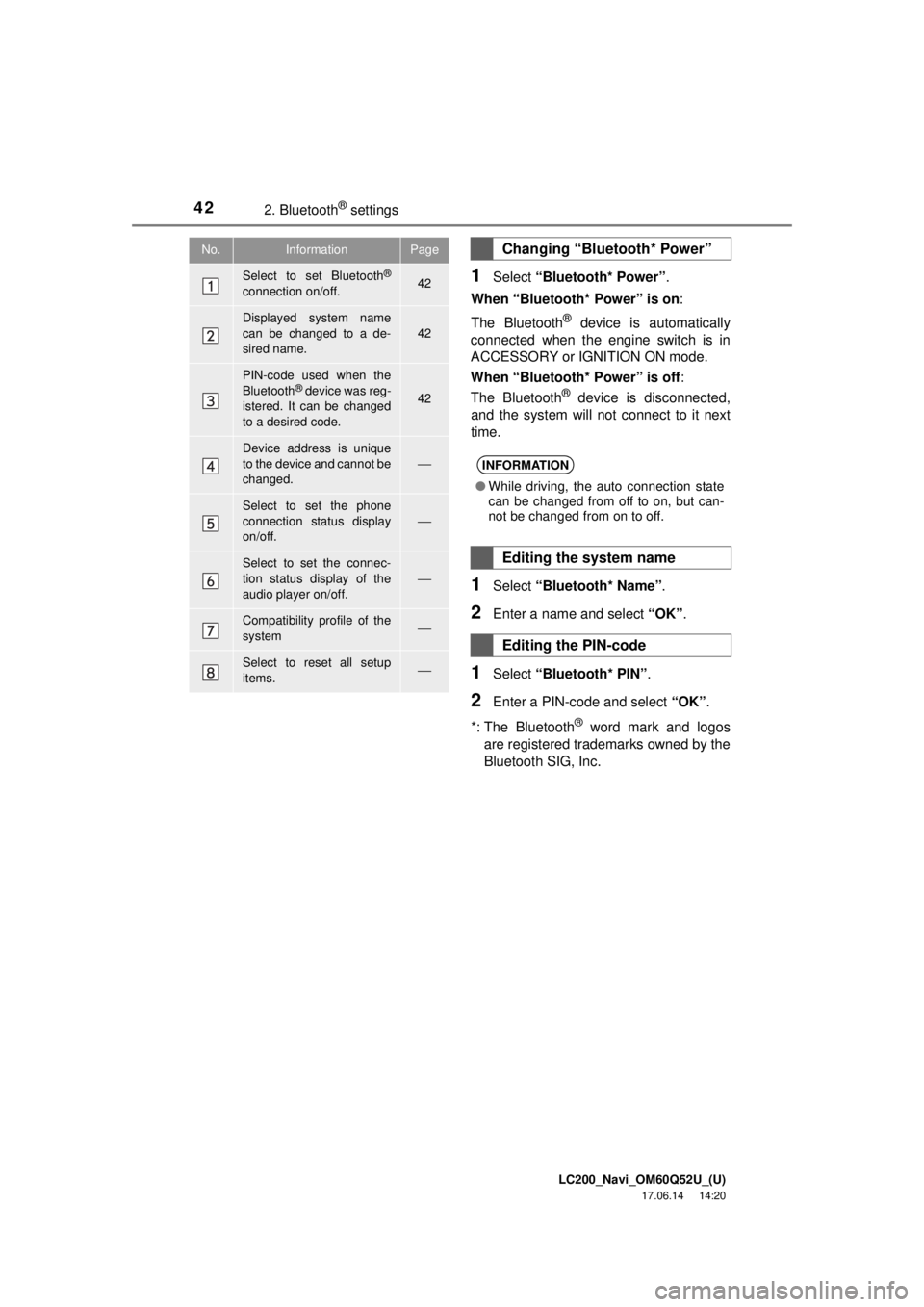
No.InformationPage
Select to set Bluetooth®
connection on/off.42
Displayed system name
can be changed to a de-
sired name.
42
PIN-code used when the
Bluetooth® device was reg-
istered. It can be changed
to a desired code.42
Device address is unique
to the device and cannot be
changed.
⎯
Select to set the phone
connection status display
on/off.
⎯
Select to set the connec-
tion status display of the
audio player on/off.⎯
Compatibility profile of the
system⎯
Select to reset all setup
items.⎯
Changing “Bluetooth* Power”
INFORMATION
● While driving, the auto connection state
can be changed from off to on, but can-
not be changed from on to off.
Editing the system name
Editing the PIN-code
Page 109 of 276
LC200_Navi_OM60Q52U_(U)
17.06.09 10:34
109
4
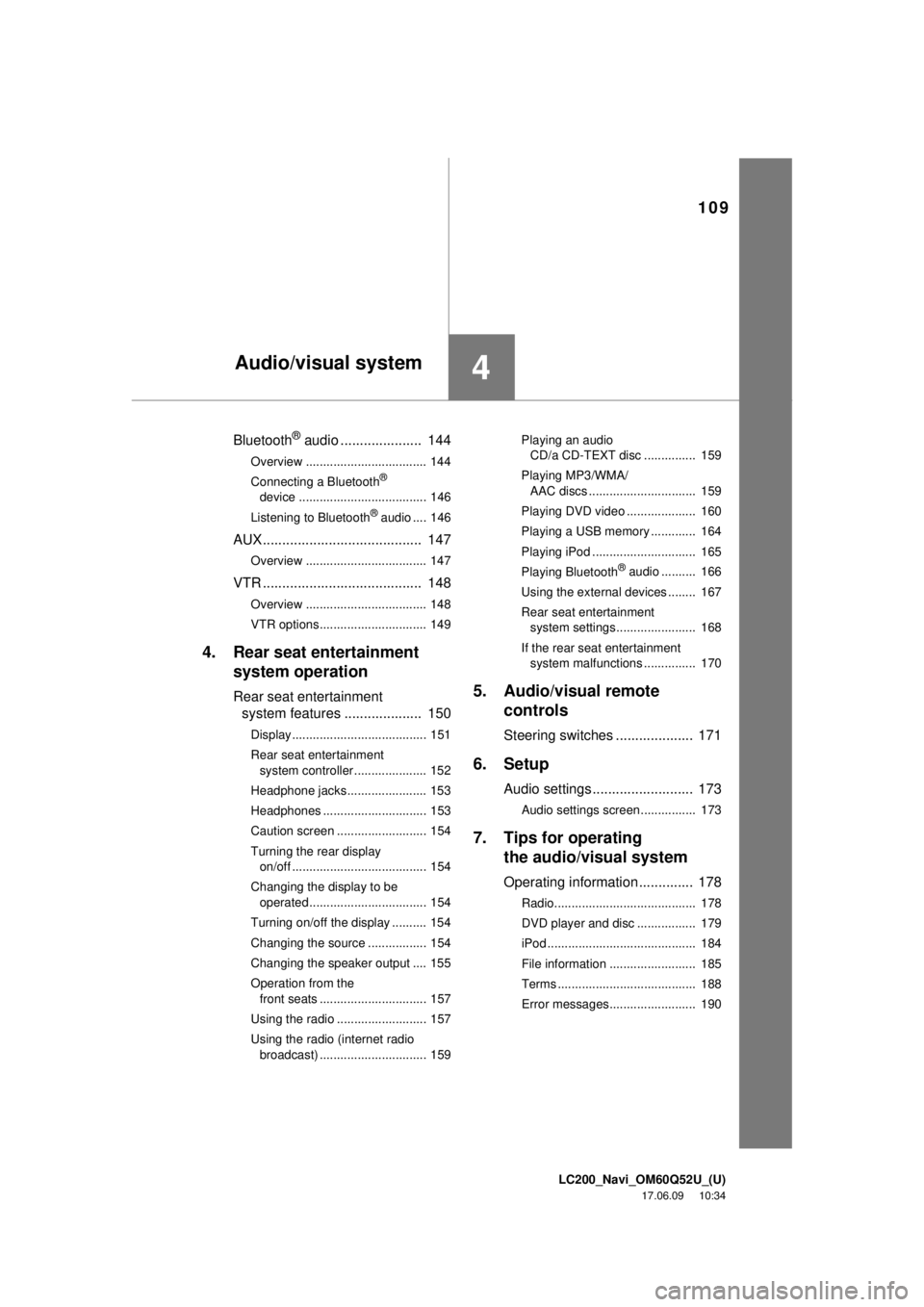
Bluetooth® audio ..................... 144
Overview ................................... 144
Connecting a Bluetooth®
device ..................................... 146
Listening to Bluetooth
® audio .... 146
AUX ......................................... 147
Overview ................................... 147
VTR ......................................... 148
Overview ................................... 148
VTR options............................... 149
4. Rear seat entertainment system operation
Rear seat entertainment
system features .................... 150
Display....................................... 151
Rear seat entertainment
system controller ..................... 152
Headphone jacks....................... 153
Headphones .............................. 153
Caution screen .......................... 154
Turning the rear display on/off ....................................... 154
Changing the display to be operated .................................. 154
Turning on/off the display .......... 154
Changing the source ................. 154
Changing the speaker output .... 155
Operation from the front seats ............................... 157
Using the radio .......................... 157
Using the radio (internet radio broadcast) ............................... 159 Playing an audio
CD/a CD-TEXT disc ............... 159
Playing MP3/WMA/ AAC discs ............................... 159
Playing DVD video .................... 160
Playing a USB memory ............. 164
Playing iPod .............................. 165
Playing Bluetooth
® audio .......... 166
Using the external devices ........ 167
Rear seat entertainment system settings....................... 168
If the rear seat entertainment system malfunctions ............... 170
5. Audio/visual remote controls
Steering switches .................... 171
6. Setup
Audio settings .......................... 173
Audio settings screen................ 173
7. Tips for operatingthe audio/visual system
Operating information .............. 178
Radio......................................... 178
DVD player and disc ................. 179
iPod ........................................... 184
File information ......................... 185
Terms ........................................ 188
Error messages......................... 190
Audio/visual system
Page 110 of 276
LC200_Navi_OM60Q52U_(U)
17.06.09 10:34
1101. Basic operation
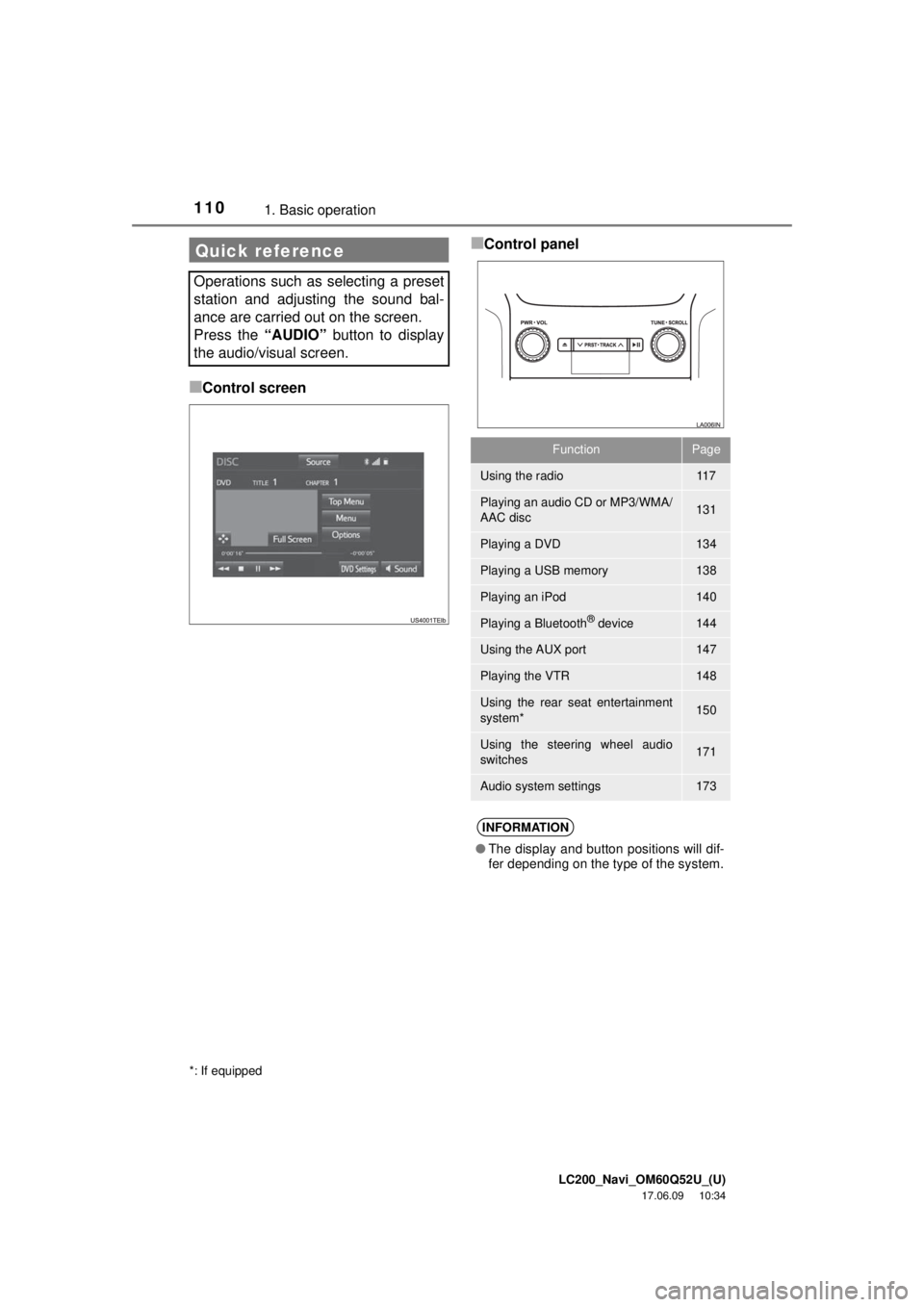
■Control screen
■Control panelQuick reference
Operations such as selecting a preset
station and adjusting the sound bal-
ance are carried out on the screen.
Press the “AUDIO” button to display
the audio/visual screen.
*: If equipped
FunctionPage
Using the radio11 7
Playing an audio CD or MP3/WMA/
AAC disc131
Playing a DVD134
Playing a USB memory138
Playing an iPod140
Playing a Bluetooth® device144
Using the AUX port147
Playing the VTR148
Using the rear seat entertainment
system*150
Using the steering wheel audio
switches171
Audio system settings173
INFORMATION
● The display and button positions will dif-
fer depending on the type of the system.