buttons TOYOTA LAND CRUISER 2018 Accessories, Audio & Navigation (in English)
[x] Cancel search | Manufacturer: TOYOTA, Model Year: 2018, Model line: LAND CRUISER, Model: TOYOTA LAND CRUISER 2018Pages: 276, PDF Size: 7.11 MB
Page 5 of 276
5
LC200_Navi_OM60Q52U_(U)
17.06.09 10:34
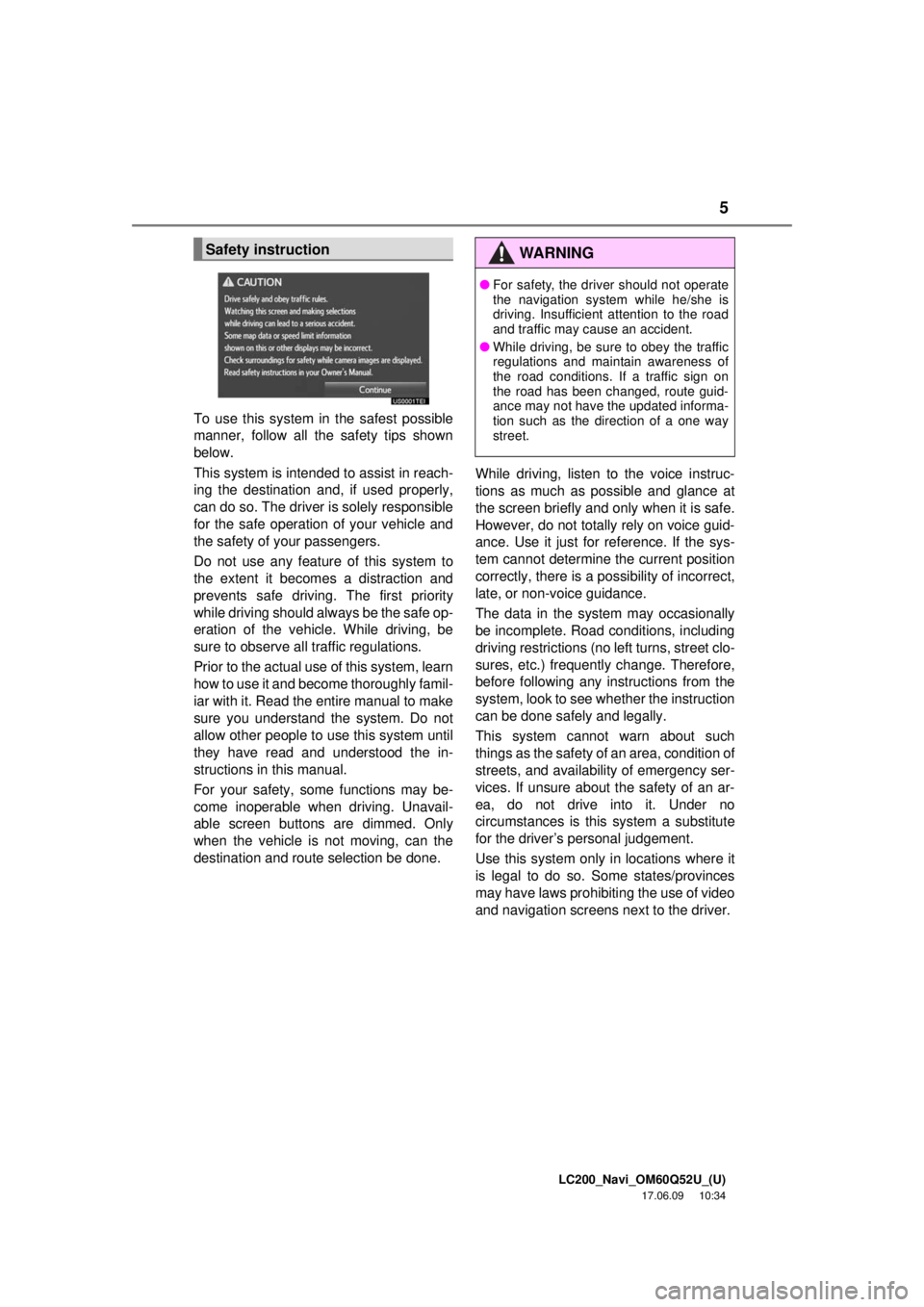
To use this system in the safest possible
manner, follow all the safety tips shown
below.
This system is intended to assist in reach-
ing the destination and, if used properly,
can do so. The driver is solely responsible
for the safe operation of your vehicle and
the safety of your passengers.
Do not use any featur e of this system to
the extent it becom es a distraction and
prevents safe driving. The first priority
while driving should always be the safe op-
eration of the vehicle. While driving, be
sure to observe all traffic regulations.
Prior to the actual us e of this system, learn
how to use it and become thoroughly famil-
iar with it. Read the entire manual to make
sure you understand the system. Do not
allow other people to use this system until
they have read and understood the in-
structions in this manual.
For your safety, some functions may be-
come inoperable when driving. Unavail-
able screen buttons are dimmed. Only
when the vehicle is not moving, can the
destination and route selection be done. While driving, listen to the voice instruc-
tions as much as possible and glance at
the screen briefly and only when it is safe.
However, do not totally rely on voice guid-
ance. Use it just for reference. If the sys-
tem cannot determine the current position
correctly, there is a po
ssibility of incorrect,
late, or non-voice guidance.
The data in the system may occasionally
be incomplete. Road conditions, including
driving restrictions (no left turns, street clo-
sures, etc.) frequently change. Therefore,
before following any instructions from the
system, look to see whether the instruction
can be done safely and legally.
This system cannot warn about such
things as the safety of an area, condition of
streets, and availability of emergency ser-
vices. If unsure about the safety of an ar-
ea, do not drive into it. Under no
circumstances is this system a substitute
for the driver’s personal judgement.
Use this system only in locations where it
is legal to do so. Some states/provinces
may have laws prohibiting the use of video
and navigation screens next to the driver.
Safety instructionWA R N I N G
● For safety, the driver should not operate
the navigation system while he/she is
driving. Insufficient attention to the road
and traffic may cause an accident.
● While driving, be sure to obey the traffic
regulations and maintain awareness of
the road conditions. If a traffic sign on
the road has been changed, route guid-
ance may not have the updated informa-
tion such as the direction of a one way
street.
Page 6 of 276
LC200_Navi_OM60Q52U_(U)
17.06.09 10:34
TABLE OF CONTENTS6
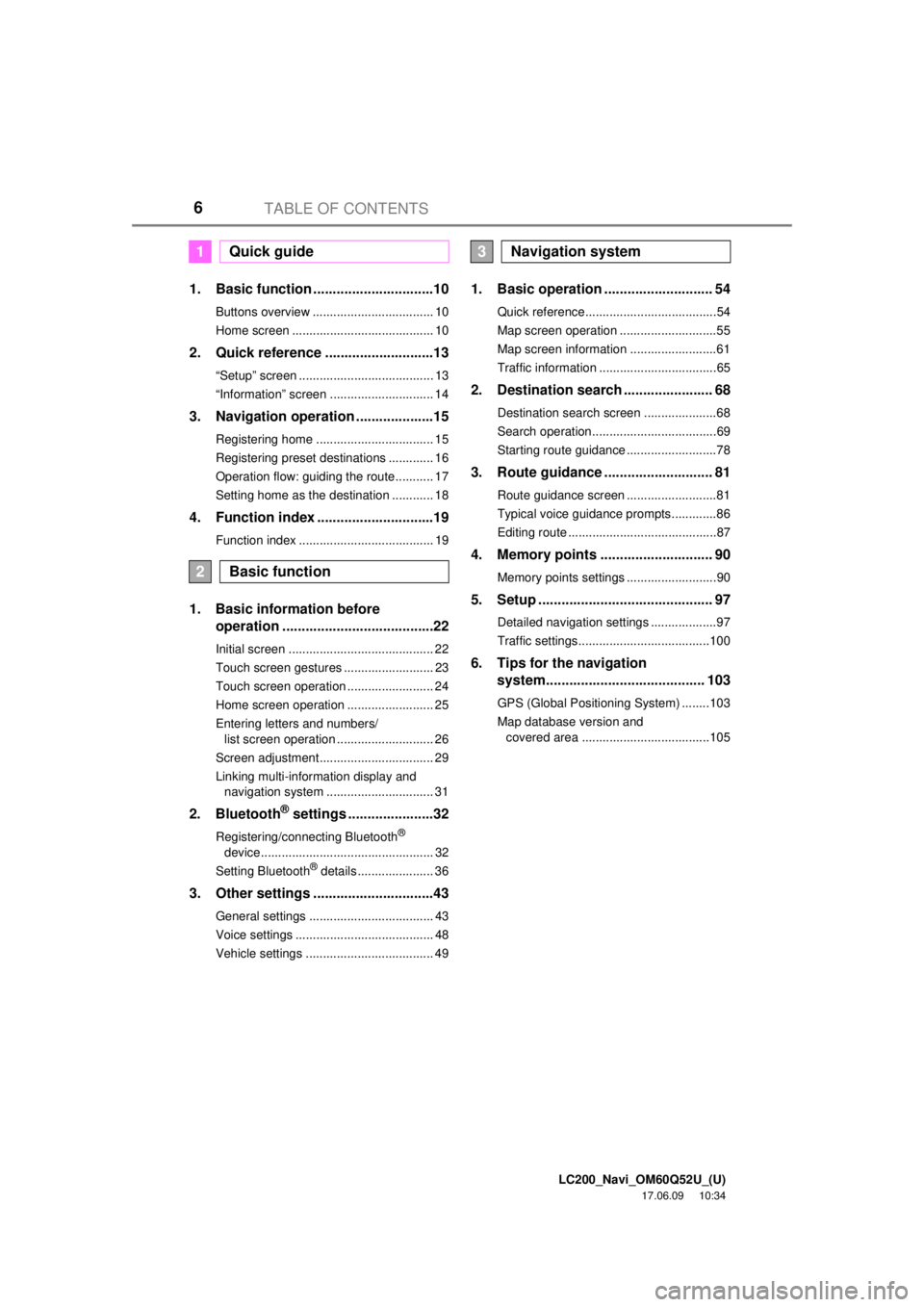
1. Basic function ...............................10
Buttons overview ................................... 10
Home screen ......................................... 10
2. Quick reference ............................13
“Setup” screen ....................................... 13
“Information” screen .............................. 14
3. Navigation operation ....................15
Registering home .................................. 15
Registering preset destinations ............. 16
Operation flow: guiding the route........... 17
Setting home as the destination ............ 18
4. Function index ..............................19
Function index ....................................... 19
1. Basic information before operation .......................................22
Initial screen .......................................... 22
Touch screen gestures .......................... 23
Touch screen operation ......................... 24
Home screen operation ......................... 25
Entering letters and numbers/
list screen operation ............................ 26
Screen adjustment................................. 29
Linking multi-information display and navigation system ............................... 31
2. Bluetooth® settings ......................32
Registering/connecting Bluetooth®
device .................................................. 32
Setting Bluetooth
® details ...................... 36
3. Other settings ...............................43
General settings .................................... 43
Voice settings ........................................ 48
Vehicle settings ..................................... 49
1. Basic operation ............................ 54
Quick reference......................................54
Map screen operation ............................55
Map screen information .........................61
Traffic information ..................................65
2. Destination search ....................... 68
Destination search screen .....................68
Search operation....................................69
Starting route guidance ..........................78
3. Route guidance ............................ 81
Route guidance screen ..........................81
Typical voice guidance prompts.............86
Editing route ...........................................87
4. Memory points ............................. 90
Memory points settings ..........................90
5. Setup ............................................. 97
Detailed navigation settings ...................97
Traffic settings......................................100
6. Tips for the navigation system......................................... 103
GPS (Global Positioning System) ........103
Map database version and
covered area .....................................105
1Quick guide
2Basic function
3Navigation system
Page 9 of 276
LC200_Navi_OM60Q52U_(U)
17.06.09 10:34
9
1
1. Basic function
Buttons overview ....................... 10
Home screen ............................. 10
Status display.............................. 11
2. Quick reference
“Setup” screen ........................... 13
“Information” screen .................. 14
3. Navigation operation
Registering home ...................... 15
Registering preset destinations ............................. 16
Operation flow: guiding the route ........................................ 17
Setting home as the destination............................... 18
4. Function index
Function index ........................... 19
Quick guide
Page 10 of 276
LC200_Navi_OM60Q52U_(U)
17.06.09 10:34
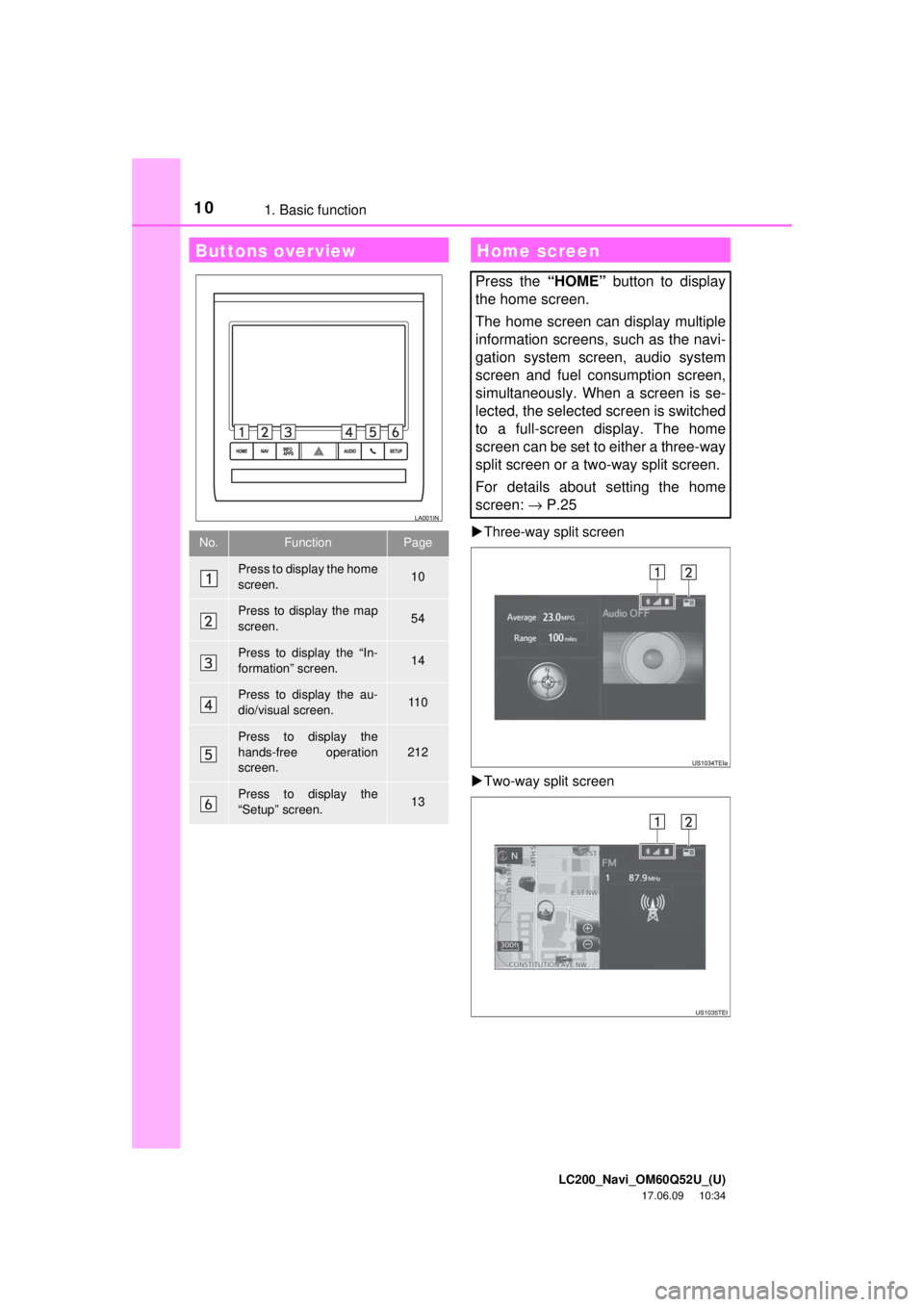
101. Basic functionThree-way split screen
Two-way split screen
Buttons overview
No.FunctionPage
Press to display the home
screen.10
Press to display the map
screen.54
Press to display the “In-
formation” screen.14
Press to display the au-
dio/visual screen.11 0
Press to display the
hands-free operation
screen.
212
Press to display the
“Setup” screen.13
Home screen
Press the “HOME” button to display
the home screen.
The home screen can display multiple
information screens, such as the navi-
gation system screen, audio system
screen and fuel consumption screen,
simultaneously. When a screen is se-
lected, the selected screen is switched
to a full-screen display. The home
screen can be set to either a three-way
split screen or a two-way split screen.
For details about setting the home
screen: → P.25
Page 16 of 276
LC200_Navi_OM60Q52U_(U)
17.06.09 10:34
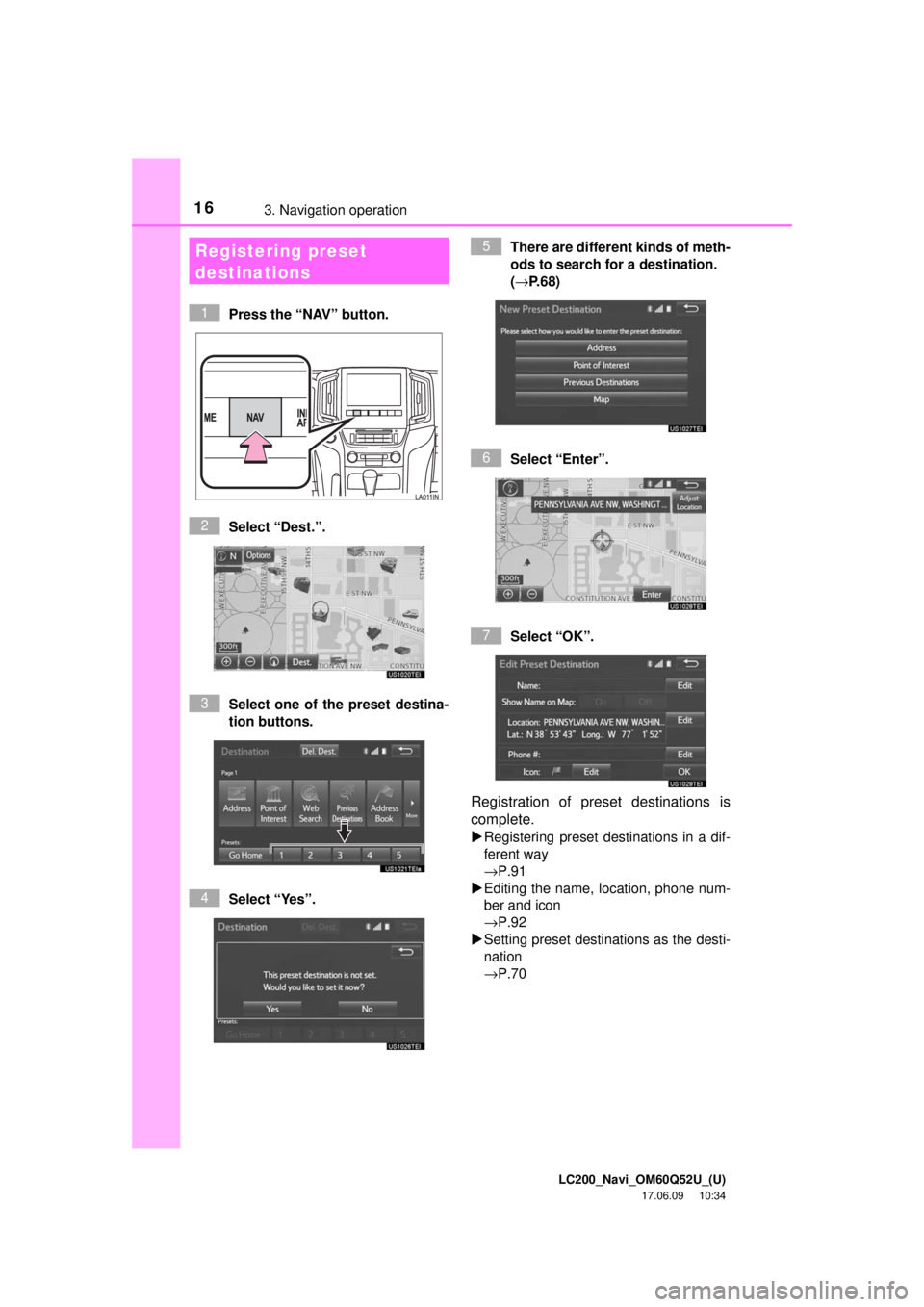
163. Navigation operation
Press the “NAV” button.
Select “Dest.”.
Select one of the preset destina-
tion buttons.
Select “Yes”. There are different kinds of meth-
ods to search for a destination.
(→
P.68)
Select “Enter”.
Select “OK”.
Registration of preset destinations is
complete.
Registering preset destinations in a dif-
ferent way
→P.91
Editing the name, location, phone num-
ber and icon
→P.92
Setting preset destinations as the desti-
nation
→P.70
Registering preset
destinations
1
2
3
4
5
6
7
Page 24 of 276
LC200_Navi_OM60Q52U_(U)
17.06.09 10:34
241. Basic information before operation
Touch screen operation
This system is operated mainly by the
buttons on the screen. (Referred to as
screen buttons in this manual.)
When a screen button is touched, a
beep sounds. (To set the beep sound,
see page 43.)
NOTICE
●To prevent damaging the screen, lightly
touch the screen buttons with your fin-
ger.
● Do not use objects other than your finger
to touch the screen.
● Wipe off fingerprints using a glass clean-
ing cloth. Do not use chemical cleaners
to clean the screen, as they may dam-
age the touch screen.
INFORMATION
●If the system does not respond to touch-
ing a screen button, move your finger
away from the screen and then touch it
again.
● Dimmed screen buttons cannot be oper-
ated.
● The displayed image may become
darker and moving images may be
slightly distorted when the screen is
cold.
● In extremely cold conditions, the map
may not be displayed and the data input
by a user may be deleted. Also, the
screen buttons may be harder than
usual to depress.
● When you look at the screen through
polarized material such as polarized
sunglasses, the screen may be dark and
hard to see. If so, look at the screen
from different angles, adjust the screen
settings on the “Display” screen or take
off your sunglasses.
● When is displayed on the
screen, select to return to the
previous screen.
Page 29 of 276
LC200_Navi_OM60Q52U_(U)
17.06.09 10:34
Basic function
2
291. Basic information before operation
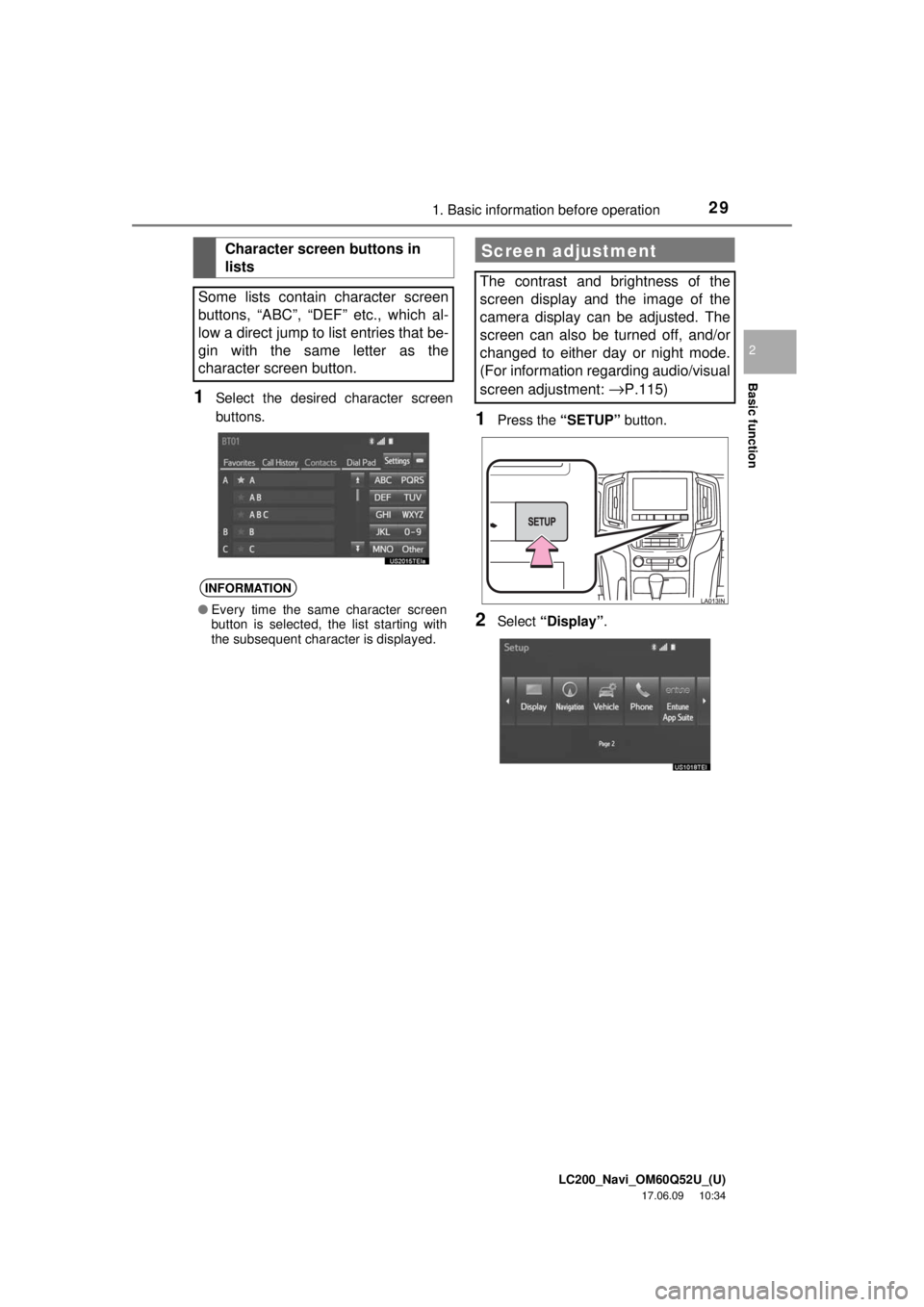
1Select the desired character screen
buttons.
1Press the “SETUP” button.
2Select “Display” .
Character screen buttons in
lists
Some lists contain character screen
buttons, “ABC”, “DEF” etc., which al-
low a direct jump to list entries that be-
gin with the same letter as the
character screen button.
INFORMATION
● Every time the same character screen
button is selected, the list starting with
the subsequent character is displayed.
Screen adjustment
The contrast and brightness of the
screen display and the image of the
camera display can be adjusted. The
screen can also be turned off, and/or
changed to either day or night mode.
(For information regarding audio/visual
screen adjustment:
→P.115)
Page 58 of 276
LC200_Navi_OM60Q52U_(U)
17.06.09 10:34
581. Basic operation
: North-up symbol
Regardless of the direction of vehicle trav-
el, north is always up.
: Heading-up symbol
The direction of vehicle travel is always up.
: 3D Heading-up symbol
The direction of vehicle travel is always up.
The letter(s) beside this symbol indicate
the vehicle’s heading direction (e.g. N for
north).
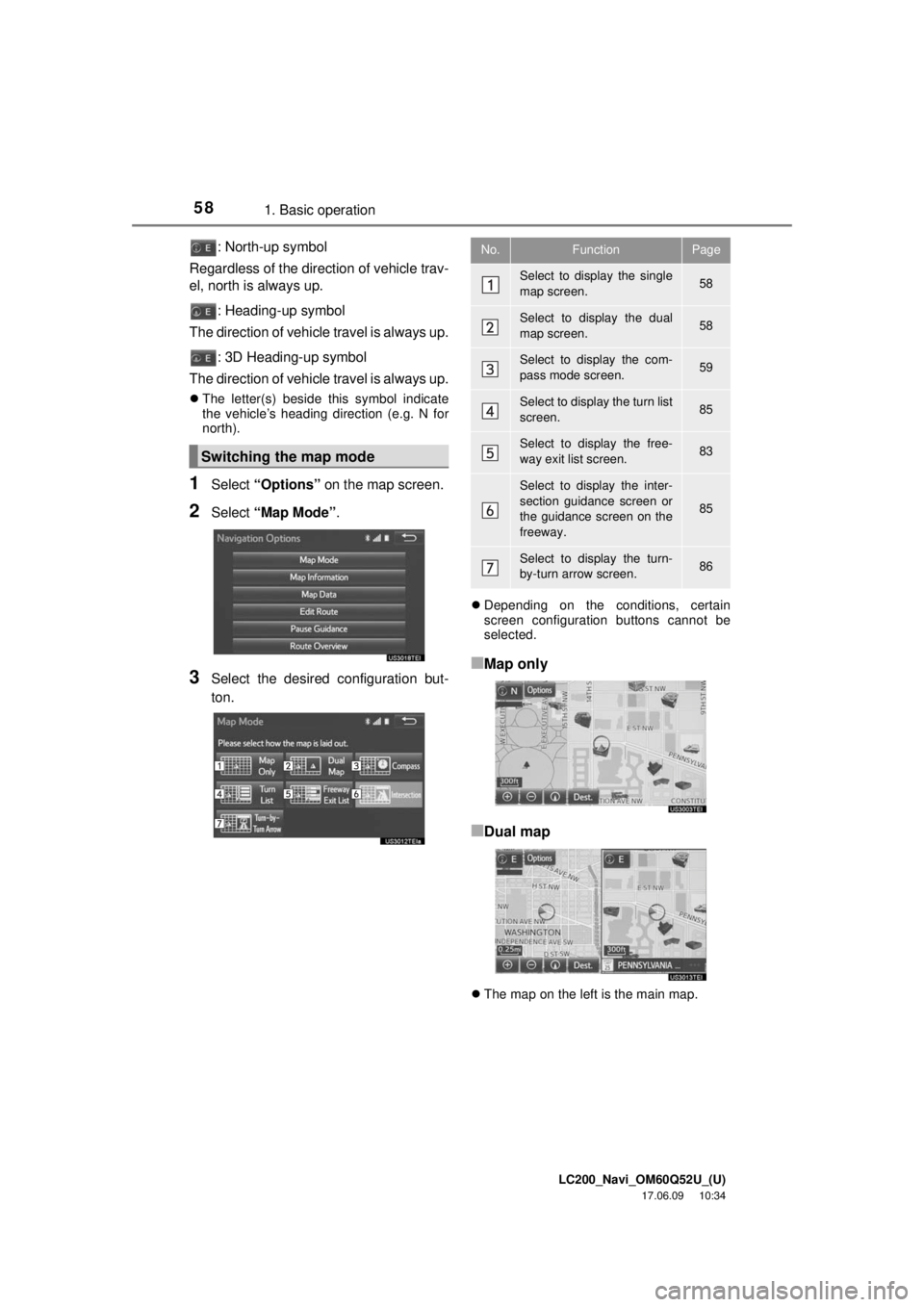
1Select “Options” on the map screen.
2Select “Map Mode” .
3Select the desired configuration but-
ton.
Depending on the conditions, certain
screen configuration buttons cannot be
selected.
■Map only
■Dual map
The map on the left is the main map.
Switching the map mode
No.FunctionPage
Select to display the single
map screen. 58
Select to display the dual
map screen.58
Select to display the com-
pass mode screen.59
Select to display the turn list
screen.85
Select to display the free-
way exit list screen.83
Select to display the inter-
section guidance screen or
the guidance screen on the
freeway.
85
Select to display the turn-
by-turn arrow screen.86
Page 70 of 276
LC200_Navi_OM60Q52U_(U)
17.06.09 10:34
702. Destination search
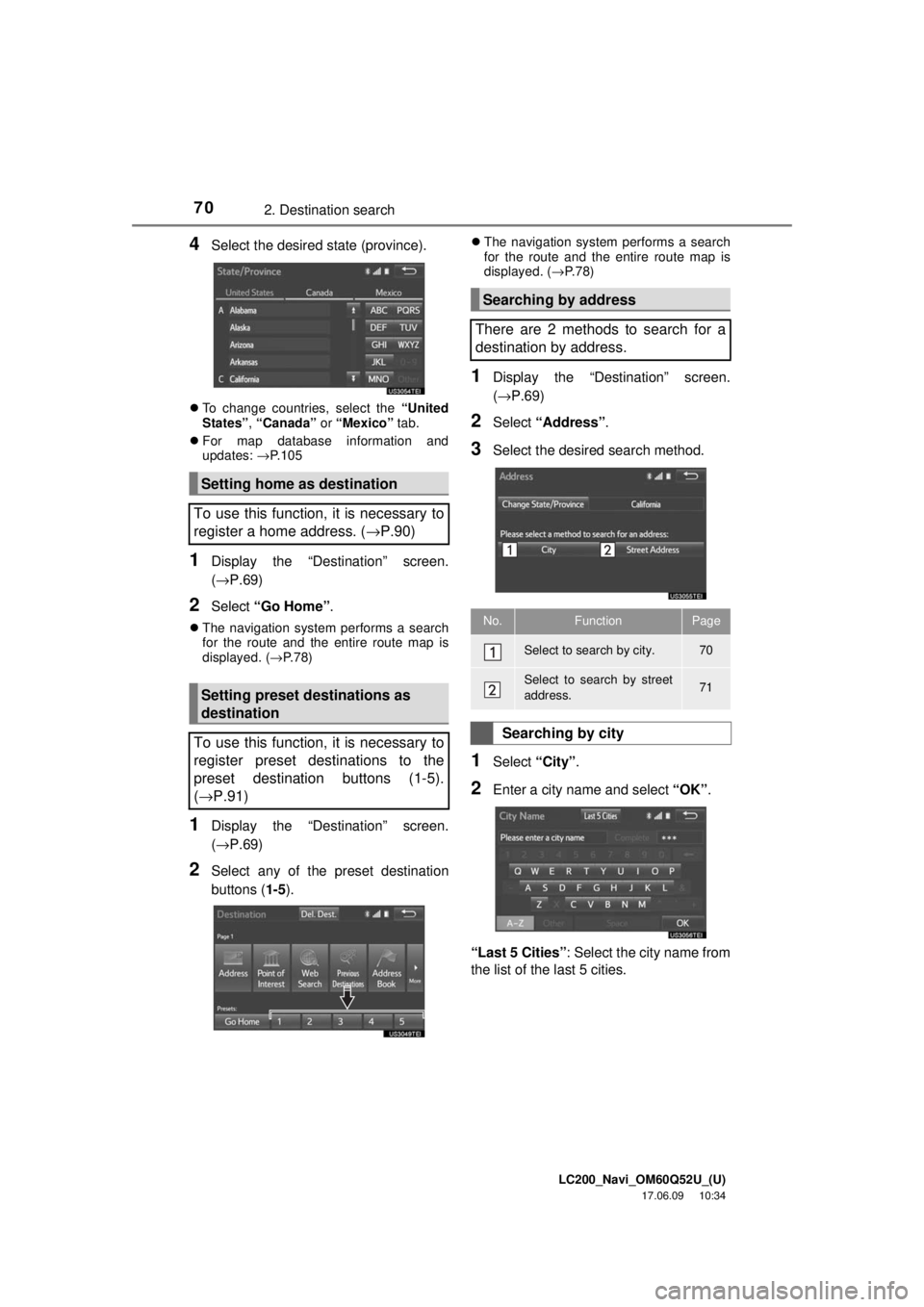
4Select the desired state (province).
To change countries, select the “United
States” , “Canada” or “Mexico” tab.
For map database information and
updates: →P. 1 0 5
1Display the “Destination” screen.
(→P.69)
2Select “Go Home” .
The navigation system performs a search
for the route and the entire route map is
displayed. ( →P.78)
1Display the “Destination” screen.
(→P.69)
2Select any of the preset destination
buttons ( 1-5).
The navigation system performs a search
for the route and the entire route map is
displayed. ( →P. 7 8 )
1Display the “Destination” screen.
(→ P.69)
2Select “Address” .
3Select the desire d search method.
1Select “City”.
2Enter a city name and select “OK”.
“Last 5 Cities” : Select the city name from
the list of the last 5 cities.
Setting home as destination
To use this function, it is necessary to
register a home address. ( →P.90)
Setting preset destinations as
destination
To use this function, it is necessary to
register preset destinations to the
preset destination buttons (1-5).
( → P.91)
Searching by address
There are 2 methods to search for a
destination by address.
No.FunctionPage
Select to search by city.70
Select to search by street
address.71
Searching by city
Page 82 of 276
LC200_Navi_OM60Q52U_(U)
17.06.09 10:34
823. Route guidance
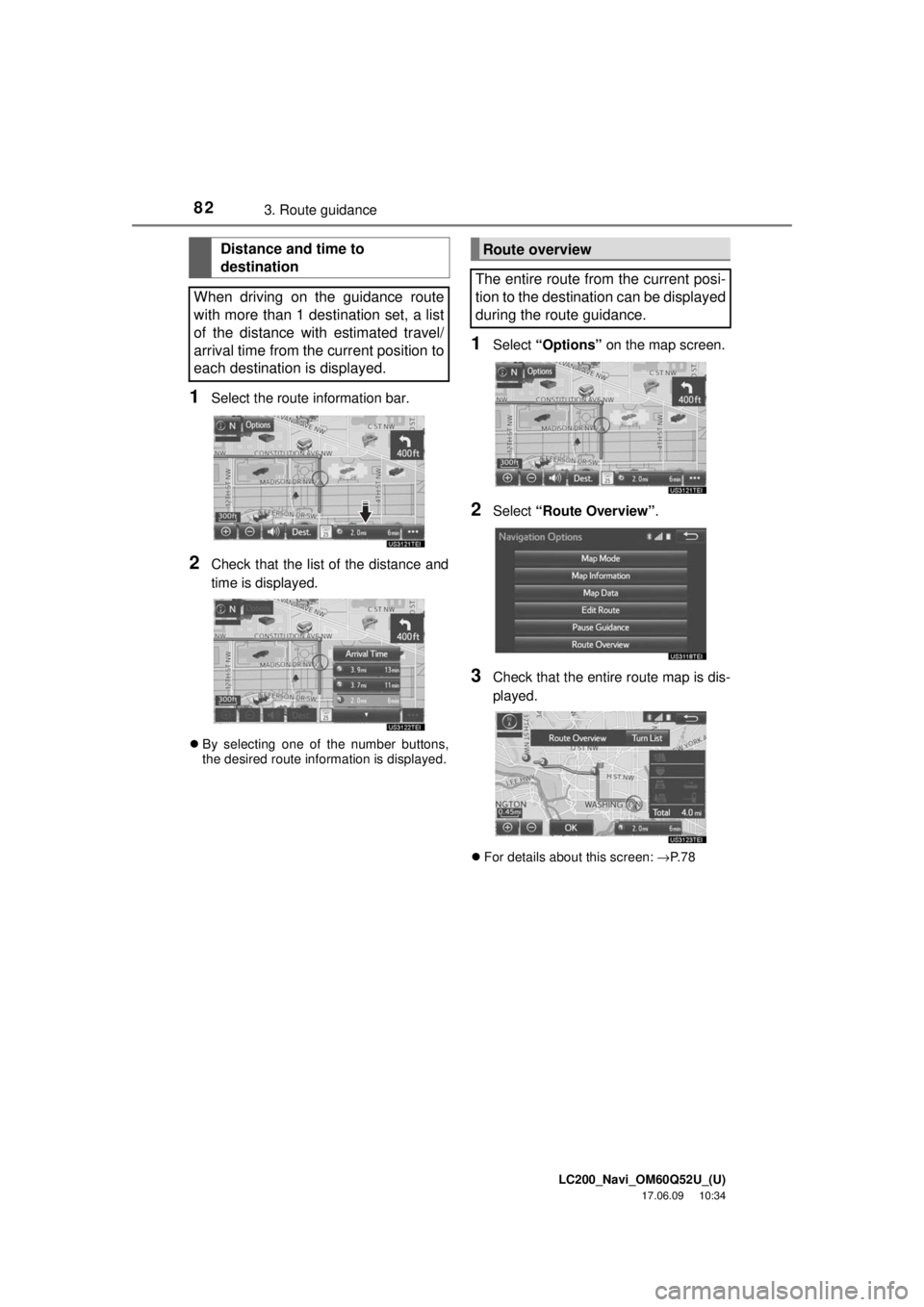
1Select the route information bar.
2Check that the list of the distance and
time is displayed.
By selecting one of the number buttons,
the desired route information is displayed.
1Select “Options” on the map screen.
2Select “Route Overview” .
3Check that the entire route map is dis-
played.
For details about this screen: →P. 7 8
Distance and time to
destination
When driving on the guidance route
with more than 1 destination set, a list
of the distance with estimated travel/
arrival time from the current position to
each destination is displayed.Route overview
The entire route from the current posi-
tion to the destination can be displayed
during the route guidance.