light TOYOTA LAND CRUISER 2018 Accessories, Audio & Navigation (in English)
[x] Cancel search | Manufacturer: TOYOTA, Model Year: 2018, Model line: LAND CRUISER, Model: TOYOTA LAND CRUISER 2018Pages: 276, PDF Size: 7.11 MB
Page 24 of 276
LC200_Navi_OM60Q52U_(U)
17.06.09 10:34
241. Basic information before operation
Touch screen operation
This system is operated mainly by the
buttons on the screen. (Referred to as
screen buttons in this manual.)
When a screen button is touched, a
beep sounds. (To set the beep sound,
see page 43.)
NOTICE
●To prevent damaging the screen, lightly
touch the screen buttons with your fin-
ger.
● Do not use objects other than your finger
to touch the screen.
● Wipe off fingerprints using a glass clean-
ing cloth. Do not use chemical cleaners
to clean the screen, as they may dam-
age the touch screen.
INFORMATION
●If the system does not respond to touch-
ing a screen button, move your finger
away from the screen and then touch it
again.
● Dimmed screen buttons cannot be oper-
ated.
● The displayed image may become
darker and moving images may be
slightly distorted when the screen is
cold.
● In extremely cold conditions, the map
may not be displayed and the data input
by a user may be deleted. Also, the
screen buttons may be harder than
usual to depress.
● When you look at the screen through
polarized material such as polarized
sunglasses, the screen may be dark and
hard to see. If so, look at the screen
from different angles, adjust the screen
settings on the “Display” screen or take
off your sunglasses.
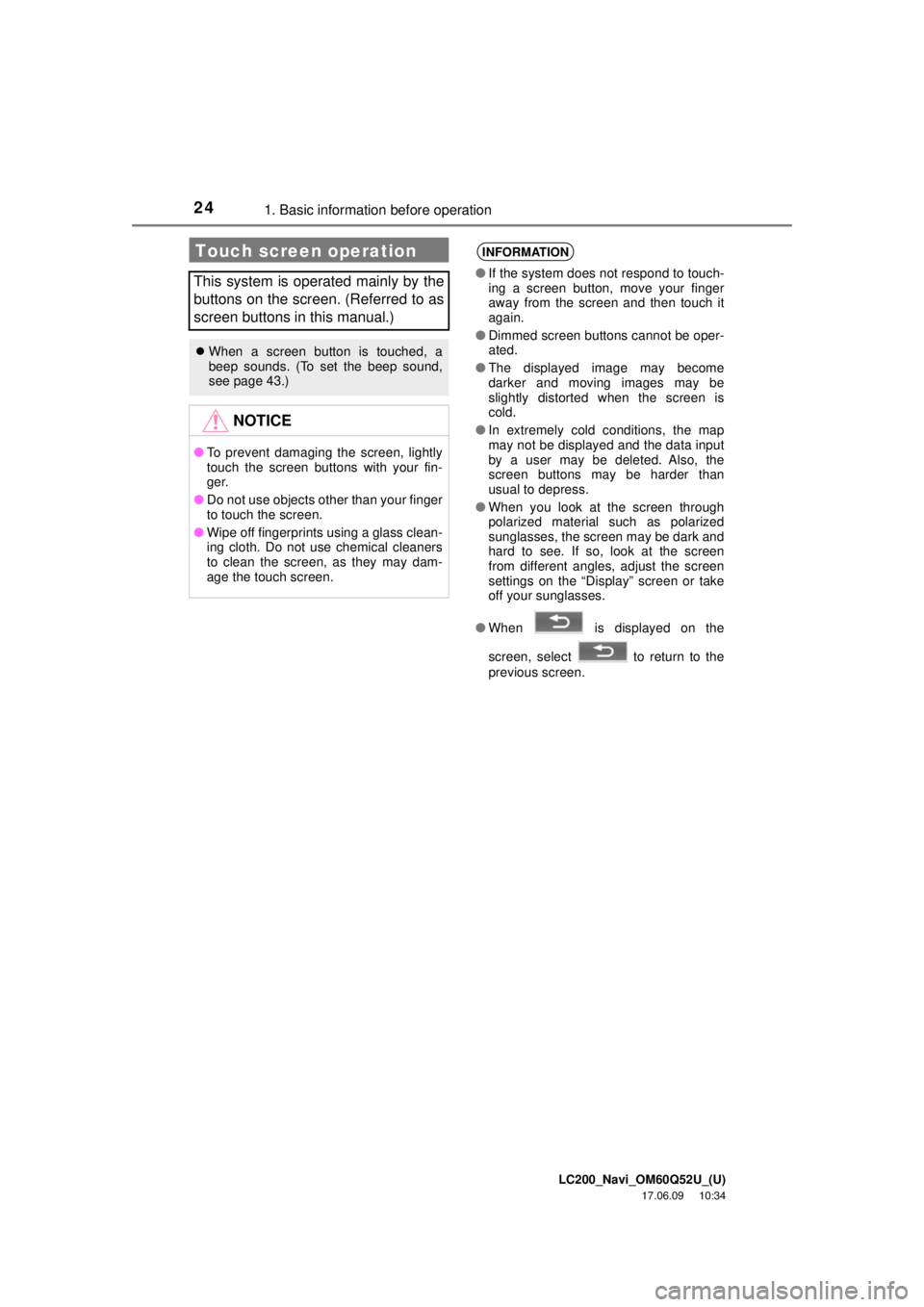
● When is displayed on the
screen, select to return to the
previous screen.
Page 30 of 276
LC200_Navi_OM60Q52U_(U)
17.06.09 10:34
301. Basic information before operation
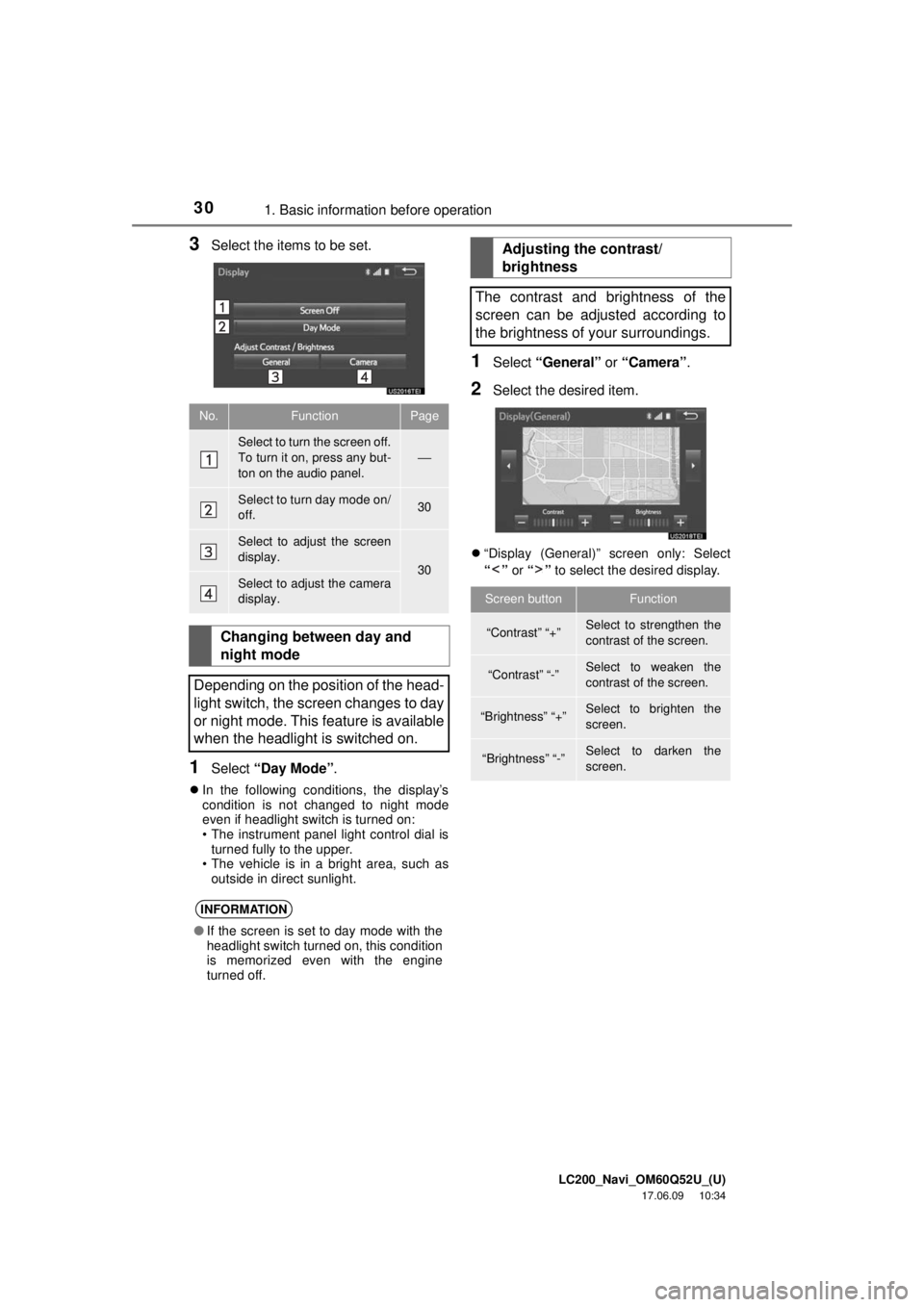
3Select the items to be set.
1Select “Day Mode” .
In the following conditions, the display’s
condition is not changed to night mode
even if headlight switch is turned on:
• The instrument panel light control dial is
turned fully to the upper.
• The vehicle is in a bright area, such as outside in direct sunlight.
1Select “General” or “Camera” .
2Select the desired item.
“Display (General)” screen only: Select
“” or “” to select the desired display.
No.FunctionPage
Select to turn the screen off.
To turn it on, press any but-
ton on the audio panel.
⎯
Select to turn day mode on/
off.30
Select to adjust the screen
display.
30Select to adjust the camera
display.
Changing between day and
night mode
Depending on the position of the head-
light switch, the screen changes to day
or night mode. This feature is available
when the headlight is switched on.
INFORMATION
● If the screen is set to day mode with the
headlight switch turned on, this condition
is memorized even with the engine
turned off.
Adjusting the contrast/
brightness
The contrast and brightness of the
screen can be adjusted according to
the brightness of your surroundings.
Screen buttonFunction
“Contrast” “+”Select to strengthen the
contrast of the screen.
“Contrast” “-”Select to weaken the
contrast of the screen.
“Brightness” “+”Select to brighten the
screen.
“Brightness” “-”Select to darken the
screen.
Page 44 of 276
LC200_Navi_OM60Q52U_(U)
17.06.09 10:34
443. Other settings
1Display the “General Settings” screen.
(→P.43)
2Select “Clock” .
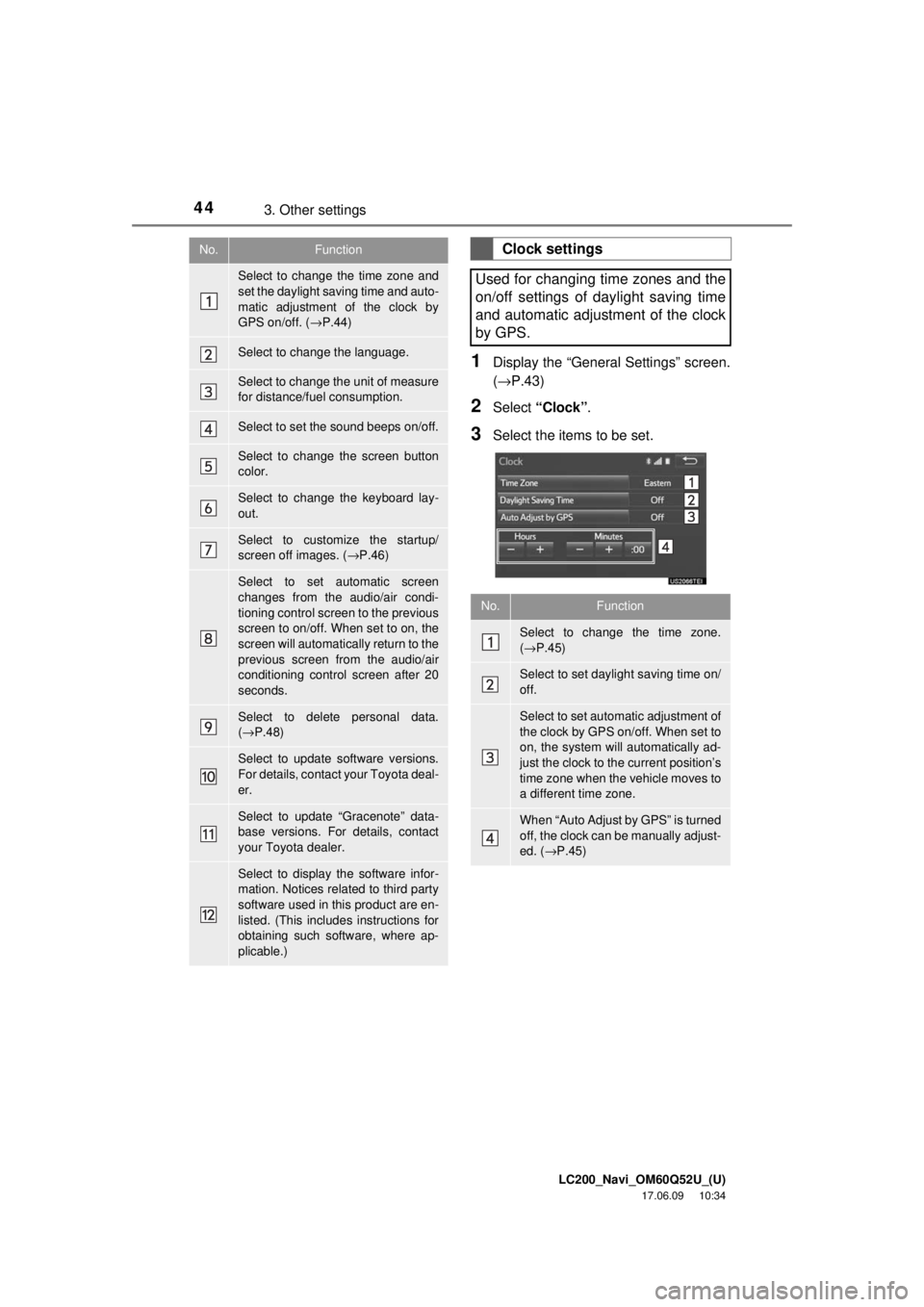
3Select the items to be set.
No.Function
Select to change the time zone and
set the daylight saving time and auto-
matic adjustment of the clock by
GPS on/off. ( →P.44)
Select to change the language.
Select to change the unit of measure
for distance/fuel consumption.
Select to set the sound beeps on/off.
Select to change the screen button
color.
Select to change the keyboard lay-
out.
Select to customize the startup/
screen off images. ( →P.46)
Select to set automatic screen
changes from the audio/air condi-
tioning control screen to the previous
screen to on/off. When set to on, the
screen will automatically return to the
previous screen from the audio/air
conditioning control screen after 20
seconds.
Select to delete personal data.
(→ P.48)
Select to update software versions.
For details, contact your Toyota deal-
er.
Select to update “Gracenote” data-
base versions. For details, contact
your Toyota dealer.
Select to display the software infor-
mation. Notices related to third party
software used in this product are en-
listed. (This includes instructions for
obtaining such software, where ap-
plicable.)
Clock settings
Used for changing time zones and the
on/off settings of daylight saving time
and automatic adjustment of the clock
by GPS.
No.Function
Select to change the time zone.
( → P.45)
Select to set daylight saving time on/
off.
Select to set automatic adjustment of
the clock by GPS on/off. When set to
on, the system will automatically ad-
just the clock to the current position’s
time zone when the vehicle moves to
a different time zone.
When “Auto Adjust by GPS” is turned
off, the clock can be manually adjust-
ed. ( →P.45)
Page 120 of 276
LC200_Navi_OM60Q52U_(U)
17.06.09 10:34
1202. Radio operation
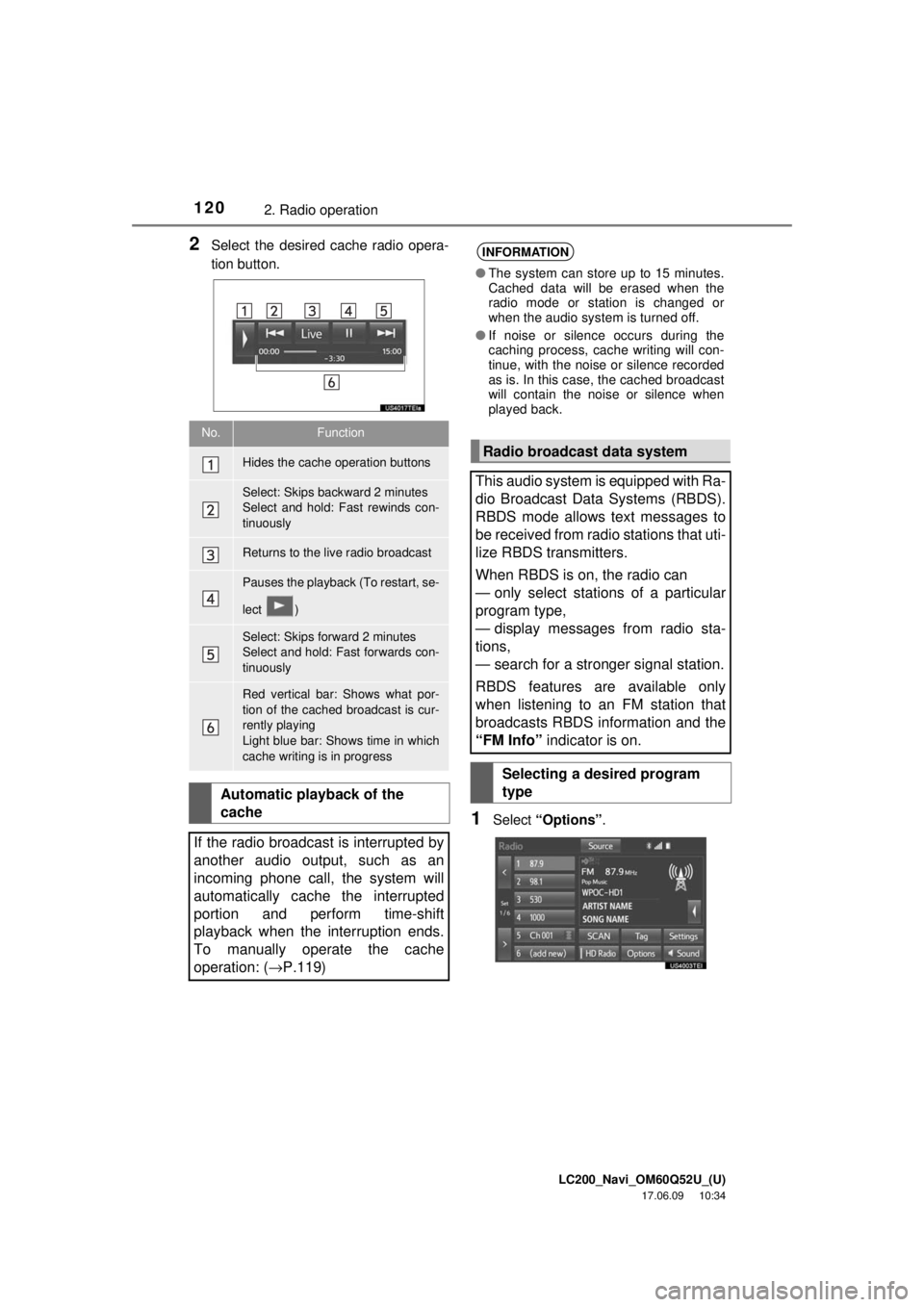
2Select the desired cache radio opera-
tion button.
1Select “Options” .
No.Function
Hides the cache operation buttons
Select: Skips backward 2 minutes
Select and hold: Fast rewinds con-
tinuously
Returns to the live radio broadcast
Pauses the playback (To restart, se-
lect )
Select: Skips forward 2 minutes
Select and hold: Fast forwards con-
tinuously
Red vertical bar: Shows what por-
tion of the cached broadcast is cur-
rently playing
Light blue bar: Shows time in which
cache writing is in progress
Automatic playback of the
cache
If the radio broadcast is interrupted by
another audio output, such as an
incoming phone call, the system will
automatically cache the interrupted
portion and perform time-shift
playback when the interruption ends.
To manually operate the cache
operation: ( →P.119)
INFORMATION
●The system can store up to 15 minutes.
Cached data will be erased when the
radio mode or station is changed or
when the audio system is turned off.
● If noise or silence occurs during the
caching process, cache writing will con-
tinue, with the noise or silence recorded
as is. In this case, the cached broadcast
will contain the noise or silence when
played back.
Radio broadcast data system
This audio system is equipped with Ra-
dio Broadcast Data Systems (RBDS).
RBDS mode allows text messages to
be received from radio stations that uti-
lize RBDS transmitters.
When RBDS is on, the radio can
— only select stations of a particular
program type,
— display messages from radio sta-
tions,
— search for a stronger signal station.
RBDS features are available only
when listening to an FM station that
broadcasts RBDS information and the
“FM Info” indicator is on.
Selecting a desired program
type
Page 155 of 276
LC200_Navi_OM60Q52U_(U)
17.06.09 10:34
Audio/visual system
4
1554. Rear seat entertainment system operation
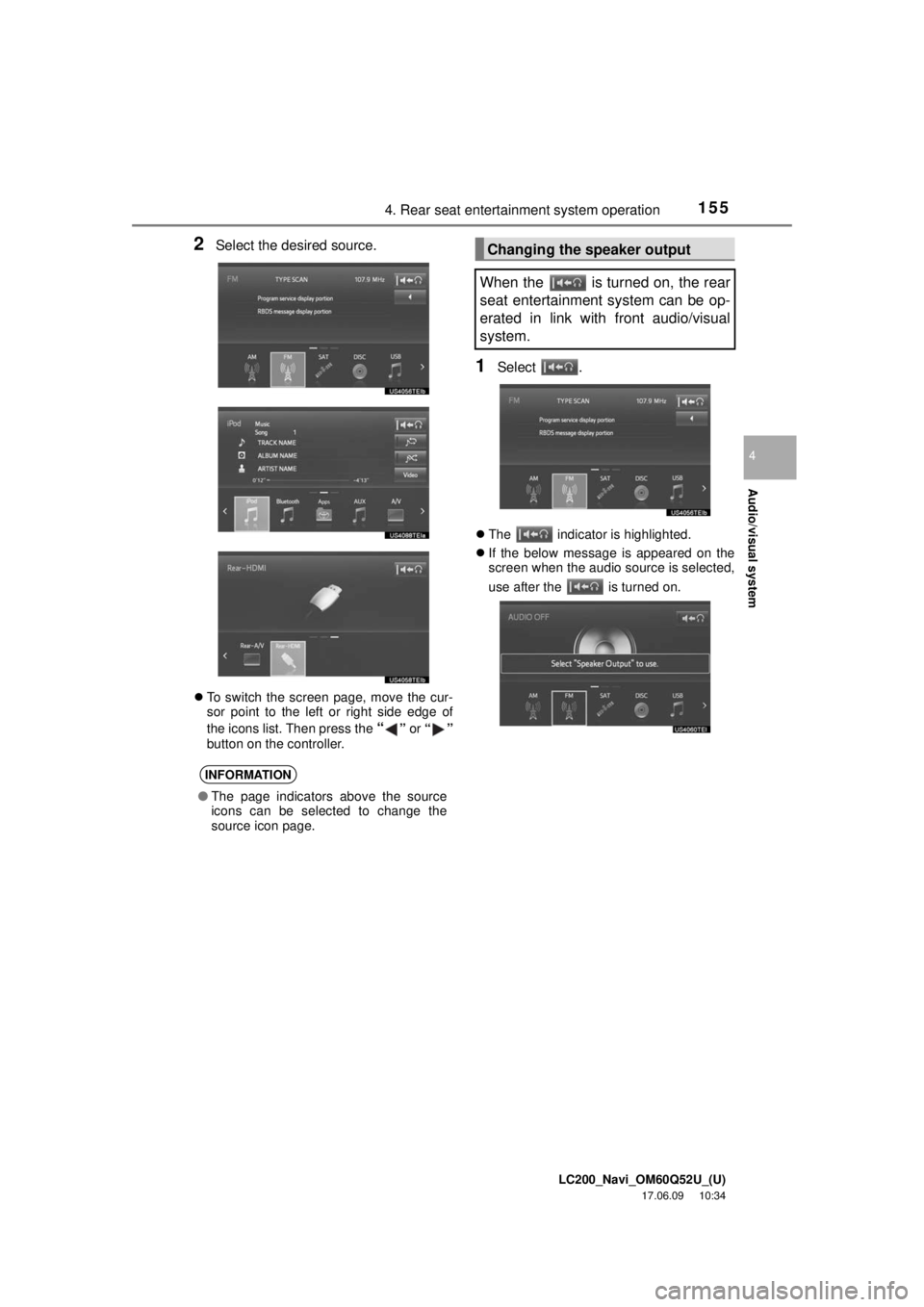
2Select the desired source.
To switch the screen page, move the cur-
sor point to the left or right side edge of
the icons list. Then press the
“” or “”
button on the controller.
1Select .
The indicator is highlighted.
If the below message is appeared on the
screen when the audio source is selected,
use after the
is turned on.
INFORMATION
● The page indicators above the source
icons can be selected to change the
source icon page.
Changing the speaker output
When the is turned on, the rear
seat entertainment system can be op-
erated in link with front audio/visual
system.
Page 156 of 276
LC200_Navi_OM60Q52U_(U)
17.06.09 10:34
1564. Rear seat entertainment system operation
WA R N I N G
●While driving
• Do not use headphones. Doing so
may cause an accident, resulting in
death or serious injury.
● To prevent accidents and electric shock
• Do not disassemble or modify the
remote control.
● When the remote control is not used
• Stow the remote cont rol. Injuries may
result in the event of sudden braking,
sudden swerving or an accident.
● Conversational speech on some DVDs
is recorded at a low volume to empha-
size the impact of sound effects. If you
adjust the volume assuming that the
conversations represent the maximum
volume level that the DVD will play, you
may be startled by louder sound effects
or startled when you change to a differ-
ent audio source. The louder sounds
may have a significant impact on the
human body or pose a driving hazard.
Keep this in mind when you adjust the
volume.
● Removed battery and other parts:
• Keep away from children. These
parts are small and if swallowed by a
child they can cause choking. Failure
to do so could result in death or seri-
ous injury.
NOTICE
● Cleaning the display
• Wipe the display with a dry soft cloth.
• If the screen is wiped with a rough
cloth, the surface of the screen may
be scratched.
● To prevent damage to the remote control
• Keep the remote control away from
direct sunlight, temperature heat and
high humidity.
• Do not drop or knock the remote con- trol against hard objects.
• Do not sit on or place heavy objects on the remote control.
● For normal operation after replacing the
battery, observe the following precau-
tions to prevent accidents:
• Always work with dry hands. Moisture
may cause the battery to rust.
• Do not touch or move any other com- ponents inside the remote control.
• Do not bend either of the battery ter- minals.
Page 157 of 276
LC200_Navi_OM60Q52U_(U)
17.06.09 10:34
Audio/visual system
4
1574. Rear seat entertainment system operation
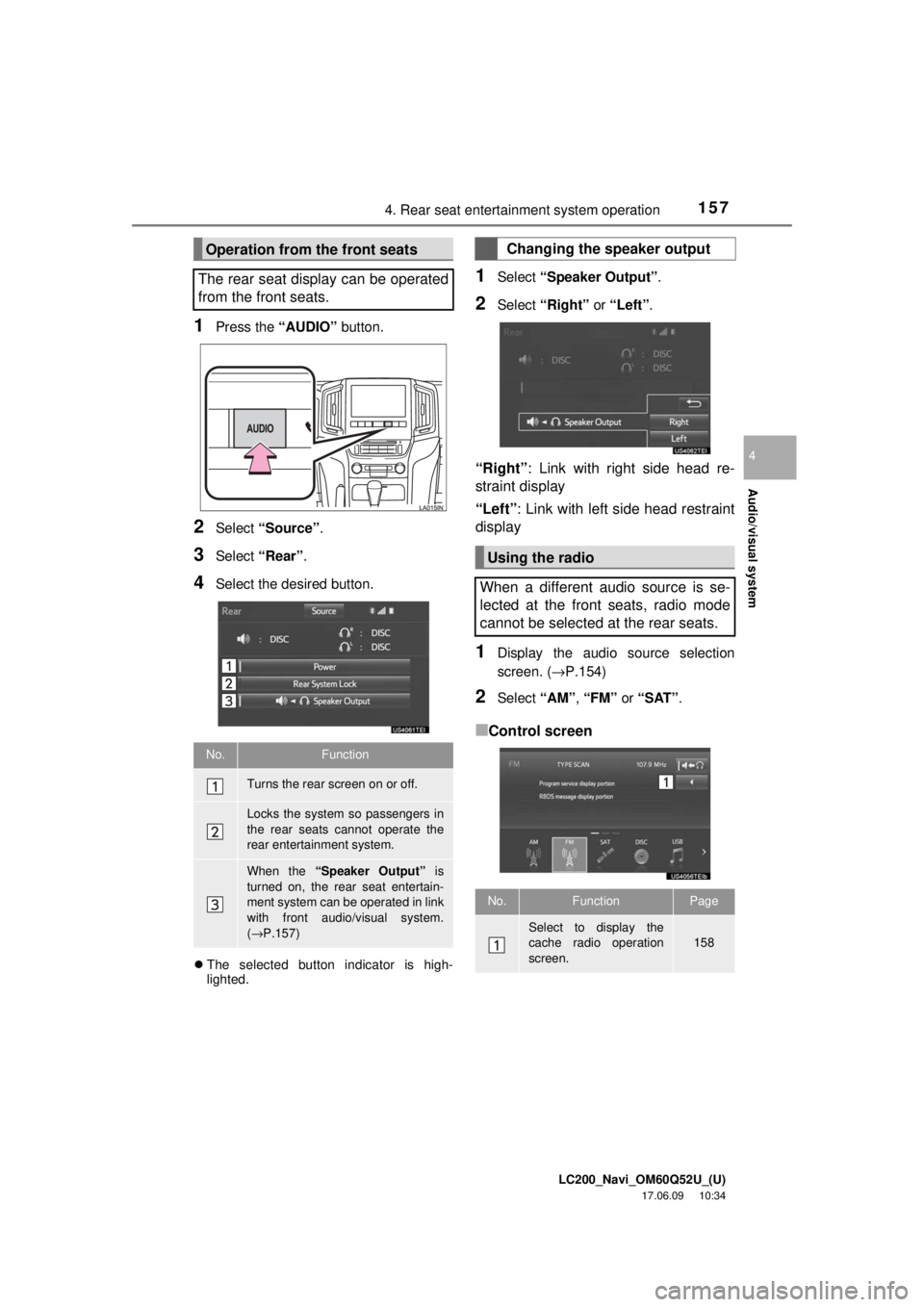
1Press the “AUDIO” button.
2Select “Source” .
3Select “Rear” .
4Select the desired button.
The selected button indicator is high-
lighted.
1Select “Speaker Output” .
2Select “Right” or “Left” .
“Right” : Link with right side head re-
straint display
“Left” : Link with left side head restraint
display
1Display the audio source selection
screen. ( →P.154)
2Select “AM”, “FM” or “SAT”.
■Control screen
Operation from the front seats
The rear seat display can be operated
from the front seats.
No.Function
Turns the rear screen on or off.
Locks the system so passengers in
the rear seats cannot operate the
rear entertainment system.
When the “Speaker Output” is
turned on, the rear seat entertain-
ment system can be operated in link
with front audio/visual system.
( → P.157)
Changing the speaker output
Using the radio
When a different audio source is se-
lected at the front seats, radio mode
cannot be selected at the rear seats.
No.FunctionPage
Select to display the
cache radio operation
screen.158
Page 179 of 276
LC200_Navi_OM60Q52U_(U)
17.06.09 10:34
Audio/visual system
4
1797. Tips for operating the audio/visual system
Fading: AM broadcasts are reflected by
the upper atmosphere — especially at
night. These reflected signals can interfere
with those received directly from the radio
station, causing the radio station to sound
alternately strong and weak.
Station interference: When a reflected sig-
nal and a signal received directly from a ra-
dio station are very nearly the same
frequency, they can interfere with each
other, making it difficult to hear the broad-
cast.
Static: AM is easily affected by external
sources of electrical noise, such as high
tension power lines, lightening or electrical
motors. This results in static.
Cargo loaded on the roof luggage carrier,
especially metal objects, may adversely
affect the reception of XM Satellite Radio.
Alternation or modifications carried out
without appropriate authorization may
invalidate the user’s right to operate the
equipment.
This DVD player is intended for use with
4.7 in. (12 cm). discs only.
Extremely high temperatures can keep the
DVD player from working. On hot days,
use the air conditioning system to cool the
inside of the vehicle before using the
player.
Bumpy roads or other vibrations may
make the DVD player skip.
If moisture gets into the DVD player, the
discs may not be able to be played.
Remove the discs from the player and
wait until it dries.
AMXM
DVD player and disc
WA R N I N G
● DVD players use an invisible laser beam
which could cause hazardous radiation
exposure if directed outside the unit. Be
sure to operate the player correctly.
Page 181 of 276
LC200_Navi_OM60Q52U_(U)
17.06.09 10:34
Audio/visual system
4
1817. Tips for operating the audio/visual system
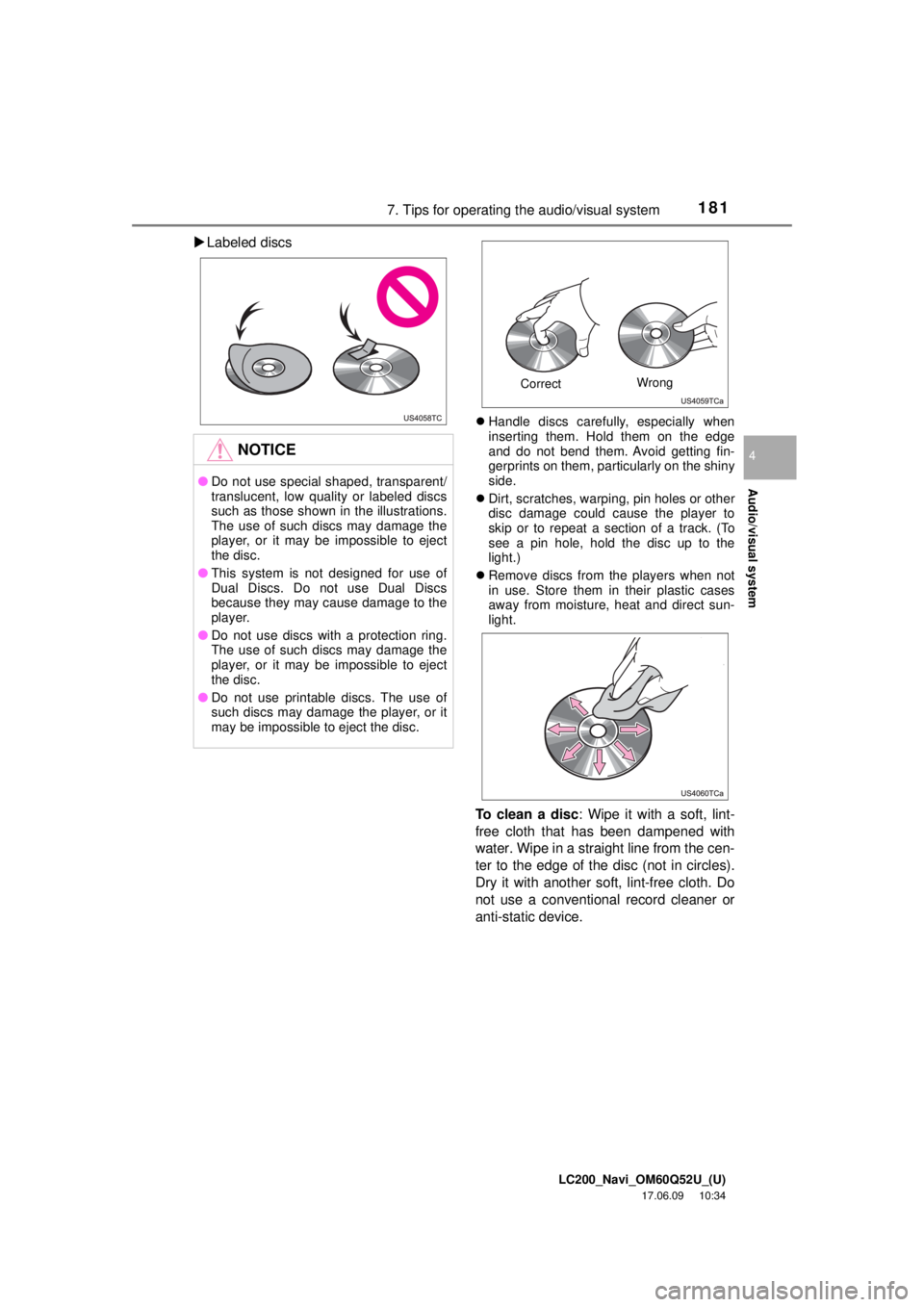
Labeled discs
Handle discs carefully, especially when
inserting them. Hold them on the edge
and do not bend them. Avoid getting fin-
gerprints on them, particularly on the shiny
side.
Dirt, scratches, warping, pin holes or other
disc damage could cause the player to
skip or to repeat a section of a track. (To
see a pin hole, hold the disc up to the
light.)
Remove discs from the players when not
in use. Store them in their plastic cases
away from moisture, heat and direct sun-
light.
To clean a disc : Wipe it with a soft, lint-
free cloth that has been dampened with
water. Wipe in a straight line from the cen-
ter to the edge of the disc (not in circles).
Dry it with another soft, lint-free cloth. Do
not use a conventional record cleaner or
anti-static device.
NOTICE
● Do not use special shaped, transparent/
translucent, low quality or labeled discs
such as those shown in the illustrations.
The use of such discs may damage the
player, or it may be impossible to eject
the disc.
● This system is not designed for use of
Dual Discs. Do not use Dual Discs
because they may cause damage to the
player.
● Do not use discs with a protection ring.
The use of such discs may damage the
player, or it may be impossible to eject
the disc.
● Do not use printable discs. The use of
such discs may damage the player, or it
may be impossible to eject the disc.
Correct Wrong
Page 182 of 276
LC200_Navi_OM60Q52U_(U)
17.06.09 10:34
1827. Tips for operating the audio/visual system
CD-R/CD-RW discs that have not been
subject to the “finalizing process” (a pro-
cess that allows discs to be played on a
conventional CD player) cannot be
played.
It may not be possible to play CD-R/
CD-RW discs recorded on a music CD
recorder or a personal computer because
of disc characteristics, scratches or dirt on
the disc, or dirt, condensation, etc. on the
lens of the unit.
It may not be possible to play discs
recorded on a personal computer depend-
ing on the application settings and the
environment. Record with the correct for-
mat. (For details, contact the appropriate
application manufacturers of the applica-
tions.)
CD-R/CD-RW discs may be damaged by
direct exposure to sunlight, high tempera-
tures or other storage conditions. The unit
may be unable to play some damaged
discs.
If you insert a CD-RW disc into the player,
playback will begin more slowly than with
a conventional CD or CD-R disc.
Recordings on CD-R/CD-RW cannot be
played using the DDCD (Double Density
CD) system.
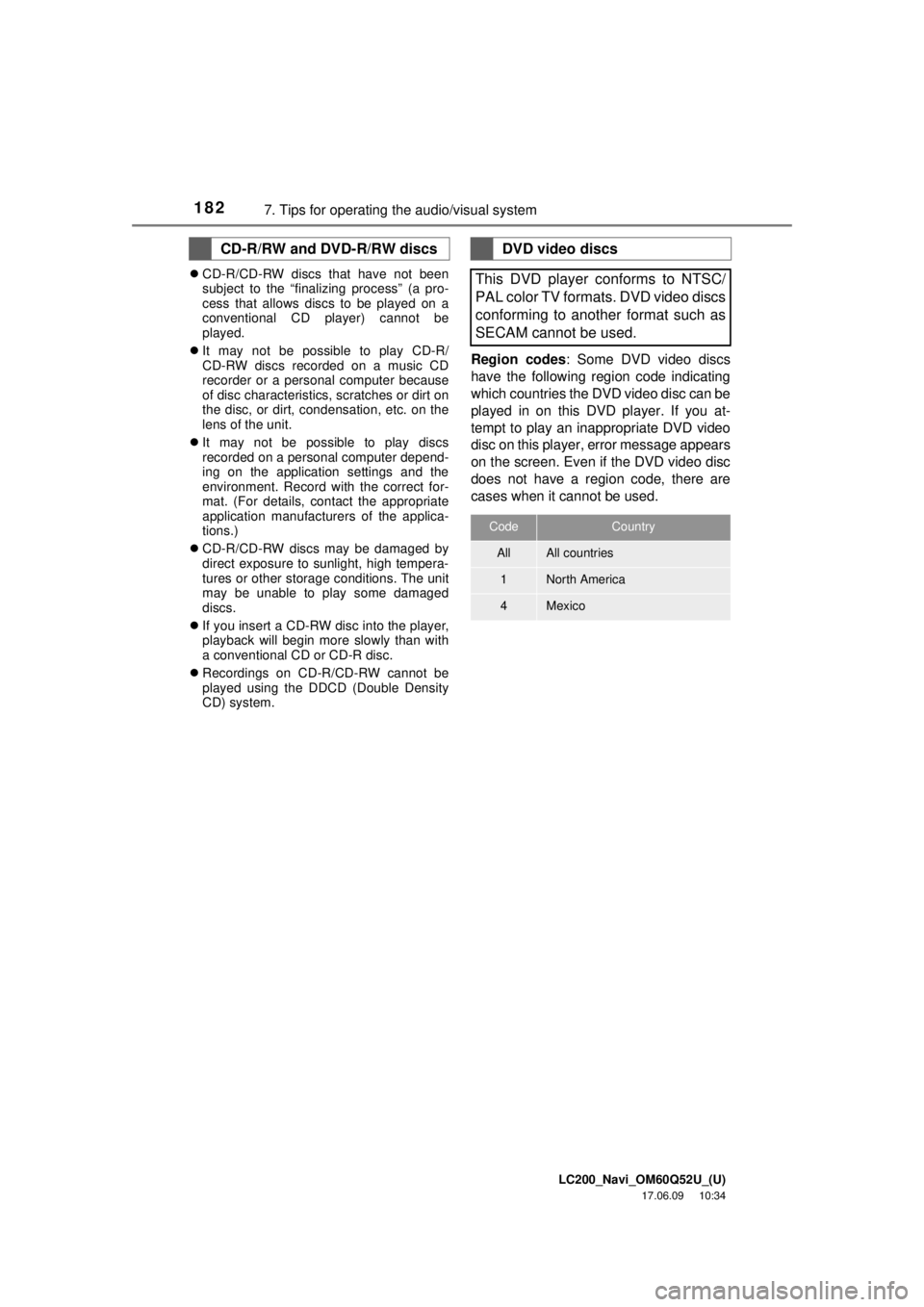
Region codes : Some DVD video discs
have the following region code indicating
which countries the DVD video disc can be
played in on this DVD player. If you at-
tempt to play an inappropriate DVD video
disc on this player, error message appears
on the screen. Even if the DVD video disc
does not have a region code, there are
cases when it cannot be used.
CD-R/RW and DVD-R/RW discsDVD video discs
This DVD player conforms to NTSC/
PAL color TV formats. DVD video discs
conforming to another format such as
SECAM cannot be used.
CodeCountry
AllAll countries
1North America
4Mexico