reset TOYOTA LAND CRUISER 2018 Accessories, Audio & Navigation (in English)
[x] Cancel search | Manufacturer: TOYOTA, Model Year: 2018, Model line: LAND CRUISER, Model: TOYOTA LAND CRUISER 2018Pages: 276, PDF Size: 7.11 MB
Page 6 of 276

LC200_Navi_OM60Q52U_(U)
17.06.09 10:34
TABLE OF CONTENTS6
1. Basic function ...............................10
Buttons overview ................................... 10
Home screen ......................................... 10
2. Quick reference ............................13
“Setup” screen ....................................... 13
“Information” screen .............................. 14
3. Navigation operation ....................15
Registering home .................................. 15
Registering preset destinations ............. 16
Operation flow: guiding the route........... 17
Setting home as the destination ............ 18
4. Function index ..............................19
Function index ....................................... 19
1. Basic information before operation .......................................22
Initial screen .......................................... 22
Touch screen gestures .......................... 23
Touch screen operation ......................... 24
Home screen operation ......................... 25
Entering letters and numbers/
list screen operation ............................ 26
Screen adjustment................................. 29
Linking multi-information display and navigation system ............................... 31
2. Bluetooth® settings ......................32
Registering/connecting Bluetooth®
device .................................................. 32
Setting Bluetooth
® details ...................... 36
3. Other settings ...............................43
General settings .................................... 43
Voice settings ........................................ 48
Vehicle settings ..................................... 49
1. Basic operation ............................ 54
Quick reference......................................54
Map screen operation ............................55
Map screen information .........................61
Traffic information ..................................65
2. Destination search ....................... 68
Destination search screen .....................68
Search operation....................................69
Starting route guidance ..........................78
3. Route guidance ............................ 81
Route guidance screen ..........................81
Typical voice guidance prompts.............86
Editing route ...........................................87
4. Memory points ............................. 90
Memory points settings ..........................90
5. Setup ............................................. 97
Detailed navigation settings ...................97
Traffic settings......................................100
6. Tips for the navigation system......................................... 103
GPS (Global Positioning System) ........103
Map database version and
covered area .....................................105
1Quick guide
2Basic function
3Navigation system
Page 9 of 276

LC200_Navi_OM60Q52U_(U)
17.06.09 10:34
9
1
1. Basic function
Buttons overview ....................... 10
Home screen ............................. 10
Status display.............................. 11
2. Quick reference
“Setup” screen ........................... 13
“Information” screen .................. 14
3. Navigation operation
Registering home ...................... 15
Registering preset destinations ............................. 16
Operation flow: guiding the route ........................................ 17
Setting home as the destination............................... 18
4. Function index
Function index ........................... 19
Quick guide
Page 13 of 276
LC200_Navi_OM60Q52U_(U)
17.06.09 10:34
13
Quick guide
1
2. Quick reference
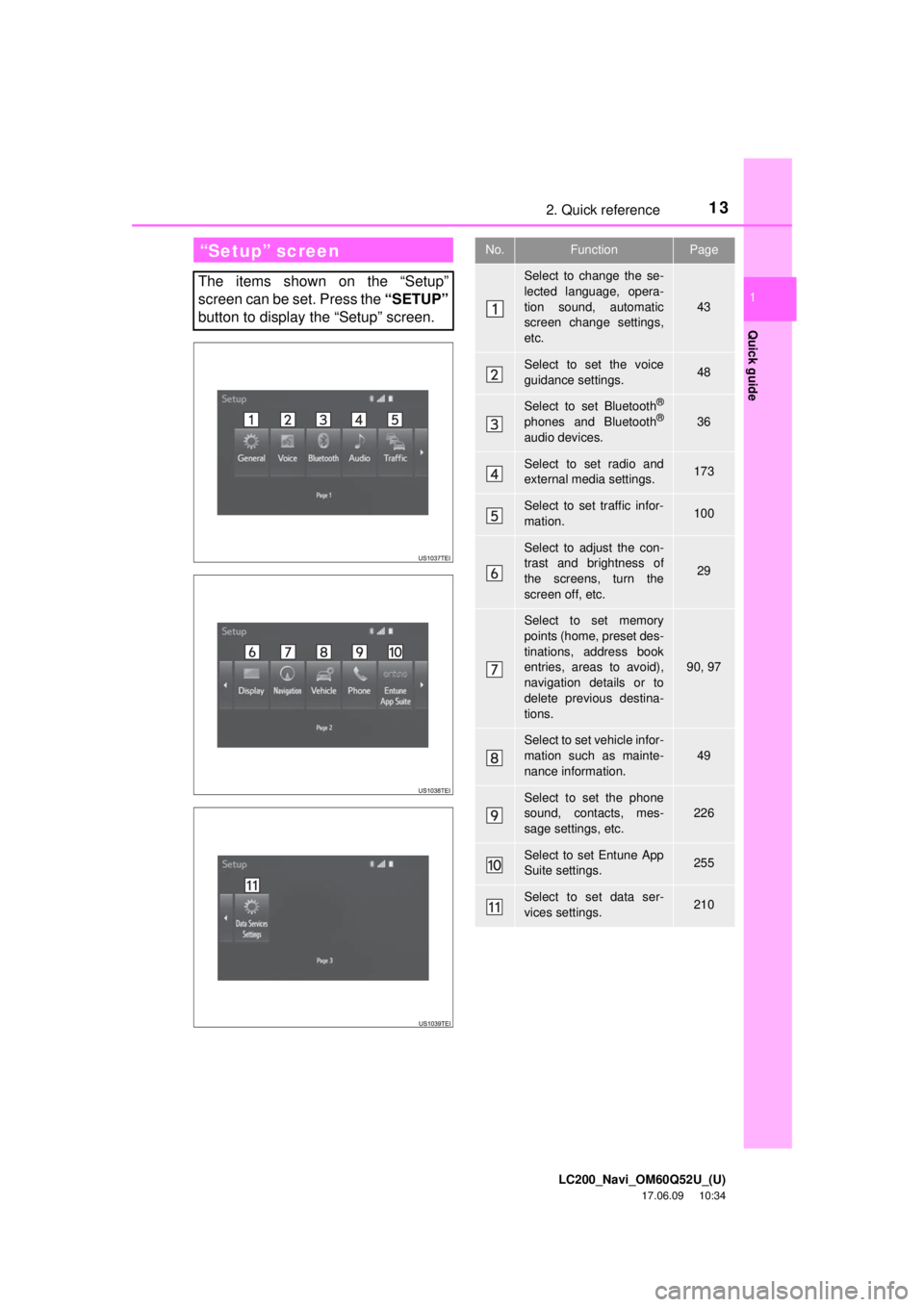
“Setup” screen
The items shown on the “Setup”
screen can be set. Press the “SETUP”
button to display the “Setup” screen.
No.FunctionPage
Select to change the se-
lected language, opera-
tion sound, automatic
screen change settings,
etc.
43
Select to set the voice
guidance settings.48
Select to set Bluetooth®
phones and Bluetooth®
audio devices.
36
Select to set radio and
external media settings.173
Select to set traffic infor-
mation.100
Select to adjust the con-
trast and brightness of
the screens, turn the
screen off, etc.
29
Select to set memory
points (home, preset des-
tinations, address book
entries, areas to avoid),
navigation details or to
delete previous destina-
tions.
90, 97
Select to set vehicle infor-
mation such as mainte-
nance information.
49
Select to set the phone
sound, contacts, mes-
sage settings, etc.226
Select to set Entune App
Suite settings.255
Select to set data ser-
vices settings.210
Page 16 of 276
LC200_Navi_OM60Q52U_(U)
17.06.09 10:34
163. Navigation operation
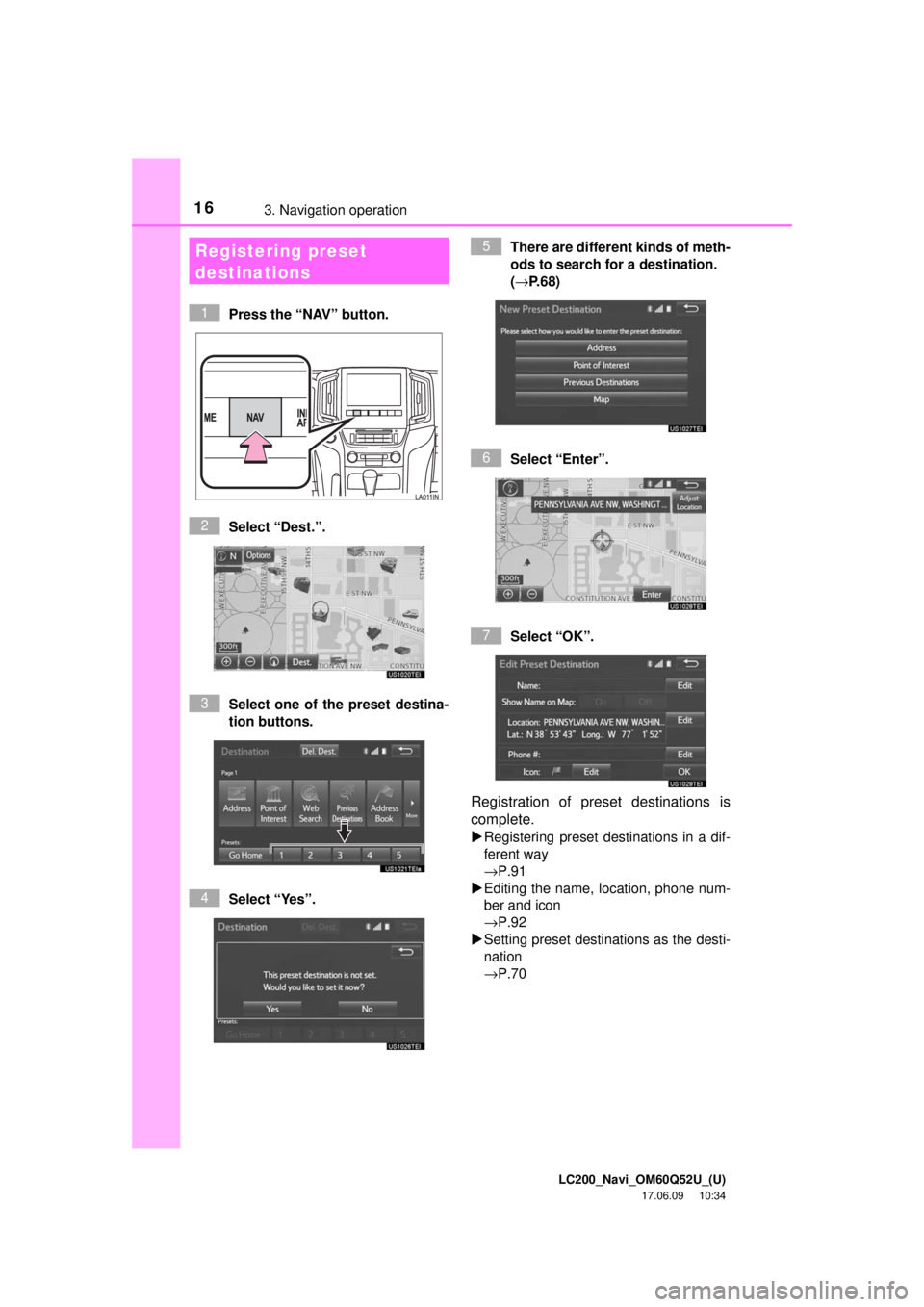
Press the “NAV” button.
Select “Dest.”.
Select one of the preset destina-
tion buttons.
Select “Yes”. There are different kinds of meth-
ods to search for a destination.
(→
P.68)
Select “Enter”.
Select “OK”.
Registration of preset destinations is
complete.
Registering preset destinations in a dif-
ferent way
→P.91
Editing the name, location, phone num-
ber and icon
→P.92
Setting preset destinations as the desti-
nation
→P.70
Registering preset
destinations
1
2
3
4
5
6
7
Page 40 of 276
LC200_Navi_OM60Q52U_(U)
17.06.14 14:20
402. Bluetooth® settings
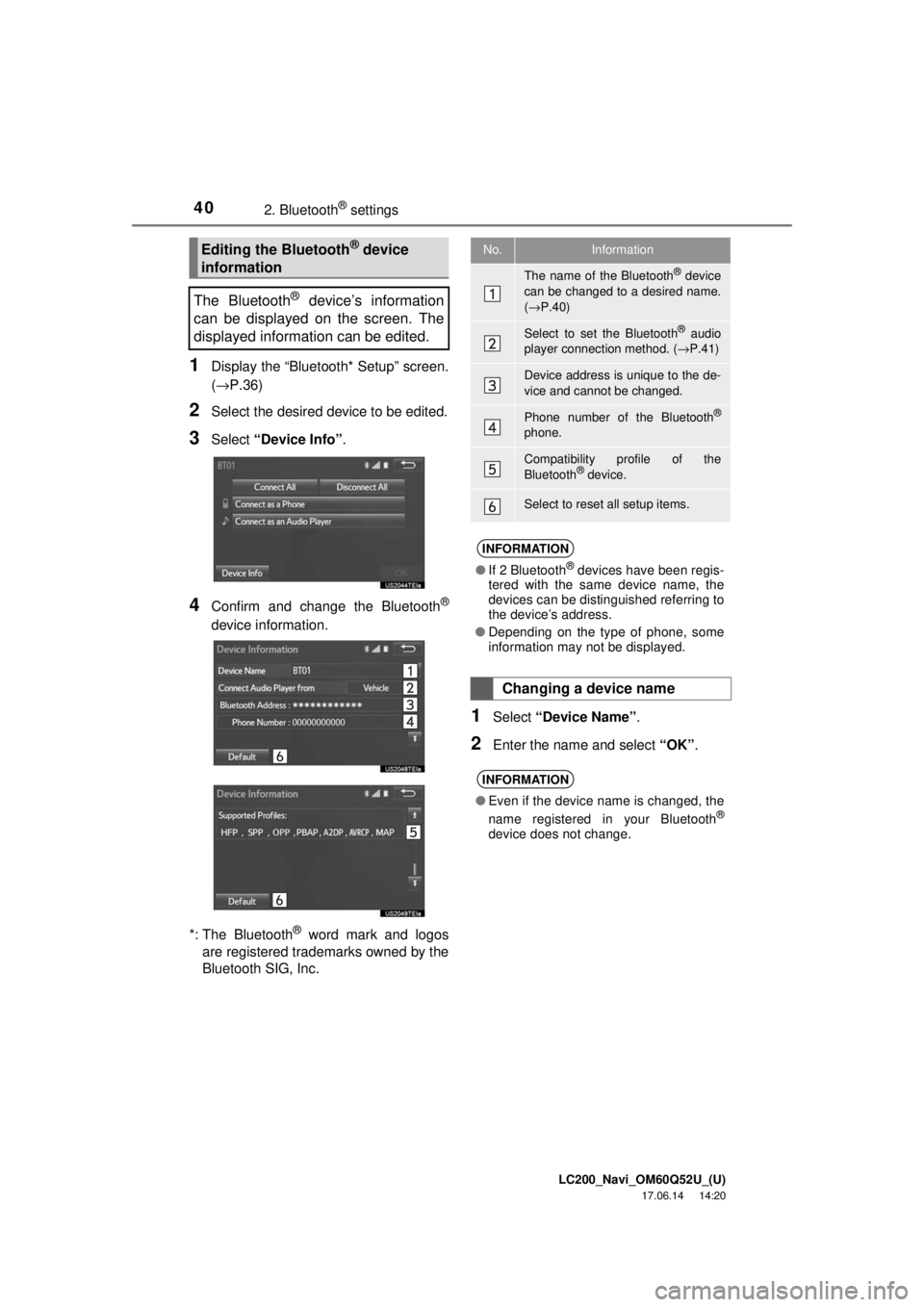
1Display the “Bluetooth* Setup” screen.
(→P.36)
2Select the desired device to be edited.
3Select “Device Info” .
4Confirm and change the Bluetooth®
device information.
*: The Bluetooth
® word mark and logos
are registered trademarks owned by the
Bluetooth SIG, Inc.
1Select “Device Name” .
2Enter the name and select “OK”.
Editing the Bluetooth® device
information
The Bluetooth
® device’s information
can be displayed on the screen. The
displayed information can be edited.
No.Information
The name of the Bluetooth® device
can be changed to a desired name.
( → P.40)
Select to set the Bluetooth® audio
player connection method. ( →P.41)
Device address is unique to the de-
vice and cannot be changed.
Phone number of the Bluetooth®
phone.
Compatibility profile of the
Bluetooth® device.
Select to reset all setup items.
INFORMATION
● If 2 Bluetooth® devices have been regis-
tered with the same device name, the
devices can be distinguished referring to
the device’s address.
● Depending on the type of phone, some
information may not be displayed.
Changing a device name
INFORMATION
●Even if the device name is changed, the
name registered in your Bluetooth®
device does not change.
Page 41 of 276
LC200_Navi_OM60Q52U_(U)
17.06.14 14:20
Basic function
2
412. Bluetooth® settings
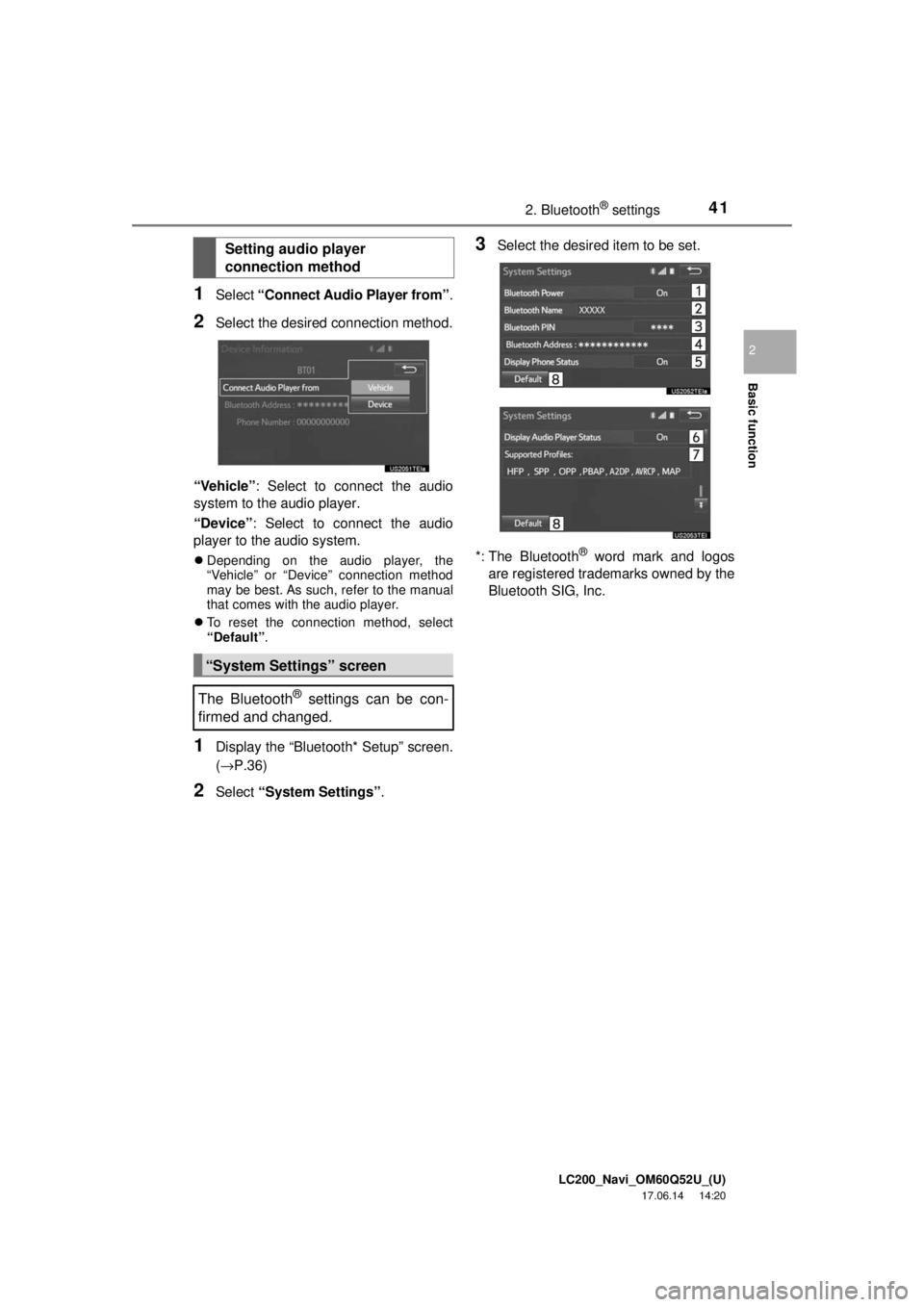
1Select “Connect Audio Player from” .
2Select the desired connection method.
“Vehicle” : Select to connect the audio
system to the audio player.
“Device” : Select to connect the audio
player to the audio system.
Depending on the audio player, the
“Vehicle” or “Device” connection method
may be best. As such, refer to the manual
that comes with the audio player.
To reset the connection method, select
“Default” .
1Display the “Bluetooth* Setup” screen.
(→P.36)
2Select “System Settings” .
3Select the desired item to be set.
*: The Bluetooth
® word mark and logos
are registered trademarks owned by the
Bluetooth SIG, Inc.
Setting audio player
connection method
“System Settings” screen
The Bluetooth
® settings can be con-
firmed and changed.
Page 42 of 276
LC200_Navi_OM60Q52U_(U)
17.06.14 14:20
422. Bluetooth® settings
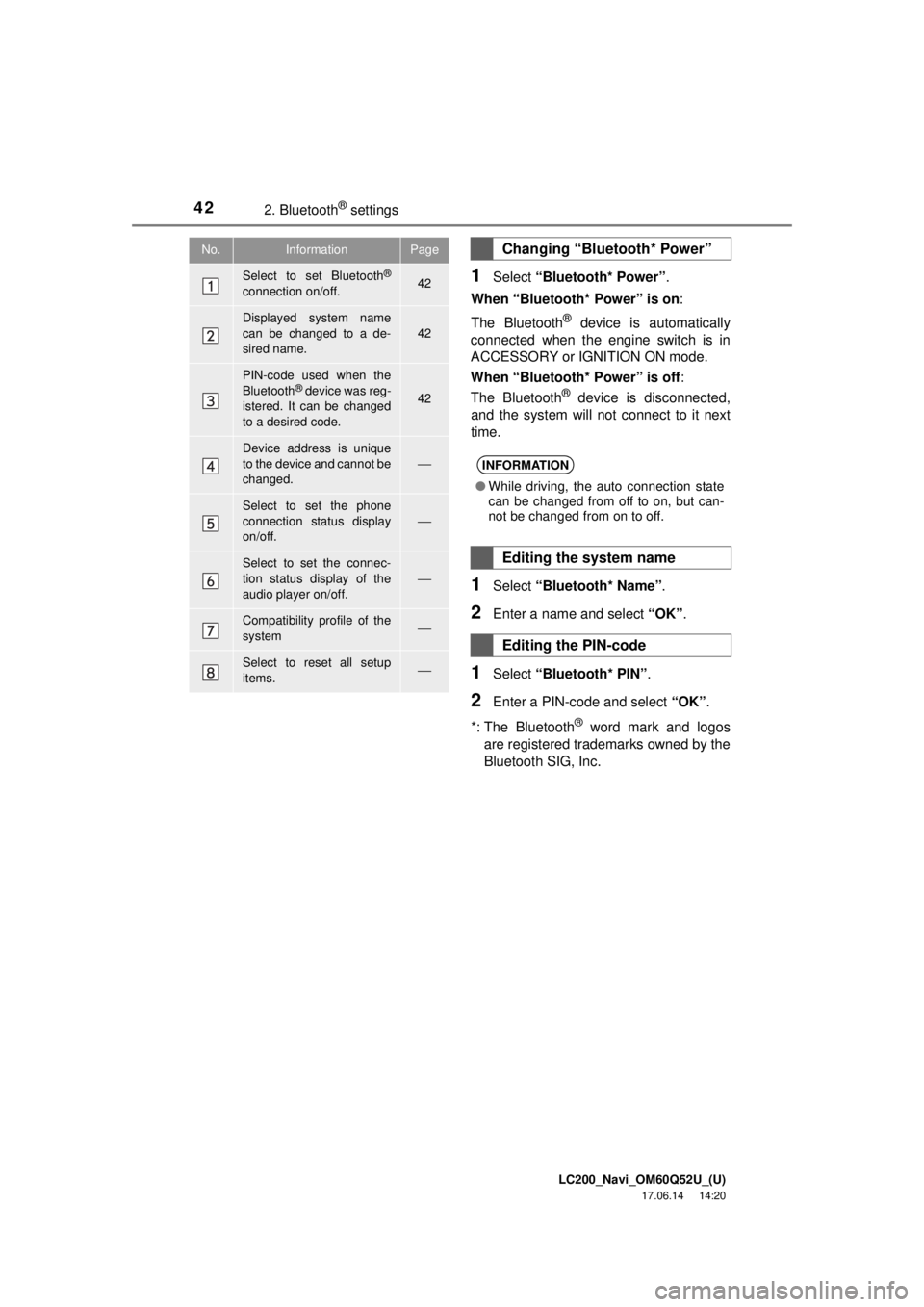
1Select “Bluetooth* Power” .
When “Bluetooth* Power” is on :
The Bluetooth
® device is automatically
connected when the engine switch is in
ACCESSORY or IGNITION ON mode.
When “Bluetooth* Power” is off :
The Bluetooth
® device is disconnected,
and the system will not connect to it next
time.
1Select “Bluetooth* Name” .
2Enter a name and select “OK”.
1Select “Bluetooth* PIN” .
2Enter a PIN-code and select “OK”.
*: The Bluetooth
® word mark and logos
are registered trademarks owned by the
Bluetooth SIG, Inc.
No.InformationPage
Select to set Bluetooth®
connection on/off.42
Displayed system name
can be changed to a de-
sired name.
42
PIN-code used when the
Bluetooth® device was reg-
istered. It can be changed
to a desired code.42
Device address is unique
to the device and cannot be
changed.
⎯
Select to set the phone
connection status display
on/off.
⎯
Select to set the connec-
tion status display of the
audio player on/off.⎯
Compatibility profile of the
system⎯
Select to reset all setup
items.⎯
Changing “Bluetooth* Power”
INFORMATION
● While driving, the auto connection state
can be changed from off to on, but can-
not be changed from on to off.
Editing the system name
Editing the PIN-code
Page 49 of 276
LC200_Navi_OM60Q52U_(U)
17.06.09 10:34
Basic function
2
493. Other settings
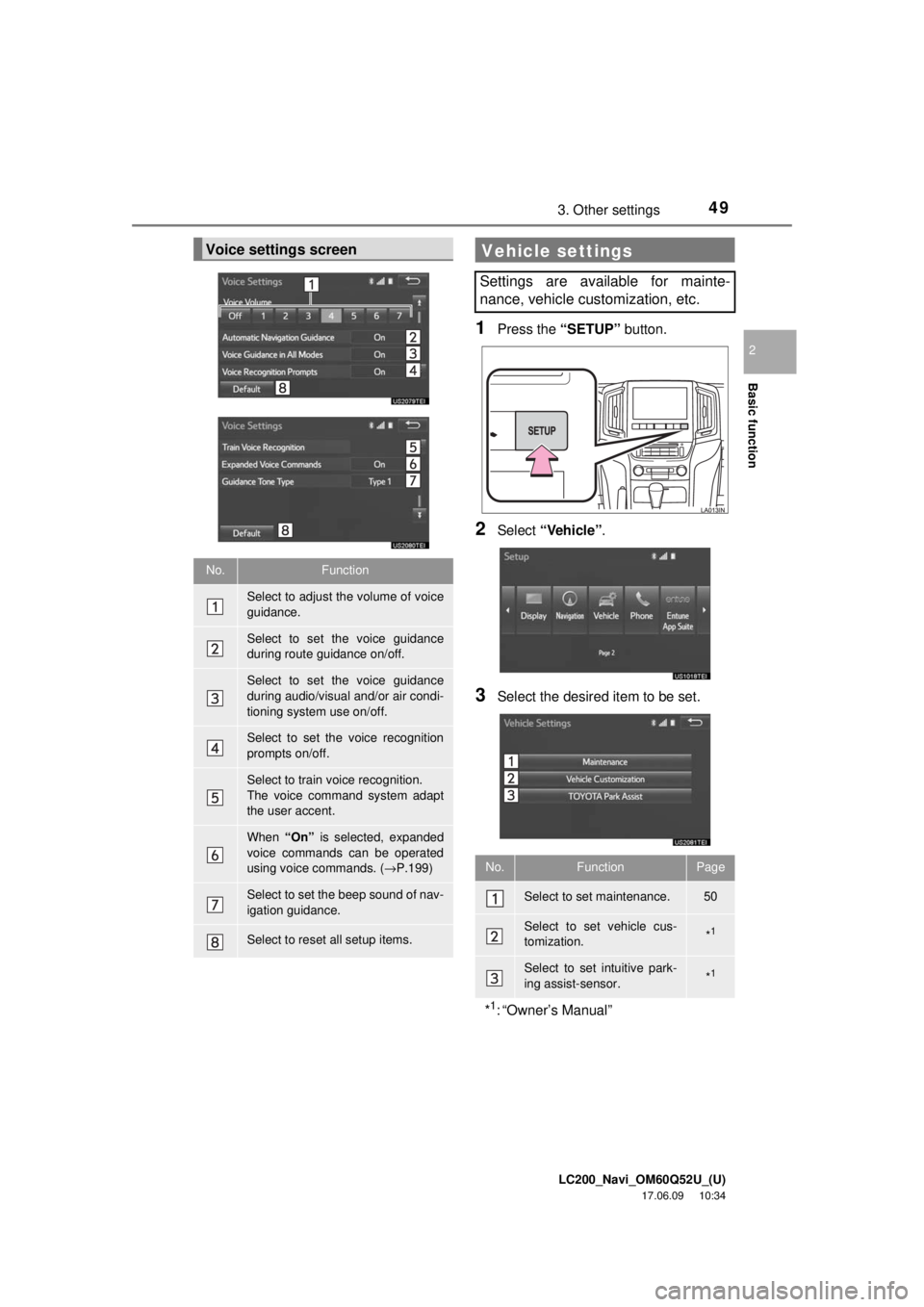
1Press the “SETUP” button.
2Select “Vehicle” .
3Select the desired item to be set.
Voice settings screen
No.Function
Select to adjust the volume of voice
guidance.
Select to set the voice guidance
during route guidance on/off.
Select to set the voice guidance
during audio/visual and/or air condi-
tioning system use on/off.
Select to set the voice recognition
prompts on/off.
Select to train voice recognition.
The voice command system adapt
the user accent.
When “On” is selected, expanded
voice commands can be operated
using voice commands. (→ P.199)
Select to set the beep sound of nav-
igation guidance.
Select to reset all setup items.
Vehicle settings
Settings are available for mainte-
nance, vehicle customization, etc.
No.FunctionPage
Select to set maintenance.50
Select to set vehicle cus-
tomization.*1
Select to set intuitive park-
ing assist-sensor.*1
*1: “Owner’s Manual”
Page 50 of 276
LC200_Navi_OM60Q52U_(U)
17.06.09 10:34
503. Other settings
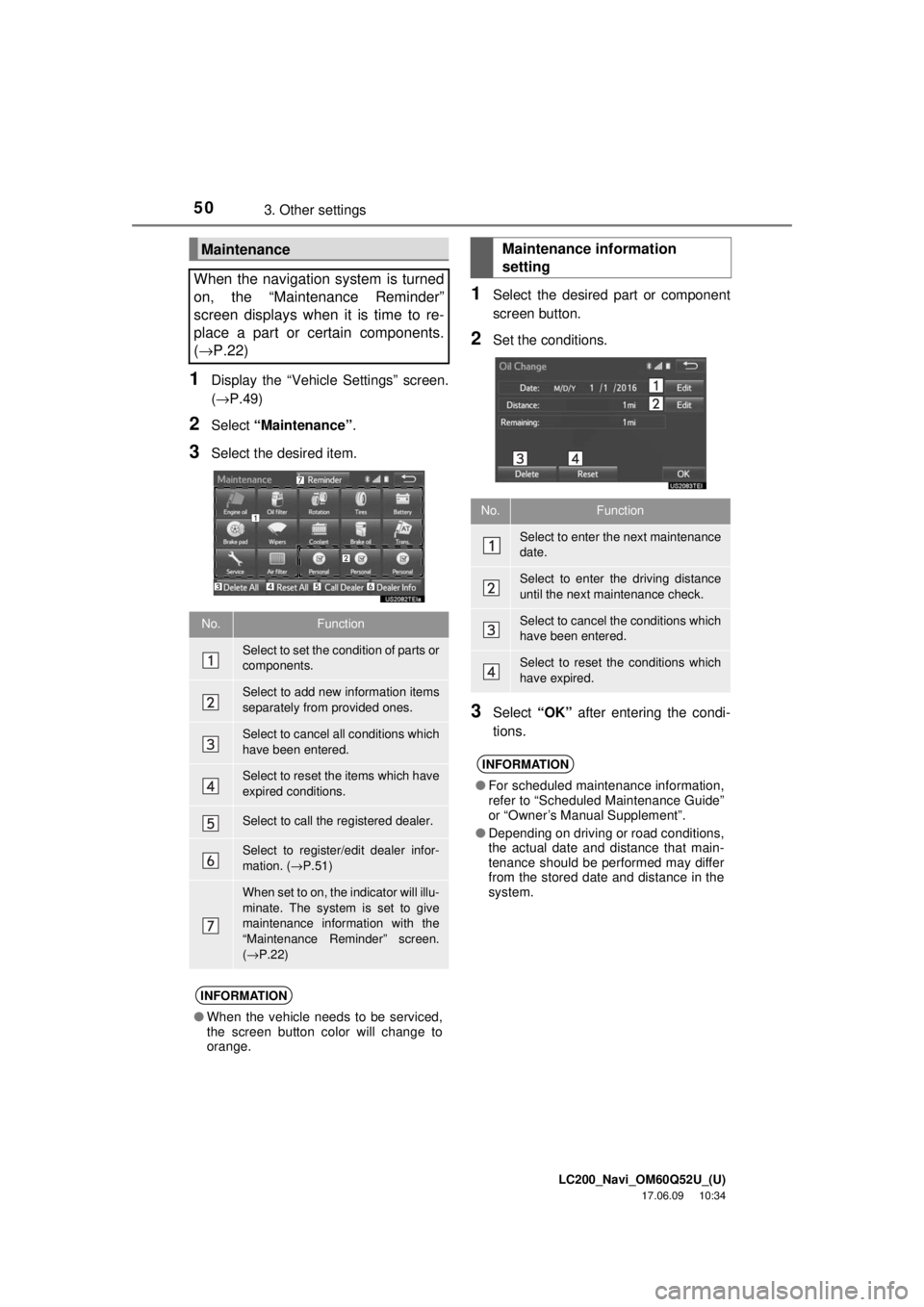
1Display the “Vehicle Settings” screen.
(→P.49)
2Select “Maintenance” .
3Select the desired item.
1Select the desired part or component
screen button.
2Set the conditions.
3Select “OK” after entering the condi-
tions.
Maintenance
When the navigation system is turned
on, the “Maintenance Reminder”
screen displays when it is time to re-
place a part or certain components.
( → P.22)
No.Function
Select to set the condition of parts or
components.
Select to add new information items
separately from provided ones.
Select to cancel all conditions which
have been entered.
Select to reset the items which have
expired conditions.
Select to call the registered dealer.
Select to register/edit dealer infor-
mation. ( →P.51)
When set to on, the indicator will illu-
minate. The system is set to give
maintenance information with the
“Maintenance Reminder” screen.
(→ P.22)
INFORMATION
● When the vehicle needs to be serviced,
the screen button color will change to
orange.
Maintenance information
setting
No.Function
Select to enter the next maintenance
date.
Select to enter the driving distance
until the next maintenance check.
Select to cancel the conditions which
have been entered.
Select to reset the conditions which
have expired.
INFORMATION
●For scheduled maintenance information,
refer to “Scheduled Maintenance Guide”
or “Owner’s Manual Supplement”.
● Depending on driving or road conditions,
the actual date and distance that main-
tenance should be performed may differ
from the stored date and distance in the
system.
Page 52 of 276

52
LC200_Navi_OM60Q52U_(U)
17.06.09 10:34
1. Basic operation
Quick reference......................... 54
Map screen.................................. 54
Navigation options screen ........... 55
Map screen operation ............... 55
Current position display ............... 55
Map scale .................................... 56
Orientation of the map ................. 57
Switching the map mode ............. 58
Screen scroll operation................ 60
Adjusting location in small increments ................................ 60
Map screen information ............ 61
Displaying map information ......... 61
Displaying information about the
icon where the cursor is set ...... 63
Standard map icons .................... 65
Traffic information ..................... 65
Displaying traffic information on the map ..................................... 67
2. Destination search
Destination search screen ......... 68
Search operation ....................... 69
Selecting search area ................. 69
Setting home as destination........ 70
Setting preset destinations as destination ................................ 70
Searching by address ................. 70
Searching by point of interest ..... 71
Searching from previous destinations .............................. 74
Searching by address book ........ 75
Searching by emergency ............ 75
Searching by intersection and freeway ..................................... 76
Searching by map ....................... 77
Searching by coordinates ........... 77
Starting route guidance ............. 78
Starting route guidance ............... 78
Pausing guidance ....................... 80
3Navigation system