parking brake TOYOTA LAND CRUISER 2018 (in English) User Guide
[x] Cancel search | Manufacturer: TOYOTA, Model Year: 2018, Model line: LAND CRUISER, Model: TOYOTA LAND CRUISER 2018Pages: 620, PDF Size: 12.04 MB
Page 193 of 620

LC200_OM_OM60Q26U_(U)
1934-1. Before driving
4
Driving
●Always place wheel blocks under both the vehicle’s and the trailer’s
wheels when parking. Apply the parking brake firmly, and put the
transmission in P. Avoid parking on a slope, but if unavoidable, do
so only after performing the following:
Apply the brakes and keep them applied.
Have someone place wheel blocks under both the vehicle’s and
trailer’s wheels.
When the wheel blocks are in pl ace, release the brakes slowly
until the blocks absorb the load.
Apply the parking brake firmly.
Shift into P and turn off the engine.
● When restarting after parking on a slope:
With the transmission in P, start the engine. Be sure to keep the
brake pedal pressed.
Shift into a forward gear. If reversing, shift into R.
Release the parking brake and brake pedal, and slowly pull or
back away from the wheel bloc ks. Stop and apply the brakes.
Have someone retrieve the blocks.
1
2
3
4
5
1
2
3
4
Page 199 of 620
199
LC200_OM_OM60Q26U_(U)
4-2. Driving procedures
4
Driving
Engine (ignition) switch
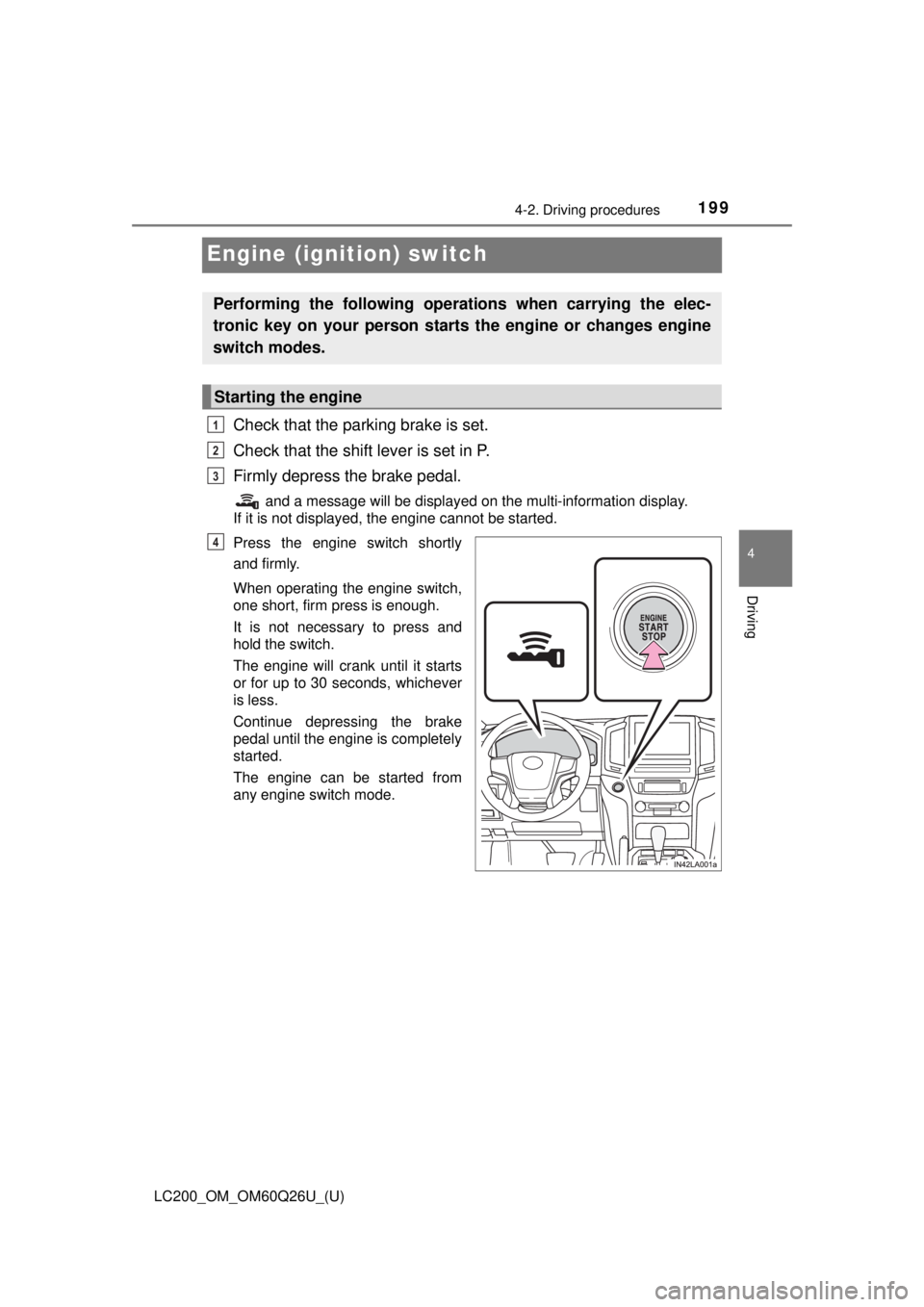
Check that the parking brake is set.
Check that the shift lever is set in P.
Firmly depress the brake pedal.
and a message will be displayed on the multi-information display.
If it is not displayed, the engine cannot be started.
Press the engine switch shortly
and firmly.
When operating the engine switch,
one short, firm press is enough.
It is not necessary to press and
hold the switch.
The engine will crank until it starts
or for up to 30 seconds, whichever
is less.
Continue depressing the brake
pedal until the engine is completely
started.
The engine can be started from
any engine switch mode.
Performing the following operati ons when carrying the elec-
tronic key on your person starts the engine or changes engine
switch modes.
Starting the engine
1
2
3
4
Page 200 of 620
200
LC200_OM_OM60Q26U_(U)
4-2. Driving procedures
Stop the vehicle.
Set the parking brake (→P. 212), and shift the shift lever to P.
Press the engine switch.
Release the brake pedal and check that the display on the instru-
ment cluster is off.
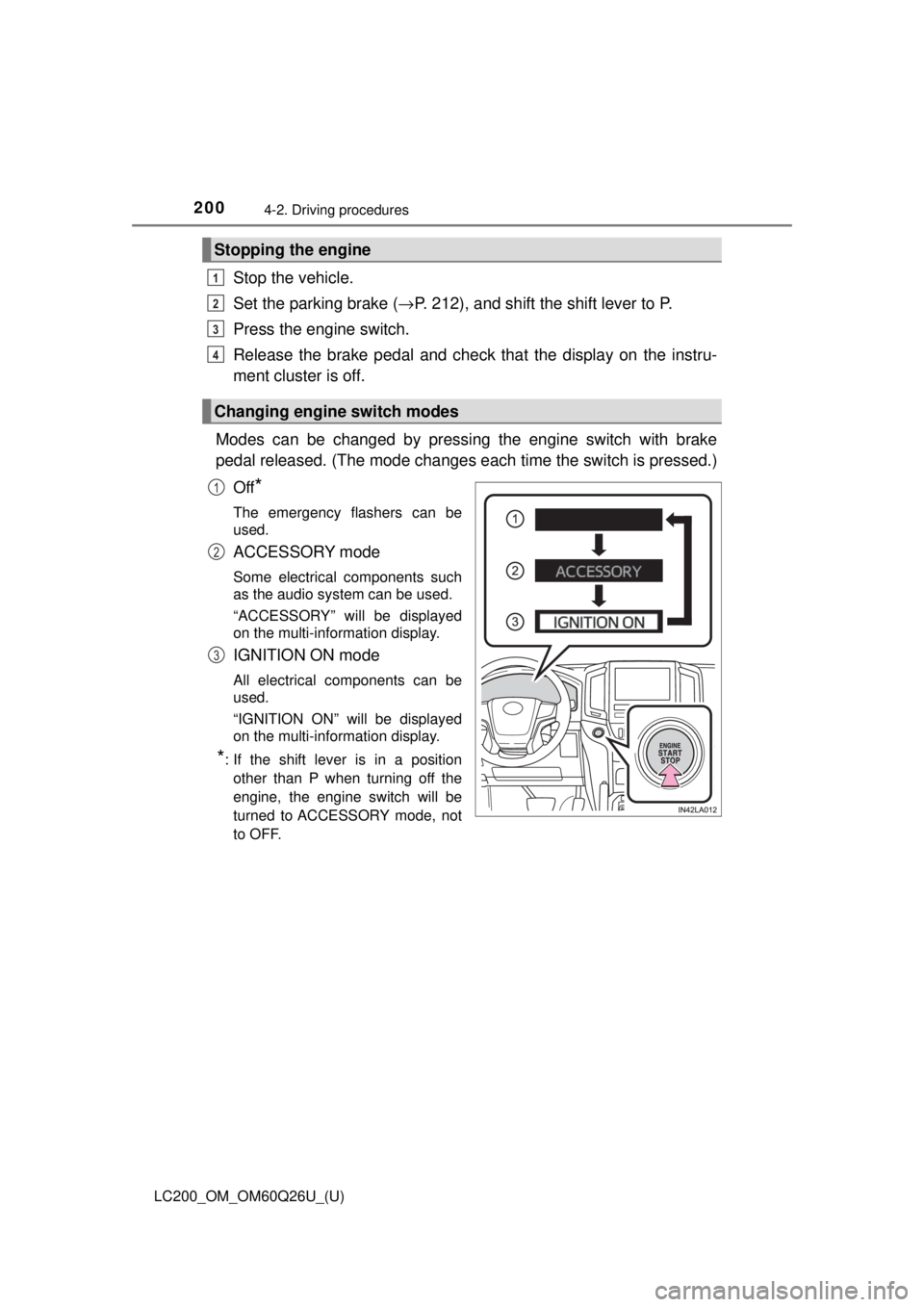
Modes can be changed by pressing the engine switch with brake
pedal released. (The mode changes ea ch time the switch is pressed.)
Off
*
The emergency flashers can be
used.
ACCESSORY mode
Some electrical components such
as the audio system can be used.
“ACCESSORY” will be displayed
on the multi-information display.
IGNITION ON mode
All electrical components can be
used.
“IGNITION ON” will be displayed
on the multi-information display.
*: If the shift lever is in a position other than P when turning off the
engine, the engine switch will be
turned to ACCESSORY mode, not
to OFF.
Stopping the engine
Changing engine switch modes
1
2
3
4
1
2
3
Page 201 of 620

LC200_OM_OM60Q26U_(U)
2014-2. Driving procedures
4
Driving
If the engine is stopped with the shift lever in a position other than P,
the engine switch will not be turned off but instead be turned to
ACCESSORY mode. Perform the following procedure to turn the
switch off:
Check that the parking brake is set.
Shift the shift lever to P.
Check that “Turn Off Vehicle” is displayed on the multi-information
display and then press the engine switch once.
Check that “Turn Off Vehicle” on th e multi-information display is off.
■Auto power off function
If the vehicle is left in ACCESSORY mode for more than 20 minutes or IGNI-
TION ON mode (the engine is not running) for more than an hour with th\
e
shift lever in P, the engine switch will automatically turn off. However, this
function cannot entirely prevent battery discharge. Do not leave the vehicle
with the engine switch in ACCESSORY or IGNITION ON mode for long peri-
ods of time when the engine is not running.
■ Operation of the engine switch
●If the switch is not pressed shortly and firmly, the engine switch mode may
not change or the engine may not start.
● If attempting to restart the engine immediately after turning the engine
switch off, the engine may not start in some cases. After turning the engine
off, please wait a few seconds before restarting the engine.
■ Electronic key battery depletion
→P. 104
■ Conditions affecting operation
→P. 128
■ Note for the entry function
→P. 129
■ If the engine does not start
●The engine immobilizer system may not have been deactivated. ( →P. 73)
Contact your Toyota dealer.
● Check that the shift lever is securely set in P. The engine may not start if the
shift lever is displaced out of P.
A message will be displayed on the multi-information display.
When stopping the engine with the shift lever in a position other
than P
1
2
3
4
Page 205 of 620
205
LC200_OM_OM60Q26U_(U)
4-2. Driving procedures
4
Driving
Automatic transmission
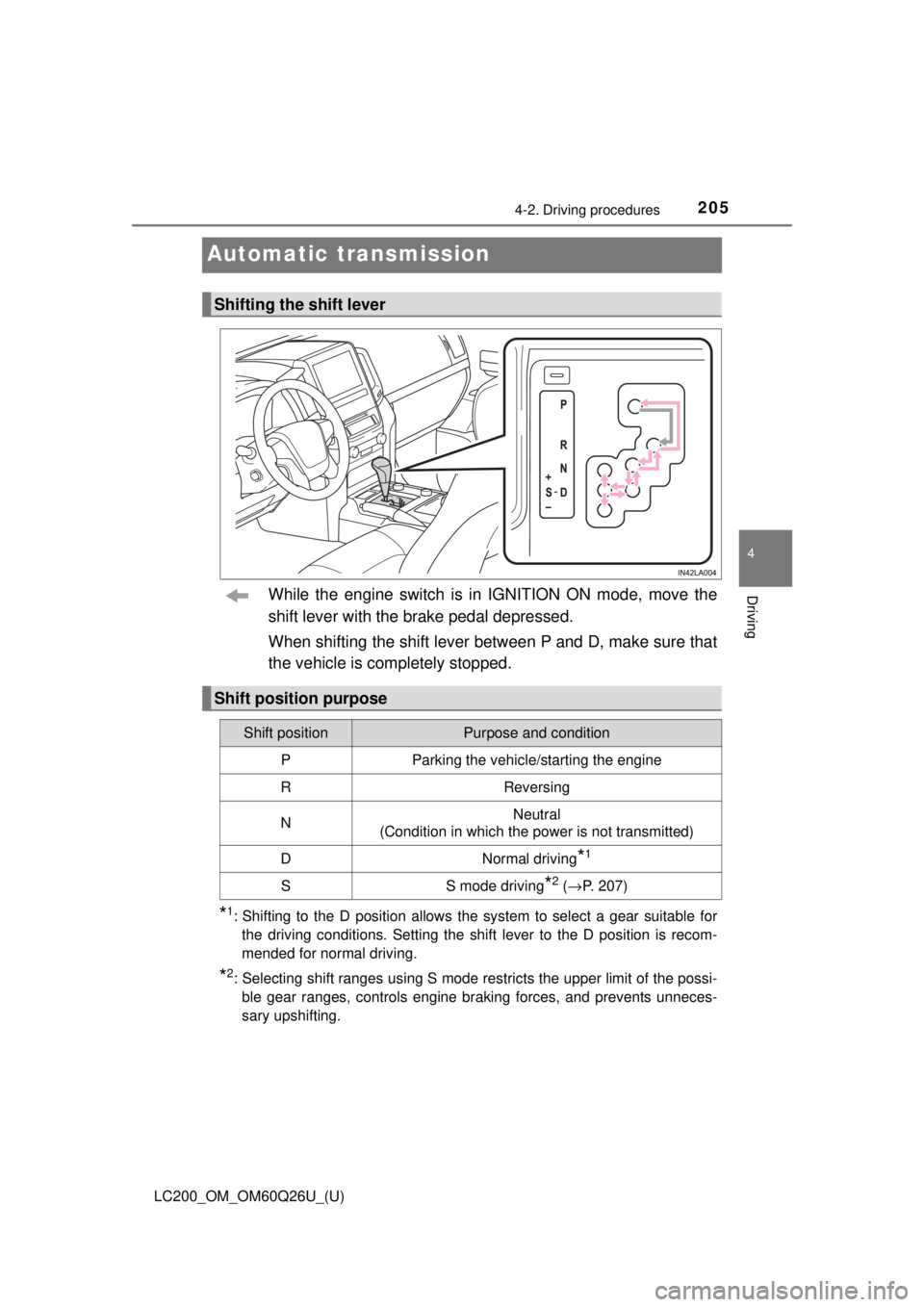
While the engine switch is in IGNITION ON mode, move the
shift lever with the brake pedal depressed.
When shifting the shift lever between P and D, make sure that
the vehicle is completely stopped.
*1: Shifting to the D position allows the system to select a gear suitable forthe driving conditions. Setting the shift lever to the D position is recom-
mended for normal driving.
*2: Selecting shift ranges using S mode restricts the upper limit of the possi-ble gear ranges, controls engine braking forces, and prevents unneces-
sary upshifting.
Shifting the shift lever
Shift position purpose
Shift positionPurpose and condition
PParking the vehicle/starting the engine
RReversing
NNeutral
(Condition in which the power is not transmitted)
DNormal driving*1
SS mode driving*2 ( → P. 207)
Page 209 of 620
LC200_OM_OM60Q26U_(U)
2094-2. Driving procedures
4
Driving
■If the shift lever canno t be shifted from P
First, check whether the brake pedal is being depressed.
If the shift lever cannot be shifted with your foot on the brake pedal, there may
be a problem with the shift lock system. Have the vehicle inspected by y\
our
Toyota dealer, immediately.
The following steps may be used as an emergency measure to ensure that
the shift lever can be shifted.
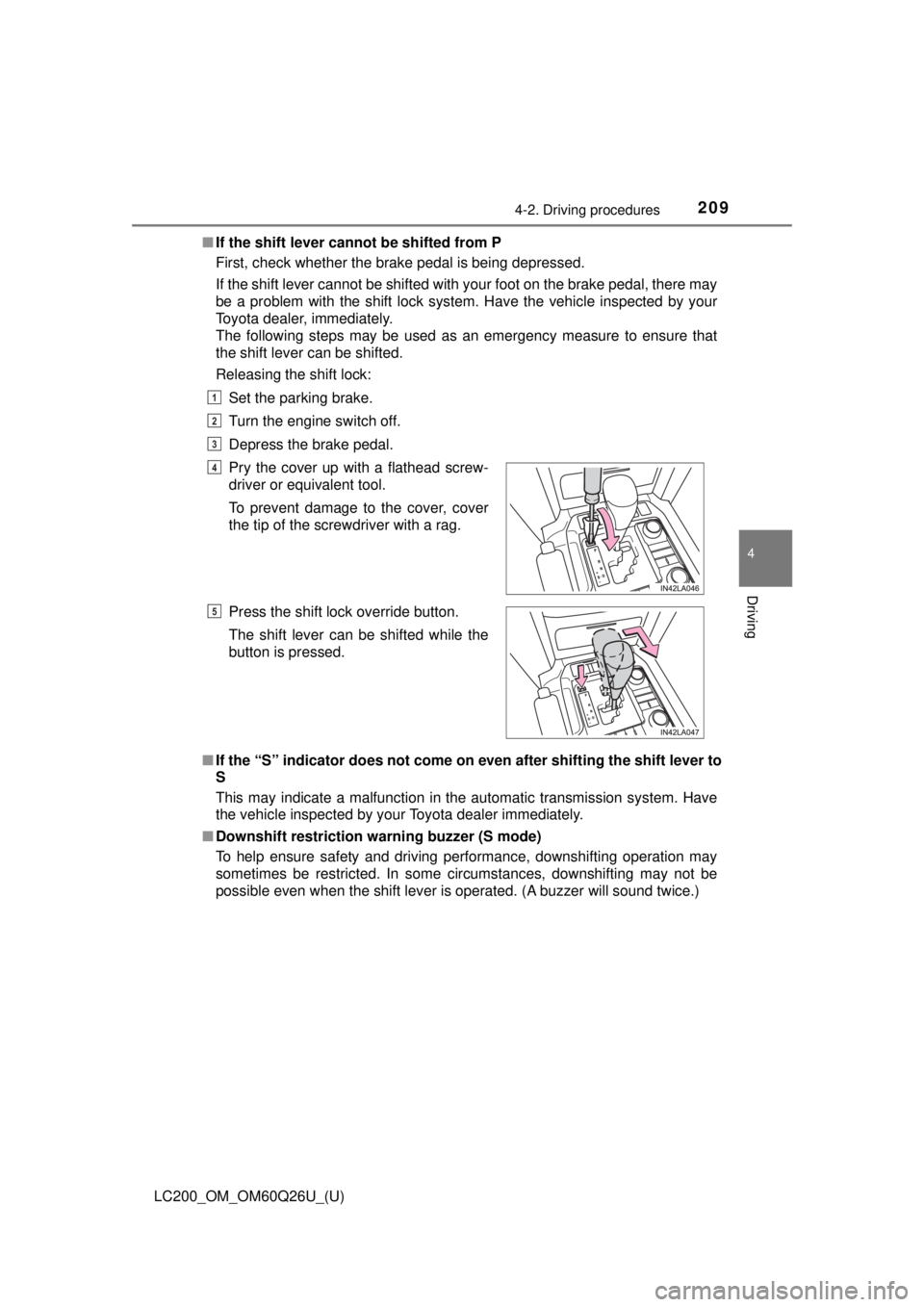
Releasing the shift lock:
Set the parking brake.
Turn the engine switch off.
Depress the brake pedal.
■ If the “S” indicator does not come on even after shifting the shift lever to
S
This may indicate a malfunction in the automatic transmission system. Have
the vehicle inspected by your Toyota dealer immediately.
■ Downshift restriction warning buzzer (S mode)
To help ensure safety and driving performance, downshifting operation may
sometimes be restricted. In some circumstances, downshifting may not be
possible even when the shift lever is operated. (A buzzer will sound twice.)Pry the cover up with a flathead screw-
driver or equivalent tool.
To prevent damage to the cover, cover
the tip of the screwdriver with a rag.
Press the shift lock override button.
The shift lever can be shifted while the
button is pressed.
1
2
3
4
5
Page 210 of 620

210
LC200_OM_OM60Q26U_(U)
4-2. Driving procedures
WARNING
■When driving on slippery road surfaces
Do not accelerate or shift gears suddenly.
Sudden changes in engine braking may cause the vehicle to spin or skid,
resulting in an accident.
■ To prevent an accident when releasing the shift lock
Before pressing the shift lock override button, make sure to set the parking
brake and depress the brake pedal.
If the accelerator pedal is accidentally depressed instead of the brake pedal
when the shift lock override button is pressed and the shift lever is shifted
out of P, the vehicle may suddenly start, possibly leading to an accident
resulting in death or serious injury.
Page 212 of 620
212
LC200_OM_OM60Q26U_(U)
4-2. Driving procedures
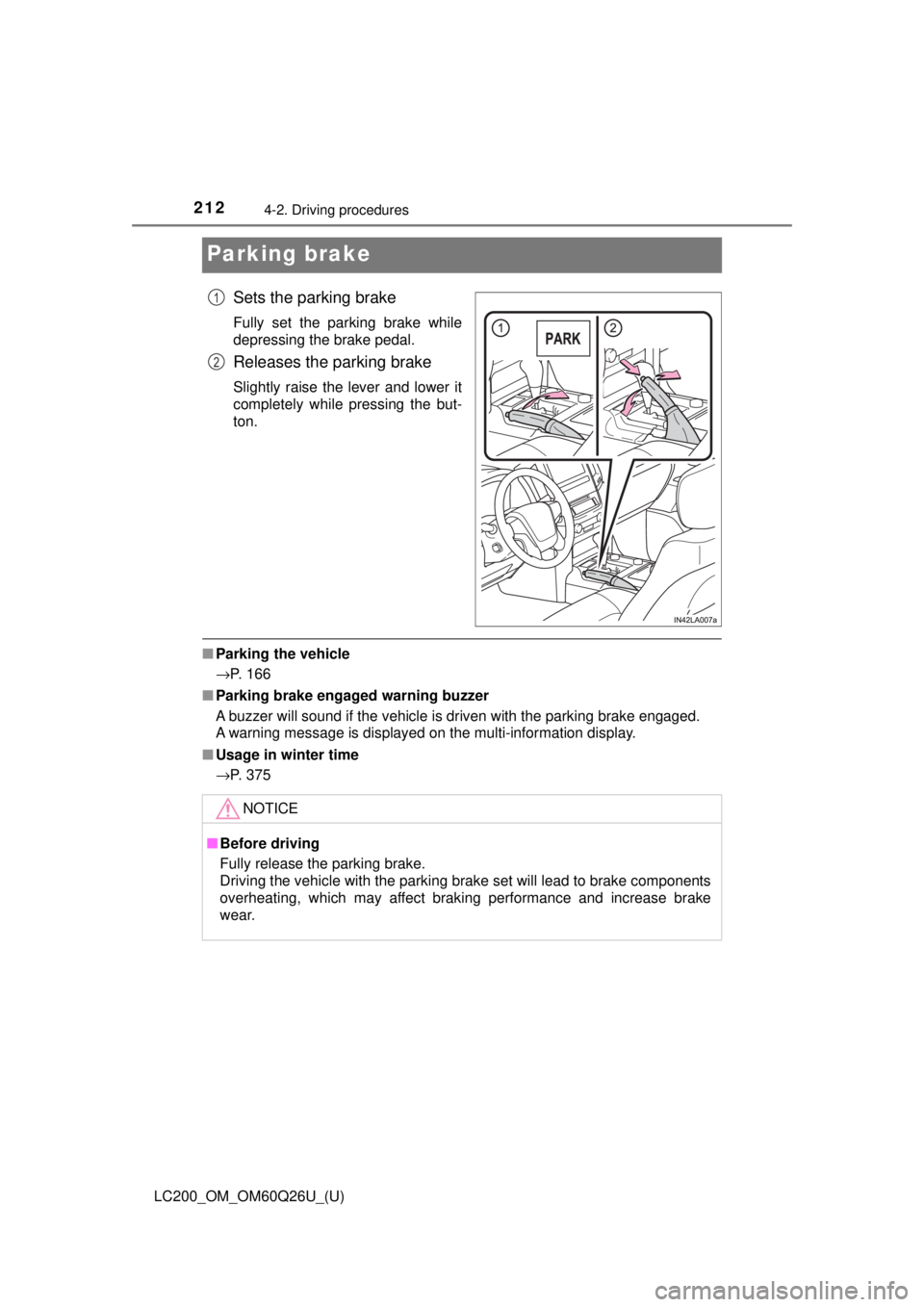
Parking brake
Sets the parking brake
Fully set the parking brake while
depressing the brake pedal.
Releases the parking brake
Slightly raise the lever and lower it
completely while pressing the but-
ton.
■Parking the vehicle
→P. 166
■ Parking brake engaged warning buzzer
A buzzer will sound if the vehicle is driven with the parking brake engaged.
A warning message is displayed on the multi-information display.
■ Usage in winter time
→P. 375
1
2
NOTICE
■Before driving
Fully release the parking brake.
Driving the vehicle with the parking brake set will lead to brake components
overheating, which may affect braking performance and increase brake
wear.
Page 215 of 620
LC200_OM_OM60Q26U_(U)
2154-3. Operating the lights and wipers
4
Driving
■Daytime running light system
●The daytime running lights illuminate using the same lights as the headlights
and illuminate dimmer than the headlights.
● To make your vehicle more visible to other drivers during daytime driving,
the daytime running lights turn on automatically when all of the following
conditions are met. (The daytime running lights are not designed for use at
night.)
• The engine is running
• The parking brake is released
• The headlight switch is in the or “AUTO”
* position
*: When the surroundings are bright
The daytime running lights remain on after they illuminate, even if the parking
brake is set again.
● For the U.S.A.: Daytime running lights can be turned off by operating the
switch.
● Compared to turning on the headlights, the daytime running light system
offers greater durability and consumes less electricity, so it can help improve
fuel economy.
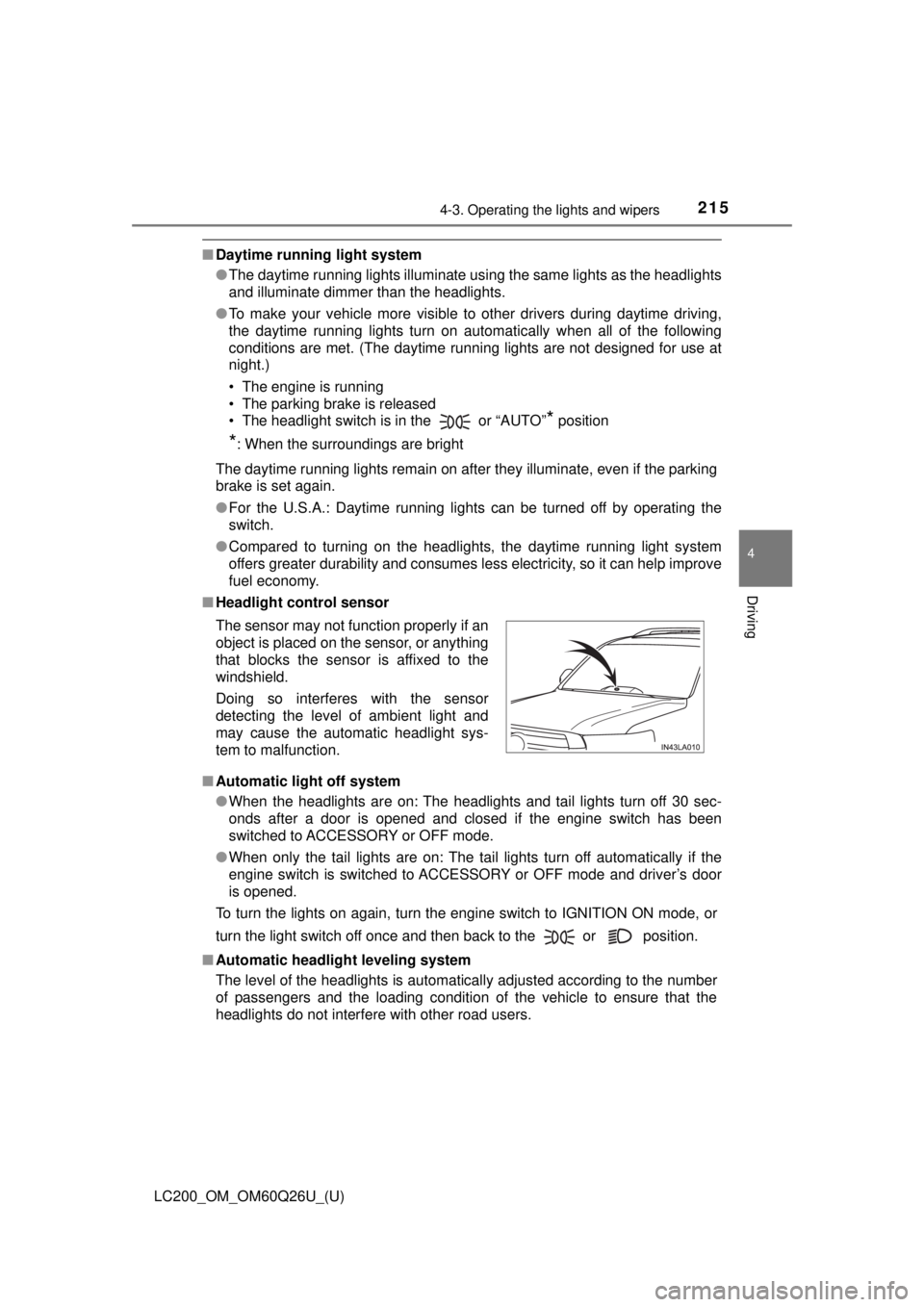
■ Headlight control sensor
■ Automatic light off system
●When the headlights are on: The headlights and tail lights turn off 30 sec-
onds after a door is opened and closed if the engine switch has been
switched to ACCESSORY or OFF mode.
● When only the tail lights are on: The tail lights turn off automatically if the
engine switch is switched to ACCESSORY or OFF mode and driver’s door
is opened.
To turn the lights on again, turn the engine switch to IGNITION ON mode, or
turn the light switch off once and then back to the or position.
■ Automatic headlight leveling system
The level of the headlights is automatically adjusted according to the n\
umber
of passengers and the loading condition of the vehicle to ensure that the
headlights do not interfere with other road users. The sensor may not function properly if an
object is placed on the sensor, or anything
that blocks the sensor is affixed to the
windshield.
Doing so interferes with the sensor
detecting the level of ambient light and
may cause the automatic headlight sys-
tem to malfunction.
Page 283 of 620

LC200_OM_OM60Q26U_(U)
2834-5. Using the driving support systems
4
Driving
■The intuitive parking assist can be operated when
●Front corner sensors:
• The engine switch is in IGNITION ON mode.
• The shift lever is in a position other than P.
• The vehicle speed is less than approximately 6 mph (10 km/h).
● Rear corner and rear center sensors:
• The engine switch is in IGNITION ON mode.
• The shift lever is in R.
■ Intuitive parking assist display
When an obstacle is detected while the rear view monitor system, Multi-ter-
rain Monitor is in use, the warning indicator will appear in the upper corner of
the screen even if the display setting has been set to off.
■ Sensor detection information
●The sensor’s detection areas are limited to the areas around the vehicle’s
bumper.
● Certain vehicle conditions and the surrounding environment may affect the
ability of a sensor to correctly detect an obstacle. Particular instances where
this may occur are listed below.
• There is dirt, snow or ice on the sensor. (Wiping the sensors will resolve
this problem.)
• The sensor is frozen. (Thawing the area will resolve this problem.) In especially cold weather, if a sensor is frozen the screen may show an
abnormal display, or obstacles may not be detected.
• The sensor is covered in any way.
• The vehicle is leaning considerably to one side.
• On an extremely bumpy road, on an incline, on gravel, or on grass.
• The vicinity of the vehicle is noisy due to vehicle horns, motorcycle engines, air brakes of large vehicles, or other loud noises producing ultra-
sonic waves.
• There is another vehicle equipped with parking assist sensors in the vicinity.
• The sensor is coated with a sheet of spray or heavy rain.
• The vehicle is equipped with a fender pole or wireless antenna.
• The bumper or sensor receives a strong impact.
• The vehicle is approaching a tall or curved curb.
• In harsh sunlight or intense cold weather.
• The area directly under the bumpers is not detected.
• If obstacles draw too close to the sensor.
• A non-genuine Toyota suspension (lowered suspension etc.) is installed.
• People may not be detected if they are wearing certain types of clothing.
In addition to the examples above, there are instances in which, because of
their shape, signs and other objects may be judged by a sensor to be closer
than they are.