ad blue TOYOTA LAND CRUISER 2018 Owners Manual (in English)
[x] Cancel search | Manufacturer: TOYOTA, Model Year: 2018, Model line: LAND CRUISER, Model: TOYOTA LAND CRUISER 2018Pages: 620, PDF Size: 12.04 MB
Page 309 of 620
LC200_OM_OM60Q26U_(U)
3094-5. Using the driving support systems
4
Driving
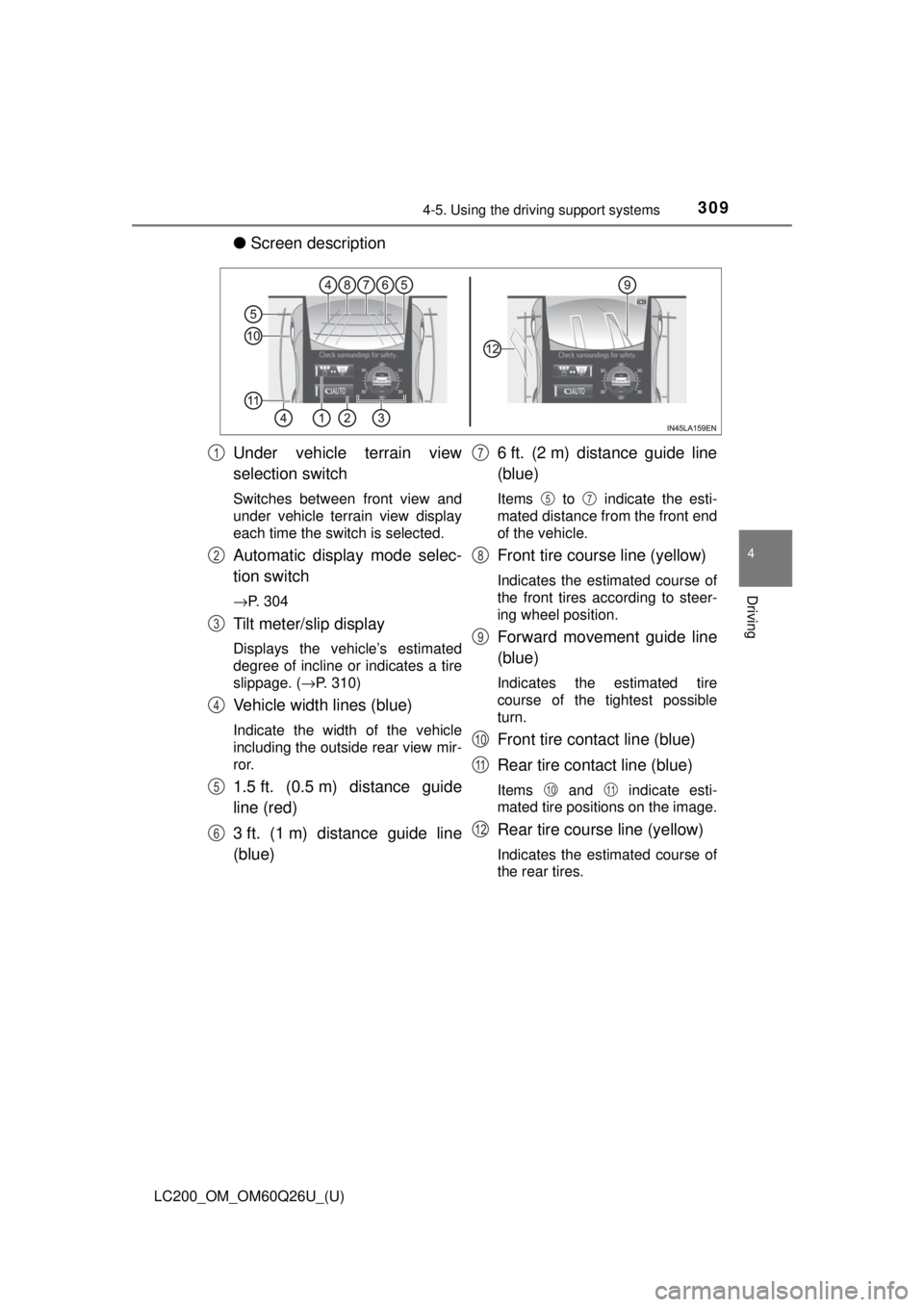
●Screen description
Under vehicle terrain view
selection switch
Switches between front view and
under vehicle terrain view display
each time the switch is selected.
Automatic display mode selec-
tion switch
→P. 304
Tilt meter/slip display
Displays the vehicle’s estimated
degree of incline or indicates a tire
slippage. ( →P. 310)
Vehicle width lines (blue)
Indicate the width of the vehicle
including the outside rear view mir-
ror.
1.5 ft. (0.5 m) distance guide
line (red)
3 ft. (1 m) distance guide line
(blue) 6 ft. (2 m) distance guide line
(blue)
Items to indicate the esti-
mated distance from the front end
of the vehicle.
Front tire course line (yellow)
Indicates the estimated course of
the front tires according to steer-
ing wheel position.
Forward movement guide line
(blue)
Indicates the estimated tire
course of the tightest possible
turn.
Front tire contact line (blue)
Rear tire contact line (blue)
Items and indicate esti-
mated tire positions on the image.
Rear tire course line (yellow)
Indicates the estimated course of
the rear tires.
1
2
3
4
5
6
7
57
8
9
10
11
1011
12
Page 312 of 620
312
LC200_OM_OM60Q26U_(U)
4-5. Using the driving support systems
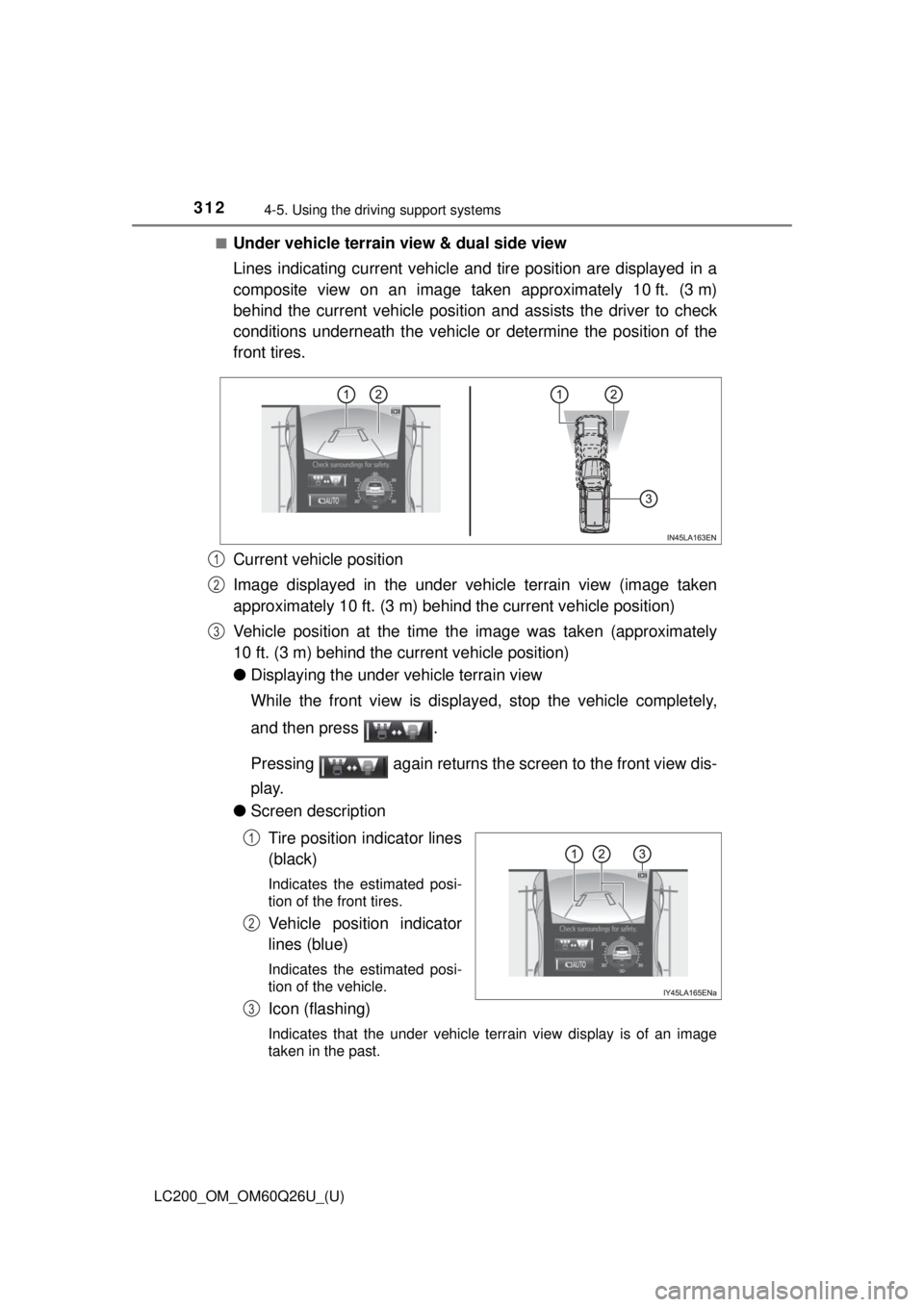
■Under vehicle terrain view & dual side view
Lines indicating current vehicle and tire position are displayed in a
composite view on an image taken approximately 10 ft. (3 m)
behind the current vehicle position and assists the driver to check
conditions underneath t he vehicle or determine the position of the
front tires.
Current vehicle position
Image displayed in the under vehicle terrain view (image taken
approximately 10 ft. (3 m) behind the current vehicle position)
Vehicle position at the time t he image was taken (approximately
10 ft. (3 m) behind the current vehicle position)
● Displaying the under vehicle terrain view
While the front view is displayed, stop the vehicle completely,
and then press .
Pressing again returns the screen to the front view dis-
play.
● Screen description
Tire position indicator lines
(black)
Indicates the estimated posi-
tion of the front tires.
Vehicle position indicator
lines (blue)
Indicates the estimated posi-
tion of the vehicle.
Icon (flashing)
Indicates that the under vehicle terrain view display is of an image
taken in the past.
1
2
3
1
2
3
Page 315 of 620
LC200_OM_OM60Q26U_(U)
3154-5. Using the driving support systems
4
Driving
Vehicle width extension guide line (blue)
Indicates the estimated vehicle width including the outside rear view mir-
rors.
Front tire contact line (blue)
Rear tire contact line (blue)
Items and indicate estimated tire positions on the image.
■Rear view & dual side view/wide rear view
The screen can be displayed when the shift lever is in R.
■ Guide lines
If the back door is not closed, guide lines will not be displayed. If the guide
lines do not display even when the back door is closed, have the vehicle
inspected at your Toyota dealer.
■ Intuitive parking assist pop-up display
→P. 278
WARNING
■Guide lines
The tire position indicator lines and vehicle position indicator lines m\
ay differ
from actual vehicle positions depending on the number of passengers,
cargo weight, road grade, road surface conditions, brightness of the sur-
rounding environment, etc. Always drive the vehicle while confirming the
safety of your surroundings.
7
8
9
89
Page 316 of 620
316
LC200_OM_OM60Q26U_(U)
4-5. Using the driving support systems
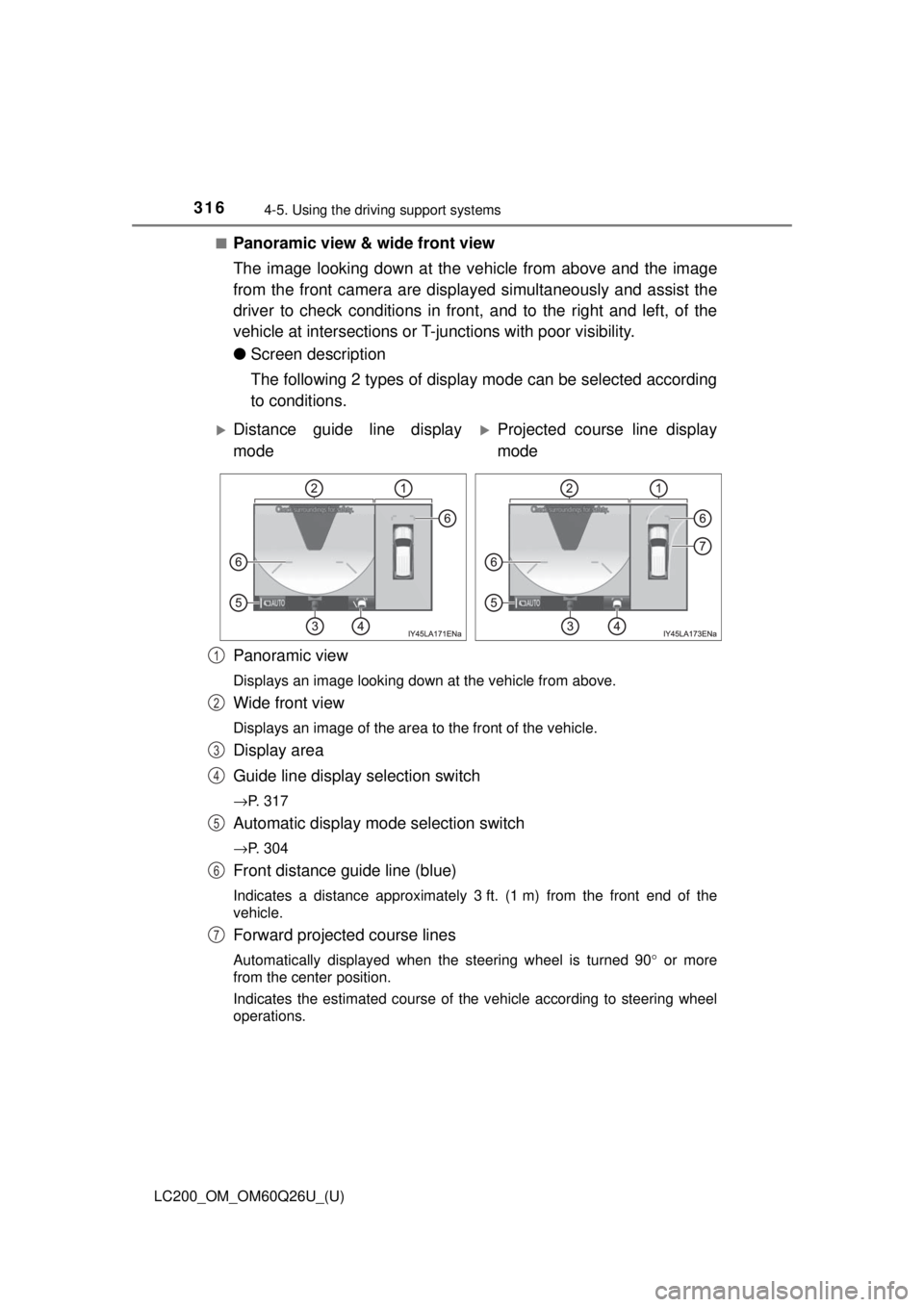
■Panoramic view & wide front view
The image looking down at the ve hicle from above and the image
from the front camera are displayed simultaneously and assist the
driver to check conditions in front, and to the right and left, of the
vehicle at intersections or T-ju nctions with poor visibility.
● Screen description
The following 2 types of display mode can be selected according
to conditions.
Panoramic view
Displays an image looking down at the vehicle from above.
Wide front view
Displays an image of the area to the front of the vehicle.
Display area
Guide line display selection switch
→P. 317
Automatic display mode selection switch
→P. 304
Front distance guide line (blue)
Indicates a distance approximately 3 ft. (1 m) from the front end of the
vehicle.
Forward projected course lines
Automatically displayed when the steering wheel is turned 90 ° or more
from the center position.
Indicates the estimated course of the vehicle according to steering wheel
operations.
Distance guide line display
modeProjected course line display
mode
1
2
3
4
5
6
7
Page 318 of 620
318
LC200_OM_OM60Q26U_(U)
4-5. Using the driving support systems
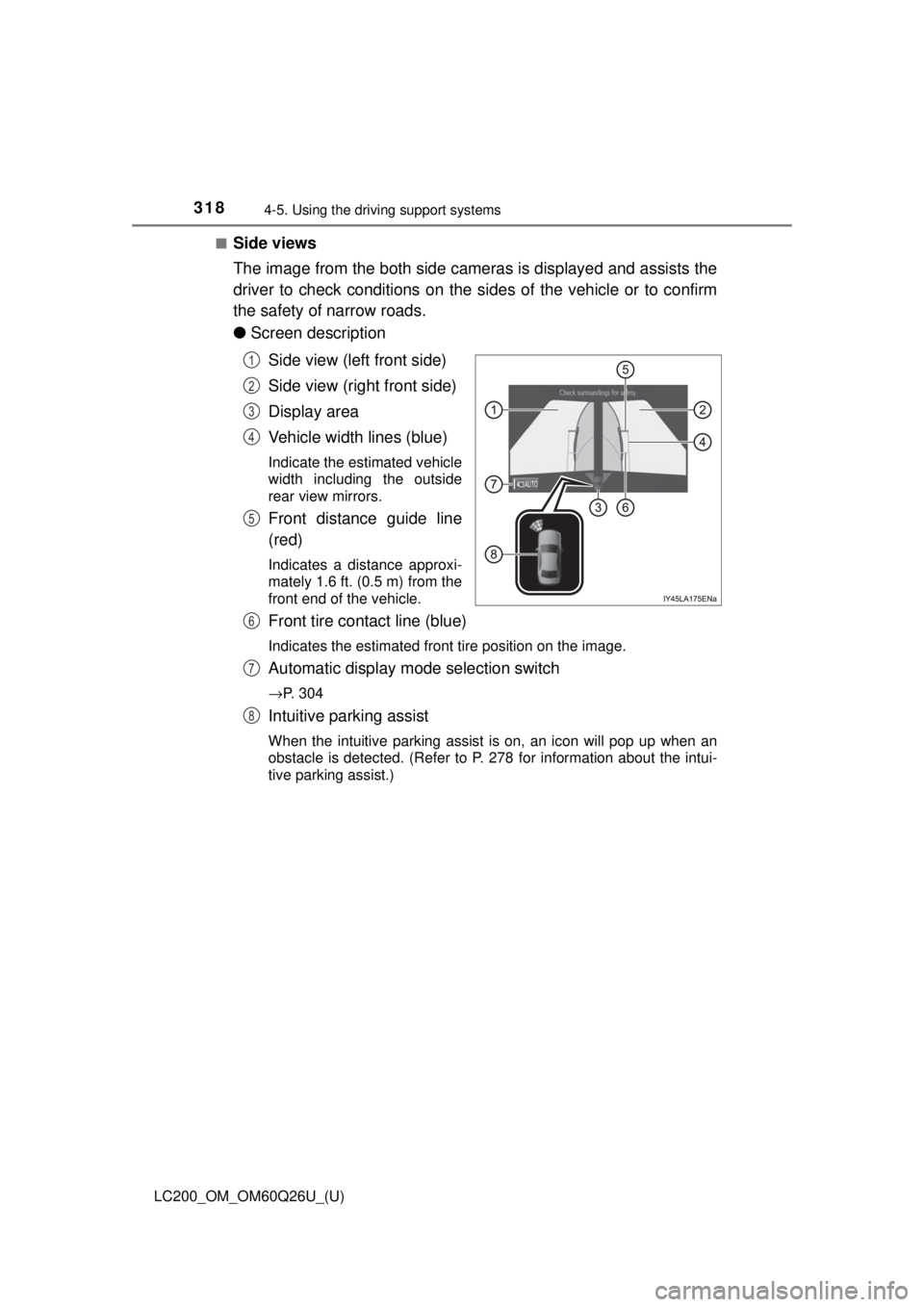
■Side views
The image from the both side cameras is displayed and assists the
driver to check conditions on the sides of the vehicle or to confirm
the safety of narrow roads.
●Screen description
Side view (left front side)
Side view (right front side)
Display area
Vehicle width lines (blue)
Indicate the estimated vehicle
width including the outside
rear view mirrors.
Front distance guide line
(red)
Indicates a distance approxi-
mately 1.6 ft. (0.5 m) from the
front end of the vehicle.
Front tire contact line (blue)
Indicates the estimated front tire position on the image.
Automatic display mode selection switch
→P. 304
Intuitive parking assist
When the intuitive parking assist is on, an icon will pop up when an
obstacle is detected. (Refer to P. 278 for information about the intui-
tive parking assist.)
1
2
3
4
5
6
7
8
Page 323 of 620
LC200_OM_OM60Q26U_(U)
3234-5. Using the driving support systems
4
Driving
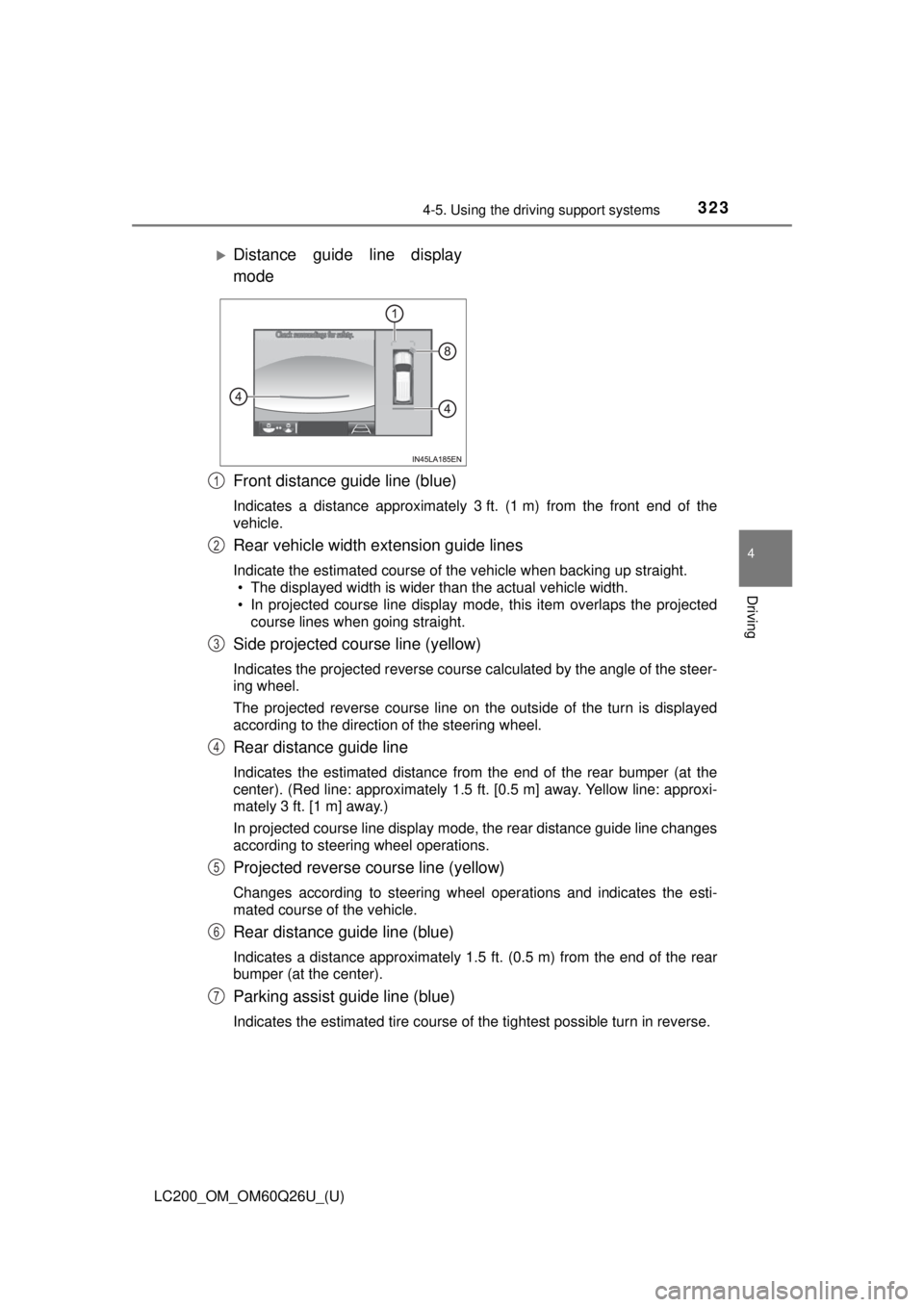
Front distance guide line (blue)
Indicates a distance approximately 3 ft. (1 m) from the front end of the
vehicle.
Rear vehicle width extension guide lines
Indicate the estimated course of the vehicle when backing up straight.
• The displayed width is wider than the actual vehicle width.
• In projected course line display mode, this item overlaps the projected
course lines when going straight.
Side projected course line (yellow)
Indicates the projected reverse course calculated by the angle of the steer-
ing wheel.
The projected reverse course line on the outside of the turn is displayed
according to the direction of the steering wheel.
Rear distance guide line
Indicates the estimated distance from the end of the rear bumper (at the
center). (Red line: approximately 1.5 ft. [0.5 m] away. Yellow line: approxi-
mately 3 ft. [1 m] away.)
In projected course line display mode, the rear distance guide line changes
according to steering wheel operations.
Projected reverse course line (yellow)
Changes according to steering wheel operations and indicates the esti-
mated course of the vehicle.
Rear distance guide line (blue)
Indicates a distance approximately 1.5 ft. (0.5 m) from the end of the rear
bumper (at the center).
Parking assist guide line (blue)
Indicates the estimated tire course of the tightest possible turn in rev\
erse.
Distance guide line display
mode
1
2
3
4
5
6
7
Page 324 of 620
324
LC200_OM_OM60Q26U_(U)
4-5. Using the driving support systems
Intuitive parking assist
When the intuitive parking assist is on, an icon will be displayed when an
obstacle is detected. (Refer to P. 278 for information about the intuitive
parking assist.)
Vehicle center line (blue)
Indicates the estimated vehicle center on the ground.
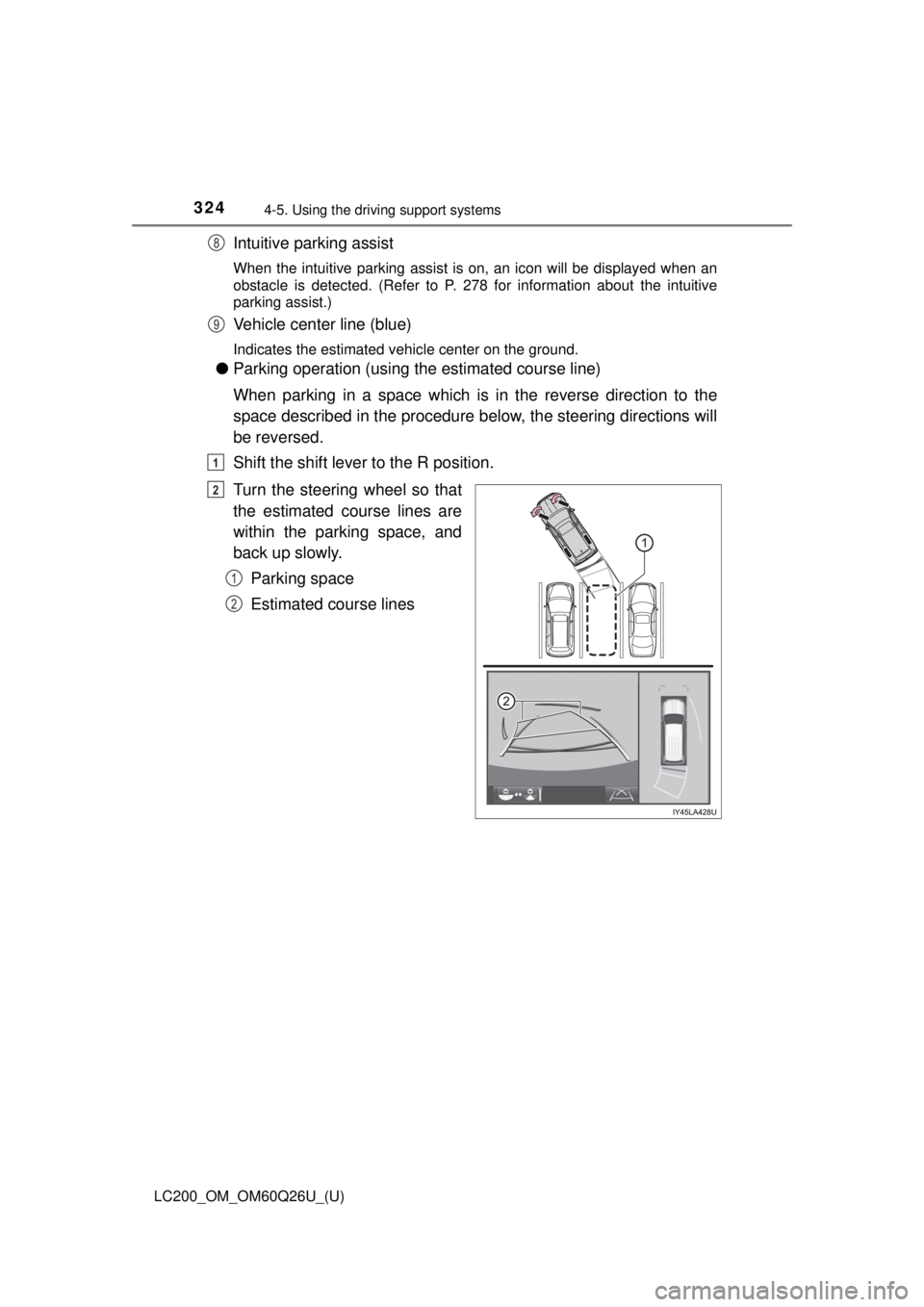
●Parking operation (using the estimated course line)
When parking in a space which is in the reverse direction to the
space described in the procedure be low, the steering directions will
be reversed.
Shift the shift lever to the R position.
Turn the steering wheel so that
the estimated course lines are
within the parking space, and
back up slowly.
Parking space
Estimated course lines
8
9
1
2
1
2
Page 328 of 620

328
LC200_OM_OM60Q26U_(U)
4-5. Using the driving support systems
For information about other than t he side view and side views display
area, refer to the page for the respective screen.
Front distance guide line (red)
Indicates a distance approximately 1.5 ft. (0.5 m) from the front end of the
vehicle.
Front tire contact line (blue)
Indicates the estimated front tire position on the image.
Vehicle width lines (blue)
Indicate the estimated vehicle width including the outside rear view mir-
rors.
Rear tire contact line (blue)
Indicates the estimated rear tire position on the image.
1
2
3
4
Page 436 of 620
436
LC200_OM_OM60Q26U_(U)
5-4. Using the other interior features
Subscribers have the following Safety Connect services available:
●Automatic Collision Notification
*
Helps drivers receive necessary response from emergency service
providers. ( →P. 438)
*: U.S. Patent No. 7,508,298 B2
● Stolen Vehicle Location
Helps drivers in the event of vehicle theft. ( →P. 438)
● Emergency Assistanc e Button (SOS)
Connects drivers to response-center support. ( →P. 438)
● Roadside Assistance
Provides drivers various on-road assistance. ( →P. 438)
After you have signed the Telemati cs Subscription Service Agreement
and are enrolled, you can begin receiving services.
A variety of subscription terms is available for purchase. Contact your
Toyota dealer, call 1-800-331-4331, or push the “SOS” button in your
vehicle for further subscription details.
■ Safety Connect Services Information
●Phone calls using the vehicles Bluetooth® technology will not be possible
during Safety Connect.
● Safety Connect is available beginning Fall 2009 on select Toyota models.
Contact with the Safety Connect response center is dependent upon the
telematics device being in operative condition, cellular connection availabil-
ity, and GPS satellite signal reception, which can limit the ability to reach the
response center or receive emergency service support. Enrollment and
Telematics Subscription Service Agreement required. A variety of subscrip-
tion terms is available; charges vary by subscription term selected.
● Automatic Collision Notification, Emergency Assistance, Stolen Vehicle
Location, and Enhanced Roadside Assistance will function in the United
States, including Hawaii and Alaska, and in Canada. No Safety Connect
services will function outside of the United States in countries other than
Canada.
● Safety Connect services are not subject to section 255 of the Telecommuni-
cations Act and the device is not TTY compatible.
Services
Subscription
Page 603 of 620
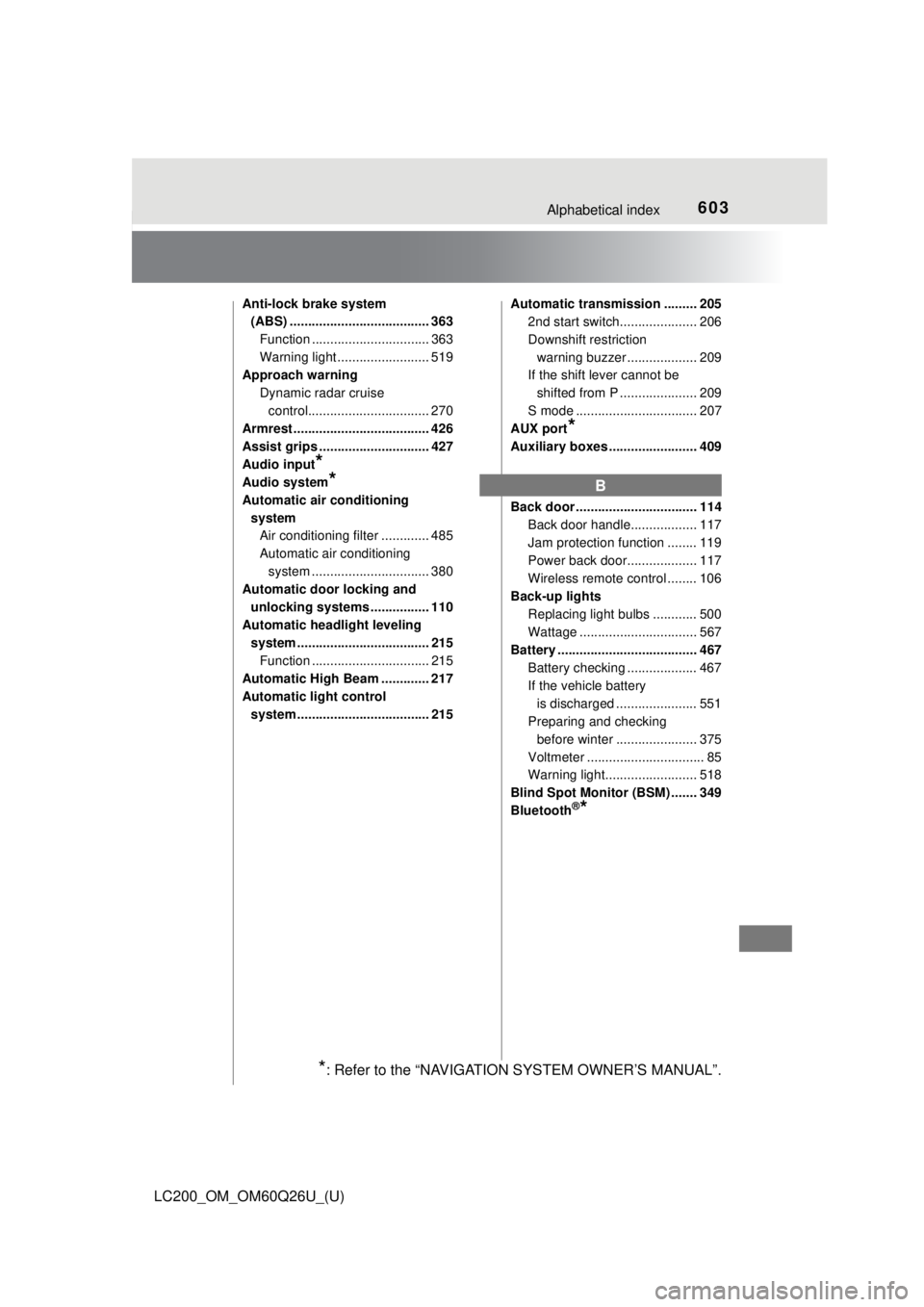
603Alphabetical index
LC200_OM_OM60Q26U_(U)
Anti-lock brake system (ABS) ...................................... 363
Function ................................ 363
Warning light ......................... 519
Approach warning
Dynamic radar cruise control................................. 270
Armrest ..................................... 426
Assist grips .............................. 427
Audio input
*
Audio system*
Automatic air conditioning
system Air conditioning filter ............. 485
Automatic air conditioning
system ......... ....................... 380
Automatic door locking and
unlocking systems ................ 110
Automatic headli ght leveling
system .................................... 215
Function ................................ 215
Automatic High Beam ............. 217
Automatic light control system .................................... 215 Automatic transmission ......... 205
2nd start switch..................... 206
Downshift restriction
warning buzzer ................... 209
If the shift lever cannot be
shifted from P ..................... 209
S mode ................................. 207
AUX port
*
Auxiliary boxes ........................ 409
Back door ................................. 114
Back door handle.................. 117
Jam protection function ........ 119
Power back door................... 117
Wireless remote control ........ 106
Back-up lights
Replacing light bulbs ............ 500
Wattage ................................ 567
Battery ...................................... 467
Battery checking ................... 467
If the vehicle battery is discharged ...................... 551
Preparing and checking before winter ...................... 375
Voltmeter ................................ 85
Warning light......................... 518
Blind Spot Monitor (BSM) ....... 349
Bluetooth
®*
B
*: Refer to the “NAVIGATION SYSTEM OWNER’S MANUAL”.