rear view mirror TOYOTA LAND CRUISER 2018 Owners Manual (in English)
[x] Cancel search | Manufacturer: TOYOTA, Model Year: 2018, Model line: LAND CRUISER, Model: TOYOTA LAND CRUISER 2018Pages: 620, PDF Size: 12.04 MB
Page 2 of 620
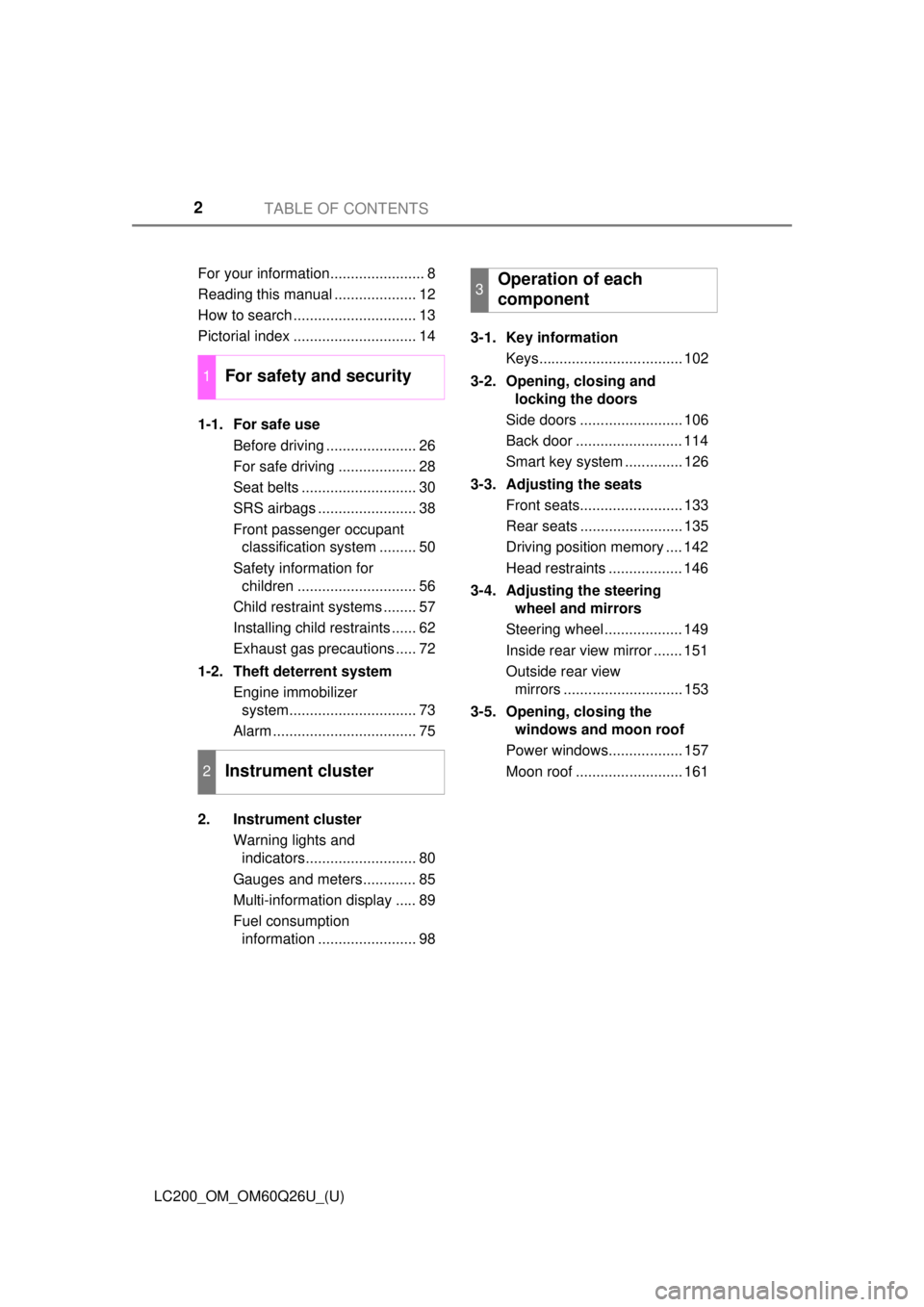
TABLE OF CONTENTS2
LC200_OM_OM60Q26U_(U)For your information....................... 8
Reading this manual .................... 12
How to search .............................. 13
Pictorial index .............................. 14
1-1. For safe use
Before driving ...................... 26
For safe driving ................... 28
Seat belts ............................ 30
SRS airbags ........................ 38
Front passenger occupant classification system ......... 50
Safety information for children ............................. 56
Child restraint systems ........ 57
Installing child restraints ...... 62
Exhaust gas precautions ..... 72
1-2. Theft deterrent system Engine immobilizer system............................... 73
Alarm ................................... 75
2. Instrument cluster Warning lights and indicators........................... 80
Gauges and meters............. 85
Multi-information display ..... 89
Fuel consumption information ........................ 98 3-1. Key information
Keys................................... 102
3-2. Opening, closing and locking the doors
Side doors ......................... 106
Back door .......................... 114
Smart key system .............. 126
3-3. Adjusting the seats Front seats......................... 133
Rear seats ......................... 135
Driving position memory .... 142
Head restraints .................. 146
3-4. Adjusting the steering wheel and mirrors
Steering wheel ................... 149
Inside rear view mirror ....... 151
Outside rear view mirrors ............................. 153
3-5. Opening, closing the windows and moon roof
Power windows.................. 157
Moon roof .......................... 161
1For safety and security
2Instrument cluster
3Operation of each
component
Page 14 of 620
14Pictorial index
LC200_OM_OM60Q26U_(U)
Pictorial index
■
Exterior
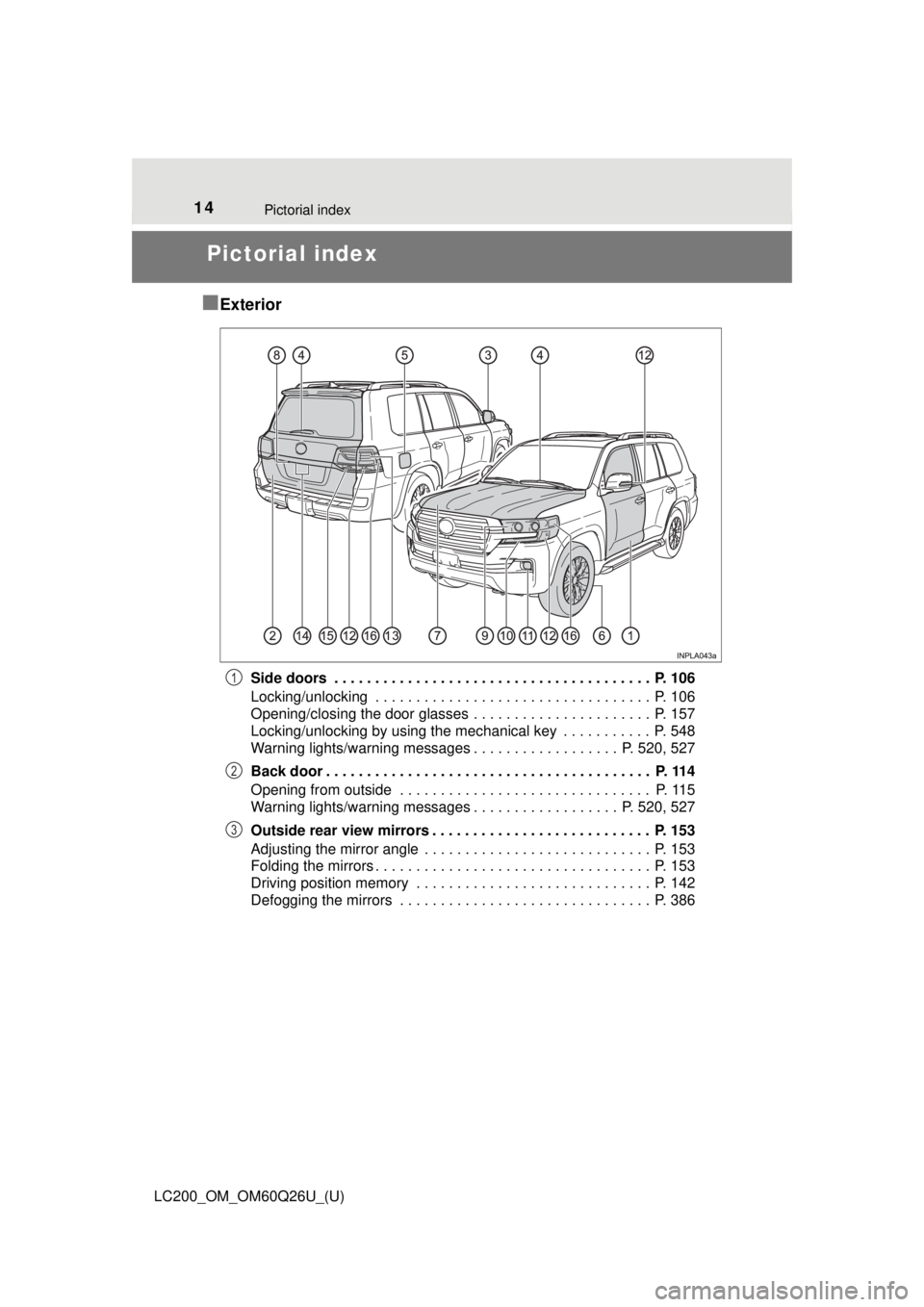
Side doors . . . . . . . . . . . . . . . . . . . . . . . . . . . . . . . . . . . . . . . P. 106
Locking/unlocking . . . . . . . . . . . . . . . . . . . . . . . . . . . . . . . . . . P. 106
Opening/closing the door glasses . . . . . . . . . . . . . . . . . . . . . . P. 157
Locking/unlocking by using the mechanical key . . . . . . . . . . . P. 548
Warning lights/warning messages . . . . . . . . . . . . . . . . . . P. 520, 527
Back door . . . . . . . . . . . . . . . . . . . . . . . . . . . . . . . . . . . . . . . . P. 114
Opening from outside . . . . . . . . . . . . . . . . . . . . . . . . . . . . . . . P. 115
Warning lights/warning messages . . . . . . . . . . . . . . . . . . P. 520, 527
Outside rear view mirrors . . . . . . . . . . . . . . . . . . . . . . . . . . . P. 153
Adjusting the mirror angle . . . . . . . . . . . . . . . . . . . . . . . . . . . . P. 153
Folding the mirrors . . . . . . . . . . . . . . . . . . . . . . . . . . . . . . . . . . P. 153
Driving position memory . . . . . . . . . . . . . . . . . . . . . . . . . . . . . P. 142
Defogging the mirrors . . . . . . . . . . . . . . . . . . . . . . . . . . . . . . . P. 3861
2
3
Page 18 of 620
18Pictorial index
LC200_OM_OM60Q26U_(U)
■Switches
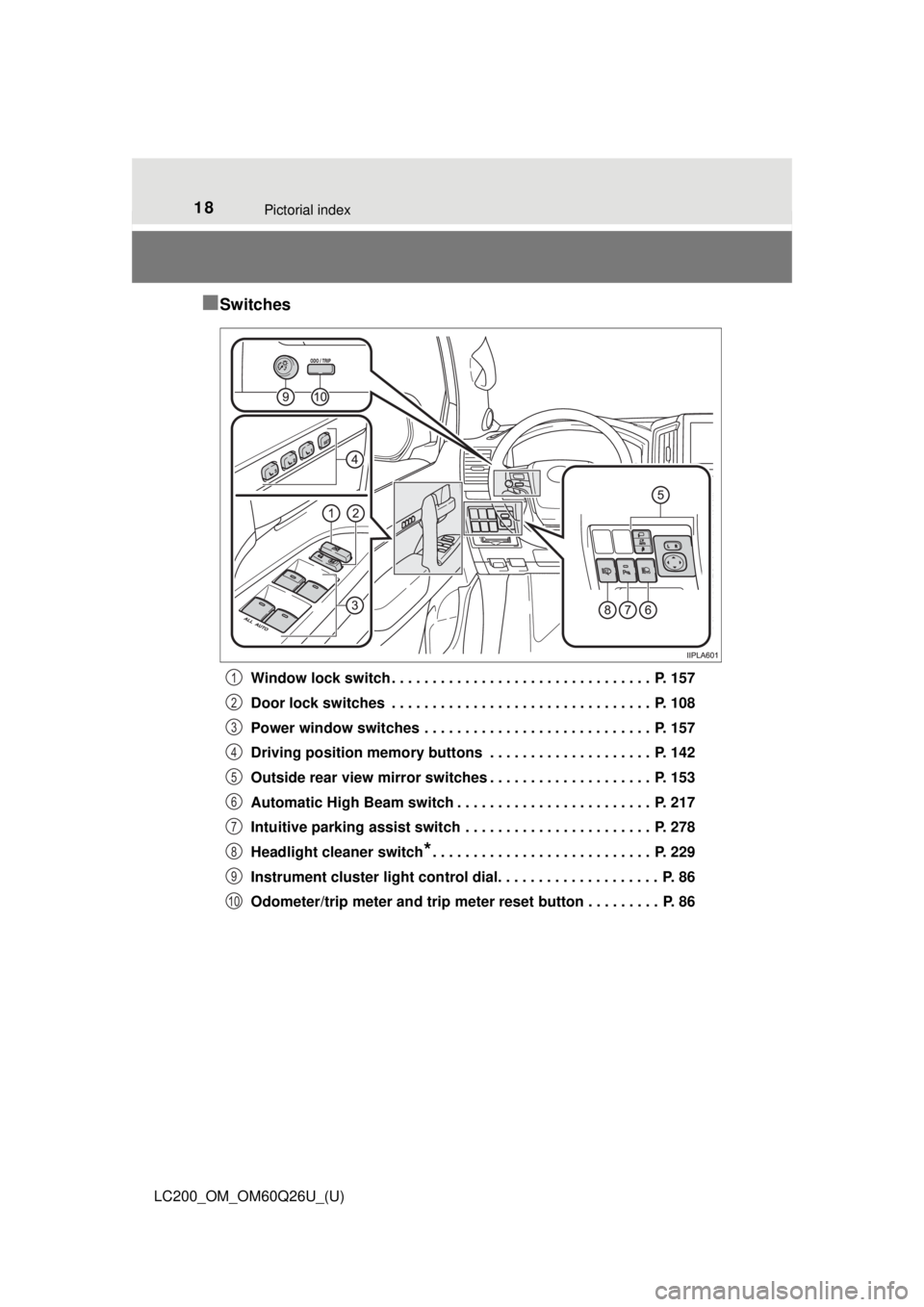
Window lock switch . . . . . . . . . . . . . . . . . . . . . . . . . . . . . . . . P. 157
Door lock switches . . . . . . . . . . . . . . . . . . . . . . . . . . . . . . . . P. 108
Power window switches . . . . . . . . . . . . . . . . . . . . . . . . . . . . P. 157
Driving position memory buttons . . . . . . . . . . . . . . . . . . . . P. 142
Outside rear view mirror switches . . . . . . . . . . . . . . . . . . . . P. 153
Automatic High Beam switch . . . . . . . . . . . . . . . . . . . . . . . . P. 217
Intuitive parking assist switch . . . . . . . . . . . . . . . . . . . . . . . P. 278
Headlight cleaner switch
*. . . . . . . . . . . . . . . . . . . . . . . . . . . P. 229
Instrument cluster light control dial. . . . . . . . . . . . . . . . . . . . P. 86
Odometer/trip meter and trip meter reset button . . . . . . . . . P. 86
1
2
3
4
5
6
7
8
9
10
Page 23 of 620
23Pictorial index
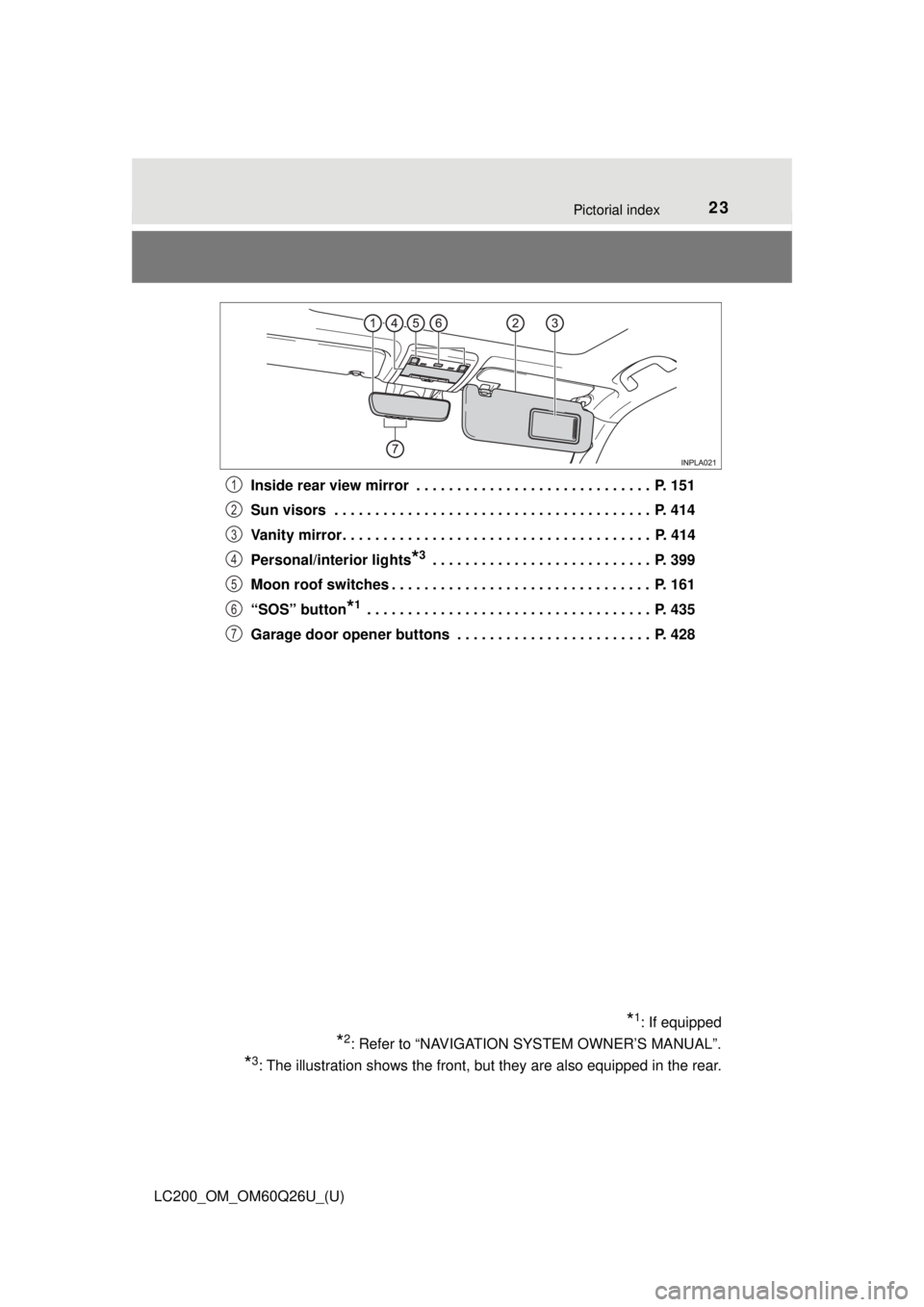
LC200_OM_OM60Q26U_(U)Inside rear view mirror . . . . . . . . . . . . . . . . . . . . . . . . . . . . . P. 151
Sun visors . . . . . . . . . . . . . . . . . . . . . . . . . . . . . . . . . . . . . . . P. 414
Vanity mirror . . . . . . . . . . . . . . . . . . . . . . . . . . . . . . . . . . . . . . P. 414
Personal/interior lights
*3 . . . . . . . . . . . . . . . . . . . . . . . . . . . P. 399
Moon roof switches . . . . . . . . . . . . . . . . . . . . . . . . . . . . . . . . P. 161
“SOS” button
*1 . . . . . . . . . . . . . . . . . . . . . . . . . . . . . . . . . . . P. 435
Garage door opener buttons . . . . . . . . . . . . . . . . . . . . . . . . P. 428
*1: If equipped
*2: Refer to “NAVIGATION SYSTEM OWNER’S MANUAL”.
*3: The illustration shows the front, but they are also equipped in the rear.
1
2
3
4
5
6
7
Page 29 of 620
291-1. For safe use
LC200_OM_OM60Q26U_(U)
1
For safety and security
Make sure that you can see backward clearly by adjusting the inside
and outside rear view mirrors properly. ( →P. 151, 153)
Adjusting the mirrors
WARNING
Observe the following precautions.
Failure to do so may result in death or serious injury.
●Do not adjust the position of the driver’s seat while driving.
Doing so could cause the driver to lose control of the vehicle.
● Do not place a cushion between the driver or passenger and the seatback.
A cushion may prevent correct posture from being achieved, and reduce
the effectiveness of the seat belt and head restraint.
● Do not place anything under the front seats.
Objects placed under the front seats may become jammed in the seat
tracks and stop the seat from locking in place. This may lead to an acci-
dent and the adjustment mechanism may also be damaged.
● Always observe the legal speed limit when driving on public roads.
● When driving over long distances, take regular breaks before you start to
feel tired.
Also, if you feel tired or sleepy while driving, do not force yourself to con-
tinue driving and take a break immediately.
Page 83 of 620
LC200_OM_OM60Q26U_(U)
832. Instrument cluster
2
Instrument cluster
*1: These lights turn on when the engine switch is turned to IGNITION ONmode to indicate that a system check is being performed. They will turn
off after the engine is on, or after a few seconds. There may be a mal-
function in a system if the lights do not turn on, or turn off. Have the vehi-
cle inspected by your Toyota dealer.
*2: The light flashes to indicate that the system is operating.
*3: The light turns on when the system is turned off.
*4: This light illuminates on the center panel.
*5: In order to confirm operation, the BSM outside rear view mirror indicators
illuminate in the following situations:
• When the engine switch is turned to IGNITION ON mode while the sys- tem is set to on.
• When the system is set to on while the engine switch is in IGNITION ON mode.
If the system is functioning correctly, the BSM outside rear view mirror
indicators will turn off after a few seconds.
If the BSM outside rear view mirror indicators do not illuminate or do not
turn off, there may be a malfunction with the system.
If this occurs, have the vehicle inspected by your Toyota dealer.
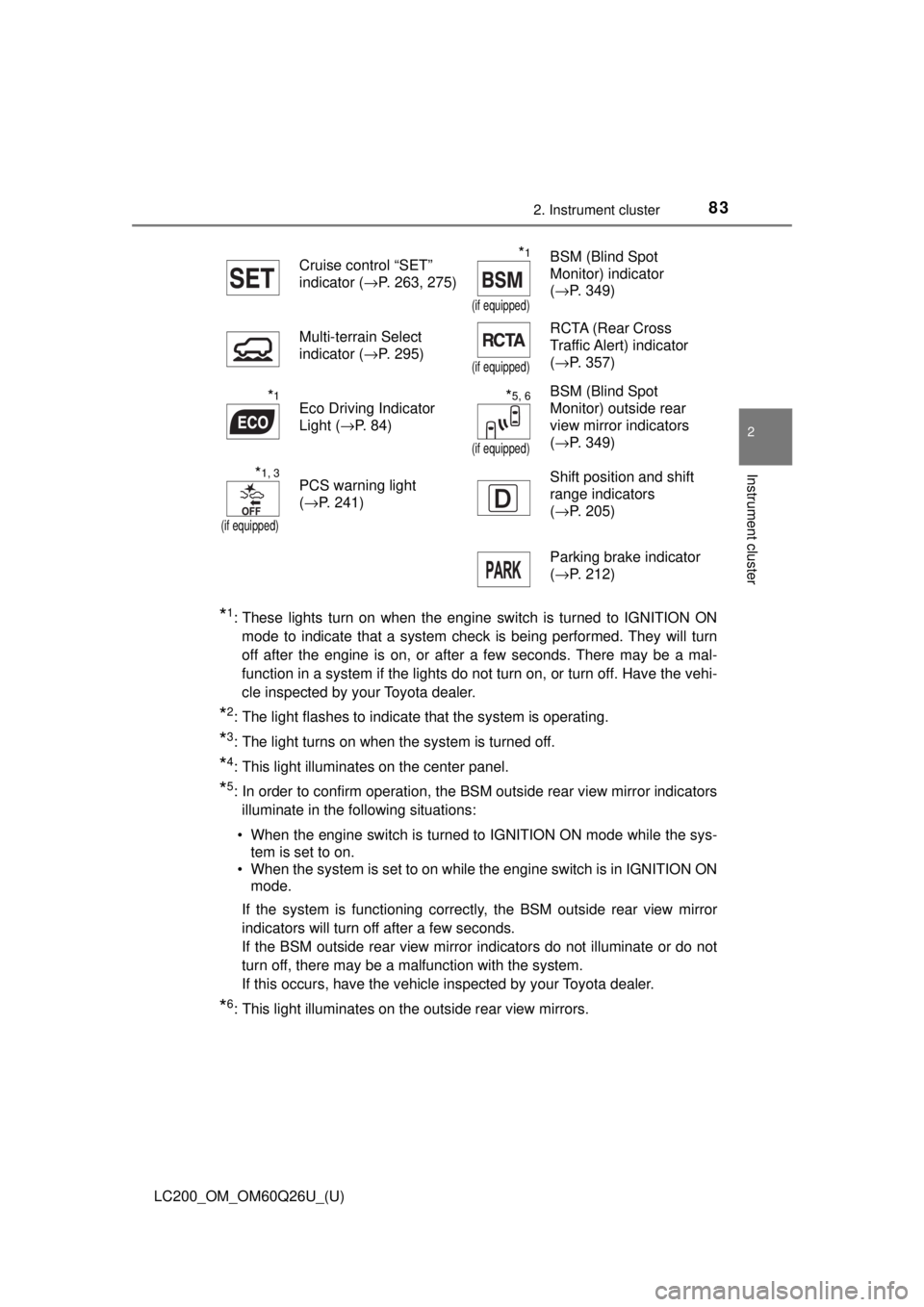
*6: This light illuminates on the outside rear view mirrors. Cruise control “SET”
indicator (
→P. 263, 275)
*1
(if equipped)
BSM (Blind Spot
Monitor) indicator
(→P. 349)
Multi-terrain Select
indicator ( →P. 295)
(if equipped)
RCTA (Rear Cross
Traffic Alert) indicator
(→P. 357)
*1Eco Driving Indicator
Light ( →P. 84)*5, 6
(if equipped)
BSM (Blind Spot
Monitor) outside rear
view mirror indicators
(→P. 349)
*1, 3
(if equipped)
PCS warning light
(→P. 241) Shift position and shift
range indicators
(
→P. 205)
Parking brake indicator
( →P. 212)
Page 101 of 620
101
LC200_OM_OM60Q26U_(U)
3
Operation of
each component
3-1. Key information
Keys .................................. 102
3-2. Opening, closing and locking the doors
Side doors ......................... 106
Back door .......................... 114
Smart key system ............. 126
3-3. Adjusting the seats Front seats ........................ 133
Rear seats......................... 135
Driving position memory ... 142
Head restraints.................. 146
3-4. Adjusting the steering wheel and mirrors
Steering wheel .................. 149
Inside rear view mirror ...... 151
Outside rear view mirrors ............................. 153
3-5. Opening, closing the windows and moon roof
Power windows ................. 157
Moon roof .......................... 161
Page 142 of 620
142
LC200_OM_OM60Q26U_(U)
3-3. Adjusting the seats
Driving position memory
Your preferred driving position (the position of the driver’s seat, steer-
ing wheel and outside rear view mirrors) can be recorded and recalled
by pressing a button.
Three different driving positions can be recorded into memory.
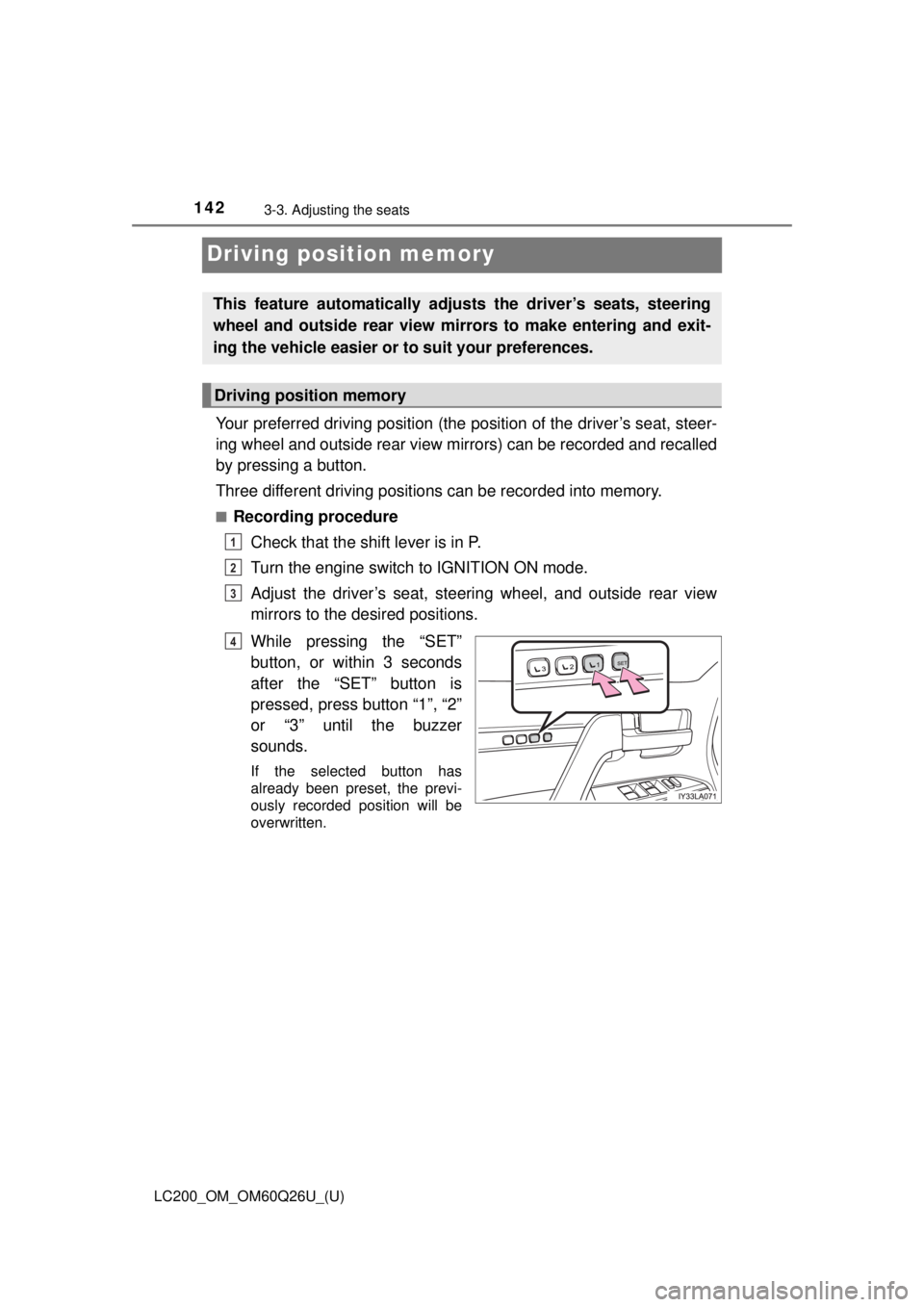
■Recording procedureCheck that the shift lever is in P.
Turn the engine switch to IGNITION ON mode.
Adjust the driver’s seat, steering wheel, and outside rear view
mirrors to the desired positions.
While pressing the “SET”
button, or within 3 seconds
after the “SET” button is
pressed, press button “1”, “2”
or “3” until the buzzer
sounds.
If the selected button has
already been preset, the previ-
ously recorded position will be
overwritten.
This feature automatically adjusts the driver’s seats, steering
wheel and outside rear view mirrors to make entering and exit-
ing the vehicle easier or to suit your preferences.
Driving position memory
1
2
3
4
Page 144 of 620
144
LC200_OM_OM60Q26U_(U)
3-3. Adjusting the seats
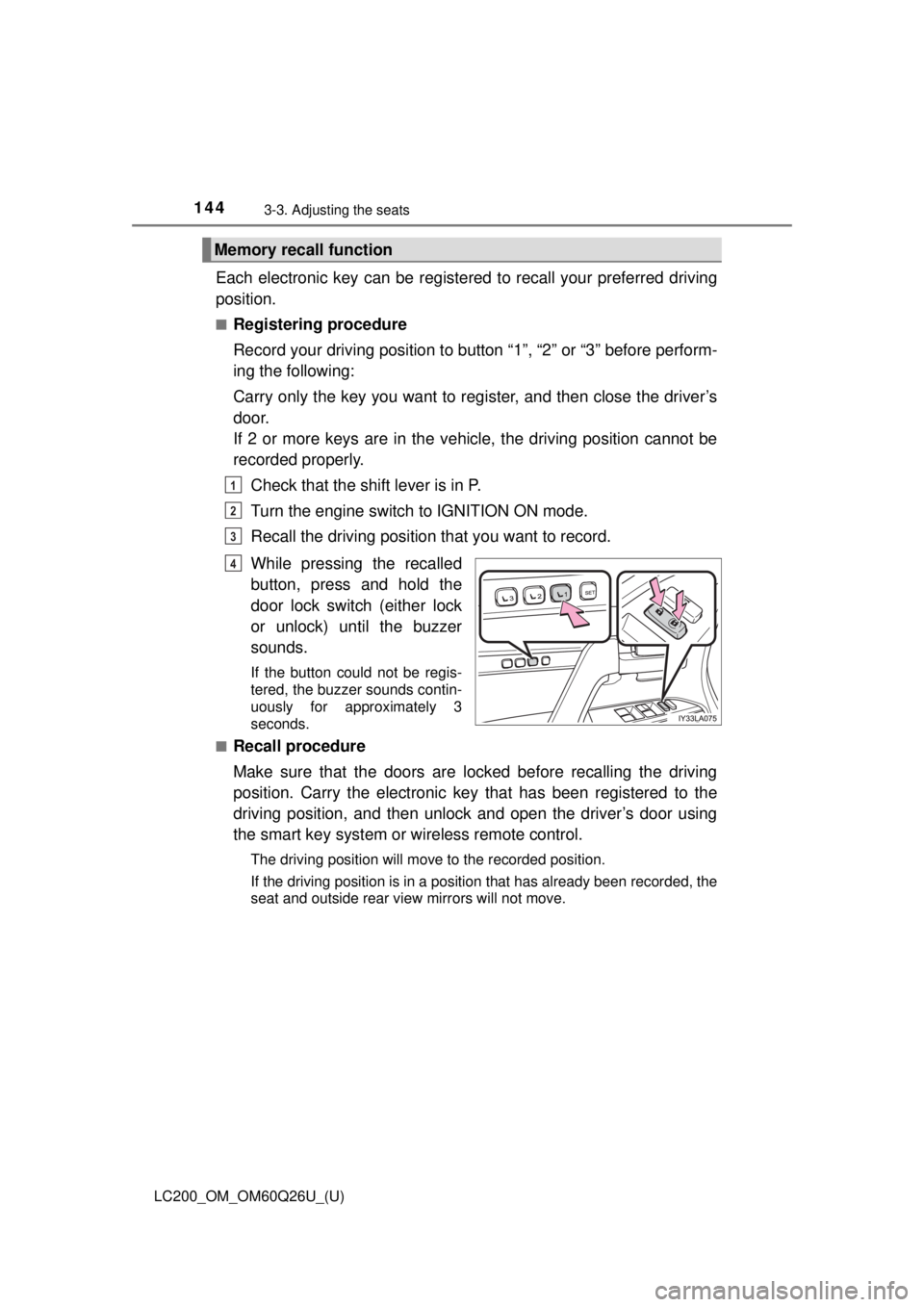
Each electronic key can be registered to recall your preferred driving
position.
■Registering procedure
Record your driving position to button “1”, “2” or “3” before perform-
ing the following:
Carry only the key you want to register, and then close the driver’s
door.
If 2 or more keys are in the vehicle, the driving position cannot be
recorded properly.
Check that the shift lever is in P.
Turn the engine switch to IGNITION ON mode.
Recall the driving position that you want to record.
While pressing the recalled
button, press and hold the
door lock switch (either lock
or unlock) until the buzzer
sounds.
If the button could not be regis-
tered, the buzzer sounds contin-
uously for approximately 3
seconds.
■
Recall procedure
Make sure that the doors are locked before recalling the driving
position. Carry the electronic ke y that has been registered to the
driving position, and then unlock and open the driver’s door using
the smart key system or wireless remote control.
The driving position will move to the recorded position.
If the driving position is in a position that has already been recorded, the
seat and outside rear view mirrors will not move.
Memory recall function
1
2
3
4
Page 151 of 620
1513-4. Adjusting the steering wheel and mirrors
3
Operation of each component
LC200_OM_OM60Q26U_(U)
Inside rear view mirror
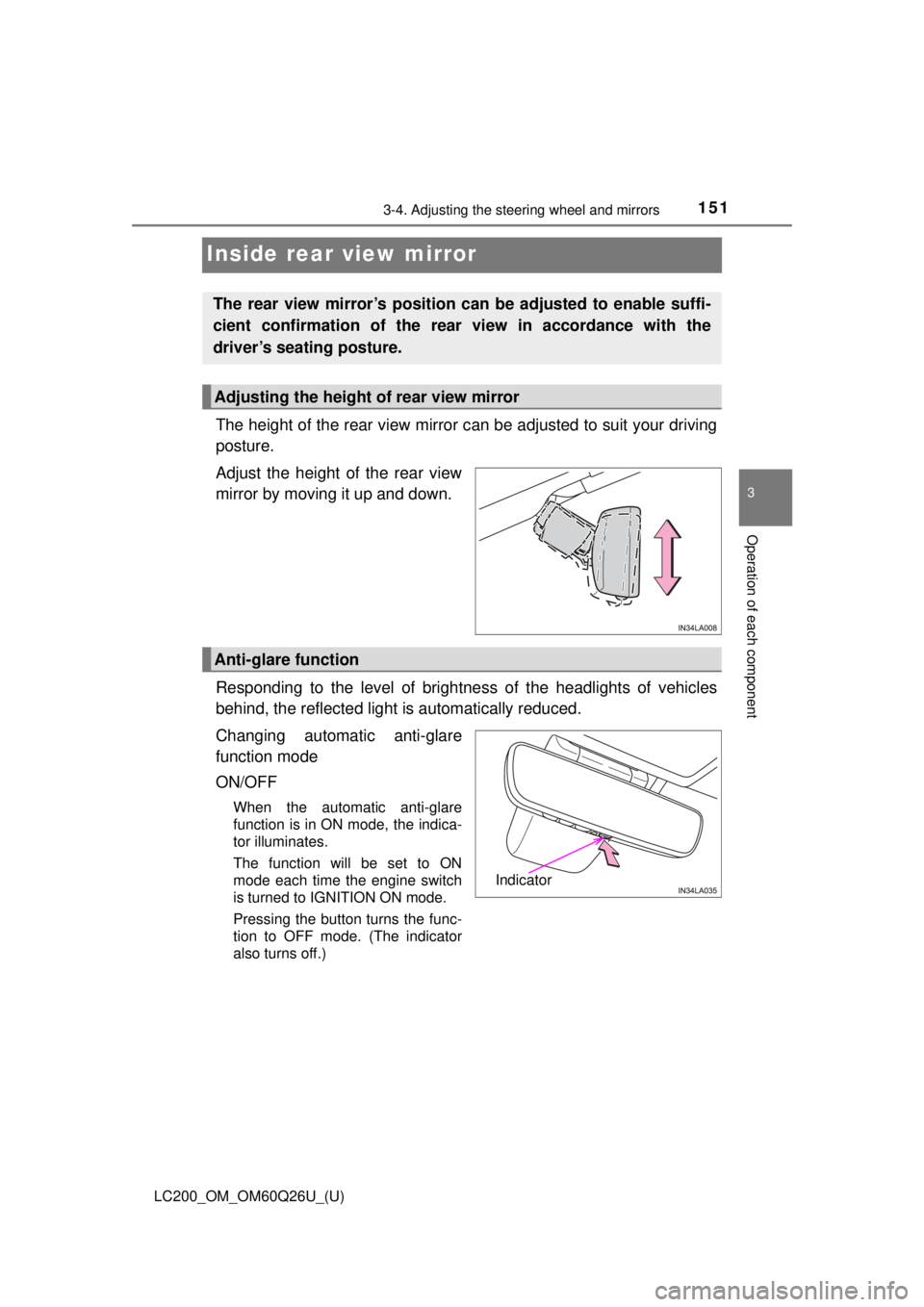
The height of the rear view mirror can be adjusted to suit your driving
posture.
Adjust the height of the rear view
mirror by moving it up and down.
Responding to the level of brightne ss of the headlights of vehicles
behind, the reflected light is automatically reduced.
Changing automatic anti-glare
function mode
ON/OFF
When the automatic anti-glare
function is in ON mode, the indica-
tor illuminates.
The function will be set to ON
mode each time the engine switch
is turned to IGNITION ON mode.
Pressing the button turns the func-
tion to OFF mode. (The indicator
also turns off.)
The rear view mirror’s position can be adjusted to enable suffi-
cient confirmation of the rear view in accordance with the
driver’s seating posture.
Adjusting the height of rear view mirror
Anti-glare function
Indicator