Phone connection TOYOTA LAND CRUISER 2021 Accessories, Audio & Navigation (in English)
[x] Cancel search | Manufacturer: TOYOTA, Model Year: 2021, Model line: LAND CRUISER, Model: TOYOTA LAND CRUISER 2021Pages: 277, PDF Size: 9.32 MB
Page 11 of 277
111. Basic function
LC200_Navi_OM60T11U_(U)
20.03.24 14:50
Quick guide
1
No.FunctionPage
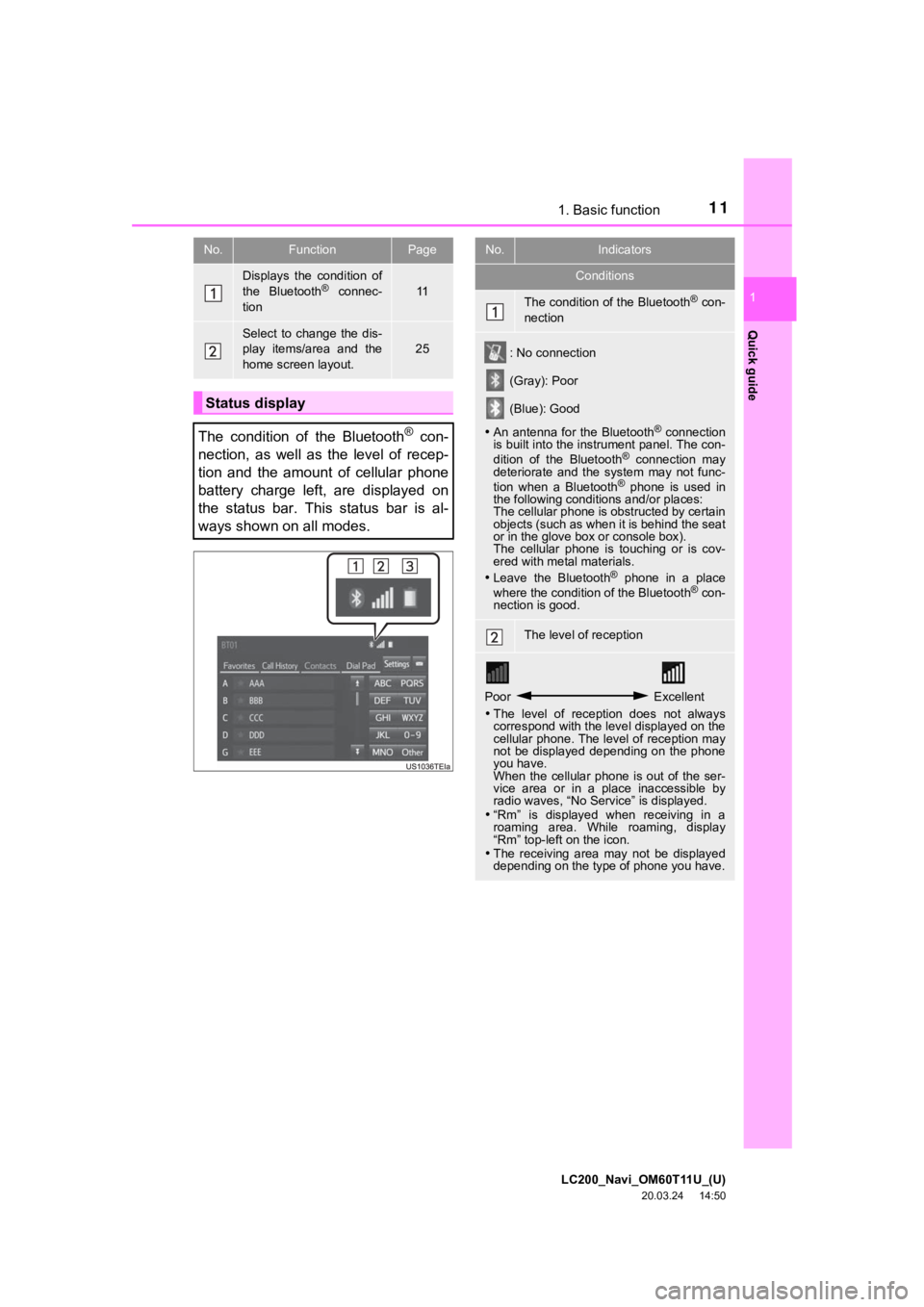
Displays the condition of
the Bluetooth® connec-
tion11
Select to change the dis-
play items/area and the
home screen layout.
25
Status display
The condition of the Bluetooth
® con-
nection, as well as the level of recep-
tion and the amount of cellular phone
battery charge left, are displayed on
the status bar. This status bar is al-
ways shown on all modes.
No.Indicators
Conditions
The condition of the Bluetooth® con-
nection
: No connection
(Gray): Poor
(Blue): Good
An antenna for the Bluetooth
® connection
is built into the instrument panel. The con-
dition of the Bluetooth
® connection may
deteriorate and the system may not func-
tion when a Bluetooth
® phone is used in
the following conditions and/or places:
The cellular phone is obstructed by certain
objects (such as when it is behind the seat
or in the glove box or console box).
The cellular phone is touching or is cov-
ered with metal materials.
Leave the Bluetooth
® phone in a place
where the condition of the Bluetooth® con-
nection is good.
The level of reception
Poor Excellent
The level of reception does not always
correspond with the level displayed on the
cellular phone. The level of reception may
not be displayed depending on the phone
you have.
When the cellular phone is out of the ser-
vice area or in a place inaccessible by
radio waves, “No Service” is displayed.
“Rm” is displayed when receiving in a
roaming area. While roaming, display
“Rm” top-left on the icon.
The receiving area may not be displayed
depending on the type of phone you have.
Page 32 of 277
LC200_Navi_OM60T11U_(U)
20.03.24 14:50
322. Bluetooth® settings
1Turn the Bluetooth® connection setting
of your cellular phone on.
This function is not available when
Bluetooth® connection setting of your cel-
lular phone is set to off.
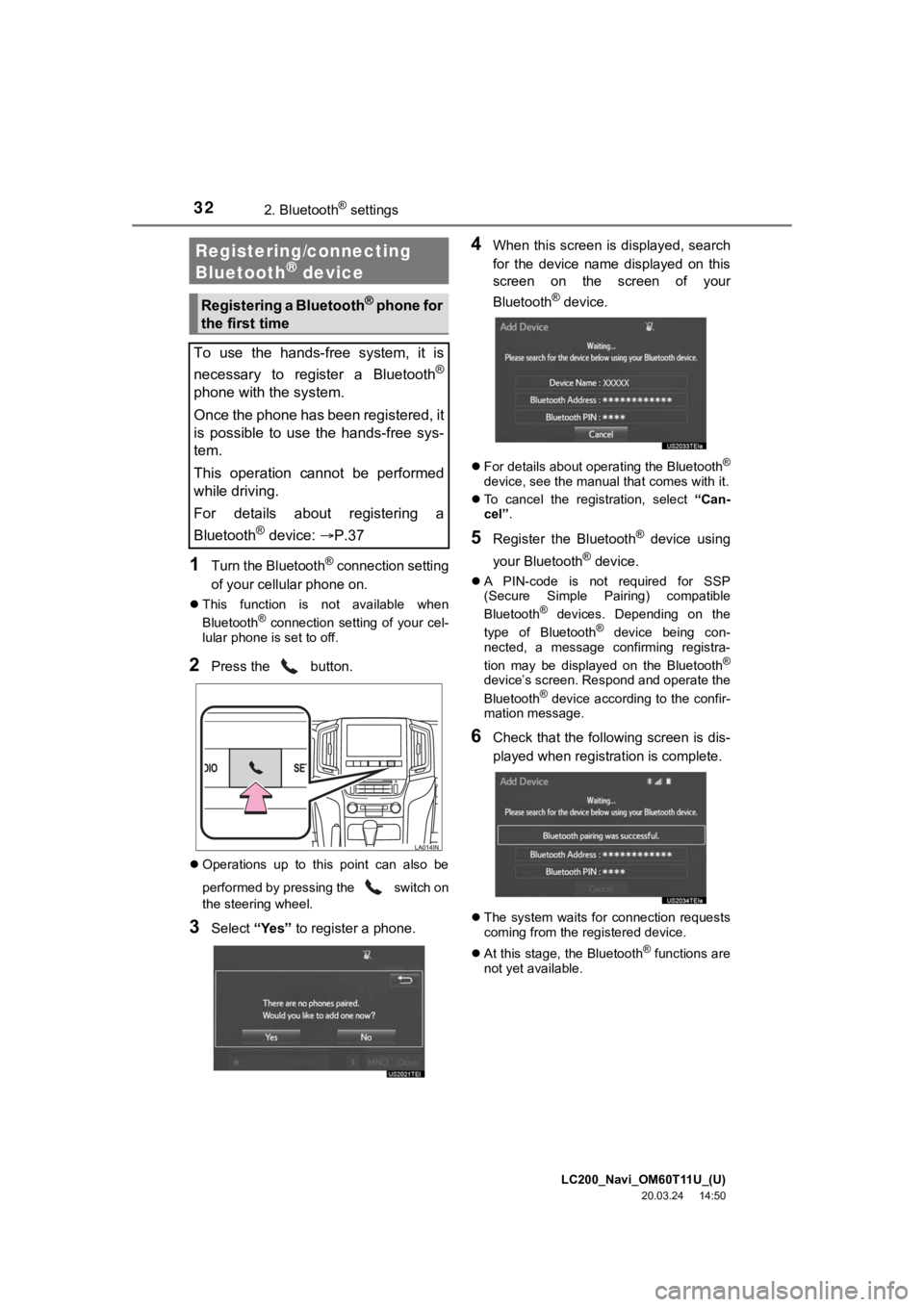
2Press the button.
Operations up to this point can also be
performed by pressing the switch on
the steering wheel.
3Select “Yes” to register a phone.
4When this screen is displayed, search
for the device name displayed on this
screen on the screen of your
Bluetooth
® device.
For details about operating the Bluetooth®
device, see the manual that comes with it.
To cancel the registration, select “Can-
cel”.
5Register the Bluetooth® device using
your Bluetooth
® device.
A PIN-code is not required for SSP
(Secure Simple Pairing) compatible
Bluetooth
® devices. Depending on the
type of Bluetooth® device being con-
nected, a message confirming registra-
tion may be displayed on the Bluetooth
®
device’s screen. Respond and operate the
Bluetooth® device according to the confir-
mation message.
6Check that the following screen is dis-
played when registration is complete.
The system waits for connection requests
coming from the registered device.
At this stage, the Bluetooth
® functions are
not yet available.
Registering/connecting
Bluetooth® device
Registering a Bluetooth® phone for
the first time
To use the hands-free system, it is
necessary to register a Bluetooth
®
phone with the system.
Once the phone has been registered, it
is possible to use the hands-free sys-
tem.
This operation cannot be performed
while driving.
For details about registering a
Bluetooth
® device: P.37
Page 33 of 277
LC200_Navi_OM60T11U_(U)
20.03.24 14:50
Basic function
2
332. Bluetooth® settings
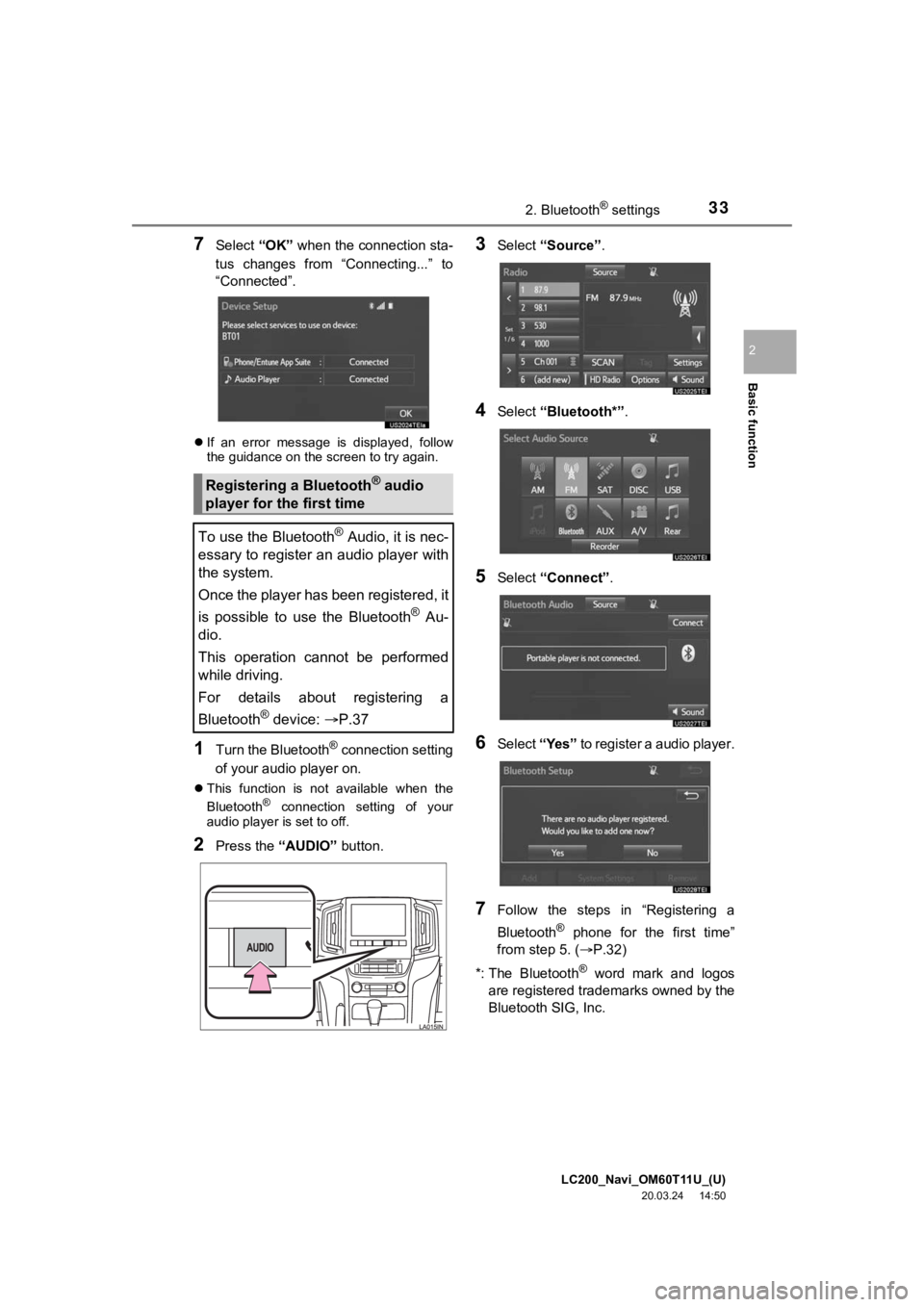
7Select “OK” when the connection sta-
tus changes from “Connecting...” to
“Connected”.
If an error message is displayed, follow
the guidance on the screen to try again.
1Turn the Bluetooth® connection setting
of your audio player on.
This function is not available when the
Bluetooth® connection setting of your
audio player is set to off.
2Press the “AUDIO” button.
3Select “Source” .
4Select “Bluetooth*” .
5Select “Connect” .
6Select “Yes” to register a audio player.
7Follow the steps in “Registering a
Bluetooth
® phone for the first time”
from step 5. ( P.32)
*: The Bluetooth
® word mark and logos
are registered trademarks owned by the
Bluetooth SIG, Inc.
Registering a Bluetooth® audio
player for the first time
To use the Bluetooth
® Audio, it is nec-
essary to register an audio player with
the system.
Once the player has been registered, it
is possible to use the Bluetooth
® Au-
dio.
This operation cannot be performed
while driving.
For details about registering a
Bluetooth
® device: P.37
Page 37 of 277
LC200_Navi_OM60T11U_(U)
20.03.24 14:50
Basic function
2
372. Bluetooth® settings
1Display the “Bluetooth* Setup” screen.
(P.36)
2Select “Add”.
When another Bluetooth® device is con-
nected
To disconnect the Bluetooth® device,
select “Yes”.
When 5 Bluetooth® devices have al-
ready been registered
A registered device needs to be replaced.
Select “Yes”, and select the device to be
replaced.
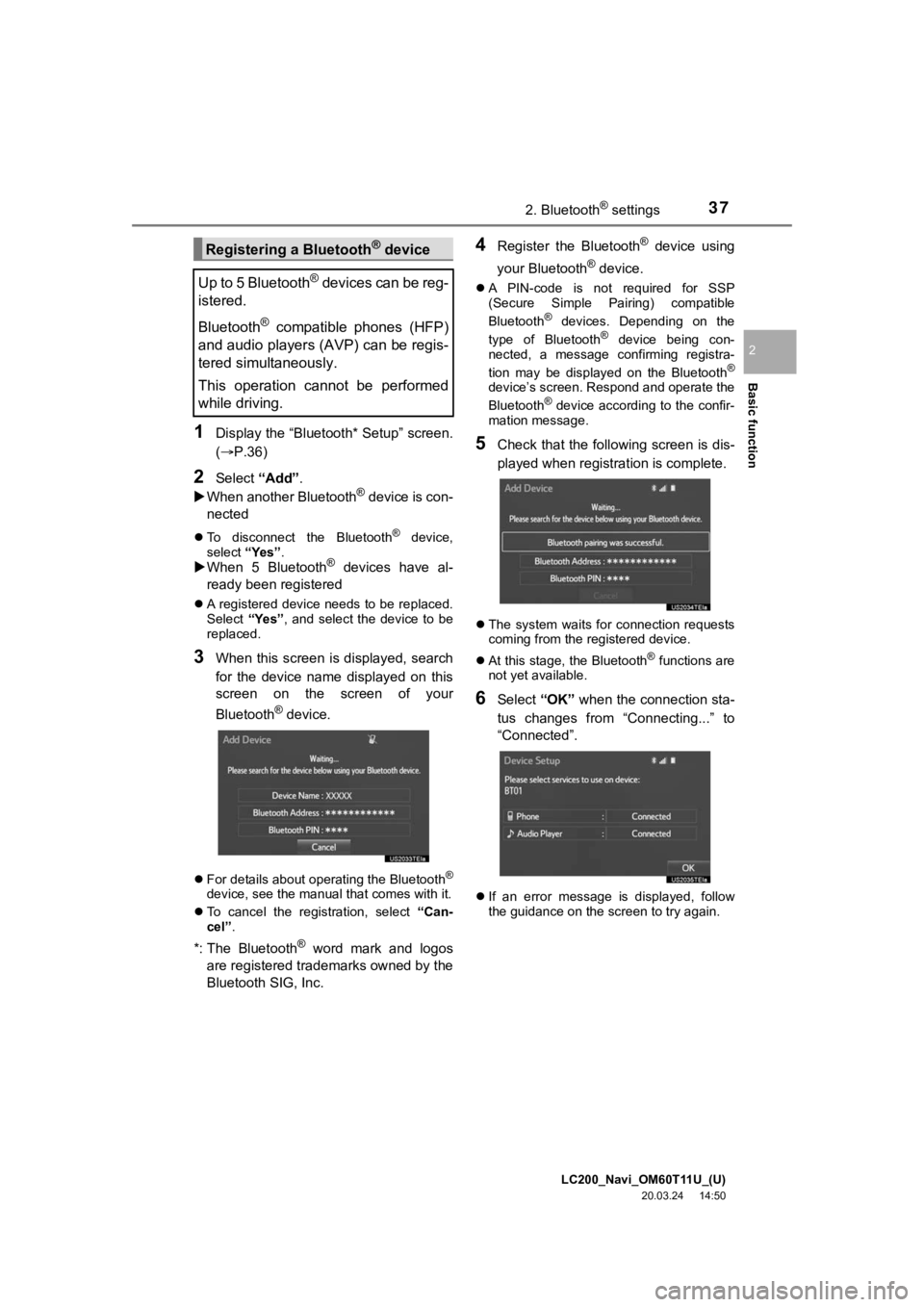
3When this screen is displayed, search
for the device name displayed on this
screen on the screen of your
Bluetooth
® device.
For details about operating the Bluetooth®
device, see the manual that comes with it.
To cancel the registration, select “Can-
cel”.
*: The Bluetooth® word mark and logos
are registered tra demarks owned by the
Bluetooth SIG, Inc.
4Register the Bluetooth® device using
your Bluetooth
® device.
A PIN-code is not required for SSP
(Secure Simple Pairing) compatible
Bluetooth
® devices. Depending on the
type of Bluetooth® device being con-
nected, a message confirming registra-
tion may be displayed on the Bluetooth
®
device’s screen. Respond and operate the
Bluetooth® device according to the confir-
mation message.
5Check that the following screen is dis-
played when registration is complete.
The system waits for connection requests
coming from the registered device.
At this stage, the Bluetooth
® functions are
not yet available.
6Select “OK” when the connection sta-
tus changes from “Connecting...” to
“Connected”.
If an error message is displayed, follow
the guidance on the screen to try again.
Registering a Bluetooth® device
Up to 5 Bluetooth
® devices can be reg-
istered.
Bluetooth
® compatible phones (HFP)
and audio players (AVP) can be regis-
tered simultaneously.
This operation cannot be performed
while driving.
Page 39 of 277
LC200_Navi_OM60T11U_(U)
20.03.24 14:50
Basic function
2
392. Bluetooth® settings
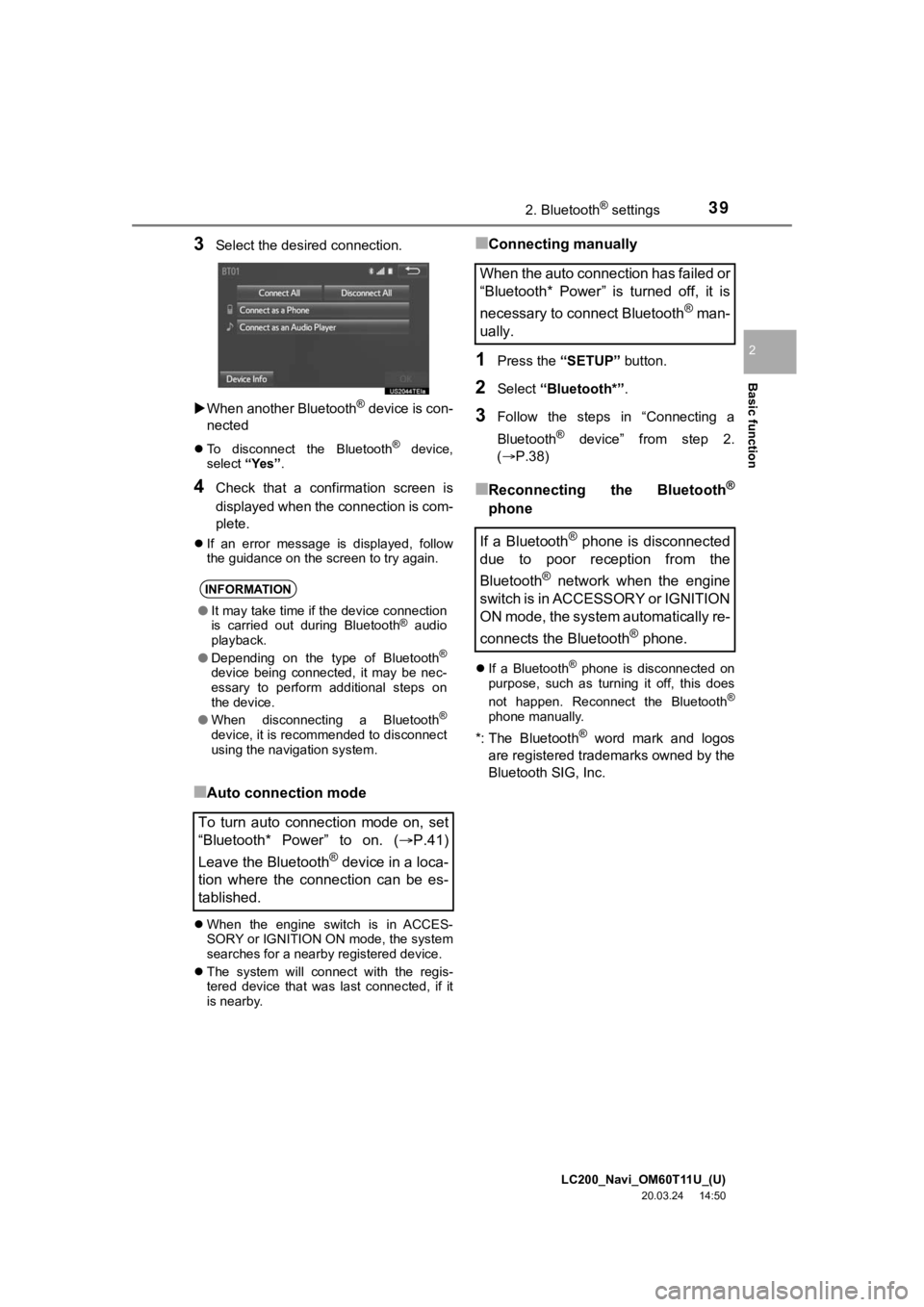
3Select the desired connection.
When another Bluetooth
® device is con-
nected
To disconnect the Bluetooth® device,
select “Yes”.
4Check that a confirmation screen is
displayed when the connection is com-
plete.
If an error message is displayed, follow
the guidance on the screen to try again.
■Auto connection mode
When the engine switch is in ACCES-
SORY or IGNITION ON mode, the system
searches for a nearby registered device.
The system will connect with the regis-
tered device that was last connected, if it
is nearby.
■Connecting manually
1Press the “SETUP” button.
2Select “Bluetooth*” .
3Follow the steps in “Connecting a
Bluetooth
® device” from step 2.
(P.38)
■Reconnecting the Bluetooth®
phone
If a Bluetooth® phone is disconnected on
purpose, such as turning it off, this does
not happen. Reconnect the Bluetooth
®
phone manually.
*: The Bluetooth® word mark and logos
are registered trademarks owned by the
Bluetooth SIG, Inc.
INFORMATION
● It may take time if the device connection
is carried out during Bluetooth® audio
playback.
● Depending on the type of Bluetooth
®
device being connected, it may be nec-
essary to perform additional steps on
the device.
● When disconnecting a Bluetooth
®
device, it is recommended to disconnect
using the navigation system.
To turn auto connection mode on, set
“Bluetooth* Power” to on. ( P.41)
Leave the Bluetooth
® device in a loca-
tion where the connection can be es-
tablished.
When the auto connection has failed or
“Bluetooth* Power” is turned off, it is
necessary to connect Bluetooth
® man-
ually.
If a Bluetooth
® phone is disconnected
due to poor reception from the
Bluetooth
® network when the engine
switch is in ACCESSORY or IGNITION
ON mode, the system automatically re-
connects the Bluetooth
® phone.
Page 40 of 277
LC200_Navi_OM60T11U_(U)
20.03.24 14:50
402. Bluetooth® settings
1Display the “Bluetooth* Setup” screen.
(P.36)
2Select the desired device to be edited.
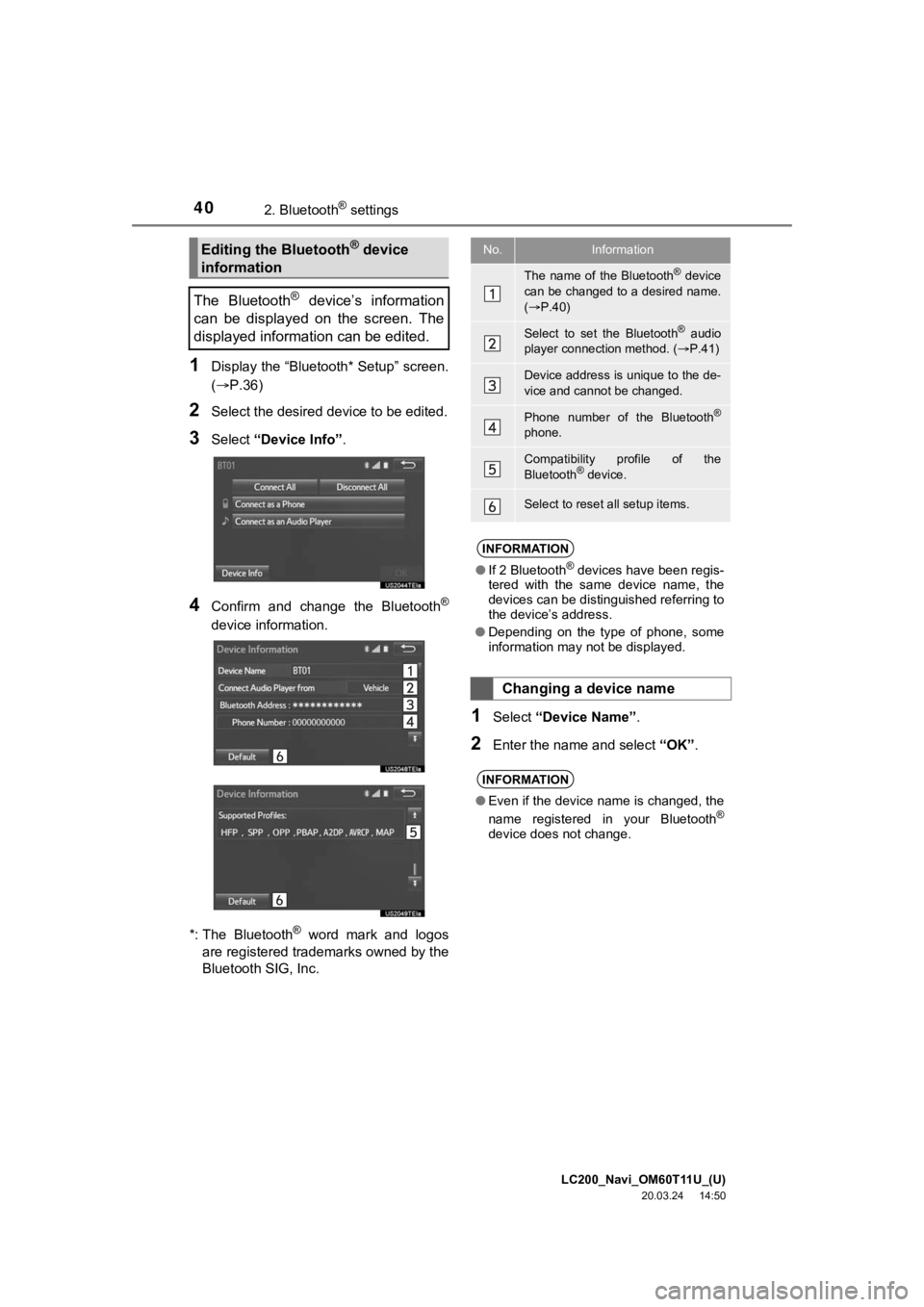
3Select “Device Info” .
4Confirm and change the Bluetooth®
device information.
*: The Bluetooth
® word mark and logos
are registered trademarks owned by the
Bluetooth SIG, Inc.
1Select “Device Name” .
2Enter the name and select “OK”.
Editing the Bluetooth® device
information
The Bluetooth
® device’s information
can be displayed on the screen. The
displayed information can be edited.
No.Information
The name of the Bluetooth® device
can be changed to a desired name.
( P.40)
Select to set the Bluetooth® audio
player connection method. ( P.41)
Device address is unique to the de-
vice and cannot be changed.
Phone number of the Bluetooth®
phone.
Compatibility profile of the
Bluetooth® device.
Select to reset all setup items.
INFORMATION
●If 2 Bluetooth® devices have been regis-
tered with the same device name, the
devices can be distinguished referring to
the device’s address.
● Depending on the type of phone, some
information may not be displayed.
Changing a device name
INFORMATION
●Even if the device name is changed, the
name registered in your Bluetooth®
device does not change.
Page 42 of 277
LC200_Navi_OM60T11U_(U)
20.03.24 14:50
422. Bluetooth® settings
1Select “Bluetooth* Power” .
When “Bluetooth* Power” is on :
The Bluetooth
® device is automatically
connected when the engine switch is in
ACCESSORY or IGNITION ON mode.
When “Bluetooth* Power” is off:
The Bluetooth
® device is disconnected,
and the system will not connect to it next
time.
1Select “Bluetooth* Name” .
2Enter a name and select “OK”.
1Select “Bluetooth* PIN” .
2Enter a PIN-code and select “OK”.
*: The Bluetooth
® word mark and logos
are registered trademarks owned by the
Bluetooth SIG, Inc.
No.InformationPage
Select to set Bluetooth®
connection on/off.42
Displayed system name
can be changed to a de-
sired name.
42
PIN-code used when the
Bluetooth® device was reg-
istered. It can be changed
to a desired code.42
Device address is unique
to the device and cannot be
changed.
Select to set the phone
connection status display
on/off.
Select to set the connec-
tion status display of the
audio player on/off.
Compatibility profile of the
system
Select to reset all setup
items.
Changing “Bluetooth* Power”
INFORMATION
● While driving, the auto connection state
can be changed from off to on, but can-
not be changed from on to off.
Editing the system name
Editing the PIN-code
Page 131 of 277
LC200_Navi_OM60T11U_(U)
20.03.24 14:50
Audio/visual system
4
1312. Radio operation
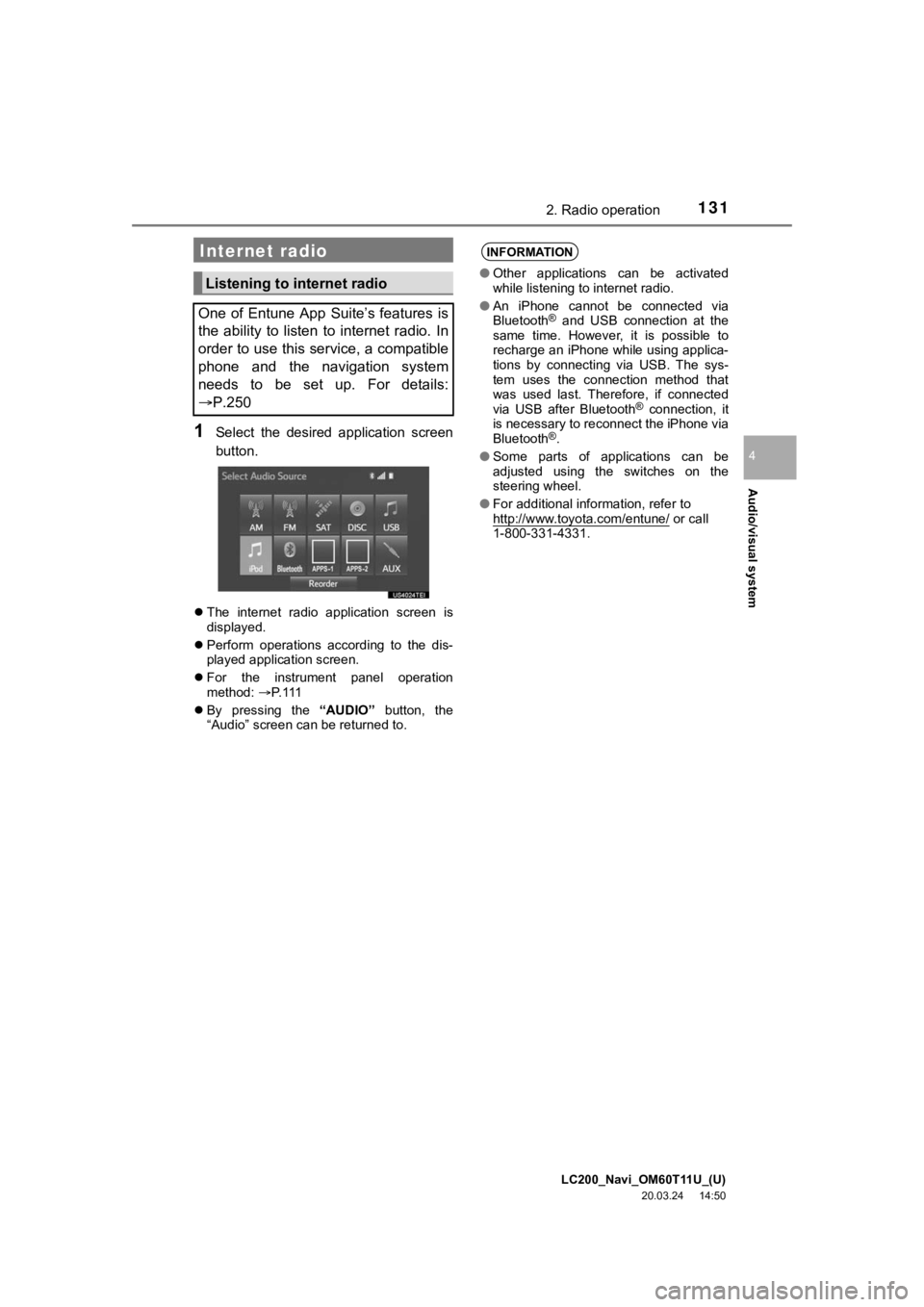
1Select the desired application screen
button.
The internet radio application screen is
displayed.
Perform operations according to the dis-
played application screen.
For the instrument panel operation
method: P. 1 1 1
By pressing the “AUDIO” button, the
“Audio” screen can be returned to.
Internet radio
Listening to internet radio
One of Entune App Suite’s features is
the ability to listen to internet radio. In
order to use this service, a compatible
phone and the navigation system
needs to be set up. For details:
P.250
INFORMATION
● Other applications can be activated
while listening to internet radio.
● An iPhone cannot be connected via
Bluetooth
® and USB connection at the
same time. However, it is possible to
recharge an iPhone while using applica-
tions by connecting via USB. The sys-
tem uses the connection method that
was used last. Therefore, if connected
via USB after Bluetooth
® connection, it
is necessary to reconnect the iPhone via
Bluetooth
®.
● Some parts of applications can be
adjusted using the switches on the
steering wheel.
● For additional information, refer to
http://www.toyota.com/entune/
or call
1-800-331-4331.
Page 215 of 277
LC200_Navi_OM60T11U_(U)
20.03.24 14:50
2151. Phone operation (Hands-free system for cellular phones)
Phone
7
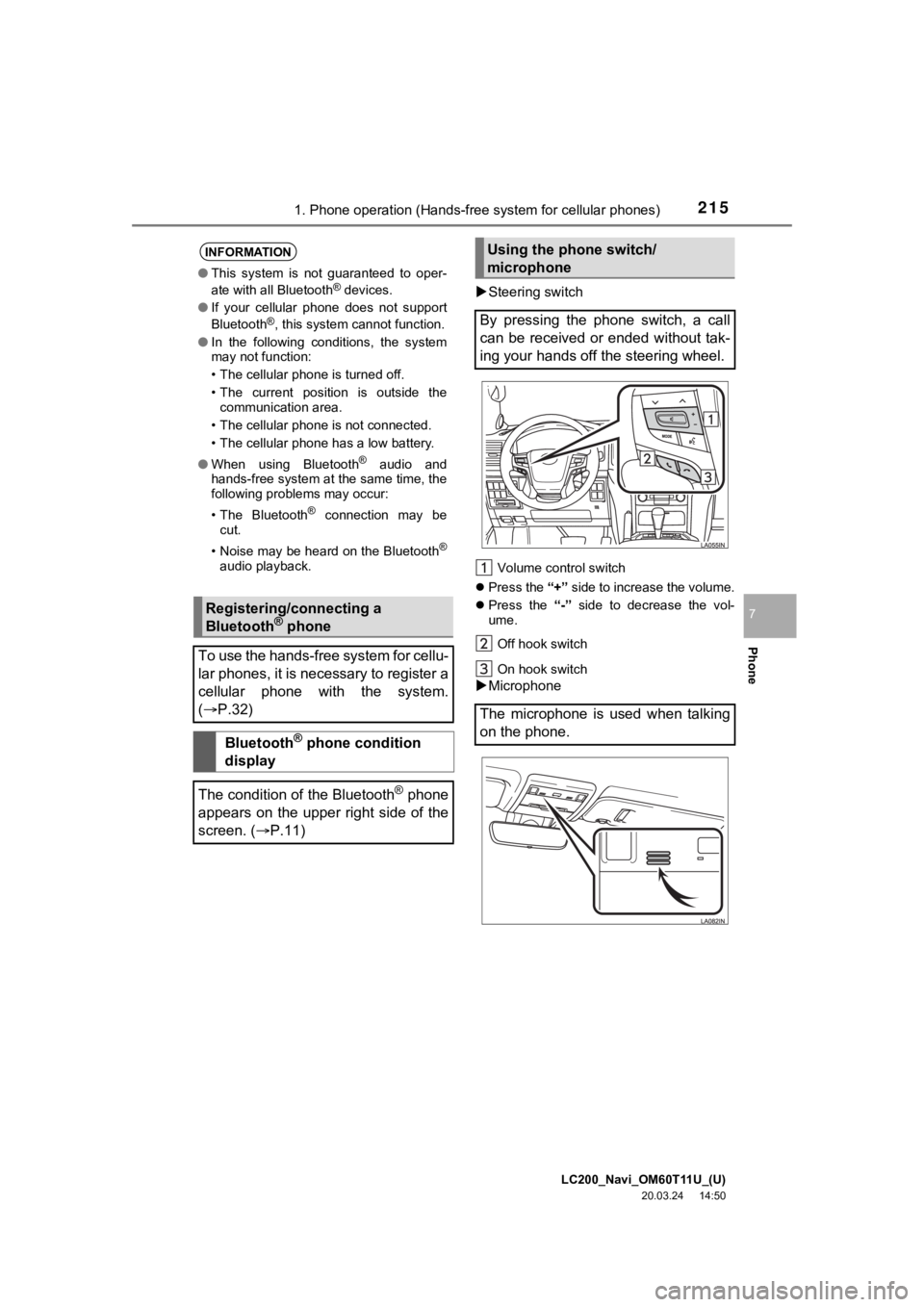
Steering switch
Volume control switch
Press the “+” side to increase the volume.
Press the “-” side to decrease the vol-
ume.
Off hook switch
On hook switch
Microphone
INFORMATION
● This system is not guaranteed to oper-
ate with all Bluetooth® devices.
● If your cellular phone does not support
Bluetooth
®, this system cannot function.
● In the following conditions, the system
may not function:
• The cellular phone is turned off.
• The current position is outside the
communication area.
• The cellular phone is not connected.
• The cellular phone has a low battery.
● When using Bluetooth
® audio and
hands-free system at the same time, the
following problems may occur:
• The Bluetooth
® connection may be
cut.
• Noise may be heard on the Bluetooth
®
audio playback.
Registering/connecting a
Bluetooth® phone
To use the hands-free system for cellu-
lar phones, it is necessary to register a
cellular phone with the system.
( P.32)
Bluetooth® phone condition
display
The condition of the Bluetooth
® phone
appears on the upper right side of the
screen. ( P.11)
Using the phone switch/
microphone
By pressing the phone switch, a call
can be received or ended without tak-
ing your hands off the steering wheel.
The microphone is used when talking
on the phone.
Page 243 of 277
LC200_Navi_OM60T11U_(U)
20.03.24 14:50
2433. What to do if...
Phone
7
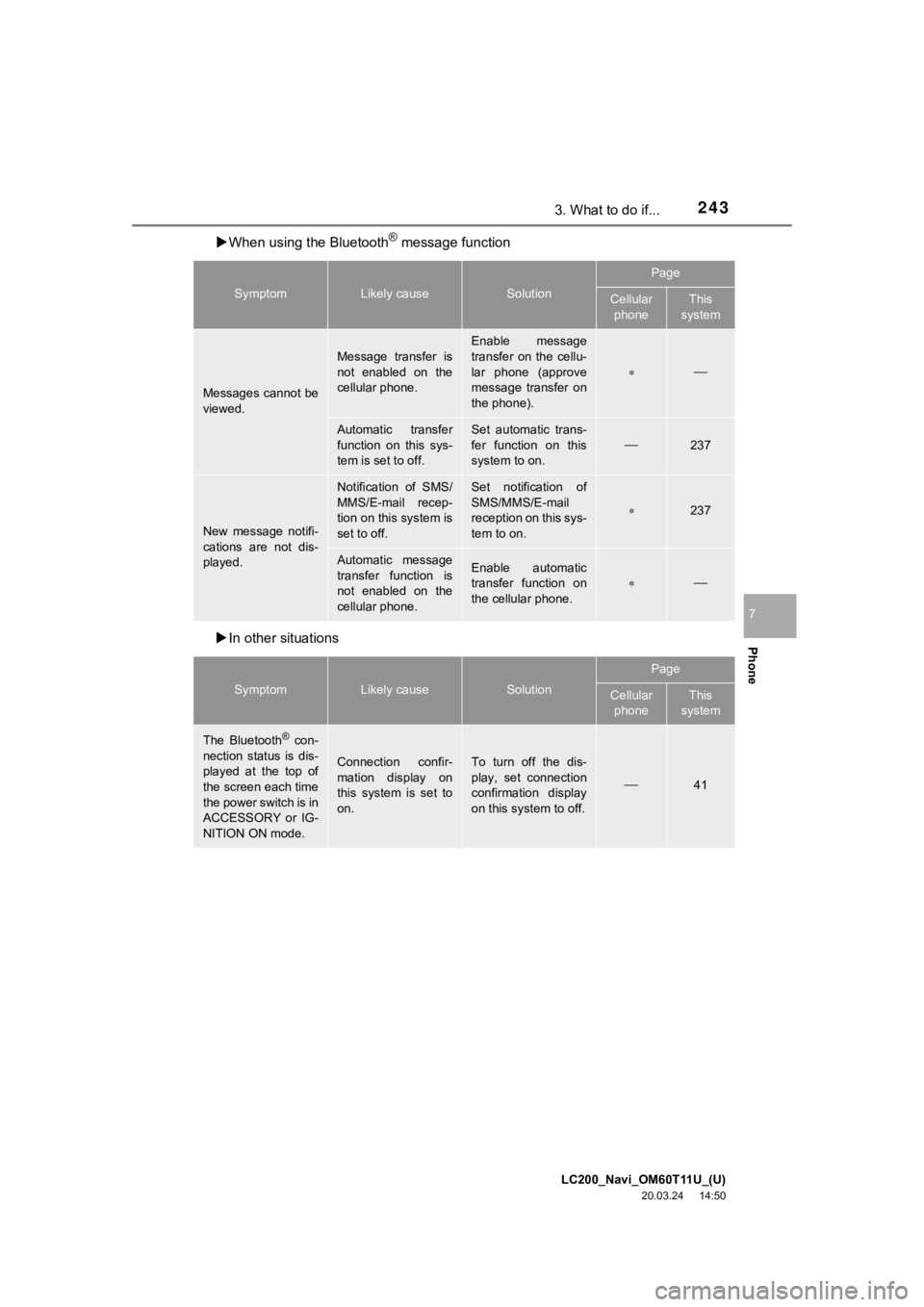
When using the Bluetooth® message function
In other situations
SymptomLikely causeSolution
Page
Cellular
phoneThis
system
Messages cannot be
viewed.
Message transfer is
not enabled on the
cellular phone.
Enable message
transfer on the cellu-
lar phone (approve
message transfer on
the phone).
Automatic transfer
function on this sys-
tem is set to off.Set automatic trans-
fer function on this
system to on.
237
New message notifi-
cations are not dis-
played.
Notification of SMS/
MMS/E-mail recep-
tion on this system is
set to off.Set notification of
SMS/MMS/E-mail
reception on this sys-
tem to on.
237
Automatic message
transfer function is
not enabled on the
cellular phone.Enable automatic
transfer function on
the cellular phone.
SymptomLikely causeSolution
Page
Cellular phoneThis
system
The Bluetooth® con-
nection status is dis-
played at the top of
the screen each time
the power switch is in
ACCESSORY or IG-
NITION ON mode.
Connection confir-
mation display on
this system is set to
on.To turn off the dis-
play, set connection
confirmation display
on this system to off.
41