change time TOYOTA LAND CRUISER 2021 (in English) Owner's Manual
[x] Cancel search | Manufacturer: TOYOTA, Model Year: 2021, Model line: LAND CRUISER, Model: TOYOTA LAND CRUISER 2021Pages: 632, PDF Size: 13.87 MB
Page 437 of 632

LC200_OM_OM60T03U_(U)
4375-4. Using the other interior features
5
Interior features
■The wireless charger can be operated when
The engine switch is in ACCESSORY or IGNITION ON mode.
■ Usable portable devices
Qi standard wireless charge standard can be used on compatible devices.
However, not all Qi standard devices and compatibility are guar anteed.
Starting with mobile phones and smart phones, it is aimed for l ow power elec-
trically supplied portable devices of no more than 5W.
■ When covers and accessories are attached to portable devices
Do not charge in situations where cover and accessories not able to handle
Qi are attached to the portable device. Depending on the type o f cover and
accessory, it may not be possible to charge. When charging is not performed
even with the portable device placed on the charge area, remove the cover
and accessories.
■ While charging, noise enters the AM radio
Turn off the wireless charger and confirm that the noise has decreased. If the
noise decreases, continuously pushing the power supply switch o f the wire-
less charger for 2 seconds, the frequency of the charger can be changed and
the noise can be reduced.
Also, on that occasion, the operation indicator light will flas h orange 2 times.
■ Important points of the wireless charger
●If the electronic key cannot be detected within the vehicle int erior, charging
cannot be done. When the door is opened and closed, charging ma y be
temporarily suspended.
● When charging, the wireless charging device and portable device will get
warmer, however this is not a malfunction.
When a portable device gets warm while charging, charging may s top due
to the protection function on the portable device side. In this case, when the
temperature of the portable device drops significantly, charge again.
■ Operation sounds
When the power supply is turned on, while searching for the portable device a
sound will be produced, however this is not a malfunction.
Page 488 of 632

488
LC200_OM_OM60T03U_(U)
6-3. Do-it-yourself maintenance
■The initialization operation
●Make sure to carry out initialization after adjusting the tire inflation pres-
sure. Also, make sure the tires are cold before carrying out initialization
or tire inflation pressure adjustment.
●If you have accidentally turned the engine switch off during in itialization,
it is not necessary to press the reset swit ch again as initialization will
restart automatically when the engine switch has been turned to IGNI-
TION ON mode for the next time.
●If you accidentally press the reset switch when initialization is not neces-
sary, adjust the tire inflation pressure to the specified level when the
tires are cold, and cond uct initialization again.
●While the position of each tire is being determined and the inf lation pres-
sures are not being displayed on the multi-information display, if the
inflation pressure of a tire drops, the tire pressure warning l ight will come
on.
■Warning performance of the tire pressure warning system
The warning of the tire pressu re warning system will change in accor-
dance with the conditions under which it was initialized. For t his reason,
the system may give a warning even if the tire pressure does no t reach a
low enough level, or if the pressure is higher than the pressur e that was
adjusted to when the sys tem was initialized.
■When initialization of the tire pressure warning system has fai led
Initialization may take longer to complete if the vehicle is driven on an
unpaved road. When performing ini tialization, drive on a paved road if
possible. Depending on the driving environment and condition of the tires,
initialization will be completed in approximately 10 minutes. If initialization
is not complete after driving app roximately 10 minutes, continue driving
for a while.
If the inflation of each tire is not displayed after driving fo r approximately 1
hour, perform the following procedure.
●Park the vehicle in a safe place for approximately 20 minutes. Then
drive straight (with occasional left and right turns) at approx imately
25 mph (40 km/h) or more for app roximately 10 to 20 minutes.
However, in the following situatio ns, the tire inflation pressure will not be
recorder and the system will not operate properly. Perform initialization.
●When operating the tire pressure warning reset switch, the tire pressure
warning light does not blink 3 times.
●After performing initi alization, the tire pressure warning ligh t blinks for 1
minute then stays on after driving for about 20 minutes.
If the inflation pressure of eac h tire is still not displayed, have the vehicle
inspected by you r Toyota dealer.
Page 561 of 632
5617-2. Steps to take in an emergency
LC200_OM_OM60T03U_(U)
7
When trouble arises
Ensure that the shift lever is in P and depress the brake pedal.
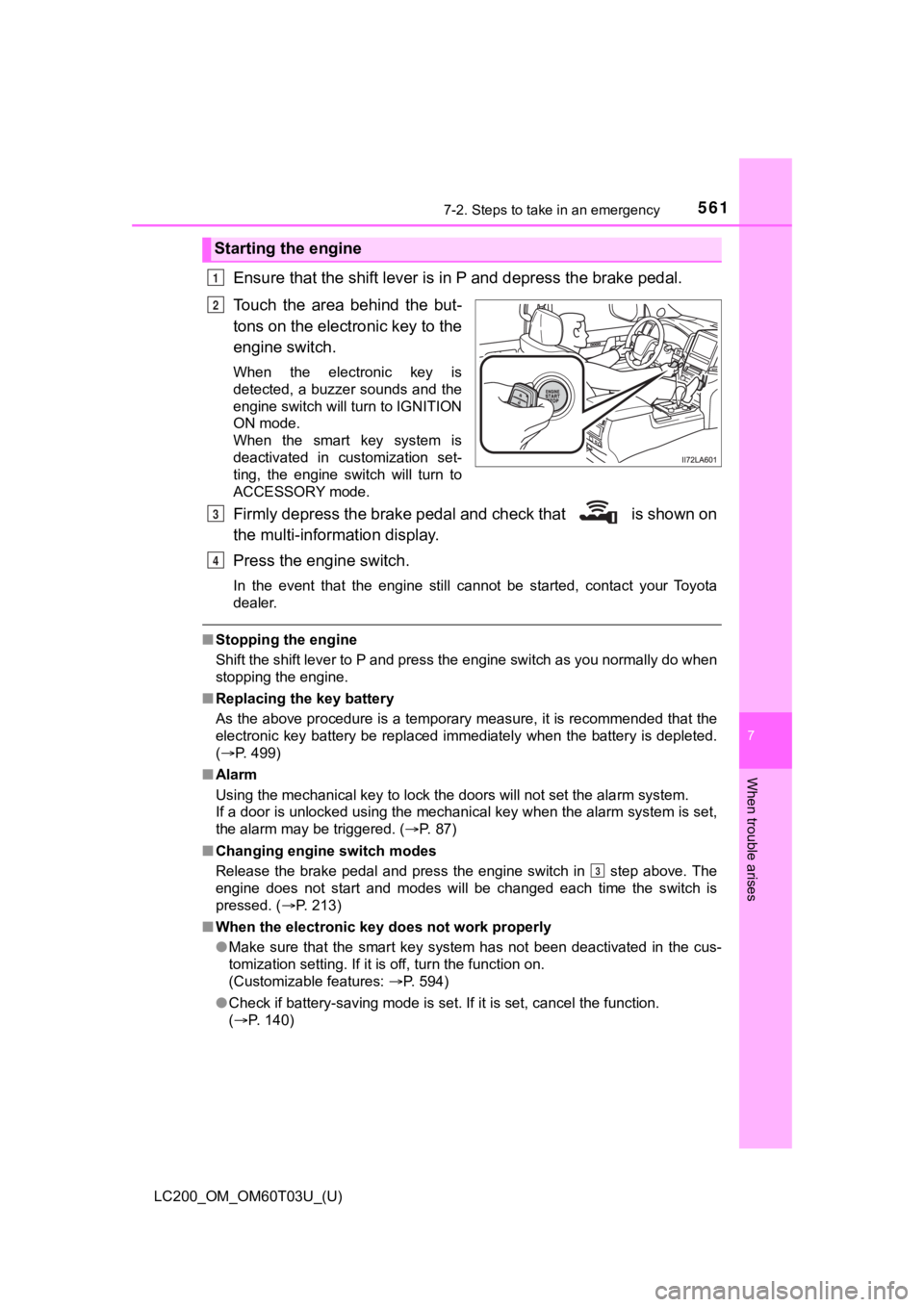
Touch the area behind the but-
tons on the electronic key to the
engine switch.
When the electronic key is
detected, a buzzer sounds and the
engine switch will turn to IGNITION
ON mode.
When the smart key system is
deactivated in customization set-
ting, the engine switch will turn to
ACCESSORY mode.
Firmly depress the brake pedal and check that is shown on
the multi-inform ation display.
Press the engine switch.
In the event that the engine still cannot be started, contact y our Toyota
dealer.
■ Stopping the engine
Shift the shift lever to P and press the engine switch as you normally do when
stopping the engine.
■ Replacing the key battery
As the above procedure is a temporary measure, it is recommende d that the
electronic key battery be replaced immediately when the battery is depleted.
( P. 499)
■ Alarm
Using the mechanical key to lock the doors will not set the ala rm system.
If a door is unlocked using the mechanical key when the alarm system is set,
the alarm may be triggered. ( P. 87)
■ Changing engine switch modes
Release the brake pedal and press the engine switch in step above. The
engine does not start and modes will be changed each time the s witch is
pressed. ( P. 213)
■ When the electronic key does not work properly
●Make sure that the smart key system has not been deactivated in the cus-
tomization setting. If it is off, turn the function on.
(Customizable features: P. 594)
● Check if battery-saving mode is set. If it is set, cancel the f unction.
( P. 140)
Starting the engine
1
2
3
4
3