ESP TOYOTA LAND CRUISER 2021 (in English) Owner's Guide
[x] Cancel search | Manufacturer: TOYOTA, Model Year: 2021, Model line: LAND CRUISER, Model: TOYOTA LAND CRUISER 2021Pages: 632, PDF Size: 13.87 MB
Page 295 of 632
LC200_OM_OM60T03U_(U)
2954-5. Using the driving support systems
4
Driving
■Buzzer operation and di stance to an obstacle
A buzzer sounds when the sensors are operating.
● The buzzer sounds faster as the vehicle approaches an obstacle.
When the vehicle comes within the following distance of the
obstacle, the buzzer sounds continuously.
• Corner sensors: Approximately 1.1ft. (35 cm)
• Rear center sensors: Approximately 1.3 ft. (50 cm)
● When 2 or more obstacles are detected simultaneously, the
buzzer system responds to the nearest obstacle. If one or both
come within the above distances , the beep will repeat a long
tone, followed by fast beeps.
● You can change the volume of the warning beeps. (P. 296)
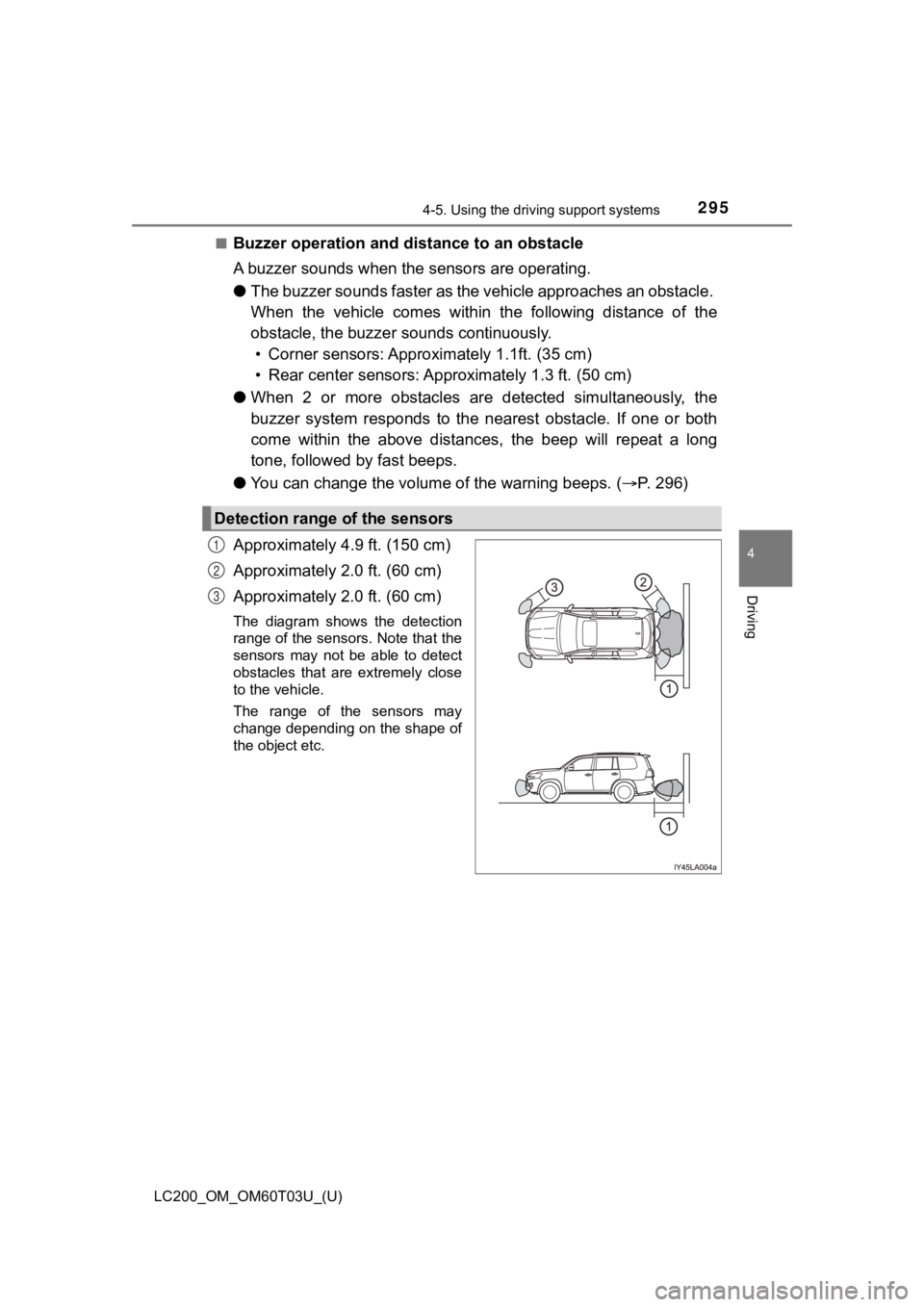
Approximately 4.9 ft. (150 cm)
Approximately 2.0 ft. (60 cm)
Approximately 2.0 ft. (60 cm)
The diagram shows the detection
range of the sensors. Note that the
sensors may not be able to detect
obstacles that are extremely close
to the vehicle.
The range of the sensors may
change depending on the shape of
the object etc.
Detection range of the sensors
1
2
3
Page 297 of 632
LC200_OM_OM60T03U_(U)
2974-5. Using the driving support systems
4
Driving
■The intuitive parking assist can be operated when
●Front corner sensors:
• The engine switch is in IGNITION ON mode.
• The shift lever is in a position other than P.
• The vehicle speed is less than approximately 6 mph (10 km/h).
● Rear corner and rear center sensors:
• The engine switch is in IGNITION ON mode.
• The shift lever is in R.
■ Intuitive parking assist display
When an obstacle is detected while the rear view monitor system , Multi-ter-
rain Monitor is in use, the warning indicator will appear in th e upper corner of
the screen even if the display setting has been set to off.
■ Sensor detection information
●The sensor’s detection areas are limited to the areas around th e vehicle’s
bumper.
● Certain vehicle conditions and the surrounding environment may affect the
ability of a sensor to correctly detect an obstacle. Particular instances where
this may occur are listed below.
• There is dirt, snow or ice on the sensor. (Wiping the sensors will resolve
this problem.)
• The sensor is frozen. (Thawing the area will resolve this problem.) In especially cold weather, if a sensor is frozen the screen ma y show an
abnormal display, or obstacles may not be detected.
• The sensor is covered in any way.
• The vehicle is leaning considerably to one side.
• On an extremely bumpy road, on an incline, on gravel, or on grass.
• The vicinity of the vehicle is noisy due to vehicle horns, motorcycle engines, air brakes of large vehicles, or other loud noises pro ducing ultra-
sonic waves.
• There is another vehicle equipped with parking assist sensors in the
vicinity.
• The sensor is coated with a sheet of spray or heavy rain.
• The vehicle is equipped with a fender pole or wireless antenna .
• The bumper or sensor receives a strong impact.
• The vehicle is approaching a tall or curved curb.
• In harsh sunlight or intense cold weather.
• The area directly under the bumpers is not detected.
• If obstacles draw too close to the sensor.
• A non-genuine Toyota suspension (lowered suspension etc.) is i nstalled.
• People may not be detected if they are wearing certain types o f clothing.
In addition to the examples above, there are instances in which, because of
their shape, signs and other objects may be judged by a sensor to be closer
than they are.
Page 299 of 632
LC200_OM_OM60T03U_(U)
2994-5. Using the driving support systems
4
Driving
WARNING
■When using the intuitive parking assist
Observe the following precautions.
Failing to do so may result in the vehicle being unable to be d riven safely
and possibly cause an accident.
● Do not use the sensor at speeds in excess of 6 mph (10 km/h).
● The sensors’ detection areas and reaction times are limited. When moving
forward or reversing, check the areas surrounding the vehicle ( especially
the sides of the vehicle) for safety, and drive slowly, using t he brake to
control the vehicle’s speed.
● Do not install accessories within the sensors’ detection areas.
NOTICE
■When using intuitive parking assist
In the following situations, the system may not function correctly due to a
sensor malfunction etc. Have the vehicle checked by your Toyota dealer.
● A buzzer does not sound when you turn the intuitive parking ass ist on.
● The intuitive parking assist operation display flashes, and a buzzer sounds
when no obstacles are detected.
● If the area around a sensor collides with something, or is subjected to
strong impact.
● If the bumper collides with something, except when the buzzer m ute
switch has been turned on.
● If the display shows continuously without a beep.
● If a display error occurs, first check the sensor.
If the error occurs even if there is no ice, snow or mud on the sensor, it is
likely that the sensor is malfunctioning.
■ Notes when washing the vehicle
Do not apply intensive bursts of water or steam to the sensor a rea.
Doing so may result in the sensor malfunctioning.
Page 342 of 632

342
LC200_OM_OM60T03U_(U)
4-5. Using the driving support systems
For information about other th an the side view and side views d isplay
area, refer to the page for the respective screen.
Front distance guide line (red)
Indicates a distance approximately 1.5 ft. (0.5 m) from the front end of the
vehicle.
Front tire contact line (blue)
Indicates the estimated front tire position on the image.
Vehicle width lines (blue)
Indicate the estimated vehicle width including the outside rear view mir-
rors.
Rear tire contact line (blue)
Indicates the estimated rear tire position on the image.
1
2
3
4
Page 366 of 632
366
LC200_OM_OM60T03U_(U)
4-5. Using the driving support systems
WARNING
■Handling the radar sensor
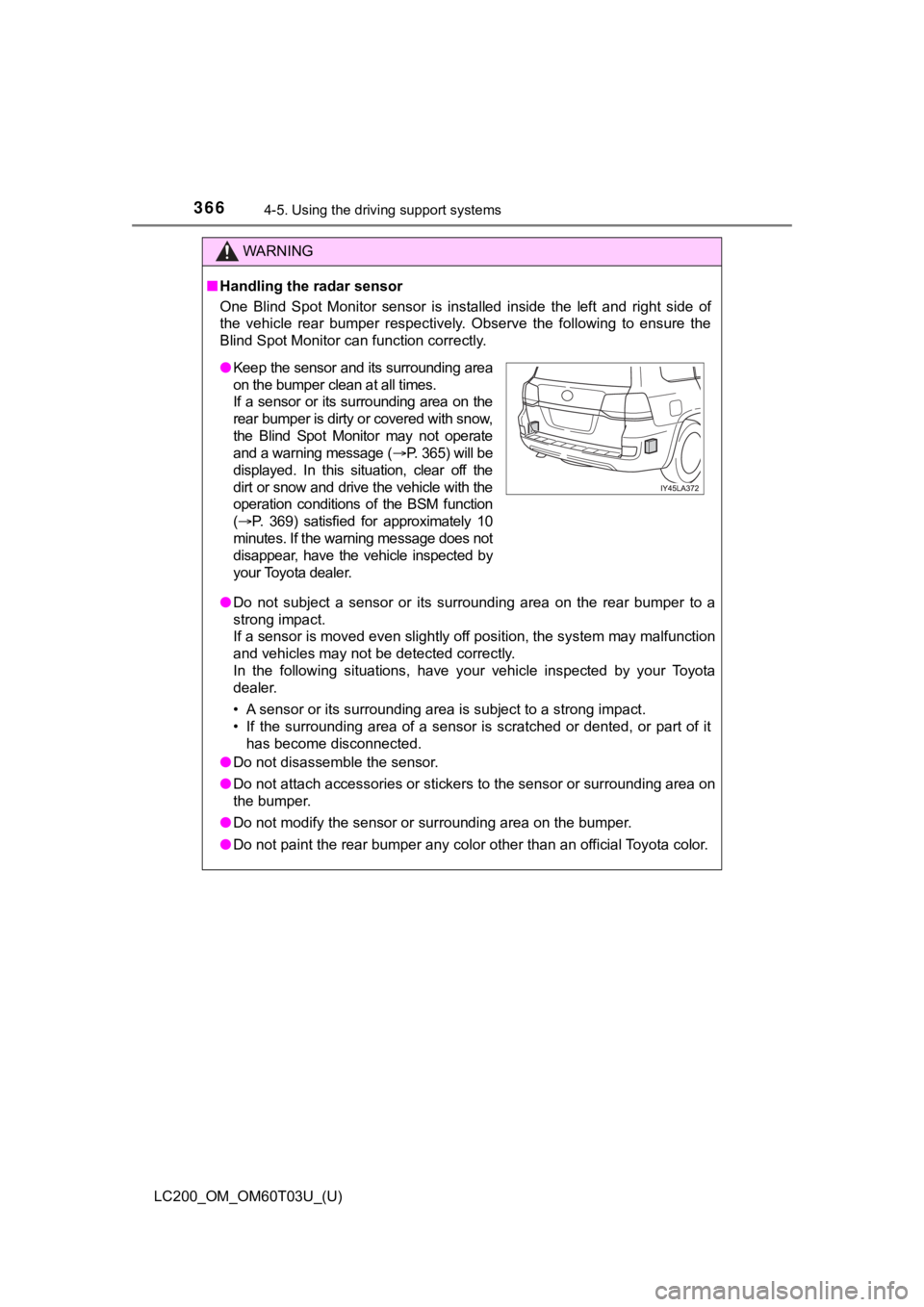
One Blind Spot Monitor sensor is installed inside the left and right side of
the vehicle rear bumper respectively. Observe the following to ensure the
Blind Spot Monitor can function correctly.
● Do not subject a sensor or its surrounding area on the rear bum per to a
strong impact.
If a sensor is moved even slightly off position, the system may malfunction
and vehicles may not be detected correctly.
In the following situations, have your vehicle inspected by your Toyota
dealer.
• A sensor or its surrounding area is subject to a strong impact .
• If the surrounding area of a sensor is scratched or dented, or part of it
has become disconnected.
● Do not disassemble the sensor.
● Do not attach accessories or stickers to the sensor or surround ing area on
the bumper.
● Do not modify the sensor or surrounding area on the bumper.
● Do not paint the rear bumper any color other than an official Toyota color.
●Keep the sensor and its surrounding area
on the bumper clean at all times.
If a sensor or its surrounding area on the
rear bumper is dirty or covered with snow,
the Blind Spot Monitor may not operate
and a warning message ( P. 365) will be
displayed. In this situation, clear off the
dirt or snow and drive the vehicle with the
operation conditions of the BSM function
( P. 369) satisfied for approximately 10
minutes. If the warning message does not
disappear, have the vehicle inspected by
your Toyota dealer.
Page 368 of 632
368
LC200_OM_OM60T03U_(U)
4-5. Using the driving support systems
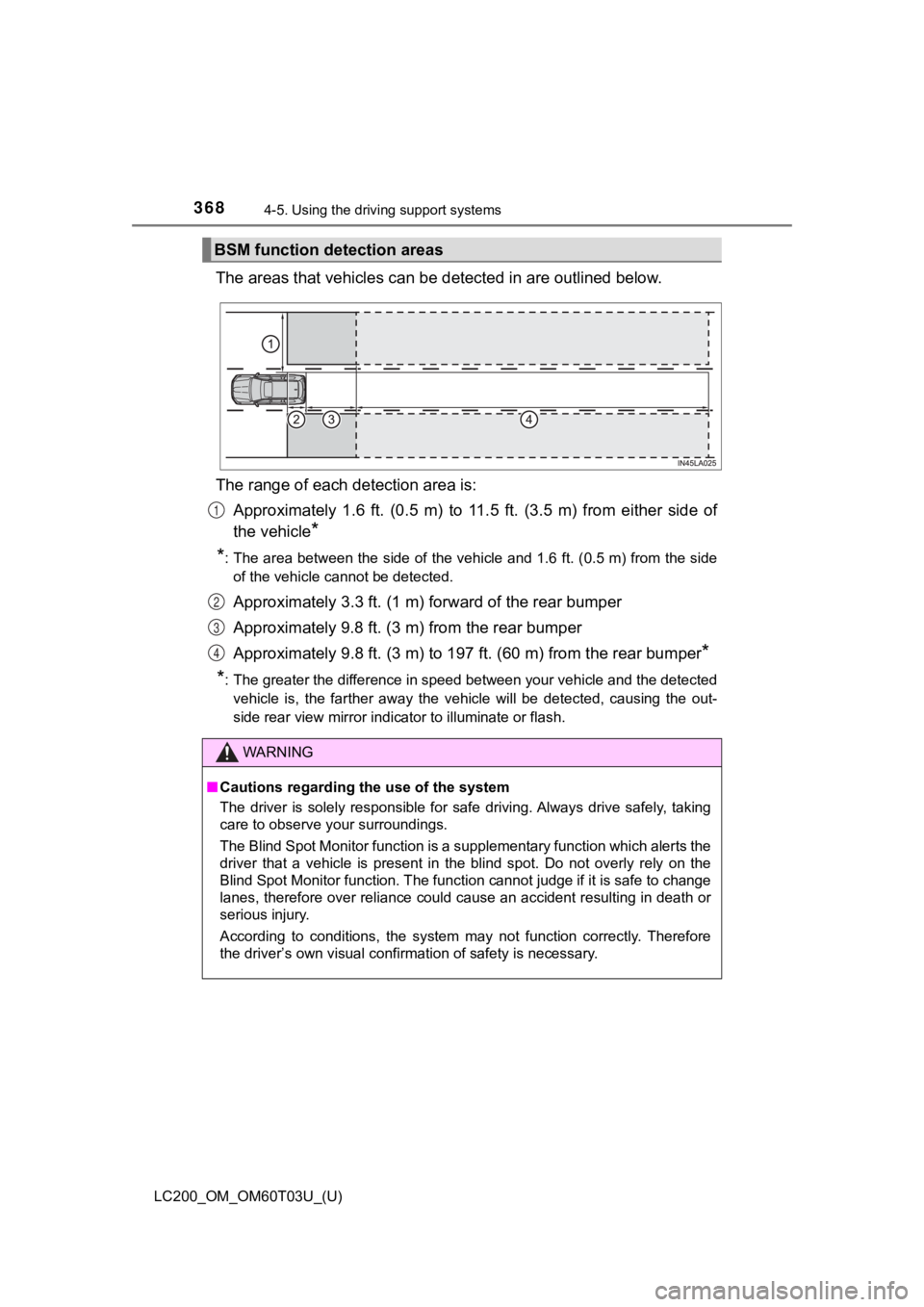
The areas that vehicles can be detected in are outlined below.
The range of each detection area is: Approximately 1.6 ft. (0.5 m) to 11.5 ft. (3.5 m) from either s ide of
the vehicle
*
*
: The area between the side of the vehicle and 1.6 ft. (0.5 m) f rom the side
of the vehicle cannot be detected.
Approximately 3.3 ft. (1 m) f orward of the rear bumper
Approximately 9.8 ft. (3 m) from the rear bumper
Approximately 9.8 ft. (3 m) to 19 7 ft. (60 m) from the rear bumper
*
*
: The greater the difference in speed between your vehicle and t he detected
vehicle is, the farther away the vehicle will be detected, causing the out-
side rear view mirror indicator to illuminate or flash.
BSM function detection areas
WARNING
■ Cautions regarding the use of the system
The driver is solely responsible for safe driving. Always drive safely, taking
care to observe your surroundings.
The Blind Spot Monitor function is a supplementary function whi ch alerts the
driver that a vehicle is present in the blind spot. Do not over ly rely on the
Blind Spot Monitor function. The function cannot judge if it is safe to change
lanes, therefore over reliance could cause an accident resultin g in death or
serious injury.
According to conditions, the system may not function correctly. Therefore
the driver’s own visual confirmation of safety is necessary.
1
2
3
4
Page 372 of 632
372
LC200_OM_OM60T03U_(U)
4-5. Using the driving support systems
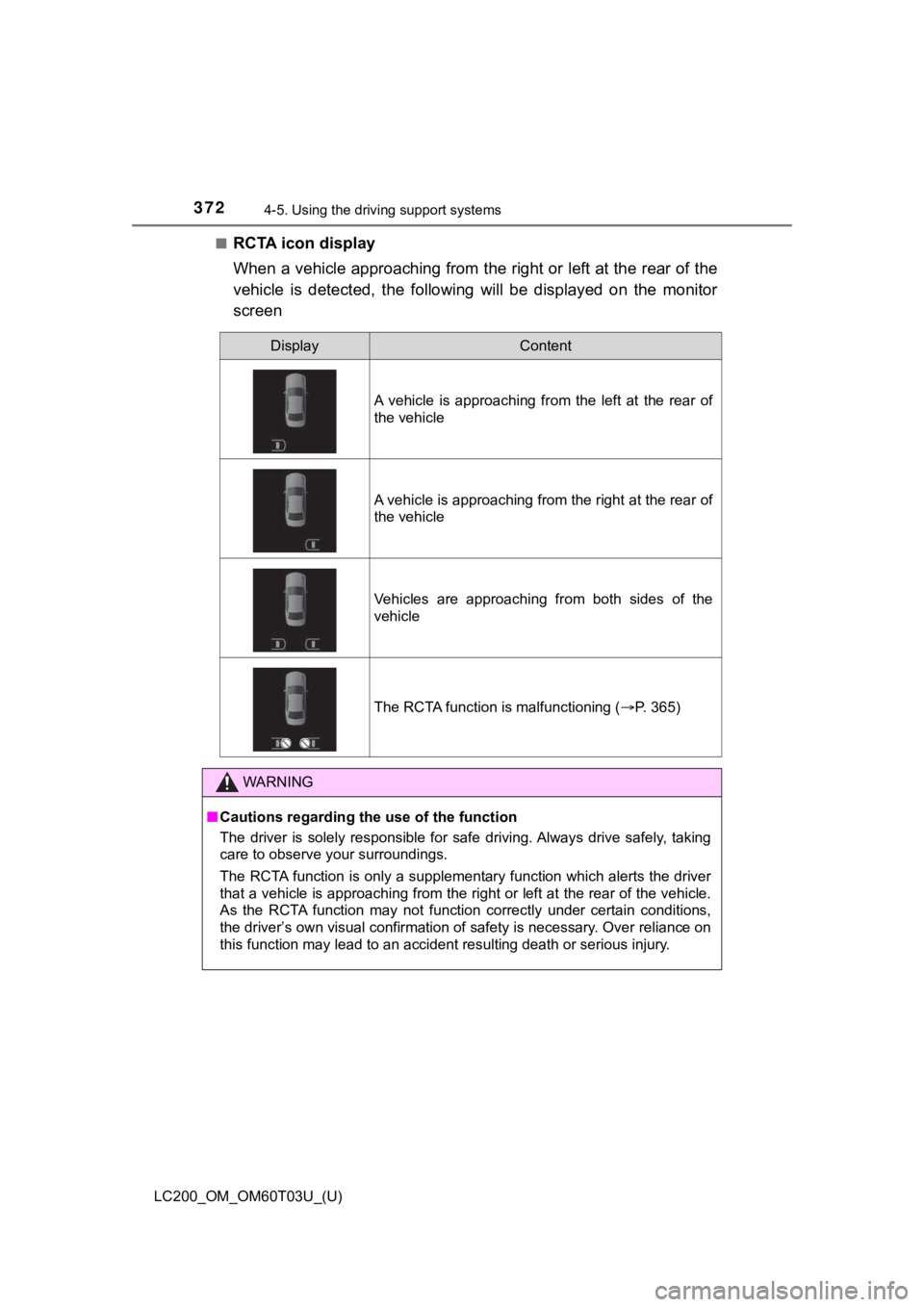
■RCTA icon display
When a vehicle approaching from the right or left at the rear o f the
vehicle is detected, the following will be displayed on the mon itor
screen
DisplayContent
A vehicle is approaching from the left at the rear of
the vehicle
A vehicle is approaching from the right at the rear of
the vehicle
Vehicles are approaching from both sides of the
vehicle
The RCTA function is malfunctioning ( P. 365)
WARNING
■Cautions regarding the use of the function
The driver is solely responsible for safe driving. Always drive safely, taking
care to observe your surroundings.
The RCTA function is only a supplementary function which alerts the driver
that a vehicle is approaching from the right or left at the rear of the vehicle.
As the RCTA function may not function correctly under certain c onditions,
the driver’s own visual confirmation of safety is necessary. Ov er reliance on
this function may lead to an accident resulting death or seriou s injury.
Page 373 of 632
LC200_OM_OM60T03U_(U)
3734-5. Using the driving support systems
4
Driving
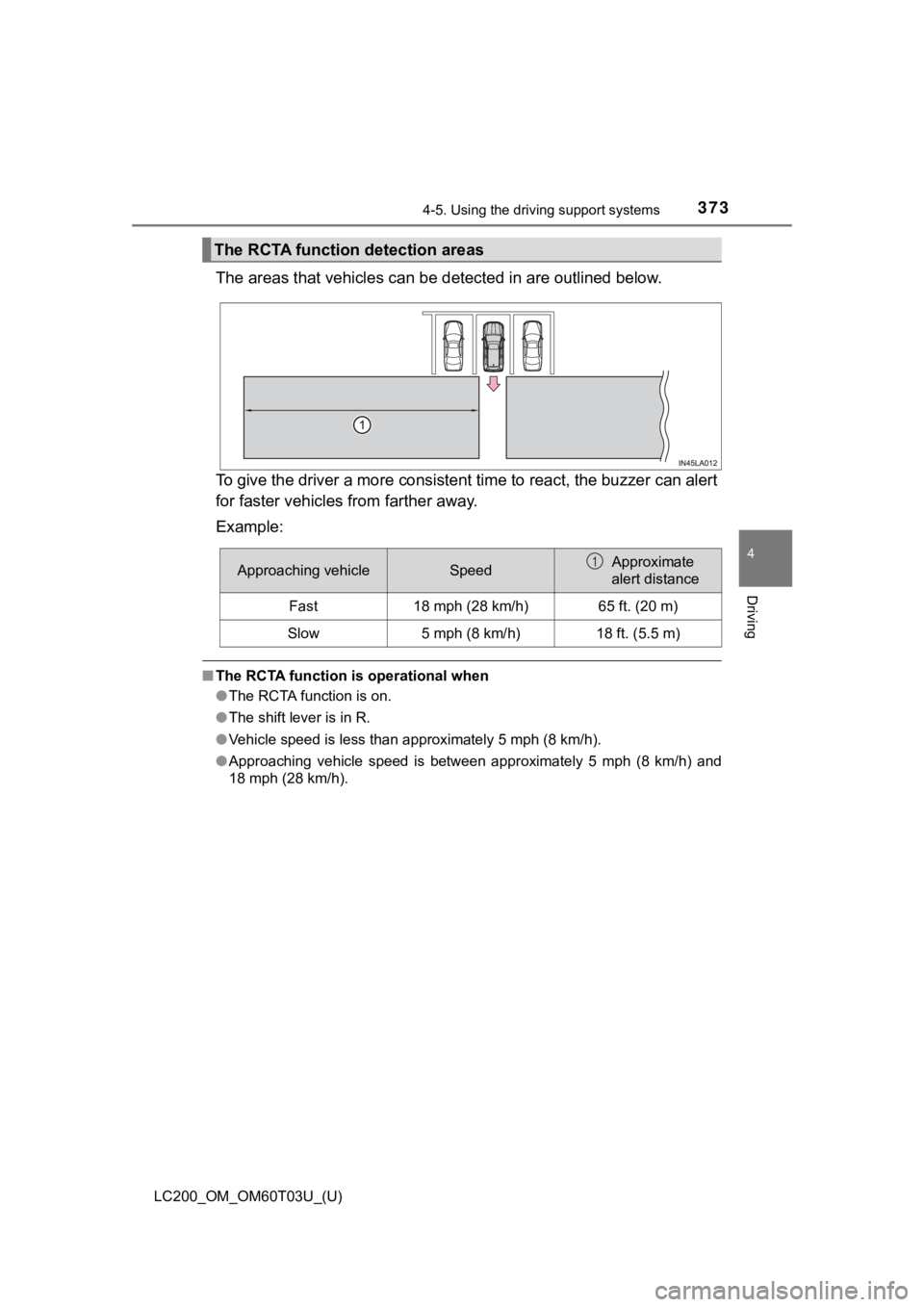
The areas that vehicles can be detected in are outlined below.
To give the driver a more consistent time to react, the buzzer can alert
for faster vehicles from farther away.
Example:
■ The RCTA function is operational when
●The RCTA function is on.
● The shift lever is in R.
● Vehicle speed is less than approximately 5 mph (8 km/h).
● Approaching vehicle speed is between approximately 5 mph (8 km/ h) and
18 mph (28 km/h).
The RCTA function detection areas
Approaching vehicleSpeedApproximate
alert distance
Fast18 mph (28 km/h)65 ft. (20 m)
Slow5 mph (8 km/h)18 ft. (5.5 m)
1
Page 377 of 632
377
LC200_OM_OM60T03U_(U)
4-5. Using the driving support systems
4
Driving
Driving assist systems
◆Multi Terrain ABS (Anti-lock Brake System)
Helps to prevent wheel lock when the brakes are applied suddenl y, or if the
brakes are applied while driving on a slippery road surface, or in off-road
conditions (such as rough roads, sand and mud)
◆Brake assist
Generates an increased level of braking force after the brake pedal is
depressed when the system detects a panic stop situation
◆VSC (Vehicle Stability Control)
Helps the driver to control skidding when swerving suddenly or turning on
slippery road surfaces
◆Active TRAC (Traction Control)
Helps to maintain drive power and prevent the 4 wheels from spi nning
when starting the vehicle or accelerating on slippery roads, or in off-road
conditions
◆Hill-start assist control
Helps to reduce the backward movement of the vehicle when start ing on
an incline or slippery slope
◆KDSS (Kinetic Dynamic Suspension System)
KDSS helps to enhance ride comfort and handling response by usi ng a
hydraulic control system to control the suspension stabilizer b ars in
response to road surface and driving conditions during cornerin g or off-
road driving
To help enhance driving safety and performance, the following
systems operate autom atically in response to various driving
situations. Be aware, however, that these systems are supple-
mentary and should not be relied upon too heavily when operat-
ing the vehicle.
Page 381 of 632
LC200_OM_OM60T03U_(U)
3814-5. Using the driving support systems
4
Driving
WARNING
Any of the following conditions may result in an accident which could cause
death or serious injury:
■ The Multi Terrain ABS does not operate effectively when
● The limits of tire gripping performance have been exceeded (suc h as
excessively worn tires on a snow covered road).
● The vehicle hydroplanes while driving at high speed on the wet or slick
road.
■ Stopping distance when the Multi Terrain ABS is operating may exceed
that of normal conditions
The Multi Terrain ABS is not designed to shorten the vehicle’s stopping dis-
tance. Always maintain a safe distance from the vehicle in fron t of you,
especially in the following situations.
● When driving on dirt, gravel or snow-covered roads
● When driving with tire chains
● When driving over bumps in the road
● When driving over roads with potholes or uneven roads
■ Active TRAC may not operate effectively when
Directional control and power may not be achievable while driving on slip-
pery road surfaces, even if the Active TRAC is operating.
Do not drive the vehicle in conditions where stability and powe r may be lost.
■ If the hill-start assist control does not operate effectively
Do not overly rely on the hill-start assist control. The hill-start assist control
may not operate effectively on steep inclines and roads covered in ice.
■ When Active TRAC, VSC and Trailer Sway Control are off
Be especially careful and drive at a speed appropriate to the r oad condi-
tions. As there are systems to help ensure vehicle stability an d driving force,
do not turn off Active TRAC, VSC and Trailer Sway Control unless neces-
sary.