tower TOYOTA LAND CRUISER 2021 Owners Manual (in English)
[x] Cancel search | Manufacturer: TOYOTA, Model Year: 2021, Model line: LAND CRUISER, Model: TOYOTA LAND CRUISER 2021Pages: 632, PDF Size: 13.87 MB
Page 140 of 632
140
LC200_OM_OM60T03U_(U)
3-2. Opening, closing and locking the doors
■Battery-saving function
The battery-saving function will be activated in order to preve nt the electronic
key battery and the battery from being discharged while the veh icle is not in
operation for a long time.
● In the following situations, the smart key system may take some time to
unlock the doors.
• The electronic key has been left in an area of approximately 6 ft. (2 m) of
the outside of the vehicle for 10 minutes or longer.
• The smart key system has not been used for 5 days or longer.
● If the smart key system has not been used for 14 days or longer , the doors
cannot be unlocked at any doors except the driver’s door. In th is case, take
hold of the driver’s door handle, or use the wireless remote co ntrol or the
mechanical key, to unlock the doors.
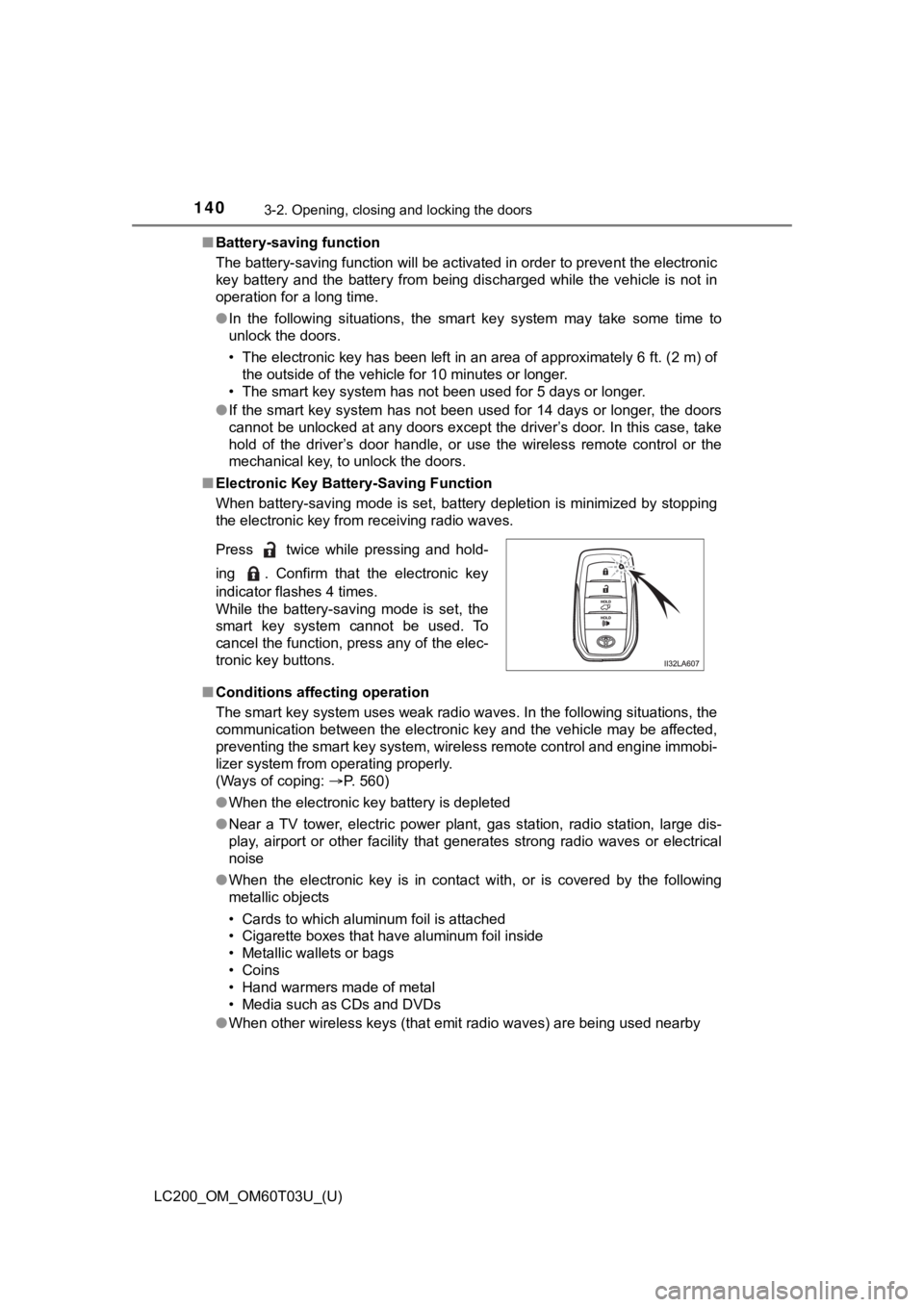
■ Electronic Key Battery-Saving Function
When battery-saving mode is set, battery depletion is minimized by stopping
the electronic key from receiving radio waves.
■ Conditions affecting operation
The smart key system uses weak radio waves. In the following si tuations, the
communication between the electronic key and the vehicle may be affected,
preventing the smart key system, wireless remote control and en gine immobi-
lizer system from operating properly.
(Ways of coping: P. 560)
● When the electronic key battery is depleted
● Near a TV tower, electric power plant, gas station, radio stati on, large dis-
play, airport or other facility that generates strong radio wav es or electrical
noise
● When the electronic key is in contact with, or is covered by the following
metallic objects
• Cards to which aluminum foil is attached
• Cigarette boxes that have aluminum foil inside
• Metallic wallets or bags
• Coins
• Hand warmers made of metal
• Media such as CDs and DVDs
● When other wireless keys (that emit radio waves) are being used nearby
Press twice while pressing and hold-
ing . Confirm that the electronic key
indicator flashes 4 times.
While the battery-saving mode is set, the
smart key system cannot be used. To
cancel the function, press any of the elec-
tronic key buttons.
Page 262 of 632
262
LC200_OM_OM60T03U_(U)
4-5. Using the driving support systems
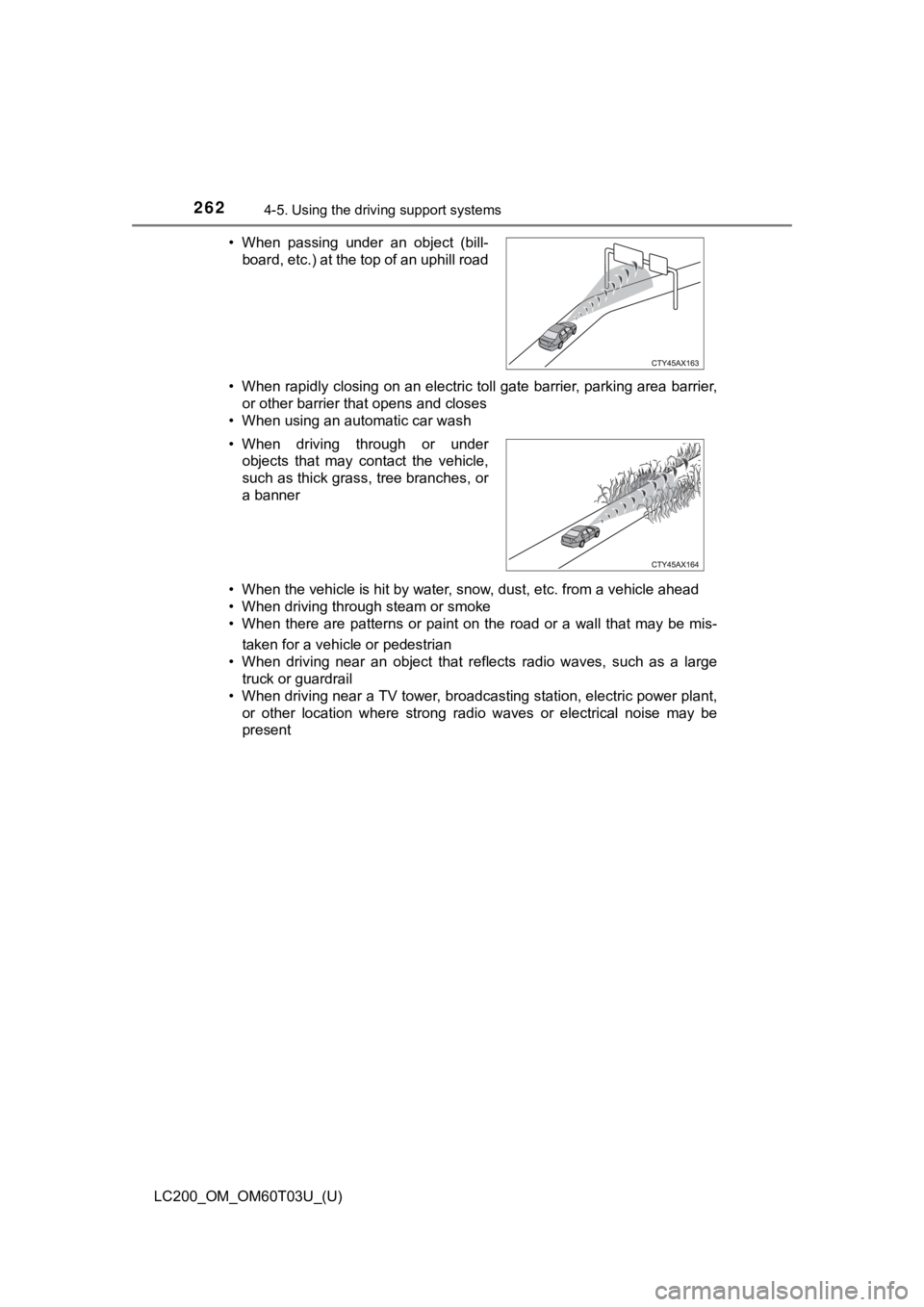
• When rapidly closing on an electric toll gate barrier, parking area barrier,
or other barrier that opens and closes
• When using an automatic car wash
• When the vehicle is hit by water, snow, dust, etc. from a vehicle ahead
• When driving through steam or smoke
• When there are patterns or paint on the road or a wall that may be mis-
taken for a vehicle or pedestrian
• When driving near an object that reflects radio waves, such as a large
truck or guardrail
• When driving near a TV tower, broadcasting station, electric power plant,
or other location where strong radio waves or electrical noise may be
present
• When passing under an object (bill-
board, etc.) at the top of an uphill road
• When driving through or under objects that may contact the vehicle,
such as thick grass, tree branches, or
a banner
Page 441 of 632
LC200_OM_OM60T03U_(U)
4415-4. Using the other interior features
5
Interior features
NOTICE
■Conditions in which the function may not operate correctly
In the following conditions, the wireless charger may not opera te correctly
● The portable device is fully charged
● There is foreign matter between the charge area and portable de vice
● The temperature of the portable device gets higher from charging
● The charging surface of the portable device is facing up
● The placement of the portable device is out of alignment with t he charge
area
● Near a TV tower, electric power plant, gas station, radio stati on, large dis-
play, airport or other facility that generates strong radio wav es or electrical
noise
● When the electronic key is in contact with, or is covered by th e following
metallic objects
• Cards to which aluminum foil is attached
• Cigarette boxes that have aluminum foil inside
• Metallic wallets or bags
• Coins
• Hand warmers made of metal
• Media such as CDs and DVDs
● When other wireless keys (that emit radio waves) are being used nearby
In addition, excluding the above-mentioned, when the charger do es not per-
form normally or the operation indicator light is flashing continuously, it is
considered that the wireless charger is malfunctioning. Contact your Toyota
dealer.
■ To prevent failure or damage to data
● Do not bring magnetic cards, such as credit cards, or magnetic recording
media, etc., close to the charger while charging, otherwise, da ta may dis-
appear under the influence of magnetism. Also, do not bring pre cision
instruments such as wrist watches, etc., close to the charger, as such
objects may break.
● Do not leave portable devices in the cabin. The temperature ins ide the
cabin may become high, when under the sun, and cause damage to the
device.
■ To prevent battery discharge
When the engine is stopped, do not use the wireless charger for a long
time.
Page 487 of 632

LC200_OM_OM60T03U_(U)
4876-3. Do-it-yourself maintenance
6
Maintenance and care
■If the tread on snow tires wears down below 0.16 in. (4 mm)
The effectiveness of the tires as snow tires is lost.
■Initializing the tire pressure warning system
initialize the system with the ti re inflation pressure adjusted to the speci-
fied level.
■Situations in which the tire pressure warning system may not op er-
ate properly
●In the following cases, the tire pressure warning system may no t operate
properly.
• If non-genuine Toyota wheels are used.
• A tire has been replaced with a tire that is not an OE (Original Equip-
ment) tire.
• A tire has been replac ed with a tire that is not of the specif ied size.
• Tire chains etc . are equipped.
• An auxiliary-supported ru n-flat tire is equipped.
• If a window tint that affects the radio wave signals is instal led.
• If there is a lot of snow or ice on the vehicle, particularly around the
wheels or wheel housings.
• If the spare tire is in a location subject to poor radio wave signal
reception.
• If a large metallic object whic h can interfere with signal reception is
put near the spare tire.
• If tires not equipped with the tire pressure warning valves an d trans-
mitters are used.
• If the ID code on the tire pressure warning valves and transmi tters is
not registered in the tire pressure warning computer.
●Performance may be affected in the following situations.
• Near a TV tower, electric power plant, gas station, radio stat ion, large
display, airport or other facilit y that generates strong radio waves or
electrical noise
• When carrying a portable radio, cellular phone, cordless phone or
other wireless communication device
●When the vehicle is parked, the time taken for the warning to s tart or go
off could be extended.
●When tire inflation pressure declines rapidly for example when a tire has
burst, the warning may not function.