display TOYOTA LAND CRUISER 2021 Owners Manual (in English)
[x] Cancel search | Manufacturer: TOYOTA, Model Year: 2021, Model line: LAND CRUISER, Model: TOYOTA LAND CRUISER 2021Pages: 56, PDF Size: 3.5 MB
Page 3 of 56
1
OVERVIEW
FEATURES & OPERATIONS
TOYOTA SAFETY SENSE
SAFETY &
EMERGENCY FEATURES
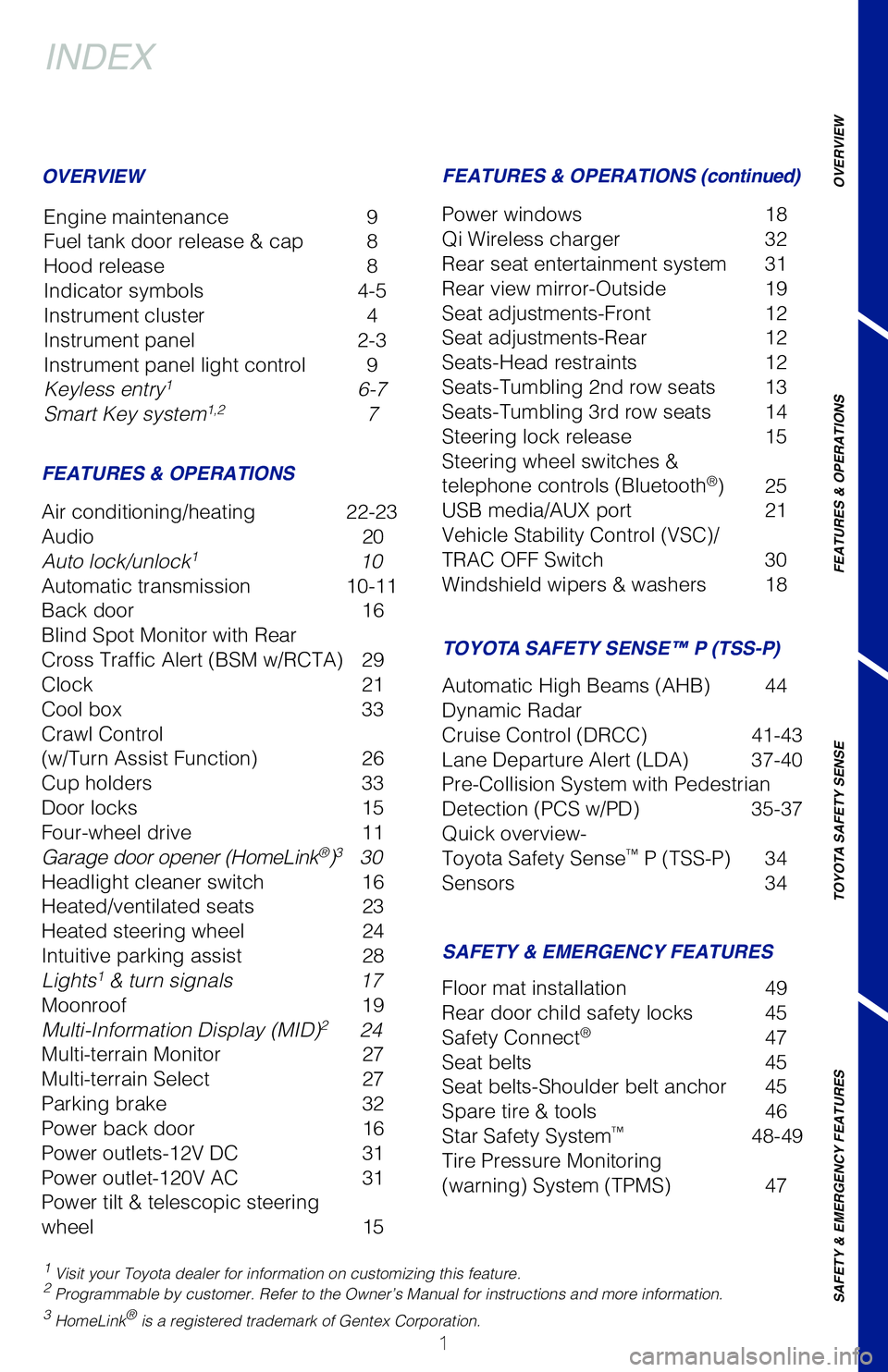
INDEX
Engine maintenance 9
Fuel tank door release & cap 8
Hood release 8
Indicator symbols 4-5
Instrument cluster 4
Instrument panel 2-3
Instrument panel light control 9
Keyless entry
1 6-7
Smart Key system1,2 7
1 Visit your Toyota dealer for information on customizing this feature.2 Programmable by customer. Refer to the Owner’s Manual for instructio\
ns and more information.3 HomeLink® is a registered trademark of Gentex Corporation.
OVERVIEW
FEATURES & OPERATIONS FEATURES & OPERATIONS (continued)
SAFETY & EMERGENCY FEATURES TOYOTA SAFETY SENSE™ P (TSS-P)
Air conditioning/heating 22-23
Audio
20
Auto lock/unlock
1 10
Automatic transmission 10-11
Back door 16
Blind Spot Monitor with Rear
Cross Traffic Alert (BSM w/RCTA) 29
Clock 21
Cool box 33
Crawl Control
(w/Turn Assist Function) 26
Cup holders 33
Door locks 15
Four-wheel drive 11
Garage door opener (HomeLink
®)3 30
Headlight cleaner switch 16
Heated/ventilated seats 23
Heated steering wheel 24
Intuitive parking assist 28
Lights
1 & turn signals 17
Moonroof 19
Multi-Information Display (MID)
2 24
Multi-terrain Monitor 27
Multi-terrain Select 27
Parking brake 32
Power back door 16
Power outlets-12V DC 31
Power outlet-120V AC 31
Power tilt & telescopic steering
wheel 15Power windows
18
Qi Wireless charger 32
Rear seat entertainment system 31
Rear view mirror-Outside 19
Seat adjustments-Front 12
Seat adjustments-Rear 12
Seats-Head restraints 12
Seats-Tumbling 2nd row seats 13
Seats-Tumbling 3rd row seats 14
Steering lock release 15
Steering wheel switches &
telephone controls (Bluetooth
®) 25
USB media/AUX port 21
Vehicle Stability Control (VSC)/
TRAC OFF Switch 30
Windshield wipers & washers 18
Floor mat installation 49
Rear door child safety locks 45
Safety Connect
® 47
Seat belts 45
Seat belts-Shoulder belt anchor 45
Spare tire & tools 46
Star Safety System
™ 48-49
Tire Pressure Monitoring
(warning) System (TPMS) 47
Automatic High Beams (AHB) 44
Dynamic Radar
Cruise Control (DRCC) 41-43
Lane Departure Alert (LDA) 37-40
Pre-Collision System with Pedestrian
Detection (PCS w/PD) 35-37
Quick overview-
Toyota Safety Sense
™ P (TSS-P) 34
Sensors 34
Page 4 of 56
2
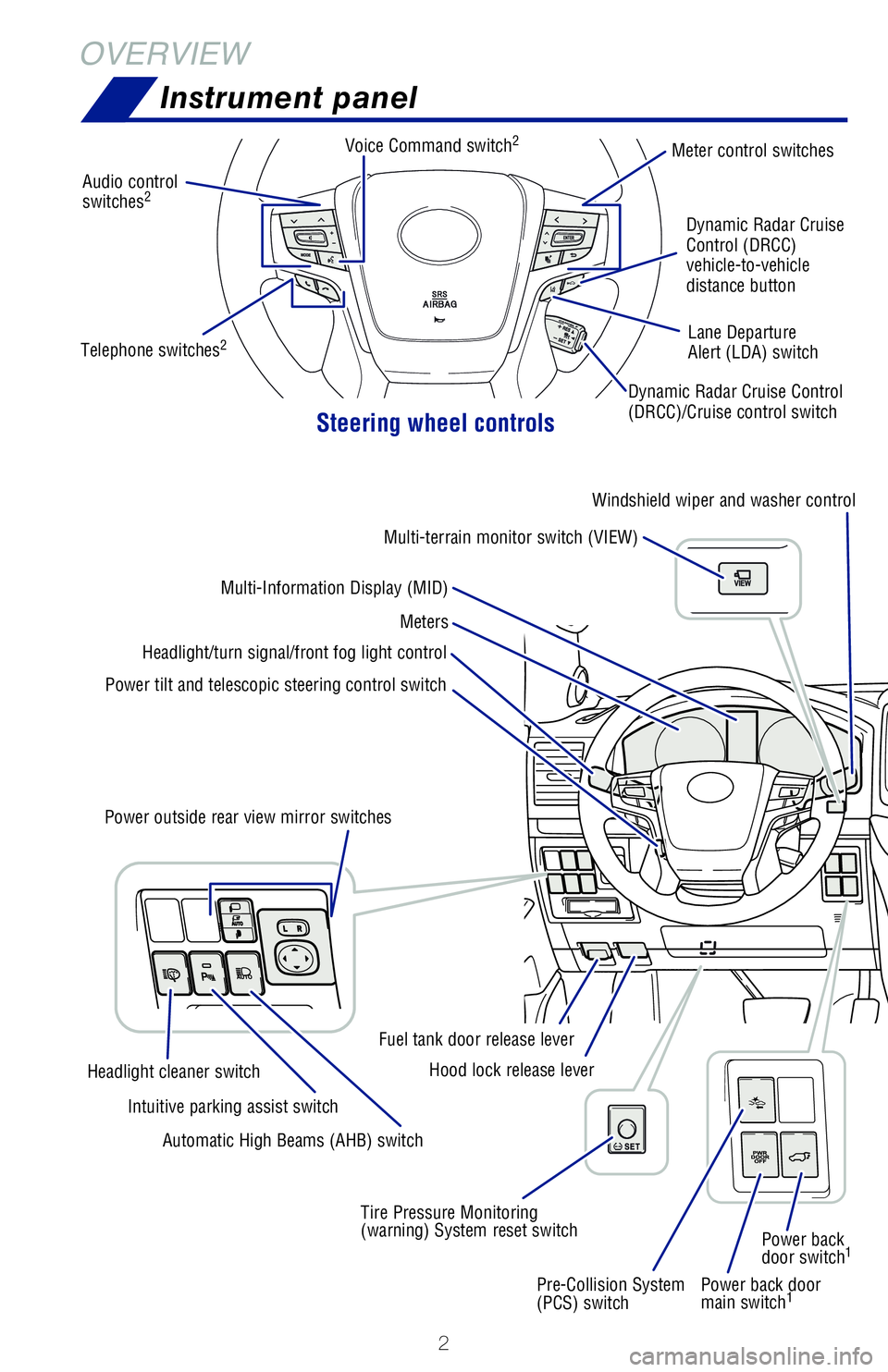
OVERVIEWInstrument panel
Steering wheel controls
Power back door
main switch1
Audio control
switches2
Meter control switches
Dynamic Radar Cruise Control
(DRCC)/Cruise control switch Dynamic Radar Cruise
Control (DRCC)
vehicle-to-vehicle
distance button
Lane Departure
Alert (LDA) switch
Power tilt and telescopic steering control switch Headlight/turn signal/front fog light control
Meters
Multi-Information Display (MID) Windshield wiper and washer control
Multi-terrain monitor switch (VIEW)
Pre-Collision System
(PCS) switch Power back
door switch
1
Tire Pressure Monitoring
(warning) System reset switchHood lock release lever
Fuel tank door release lever
Power outside rear view mirror switches
Automatic High Beams (AHB) switch
Intuitive parking assist switch
Headlight cleaner switch Voice Command switch
2
Telephone switches2
Page 6 of 56
 4
OVERVIEWInstrument cluster
For details, refer to “Warning lights and indicators,” Section 2, \
2021 Owner’s
Manual.
Engine oil pressure gauge Tachometer
Multi-Information Display (MID)
Speedo")
4
OVERVIEWInstrument cluster
For details, refer to “Warning lights and indicators,” Section 2, \
2021 Owner’s
Manual.
Engine oil pressure gauge Tachometer
Multi-Information Display (MID)
Speedometer
Voltmeter
Fuel gauge
Odometer and trip meter display
Shift position and range display
Odometer/trip meter display change button
Instrument panel light control dial
Engine coolant temperature gauge
Vehicles with a monochrome display
Arrow direction indicates fuel
tank door position
Brake system warning1
Anti-lock Brake System (ABS)
warning1
Charging system warning1
Center differential lock indicator
Crawl Control indicator1
Automatic headlight leveling system
warning1,2
AIR BAG ON-OFF indicator1
Airbag SRS warning1
Constant speed cruise control
indicator/Constant speed
cruise control SET indicator
Auto High Beams (AHB) indicator Blind Spot Monitor (BSM)
indicator
1
BSM outside rear view mirror
indicators
BSM w/Rear Cross Traffic Alert
(RCTA) Indicator
Indicator symbols
Service indicators and warning lights
Page 17 of 56
15
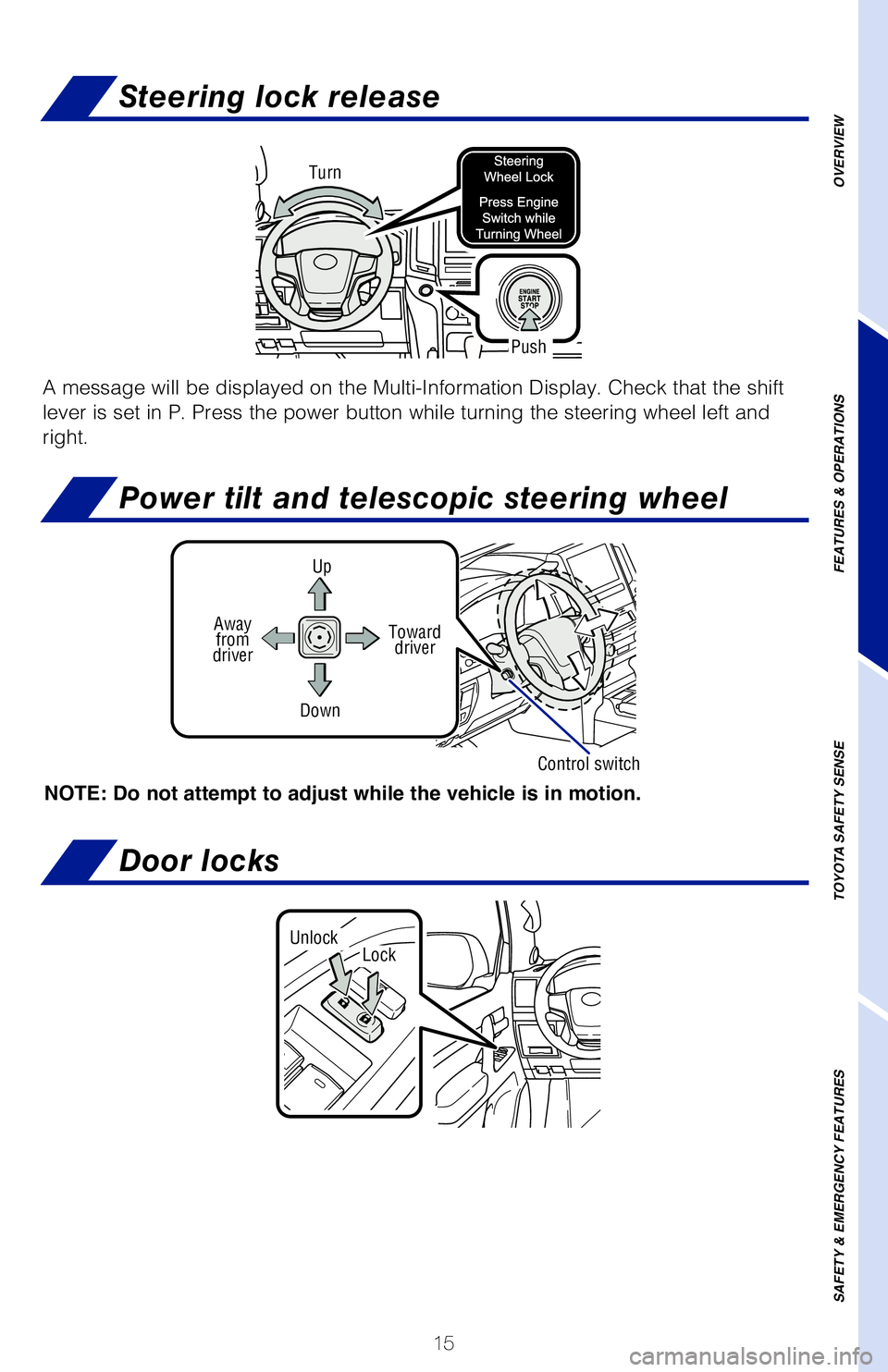
Steering lock release
Turn
Push
Power tilt and telescopic steering wheel
UpToward driver
Down
NOTE: Do not attempt to adjust while the vehicle is in motion.
Away from
driver
Control switch
OVERVIEW
FEATURES & OPERATIONS
TOYOTA SAFETY SENSE
SAFETY & EMERGENCY FEATURES
A message will be displayed on the Multi-Information Display. Check that\
the shift
lever is set in P. Press the power button while turning the steering whe\
el left and
right.
Door locks
LockUnlock
Page 22 of 56
20
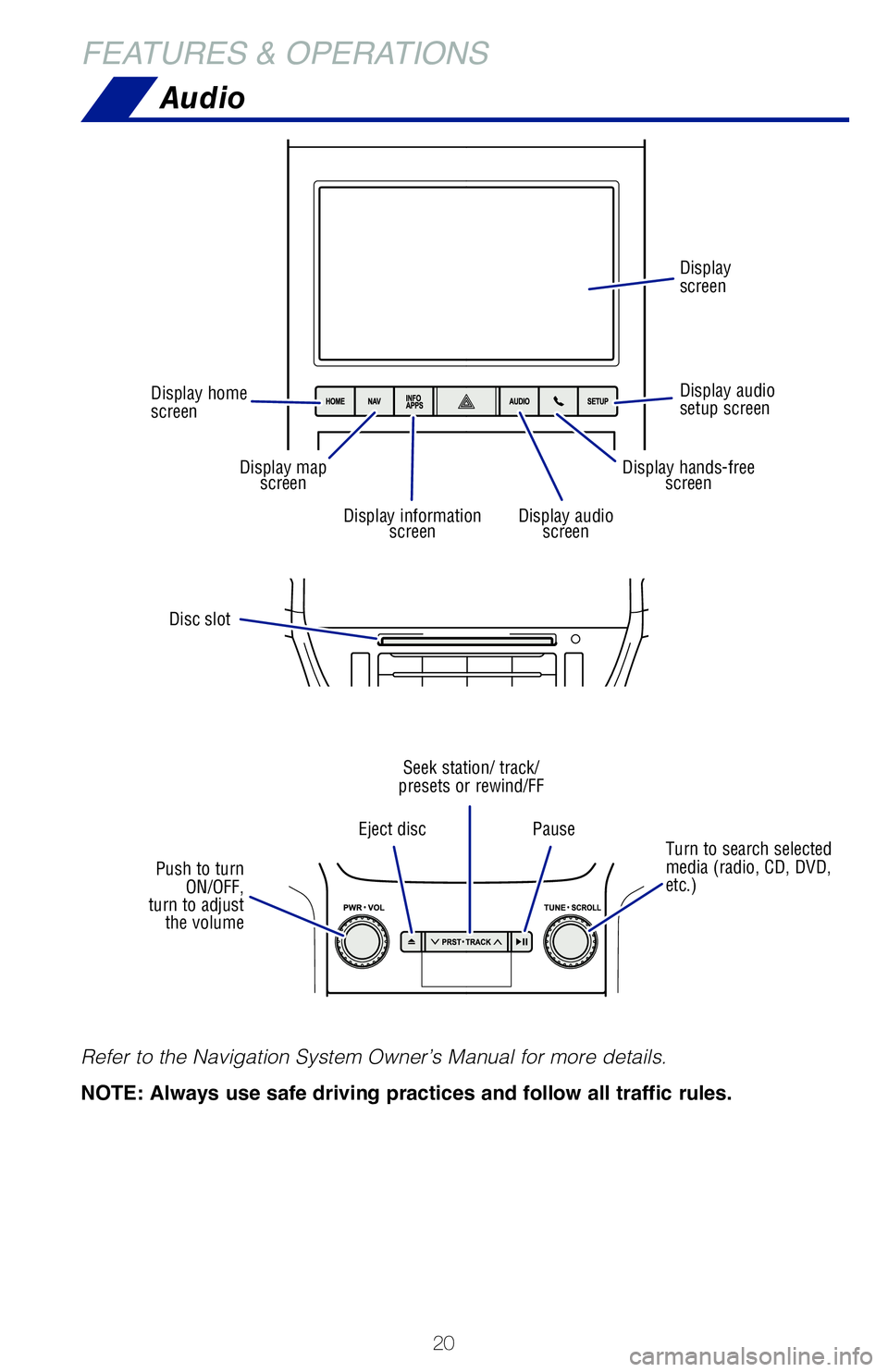
Audio
FEATURES & OPERATIONS
Refer to the Navigation System Owner’s Manual for more details.
NOTE: Always use safe driving practices and follow all traffic rules.
Disc slot
Turn to search selected
media (radio, CD, DVD,
etc.)
Eject disc
Pause
Seek station/ track/
presets or rewind/FF
Push to turn ON/OFF,
turn to adjust the volume
Display home
screen
Display audio
setup screen Display
screen
Display map
screen
Display audio screenDisplay information screen
Display hands-freescreen
Page 24 of 56
22
FEATURES & OPERATIONS
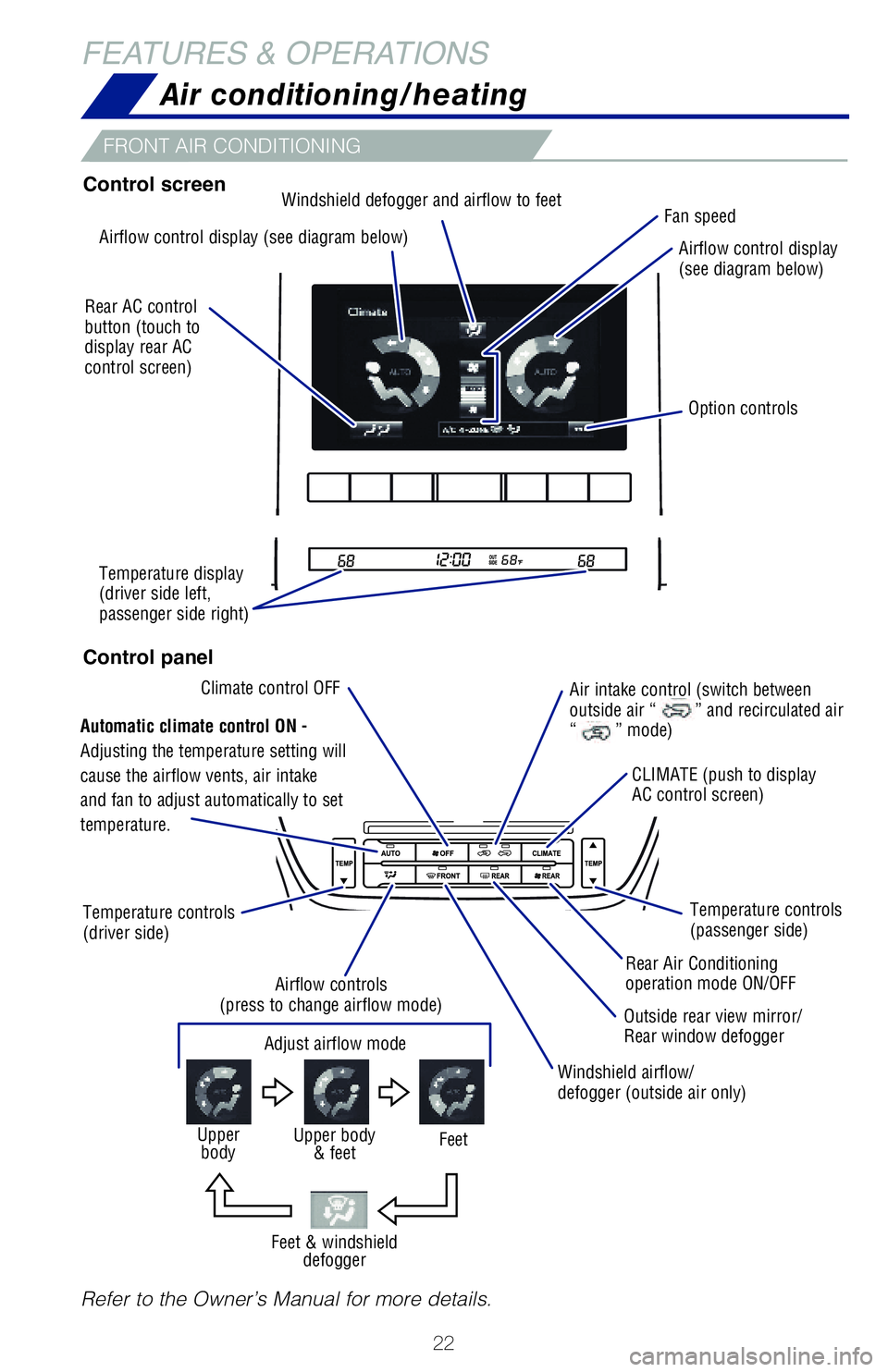
Refer to the Owner’s Manual for more details.
Adjust airflow mode
FeetUpper body& feet Upperbody
FRONT AIR CONDITIONING
Feet & windshield defogger
Control screen
Control panel
Air conditioning/heating
Airflow control display (see diagram below) Airflow control display
(see diagram below)
CLIMATE (push to display
AC control screen) Temperature controls
(passenger side)
Rear Air Conditioning
operation mode ON/OFF
Windshield airflow/
defogger (outside air only)
Airflow controls
(press to change airflow mode) Outside rear view mirror/
Rear window defogger
Temperature controls
(driver side) Windshield defogger and airflow to feet
Temperature display
(driver side left,
passenger side right)
Automatic climate control ON -
Adjusting the temperature setting will
cause the airflow vents, air intake
and fan to adjust automatically to set
temperature. Air intake control (switch between
outside air “
” and recirculated air
“” mode)
Rear AC control
button (touch to
display rear AC
control screen)
Option controls
Climate control OFF Fan speed
Page 26 of 56
24
FEATURES & OPERATIONSMulti-Information Display (MID)
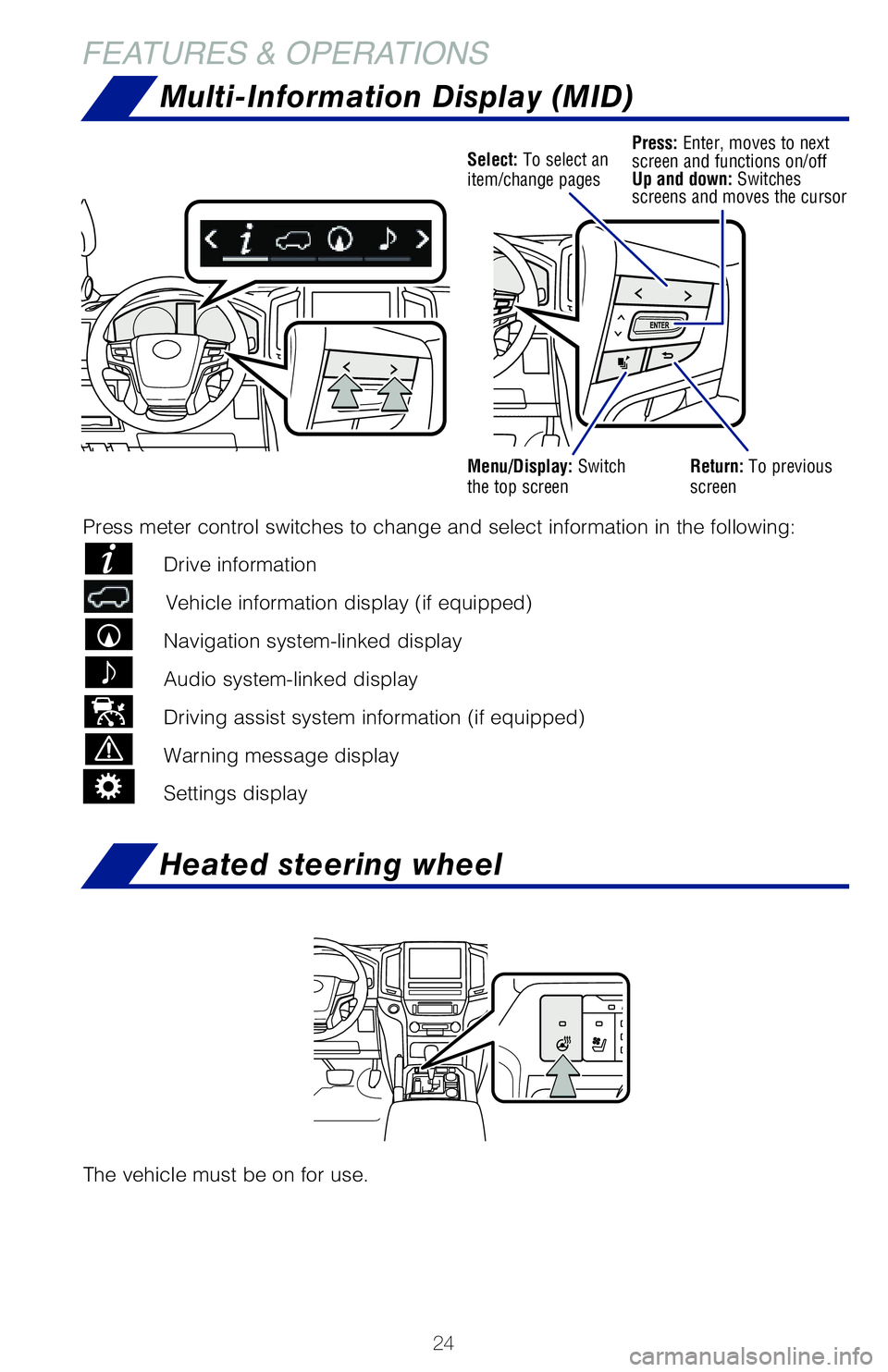
Select: To select an
item/change pagesPress: Enter, moves to next
screen and functions on/off
Up and down: Switches
screens and moves the cursor
Menu/Display: Switch
the top screenReturn: To previous
screen
Press meter control switches to change and select information in the fol\
lowing:
Drive information
Vehicle information display (if equipped)
Navigation system-linked display
Audio system-linked display
Driving assist system information (if equipped)
Warning message display
Settings display
The vehicle must be on for use.
Heated steering wheel
Page 28 of 56
 26
FEATURES & OPERATIONSCrawl Control (with Turn Assist function)
Speed selection switch
LoHi
Med
Lo-MedMed-Hi
Speed modes
Crawl Control allows travel on extremely rough off-road surfaces at a fi\
xed")
26
FEATURES & OPERATIONSCrawl Control (with Turn Assist function)
Speed selection switch
LoHi
Med
Lo-MedMed-Hi
Speed modes
Crawl Control allows travel on extremely rough off-road surfaces at a fi\
xed low
speed without pressing the accelerator or brake pedal. Operating status \
displays
on the MID.
Lo to Lo-Med - Rock, mogul (downhill) and gravel (downhill)
Lo-Med to Med - Mogul (uphill)
Med to Hi - Snow, mud, gravel (uphill), sand, dirt, mogul (uphill) and grass
This function assists cornering performance in accordance with steering \
operation
when driving through a tight corner. It maintains vehicle speed while dr\
iving and
reduces the number of turns needed to navigate a corner that requires tu\
rning the
wheel in the opposite direction.
Refer to the Owner‘s Manual for limitations and more details on this \
system.
CRAWL CONTROL SWITCH
TURN ASSIST FUNCTION
Page 29 of 56
27
OVERVIEW
FEATURES & OPERATIONS
TOYOTA SAFETY SENSE
SAFETY & EMERGENCY FEATURES
Multi-terrain Select
Multi-terrain Monitor
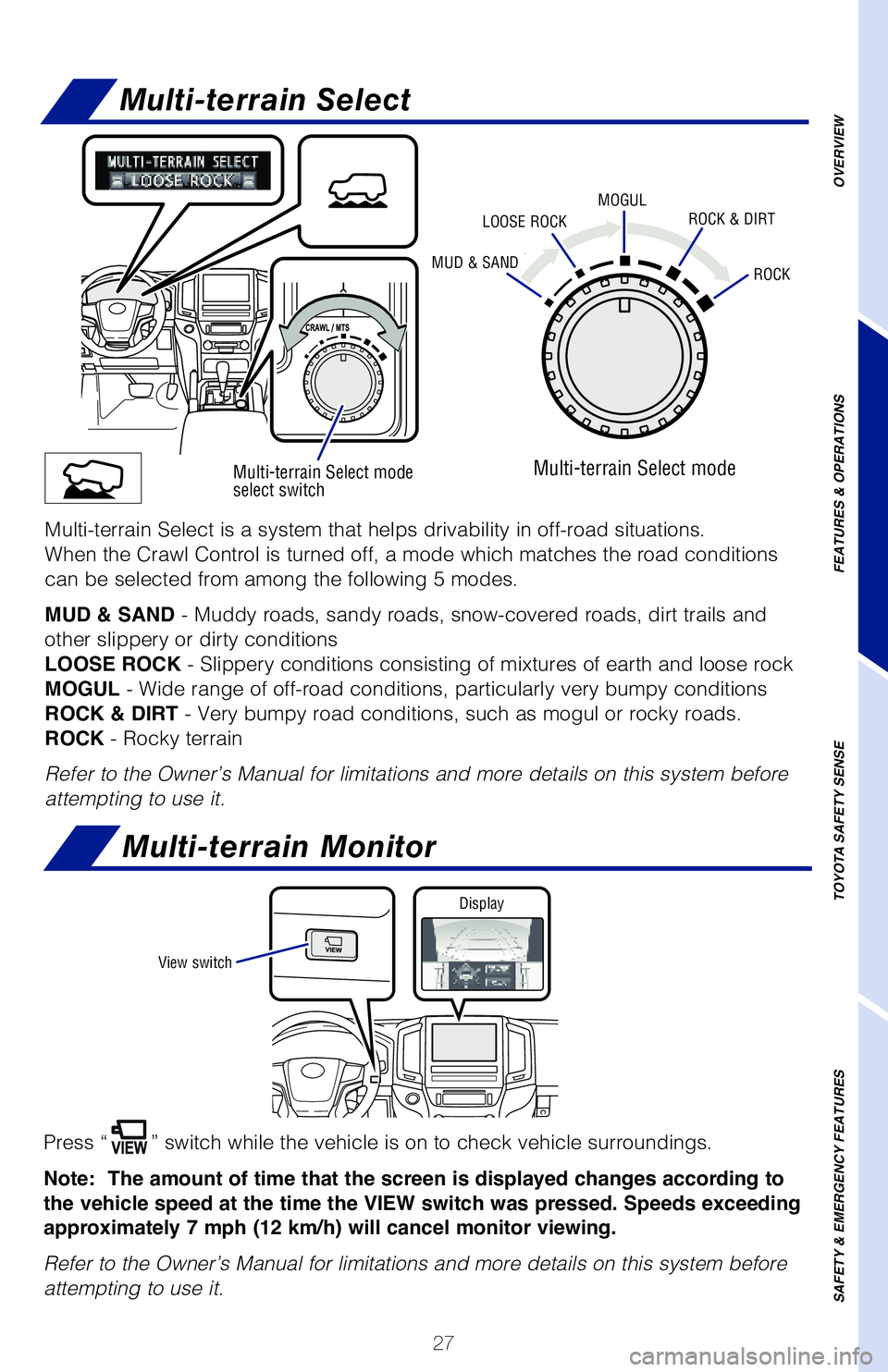
Press “” switch while the vehicle is on to check vehicle surroundings.
Note: The amount of time that the screen is displayed changes according to
the vehicle speed at the time the VIEW switch was pressed. Speeds exceeding
approximately 7 mph (12 km/h) will cancel monitor viewing.
Refer to the Owner’s Manual for limitations and more details on this \
system before
attempting to use it.
Multi-terrain Select mode
select switch
MUD & SANDROCK
MOGULLOOSE ROCKROCK & DIRT
Multi-terrain Select mode
Multi-terrain Select is a system that helps drivability in off-road situ\
ations.
When the Crawl Control is turned off, a mode which matches the road cond\
itions
can be selected from among the following 5 modes.
MUD & SAND - Muddy roads, sandy roads, snow-covered roads, dirt trails and
other slippery or dirty conditions
LOOSE ROCK - Slippery conditions consisting of mixtures of earth and loose rock
MOGUL - Wide range of off-road conditions, particularly very bumpy conditions\
ROCK & DIRT - Very bumpy road conditions, such as mogul or rocky roads.
ROCK - Rocky terrain
Refer to the Owner’s Manual for limitations and more details on this \
system before
attempting to use it.
View switch Display
Page 30 of 56
28
FEATURES & OPERATIONS
Intuitive parking assist
Rear
center sensor
Corner sensors
(front)
Corner sensors
(rear)
Corner sensors
(front) Intuitive parking assist display
Intuitive parking
assist
Rear Cross
Traffic Alert
(if equipped)
Corner sensors
(rear)
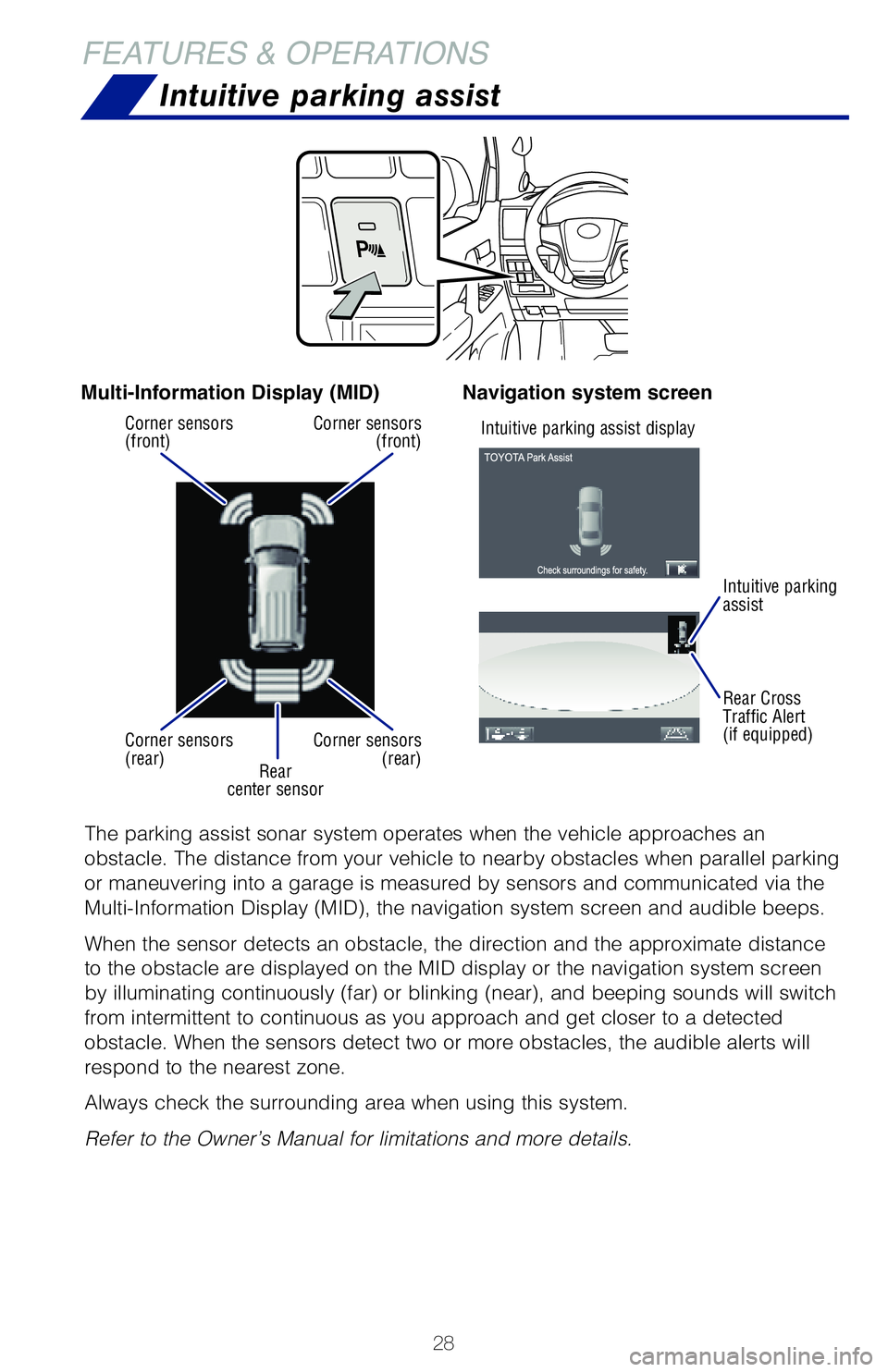
The parking assist sonar system operates when the vehicle approaches an \
obstacle. The distance from your vehicle to nearby obstacles when parall\
el parking
or maneuvering into a garage is measured by sensors and communicated via\
the
Multi-Information Display (MID), the navigation system screen and audible beeps.
When the sensor detects an obstacle, the direction and the approximate d\
istance
to the obstacle are displayed on the MID display or the navigation syste\
m screen
by illuminating continuously (far) or blinking (near), and beeping sounds will switch
from intermittent to continuous as you approach and get closer to a dete\
cted
obstacle. When the sensors detect two or more obstacles, the audible ale\
rts will
respond to the nearest zone.
Always check the surrounding area when using this system.
Refer to the Owner’s Manual for limitations and more details.
Multi-Information Display (MID) Navigation system screen