reset TOYOTA LAND CRUISER 2021 Owners Manual (in English)
[x] Cancel search | Manufacturer: TOYOTA, Model Year: 2021, Model line: LAND CRUISER, Model: TOYOTA LAND CRUISER 2021Pages: 56, PDF Size: 3.5 MB
Page 4 of 56
2
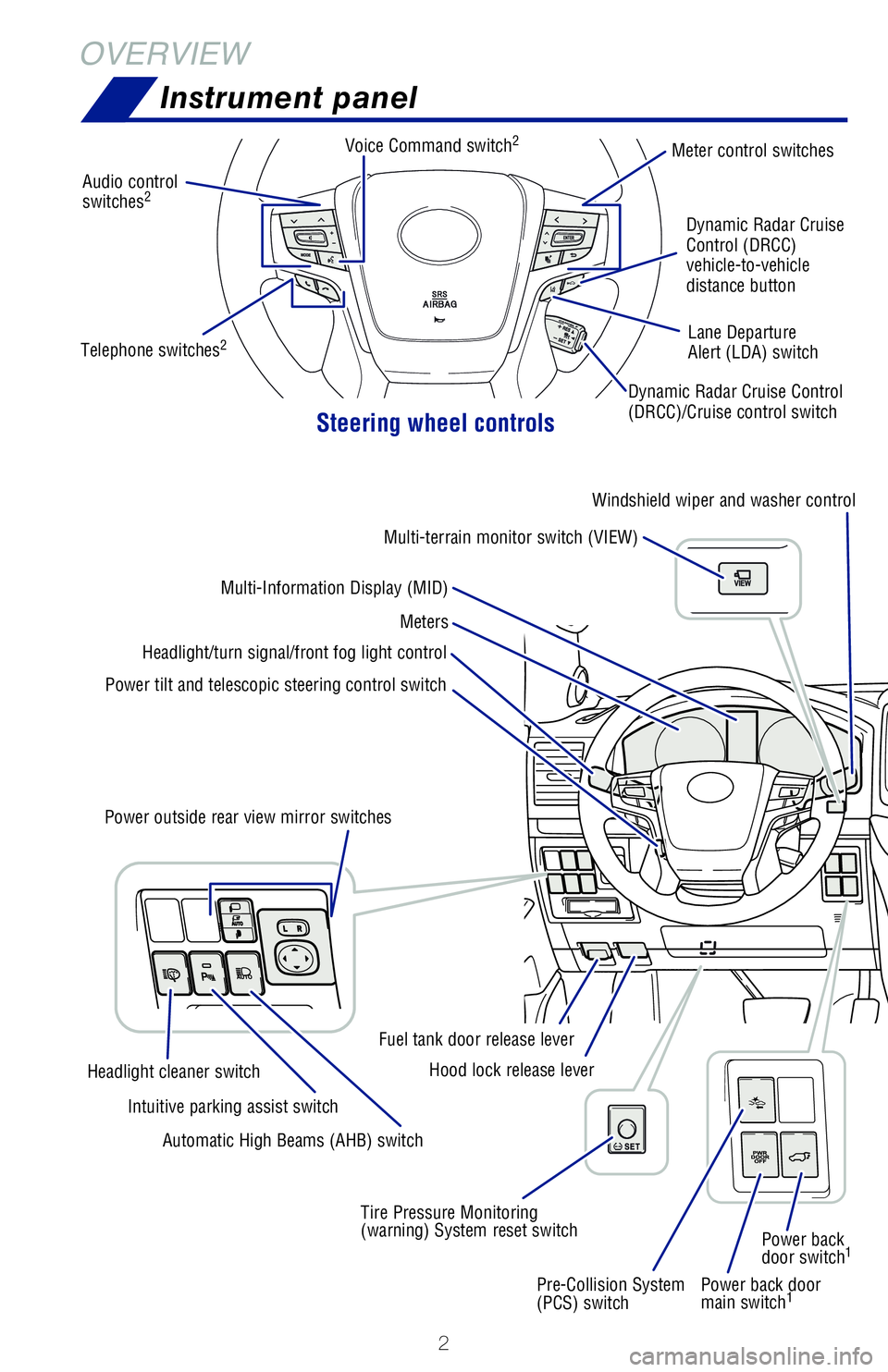
OVERVIEWInstrument panel
Steering wheel controls
Power back door
main switch1
Audio control
switches2
Meter control switches
Dynamic Radar Cruise Control
(DRCC)/Cruise control switch Dynamic Radar Cruise
Control (DRCC)
vehicle-to-vehicle
distance button
Lane Departure
Alert (LDA) switch
Power tilt and telescopic steering control switch Headlight/turn signal/front fog light control
Meters
Multi-Information Display (MID) Windshield wiper and washer control
Multi-terrain monitor switch (VIEW)
Pre-Collision System
(PCS) switch Power back
door switch
1
Tire Pressure Monitoring
(warning) System reset switchHood lock release lever
Fuel tank door release lever
Power outside rear view mirror switches
Automatic High Beams (AHB) switch
Intuitive parking assist switch
Headlight cleaner switch Voice Command switch
2
Telephone switches2
Page 22 of 56
20
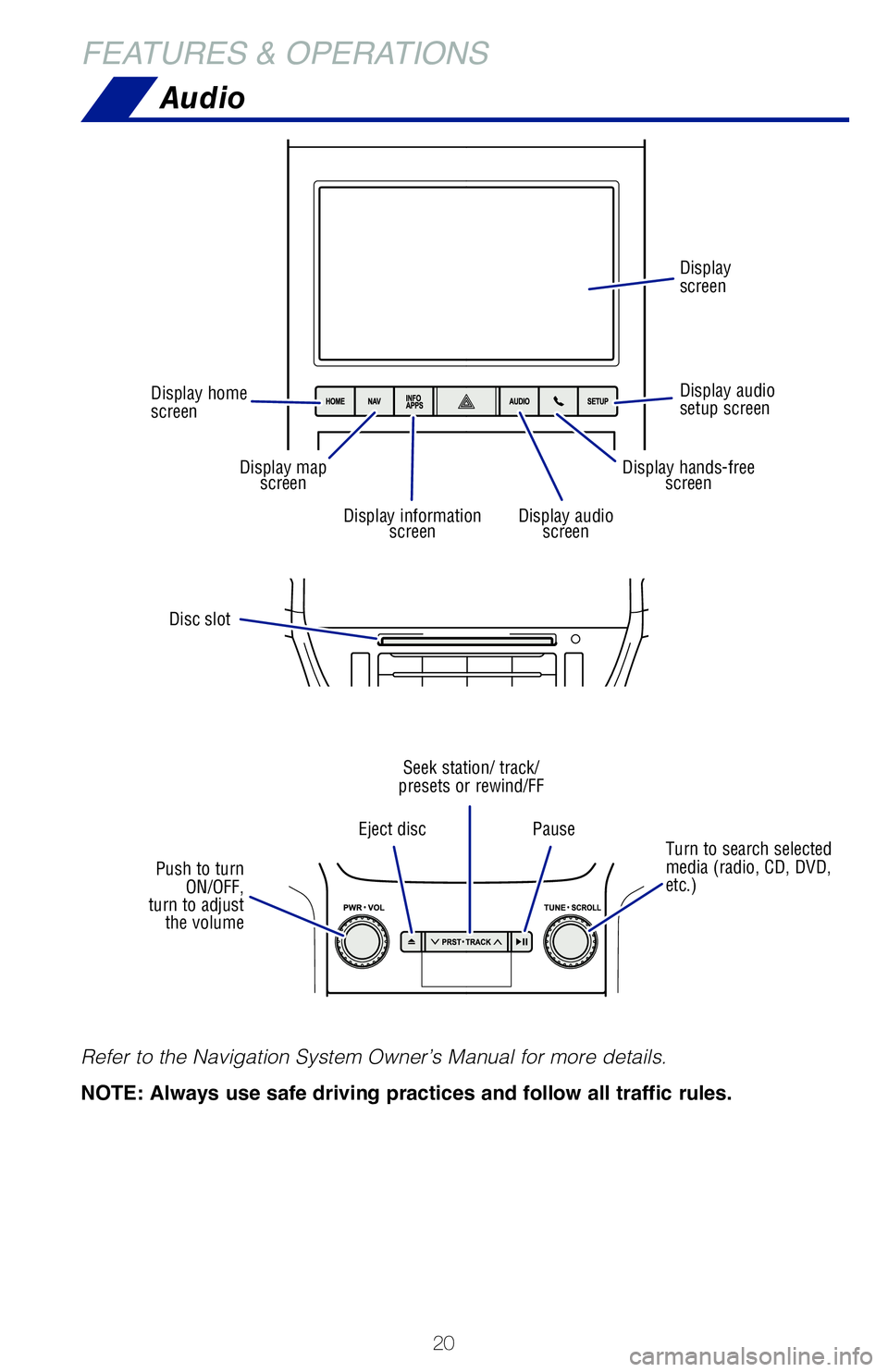
Audio
FEATURES & OPERATIONS
Refer to the Navigation System Owner’s Manual for more details.
NOTE: Always use safe driving practices and follow all traffic rules.
Disc slot
Turn to search selected
media (radio, CD, DVD,
etc.)
Eject disc
Pause
Seek station/ track/
presets or rewind/FF
Push to turn ON/OFF,
turn to adjust the volume
Display home
screen
Display audio
setup screen Display
screen
Display map
screen
Display audio screenDisplay information screen
Display hands-freescreen
Page 23 of 56
 21
USB media port
Connecting a compatible device and cable into the USB media port will su\
pport
charging and music playback through the audio multimedia system.
AUX port
By inserting an AUX cable i")
21
USB media port
Connecting a compatible device and cable into the USB media port will su\
pport
charging and music playback through the audio multimedia system.
AUX port
By inserting an AUX cable into the AUX port, you can listen to music fro\
m a
portable audio device through the vehicle’s speaker system while in A\
UX mode.
OVERVIEW
FEATURES & OPERATIONS
TOYOTA SAFETY SENSE
SAFETY & EMERGENCY FEATURES
USB media/AUX port
Clock
1) Push “SETUP” button next to the screen.
2) Select “General” in the touch screen to access the general settings screen.
3) Select “Clock.”
4) Then select desired items to be reset.
Refer to the “Navigation System Owner’s Manual” for more detail\
s.
Select to change the time zone.
Select to set daylight saving
time ON/OFF/AUTO.
Select to set to automatic GPS
adjustment of clock.
Page 41 of 56
 39
ADJUSTING LDA ALERT SENSITIVITY
SWAY WARNING SYSTEM
The sway warning function can detect swaying based on the vehicle locati\
on in the
lane and the driver’s steering wheel operation. To help pr")
39
ADJUSTING LDA ALERT SENSITIVITY
SWAY WARNING SYSTEM
The sway warning function can detect swaying based on the vehicle locati\
on in the
lane and the driver’s steering wheel operation. To help prevent swayi\
ng, the system
alerts the driver using a buzzer sound and a warning display in the MID.\
Continuous lane deviations from
swaying.
Gentle swaying from driver’s
inattentiveness.
Acute steering wheel operation after the
number of operations decrease due to driver’s
inattentiveness.
OVERVIEW
FEATURES & OPERATIONS
TOYOTA SAFETY SENSE
SAFETY & EMERGENCY FEATURES
The driver can adjust the sensitivity of the LDA (warning) function from the
Multi-Information Display (MID) customization screen.
High - Is designed to warn approximately before the front
tire crosses the lane marker.
Normal - Is designed to warn approximately when the front
tire crosses the lane marker.
(1) Press “
” switches and select “” from the Multi-Information Display (MID).
(2) Use “
” switch and select “” and then press “.” The setting screen
is displayed.
(3) Use “
” switch and select “Alert sensitivity” and then press “” to select
the desired setting.
(4) Press “
” to go back to the menu.
Note: Operation of the LDA system and setting adjustments continues in the
same condition regardless of Ignition cycle until changed by the driver or the
system is reset.
Page 42 of 56
40
TOYOTA SAFETY SENSE™
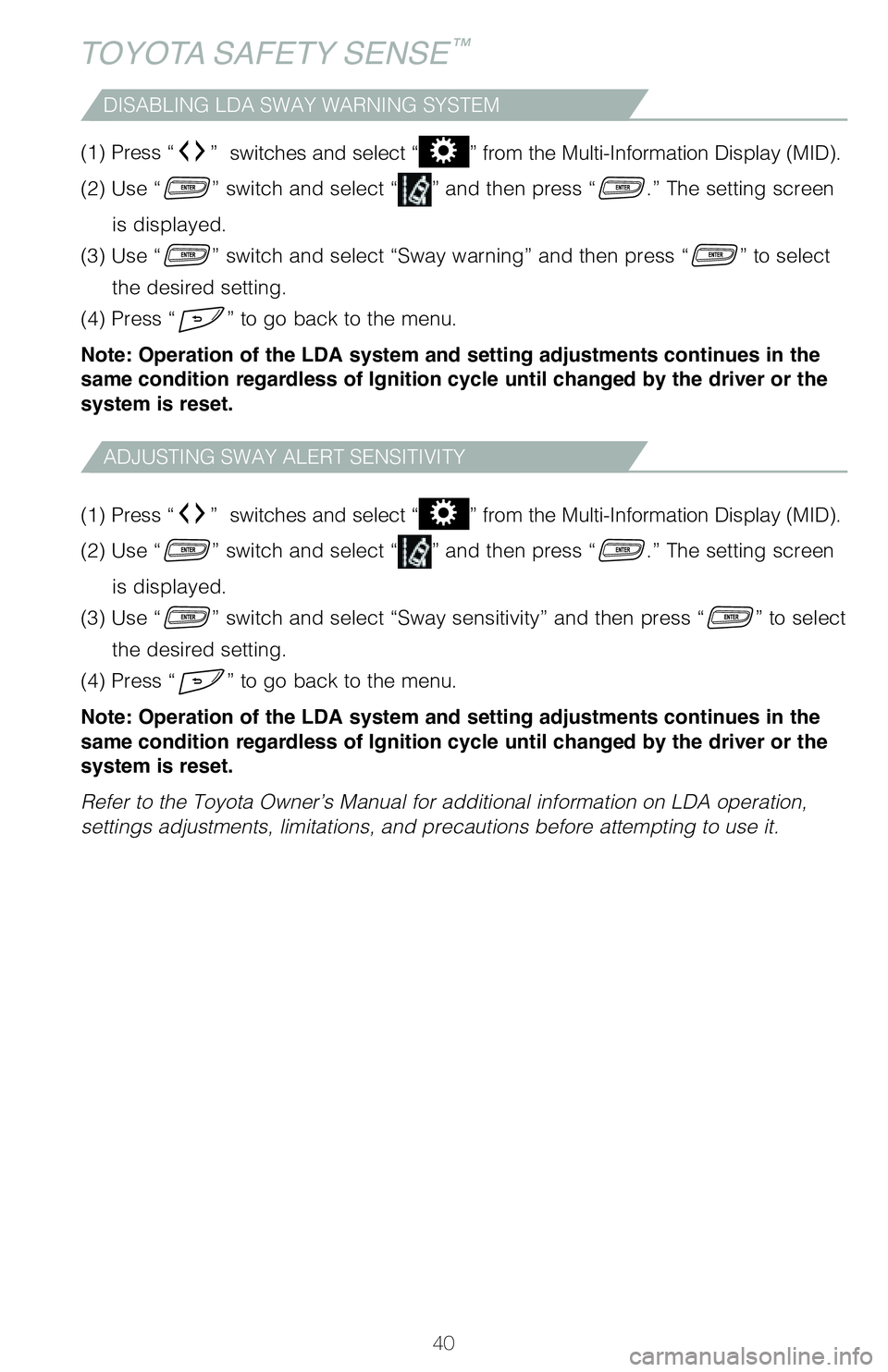
DISABLING LDA SWAY WARNING SYSTEM
ADJUSTING SWAY ALERT SENSITIVITY
(1) Press “” switches and select “” from the Multi-Information Display (MID).
(2) Use “
” switch and select “” and then press “.” The setting screen
is displayed.
(3) Use “
” switch and select “Sway sensitivity” and then press “” to select
the desired setting.
(4) Press “
” to go back to the menu.
Note: Operation of the LDA system and setting adjustments continues in the
same condition regardless of Ignition cycle until changed by the driver or the
system is reset.
Refer to the Toyota Owner’s Manual for additional information on LDA \
operation,
settings adjustments, limitations, and precautions before attempting to \
use it. (1) Press “
” switches and select “” from the Multi-Information Display (MID).
(2) Use “
” switch and select “” and then press “.” The setting screen
is displayed.
(3) Use “
” switch and select “Sway warning” and then press “” to select
the desired setting.
(4) Press “
” to go back to the menu.
Note: Operation of the LDA system and setting adjustments continues in the
same condition regardless of Ignition cycle until changed by the driver or the
system is reset.
Page 43 of 56
41
OVERVIEW
FEATURES & OPERATIONS
TOYOTA SAFETY SENSE
SAFETY & EMERGENCY FEATURES
1
The speed control may also be canceled by depressing the brake pedal.2 The speed control may be resumed once vehicle speed exceeds 25 mph (40 km/h).
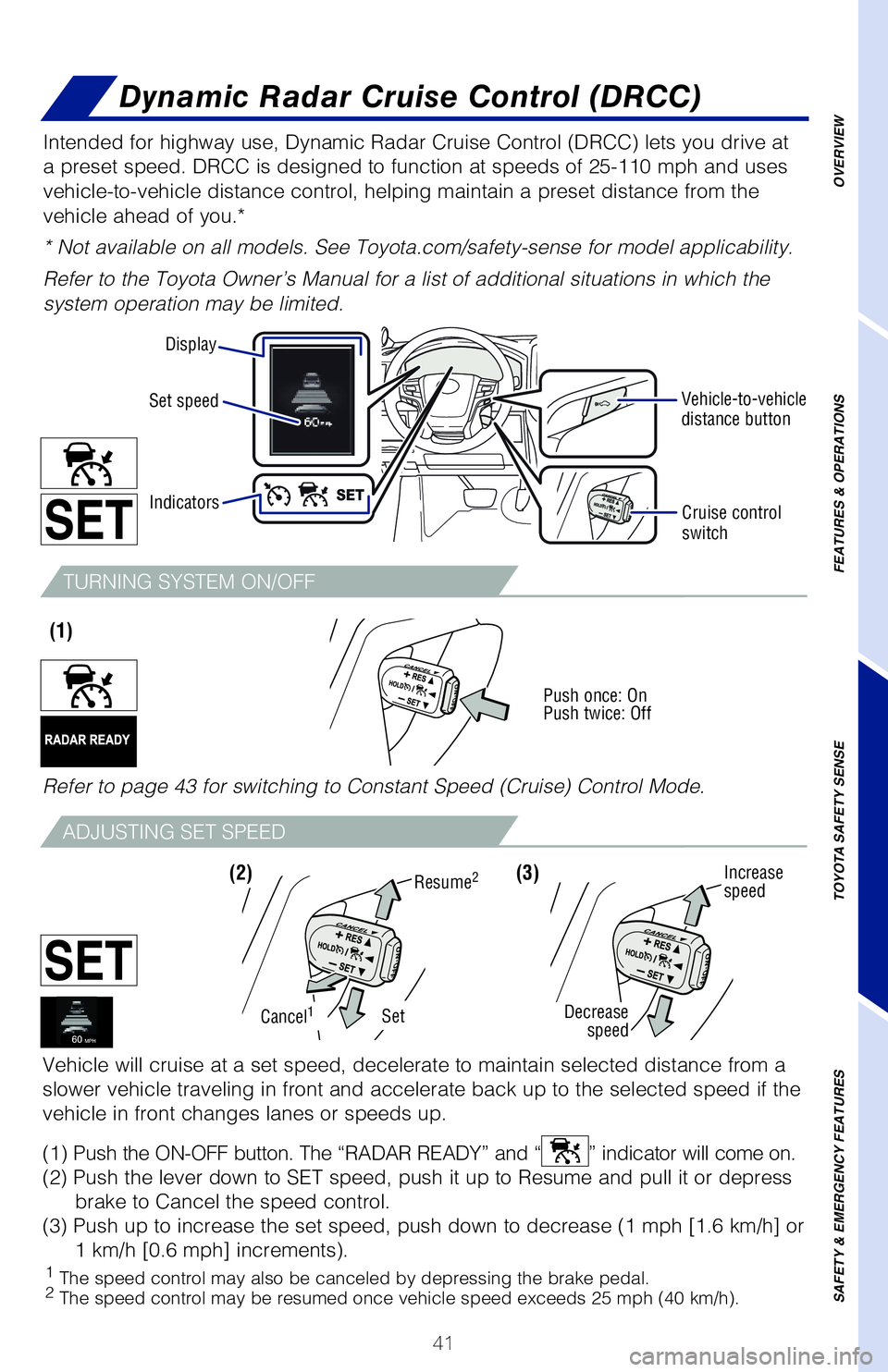
Intended for highway use, Dynamic Radar Cruise Control (DRCC) lets you drive at
a preset speed. DRCC is designed to function at speeds of 25-110 mph and\
uses
vehicle-to-vehicle distance control, helping maintain a preset distance \
from the
vehicle ahead of you.*
* Not available on all models. See Toyota.com/safety-sense for model app\
licability.
Refer to the Toyota Owner’s Manual for a list of additional situation\
s in which the
system operation may be limited.
Vehicle will cruise at a set speed, decelerate to maintain selected dist\
ance from a
slower vehicle traveling in front and accelerate back up to the selected\
speed if the
vehicle in front changes lanes or speeds up.
(1) Push the ON-OFF button. The “RADAR READY” and “
” indicator will come on.
(2) Push the lever down to SET speed, push it up to Resume and pull it or depress brake to Cancel the speed control.
(3) Push up to increase the set speed, push down to decrease (1 mph [1.6 km/h] or 1 km/h [0.6 mph] increments).
(1)
Vehicle-to-vehicle
distance button
Cruise control
switch
Increase
speed
Decrease speed
(3)
SetCancel1
Resume2(2)
Dynamic Radar Cruise Control (DRCC)
TURNING SYSTEM ON/OFF
ADJUSTING SET SPEED
Push once: On
Push twice: Off
Refer to page 43 for switching to Constant Speed (Cruise) Control Mode\
.
Display
Set speed
Indicators
Page 44 of 56
42
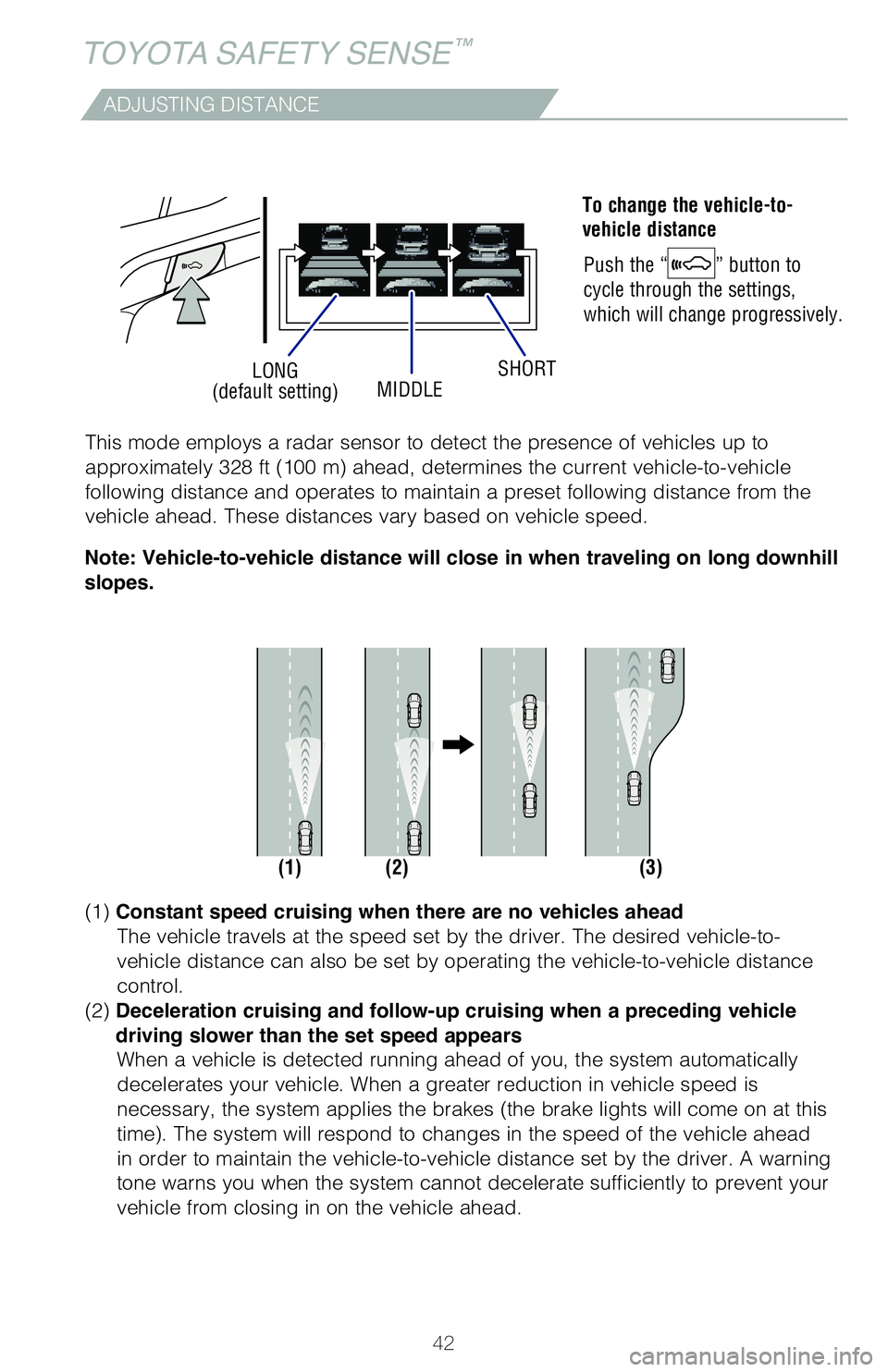
LONG
(default setting) MIDDLESHORT
ADJUSTING DISTANCE
To change the vehicle-to-
vehicle distance
Push the “
” button to
cycle through the settings,
which will change progressively.
(1) (2) (3)
This mode employs a radar sensor to detect the presence of vehicles up t\
o
approximately 328 ft (100 m) ahead, determines the current vehicle-to-vehicle
following distance and operates to maintain a preset following distance \
from the
vehicle ahead. These distances vary based on vehicle speed.
(1)
Constant speed cruising when there are no vehicles ahead
The vehicle travels at the speed set by the driver. The desired vehicle-\
to-
vehicle distance can also be set by operating the vehicle-to-vehicle dis\
tance
control.
(2) Deceleration cruising and follow-up cruising when a preceding vehicle
driving slower than the set speed appears When a vehicle is detected running ahead of you, the system automaticall\
y
decelerates your vehicle. When a greater reduction in vehicle speed is
necessary, the system applies the brakes (the brake lights will come on at this
time). The system will respond to changes in the speed of the vehicle ahead
in order to maintain the vehicle-to-vehicle distance set by the driver. \
A warning
tone warns you when the system cannot decelerate sufficiently to prevent\
your
vehicle from closing in on the vehicle ahead.
Note: Vehicle-to-vehicle distance will close in when traveling on long downhill
slopes.
TOYOTA SAFETY SENSE™
Page 49 of 56
 47
Safety Connect®
Safety Connect is a subscription-based telematics service that uses Glob\
al
Positioning System (GPS) data and embedded cellular technology to provide safety
and security featur")
47
Safety Connect®
Safety Connect is a subscription-based telematics service that uses Glob\
al
Positioning System (GPS) data and embedded cellular technology to provide safety
and security features to subscribers. Safety Connect is staffed with liv\
e agents at
the Toyota response center, which operates 24 hours per day, 7 days per \
week.
Services for subscribers include:
• Automatic collision notification
• Stolen vehicle locator
• Emergency assistance (“SOS” button)
• Enhanced roadside assistance
Microphone
LED light indicators
(Green is Active)
“SOS” button
For additional information, refer to the “Owner’s Manual” or vi\
sit www.Toyota.com/
connected-services.
Tire Pressure Monitoring (warning) System (TPMS)
System reset initialization
1. Push and hold “
SET” button until
the indicator blinks three times.
2. Wait several minutes to allow initialization to complete.
After adjusting tire pressures, or after tires have been rotated or repl\
aced, turn the
ignition switch to “ON” and press and hold the “
SET” button until indicator blinks
three times. Let the vehicle sit for a few minutes to allow initializati\
on to complete.
Refer to the load label on the door jamb or the Owner’s Manual for ti\
re inflation
specifications.
If the tire pressure indicator flashes for 1 minute and then remains on,\
take the
vehicle to your local Toyota dealer.
NOTE: The warning light may come on due to temperature changes or
changes in tire pressure from natural air leakage. If the system has not\
been
initialized recently, setting the tire pressures to factory specificatio\
ns should
turn off the light.
OVERVIEW
FEATURES & OPERATIONS
TOYOTA SAFETY SENSE
SAFETY & EMERGENCY FEATURES