reset TOYOTA MATRIX 2009 E140 / 2.G User Guide
[x] Cancel search | Manufacturer: TOYOTA, Model Year: 2009, Model line: MATRIX, Model: TOYOTA MATRIX 2009 E140 / 2.GPages: 440, PDF Size: 9.39 MB
Page 213 of 440
213 3-3. Using the hands-free phone system (for cellular phone)
3
Interior features
Dialing by inputting a name
Press the talk switch and say “Dial by name”.
Select a registered name to be input by either of the following
methods:
a. Press the talk switch and say a registered name.
b. Press the talk switch and say “List names”. Press the talk
switch while the desired name is being read aloud.
Dial by one of the following methods:
a. Press the off-hook switch.
b. Press the talk switch and say “Dial”.
c. Select “Dial” by using .
Speed dialing
Press the off-hook switch.
Press the preset button in which the desired number is regis-
tered.
Press the off-hook switch.
When receiving a phone call
■Answering the phone
Press the off-hook switch.
■Refusing the call
Press the on-hook switch.
STEP1
STEP2
STEP3
STEP1
STEP2
STEP3
Page 229 of 440
229 3-3. Using the hands-free phone system (for cellular phone)
3
Interior features
Select the desired preset button, and register the data into
speed dial by either of the following methods:
a. Press the desired preset button, and select “Confirm” by
using a voice command or .
b. Press and hold the desired preset button.
Changing a registered name
Select “Change Name” by using a voice command or .
Select the name to be changed by either of the following
methods.
a. Press the talk switch, say desired name, and select “Con-
firm” by using a voice command or
.
b. Press the talk switch, and say “List names”. While the
desired name is being read aloud, press the talk switch,
and select “Confirm” by using a voice command or .
c. Select the desired name by using .
Select “Record Name” with or the talk switch.
Say a new name, and select “Confirm” by using a voice com-
mand or .
STEP3
STEP1
STEP2
STEP3
STEP4
Page 230 of 440
230 3-3. Using the hands-free phone system (for cellular phone)
Deleting registered data
Select “Delete Entry” by using a voice command or .
Pattern A
Select the data to be deleted by either of the following meth-
ods, and select “Confirm” by using a voice command or
:
a. Press the talk switch, and say the name of the desired
phone number to be deleted.
b. Press the talk switch, say “List phones”. While the name of
the desired phone number is being read aloud, press the
talk switch.
Pattern B
Select the data to be deleted by using .
Deleting speed dials
Select “Delete Speed Dial (Del Spd Dial)” by using a voice
command or .
Press the preset button in which the desired speed dial is reg-
istered, and select “Confirm” by using a voice command or
.
STEP1
STEP2
STEP2
STEP1
STEP2
Page 293 of 440
293 4-3. Do-it-yourself maintenance
4
Maintenance and care
■Engine oil consumption
●The amount of engine oil consumed depends on the oil viscosity, the
quality of the oil and the way the vehicle is driven.
●More oil is consumed under driving conditions such as high speeds and
frequent acceleration and deceleration.
●A new engine consumes more oil.
●When judging the amount of oil consumption, keep in mind that the oil
may have become diluted, making it difficult to judge the true level accu-
rately.
●Oil consumption: Max. 1.1 qt./600 miles, 0.9 Imp.qt./600 miles (1.0 L per
1000 km)
●If you consume more than 1.1 qt. (1.0 L, 0.9 Imp.qt.) every 600 miles
(1000 km), contact your Toyota dealer.
■After changing the engine oil (U.S.A. only)
The oil change system should be reset. Perform the following procedures:
1. Turn the engine switch OFF with the trip meter A reading shown.
2. While pressing the trip meter reset button (→P. 119), turn the engine
switch to the “ON” position.
3. Continue to press and hold the button until the trip meter displays
000000.
CAUTION
■Used engine oil
●Used engine oil contains potentially harmful contaminants which may
cause skin disorders such as inflammation or skin cancer, so care should
be taken to avoid prolonged and repeated contact. To remove used engine
oil from your skin, wash thoroughly with soap and water.
●Dispose of used oil and filters only in a safe and acceptable manner. Do
not dispose of used oil and filters in household trash, in sewers or onto the
ground. Call your Toyota dealer, service station or auto parts store for
information concerning recycling or disposal.
●Do not leave used engine oil within the reach of children.
Page 305 of 440
305 4-3. Do-it-yourself maintenance
4
Maintenance and care
■How to initialize the tire pressure warning system
Park the vehicle in a safe place and turn the engine switch
OFF.
While the vehicle is moving, initialization is not performed.
Adjust the tire inflation pressure to the specified cold tire infla-
tion pressure level. (→P. 400)
Make sure to adjust the tire pressure to the specified cold tire
inflation pressure level. The tire pressure warning system will
operate based on this pressure level.
Turn the engine switch to the “ON” position.
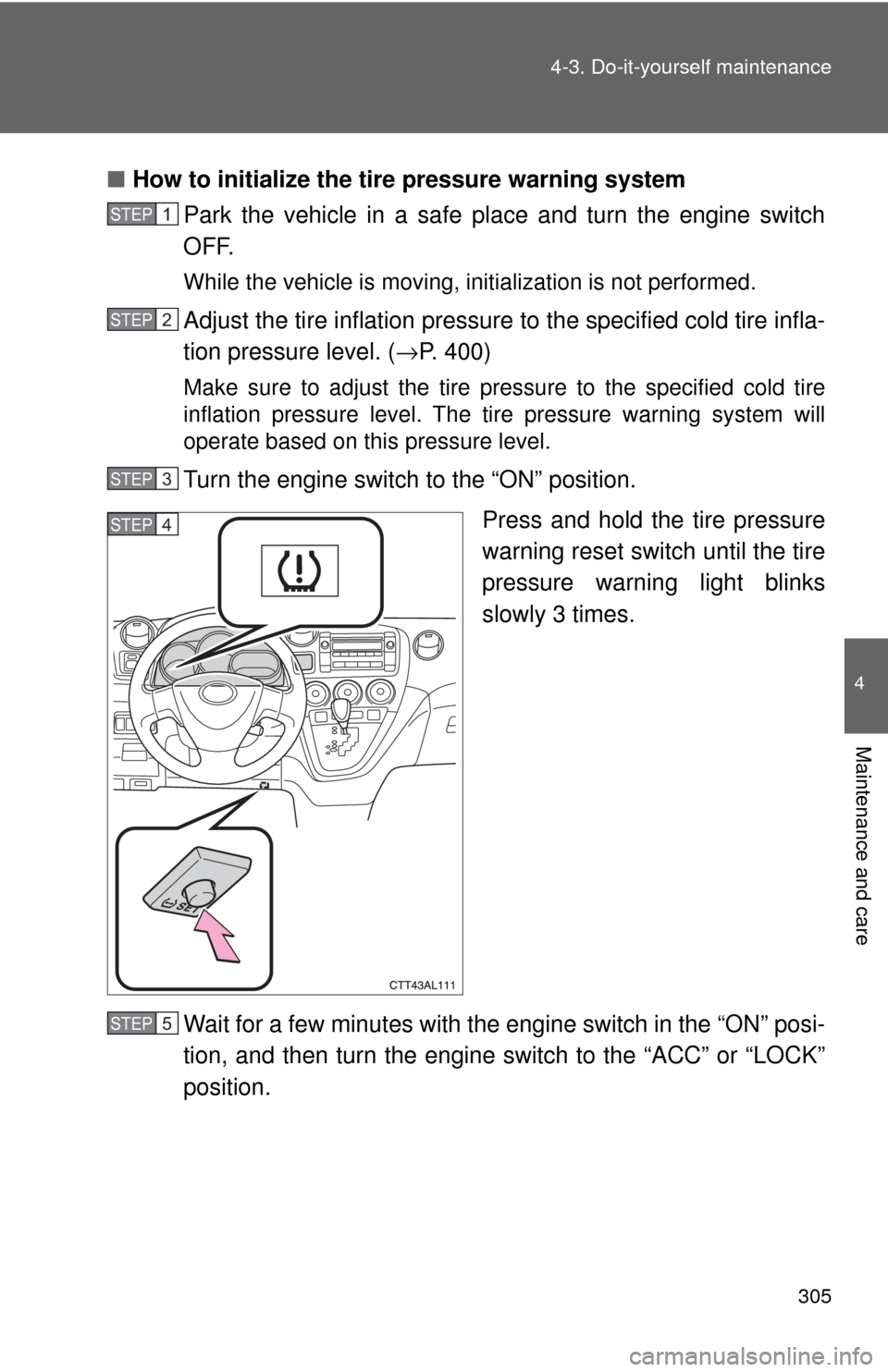
Press and hold the tire pressure
warning reset switch until the tire
pressure warning light blinks
slowly 3 times.
Wait for a few minutes with the engine switch in the “ON” posi-
tion, and then turn the engine switch to the “ACC” or “LOCK”
position.
STEP1
STEP2
STEP3
STEP4
STEP5
Page 306 of 440

306 4-3. Do-it-yourself maintenance
Registering ID codes
The tire pressure warning valve and transmitter is equipped with a
unique ID code. When replacing a tire pressure warning valve and
transmitter, it is necessary to register the ID code of tire pressure
warning valve and transmitter. Have the ID code registered by your
Toyota dealer.
■When to replace your vehicle’s tires
Tires should be replaced if:
●You have tire damage such as cuts, splits, cracks deep enough to
expose the fabric, or bulges indicating internal damage
●A tire goes flat repeatedly or cannot be properly repaired due to the
size or location of a cut or other damage
If you are not sure, consult with your Toyota dealer.
■Replacing tires and wheels
If the ID code of the tire pressure warning valve and transmitter is not
registered, the tire pressure warning system will not work properly. After
driving for about 20 minutes, the tire pressure warning light comes on
after blinking for 1 minute to indicate a system malfunction.
■Tire life
Any tire over 6 years old must be checked by a qualified technician even
if they have seldom or never been used or damage is not obvious.
■If the tread wears down below 0.16 in. (4 mm) on snow tires
The effectiveness of snow tires is lost.
■If you push the tire pressure warning reset switch accidentally
If initialization is performed, adjust the tire inflation pressure to the speci-
fied level and initialize the tire pressure warning system again.
Page 307 of 440

307 4-3. Do-it-yourself maintenance
4
Maintenance and care
■When the initialization of the tire pressure warning system has
failed
Initialization can be completed in a few minutes. However, in the follow-
ing cases, the settings have not been recorded and the system will not
operate properly. If repeated attempts to record tire inflation pressure
settings are unsuccessful, have the vehicle inspected by your Toyota
dealer.
●When operating the tire pressure warning reset switch, the tire pres-
sure warning light does not flash 3 times.
●After carrying out the initialization procedure, the tire pressure warn-
ing light blinks for 1 minute then stays on after driving for about 20
minutes.
■Routine tire inflation pressure checks
The tire pressure warning system does not replace routine tire inflation
pressure checks. Make sure to check tire inflation pressure as part of
your routine of daily vehicle checks.
■Maximum load of tire
Check that the maximum load of the replaced tire is greater than 1/2 of
the Gross Axle Weight Ratings (GAWR) of either the front axle or the
rear axle, whichever is greater.
For the maximum load of the tire, see the load limit at maximum cold tire
inflation pressure mentioned on the sidewall of the tire, and for the Gross
Axle Weight Ratings (GAWR), see the Certification Label. (→P. 312,
408).
Page 310 of 440

310 4-3. Do-it-yourself maintenance
CAUTION
■When inspecting or replacing tires
Observe the following precautions to prevent accidents. Failure to do so
may cause damage to parts of the drive train, as well as dangerous han-
dling characteristics, which may lead to fatal or injury accidents.
●Do not mix tires of different makes, models, tread patterns or tread-
wear.
●Do not use tire sizes other than those recommended by Toyota.
●Do not mix radial, bias-belted, or bias-ply tires.
●Do not mix summer, all season and winter tires.
■When initializing the tire pressure warning system
Do not push the tire pressure warning reset switch without first adjusting
the tire inflation pressure to the specified level. Otherwise, the tire pres-
sure warning light may not come on even if the tire inflation pressure is
low, or it may come on when the tire inflation pressure is actually normal.
Page 357 of 440

5
When trouble arises
357 5-2. Steps to take in an emergency
■Front passenger detection sensor and passenger seat belt reminder
●If luggage is placed on the front passenger seat, the front passenger
detection sensor may cause the warning light to flash, even if a passen-
ger is not sitting in the seat.
●If a cushion is placed on the seat, the sensor may not detect a passen-
ger, and the warning light may not operate properly.
■Changing the engine oil (U.S.A. only)
Make sure to reset the oil change system. (→P. 293)
■
When the tire pressure warning light comes on
Check the tire inflation pressure and adjust to the appropriate level.
Pushing the tire pressure warning reset switch does not turn off the tire
pressure warning light.
■The tire pressure warning light may turn on due to natural causes
The tire pressure warning light may turn on due to natural causes such
as natural air leaks or tire inflation pressure changes caused by tem-
perature. In this case, adjusting the tire inflation pressure will turn off the
warning light (after a few minutes).
Page 371 of 440
5
When trouble arises
371 5-2. Steps to take in an emergency
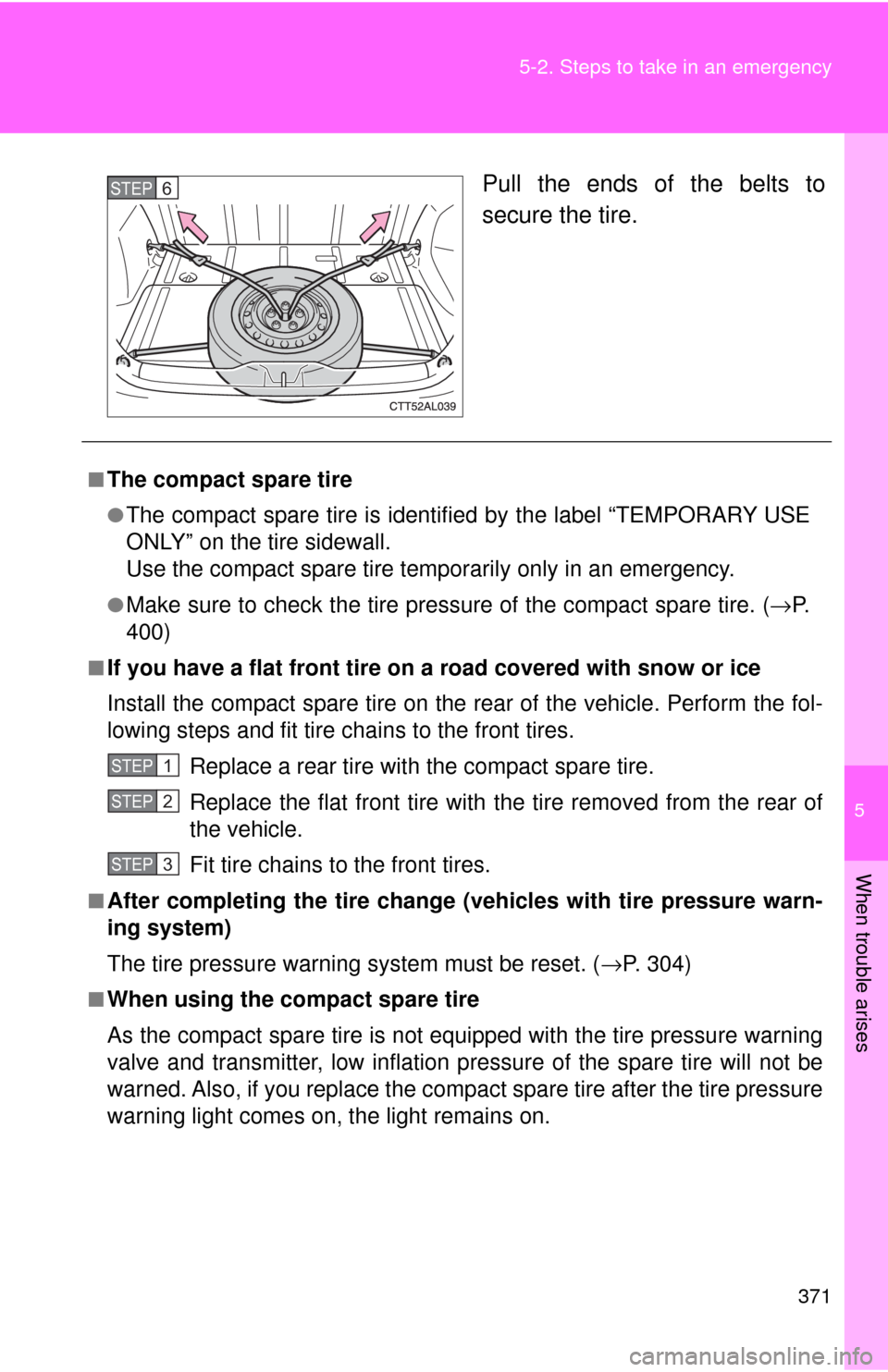
Pull the ends of the belts to
secure the tire.STEP6
■The compact spare tire
●The compact spare tire is identified by the label “TEMPORARY USE
ONLY” on the tire sidewall.
Use the compact spare tire temporarily only in an emergency.
●Make sure to check the tire pressure of the compact spare tire. (→P.
400)
■If you have a flat front tire on a road covered with snow or ice
Install the compact spare tire on the rear of the vehicle. Perform the fol-
lowing steps and fit tire chains to the front tires.
Replace a rear tire with the compact spare tire.
Replace the flat front tire with the tire removed from the rear of
the vehicle.
Fit tire chains to the front tires.
■After completing the tire change (vehicles with tire pressure warn-
ing system)
The tire pressure warning system must be reset. (→P. 304)
■When using the compact spare tire
As the compact spare tire is not equipped with the tire pressure warning
valve and transmitter, low inflation pressure of the spare tire will not be
warned. Also, if you replace the compact spare tire after the tire pressure
warning light comes on, the light remains on.
STEP1
STEP2
STEP3