lights TOYOTA MATRIX 2010 E140 / 2.G User Guide
[x] Cancel search | Manufacturer: TOYOTA, Model Year: 2010, Model line: MATRIX, Model: TOYOTA MATRIX 2010 E140 / 2.GPages: 448, PDF Size: 9.74 MB
Page 84 of 448

84 1-7. Safety information
■Unoccupied
■There is a malfunction in the system
*1: The system judges a person of adult size as an adult. When a
smaller adult sits in the front passenger seat, the system may rec-
ognize him/her as a child depending on his/her physique and pos-
ture.
*2: In the event the front passenger does not wear a seat belt.
*3: When a larger child who has outgrown a child restraint system
sits in the front passenger seat, the system may recognize him/
her as an adult depending on his/her physique or posture.
Indicator/
warning light
“AIR BAG ON” and “AIR BAG OFF” indicator
lightsNot illuminated
SRS warning light
Off
Front passenger’s seat belt reminder light
DevicesFront passenger airbag
Deactivated
Side airbag on the front
passenger seats
Curtain shield airbag in the front
passenger sideActivated
Front passenger’s seat belt pretensioner Deactivated
Indicator/
warning light
“AIR BAG ON” and “AIR BAG OFF” indicator
lights“AIR BAG
OFF”
SRS warning light On
Front passenger’s seat belt reminder light Off
DevicesFront passenger airbag
Deactivated
Side airbag on the front
passenger seats
Curtain shield airbag in the front
passenger side
Activated
Front passenger’s seat belt pretensioner
Page 101 of 448
When driving2
101
2-1. Driving procedures
Driving the vehicle............ 102
Engine (ignition) switch .... 112
Automatic transmission .... 116
Manual transmission ........ 121
Turn signal lever .............. 123
Parking brake ................... 124
Horn ................................. 125
2-2. Instrument cluster
Gauges and meters ......... 126
Indicators and warning
lights .............................. 1292-3. Operating the lights and
wipers
Headlight switch ............... 132
Fog light switch ................ 135
Windshield wipers and
washer ........................... 136
Rear window wiper and
washer ........................... 138
2-4. Using other driving
systems
Cruise control ................... 139
Driving assist systems ..... 142
2-5. Driving information
Cargo and luggage .......... 147
Vehicle load limits ............ 150
Winter driving tips ............ 151
Trailer towing ................... 155
Dinghy towing
(automatic
transmission) ................. 163
Dinghy towing
(manual transmission) ... 164
Page 123 of 448
123
2-1. Driving procedures
2
When driving
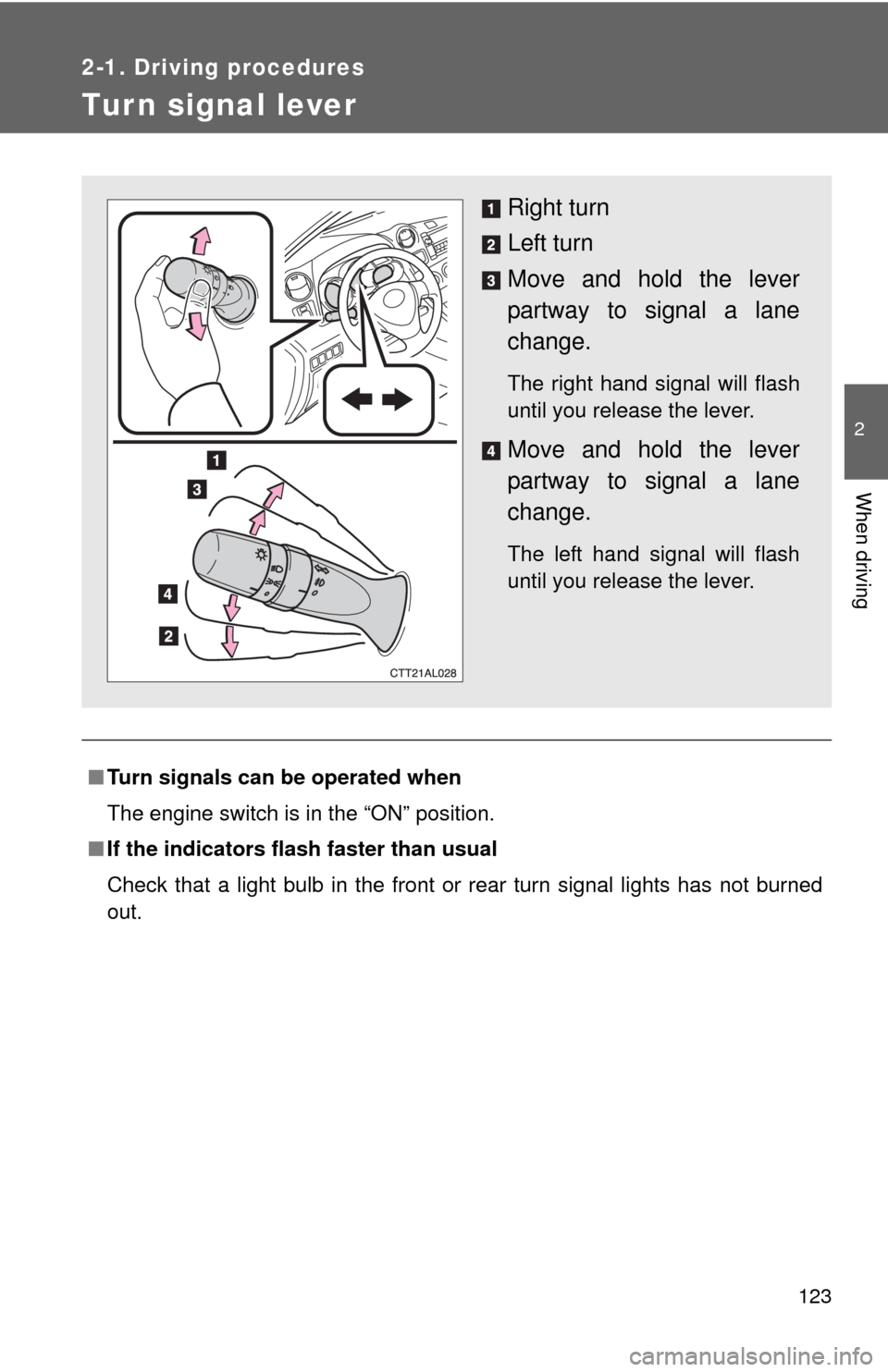
Tur n signal lever
■Turn signals can be operated when
The engine switch is in the “ON” position.
■If the indicators flash faster than usual
Check that a light bulb in the front or rear turn signal lights has not burned
out.
Right turn
Left turn
Move and hold the lever
partway to signal a lane
change.
The right hand signal will flash
until you release the lever.
Move and hold the lever
partway to signal a lane
change.
The left hand signal will flash
until you release the lever.
Page 127 of 448
127 2-2. Instrument cluster
2
When driving
Engine coolant temperature gauge
Displays the engine coolant temperature.
Automatic transmission shift position indicator lights (if
equipped)
P. 1 1 6
Odometer and trip meter
Odometer: Displays the total distance the vehicle has been driven.
Trip meter: Displays the distance the vehicle has been driven since the
meter was last reset. Trip meters A and B can be used to record and
display different distances independently.
Low fuel level warning light
P. 362
Page 128 of 448
128 2-2. Instrument cluster
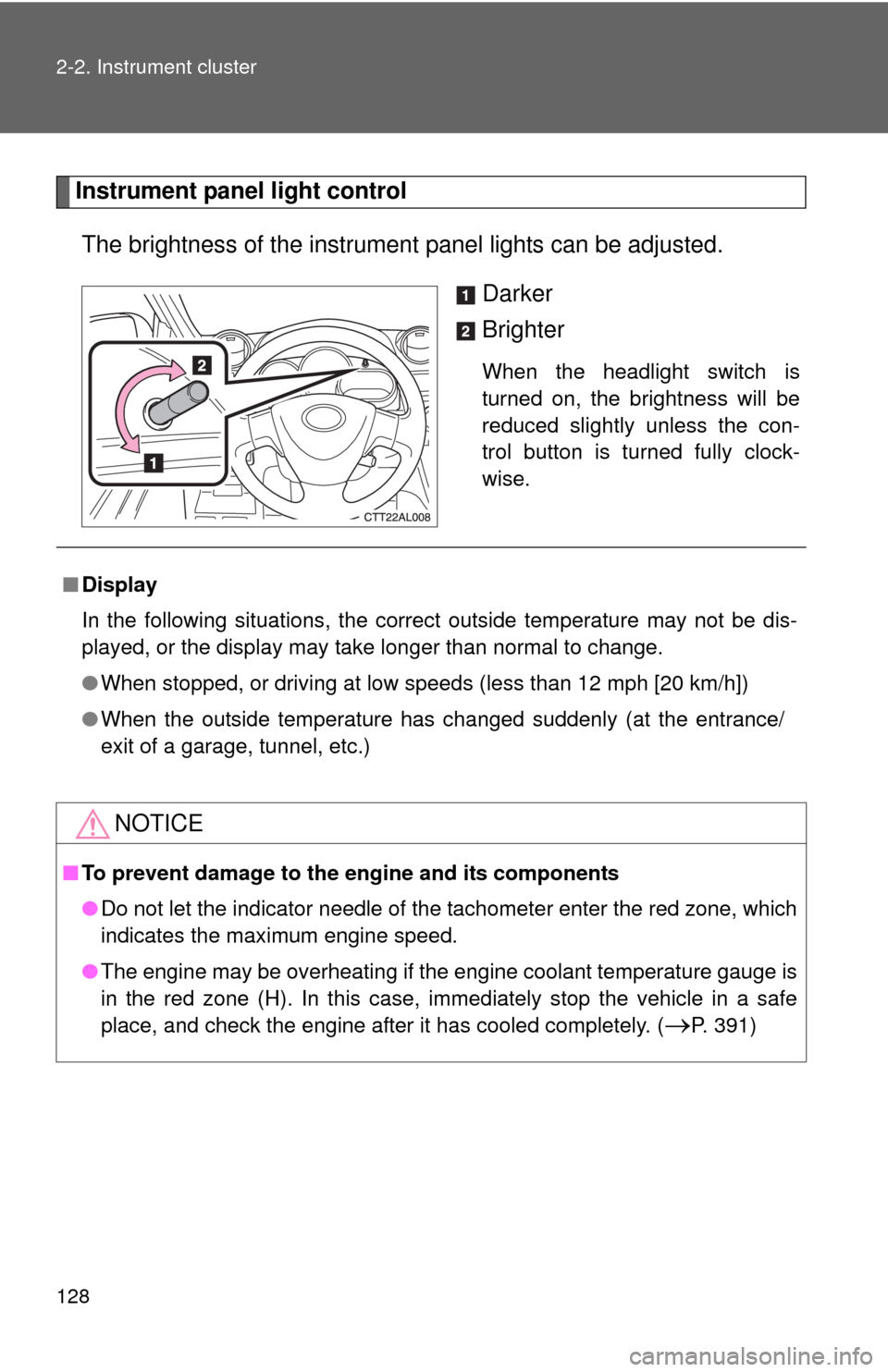
Instrument panel light control
The brightness of the instrument panel lights can be adjusted.
Darker
Brighter
When the headlight switch is
turned on, the brightness will be
reduced slightly unless the con-
trol button is turned fully clock-
wise.
■Display
In the following situations, the correct outside temperature may not be dis-
played, or the display may take longer than normal to change.
●When stopped, or driving at low speeds (less than 12 mph [20 km/h])
●When the outside temperature has changed suddenly (at the entrance/
exit of a garage, tunnel, etc.)
NOTICE
■To prevent damage to the engine and its components
●Do not let the indicator needle of the tachometer enter the red zone, which
indicates the maximum engine speed.
●The engine may be overheating if the engine coolant temperature gauge is
in the red zone (H). In this case, immediately stop the vehicle in a safe
place, and check the engine after it has cooled completely. (
P. 391)
Page 129 of 448
129
2-2. Instrument cluster
2
When driving
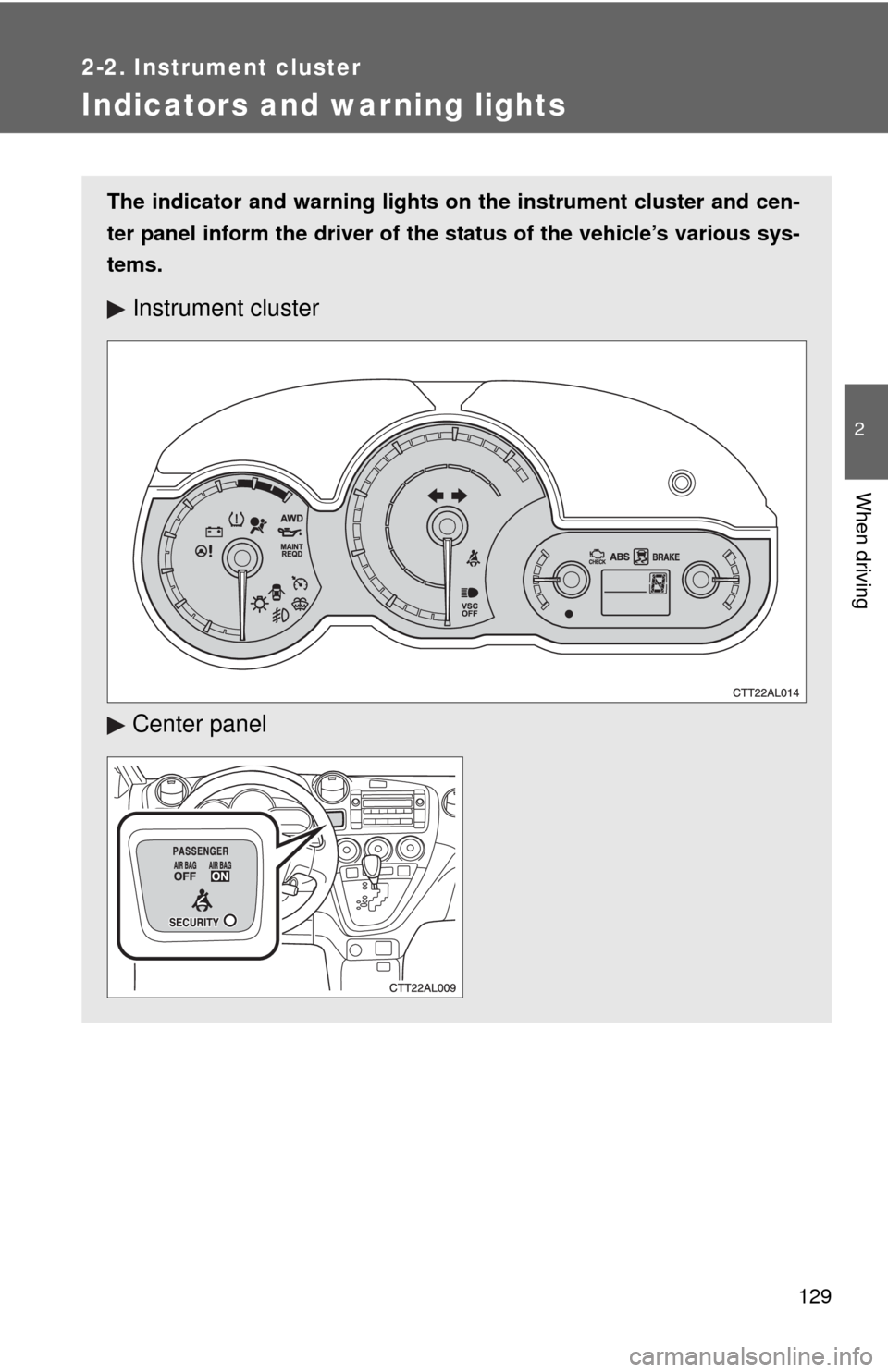
Indicators and warning lights
The indicator and warning lights on the instrument cluster and cen-
ter panel inform the driver of the status of the vehicle’s various sys-
tems.
Instrument cluster
Center panel
Page 131 of 448
131 2-2. Instrument cluster
2
When driving
CAUTION
■If a safety system warning light does not come on
Should a safety system light such as the ABS or the SRS airbag warning
light not come on when you start the engine, this could mean that these sys-
tems are not available to help protect you in an accident, which could result
in death or serious injury. Have the vehicle inspected by your Toyota dealer
immediately if this occurs.
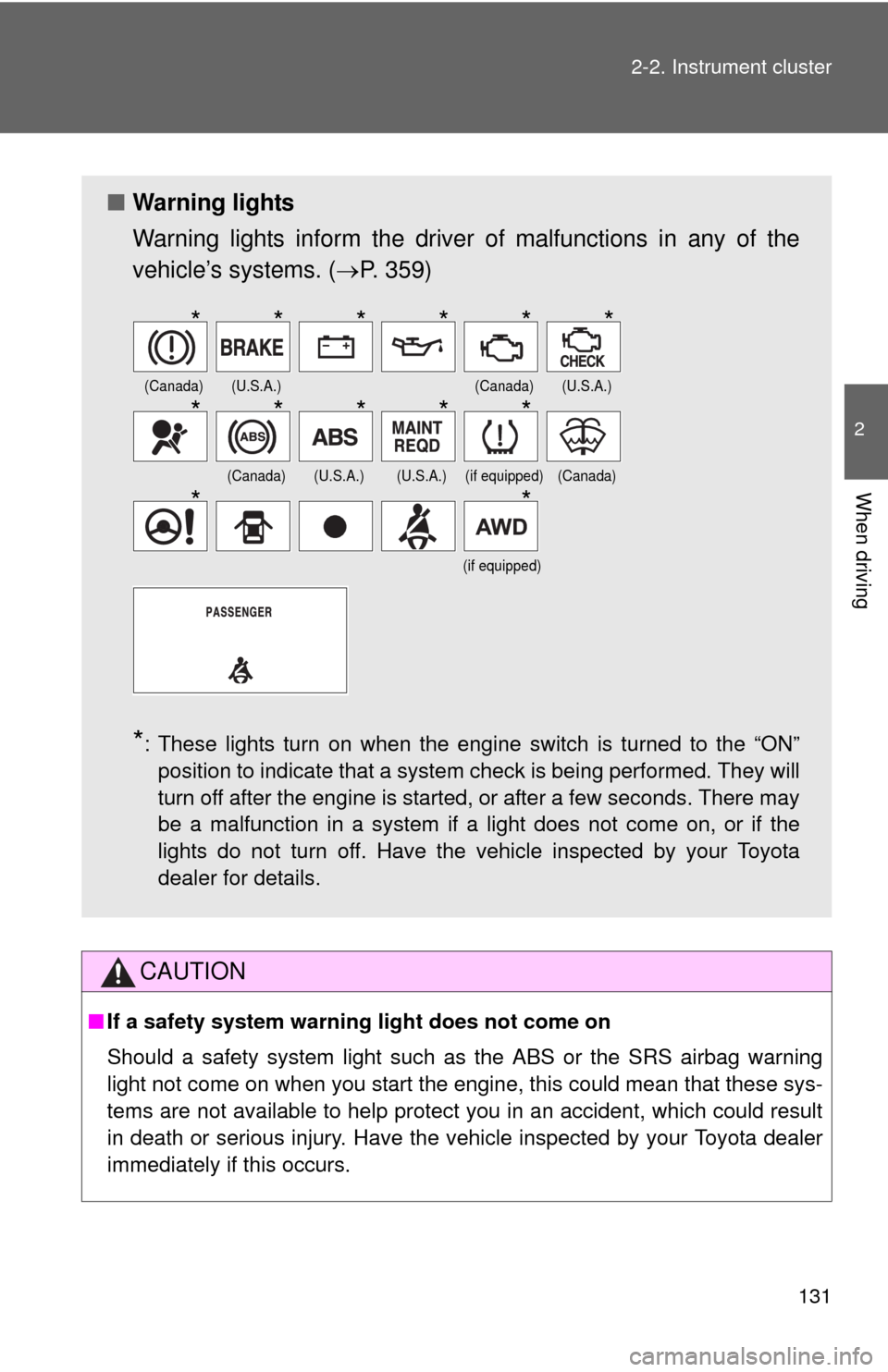
■Warning lights
Warning lights inform the driver of malfunctions in any of the
vehicle’s systems. (P. 359)
*: These lights turn on when the engine switch is turned to the “ON”
position to indicate that a system check is being performed. They will
turn off after the engine is started, or after a few seconds. There may
be a malfunction in a system if a light does not come on, or if the
lights do not turn off. Have the vehicle inspected by your Toyota
dealer for details.
(Canada)(U.S.A.)(Canada)(U.S.A.)
(Canada)(U.S.A.)(U.S.A.)(if equipped)(Canada)
(if equipped)
******
*****
**
Page 132 of 448
132
2-3. Operating the lights and wipers
Headlight switch
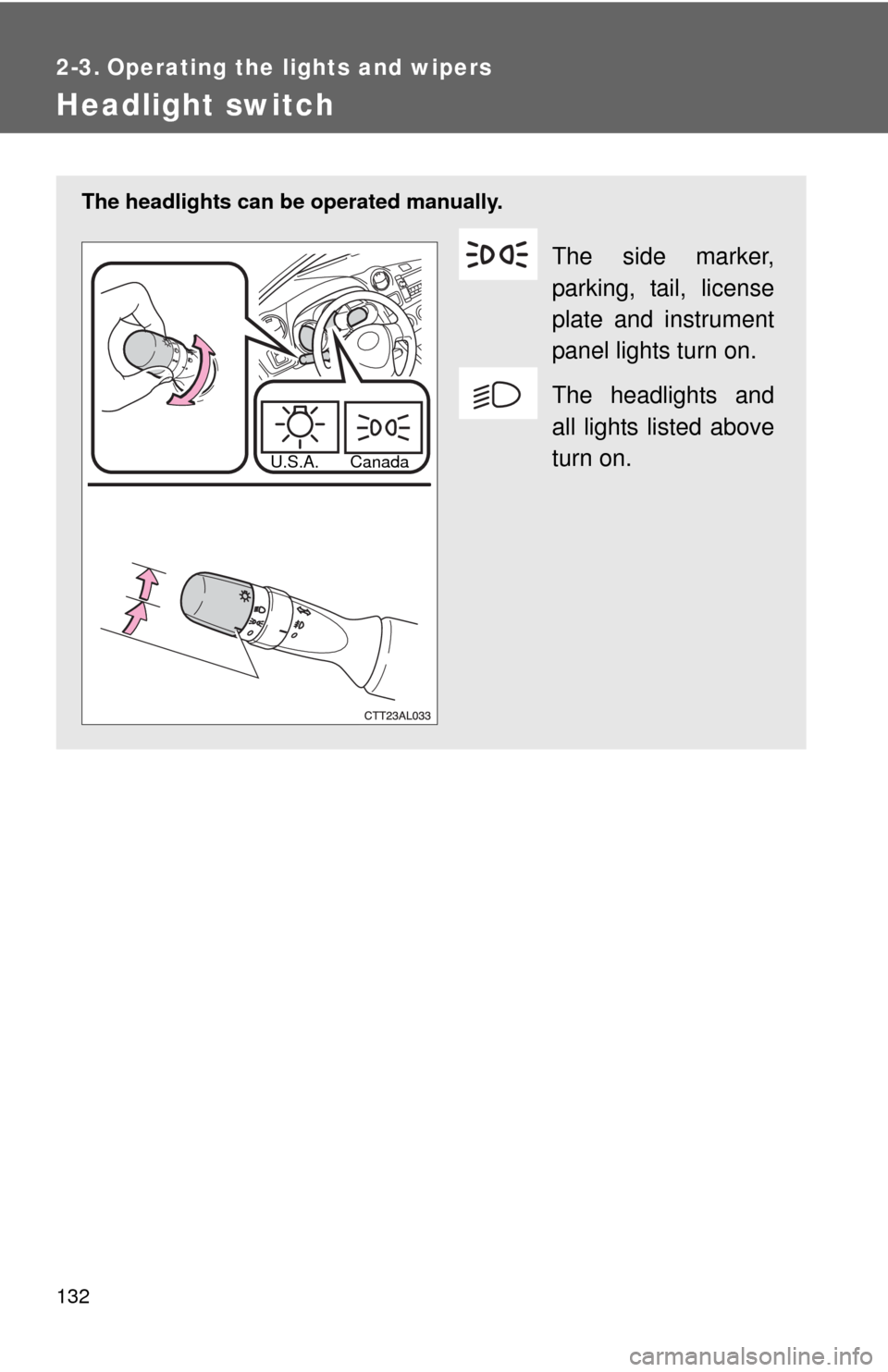
The headlights can be operated manually.
The side marker,
parking, tail, license
plate and instrument
panel lights turn on.
The headlights and
all lights listed above
turn on.
U.S.A. Canada
Page 133 of 448
133 2-3. Operating the lights and wipers
2
When driving
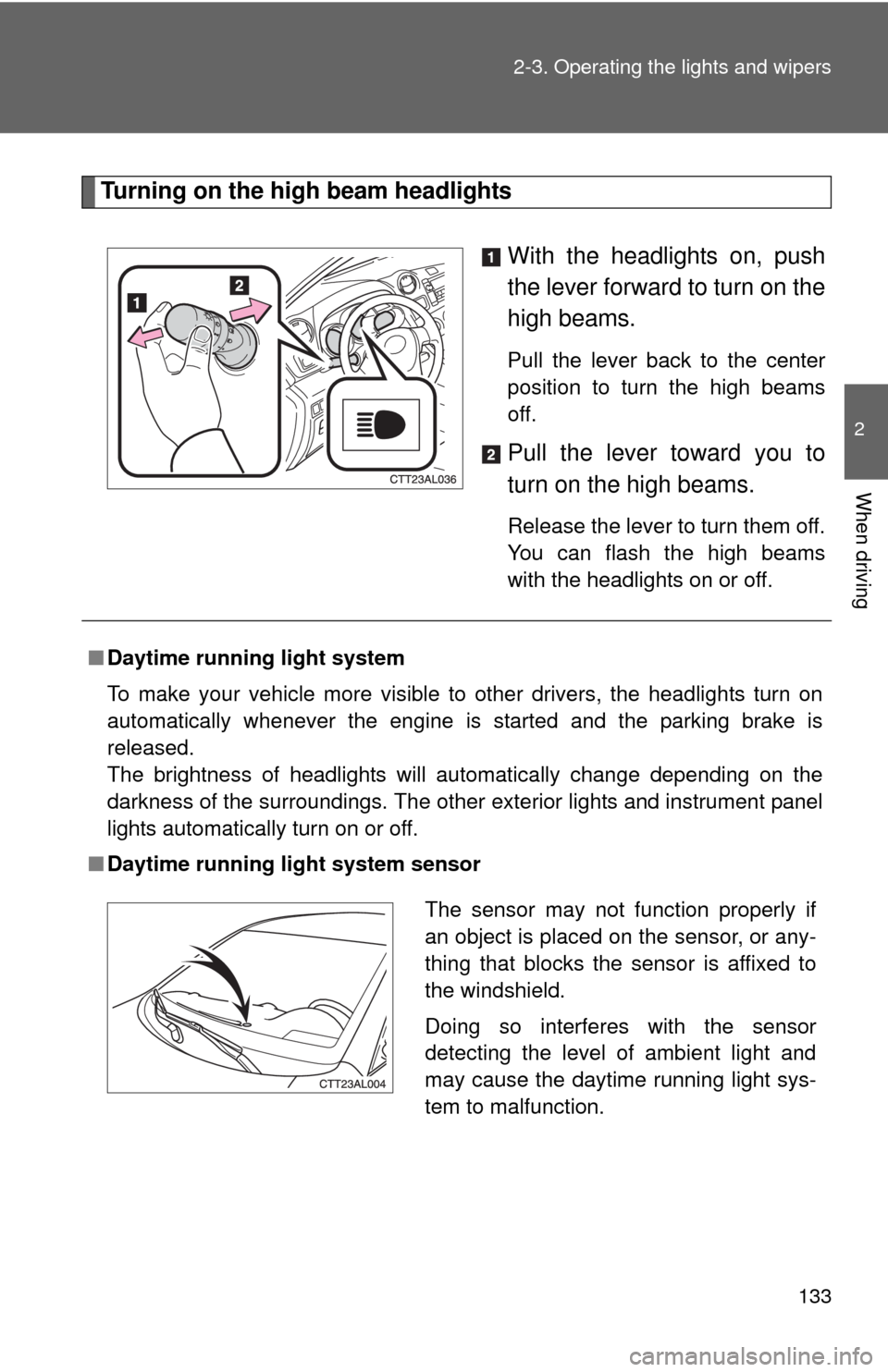
Turning on the high beam headlights
With the headlights on, push
the lever forward to turn on the
high beams.
Pull the lever back to the center
position to turn the high beams
off.
Pull the lever toward you to
turn on the high beams.
Release the lever to turn them off.
You can flash the high beams
with the headlights on or off.
■Daytime running light system
To make your vehicle more visible to other drivers, the headlights turn on
automatically whenever the engine is started and the parking brake is
released.
The brightness of headlights will automatically change depending on the
darkness of the surroundings. The other exterior lights and instrument panel
lights automatically turn on or off.
■Daytime running light system sensor
The sensor may not function properly if
an object is placed on the sensor, or any-
thing that blocks the sensor is affixed to
the windshield.
Doing so interferes with the sensor
detecting the level of ambient light and
may cause the daytime running light sys-
tem to malfunction.
Page 134 of 448

134 2-3. Operating the lights and wipers
■Light reminder buzzer
A buzzer sounds when the engine switch is turned OFF and the driver's door
is opened with the key removed from the engine switch while the lights are
turned on.
NOTICE
■To prevent battery discharge
Do not leave the lights on longer than necessary when the engine is not run-
ning.