lock TOYOTA MATRIX 2014 E140 / 2.G Repair Manual
[x] Cancel search | Manufacturer: TOYOTA, Model Year: 2014, Model line: MATRIX, Model: TOYOTA MATRIX 2014 E140 / 2.GPages: 500, PDF Size: 7.02 MB
Page 265 of 500
265
3-4. Using the hand
s-free phone system (for cellular phone)
3
Interior features
Operations during a call
● Transferring a call
A call can be transferred between the cellular phone and system
while dialing, receiving a call, or during a call. Use one of the fol-
lowing methods:
a. Operate the cellular phone.
Refer to the manual that comes with the cellular phone for the oper-
ation of the phone.
b. Press the * (PHONE).
*: This operation can be performed only when transferring a call from
the cellular phone to the system during a call.
● Muting your voice
Press (MUTE).
● Inputting digits
Press (0-9) and using the to input the desired dig-
its.
• To send the input digits press (SEND).
• When finished, press (EXIT) to return to the previous screen.
●Setting call volume
Change the call volume using .
To decrease the volume: Turn counterclockwise.
To increase the volume: Turn clockwise.
Page 266 of 500
266 3-4. Using the hands-free phone system (for cellular phone)
Adjusting the ringtone volume when receiving a call
Change the ringtone volume using .
To decrease the volume: Turn counterclockwise.
To increase the volume: Turn clockwise.
■When talking on the phone
●Do not talk simultaneously with the other party.
● Keep the volume of the received voice down. Otherwise, voice echo will
increase.
■ Automatic volume adjustment
When vehicle speed is 50 mph (80 km/h) or more, the volume automatically
increases. The volume returns to the previous volume setting when vehicle
speed drops to 43 mph (70 km/h) or less.
■ Phone call system functions
Depending on the cellular phone, certain functions may not be available.
■ Situations where the system m ay not recognize your voice
● When driving on a rough road
● When driving at high speeds
● When air is blowing out of the vents onto the microphone
● When the air conditioning fan emits a loud noise
Page 277 of 500
277
3-4. Using the hand
s-free phone system (for cellular phone)
3
Interior features
Deleting a registered phone number
Select “Delete contacts” using .
Select the desired phone number using and press (YES).
To delete all of the registered phone numbers, select “All delete”
using and press (YES).
Deleting another cellular phone’s phonebook
Select “Delete other PB” using .
Select the desired phonebook using and press (YES).
Setting call volume
Select “Call Volume” using .
Change the call volume.
To decrease the volume: Turn counterclockwise.
To increase the volume: Turn clockwise.
STEP1
STEP2
STEP1
STEP2
STEP1
STEP2
Page 278 of 500
278 3-4. Using the hands-free phone system (for cellular phone)
Setting ringtone volume
Select “Ringtone Volume” using .
Change the ringtone volume.
To decrease the volume: Turn counterclockwise.
To increase the volume: Turn clockwise.
Setting ringtone
Select “Ringtone” using .
Using , select a ringtone (1 - 3). To set the selected
ringtone, press .
Transferring call histories
Select “Transfer Histories” using and press (YES).
■ Phone number
Up to 1000 names can be stored.
■ Call history
Up to 10 numbers can be stored in each of the outgoing, incoming and
missed call history memories.
■ Limitation of number of digits
A phone number that exceeds 24 digits cannot be registered.
STEP1
STEP2
STEP1
STEP2
Page 280 of 500
280 3-5. Using the interior lights
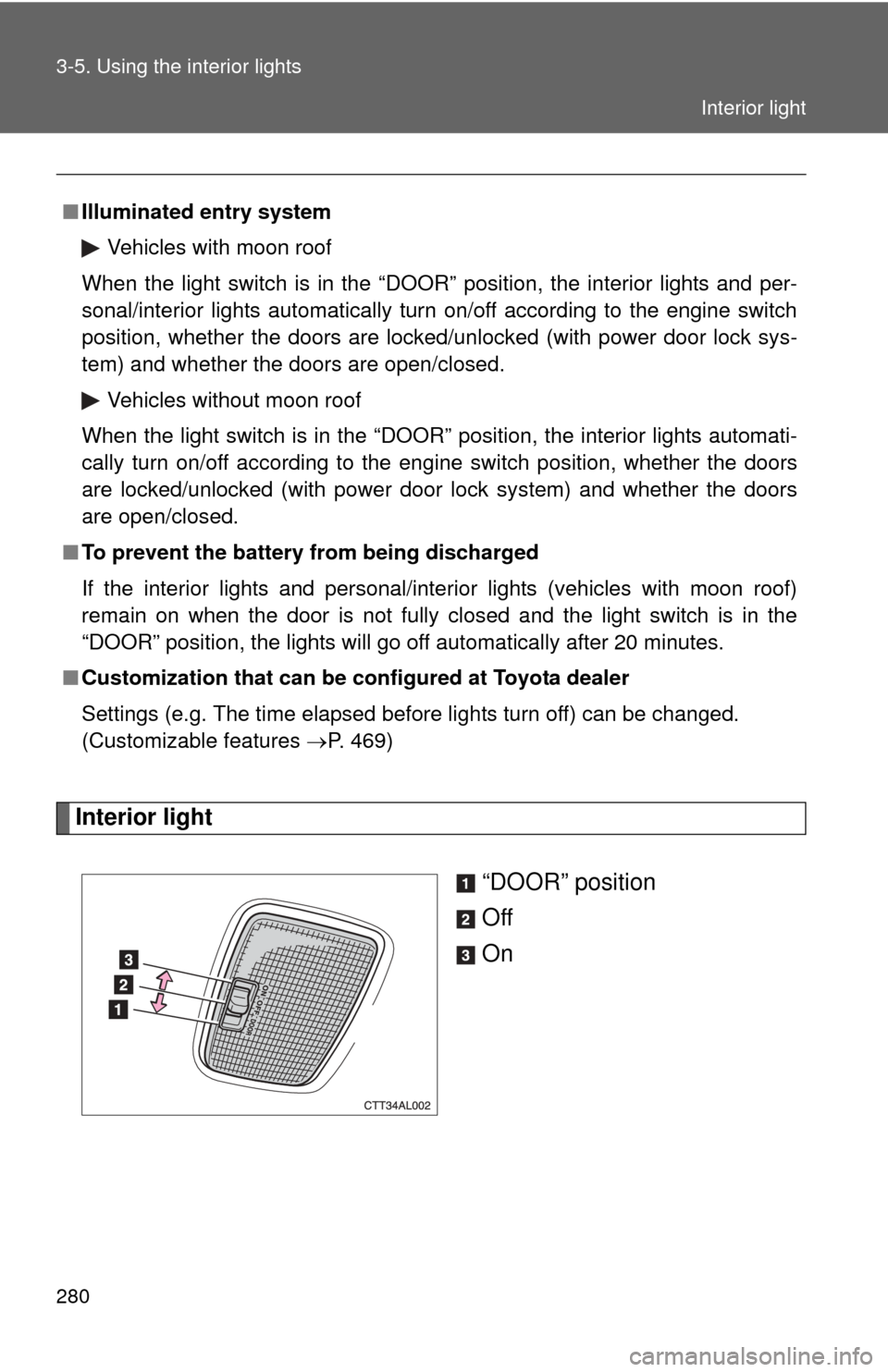
Interior light“DOOR” position
Off
On
■Illuminated entry system
Vehicles with moon roof
When the light switch is in the “DOOR” position, the interior lights and per-
sonal/interior lights automatically turn on/off according to the engine switch
position, whether the doors are locked/unlocked (with power door lock sys-
tem) and whether the doors are open/closed.
Vehicles without moon roof
When the light switch is in the “DOOR” position, the interior lights automati-
cally turn on/off according to the engine switch position, whether the doors
are locked/unlocked (with power door lock system) and whether the doors
are open/closed.
■ To prevent the battery from being discharged
If the interior lights and personal/interior lights (vehicles with moon roof)
remain on when the door is not fully closed and the light switch is in the
“DOOR” position, the lights will go off automatically after 20 minutes.
■ Customization that can be co nfigured at Toyota dealer
Settings (e.g. The time elapsed before lights turn off) can be changed.
(Customizable features P. 469)
Interior light
Page 292 of 500
292
3-7. Other interior features
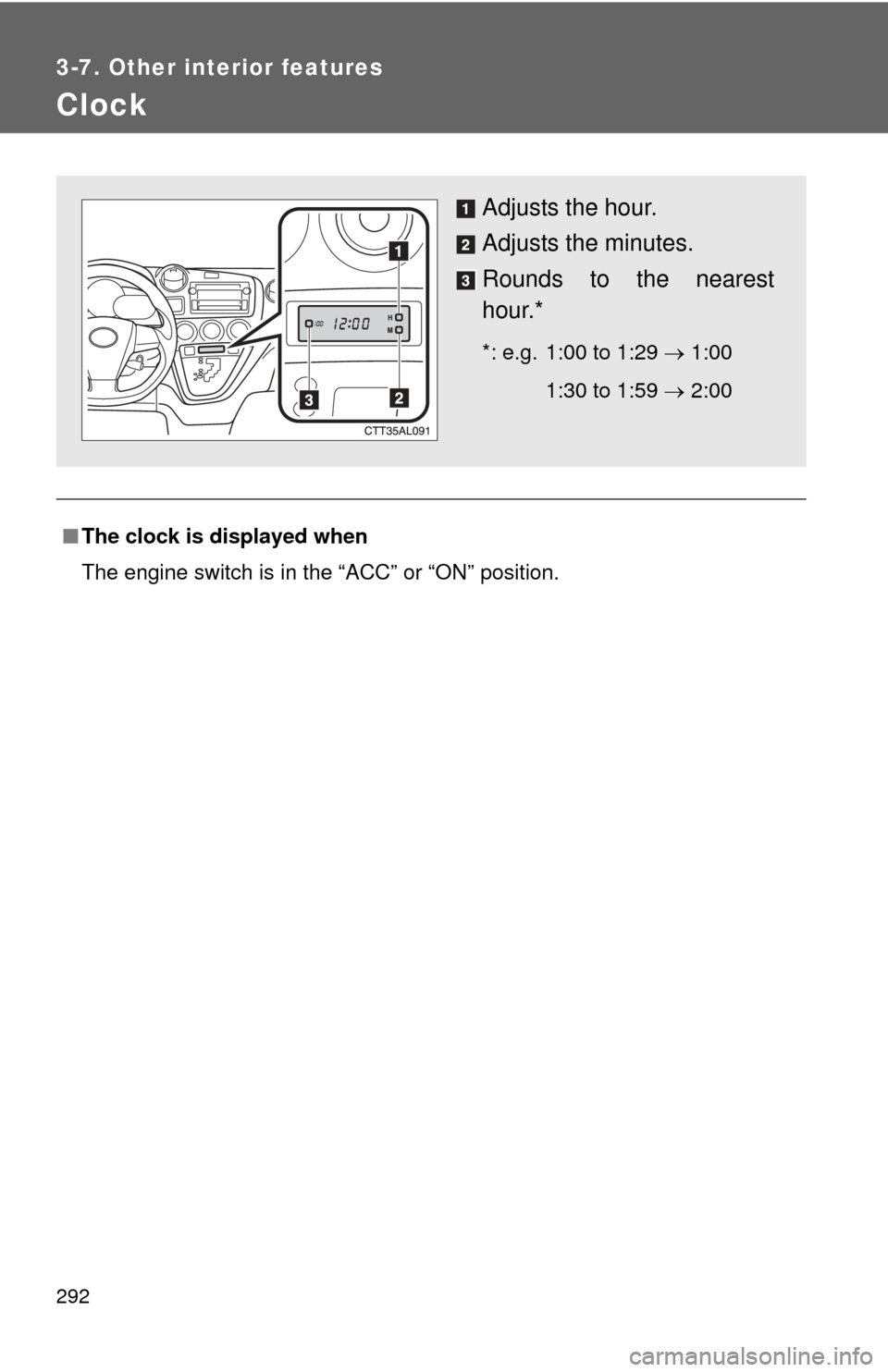
Clock
■The clock is displayed when
The engine switch is in the “ACC” or “ON” position.
Adjusts the hour.
Adjusts the minutes.
Rounds to the nearest
hour.*
*: e.g. 1:00 to 1:29 1:00
1:30 to 1:59 2:00
Page 303 of 500
303
3-7. Other interior features
3
Interior features
■
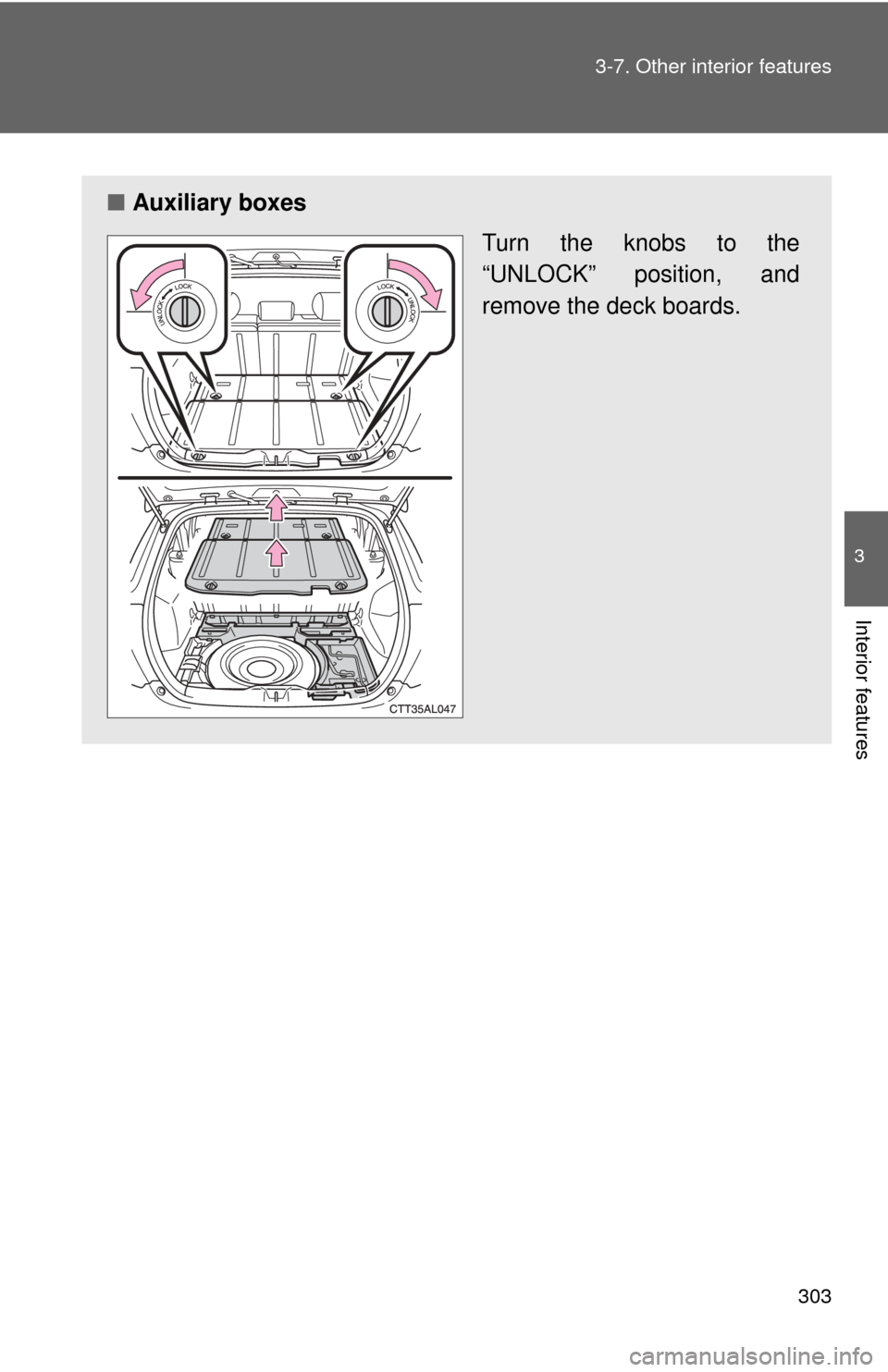
Auxiliary boxes
Turn the knobs to the
“UNLOCK” position, and
remove the deck boards.
Page 308 of 500
308 3-7. Other interior features
CAUTION
■When unfolding the tonneau cover
Be careful not to hit yourself when unfolding the tonneau cover.
■ Caution while driving
Keep the deck boards locked.
Injuries may result in the event of an accident or sudden braking.
Page 311 of 500
311
3-7. Other interior features
3
Interior features
■
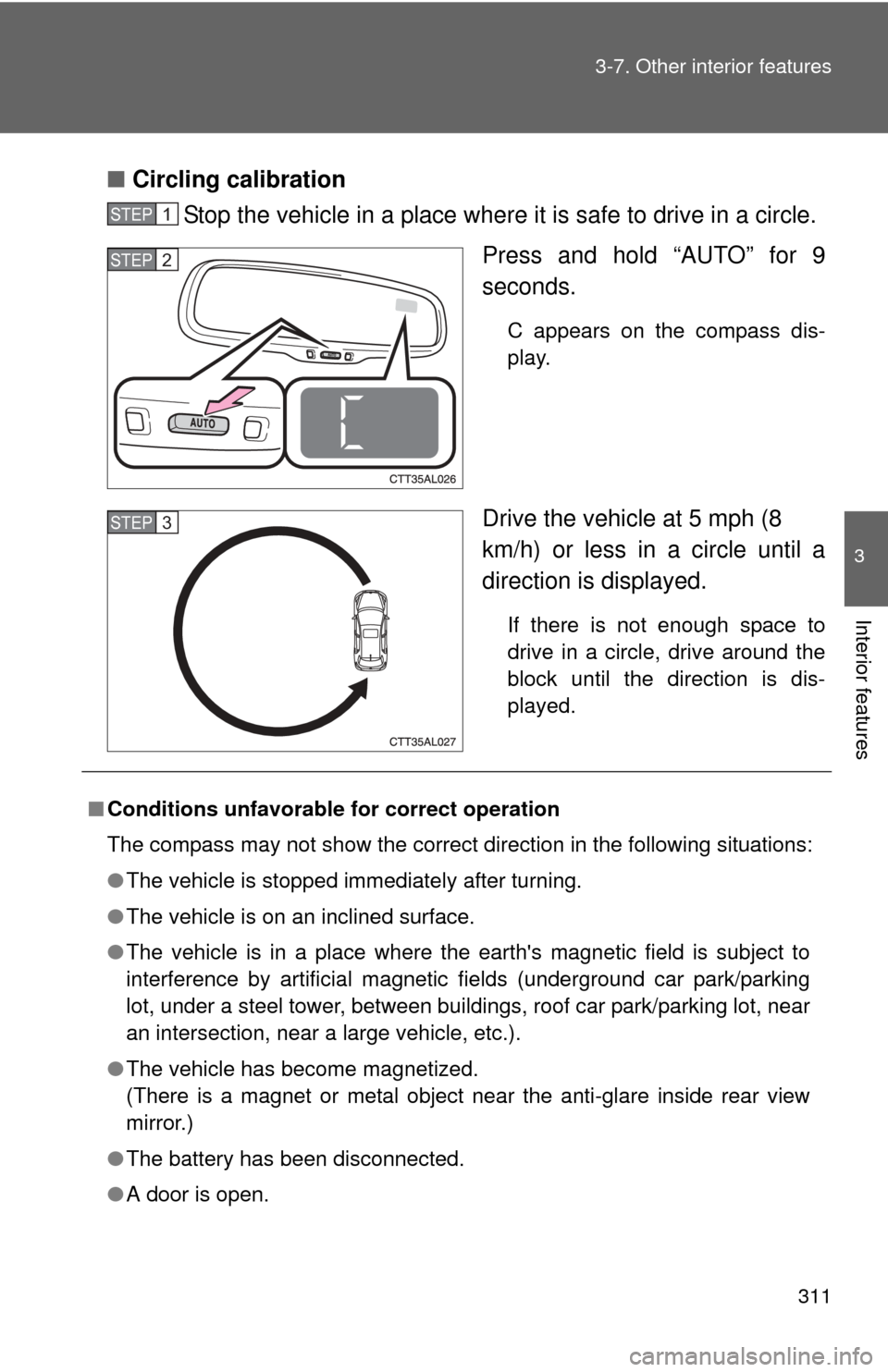
Circling calibration
Stop the vehicle in a place where it is safe to drive in a circle.
Press and hold “AUTO” for 9
seconds.
C appears on the compass dis-
play.
Drive the vehicle at 5 mph (8
km/h) or less in a circle until a
direction is displayed.
If there is not enough space to
drive in a circle, drive around the
block until the direction is dis-
played.
STEP1
STEP2
STEP3
■Conditions unfavorable for correct operation
The compass may not show the correct direction in the following situations:
●The vehicle is stopped immediately after turning.
● The vehicle is on an inclined surface.
● The vehicle is in a place where the earth's magnetic field is subject to
interference by artificial magnetic fields (underground car park/parking
lot, under a steel tower, between buildings, roof car park/parking lot, near
an intersection, near a large vehicle, etc.).
● The vehicle has become magnetized.
(There is a magnet or metal object near the anti-glare inside rear view
mirror.)
● The battery has been disconnected.
● A door is open.
Page 316 of 500
316 4-1. Maintenance and care
NOTICE
■To prevent paint deterioration and corrosion on the body and compo-
nents (aluminum wheels etc.)
● Wash the vehicle immediately in the following cases:
• After driving near the sea coast
• After driving on salted roads
• If you see coal tar or tree sap on the paint surface
• If you see dead insects or insect droppings on the paint
• After driving in an area contaminated with soot, oily smoke, mine dust,
iron powder or chemical substances
• If the vehicle becomes heavily soiled in dust or mud
• If liquids such as benzene and gasoline are spilled on the paint surface
● If the paint is chipped or scratched, have it repaired immediately.
● To prevent the wheels from corroding, remove any dirt and store in a place
with low humidity when storing the wheels.
■ If the windshield washer nozzle become blocked
Contact your Toyota dealer. Do not try to clear it with a pin or other object.
This may damage the nozzle.
■ Cleaning the exterior lights
●Wash carefully. Do not use organic substances or scrub with a hard brush.
This may damage the surfaces of the lights.
● Do not apply wax on the surfaces of the lights.
Wax may cause damage to the lenses.
■ Antenna installation and removal precautions
●Before driving, ensure that the antenna is installed.
● When the antenna is removed, such as before entering an automatic car
wash, make sure to store it in a suitable place so as not to lose it. Also,
before driving, make sure to reinstall the antenna in its original position.