key battery TOYOTA MATRIX 2014 E140 / 2.G Owners Manual
[x] Cancel search | Manufacturer: TOYOTA, Model Year: 2014, Model line: MATRIX, Model: TOYOTA MATRIX 2014 E140 / 2.GPages: 500, PDF Size: 7.02 MB
Page 4 of 500

TABLE OF CONTENTSIndex
4
3-4. Using the hands-free phone system
(for cellular phone)
Making a phone call ........... 262
Using the “SET UP” menu (“Bluetooth” menu) ........... 267
Using the “SET UP” menu (“Phone” menu) ................ 273
3-5. Using the interior lights Interior lights list ................. 279
• Interior light ...................... 280
• Personal/interior lights...... 281
• Personal lights ................. 282
3-6. Using the storage features List of storage features....... 283
• Glove box ......................... 284
• Console box ..................... 284
• Cup holders ...................... 285
• Bottle holders ................... 287
• Auxiliary boxes ................. 288
3-7. Other interior features Sun visors .......................... 290
Vanity mirrors ..................... 291
Clock .................................. 292
Ashtray ............................... 293
Cigarette lighter .................. 294
Power outlet ....................... 295
Grocery bag hooks ............. 297
Seatback table ................... 299
Assist grips ......................... 300
Floor mat ............................ 301
Luggage compartment feature .............................. 302
Compass ............................ 309 4-1. Maintenance and care
Cleaning and protecting the vehicle exterior ........... 314
Cleaning and protecting the vehicle interior ............ 317
4-2. Maintenance Maintenance requirements .................... 320
General maintenance ......... 322
Emission inspection and maintenance (I/M)
programs .......................... 325
4-3. Do-it-yourself maintenance Do-it-yourself service precautions ....................... 326
Hood ................................... 330
Positioning a floor jack........ 332
Engine compartment .......... 335
Tires.................................... 349
Tire inflation pressure ......... 358
Wheels................................ 362
Air conditioning filter ........... 365
Key battery ......................... 367
Checking and replacing fuses ................................. 369
Light bulbs .......................... 378
4Maintenance and care
Page 5 of 500

1
2
3
4
5
6
7
5
5-1. Essential informationEmergency flashers ............ 388
If your vehicle needs to be towed ................................ 389
If you think something is wrong ................................ 395
Fuel pump shut off system .............................. 396
5-2. Steps to take in an emergency
If a warning light turns on or a warning buzzer
sounds... .......................... 397
If you have a flat tire............ 408
If the engine will not start .... 422
If the shift lever cannot be shifted from P.................... 423
If you lose your keys ........... 424
If the battery is discharged ........................ 425
If your vehicle overheats ..... 430
If the vehicle becomes stuck ................................. 433
If your vehicle has to be stopped in an
emergency ........................ 435 6-1. Specifications
Maintenance data (fuel, oil level, etc.) ........... 438
Fuel information.................. 454
Tire information .................. 457
6-2. Customization Customizable features........ 469
6-3. Initialization Items to initialize ................. 471
Reporting safety defects for U.S. owners ................ 474
Seat belt instructions for Canadian owners
(in French) ........................ 475
SRS airbag instructions for Canadian owners
(in French) ........................ 477
Abbreviation list ........................ 486
Alphabetical index .................... 488
What to do if... .......................... 498
5When trouble arises6Vehicle specifications
7For owners
Index
Page 29 of 500
29
1-2. Opening, closing and locking the doors
1
Before driving
■
Key battery depletion
If the wireless remote control function does not operate, the battery may be
depleted. Replace the battery when necessary. ( P. 367)
■ Security feature
If a door is not opened within approximately 60 seconds after the vehicle is
unlocked, the security feature automatically locks the vehicle again.
■ Conditions affecting operation
The wireless remote control function may not operate normally in the follow-
ing situations.
●Near a TV tower, radio station, electr ic power plant, airport or other facil-
ity that generates strong radio waves
● When carrying a portable radio, cell ular phone or other wireless commu-
nication devices
● When multiple wireless keys are in the vicinity
● When the wireless key has come into contact with, or is covered by, a
metallic object
● When a wireless key (that emits radio waves) is being used nearby
● When the wireless key has been left near an electrical appliance such as
a personal computer
● When the wireless key battery is depleted
● If window tint with a metallic content or metallic objects are attached to
the rear window
■ Customization that can be co nfigured at Toyota dealer
Settings (e.g. operation signal) can be changed.
(Customizable features P. 469)
Page 121 of 500

121
2-1. Driving procedures
2
When driving
NOTICE
■
To prevent battery discharge
Do not leave the key in the “ACC” or “ON” position for long periods if the
engine is not running.
■ When starting the engine
●2.4 L 4-cylinder (2AZ-FE) engine Do not crank for more than 30 sec-
onds at a time. This may overheat the starter and wiring systems.
● Do not race a cold engine.
● If the engine becomes difficult to start or stalls frequently, have the engine
checked immediately.
Page 140 of 500

140 2-3. Operating the lights and wipers
■Daytime running light system
●To make your vehicle more visible to other drivers, the headlights turn on
automatically whenever the engine is started and the parking brake is
released.
● Compared to turning on the headlights, the daytime running light system
offers greater durability and consumes less electricity, so it can help
improve fuel economy.
■ Light reminder buzzer
A buzzer sounds when the engine switch is turned OFF and the driver's door
is opened with the key removed from the engine switch while the lights are
turned on.
NOTICE
■To prevent battery discharge
Do not leave the lights on longer than necessary when the engine is not run-
ning.
Page 313 of 500
Maintenance and care4
313
4-1. Maintenance and careCleaning and protecting the vehicle exterior......... 314
Cleaning and protecting the vehicle interior.......... 317
4-2. Maintenance Maintenance requirements .................. 320
General maintenance....... 322
Emission inspection and maintenance (I/M)
programs........................ 325 4-3. Do-it-yourself
maintenance
Do-it-yourself service precautions .................... 326
Hood ................................ 330
Positioning a floor jack ..... 332
Engine compartment ........ 335
Tires ................................. 349
Tire inflation pressure ...... 358
Wheels ............................. 362
Air conditioning filter......... 365
Key battery ....................... 367
Checking and replacing fuses .............................. 369
Light bulbs........................ 378
Page 367 of 500
367
4-3. Do-it-yourself maintenance
4
Maintenance and care
Key batter y (vehicles with wireless remote control)
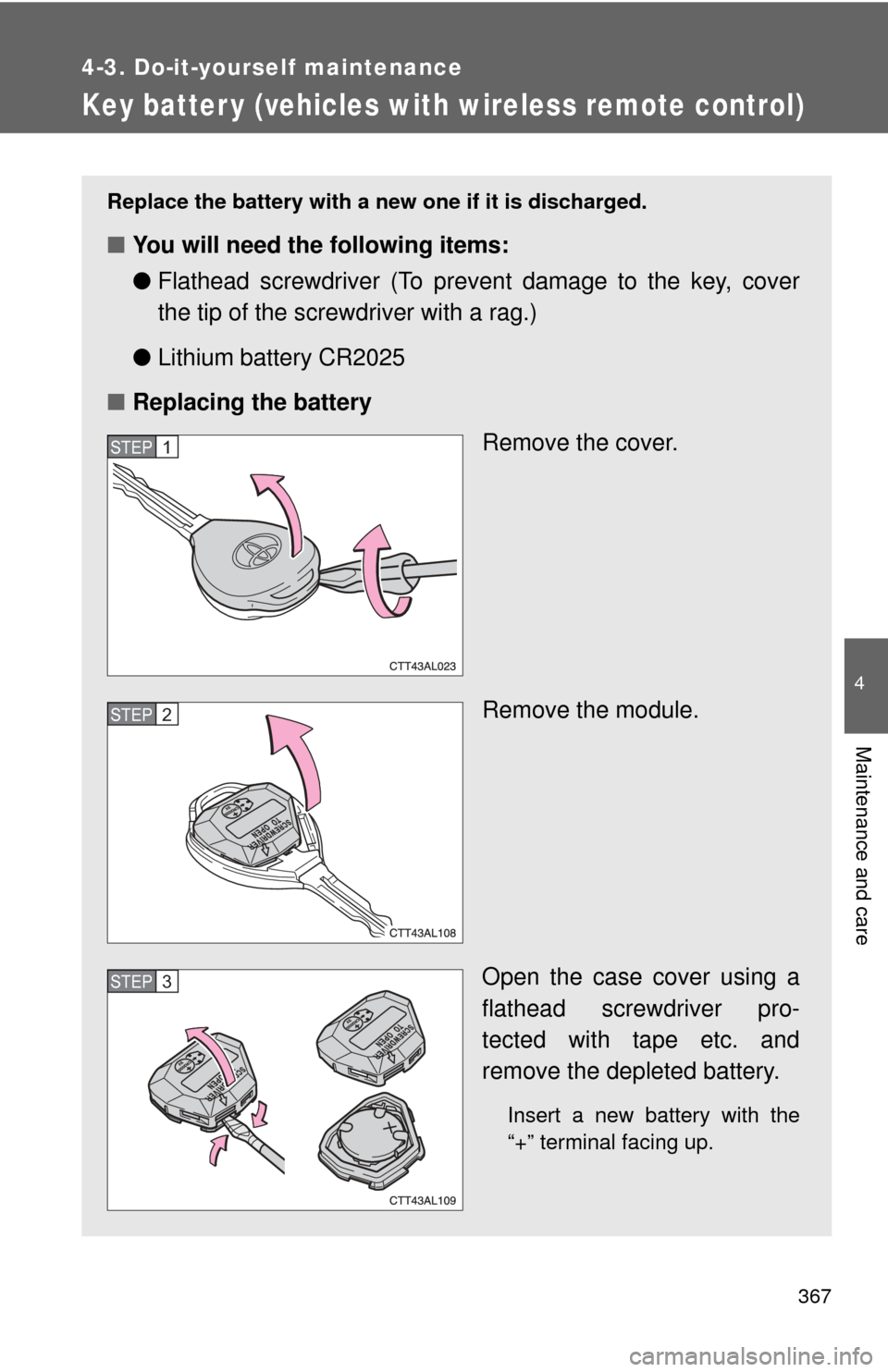
Replace the battery with a new one if it is discharged.
■You will need the following items:
●Flathead screwdriver (To prevent damage to the key, cover
the tip of the screwdriver with a rag.)
● Lithium battery CR2025
■ Replacing the battery
Remove the cover.
Remove the module.
Open the case cover using a
flathead screwdriver pro-
tected with tape etc. and
remove the depleted battery.
Insert a new battery with the
“+” terminal facing up.
STEP1
STEP2
STEP3
Page 368 of 500
368 4-3. Do-it-yourself maintenance
■If the key battery is discharged
The following symptoms may occur.
●The wireless remote control will not function properly.
● The operational range is reduced.
■ Use CR2025 lithium battery
●Batteries can be purchased at your Toyota dealer, jewelers, or camera
stores.
● Replace only with the same or equivalent type recommended by your
To y o t a dealer.
● Dispose of used batteries according to the local laws.
CAUTION
■Removed battery and other parts
These parts are small and if swallowed by a child, they can cause choking.
Keep away from children. Failure to do so could result in death or serious
injury.
NOTICE
■For normal operation after replacing the battery
Observe the following precautions to prevent accidents.
●Always work with dry hands.
Moisture may cause the battery to rust.
● Do not touch or move any other components inside the remote control.
● Do not bend either of the battery terminals.
Page 387 of 500
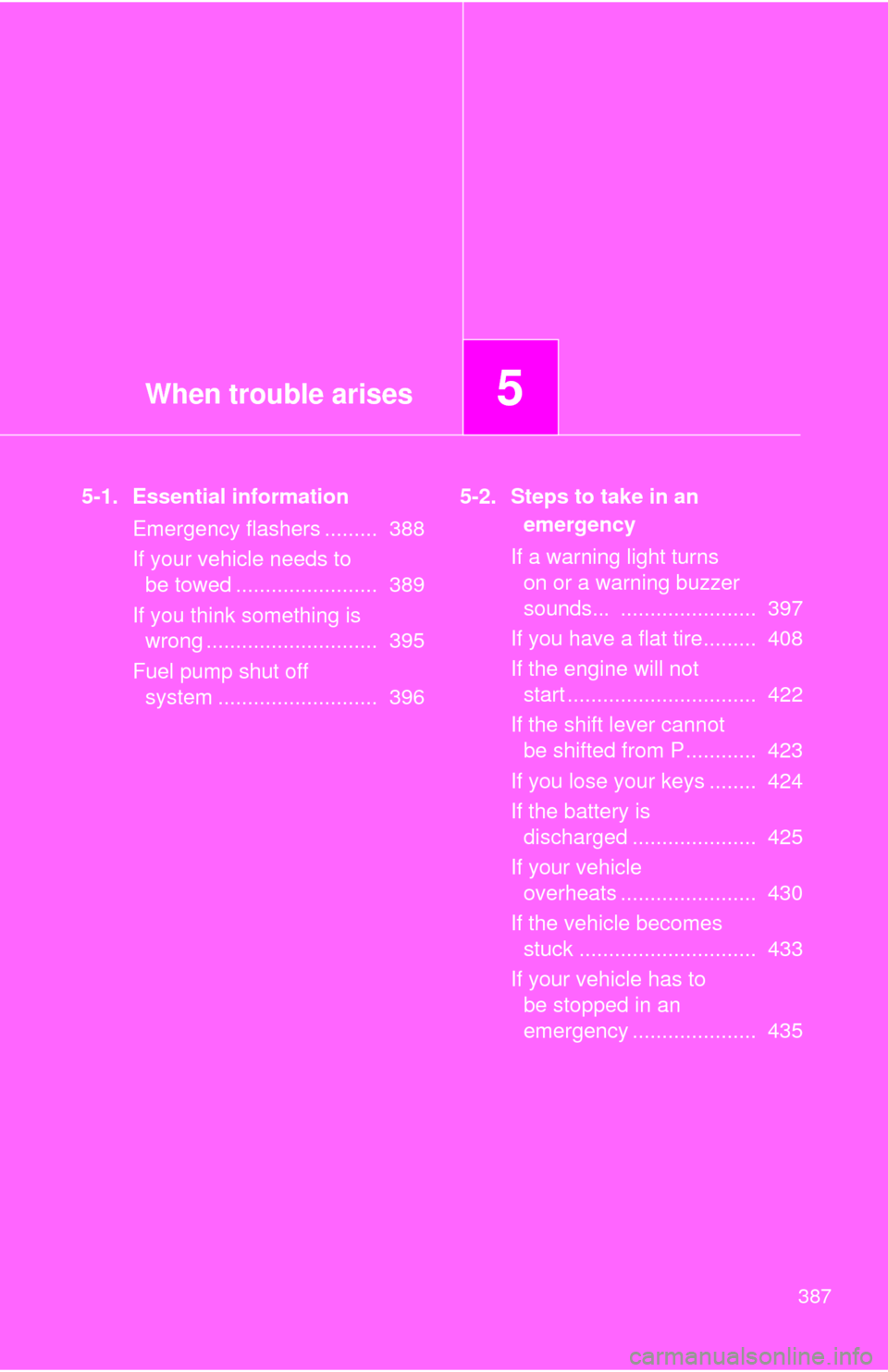
When trouble arises5
387
5-1. Essential informationEmergency flashers ......... 388
If your vehicle needs to be towed ........................ 389
If you think something is wrong ............................. 395
Fuel pump shut off system ........................... 396 5-2. Steps to take in an
emergency
If a warning light turns on or a warning buzzer
sounds... ....................... 397
If you have a flat tire......... 408
If the engine will not start ................................ 422
If the shift lever cannot be shifted from P............ 423
If you lose your keys ........ 424
If the battery is discharged ..................... 425
If your vehicle overheats ....................... 430
If the vehicle becomes stuck .............................. 433
If your vehicle has to be stopped in an
emergency ..................... 435
Page 490 of 500

490 Alphabetical index
Child safetyAirbag precautions ..................80
Battery precautions ....... 346, 429
Child restraint syst em..............90
Child-protectors .......................32
How your child should wear
the seat belt ..........................50
Installing child restraints ..........94
Moon roof precautions ............63
Power window lock switch.......59
Power window precautions .....60
Removed key battery
precautions ......................... 368
Seat belt extender
precautions ...........................53
Seat belt precautions ..............51
Child-protectors .........................32
Cleaning
Exterior .................................. 314
Interior ................................... 317
Seat belts .............................. 318
Clock ......................................... 292
Compass ................................... 309
Condenser ................................ 342
Console box ............................. 284
Cooling system Engine overheating ............... 430
Cruise control........................... 148
Cup holder ................................ 285
Curtain shield airbags ...............73
Customizable features............. 469 Daytime running light
system .................................... 140
Defogger Rear window ......................... 193
Side mirror ............................ 193
Dimension ................................ 438
Dinghy towing .................. 181, 182
Display Trip meter.............................. 132
Do-it-yourself maintenance .... 326
Doors Door lock ........................... 28, 31
Door windows ......................... 59
Side mirrors............................. 57
Driver's seat belt reminder light ......................................... 400
Driving
Break-in tips .......................... 109
Correct posture ....................... 71
Procedures............................ 106
Winter driving tips ................. 162D