turn signal TOYOTA MIRAI 2017 1.G Owners Manual
[x] Cancel search | Manufacturer: TOYOTA, Model Year: 2017, Model line: MIRAI, Model: TOYOTA MIRAI 2017 1.GPages: 464, PDF Size: 12.09 MB
Page 3 of 464

3
MIRAI_OM_USA_OM62023U
1
9 8 6 5
4
3
2
10
7
5-1. Before drivingDriving the vehicle ............. 158
Cargo and luggage............ 166
Vehicle load limits ............. 169
Trailer towing..................... 170
Dinghy towing.................... 171
5-2. Driving procedures Power switch ..................... 172
Transmission ..................... 179
Turn signal lever................ 185
Parking brake .................... 186
5-3. Operating the lights and wipers
Headlight switch ................ 187
Automatic High Beam ....... 190
Windshield wipers and washer ............................ 195
5-4. Refueling Opening the fuel door........ 198 5-5. Using the driving
support systems
Dynamic radar cruise control.............................. 203
LDA (Lane Departure Alert) ................................ 216
Intuitive parking assist ....... 223
Driving assist systems ....... 232
PCS (Pre-Collision System) ........................... 238
BSM (Blind Spot Monitor)......... 245
5-6. Driving tips Winter driving tips .............. 253
5Driving
Page 15 of 464
15Pictorial index
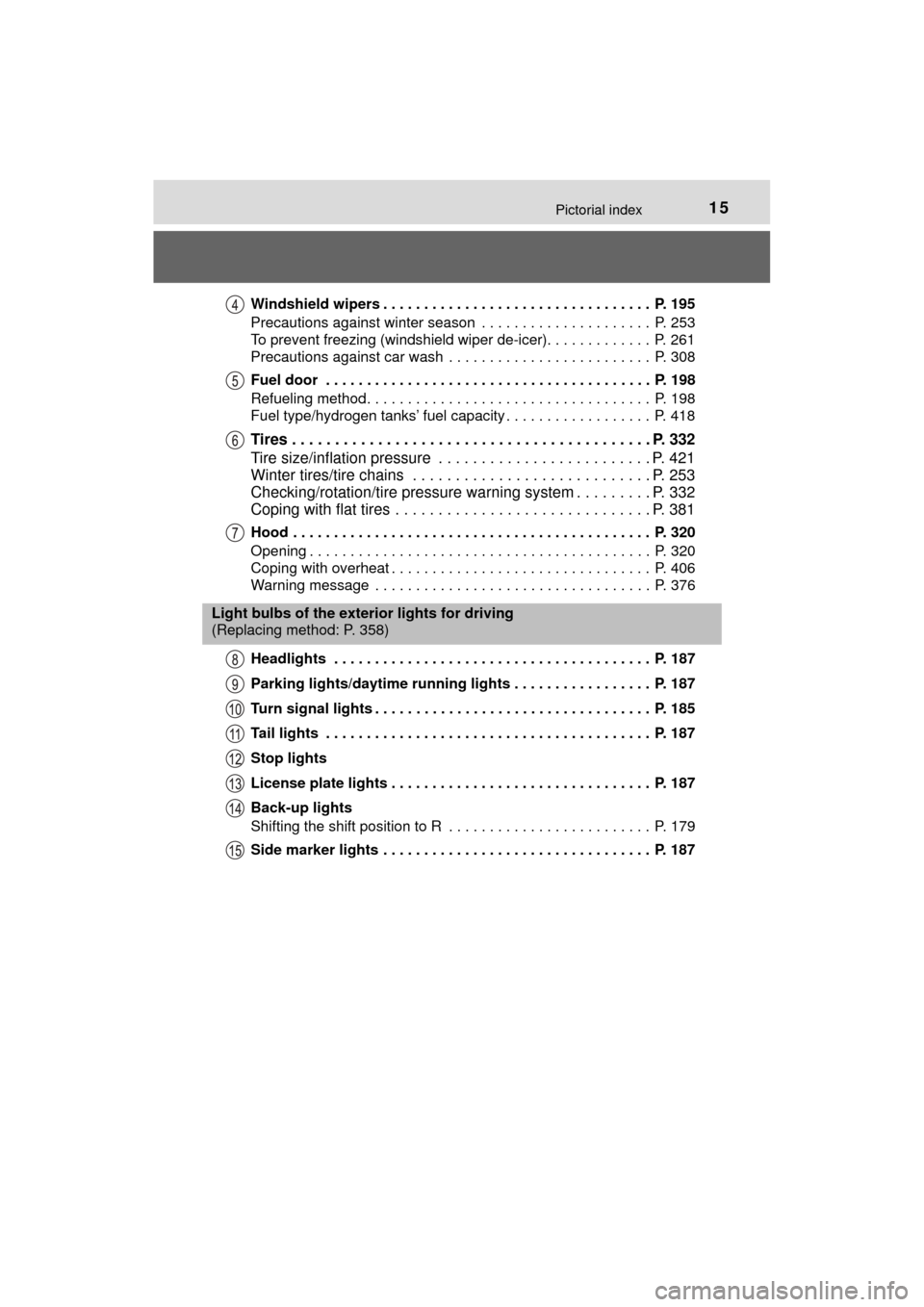
MIRAI_OM_USA_OM62023UWindshield wipers . . . . . . . . . . . . . . . . . . . . . . . . . . . . . . . . . P. 195
Precautions against winter season . . . . . . . . . . . . . . . . . . . . . P. 253
To prevent freezing (windshield wiper de-icer). . . . . . . . . . . . . P. 261
Precautions against car wash . . . . . . . . . . . . . . . . . . . . . . . . . P. 308
Fuel door . . . . . . . . . . . . . . . . . . . . . . . . . . . . . . . . . . . . . . . . P. 198
Refueling method . . . . . . . . . . . . . . . . . . . . . . . . . . . . . . . . . . . P. 198
Fuel type/hydrogen tanks’ fuel capacity . . . . . . . . . . . . . . . . . . P. 418
Tires . . . . . . . . . . . . . . . . . . . . . . . . . . . . . . . . . . . . . . . . . . P. 332
Tire size/inflation pressure . . . . . . . . . . . . . . . . . . . . . . . . . P. 421
Winter tires/tire chains . . . . . . . . . . . . . . . . . . . . . . . . . . . . P. 253
Checking/rotation/tire pressure warning system . . . . . . . . . P. 332
Coping with flat tires . . . . . . . . . . . . . . . . . . . . . . . . . . . . . . P. 381
Hood . . . . . . . . . . . . . . . . . . . . . . . . . . . . . . . . . . . . . . . . . . . . P. 320
Opening . . . . . . . . . . . . . . . . . . . . . . . . . . . . . . . . . . . . . . . . . . P. 320
Coping with overheat . . . . . . . . . . . . . . . . . . . . . . . . . . . . . . . . P. 406
Warning message . . . . . . . . . . . . . . . . . . . . . . . . . . . . . . . . . . P. 376
Headlights . . . . . . . . . . . . . . . . . . . . . . . . . . . . . . . . . . . . . . . P. 187
Parking lights/daytime running lights . . . . . . . . . . . . . . . . . P. 187
Turn signal lights . . . . . . . . . . . . . . . . . . . . . . . . . . . . . . . . . . P. 185
Tail lights . . . . . . . . . . . . . . . . . . . . . . . . . . . . . . . . . . . . . . . . P. 187
Stop lights
License plate lights . . . . . . . . . . . . . . . . . . . . . . . . . . . . . . . . P. 187
Back-up lights
Shifting the shift position to R . . . . . . . . . . . . . . . . . . . . . . . . . P. 179
Side marker lights . . . . . . . . . . . . . . . . . . . . . . . . . . . . . . . . . P. 187
Light bulbs of the exterior lights for driving
(Replacing method: P. 358)
Page 17 of 464

17Pictorial index
MIRAI_OM_USA_OM62023UParking brake . . . . . . . . . . . . . . . . . . . . . . . . . . . . . . . . . . . . . P. 186
Applying/releasing . . . . . . . . . . . . . . . . . . . . . . . . . . . . . . . . . . P. 186
Precautions against winter season . . . . . . . . . . . . . . . . . . . . . P. 254
Warning buzzer/warning message. . . . . . . . . . . . . . . . . . P. 371, 376
Turn signal lever . . . . . . . . . . . . . . . . . . . . . . . . . . . . . . . . . . P. 185
Headlight switch . . . . . . . . . . . . . . . . . . . . . . . . . . . . . . . . . . P. 187
Headlights/parking lights/side marker lights/tail lights/
daytime running lights . . . . . . . . . . . . . . . . . . . . . . . . . . . . . . . P. 187
Windshield wiper and washer switch . . . . . . . . . . . . . . . . . P. 195
Usage . . . . . . . . . . . . . . . . . . . . . . . . . . . . . . . . . . . . . . . . . . . P. 195
Adding washer fluid . . . . . . . . . . . . . . . . . . . . . . . . . . . . . . . . . P. 327
Emergency flasher switch . . . . . . . . . . . . . . . . . . . . . . . . . . P. 360
Fuel door opener switch . . . . . . . . . . . . . . . . . . . . . . . . . . . . P. 198
Trunk opener switch . . . . . . . . . . . . . . . . . . . . . . . . . . . . . . . P. 126
Hood lock release lever. . . . . . . . . . . . . . . . . . . . . . . . . . . . . P. 320
Tilt and telescopic steering control switch . . . . . . . . . . . . . P. 147
Adjustment . . . . . . . . . . . . . . . . . . . . . . . . . . . . . . . . . . . . . . . . P. 147
Driving position memory . . . . . . . . . . . . . . . . . . . . . . . . . . . . . P. 141
Air conditioning system . . . . . . . . . . . . . . . . . . . . . . . . . . . . P. 258
Usage . . . . . . . . . . . . . . . . . . . . . . . . . . . . . . . . . . . . . . . . . . . P. 258
Rear window defogger . . . . . . . . . . . . . . . . . . . . . . . . . . . . . . . P. 261
Trunk opener main switch . . . . . . . . . . . . . . . . . . . . . . . . . . P. 127
Page 100 of 464
1003. Instrument cluster
MIRAI_OM_USA_OM62023U
*1: These lights turn on when the power switch is turned to ON mode to indi-cate that a system check is being performed. They will turn off after the fuel
cell system is on, or after a few seconds. There may be a malfunction in a
system if the lights do not come on, or turn off. Have the vehicle inspected
by your Toyota dealer.
*2: The light flashes to indicate a malfunction.
*3: This light illuminates on the multi-information display.
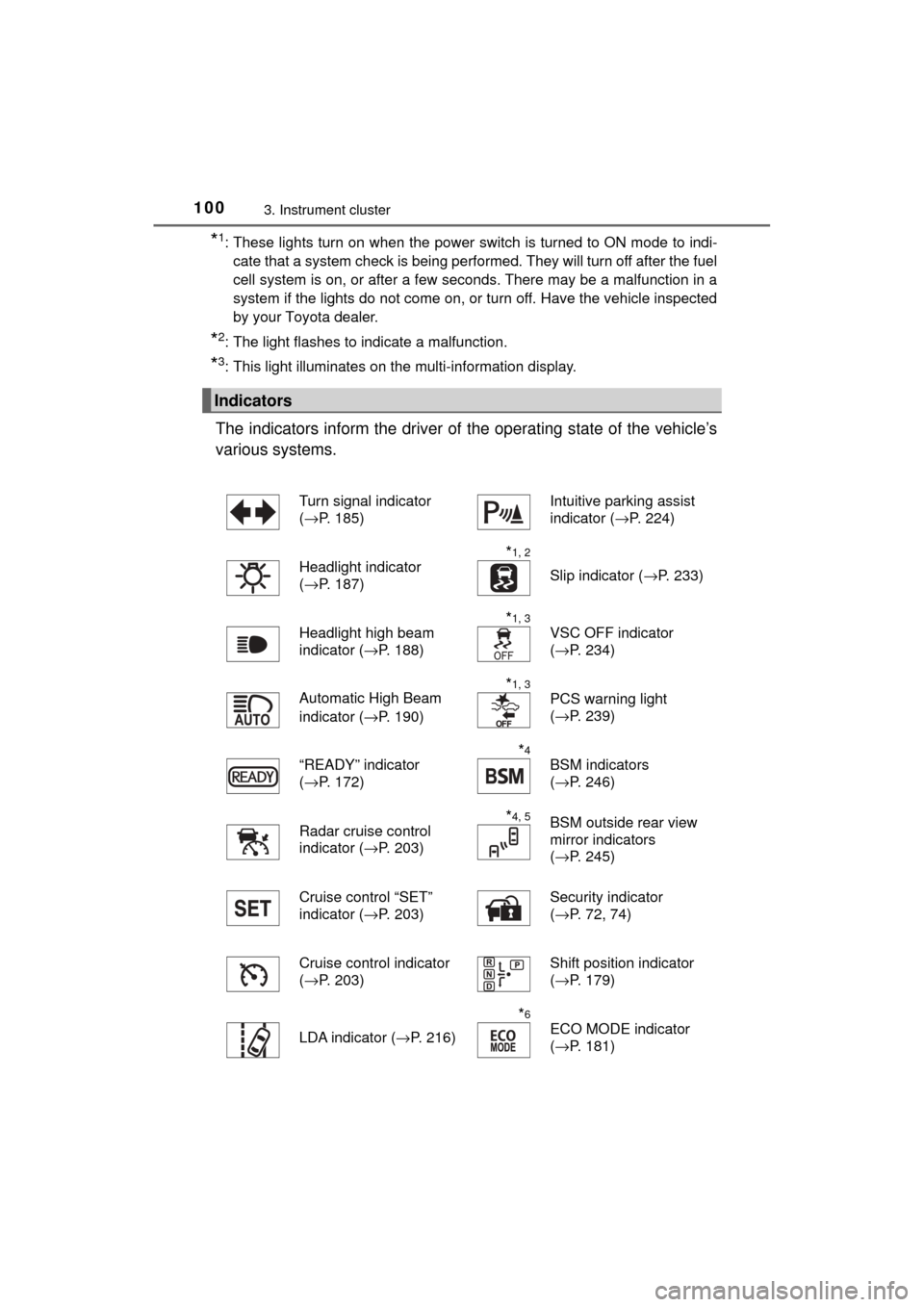
The indicators inform the driver of the operating state of the vehicle’s
various systems.
Indicators
Turn signal indicator
( →P. 185)Intuitive parking assist
indicator ( →P. 224)
Headlight indicator
( →P. 187)
*1, 2
Slip indicator ( →P. 233)
Headlight high beam
indicator ( →P. 188)
*1, 3
VSC OFF indicator
(→P. 234)
Automatic High Beam
indicator ( →P. 190)
*1, 3
PCS warning light
(→P. 239)
“READY” indicator
( →P. 172)
*4
BSM indicators
(→P. 246)
Radar cruise control
indicator ( →P. 203)
*4, 5BSM outside rear view
mirror indicators
(→P. 245)
Cruise control “SET”
indicator ( →P. 203) Security indicator
(
→P. 72, 74)
Cruise control indicator
( →P. 203)
Shift position indicator
(→P. 179)
LDA indicator ( →P. 216)
*6
ECO MODE indicator
(→P. 181)
Page 135 of 464

1354-2. Opening, closing and locking the doors
4
Operation of each component
MIRAI_OM_USA_OM62023U■
Note for the entry function
●Even when the electronic key is within the effective range (detection areas),
the system may not operate properly in the following cases:
• The electronic key is too close to the window or outside door handle, near
the ground, or in a high place when the doors are locked or unlocked.
• The electronic key is near the ground or in a high place, or too close to
the rear bumper center when the trunk is opened.
• The electronic key is on the instrument panel, rear package tray or floor, or in the door pockets or glove box when the fuel cell system is started or
power switch modes are changed.
● Do not leave the electronic key on top of the instrument panel or near t\
he
door pockets when exiting the vehicle. Depending on the radio wave recep-
tion conditions, it may be detected by the antenna outside the cabin and the
door will become lockable from the out side, possibly trapping the electronic
key inside the vehicle.
● As long as the electronic key is within the effective range, the doors may be
locked or unlocked by anyone. However, only the doors detecting the elec-
tronic key can be used to unlock the vehicle.
● Even if the electronic key is not inside the vehicle, it may be possible to start
the fuel cell system if the electronic key is near the window.
● The doors may unlock or lock if a large amount of water splashes on the
door handle, such as in the rain or in a car wash when the electronic key is
within the effective range. (The doors will automatically be locked after
approximately 60 seconds if the doors are not opened and closed.)
● If the wireless remote control is used to lock the doors when the electronic
key is near the vehicle, there is a possibility that the door may not be
unlocked by the entry function. (Use the wireless remote control to unlock
the doors.)
● Touching the door lock or unlock sensor while wearing gloves may prevent
lock or unlock operation.
● When the lock operation is performed using the lock sensor, recognition sig-
nals will be shown up to two consecutive times. After this, no recognition
signals will be given.
● If the door handle becomes wet while the electronic key is within the effec-
tive range, the door may lock and unlock repeatedly. In this case, follow the
following correction procedures to wash the vehicle:
• Place the electronic key in a location 6 ft. (2 m) or more away from the
vehicle. (Take care to ensure that the key is not stolen.)
• Set the electronic key to battery-saving mode to disable the smart key
system. ( →P. 133)
● If the electronic key is inside the vehicle and a door handle becomes wet
during a car wash, a message may be shown on the multi-information dis-
play and a buzzer will sound outside the vehicle. To turn off the alarm, lock
all the doors.
Page 157 of 464

157
5Driving
MIRAI_OM_USA_OM62023U5-1. Before driving
Driving the vehicle ............. 158
Cargo and luggage ........... 166
Vehicle load limits ............. 169
Trailer towing..................... 170
Dinghy towing ................... 171
5-2. Driving procedures Power switch ..................... 172
Transmission ..................... 179
Turn signal lever................ 185
Parking brake .................... 186 5-3. Operating the lights
and wipers
Headlight switch ................ 187
Automatic High Beam ....... 190
Windshield wipers and washer ............................ 195
5-4. Refueling Opening the fuel door ....... 198
5-5. Using the driving support systems
Dynamic radar cruise control ............................. 203
LDA (Lane Departure Alert) ............................... 216
Intuitive parking assist....... 223
Driving assist systems ...... 232
PCS (Pre-Collision System)........................... 238
BSM (Blind Spot Monitor) ........ 245
5-6. Driving tips Winter driving tips ............. 253
Page 185 of 464
1855-2. Driving procedures
5
Driving
MIRAI_OM_USA_OM62023U
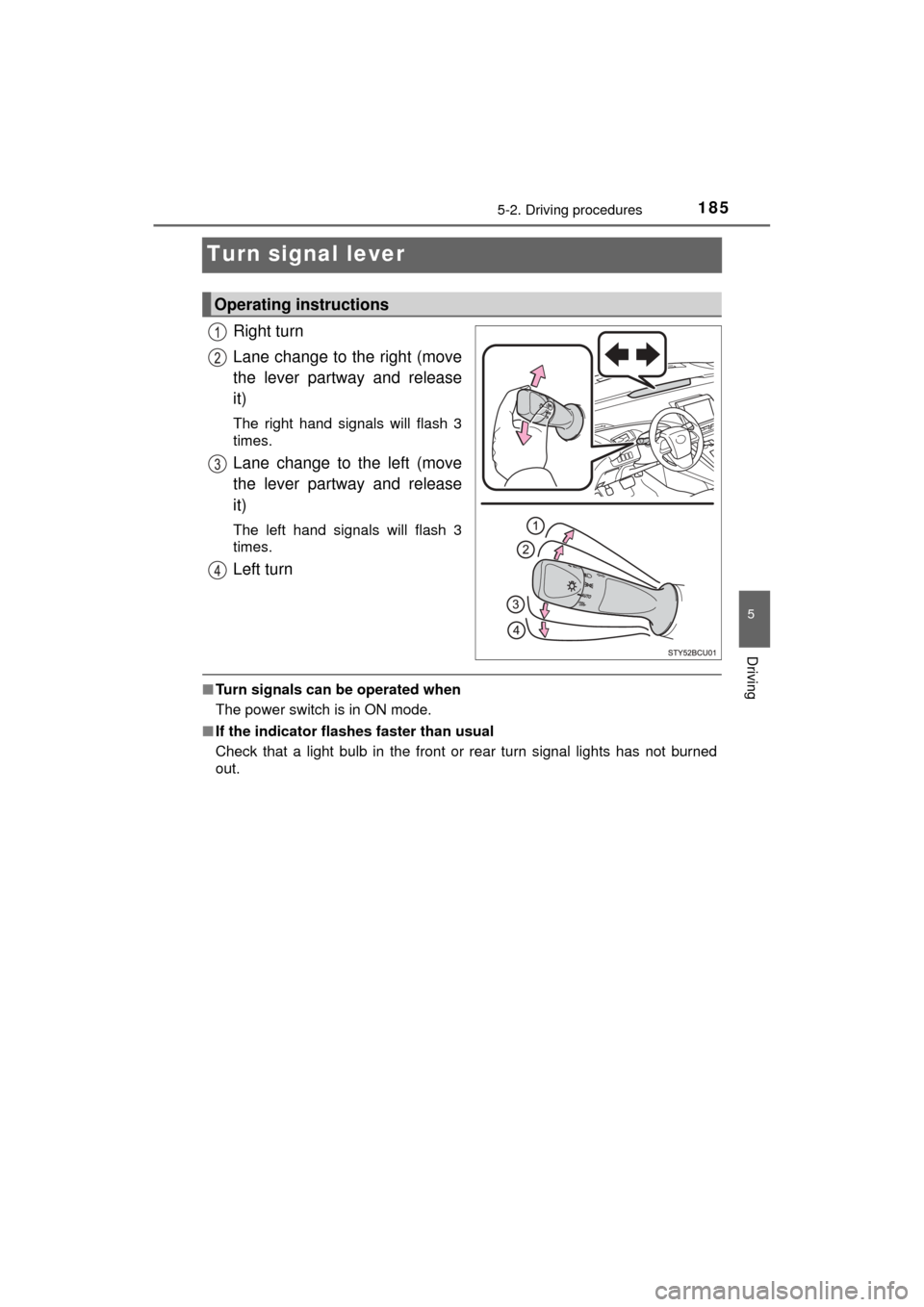
Turn signal lever
Right turn
Lane change to the right (move
the lever partway and release
it)
The right hand signals will flash 3
times.
Lane change to the left (move
the lever partway and release
it)
The left hand signals will flash 3
times.
Left turn
■Turn signals can be operated when
The power switch is in ON mode.
■ If the indicator flashes faster than usual
Check that a light bulb in the front or rear turn signal lights has not burned
out.
Operating instructions
Page 192 of 464

1925-3. Operating the lights and wipers
MIRAI_OM_USA_OM62023U
■The Automatic High Beam can be operated when
The power switch is in ON mode.
■ Camera sensor detection information
●High beam may not be automatically turned off in the following situations:
• When oncoming vehicles suddenly appear from a curve
• When the vehicle is cut in front of by another
• When oncoming or preceding vehicles are hidden from sight due to
repeated curves, road dividers or roadside trees
● High beam may be turned off if an oncoming vehicle that is using fog lights
without using the headlights is detected.
● House lights, street lights, red traf fic signals, and illuminated billboards or
signs may cause the high beam to turn off.
● The following factors may affect the amount of time taken to turn high beam
on or off:
• The brightness of headlights, fog lights, and tail lights of oncoming and
preceding vehicles
• The movement and direction of oncoming and preceding vehicles
• When an oncoming or preceding vehicle only has operational lights on one side
• When an oncoming or preceding vehicle is a two-wheeled vehicle
• The condition of the road (gradient, curve, condition of the road surface,
etc.)
• The number of passengers and amount of luggage
● High beam may be turned on or off when unexpected by the driver.
Page 219 of 464

2195-5. Using the driving support systems
5
Driving
MIRAI_OM_USA_OM62023U
■Temporary cancelation of the LDA system functions
If any of the following occurs, the LDA system functions will be temporarily
canceled. The functions will resume after the necessary operating conditions
have returned.
●The turn signal lever is operated.
● The vehicle speed deviates from the operating range of the LDA system
functions.
● When the lane lines cannot be recognized while driving.
● When the lane departure warning function is activated.
The lane departure warning function will not operate again for a several sec-
onds after it has been activated, even if the vehicle leaves the lane again.
■ Alert buzzer for lane departure alert
Depending on the audio system sound level or air conditioning fan noise
while the audio system or air conditioning system is in use, it may be difficult
to hear the alert buzzer.
■ After the vehicle has been parked in the sun
The LDA system may not be available and a warning message is displayed
for a while after driving has started. When the temperature in the cabin
decreases and the temperature around the camera sensor ( →P. 216)
becomes suitable for its operation, turn the LDA switch on again after a
short time.
■ If there are lane markers on only one side of the vehicle
The lane departure alert will not operate for the side on which lane markers
could not be recognized.
Page 235 of 464

2355-5. Using the driving support systems
5
Driving
MIRAI_OM_USA_OM62023U■
Reduced effectiveness of the EPS system
The effectiveness of the EPS system is reduced to prevent the system from
overheating when there is frequent steering input over an extended period of
time. The steering wheel may feel heavy as a result. Should this occur, refrain
from excessive steering input or stop the vehicle and turn the fuel cell system
off. The EPS system should return to normal within 10 minutes.
■ Automatic reactivation of TRAC and VSC systems
After turning the TRAC and VSC systems off, the systems will be automati-
cally re-enabled in the following situations:
● When the power switch is turned off
● If only the TRAC system is turned off, the TRAC will turn on when vehicle
speed increases
If both the TRAC and VSC systems are turned off, automatic re-enabling will
not occur when vehicle speed increases
■ Operating conditions of hill-start assist control
When the following four conditions are met, the hill-start assist control will
operate:
● The shift position is in a position other than P or N (when starting off forward/
backward on an upward incline).
● The vehicle is stopped.
● The accelerator pedal is not depressed.
● The parking brake is not engaged.
■ Automatic system cancelation of hill-start assist control
The hill-start assist control will turn off in any of the following situations:
● Shift the shift position to P or N.
● The accelerator pedal is depressed.
● The parking brake is engaged.
● Approximately 2 seconds elapse after the brake pedal is released.
■ Operating conditions of emergency brake signal
When the following three conditions are met, the emergency brake signal will
operate:
●The emergency flashers are off.
● Actual vehicle speed is over 35 mph (55 km/h).
● The brake pedal is depressed in a manner that cause the system to judge
from the vehicle deceleration that this is a sudden braking operation.
■ Automatic system cancelatio n of emergency brake signal
The emergency brake signal will turn off in any of the following situations:
● The emergency flashers are turned on.
● The brake pedal is released.
● The system judges from the vehicle deceleration that is not a sudden brak-
ing operation.