cruise control TOYOTA MIRAI 2018 Owners Manual (in English)
[x] Cancel search | Manufacturer: TOYOTA, Model Year: 2018, Model line: MIRAI, Model: TOYOTA MIRAI 2018Pages: 464, PDF Size: 8.61 MB
Page 3 of 464
3
MIRAI_OM_USA_OM62025U
1
9 8 6 5
4
3
2
10
7
5-1. Before drivingDriving the vehicle ............. 158
Cargo and luggage............ 166
Vehicle load limits ............. 169
Trailer towing..................... 170
Dinghy towing.................... 171
5-2. Driving procedures Power switch ..................... 172
Transmission ..................... 179
Turn signal lever................ 185
Parking brake .................... 186
5-3. Operating the lights and wipers
Headlight switch ................ 187
Automatic High Beam ....... 190
Windshield wipers and washer ............................ 195
5-4. Refueling Opening the fuel door........ 198 5-5. Using the driving
support systems
Dynamic radar cruise control.............................. 203
LDA (Lane Departure Alert) ................................ 216
Intuitive parking assist ....... 223
Driving assist systems ....... 231
PCS (Pre-Collision System) ........................... 237
BSM (Blind Spot Monitor)......... 244
5-6. Driving tips Winter driving tips .............. 252
5Driving
Page 7 of 464
7
MIRAI_OM_USA_OM62025UThe installation of a mobile two-way radio system in your vehic
le could affect
electronic systems such as:
● Fuel cell system
● Dynamic radar cruise control system
● Anti-lock brake system
● SRS airbag system
● Seat belt pretensioner system
Be sure to check with your Toyota dealer for precautionary meas ures or spe-
cial instructions regarding instal lation of a mobile two-way radio system.
High voltage parts and cables on the fuel cell vehicles emit ap proximately the
same amount of electromagnetic waves as the conventional gasoli ne pow-
ered vehicles or home electronic appliances despite of their el ectromagnetic
shielding.
Unwanted noise may occur in the reception of the mobile two-way radio.
Installation of a mobile two-way radio system
Page 20 of 464
20Pictorial index
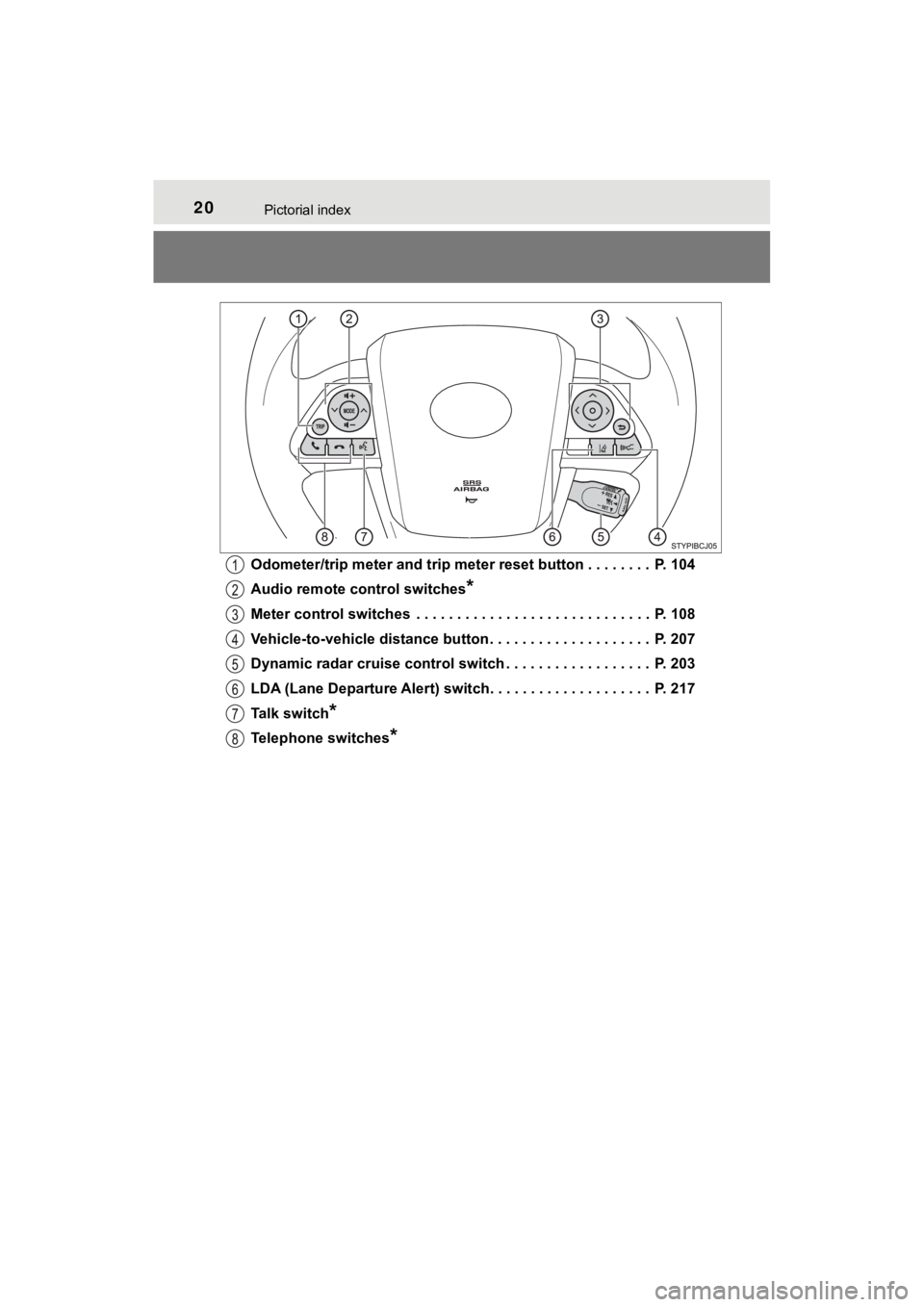
MIRAI_OM_USA_OM62025UOdometer/trip meter and trip meter reset button . . . . . . . . P. 104
Audio remote control switches
*
Meter control switches . . . . . . . . . . . . . . . . . . . . . . . . . . . . . P. 108
Vehicle-to-vehicle distance button . . . . . . . . . . . . . . . . . . . . P. 207
Dynamic radar cruise control switch . . . . . . . . . . . . . . . . . . P. 203
LDA (Lane Departure Alert) switch. . . . . . . . . . . . . . . . . . . . P. 217
Talk switch
*
Telephone switches*
Page 80 of 464
802. Fuel cell vehicle
MIRAI_OM_USA_OM62025U
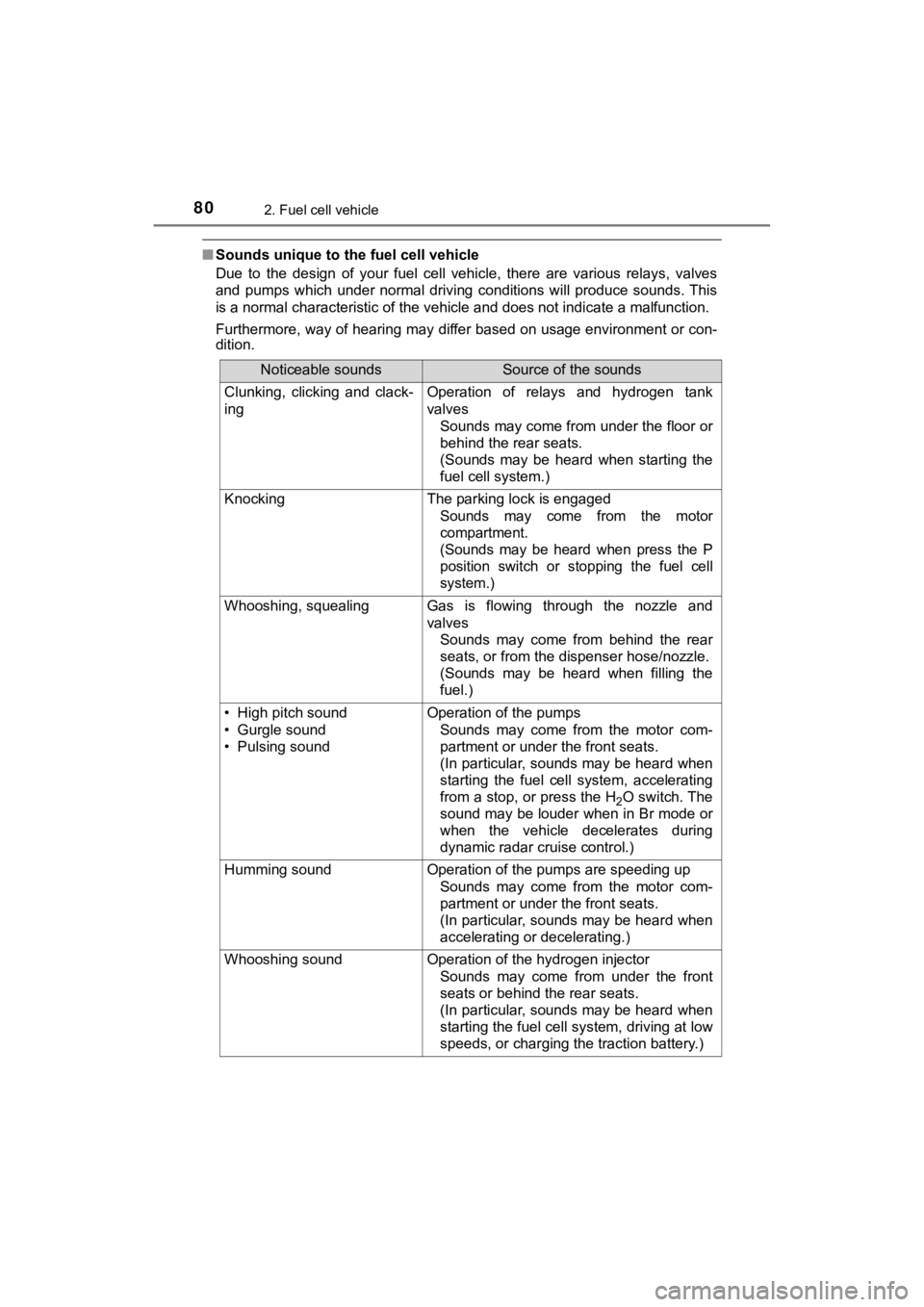
■Sounds unique to the fuel cell vehicle
Due to the design of your fuel cell vehicle, there are various relays, valves
and pumps which under normal driving conditions will produce so unds. This
is a normal characteristic of the vehicle and does not indicate a malfunction.
Furthermore, way of hearing may differ based on usage environme nt or con-
dition.
Noticeable soundsSource of the sounds
Clunking, clicking and clack-
ingOperation of relays and hydrogen tank
valves
Sounds may come from under the floor or
behind the rear seats.
(Sounds may be heard when starting the
fuel cell system.)
KnockingThe parking lock is engaged
Sounds may come from the motor
compartment.
(Sounds may be heard when press the P
position switch or stopping the fuel cell
system.)
Whooshing, squealingGas is flowing through the nozzle and
valvesSounds may come from behind the rear
seats, or from the dispenser hose/nozzle.
(Sounds may be heard when filling the
fuel.)
• High pitch sound
• Gurgle sound
• Pulsing soundOperation of the pumpsSounds may come from the motor com-
partment or under the front seats.
(In particular, sounds may be heard when
starting the fuel cell system, accelerating
from a stop, or press the H
2O switch. The
sound may be louder when in Br mode or
when the vehicle decelerates during
dynamic radar cruise control.)
Humming soundOperation of the pumps are speeding up
Sounds may come from the motor com-
partment or under the front seats.
(In particular, sounds may be heard when
accelerating or decelerating.)
Whooshing sound Operation of the hydrogen injectorSounds may come from under the front
seats or behind the rear seats.
(In particular, sounds may be heard when
starting the fuel cell system, driving at low
speeds, or charging the traction battery.)
Page 100 of 464
1003. Instrument cluster
MIRAI_OM_USA_OM62025U
*1: These lights turn on when the power switch is turned to ON mode to indi-
cate that a system check is being performed. They will turn off after the fuel
cell system is on, or after a few seconds. There may be a malfu nction in a
system if a light does not come on, or turn off. Have the vehic le inspected
by your Toyota dealer.
*2: The light flashes to indicate a malfunction.
*3: This light illuminates on the multi-information display.
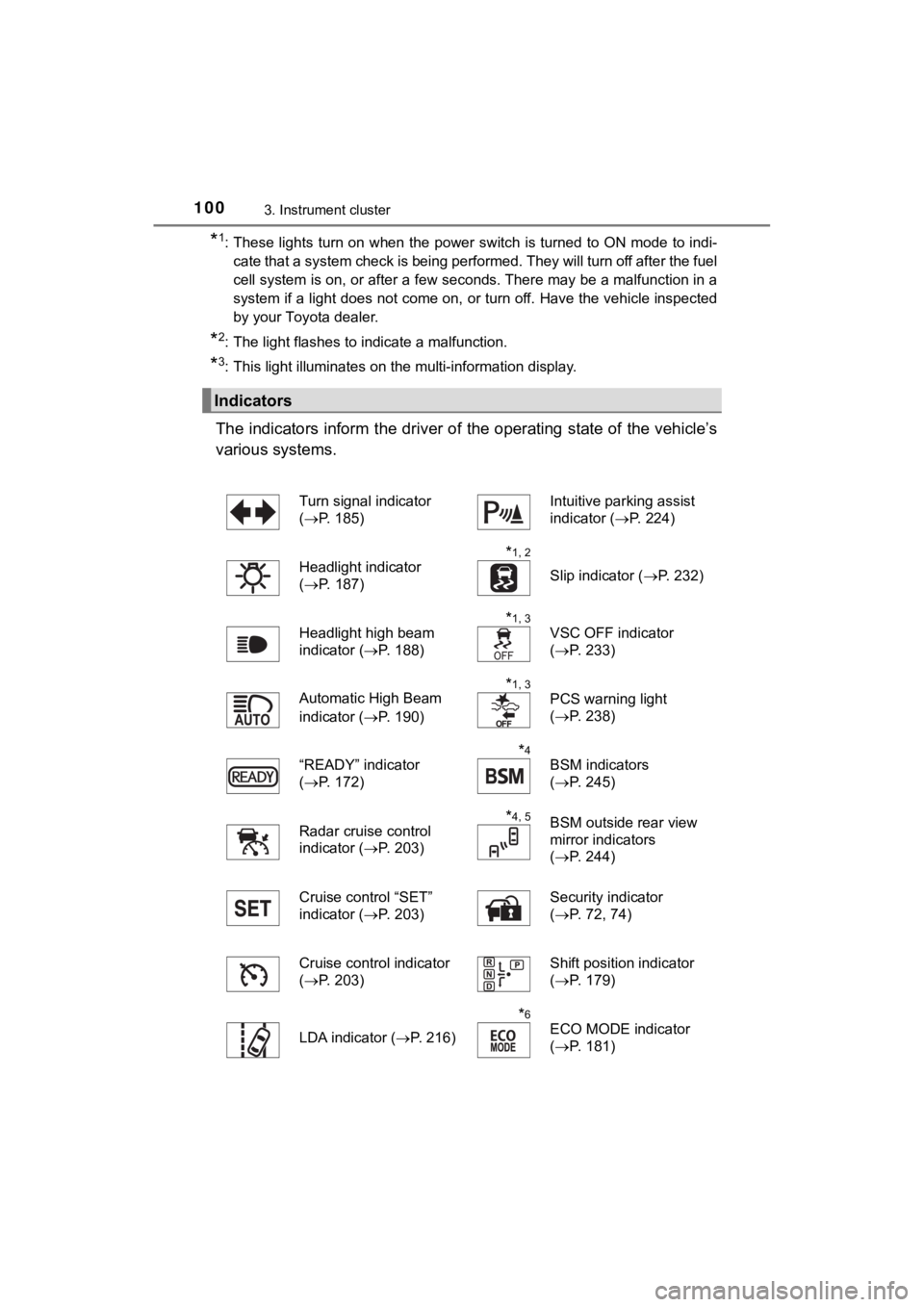
The indicators inform the driver of the operating state of the vehicle’s
various systems.
Indicators
Turn signal indicator
( P. 185)Intuitive parking assist
indicator ( P. 224)
Headlight indicator
( P. 187)
*1, 2
Slip indicator ( P. 232)
Headlight high beam
indicator ( P. 188)
*1, 3
VSC OFF indicator
(P. 233)
Automatic High Beam
indicator ( P. 190)
*1, 3
PCS warning light
(P. 238)
“READY” indicator
( P. 172)
*4
BSM indicators
(P. 245)
Radar cruise control
indicator ( P. 203)
*4, 5BSM outside rear view
mirror indicators
(P. 244)
Cruise control “SET”
indicator ( P. 203) Security indicator
(
P. 72, 74)
Cruise control indicator
( P. 203)
Shift position indicator
(P. 179)
LDA indicator ( P. 216)
*6
ECO MODE indicator
(P. 181)
Page 107 of 464
1073. Instrument cluster
3
Instrument cluster
MIRAI_OM_USA_OM62025U
Multi-infor mation display
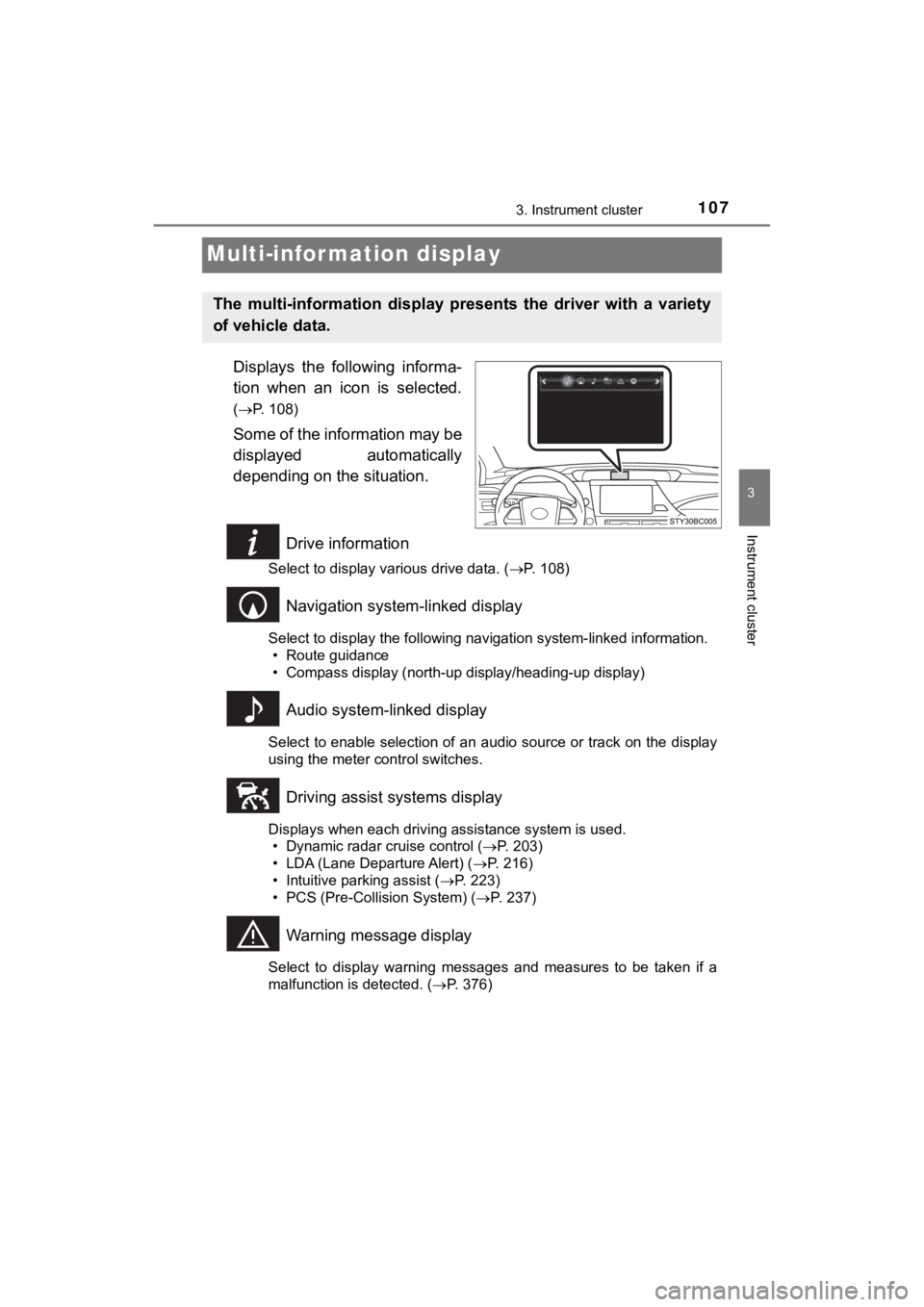
Displays the following informa-
tion when an icon is selected.
(P. 108)
Some of the information may be
displayed automatically
depending on the situation.
Drive information
Select to display various drive data. ( P. 108)
Navigation system-linked display
Select to display the following navigation system-linked information.
• Route guidance
• Compass display (north-up display/heading-up display)
Audio system-linked display
Select to enable selection of an audio source or track on the d isplay
using the meter control switches.
Driving assist systems display
Displays when each driving assistance system is used. • Dynamic radar cruise control ( P. 203)
• LDA (Lane Departure Alert) ( P. 216)
• Intuitive parking assist ( P. 223)
• PCS (Pre-Collision System) ( P. 237)
Warning message display
Select to display warning messages and measures to be taken if a
malfunction is detected. ( P. 376)
The multi-information display pre sents the driver with a variety
of vehicle data.
Page 157 of 464
157
5Driving
MIRAI_OM_USA_OM62025U5-1. Before driving
Driving the vehicle ............. 158
Cargo and luggage ........... 166
Vehicle load limits ............. 169
Trailer towing..................... 170
Dinghy towing ................... 171
5-2. Driving procedures Power switch ..................... 172
Transmission ..................... 179
Turn signal lever................ 185
Parking brake .................... 186 5-3. Operating the lights
and wipers
Headlight switch ................ 187
Automatic High Beam ....... 190
Windshield wipers and washer ............................ 195
5-4. Refueling Opening the fuel door ....... 198
5-5. Using the driving support systems
Dynamic radar cruise control ............................. 203
LDA (Lane Departure Alert) ............................... 216
Intuitive parking assist....... 223
Driving assist systems ...... 231
PCS (Pre-Collision System)........................... 237
BSM (Blind Spot Monitor) ........ 244
5-6. Driving tips Winter driving tips ............. 252
Page 203 of 464
2035-5. Using the driving support systems
5
Driving
MIRAI_OM_USA_OM62025U
Dynamic radar cruise control
Without accelerator pedal operation by the driver, in vehicle-to-vehicle
distance control mode, the vehicl e automatically accelerates and
decelerates in accordance to the changes in speed of the preced ing
vehicle. In constant speed control mode, the vehicle runs at a fixed
speed.
Use the dynamic radar cruise c ontrol on freeways and highways.
● Vehicle-to-vehicle distance control mode ( P. 204)
● Constant speed c ontrol mode (P. 209)
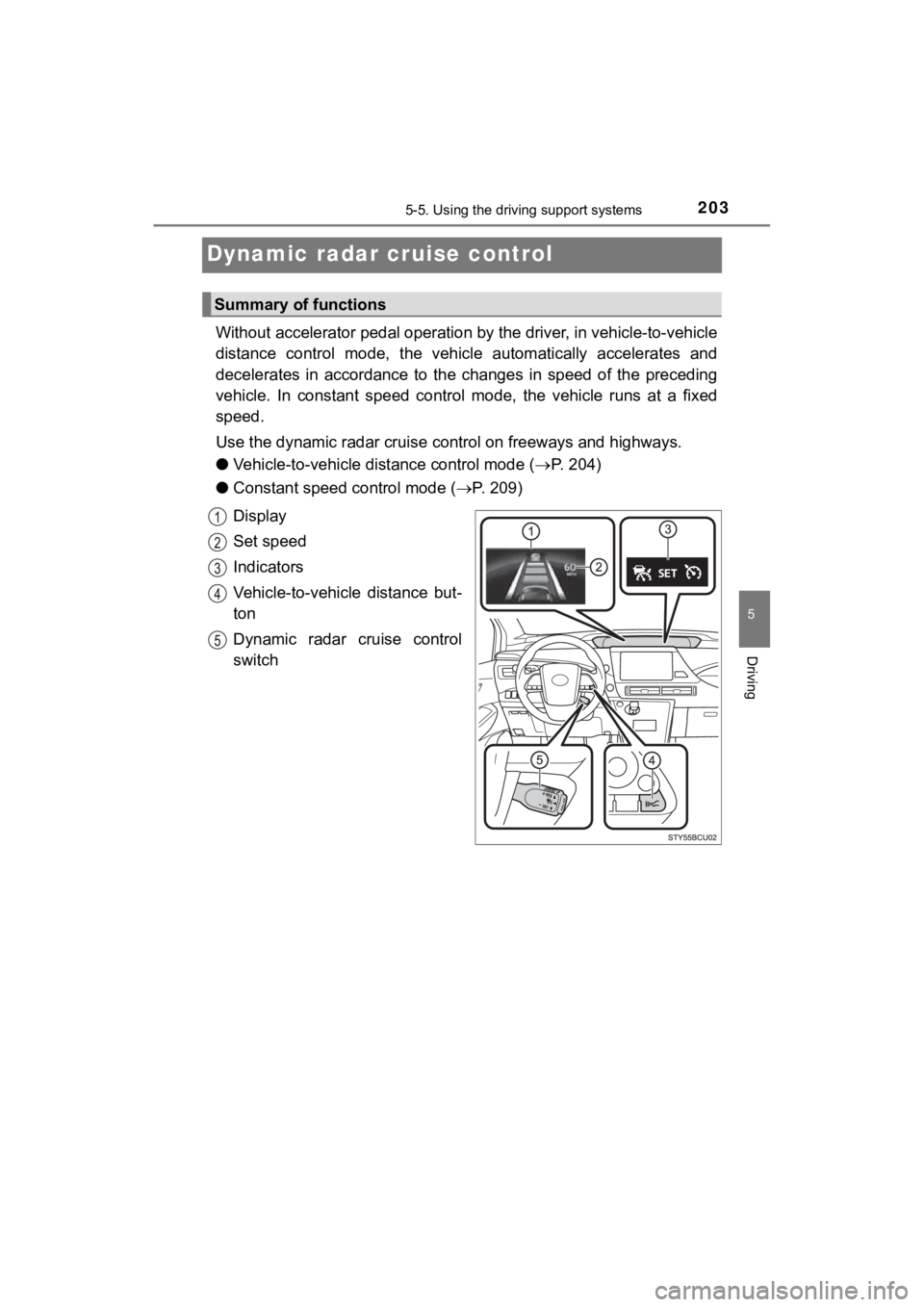
Display
Set speed
Indicators
Vehicle-to-vehicle distance but-
ton
Dynamic radar cruise control
switch
Summary of functions
Page 205 of 464
2055-5. Using the driving support systems
5
Driving
MIRAI_OM_USA_OM62025U
Example of follow-up cruising
When following a preceding vehicle that is driving slower than the
set speed
The system continues follow-up cruising while adjusting for cha nges in the
speed of the vehicle ahead in order to maintain the vehicle-to- vehicle dis-
tance set by the driver.
Example of acceleration
When there are no longer any preceding vehicles driving slower
than the set speed
The system accelerates until the set speed is reached. The syst em then
returns to constant speed cruising.
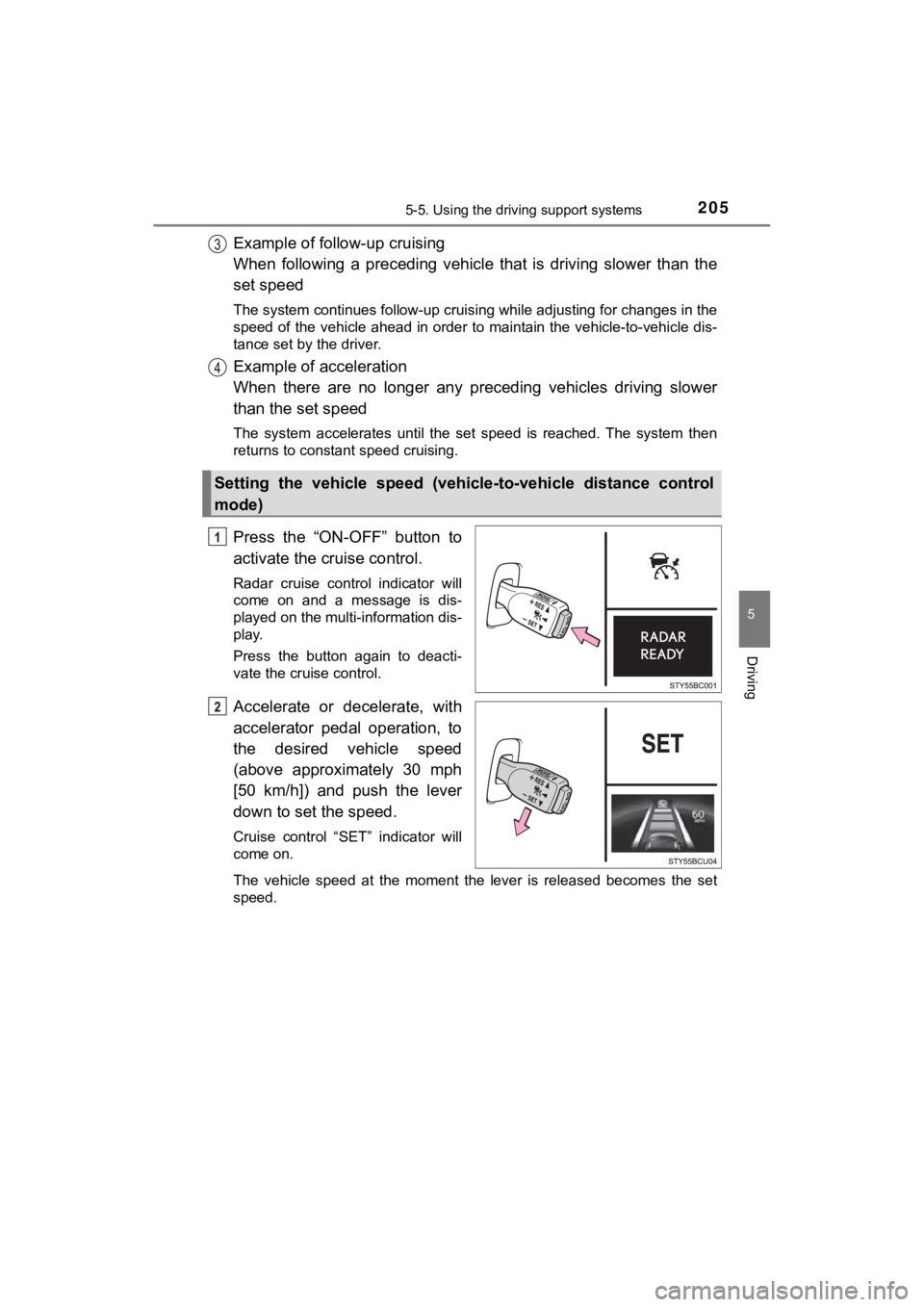
Press the “ON-OFF” button to
activate the cruise control.
Radar cruise control indicator will
come on and a message is dis-
played on the multi-information dis-
play.
Press the button again to deacti-
vate the cruise control.
Accelerate or decelerate, with
accelerator pedal operation, to
the desired vehicle speed
(above approximately 30 mph
[50 km/h]) and push the lever
down to set the speed.
Cruise control “SET” indicator will
come on.
The vehicle speed at the moment the lever is released becomes the set
speed.
Setting the vehicle speed (vehicle-to-vehicle distance control
mode)
Page 208 of 464
2085-5. Using the driving support systems
MIRAI_OM_USA_OM62025U
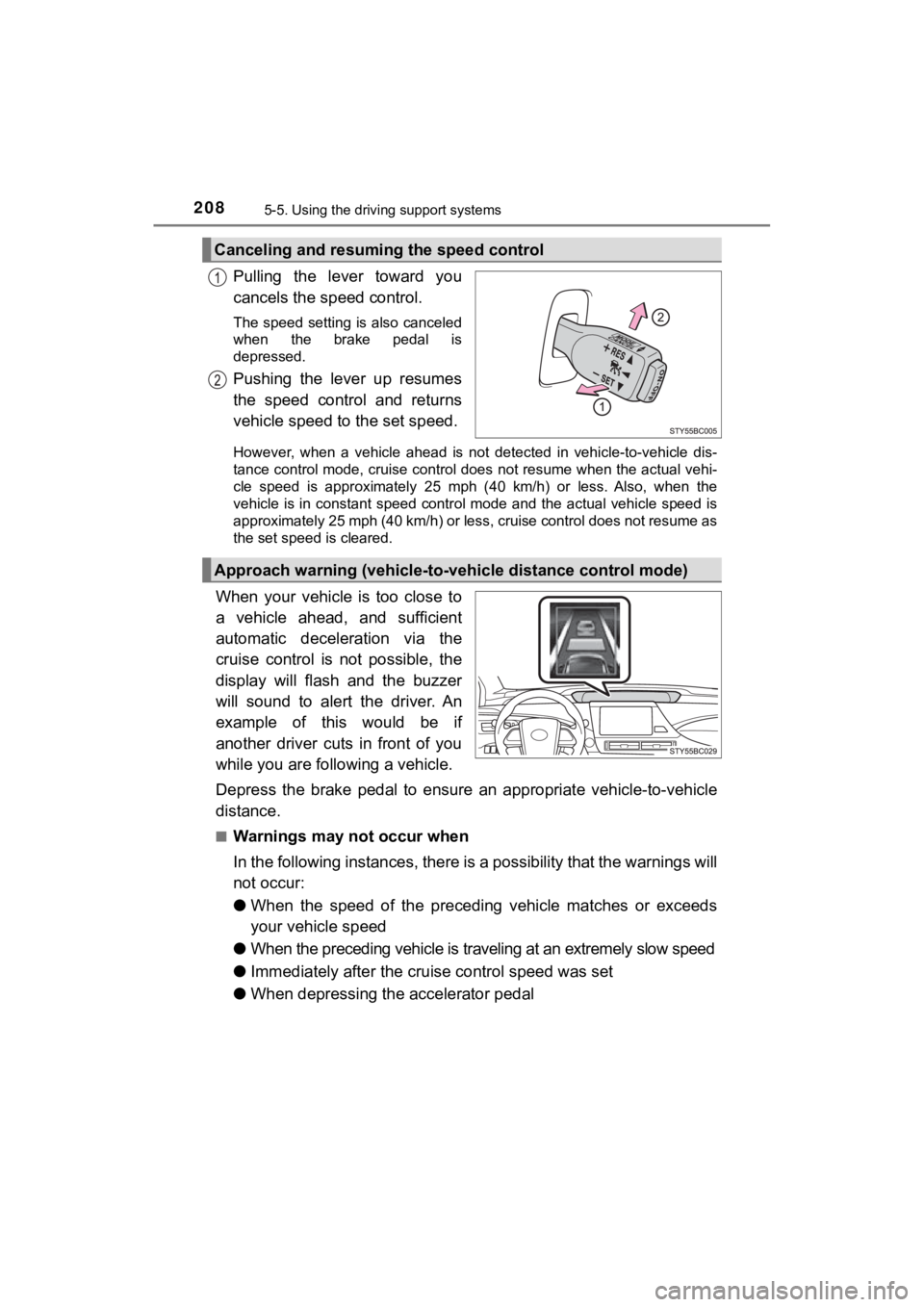
Pulling the lever toward you
cancels the speed control.
The speed setting is also canceled
when the brake pedal is
depressed.
Pushing the lever up resumes
the speed control and returns
vehicle speed to the set speed.
However, when a vehicle ahead is not detected in vehicle-to-veh icle dis-
tance control mode, cruise control does not resume when the act ual vehi-
cle speed is approximately 25 mph (40 km/h) or less. Also, when the
vehicle is in constant speed control mode and the actual vehicl e speed is
approximately 25 mph (40 km/h) or less, cruise control does not resume as
the set speed is cleared.
When your vehicle is too close to
a vehicle ahead, and sufficient
automatic deceleration via the
cruise control is not possible, the
display will flash and the buzzer
will sound to alert the driver. An
example of this would be if
another driver cuts in front of you
while you are foll owing a vehicle.
Depress the brake pedal to ensure an appropriate vehicle-to-veh icle
distance.
■Warnings may not occur when
In the following instances, there is a possibility that the warnings will
not occur:
● When the speed of the preceding vehicle matches or exceeds
your vehicle speed
● When the preceding vehicle is traveling at an extremely slow sp eed
● Immediately after the cruise control speed was set
● When depressing the accelerator pedal
Canceling and resuming the speed control
Approach warning (vehicle-to-v ehicle distance control mode)