lock TOYOTA MIRAI 2018 (in English) User Guide
[x] Cancel search | Manufacturer: TOYOTA, Model Year: 2018, Model line: MIRAI, Model: TOYOTA MIRAI 2018Pages: 40, PDF Size: 2.43 MB
Page 18 of 40
16
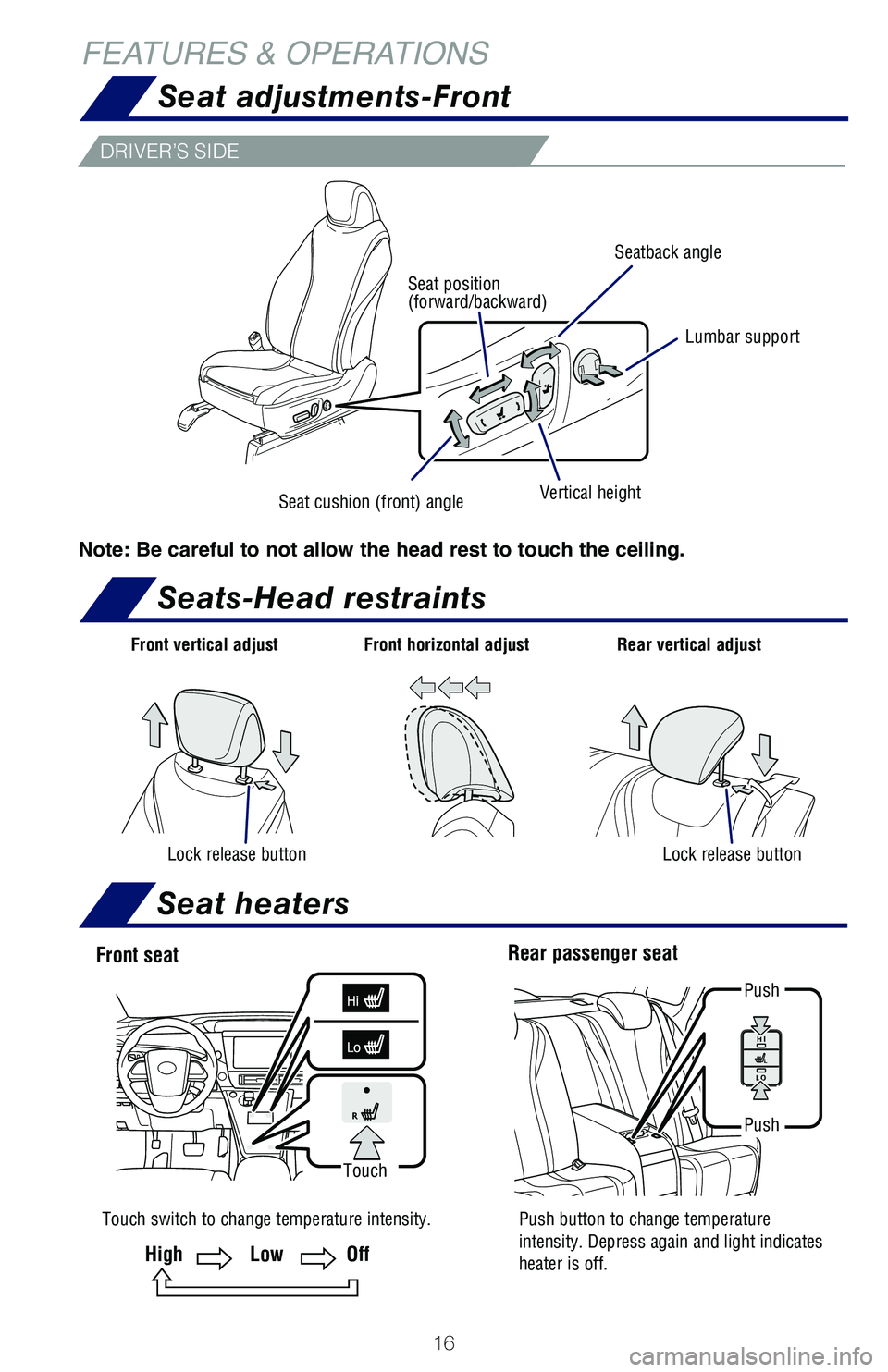
FEATURES & OPERATIONSSeat adjustments-Front
Seats-Head restraints
DRIVER’S SIDE
Note: Be careful to not allow the head rest to touch the ceiling.
Seatback angle
Lumbar support
Vertical heightSeat cushion (front) angle
Seat position
(forward/backward)
Front vertical adjust Front horizontal adjust
Lock release button
Rear vertical adjust
Lock release button
Rear passenger seat
Touch switch to change temperature intensity. Push button to change temperature intensity. Depress again and light indicates
heater is off.
Push
Push
Front seat
Touch
HighLowOff
Seat heaters
Page 23 of 40
21
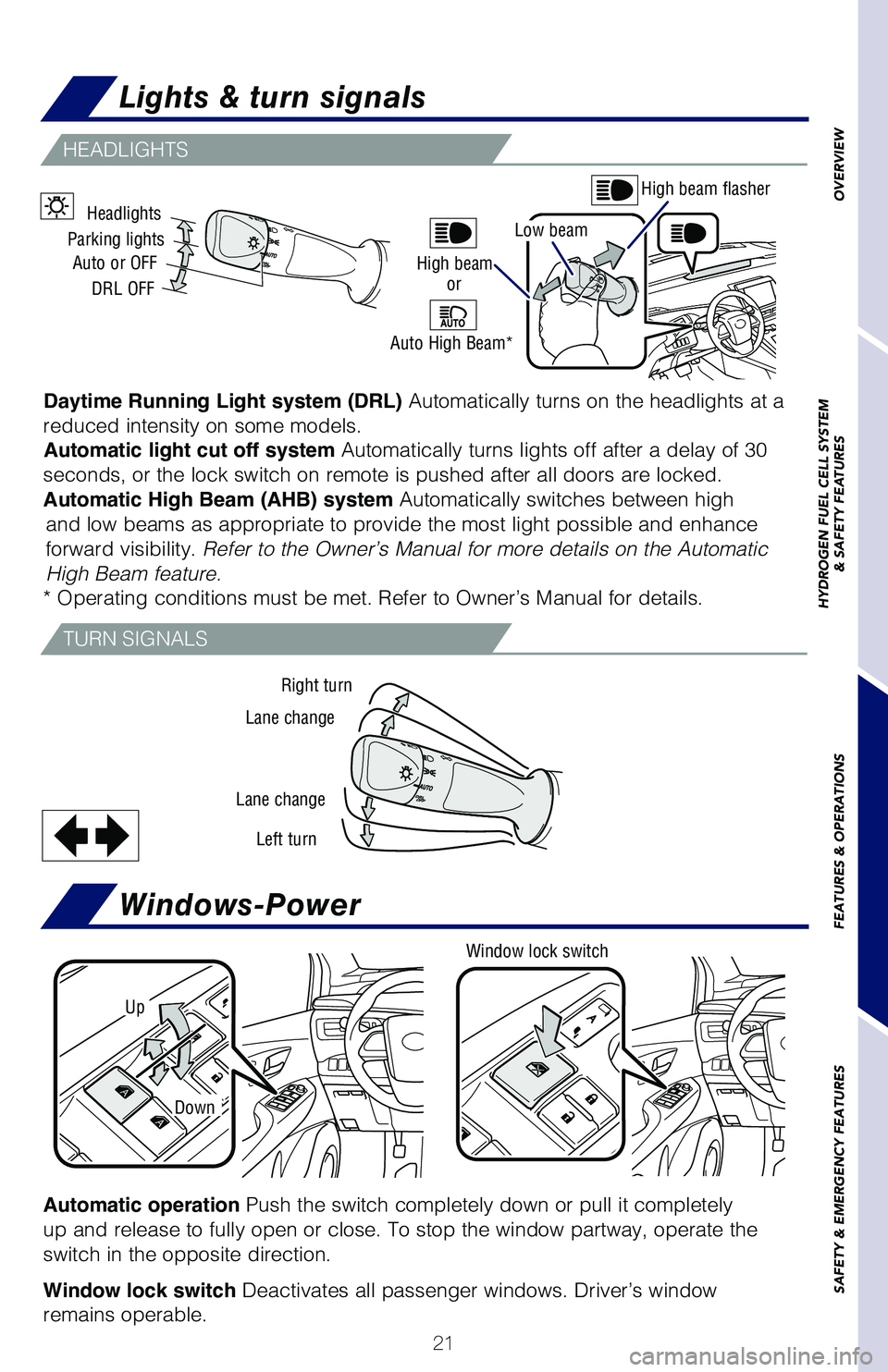
TURN SIGNALS
HEADLIGHTS
Right turn
Lane change
Lane change Left turn
Headlights
Parking lights Auto or OFF
DRL OFF
Windows-Power
Up
Window lock switch
Automatic operation Push the switch completely down or pull it completely
up and release to fully open or close. To stop the window partway, opera\
te the
switch in the opposite direction.
Window lock switch Deactivates all passenger windows. Driver’s window
remains operable.
Down
High beam flasher
High beam
Auto High Beam* or
Low beam
Daytime Running Light system (DRL)
Automatically turns on the headlights at a
reduced intensity on some models. Automatic light cut off system Automatically turns lights off after a delay of 30
seconds, or the lock switch on remote is pushed after all doors are lock\
ed.
Automatic High Beam (AHB) system Automatically switches between high and low beams as appropriate to provide the most light possible and enha\
nce
forward visibility. Refer to the Owner’s Manual for more details on the Automatic
High Beam feature.
* Operating conditions must be met. Refer to Owner’s Manual for detai\
ls.
OVERVIEW
HYDROGEN FUEL CELL SYSTEM
& SAFETY FEATURES
FEATURES & OPERATIONS
SAFETY & EMERGENCY FEATURES
Lights & turn signals
Page 28 of 40
 User Guide 26
FEATURES & OPERATIONS
Clock
Clock
Using steering wheel switches, select “Home” from multi-informatio\
n screen, then
select “
” to set clock:
(1) Round to the nearest hour, press
or , se")
26
FEATURES & OPERATIONS
Clock
Clock
Using steering wheel switches, select “Home” from multi-informatio\
n screen, then
select “
” to set clock:
(1) Round to the nearest hour, press
or , select and press .
(2) Time adjustment, press
or , select and press .
(3) Press
or , select hours and minutes or press or , to select 12-24 hour
clock and adjust.
(4) Press
when finished.
Page 29 of 40
27
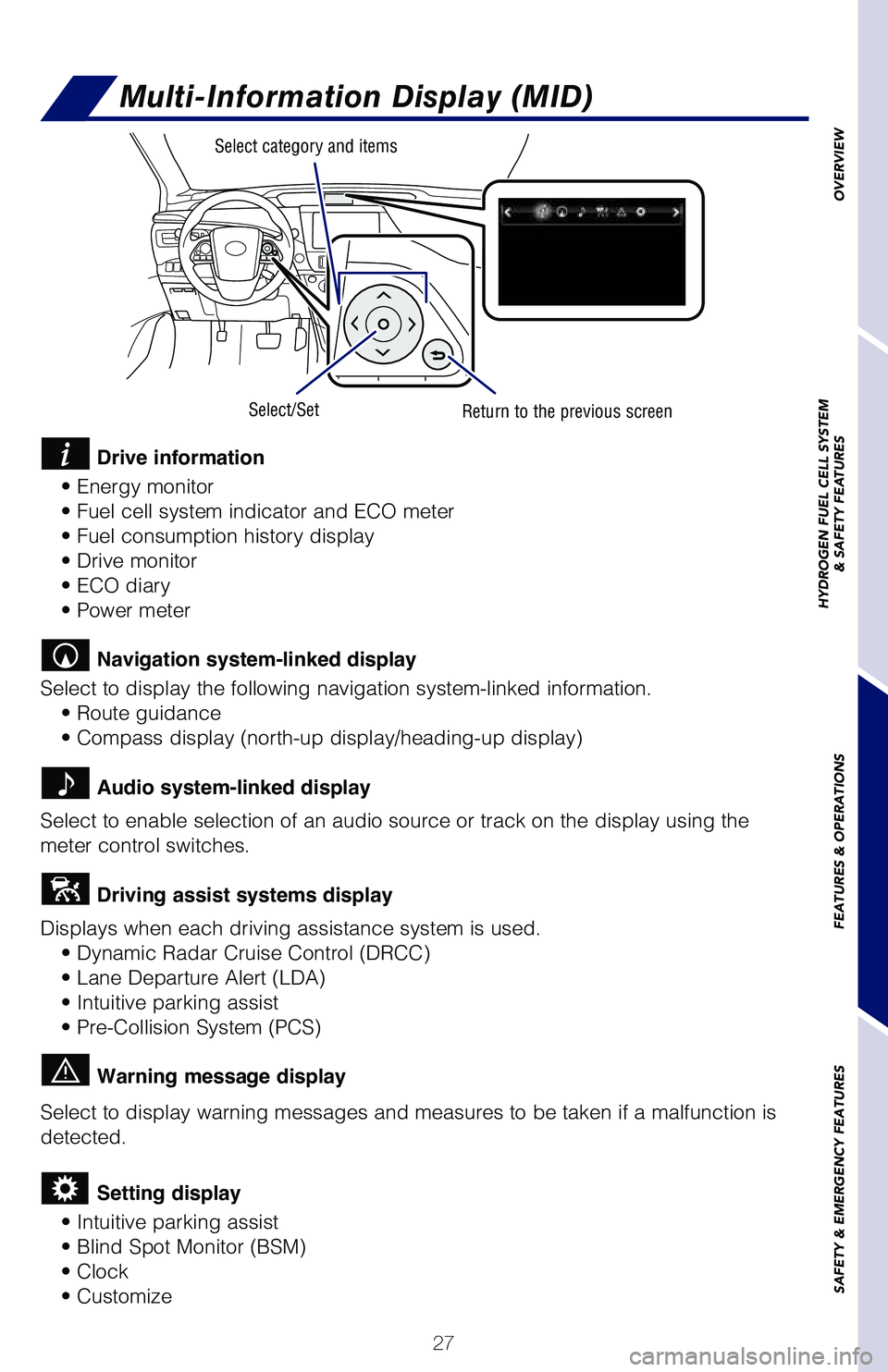
Multi-Information Display (MID)
Select category and items
Select/SetReturn to the previous screen
Drive information
• Energy monitor
• Fuel cell system indicator and ECO meter
• Fuel consumption history display
• Drive monitor
• ECO diary
• Power meter
Navigation system-linked display
Select to display the following navigation system-linked information. • Route guidance
• Compass display (north-up display/heading-up display)
Audio system-linked display
Select to enable selection of an audio source or track on the display us\
ing the
meter control switches.
Driving assist systems display
Displays when each driving assistance system is used. • Dynamic Radar Cruise Control (DRCC)
• Lane Departure Alert (LDA)
• Intuitive parking assist
• Pre-Collision System (PCS)
Warning message display
Select to display warning messages and measures to be taken if a malfunc\
tion is
detected.
Setting display
• Intuitive parking assist
• Blind Spot Monitor (BSM)
• Clock
• Customize
OVERVIEW
HYDROGEN FUEL CELL SYSTEM
& SAFETY FEATURES
FEATURES & OPERATIONS
SAFETY & EMERGENCY FEATURES
Page 33 of 40
31
OVERVIEW
HYDROGEN FUEL CELL SYSTEM
& SAFETY FEATURES
FEATURES & OPERATIONS
SAFETY & EMERGENCY FEATURES
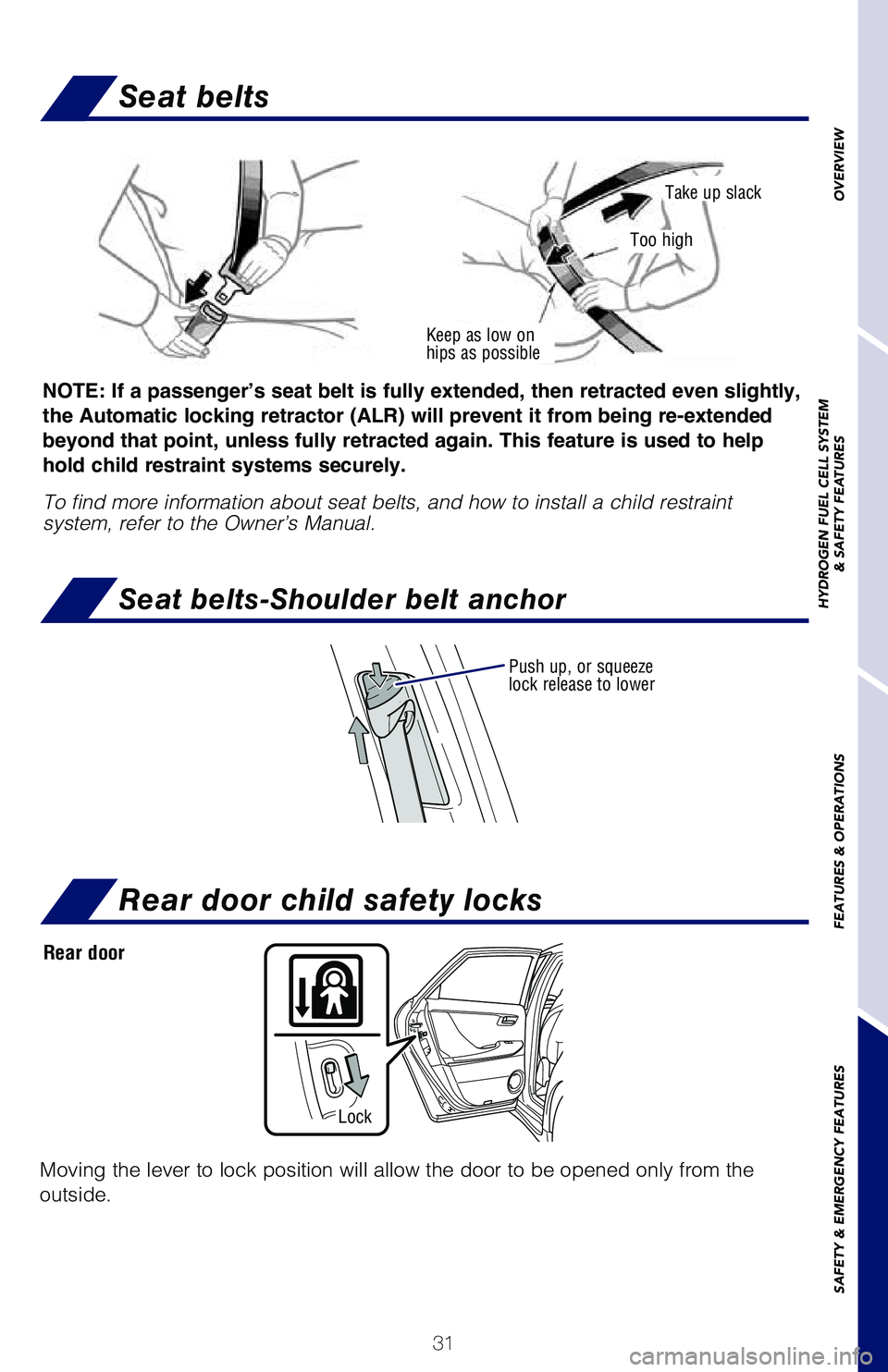
Seat belts
Seat belts-Shoulder belt anchor
Keep as low on
hips as possible
Take up slack
Too high
Push up, or squeeze
lock release to lower
NOTE: If a passenger’s seat belt is fully extended, then retracted even slightly,
the Automatic locking retractor (ALR) will prevent it from being re-extended
beyond that point, unless fully retracted again. This feature is used to help
hold child restraint systems securely.
To find more information about seat belts, and how to install a child re\
straint
system, refer to the Owner’s Manual.
Rear door child safety locks
Moving the lever to lock position will allow the door to be opened only \
from the
outside.
Rear door
Lock
Page 34 of 40
32
Star Safety System™
SAFETY & EMERGENCY FEATURES
Your vehicle comes standard with the Star Safety SystemTM, which combines
Anti-lock Braking System (ABS), Brake Assist (BA), Electronic Brake-force
Distribution (EBD), Smart Stop Technology (SST), Traction Control (\
TRAC) and
Vehicle Stability Control (VSC).
Refer to the Owner’s Manual for more details and important information on limitations
to these systems.
Enhanced Vehicle Stability Control provides cooperative control of the A\
BS, TRAC,
VSC and EPS.
Enhanced VSC helps to maintain directional stability when loss of tracti\
on occurs
during a turn.
ENHANCED VEHICLE STABILITY CONTROL (VSC)
Toyota’s ABS sensors detect which wheels are locking up and limits wh\
eel lockup
by “pulsing” each wheel’s brakes independently. Pulsing release\
s brake pressure
repeatedly for fractions of a second. This helps the tires attain the tr\
action that
current road conditions will allow, helping you to stay in directional c\
ontrol.
ANTI-LOCK BRAKE SYSTEM (ABS)
Toyota’s ABS technology has Electronic Brake-force Distribution (EBD\
) to help
maintain control and balance when braking. Abrupt stops can cause a vehi\
cle to tilt
forward, reducing the braking power of the rear wheels. EBD responds to \
sudden
stops by redistributing brake force to enhance the braking effectiveness\
of all four
wheels.
ELECTRONIC BRAKE FORCE DISTRIBUTION (EBD)
Brake Assist is designed to detect sudden or “panic” braking, and \
then add braking
pressure to help decrease the vehicle’s stopping distance. When there\
’s only a split
second to react, Brake Assist can add additional brake pressure more qui\
ckly than
just the driver alone can.
BRAKE ASSIST (BA)
SMART STOP TECHNOLOGY (SST)
Smart Stop Technology automatically reduces engine power when the accele\
rator
and brake pedals are pressed simultaneously under certain conditions.
SST engages when the accelerator is depressed first and the brakes are a\
pplied
firmly for longer than one-half second at speeds greater than five miles\
per hour.
SST doesn’t engage if the brake pedal is depressed before the acceler\
ator pedal,
allowing vehicles to start on a steep hill and safely accelerate without\
rolling
backward.