Screen TOYOTA PRIUS 2008 2.G Owners Manual
[x] Cancel search | Manufacturer: TOYOTA, Model Year: 2008, Model line: PRIUS, Model: TOYOTA PRIUS 2008 2.GPages: 512, PDF Size: 7.23 MB
Page 312 of 512
312 3-4. Using the hands-free system
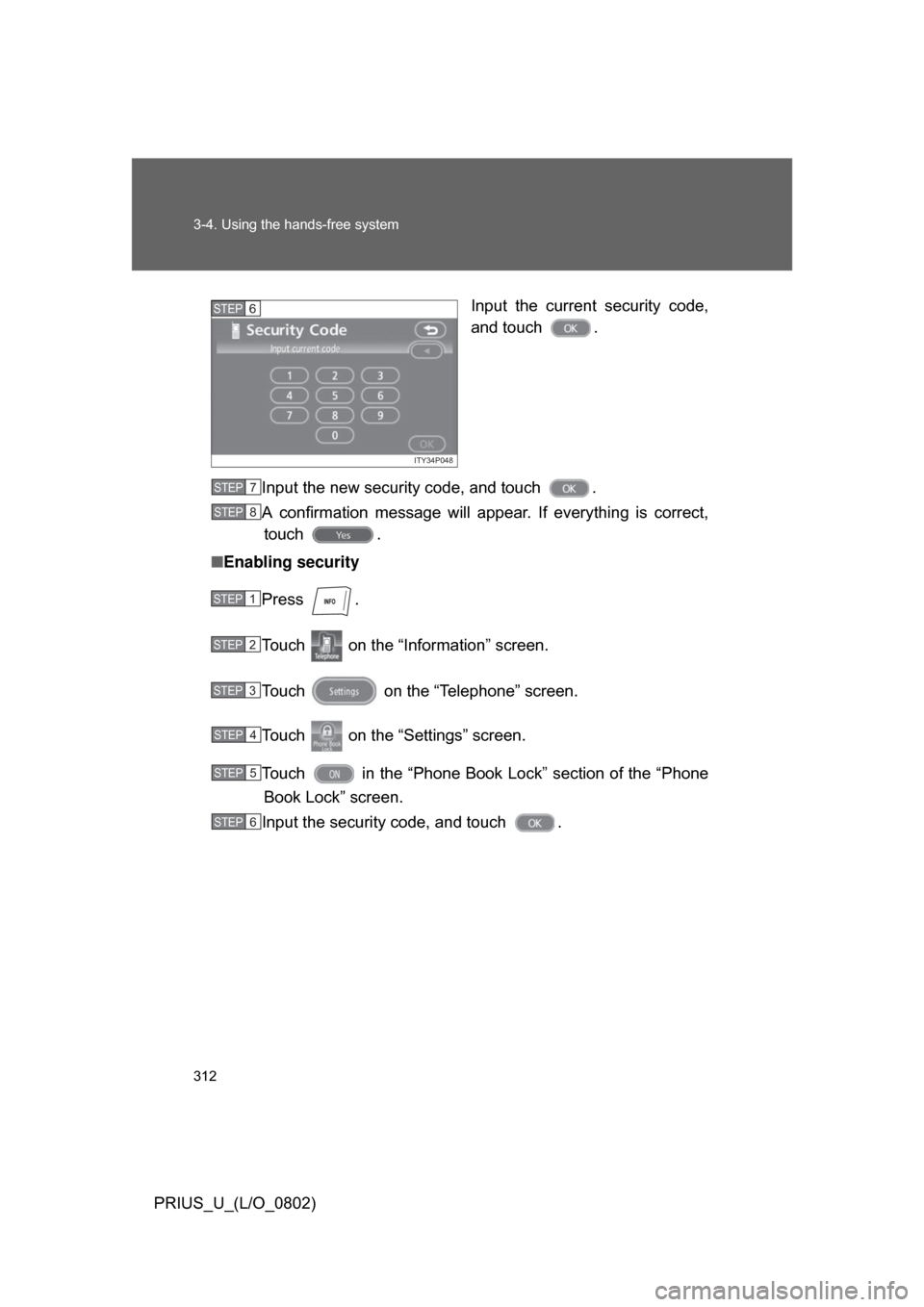
PRIUS_U_(L/O_0802)Input the current security code,
and touch .
Input the new security code, and touch .
A confirmation message will appear. If everything is correct, touch .
■ Enabling security
Press .
Touch on the “Inf ormation” screen.
Touch on the “Telephone” screen.
Touch on the “Settings” screen.
Touch in the “Phone Book Lock” section of the “Phone
Book Lock” screen.
Input the security code, and touch .
ITY34P048
STEP6
STEP7
STEP8
STEP1
STEP2
STEP3
STEP4
STEP5
STEP6
Page 313 of 512
313
3-4. Using the hands-free system
3
Interior features
PRIUS_U_(L/O_0802)
■
Setting the security code to default
Press .
Touch on the “Information” screen.
Touch ; on the “Telephone” screen.
Touch on the “Settings” screen.
Touch on the “Phone Book Lock” screen.
Input the security code on t he “Security Code” screen, then
touch .
A confirmation message will a ppear. If everything is correct,
touch .
■ If the “Phone Book Lock” is set
If the security code is input and the “Phone Book Lock” set, the following
functions are locked.
● Display of the phone book screen and transferring, registering, editing,
deleting the phone book data.
● Display of speed dial screen, registering, deleting the speed dial and
speed dialing.
● Display of the other party’s name for calls being received or made.
● Displayed of dialed numbers screen and received calls screen, deleting
dialed numbers and received numbers.
● Display of phone information screen.
● Changing the security code.
The speed dial screen is not displayed while driving.
STEP1
STEP2
STEP3
STEP4
STEP5
STEP6
STEP7
Page 314 of 512
314 3-4. Using the hands-free system
PRIUS_U_(L/O_0802)
Setting a Bluetooth® phone
■ Selecting a Bluetooth
® phone
If multiple Bluetooth
® phones are registered, follow the below pro-
cedure to select the Bluetooth® phone to be used. You may only
use one phone at a time.
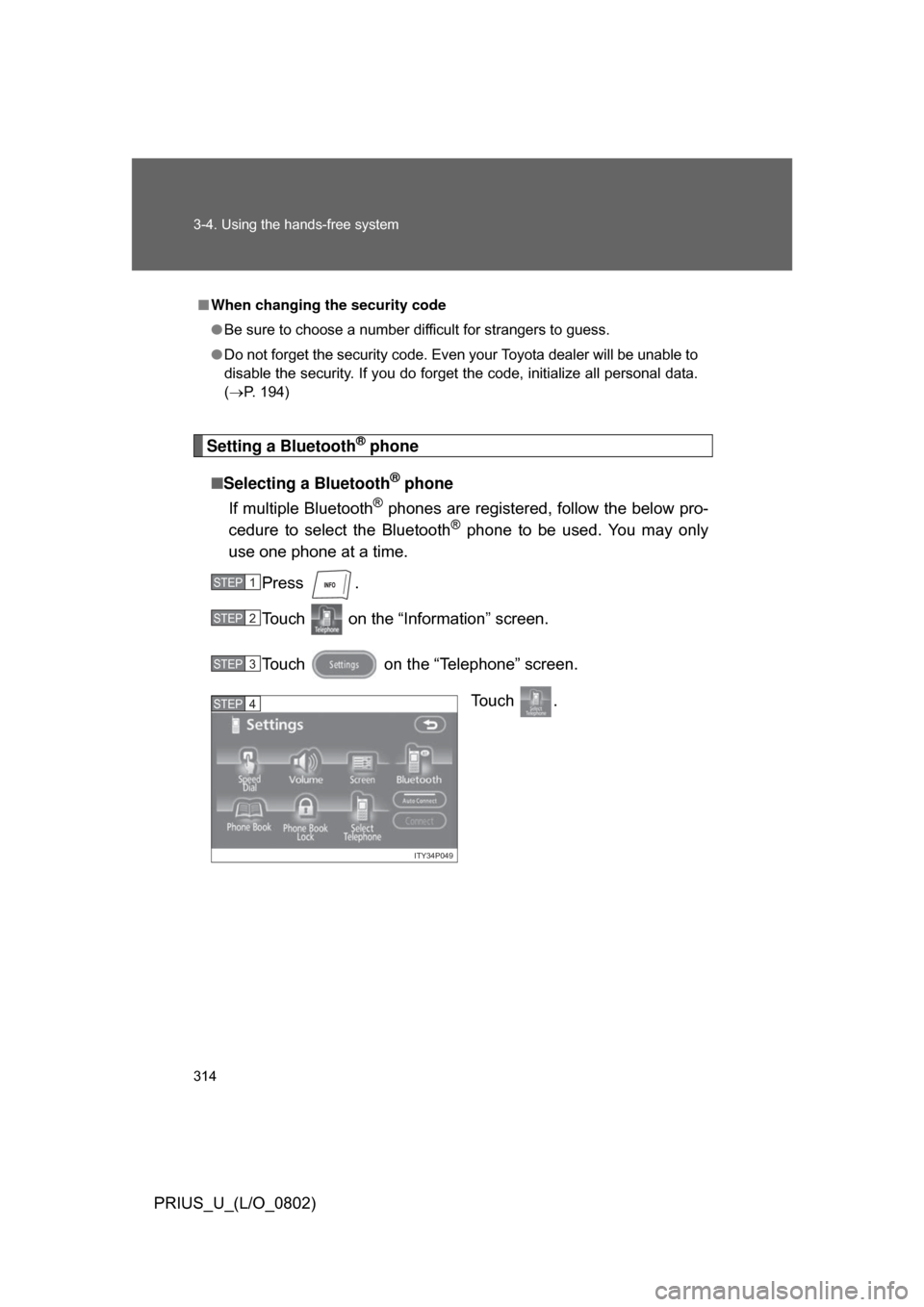
Press .
Touch on the “Inf ormation” screen.
Touch on the “Telephone” screen. To u c h .
■When changing the security code
● Be sure to choose a number difficult for strangers to guess.
● Do not forget the security code. Even your Toyota dealer will be unable to
disable the security. If you do forget the code, initialize all personal data.
(P. 194)
STEP1
STEP2
STEP3
ITY34P049
STEP4
Page 315 of 512
315
3-4. Using the hands-free system
3
Interior features
PRIUS_U_(L/O_0802)
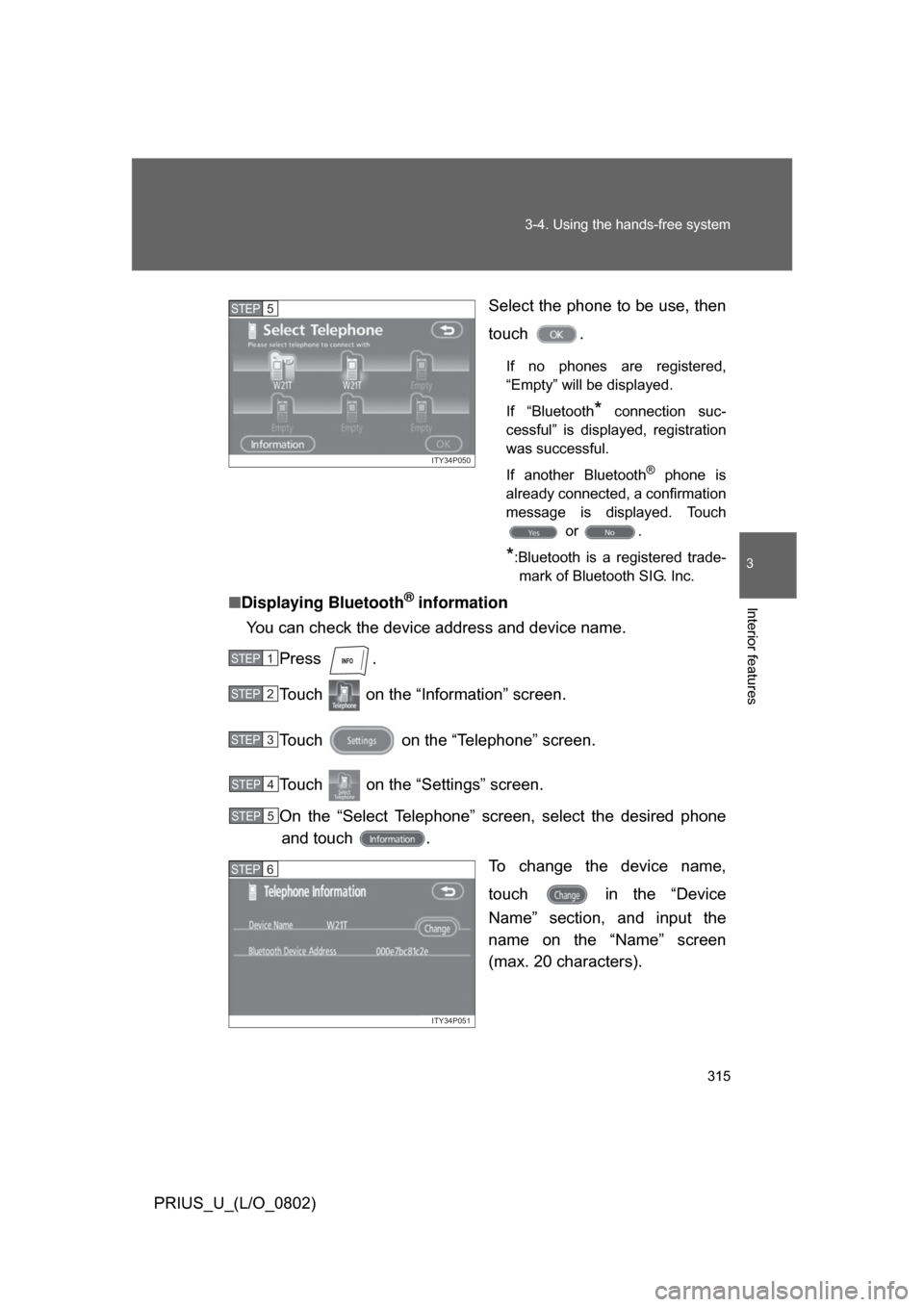
Select the phone to be use, then
touch .
If no phones are registered,
“Empty” will be displayed.
If “Bluetooth
* connection suc-
cessful” is displayed, registration
was successful.
If another Bluetooth
® phone is
already connected, a confirmation
message is displayed. Touch or .
*:Bluetooth is a registered trade-mark of Bluetooth SIG. Inc.
■ Displaying Bluetooth® information
You can check the device address and device name.
Press .
Touch on the “Information” screen.
Touch on the “Telephone” screen.
Touch on the “Settings” screen.
On the “Select Telephone” screen, select the desired phoneand touch .
To change the device name,
touch in the “Device
Name” section, and input the
name on the “Name” screen
(max. 20 characters).
ITY34P050
STEP5
STEP1
STEP2
STEP3
STEP4
STEP5
ITY34P051
STEP6
Page 316 of 512
316 3-4. Using the hands-free system
PRIUS_U_(L/O_0802)■
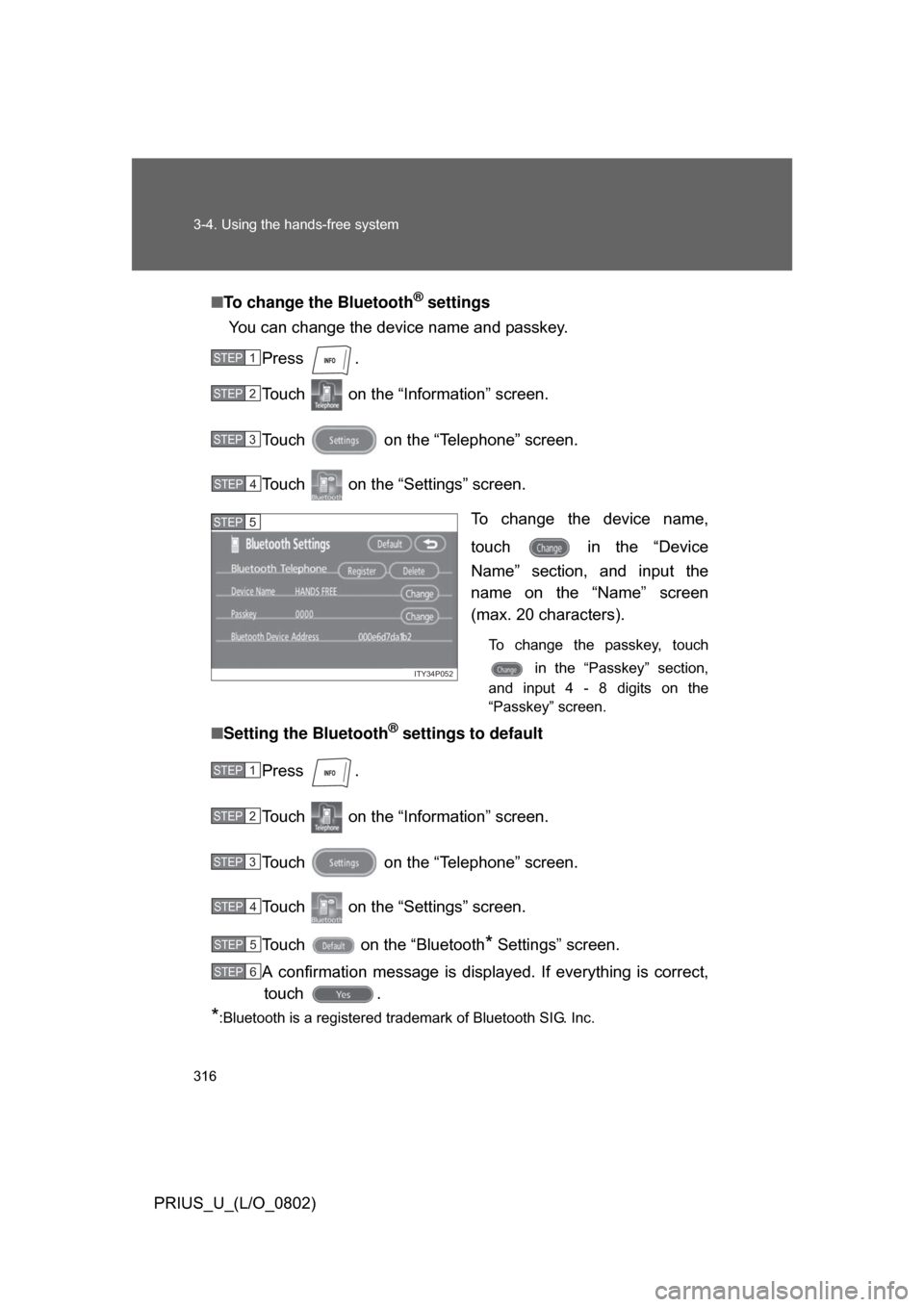
To change the Bluetooth
® settings
You can change the device name and passkey.
Press .
Touch on the “Inf ormation” screen.
Touch on the “Telephone” screen.
Touch on the “Settings” screen. To change the device name,
touch in the “Device
Name” section, and input the
name on the “Name” screen
(max. 20 characters).
To change the passkey, touch in the “Passkey” section,
and input 4 - 8 digits on the
“Passkey” screen.
■ Setting the Bluetooth® settings to default
Press .
Touch on the “Inf ormation” screen.
Touch on the “Telephone” screen.
Touch on the “Settings” screen.
Touch on the “Bluetooth
* Settings” screen.
A confirmation message is displa yed. If everything is correct,
touch .
*:Bluetooth is a registered trademark of Bluetooth SIG. Inc.
STEP1
STEP2
STEP3
STEP4
ITY34P052
STEP5
STEP1
STEP2
STEP3
STEP4
STEP5
STEP6
Page 317 of 512
317
3-4. Using the hands-free system
3
Interior features
PRIUS_U_(L/O_0802)
■
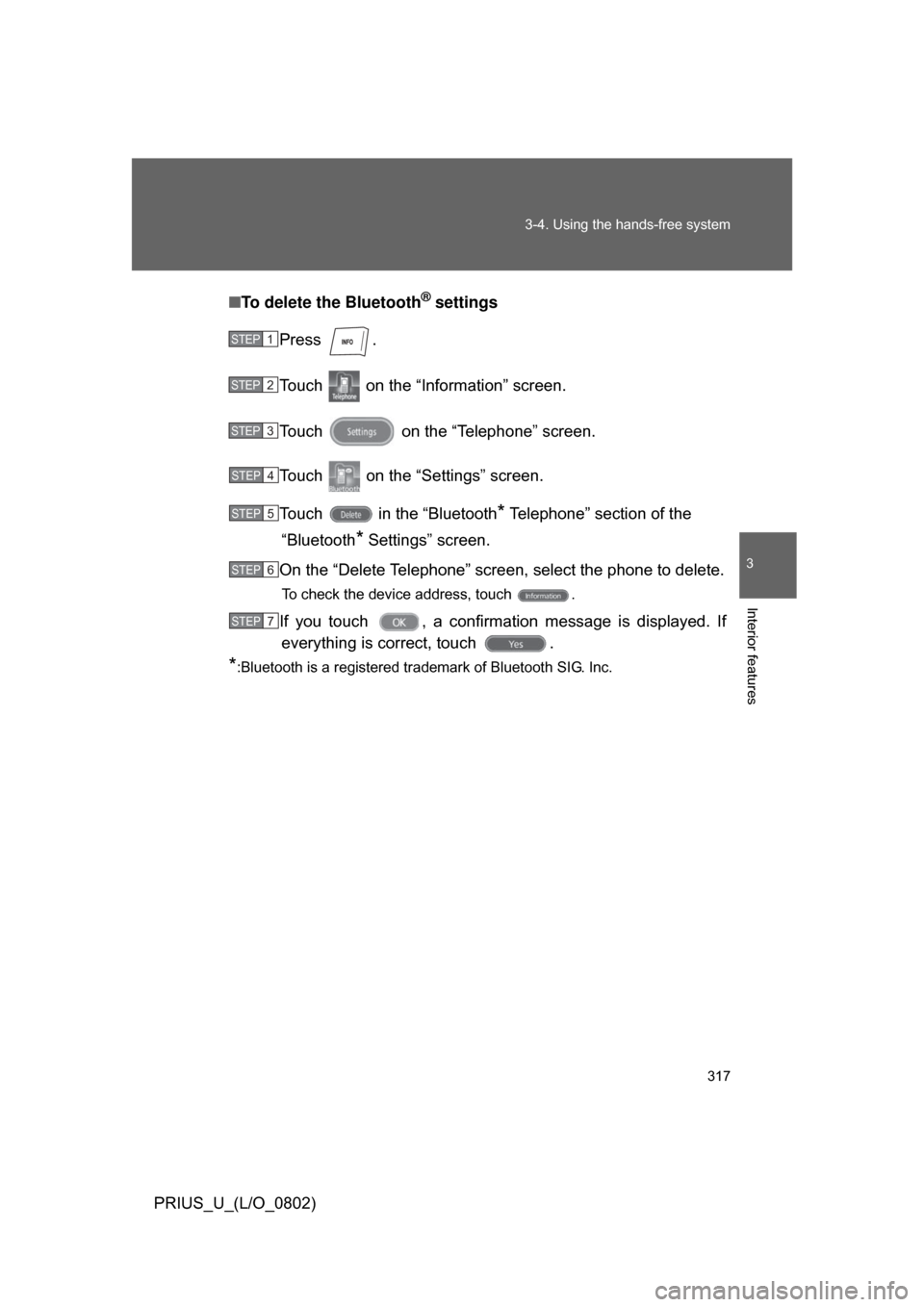
To delete the Bluetooth
® settings
Press .
Touch on the “Information” screen.
Touch on the “Telephone” screen.
Touch on the “Settings” screen.
Touch in the “Bluetooth
* Telephone” section of the
“Bluetooth
* Settings” screen.
On the “Delete Telephone” scre en, select the phone to delete.
To check the device address, touch .
If you touch , a confirmation message is displayed. If
everything is correct, touch .
*:Bluetooth is a registered trademark of Bluetooth SIG. Inc.
STEP1
STEP2
STEP3
STEP4
STEP5
STEP6
STEP7
Page 401 of 512
401
4-3. Do-it-yourself maintenance
4
Maintenance and care
PRIUS_U_(L/O_0802)
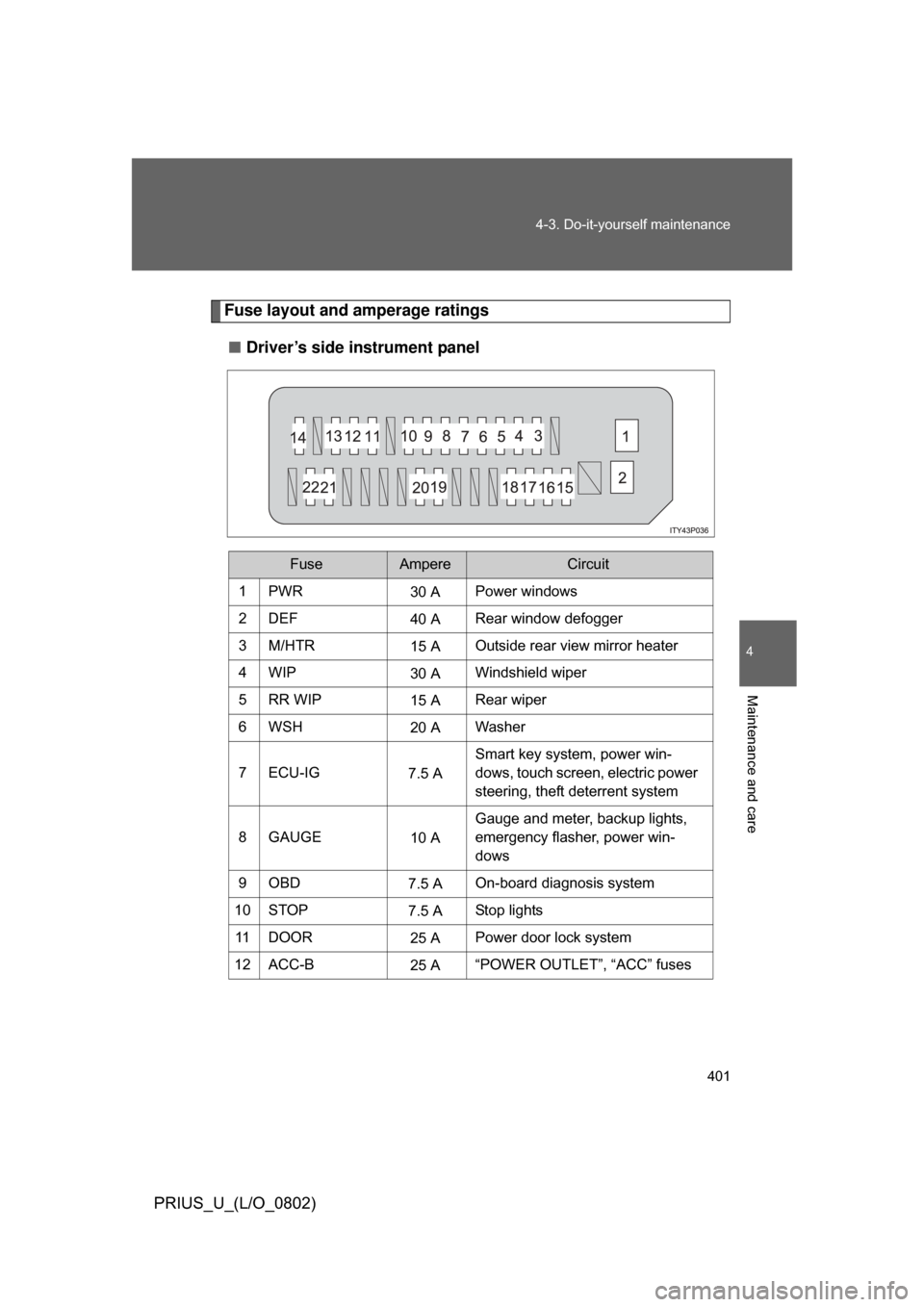
Fuse layout and amperage ratings
■ Driver’s side instrument panel
FuseAmpereCircuit
1PWR30 APower windows
2DEF 40 ARear window defogger
3M/HTR 15 AOutside rear view mirror heater
4WIP 30 AWindshield wiper
5RR WIP 15 ARear wiper
6WSH 20 AWasher
7 ECU-IG 7.5 ASmart key system, power win-
dows, touch screen, electric power
steering, theft deterrent system
8GAUGE 10 AGauge and meter, backup lights,
emergency flasher, power win-
dows
9OBD 7.5 AOn-board diagnosis system
10 STOP 7.5 AStop lights
11 D O O R 25 APower door lock system
12 ACC-B 25 A“POWER OUTLET”, “ACC” fuses
Page 402 of 512

402 4-3. Do-it-yourself maintenance
PRIUS_U_(L/O_0802)
13 ECU-B15 ATouch screen, power windows, air
conditioning system
14 AM1 7.5 AHybrid system
15 TAIL 10 ATail lights, license plates light,
parking lights
16 PANEL 7.5 ATouch screen, clock, audio sys-
tem, instrument panel lights
17 A/C (HTR) 10 AAir conditioning system
18 FR DOOR 20 APower windows
19 PWR OUTLET 15 APower outlet
20 ACC 7.5 AAudio system, touch screen, clock
21 PWR OUTLET
FR
15 A
Power outlet
22 IGN 7.5 AHybrid system, hybrid vehicle
immobilizer system, SRS airbags
FuseAmpereCircuit
Page 430 of 512
430 5-2. Steps to take in an emergency
PRIUS_U_(L/O_0802)
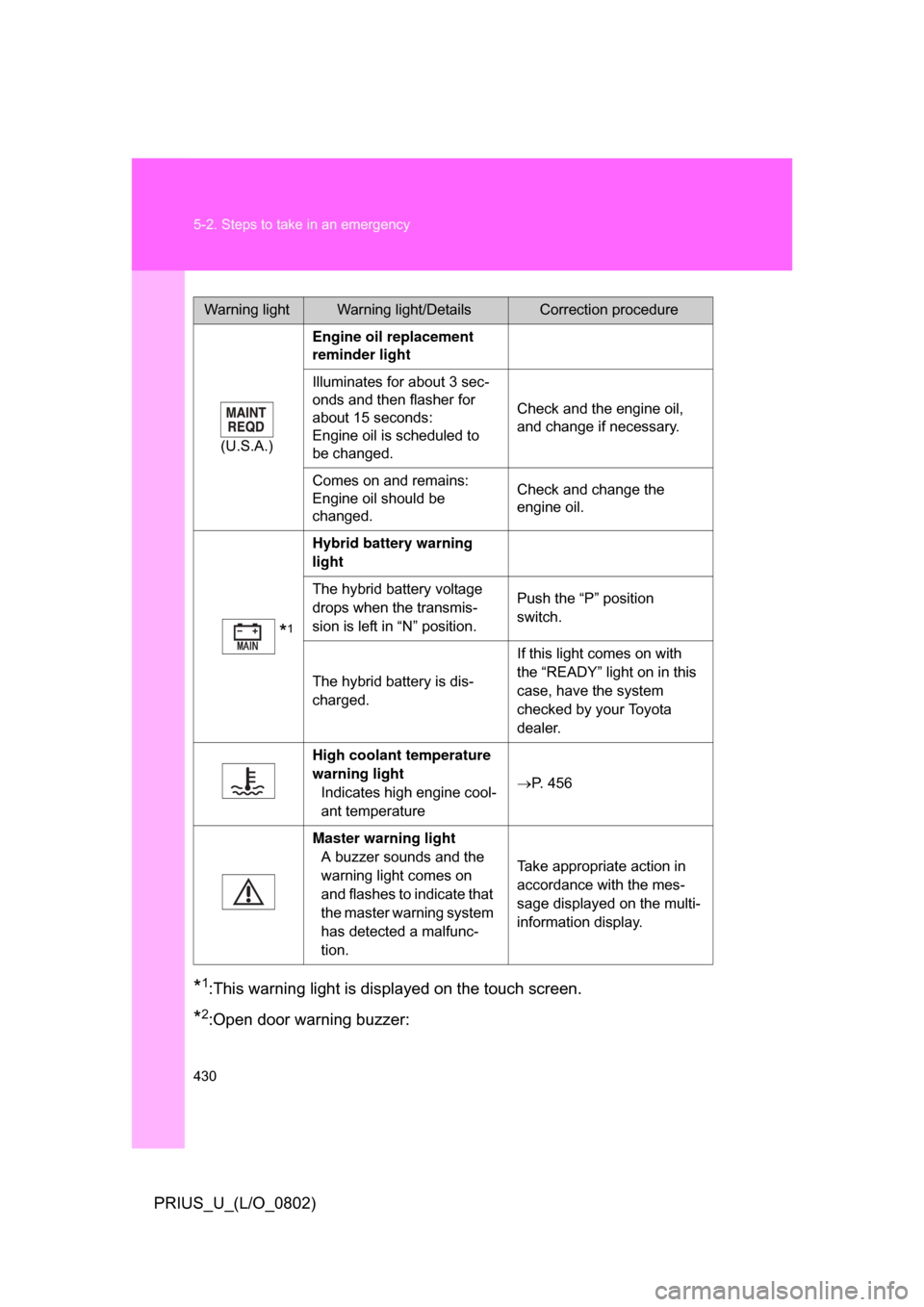
*1:This warning light is displayed on the touch screen.
*2:Open door warning buzzer:
(U.S.A.)
Engine oil replacement
reminder light
Illuminates for about 3 sec-
onds and then flasher for
about 15 seconds:
Engine oil is scheduled to
be changed. Check and the engine oil,
and change if necessary.
Comes on and remains:
Engine oil should be
changed. Check and change the
engine oil.
*1
Hybrid battery warning
light
The hybrid battery voltage
drops when the transmis-
sion is left in “N” position. Push the “P” position
switch.
The hybrid battery is dis-
charged. If this light comes on with
the “READY” light on in this
case, have the system
checked by your Toyota
dealer.
High coolant temperature
warning light Indicates high engine cool-
ant temperature P. 456
Master warning light A buzzer sounds and the
warning light comes on
and flashes to indicate that
the master warning system
has detected a malfunc-
tion. Take appropriate action in
accordance with the mes-
sage displayed on the multi-
information display.
Warning lightWarning light/DetailsCorrection procedure
Page 457 of 512
5
When trouble arises
457
5-2. Steps to take in an emergency
PRIUS_U_(L/O_0802)
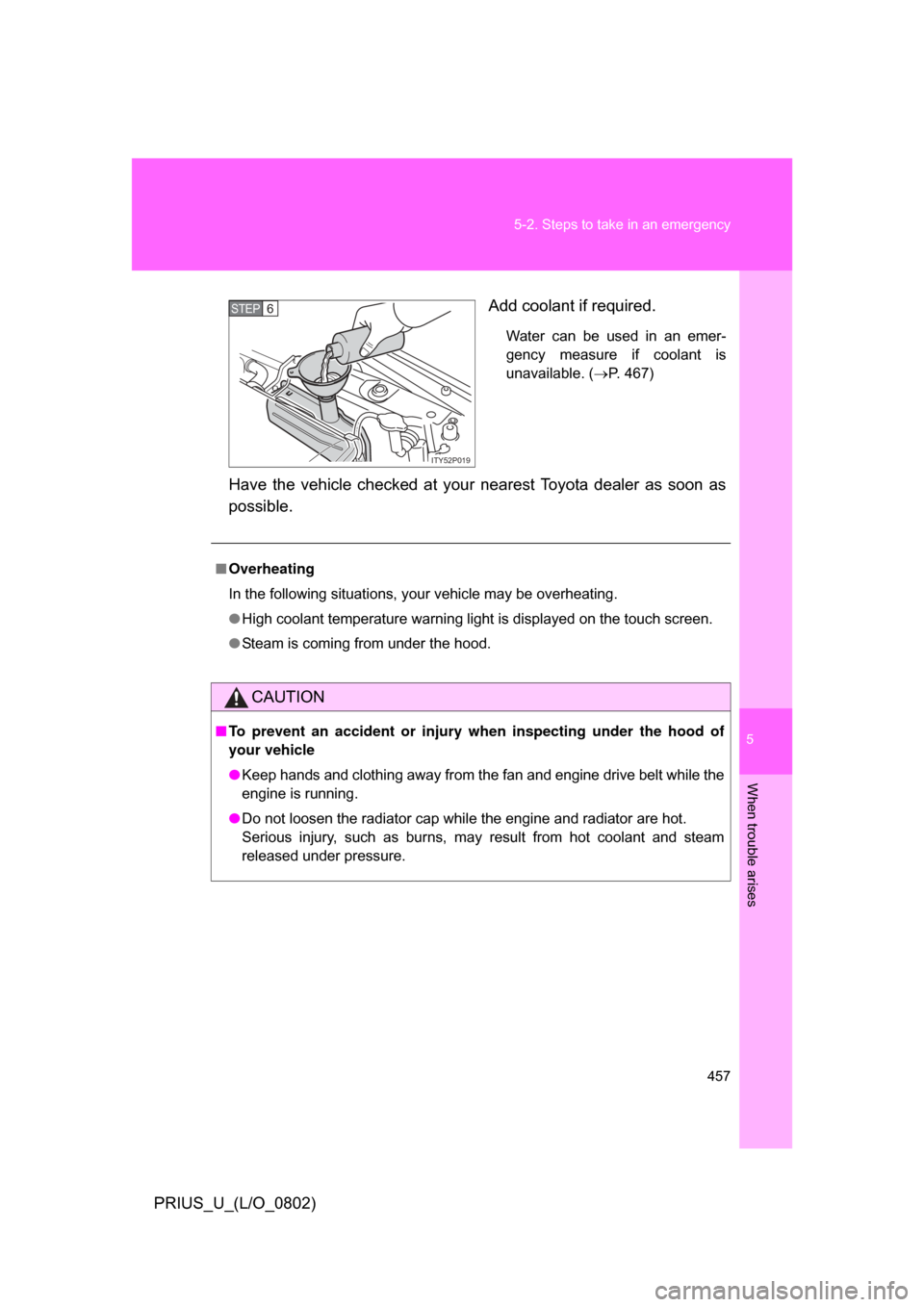
Add coolant if required.
Water can be used in an emer-
gency measure if coolant is
unavailable. (
P. 467)
Have the vehicle checked at your nearest Toyota dealer as soon as
possible.
ITY52P019
STEP6
■Overheating
In the following situations, your vehicle may be overheating.
● High coolant temperature warning light is displayed on the touch screen.
● Steam is coming from under the hood.
CAUTION
■To prevent an accident or injury when inspecting under the hood of
your vehicle
● Keep hands and clothing away from the fan and engine drive belt while the
engine is running.
● Do not loosen the radiator cap while the engine and radiator are hot.
Serious injury, such as burns, may result from hot coolant and steam
released under pressure.