ECO mode TOYOTA PRIUS 2008 2.G User Guide
[x] Cancel search | Manufacturer: TOYOTA, Model Year: 2008, Model line: PRIUS, Model: TOYOTA PRIUS 2008 2.GPages: 512, PDF Size: 7.23 MB
Page 161 of 512
161
2-3. Operating the lights and windshield wipers
2
When driving
PRIUS_U_(L/O_0802)
■
The windshield wiper and washer can be operated when
The “POWER” switch is in ON mode.
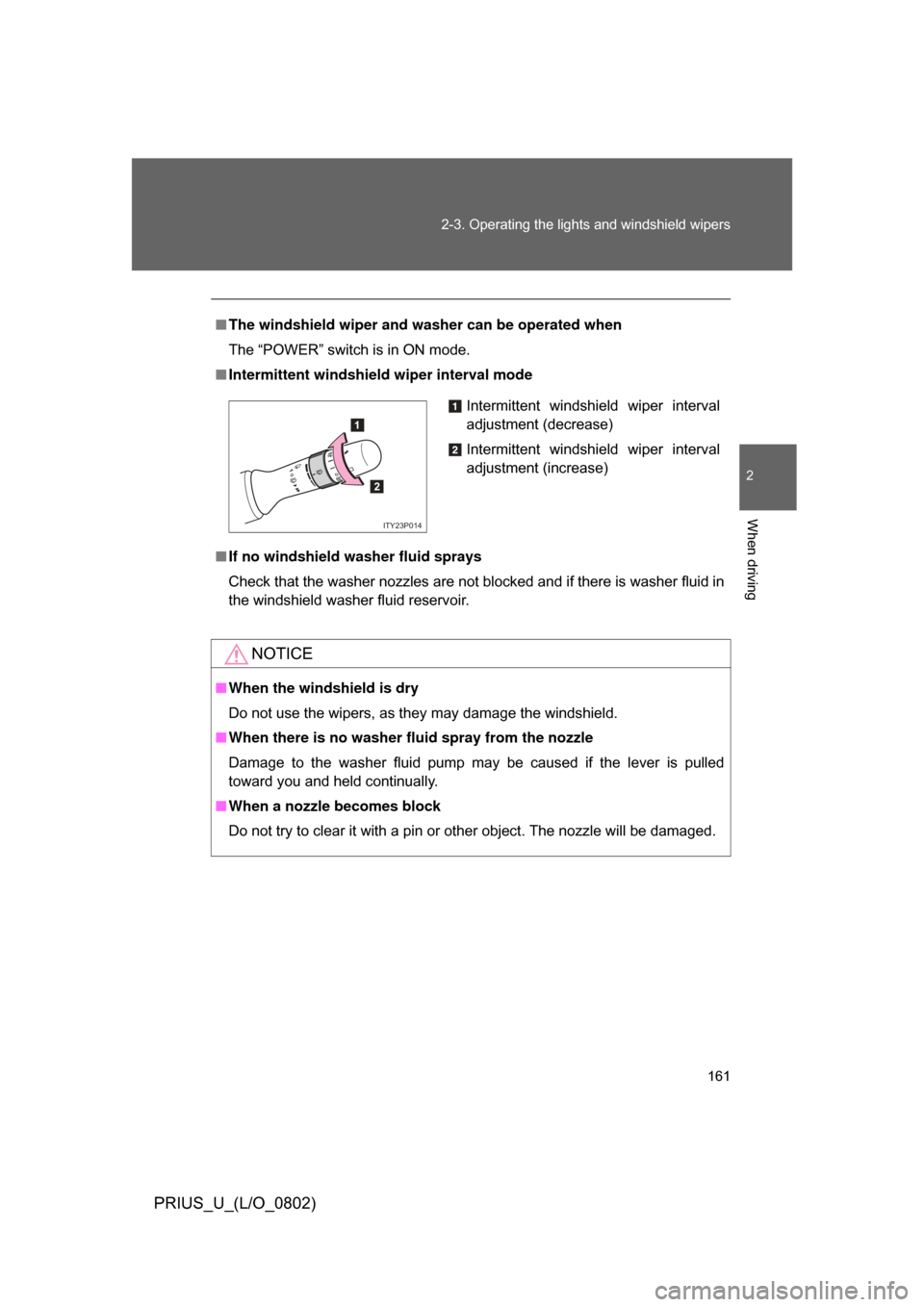
■ Intermittent windshield wiper interval mode
■ If no windshield washer fluid sprays
Check that the washer nozzles are not blocked and if there is washer fluid in
the windshield washer fluid reservoir.
NOTICE
■When the windshield is dry
Do not use the wipers, as they may damage the windshield.
■ When there is no washer fluid spray from the nozzle
Damage to the washer fluid pump may be caused if the lever is pulled
toward you and held continually.
■ When a nozzle becomes block
Do not try to clear it with a pin or other object. The nozzle will be damaged.
Intermittent windshield wiper interval
adjustment (decrease)
Intermittent windshield wiper interval
adjustment (increase)
1
2
ITY23P014
Page 188 of 512

188 3-1. Using the touch screen
PRIUS_U_(L/O_0802)
The initial screenVehicles with navigation system and vehicles without navigation
system (Type A)
If the “POWER” switch is set to
ACCESSORY or ON mode, the
initializing screen will be dis-
played for a few seconds as the
system starts up.
Vehicles without navigation system (Type B)
Page 206 of 512
206 3-2. Using the air conditioning system and defogger
PRIUS_U_(L/O_0802)
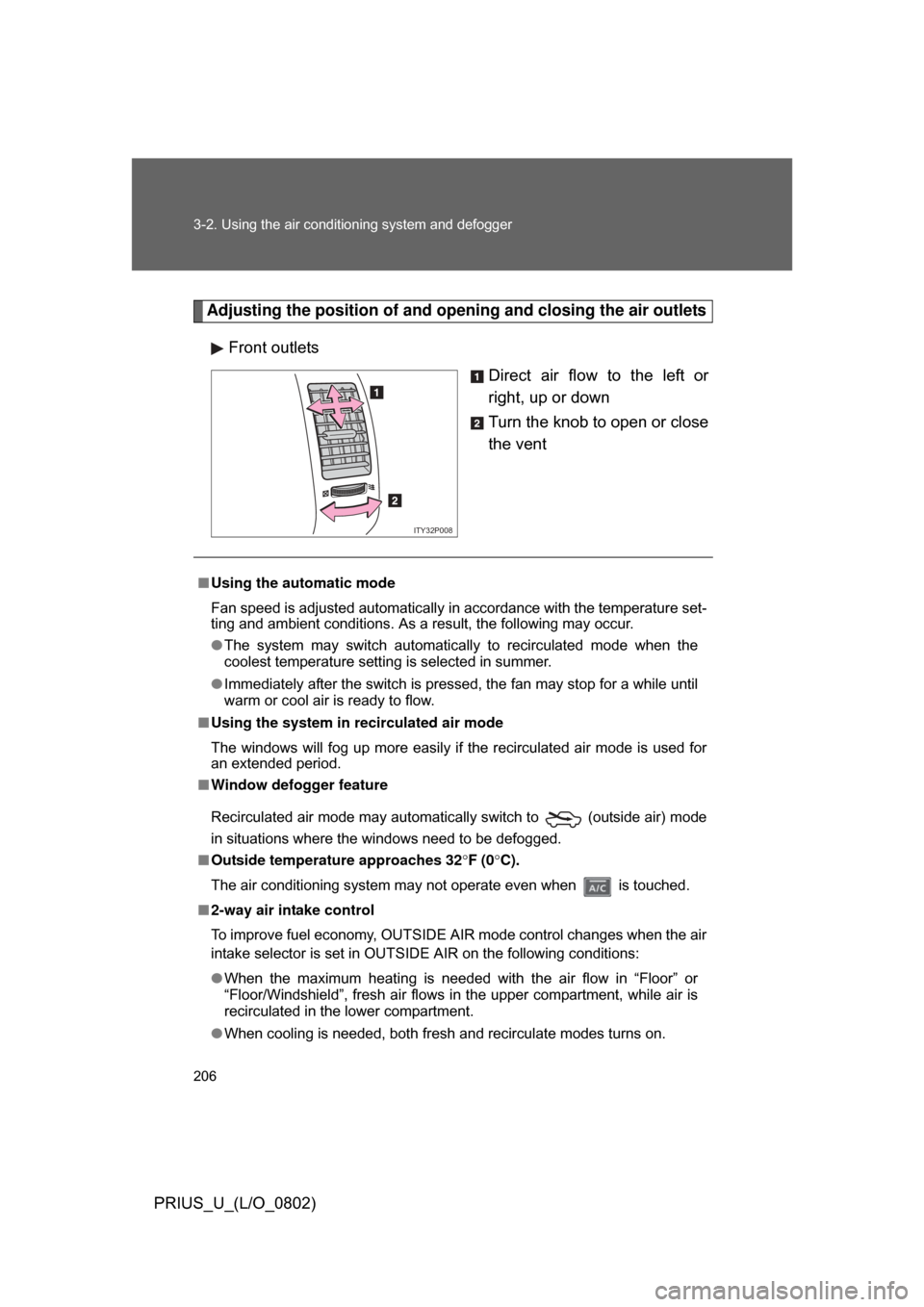
Adjusting the position of and opening and closing the air outlets
Front outlets Direct air flow to the left or
right, up or down
Turn the knob to open or close
the vent
ITY32P008
■Using the automatic mode
Fan speed is adjusted automatically in accordance with the temperature set-
ting and ambient conditions. As a result, the following may occur.
● The system may switch automatically to recirculated mode when the
coolest temperature setting is selected in summer.
● Immediately after the switch is pressed, the fan may stop for a while until
warm or cool air is ready to flow.
■ Using the system in recirculated air mode
The windows will fog up more easily if the recirculated air mode is used for
an extended period.
■ Window defogger feature
Recirculated air mode may automatically switch to
(outside air) mode
in situations where the windows need to be defogged.
■ Outside temperature approaches 32 F (0 C).
The air conditioning system may not operate even when is touched.
■ 2-way air intake control
To improve fuel economy, OUTSIDE AIR mode control changes when the air
intake selector is set in OUTSIDE AIR on the following conditions:
● When the maximum heating is needed with the air flow in “Floor” or
“Floor/Windshield”, fresh air flows in the upper compartment, while air is
recirculated in the lower compartment.
● When cooling is needed, both fresh and recirculate modes turns on.
Page 213 of 512
213
3-2. Using the air conditioning system
and defogger
3
Interior features
PRIUS_U_(L/O_0802)
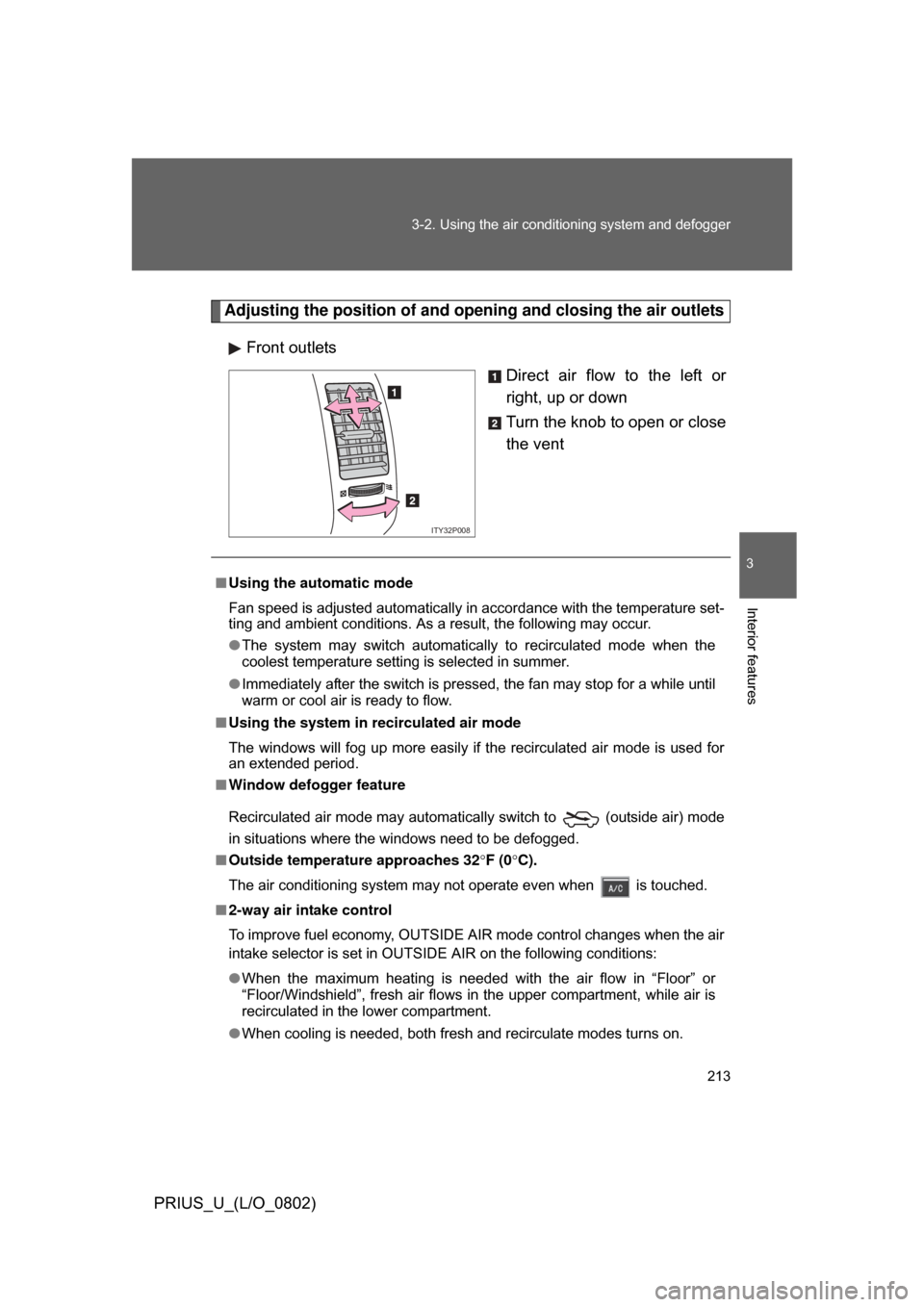
Adjusting the position of and opening and closing the air outlets
Front outlets Direct air flow to the left or
right, up or down
Turn the knob to open or close
the vent
ITY32P008
■Using the automatic mode
Fan speed is adjusted automatically in accordance with the temperature set-
ting and ambient conditions. As a result, the following may occur.
● The system may switch automatically to recirculated mode when the
coolest temperature setting is selected in summer.
● Immediately after the switch is pressed, the fan may stop for a while until
warm or cool air is ready to flow.
■ Using the system in recirculated air mode
The windows will fog up more easily if the recirculated air mode is used for
an extended period.
■ Window defogger feature
Recirculated air mode may automatically switch to
(outside air) mode
in situations where the windows need to be defogged.
■ Outside temperatur e approaches 32F (0 C).
The air conditioning system may not operate even when is touched.
■ 2-way air intake control
To improve fuel economy, OUTSIDE AIR mode control changes when the air
intake selector is set in OUTSIDE AIR on the following conditions:
● When the maximum heating is needed with the air flow in “Floor” or
“Floor/Windshield”, fresh air flows in the upper compartment, while air is
recirculated in the lower compartment.
● When cooling is needed, both fresh and recirculate modes turns on.
Page 218 of 512

218 3-2. Using the air conditioning system and defogger
PRIUS_U_(L/O_0802)
■Operating conditions
The “POWER” switch must be in the ON mode.
CAUTION
■When the outside rear view mirror defoggers are on (vehicles with mir-
ror defoggers)
Do not touch the rear view mirror surfaces, as they can become very hot and
burn you.
NOTICE
■ To prevent 12 volt battery discharge
Turn the defoggers off when the engine is not running.
Page 258 of 512

258 3-3. Using the audio system
PRIUS_U_(L/O_0802)
■MP3 and WMA files
MP3 (MPEG Audio LAYER 3) is a standard audio compression format.
Files can be compressed to approximately 1/10 of their original size by using
MP3 compression.
WMA (Windows Media
TMAudio) is a Microsoft audio compression format.
This format compresses audio data to a size smaller than that of the MP3
format.
There is a limit to the MP3 and WMA file standards and to the media/formats
recorded by them that can be used.
● MP3 file compatibility
• Compatible standards
MP3 (MPEG1 LAYER3, MPEG2 LSF LAYER3)
• Compatible sampling frequencies MPEG1 LAYER3: 32, 44.1, 48 (kHz)
MPEG2 LSF LAYER3: 16, 22.05, 24 (kHz)
• Compatible bit rates MPEG1 LAYER3: 64, 80, 96, 112, 128, 160, 192, 224, 256, 320 (kbps)
• MPEG2 LSF LAYER3: 64, 80, 96, 112, 128, 144, 160 (kbps)
*: Compatible with VBR
• Compatible channel modes: stereo, joint stereo, dual channel and monaural
● WMA file compatibility
• Compatible standards
WMA Ver. 7, 8, 9
• Compatible sampling frequencies 32, 44.1, 48 (kHz)
• Compatible bit rates Ver. 7, 8: CBR 48, 64, 80, 96, 128, 160, 192 (kbps)
Ver. 9: CBR 48, 64, 80, 96, 128, 160, 192, 256, 320 (kbps)
*: Only compatible with 2-channel playback
● Compatible media
Media that can be used for MP3 and WMA playback are CD-Rs and CD-
RWs.
Playback in some instances may not be possible, depending on the status
of the CD-R or CD-RW. Playback may not be possible or the audio may
jump if the disc is scratched or marked with fingerprints.
Page 259 of 512

259
3-3. Using the audio system
3
Interior features
PRIUS_U_(L/O_0802)
●
Compatible disc formats
The following disc formats can be used.
• Disc formats: CD-ROM Mode 1 and Mode 2
CD-ROM XA Mode 2, Form 1 and Form 2
• File formats: ISO9660 level 1, level 2, (Romeo, Joliet) MP3 and WMA files written in any format other than those listed above
may not play correctly, and their file names and folder names may not be
displayed correctly.
Items related to standards and limitations are as follows:
• Maximum directory hierarchy: 8 levels
• Maximum length of folder names/file names: 32 characters
• Maximum number of folders: 192 (including the root)
• Maximum number of files per disc: 255
● File names
The only files that can be recogniz ed as MP3/WMA and played are those
with the extension .mp3 or .wma.
● Multi-sessions
As the audio system is compatible with multi-sessions, it is possible to play
discs that contain MP3 and WMA files. However, only the first session can
be played.
● ID3 and WMA tags
ID3 tags can be added to MP3 files, making it possible to record the track
title and artist name, etc.
The system is compatible with ID3 Ver. 1.0, 1.1, and Ver. 2.2, 2.3 ID3 tags.
(The number of characters is based on ID3 Ver. 1.0 and 1.1.)
WMA tags can be added to WMA files, making it possible to record the
track title and artist name in the same way as with ID3 tags.
Page 269 of 512
269
3-3. Using the audio system
3
Interior features
PRIUS_U_(L/O_0802)
Using the steering switches
Turning on the powerPress when the audio system is turned OFF.
The audio system can be turned OFF by holding the switch down for 1
second or more.
Changing the audio sourcePress when the audio system is turned ON. The audio source
changes as follows each time the bu tton is pressed. If a CD is not
inserted, that mode will be skipped.
FM (1, 2) CD player AM SAT (1, 2, 3)
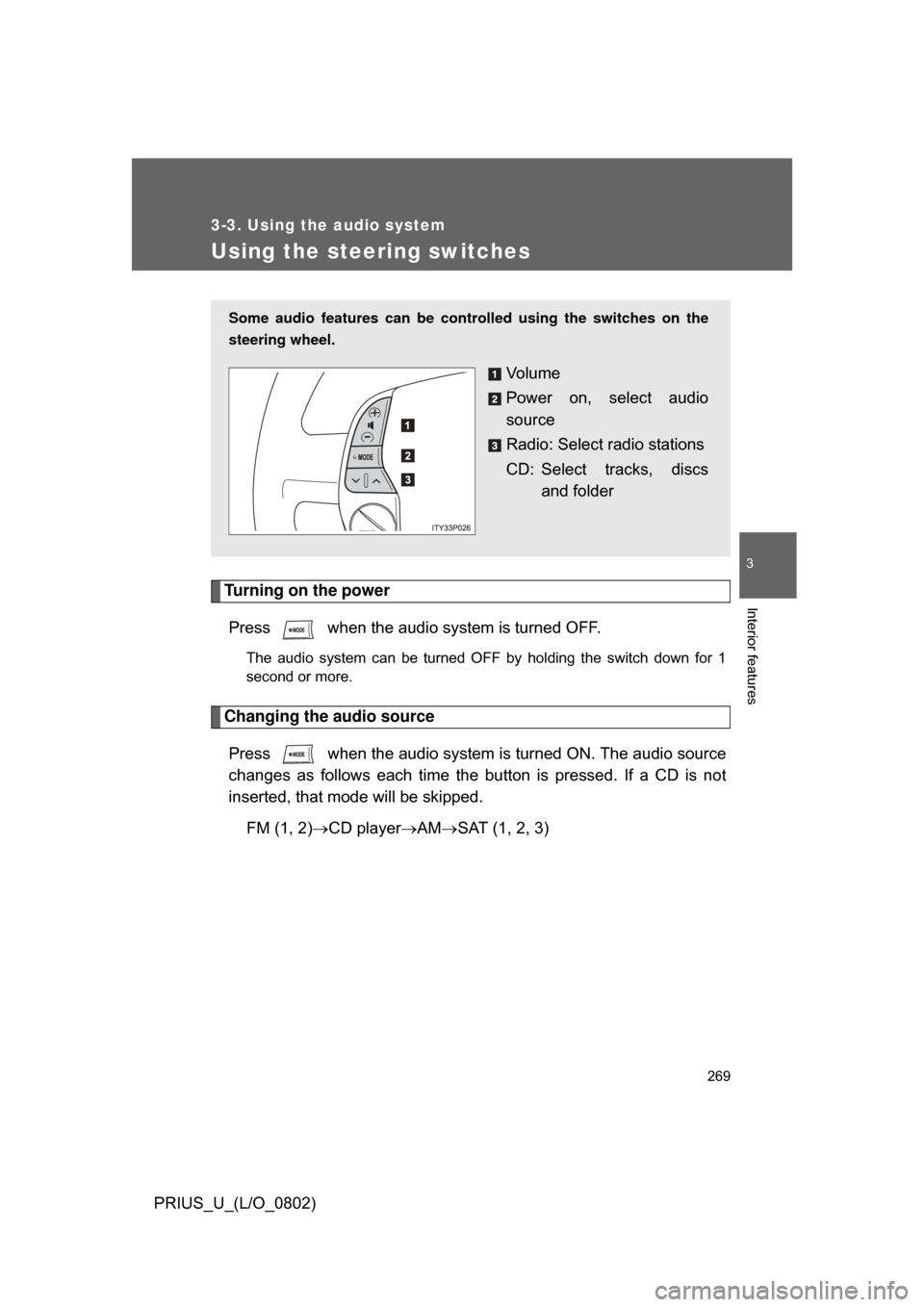
Some audio features can be cont rolled using the switches on the
steering wheel.
Vo l u m e
Power on, select audio
source
Radio: Select radio stations
CD: Select tracks, discs and folder
Page 279 of 512
279
3-4. Using the hands-free system
3
Interior features
PRIUS_U_(L/O_0802)
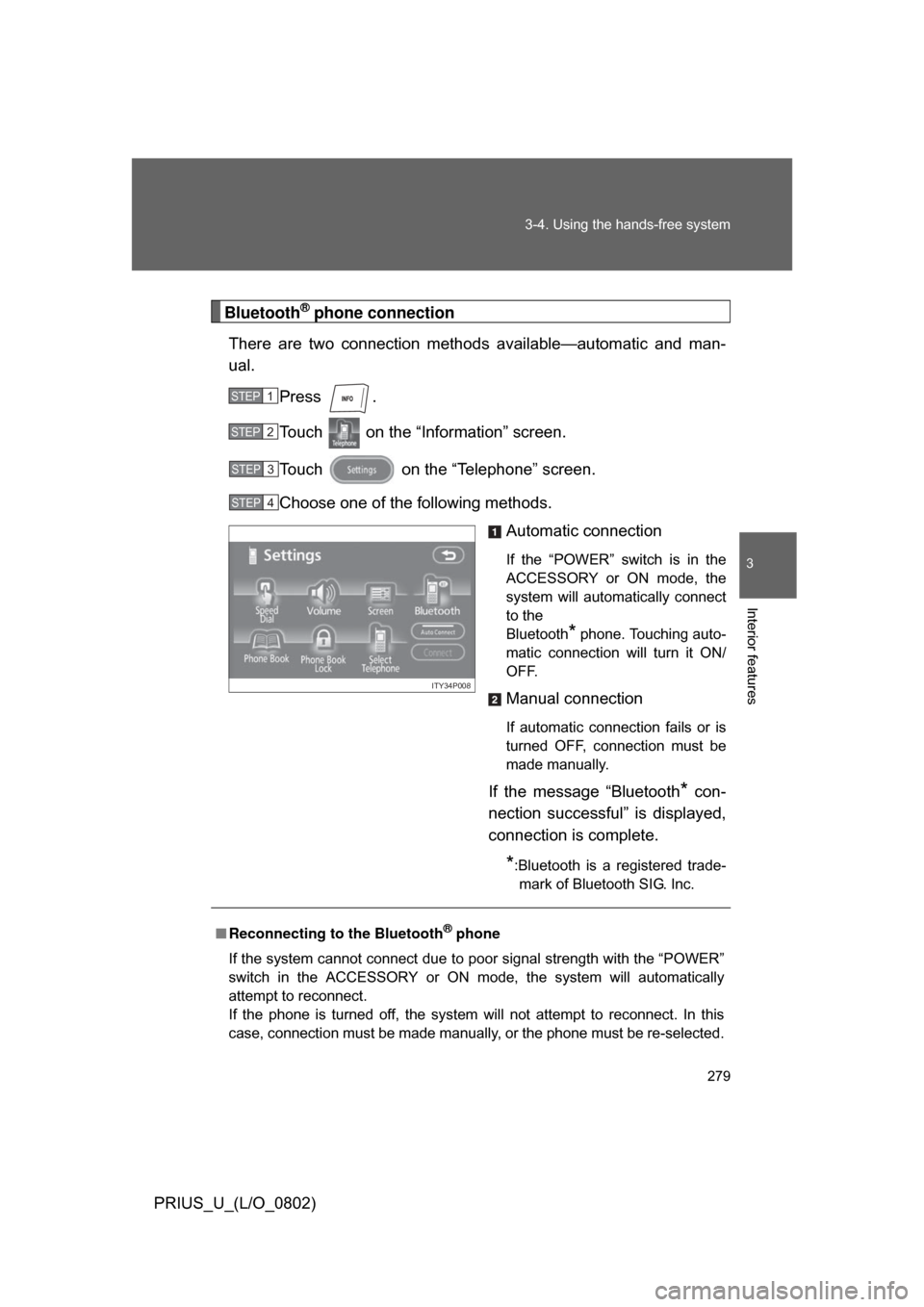
Bluetooth® phone connection
There are two connection method s available—automatic and man-
ual.
Press .
Touch on the “Information” screen.
Touch on the “Telephone” screen.
Choose one of the following methods. Automatic connection
If the “POWER” switch is in the
ACCESSORY or ON mode, the
system will automatically connect
to the
Bluetooth
* phone. Touching auto-
matic connection will turn it ON/
OFF.
Manual connection
If automatic connection fails or is
turned OFF, connection must be
made manually.
If the message “Bluetooth* con-
nection successful” is displayed,
connection is complete.
*:Bluetooth is a registered trade- mark of Bluetooth SIG. Inc.
STEP1
STEP2
STEP3
STEP4
ITY34P008
■ Reconnecting to the Bluetooth® phone
If the system cannot connect due to poor signal strength with the “POWER”
switch in the ACCESSORY or ON mode, the system will automatically
attempt to reconnect.
If the phone is turned off, the system will not attempt to reconnect. In this
case, connection must be made manually, or the phone must be re-selected.
Page 359 of 512
359
4-3. Do-it-yourself maintenance
4
Maintenance and care
PRIUS_U_(L/O_0802)
CAUTION
The engine compartment contains many mechanisms and fluids that may
move suddenly, become hot, or become electrically energized. To avoid death
or serious injury.
■
When working on the engine compartment:
● Keep hands, clothing, and tools away from the moving fan and engine
drive belt.
● Be careful not to touch the engine, inverter, radiator, exhaust manifold, etc.
right after driving as they may be hot. Oil and other fluids may also be hot.
● Do not leave anything that may burn easily, such as paper or rags, in the
engine compartment.
● Do not smoke, cause sparks or expose an open flame to fuel or the 12 volt
battery. Fuel and 12 volt battery fumes are flammable.
● Be extremely cautious when working on the 12 volt battery. It contains poi-
sonous and corrosive sulfuric acid.
● Never touch, disassemble, remove or replace the high voltage parts,
cables and their connectors. It can cause severe burns or electric shock
that may result in death or serious injury.
● When the hybrid system is operating with the “READY” light on, the engine
may suddenly start in some cases. When you inspect the engine compart-
ment, be sure to turn off the hybrid system.
■ When working near the electric cooling fan or radiator grille
Be sure the “POWER” switch is OFF.
With the “POWER” switch in ON mode, the electric cooling fan may automat-
ically start to run if the air conditioning is on and/or the coolant temperature
is high. ( P. 373)
■ Safety glasses
Wear safety glasses to prevent flying or falling material, fluid spray, etc. from
getting in the eyes.