mirror TOYOTA PRIUS 2008 2.G Owner's Manual
[x] Cancel search | Manufacturer: TOYOTA, Model Year: 2008, Model line: PRIUS, Model: TOYOTA PRIUS 2008 2.GPages: 512, PDF Size: 7.23 MB
Page 70 of 512
70
1-4. Adjustable components (seats, mirrors, steering wheel)
PRIUS_U_(L/O_0802)
Steering wheel
CAUTION
■While driving
Do not adjust the steering wheel while driving.
Doing so may cause the driver to mishandle the vehicle and an accident,
resulting in death or serious injury.
■ After adjusting the steering wheel
Make sure that the steering wheel is securely locked.
Otherwise, the steering wheel may move suddenly, possibly causing an
accident and resulting in death or serious injury.
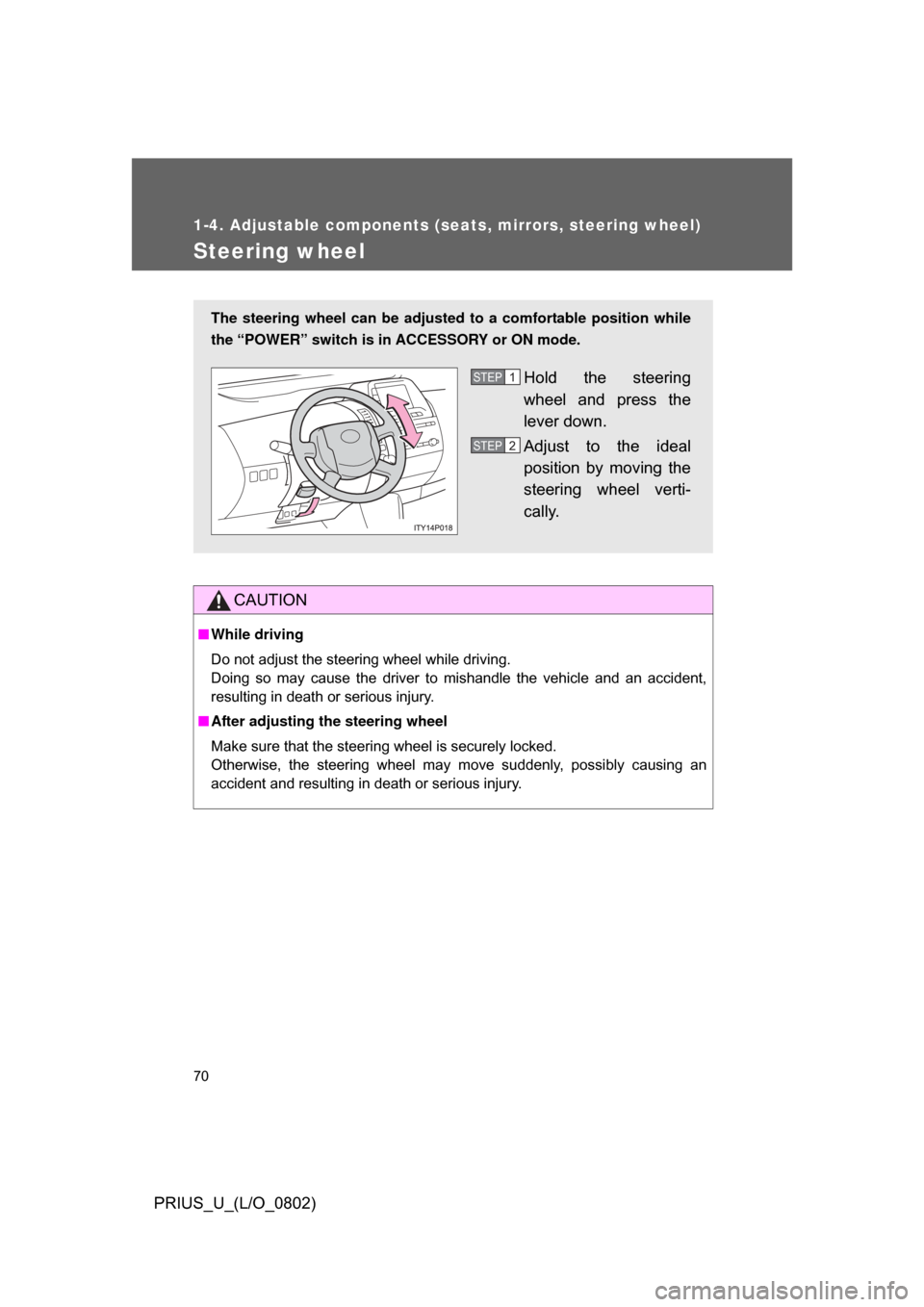
The steering wheel can be adjusted to a comfortable position while
the “POWER” switch is in ACCESSORY or ON mode.
Hold the steering
wheel and press the
lever down.
Adjust to the ideal
position by moving the
steering wheel verti-
cally.STEP1
STEP2
Page 71 of 512
71
1
1-4. Adjustable components (seats, mirrors, steering wheel)
Before driving
PRIUS_U_(L/O_0802)
Anti- glare inside rear view mirror
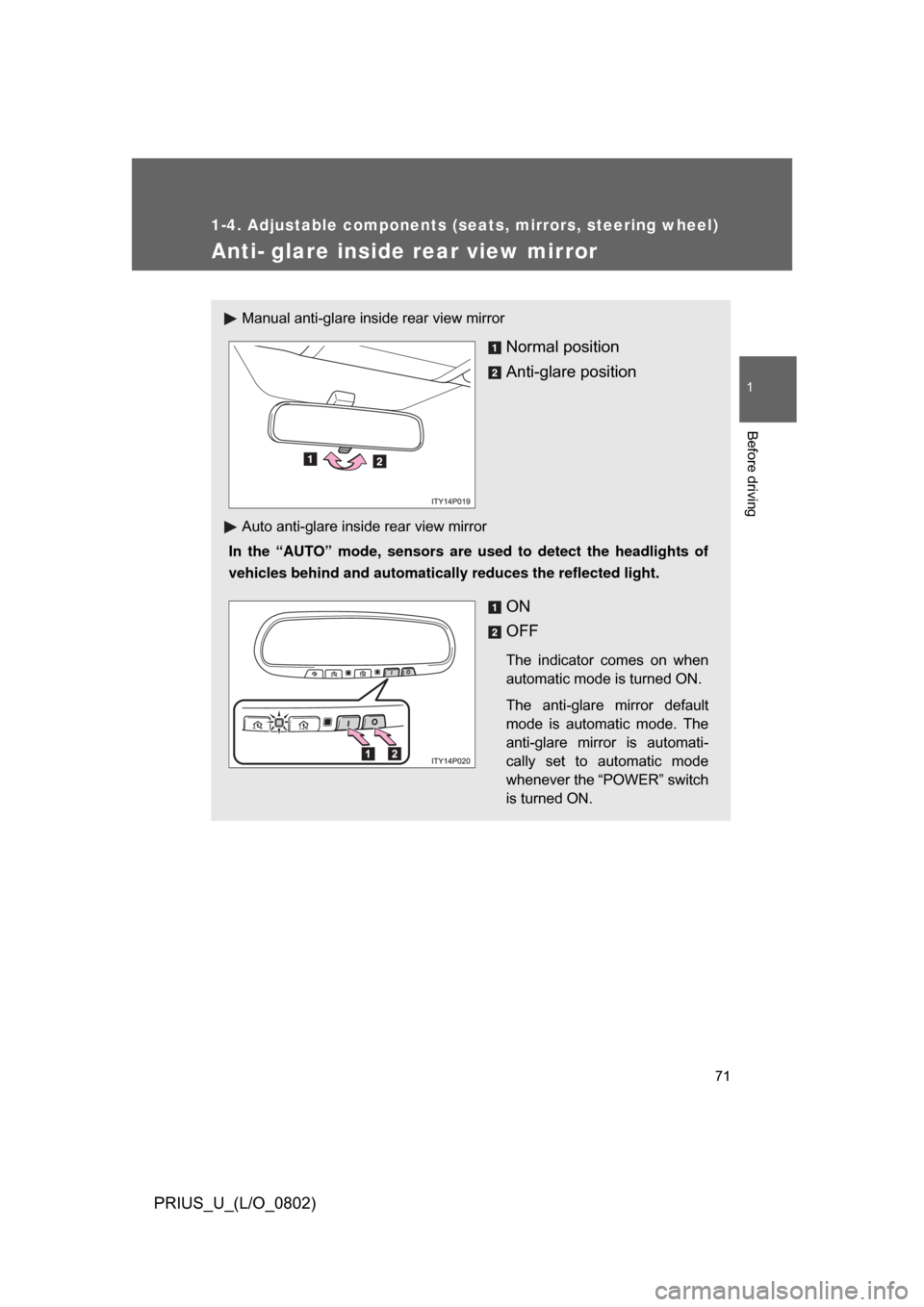
Manual anti-glare inside rear view mirror
Normal position
Anti-glare position
Auto anti-glare inside rear view mirror
In the “AUTO” mode, sensors are used to detect the headlights of
vehicles behind and automatically reduces the reflected light.
ON
OFF
The indicator comes on when
automatic mode is turned ON.
The anti-glare mirror default
mode is automatic mode. The
anti-glare mirror is automati-
cally set to automatic mode
whenever the “POWER” switch
is turned ON.
Page 72 of 512
72 1-4. Adjustable components (seats, mirrors, steering wheel)
PRIUS_U_(L/O_0802)
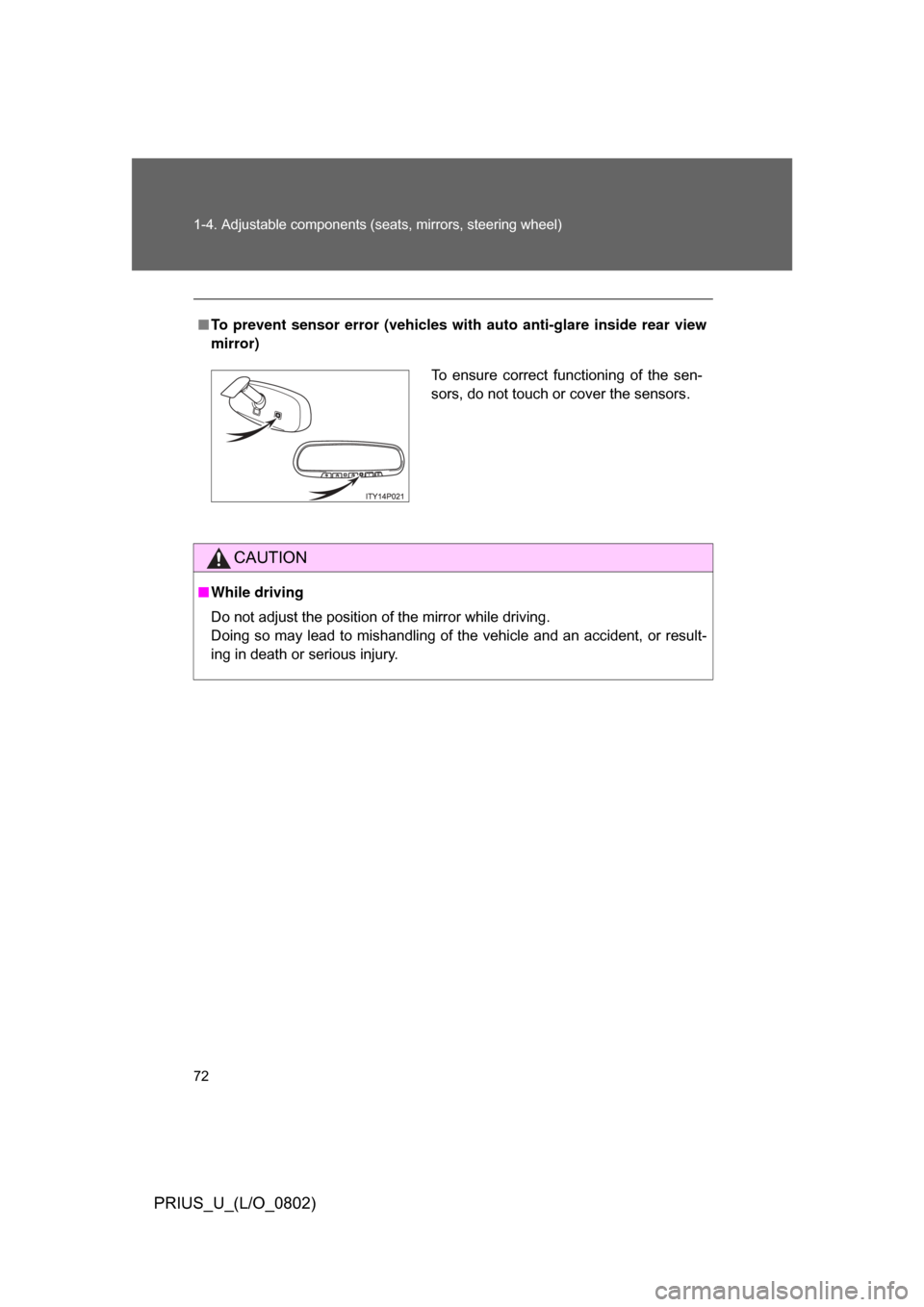
■To prevent sensor error (vehicles with auto anti-glare inside rear view
mirror)
CAUTION
■ While driving
Do not adjust the position of the mirror while driving.
Doing so may lead to mishandling of the vehicle and an accident, or result-
ing in death or serious injury.
To ensure correct functioning of the sen-
sors, do not touch or cover the sensors.
Page 73 of 512
73
1
1-4. Adjustable components (seats, mirrors, steering wheel)
Before driving
PRIUS_U_(L/O_0802)
Outside rear view mirrors
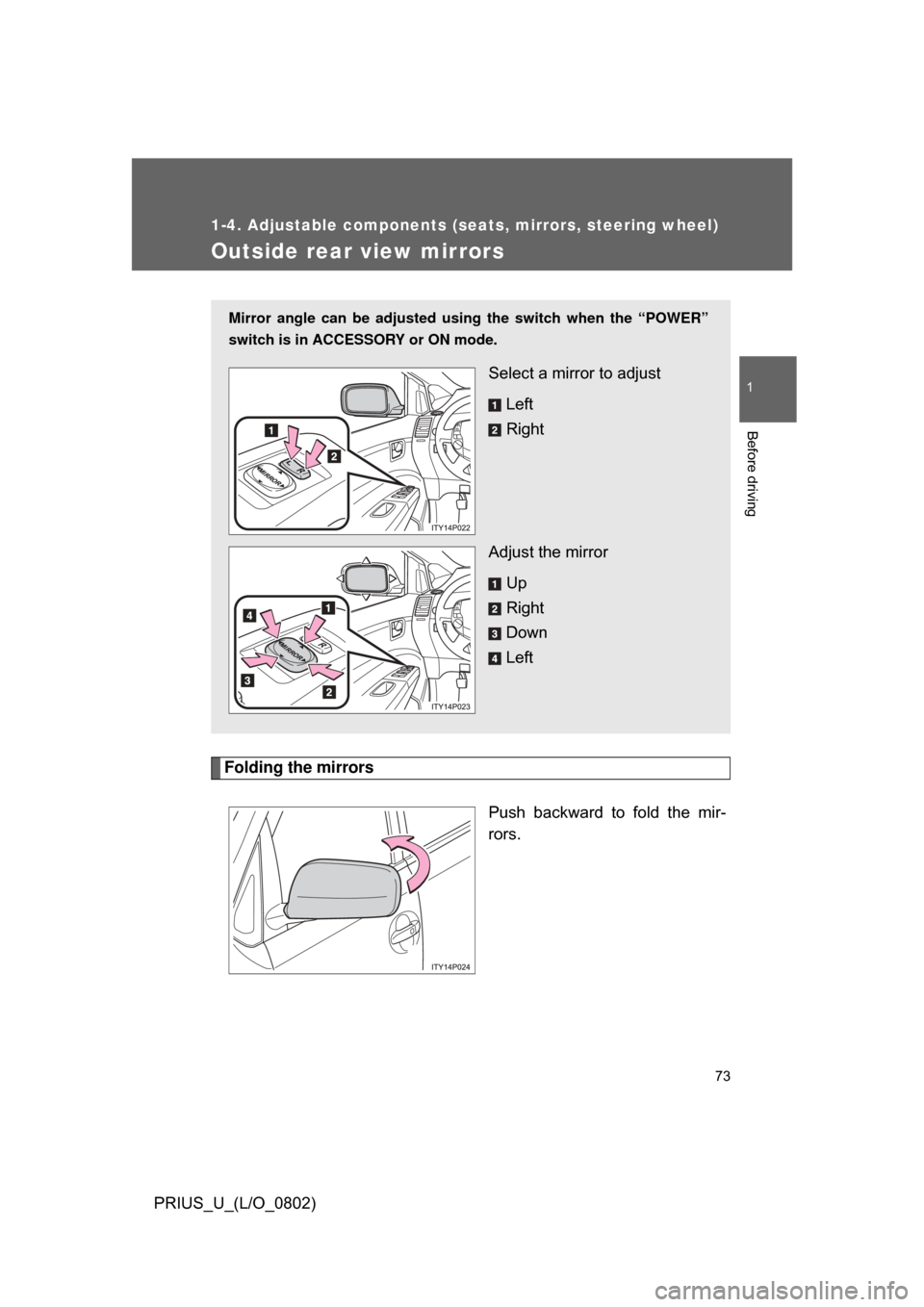
Folding the mirrorsPush backward to fold the mir-
rors.
Mirror angle can be adjusted usin g the switch when the “POWER”
switch is in ACCESSORY or ON mode.
Select a mirror to adjust
Left
Right
Adjust the mirror Up
Right
Down
Left
Page 74 of 512

74 1-4. Adjustable components (seats, mirrors, steering wheel)
PRIUS_U_(L/O_0802)
■When the mirrors are fogged up (vehicle with mirror defoggers)
Turn on the mirror heaters to defog the mirrors. (P. 217)
CAUTION
■While driving
Observe the following precautions.
Failing to do so may result in losing control of the vehicle and cause an acci-
dent, resulting in death or serious injury.
● Do not adjust the mirrors.
● Do not drive with the mirrors folded back.
● Before driving, be sure to extend mirrors and make an adjustment prop-
erly.
■ When the mirror h eaters are operating
Do not touch the mirror surface as the mirror surface becomes hot.
And do not touch the mirror surface also when the wiper switch is on at lower
than 77 F (25C) of the outside temperature.
NOTICE
■ If ice should jam the mirror
Do not operate the control or scrape the mirror face. Use a spray de-icer to
free the mirror.
Page 124 of 512

124 2-1. Driving procedures
PRIUS_U_(L/O_0802)
CAUTION
■When driving the vehicle
● Do not under any circumstances shift the shift lever to “R”, “N” or push the
“P” position switch while the vehicle is moving.
Doing so can cause significant damage to the transmission and may result
in a loss of vehicle control.
● Do not shift the shift lever to “N” while the vehicle is moving.
Doing so may cause the engine brake not to operate properly and lead to
an accident.
● Do not turn the hybrid system off while driving.
The power steering and brake actuator will not operate properly if the
hybrid system is not running.
● Use engine braking (“B”) to maintain a safe speed when driving down a
steep hill.
Using the brakes continuously may cause the brakes to overheat and lose
effectiveness. ( P. 136)
● When stopped on an inclined surface, use the brake pedal and parking
brake to prevent the vehicle from rolling backward or forward and causing
an accident.
● Do not adjust the position of the steering wheel, the seat, or the inside or
outside rear view mirrors while driving.
Doing so may result in a loss of vehicle control that can cause accidents
that may result in death or serious injury.
● Always check that all passengers’ arms, heads or other parts of their bod-
ies are not outside the vehicle, as this may result in death or serious injury.
● Do not drive in excess of the speed limit. Even if the legal speed limit per-
mits it, do not drive over 85 mph (140 km/h) unless your vehicle has high
speed capability tires. Driving over 85 mph (140 km/h) may result in tire
failure, loss of control and possible injury. Be sure to consult a tire dealer
to determine whether the tires on your vehicle are high-speed capability
tires or not before driving at such speeds.
Page 148 of 512
148 2-2. Instrument cluster
PRIUS_U_(L/O_0802)
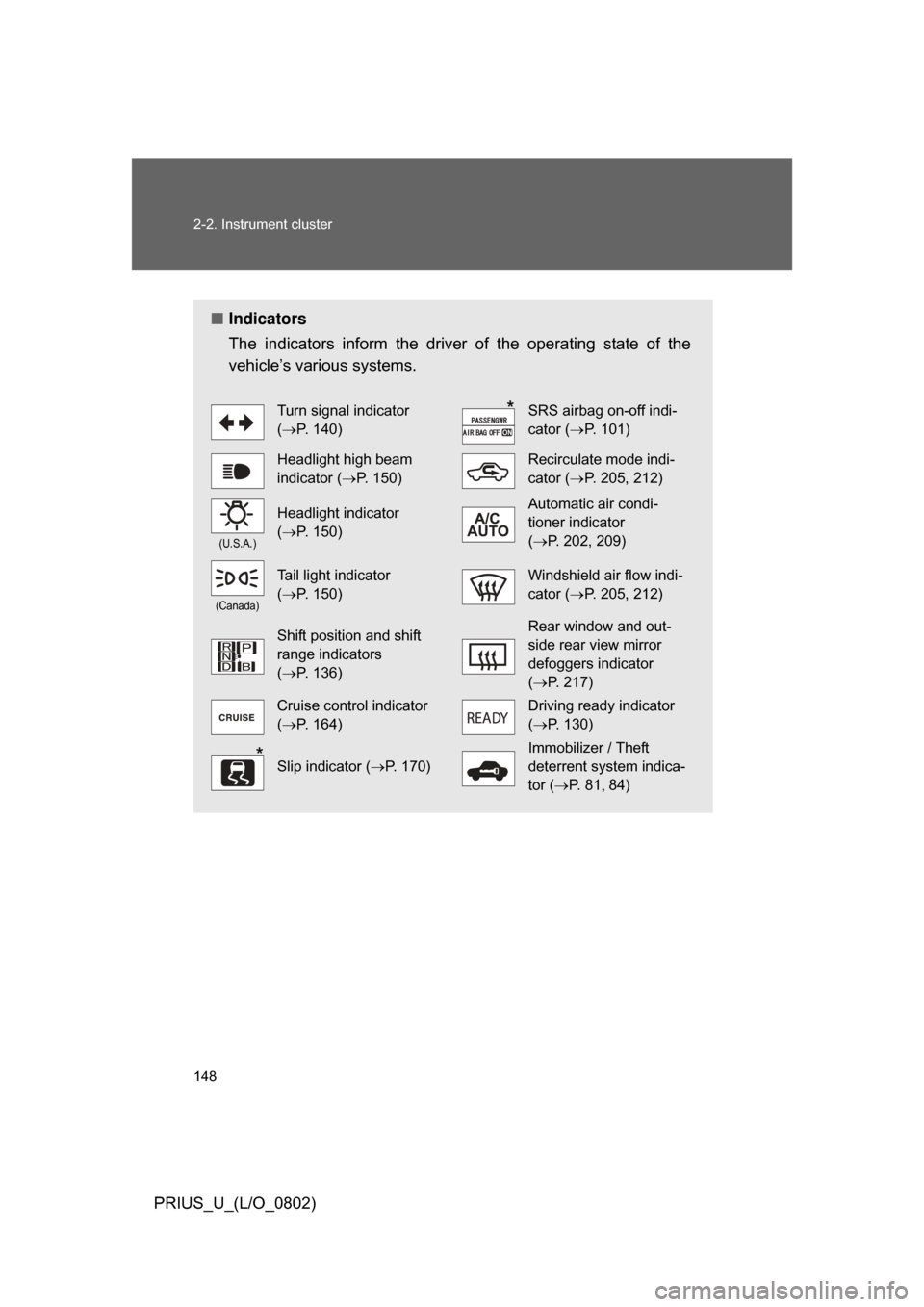
■Indicators
The indicators inform the driver of the operating state of the
vehicle’s various systems.
Turn signal indicator
(P. 140)SRS airbag on-off indi-
cator ( P. 101)
Headlight high beam
indicator ( P. 150)Recirculate mode indi-
cator (P. 205, 212)
(U.S.A.)
Headlight indicator
(P. 150)Automatic air condi-
tioner indicator
(P. 202, 209)
(Canada)
Tail light indicator
(P. 150)Windshield air flow indi-
cator ( P. 205, 212)
Shift position and shift
range indicators
(P. 136)Rear window and out-
side rear view mirror
defoggers indicator
(P. 217)
Cruise control indicator
(P. 164)Driving ready indicator
(P. 130)
Slip indicator ( P. 170)
Immobilizer / Theft
deterrent system indica-
tor (P. 8 1 84)
ON
Page 167 of 512
167
2-4. Using other driving systems
2
When driving
PRIUS_U_(L/O_0802)
Rear view monitor system
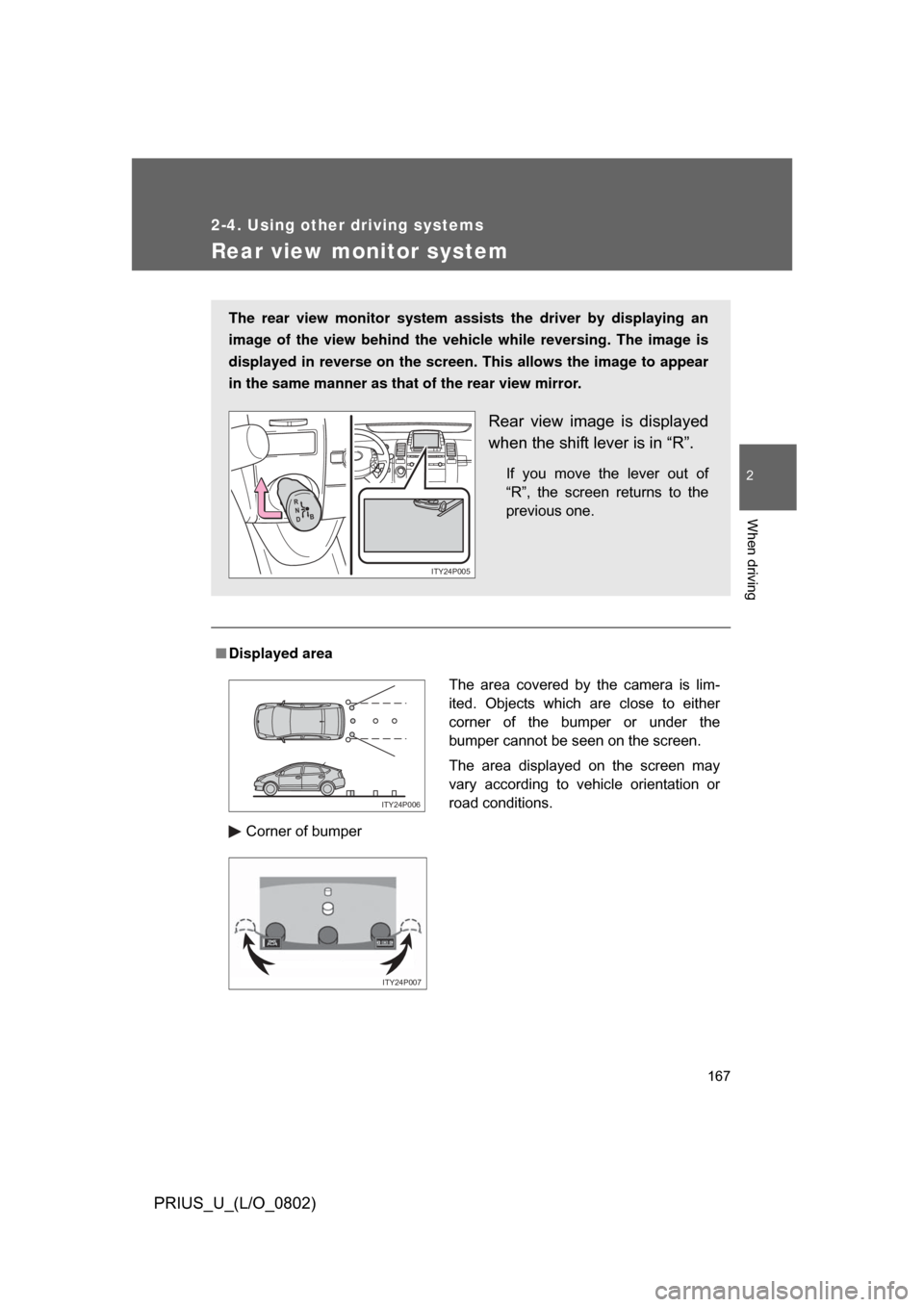
■Displayed area
Corner of bumper
The rear view monitor system assists the driver by displaying an
image of the view behind the vehicle while reversing. The image is
displayed in reverse on the screen . This allows the image to appear
in the same manner as that of the rear view mirror.
Rear view image is displayed
when the shift lever is in “R”.
If you move the lever out of
“R”, the screen returns to the
previous one.
R
N
D B
ITY24P005
The area covered by the camera is lim-
ited. Objects which are close to either
corner of the bumper or under the
bumper cannot be seen on the screen.
The area displayed on the screen may
vary according to vehicle orientation or
road conditions.
ITY24P006
ITY24P007
Page 169 of 512
169
2-4. Using other
driving systems
2
When driving
PRIUS_U_(L/O_0802)
CAUTION
■When using the rear view moni tor system, observe these precautions
to avoid an accident that could r esult in death or serious injuries.
● Never depend solely on the monitor system when reversing.
● Always check visually and with the mirrors to confirm your intended path is
clear.
● Depicted distances between objects and flat surfaces differ from actual
distances.
● Do not use the system if the back door is open.
■ Conditions which may affect the rear view monitor system
● If the back of the vehicle is hit, the camera’s position and mounting angle
may change. Contact your Toyota dealer.
● Rapid temperature changes, such as when hot water is poured on the
vehicle in cold weather, may cause the system to function abnormally.
● If the camera lens is dirty, it cannot transmit a clear image. Rinse with
water and wipe with a soft cloth. If extremely dirty, wash with a mild
cleanser and rinse.
● The displayed image may be darker and moving images may be slightly
distorted when the system is cold.
Page 184 of 512
184
PRIUS_U_(L/O_0802)
3-1. Using the touch screen ........................... 186
Touch screen ................... 186
Setting the touch screen (Vehicles with AUX
adapter) ......................... 191
Setting the touch screen (Vehicles without AUX
adapter) ......................... 196
3-2. Using the air conditioning system
and defogger ................ 201
Automatic air conditioning system (Vehicles with AUX
adapter) ......................... 201
Automatic air conditioning system (Vehicles without
AUX adapter) ................. 208
Using the steering wheel climate remote control
switches ......................... 215
Rear window and outside rear view mirror
defoggers ....................... 217