battery TOYOTA PRIUS 2008 2.G Owner's Guide
[x] Cancel search | Manufacturer: TOYOTA, Model Year: 2008, Model line: PRIUS, Model: TOYOTA PRIUS 2008 2.GPages: 512, PDF Size: 7.23 MB
Page 214 of 512
214 3-2. Using the air conditioning system and defogger
PRIUS_U_(L/O_0802)
CAUTION
■To prevent the windshield from fogging up
Do not use during cool air operation in extremely humid weather.
The difference between the temperature of the outside air and that of the
windshield can cause the outer surface of the windshield to fog up, blocking
your vision.
NOTICE
■To prevent 12 volt battery discharge
Do not leave the automatic air conditioning system on longer than necessary
when the hybrid system is not running.
Page 218 of 512
218 3-2. Using the air conditioning system and defogger
PRIUS_U_(L/O_0802)
■Operating conditions
The “POWER” switch must be in the ON mode.
CAUTION
■When the outside rear view mirror defoggers are on (vehicles with mir-
ror defoggers)
Do not touch the rear view mirror surfaces, as they can become very hot and
burn you.
NOTICE
■ To prevent 12 volt battery discharge
Turn the defoggers off when the engine is not running.
Page 221 of 512
221
3-3. Using the audio system
3
Interior features
PRIUS_U_(L/O_0802)
CAUTION
■
For vehicles sold in the U.S.A. and Canada
● Part 15 of the FCC Rules
FCC Warning:
Any unauthorized changes or modifications to this equipment will void the
user’s authority to operate this device.
● Laser products
• Do not take this unit apart or attempt to make any changes yourself.
This is an intricate unit that uses a laser pickup to retrieve information
from the surface of compact discs. The laser is carefully shielded so
that its rays remain inside the cabinet. Therefore, never try to disas-
semble the player or alter any of its parts since you may be exposed to
laser rays and dangerous voltages.
• This product utilizes a laser. Use of controls or adjustments or performance of procedures other
than those specified herein may result in hazardous radiation expo-
sure.
NOTICE
■To prevent 12 volt battery discharge
Do not leave the audio system on longer than necessary when the engine is
not running.
■ To avoid damaging the audio system
Take care not to spill drinks or other fluids over the audio system.
Page 224 of 512

224 3-3. Using the audio system
PRIUS_U_(L/O_0802)
NOTICE
■To prevent 12 volt battery discharge
Do not leave the audio system on longer than necessary when the engine is
not running.
■ To avoid damaging the audio system
Take care not to spill drinks or other fluids over the audio system.
Page 231 of 512
231
3-3. Using the audio system
3
Interior features
PRIUS_U_(L/O_0802)
■
When the 12 volt battery is disconnected
All preset stations are erased.
■ Reception sensitivity
● Maintaining perfect radio reception at all times is difficult due to the con-
tinually changing position of the antenna, differences in signal strength
and surrounding objects, such as trains, transmitters, etc.
● The radio antenna is mounted on the roof. To maintain clear radio recep-
tion, do not attach metallic window tinting or other metallic objects to the
antenna wire mounted inside the rear window.
■ XM
® satellite radio
An XM
® Satellite Radio is a tuner designed exclusively to receive broadcasts
provided under a separate subscription.
Availability is limited to the 48 contiguous states and 10 Canadian provinces.
● XM
® subscriptions
For detailed information about XM® Satellite Radio or to subscribe:
U.S.A. –
Visit on the web at www.xmradio.com
or call 1-800-967-2346.
Canada. –
Visit on the web at www.xmradio.ca
or call 1-877-438-9677.
● Radio ID
You will need the radio ID when activating XM
® service or reporting a
problem. Select “CH000” using the dial, and the receiver’s 8-char-
acter ID number will appear.
● Satellite tuner
The tuner supports only Audio Services (Music and Talk) and the accom-
panying Text Information of XM
® satellite radio.
*: Terms and services provided by XM® Radio are subject to change without
notice.
TUNE FILE
Page 238 of 512
238 3-3. Using the audio system
PRIUS_U_(L/O_0802)■
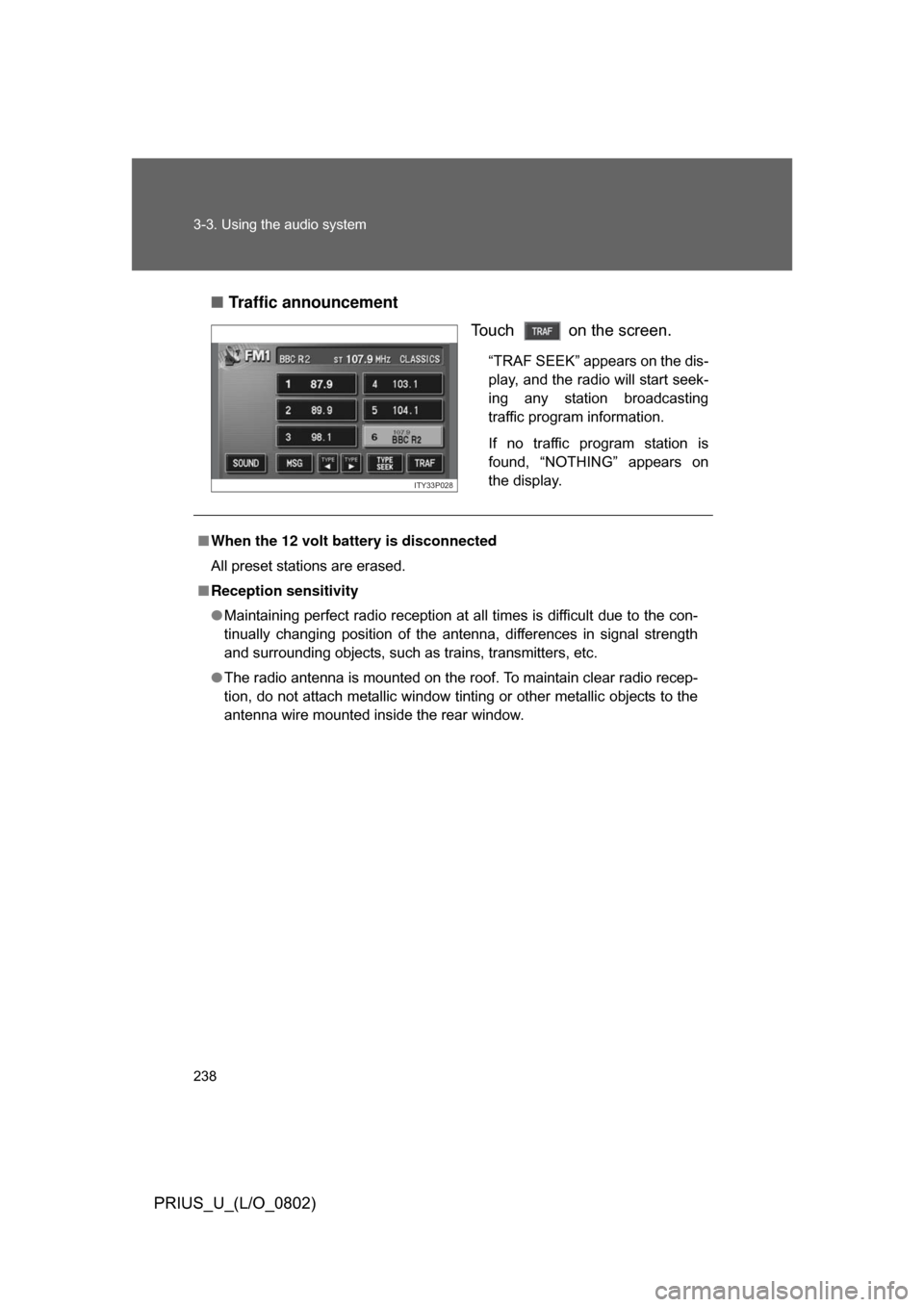
Traffic announcement
Touch on the screen.
“TRAF SEEK” appears on the dis-
play, and the radio will start seek-
ing any station broadcasting
traffic program information.
If no traffic program station is
found, “NOTHING” appears on
the display.
ITY33P028
■When the 12 volt battery is disconnected
All preset stations are erased.
■ Reception sensitivity
● Maintaining perfect radio reception at all times is difficult due to the con-
tinually changing position of the antenna, differences in signal strength
and surrounding objects, such as trains, transmitters, etc.
● The radio antenna is mounted on the roof. To maintain clear radio recep-
tion, do not attach metallic window tinting or other metallic objects to the
antenna wire mounted inside the rear window.
Page 273 of 512
273
3-4. Using the hands-free system
3
Interior features
PRIUS_U_(L/O_0802)
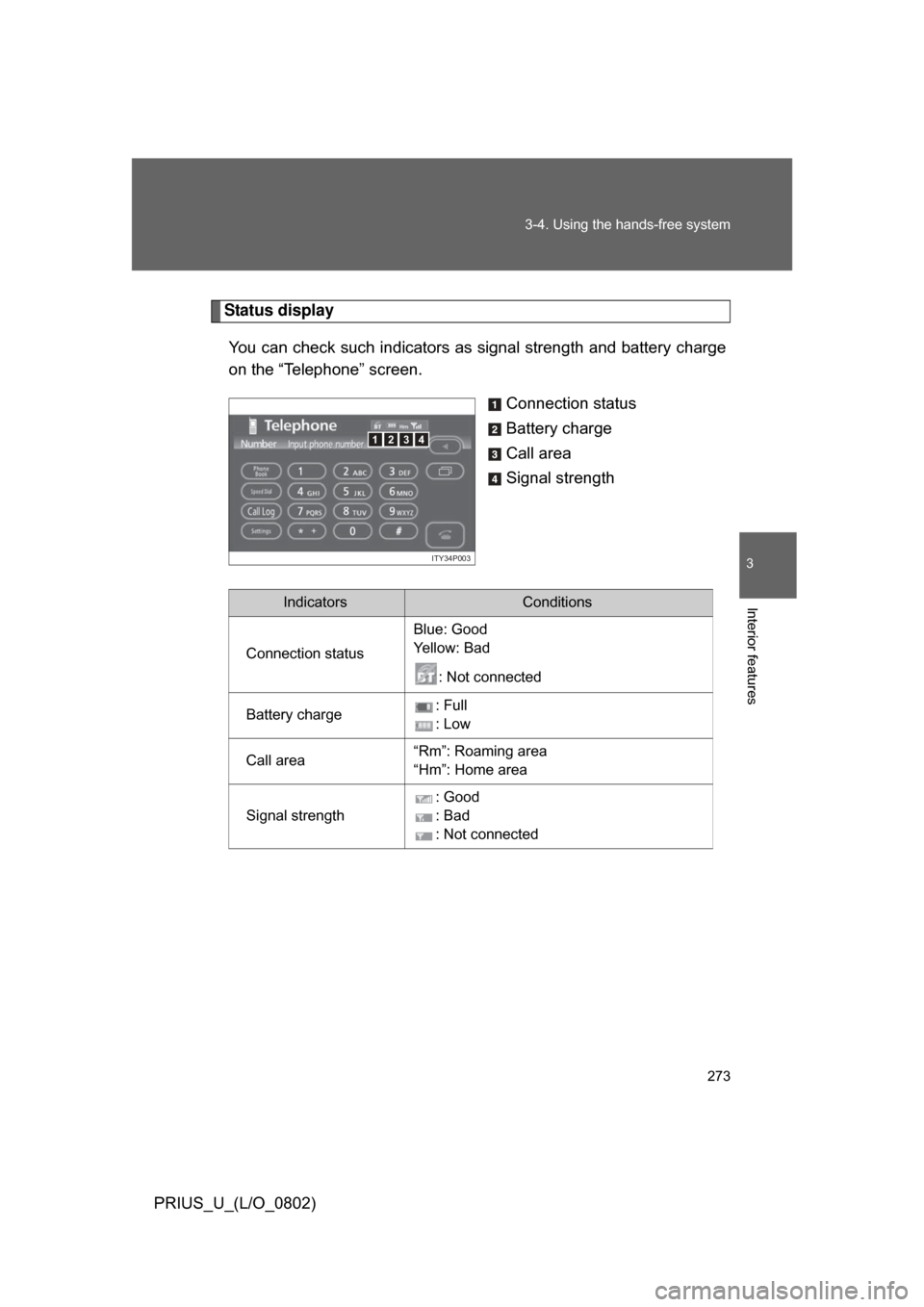
Status display
You can check such indicators as signal strength and battery charge
on the “Telephone” screen.
Connection status
Battery charge
Call area
Signal strength
4123
ITY34P003
IndicatorsConditions
Connection status Blue: Good
Ye l l o w : B a d
: Not connected
Battery charge : Full
: Low
Call area “Rm”: Roaming area
“Hm”: Home area
Signal strength : Good
: Bad
: Not connected
Page 274 of 512
274 3-4. Using the hands-free system
PRIUS_U_(L/O_0802)
■When using the hands-free system
● The audio system and voice guidance are muted when making a call.
● If both parties speak at the same time it may be difficult to hear.
● If the received call volume is overly loud, an echo may be heard.
● Try to face the microphone as much as possible when speaking.
● In the following circumstances it may be difficult to hear the other party.
• When driving on unsealed roads
• When driving at high speeds
• If the window is open
• If the air-conditioning is blowing directly on the microphone
• If the air-conditioning is set to high
■ Conditions under which th e system will not operate
● If using a mobile phone that does not support Bluetooth
®.
● If the mobile phone is switched off.
● If you are outside service range.
● If the mobile phone is not connected.
● If the mobile phone’s battery is low.
■ Bluetooth
® antenna
The antenna is built into the display. If the mobile phone is behind the seat or
in the console box, or touching or covered by metal objects, connection sta-
tus may deteriorate.
■ Battery charge/Signal status
This display may not correspond exactly with the mobile phone itself.
Page 319 of 512
319
3-5. Using the interior lights
3
Interior features
PRIUS_U_(L/O_0802)
■
To prevent 12 volt battery discharge
If the interior lights and personal lights ON when the door is not fully closed
or the interior light switch in “DOOR” position, the lights will go off automati-
cally after 20 minutes.
■ Customization that can be co nfigured at Toyota dealer
Setting (e.g. The time elapsed before lights turn off) can be changed.
(
Customizable features P. 488)
Page 331 of 512
331
3-7. Other interior features
3
Interior features
PRIUS_U_(L/O_0802)
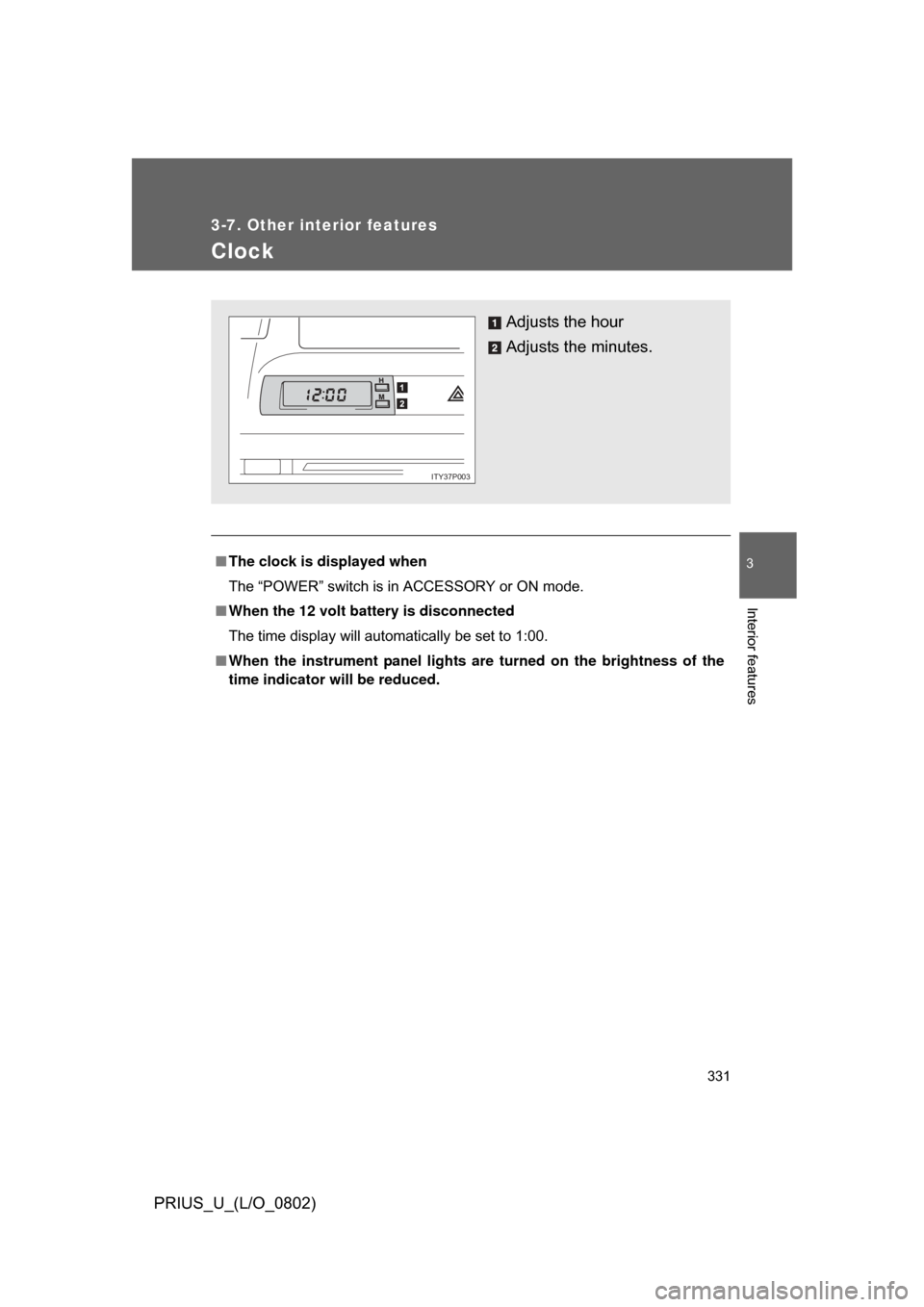
Clock
■The clock is displayed when
The “POWER” switch is in ACCESSORY or ON mode.
■ When the 12 volt battery is disconnected
The time display will automatically be set to 1:00.
■ When the instrument panel lights ar e turned on the brightness of the
time indicator will be reduced.
Adjusts the hour
Adjusts the minutes.
ITY37P003