audio TOYOTA PRIUS 2008 2.G Workshop Manual
[x] Cancel search | Manufacturer: TOYOTA, Model Year: 2008, Model line: PRIUS, Model: TOYOTA PRIUS 2008 2.GPages: 512, PDF Size: 7.23 MB
Page 259 of 512

259
3-3. Using the audio system
3
Interior features
PRIUS_U_(L/O_0802)
●
Compatible disc formats
The following disc formats can be used.
• Disc formats: CD-ROM Mode 1 and Mode 2
CD-ROM XA Mode 2, Form 1 and Form 2
• File formats: ISO9660 level 1, level 2, (Romeo, Joliet) MP3 and WMA files written in any format other than those listed above
may not play correctly, and their file names and folder names may not be
displayed correctly.
Items related to standards and limitations are as follows:
• Maximum directory hierarchy: 8 levels
• Maximum length of folder names/file names: 32 characters
• Maximum number of folders: 192 (including the root)
• Maximum number of files per disc: 255
● File names
The only files that can be recogniz ed as MP3/WMA and played are those
with the extension .mp3 or .wma.
● Multi-sessions
As the audio system is compatible with multi-sessions, it is possible to play
discs that contain MP3 and WMA files. However, only the first session can
be played.
● ID3 and WMA tags
ID3 tags can be added to MP3 files, making it possible to record the track
title and artist name, etc.
The system is compatible with ID3 Ver. 1.0, 1.1, and Ver. 2.2, 2.3 ID3 tags.
(The number of characters is based on ID3 Ver. 1.0 and 1.1.)
WMA tags can be added to WMA files, making it possible to record the
track title and artist name in the same way as with ID3 tags.
Page 260 of 512

260 3-3. Using the audio system
PRIUS_U_(L/O_0802)
●MP3 and WMA playback
When a disc containing MP3 or WMA files is inserted, all files on the disc
are first checked. Once the file check is finished, the first MP3 or WMA file
is played. To make the file check finish more quickly, we recommend you
do not write in any files other than MP3 or WMA files or create any unnec-
essary folders.
Discs that contain a mixture of music data and MP3 or WMA format data
cannot be played.
● Extensions
If the file extensions .mp3 and .wma are used for files other than MP3 and
WMA files, they will be mistakenly recognized and played as MP3 and
WMA files. This may result in large amounts of interference and damage
to the speakers.
● Playback
• To play MP3 files with steady sound quality, we recommend a fixed bit
rate of 128 kbps and a sampling frequency of 44.1 kHz.
• CD-R or CD-RW playback may not be possible in some instances, depending on the characteristics of the disc.
• There is a wide variety of freeware and other encoding software for MP3 and WMA files on the market, and depending on the status of the encod-
ing and the file format, poor sound quality or noise at the start of playback
may result. In some cases, playback may not be possible at all.
• When files other than MP3 or WMA files are recorded on a disc, it may take more time to recognize the disc and in some cases, playback may
not be possible at all.
• Microsoft, Windows, and Windows Media are the registered trademarks of Microsoft Corporation in the U.S. and other countries.
Page 261 of 512

261
3-3. Using the audio system
3
Interior features
PRIUS_U_(L/O_0802)
■
CD-R and CD-RW discs
● CD-R/CD-RW discs that have not been subject to the “finalizing process”
(a process that allows discs to be played on a conventional CD player)
cannot be played.
● It may not be possible to play CD-R/CD-RW discs recorded on a music
CD recorder or a personal computer because of disc characteristics,
scratches or dirt on the disc, or dirt, condensation, etc. on the lens of the
unit.
● It may not be possible to play discs recorded on a personal computer
depending on the application settings and the environment. Record with
the correct format. (For details, contact the appropriate application manu-
facturers of the applications.)
● CD-R/CD-RW discs may be damaged by direct exposure to sunlight,
high temperatures or other storage conditions. The unit may be unable to
play damaged discs.
● If you insert a CD-RW disc into the MP3/WMA player, playback will begin
more slowly than with a conventional CD or CD-R disc.
● Recordings on CD-R/CD-RW cannot be played using the DDCD (Double
Density CD) system.
■ Unsuitable discs, and player precautions
P. 245
Page 262 of 512
262
3-3. Using the audio system
PRIUS_U_(L/O_0802)
Optimal use of the audio (Vehicle with AUX adapter)
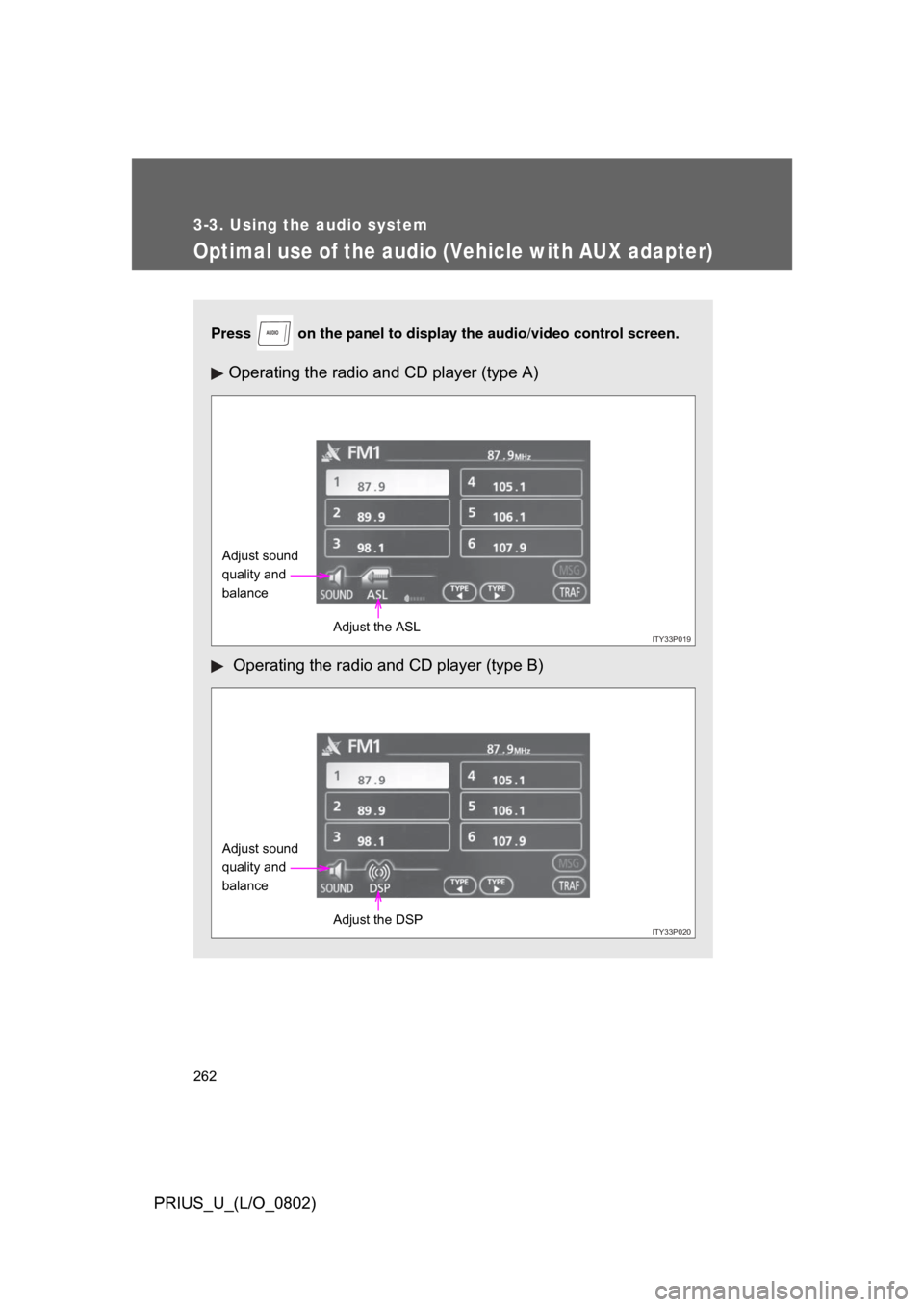
Press on the panel to display the audio/video control screen.
Operating the radio and CD player (type A)
Operating the radio and CD player (type B)
AUDIO
ITY33P019
Adjust sound
quality and
balance
Adjust the ASL
ITY33P020
Adjust sound
quality and
balanceAdjust the DSP
Page 263 of 512
263
3-3. Using the audio system
3
Interior features
PRIUS_U_(L/O_0802)
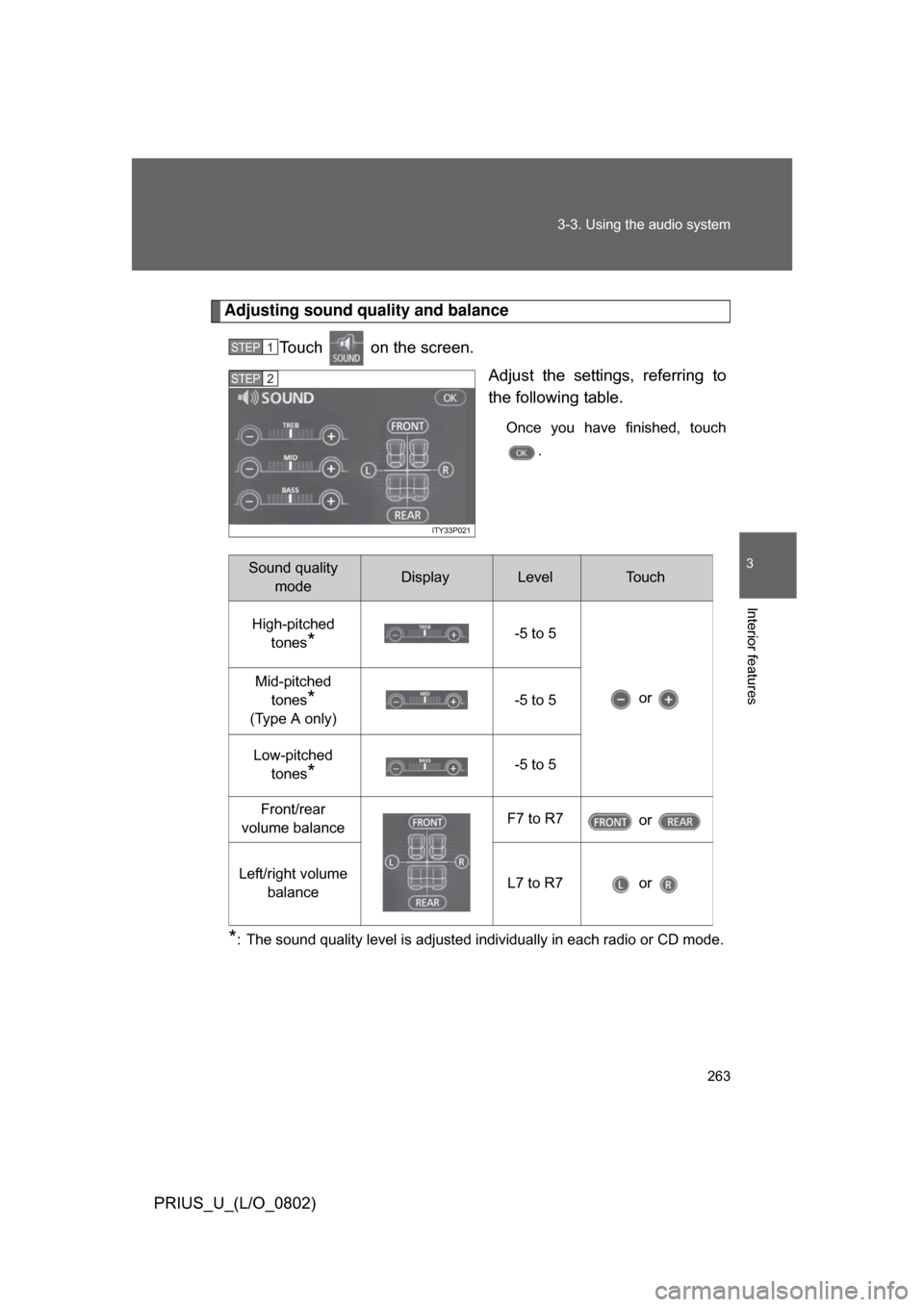
Adjusting sound quality and balance
Touch on the screen. Adjust the settings, referring to
the following table.
Once you have finished, touch.
*: The sound quality level is adjusted individually in each radio or CD mode.
STEP1
STEP2
Sound quality modeDisplayLevelTo u c h
High-pitched tones
*-5 to 5
or
Mid-pitched
tones
*
(Type A only) -5 to 5
Low-pitched tones
*-5 to 5
Front/rear
volume balance F7 to R7
or
Left/right volume balance L7 to R7 or
Page 264 of 512
264 3-3. Using the audio system
PRIUS_U_(L/O_0802)
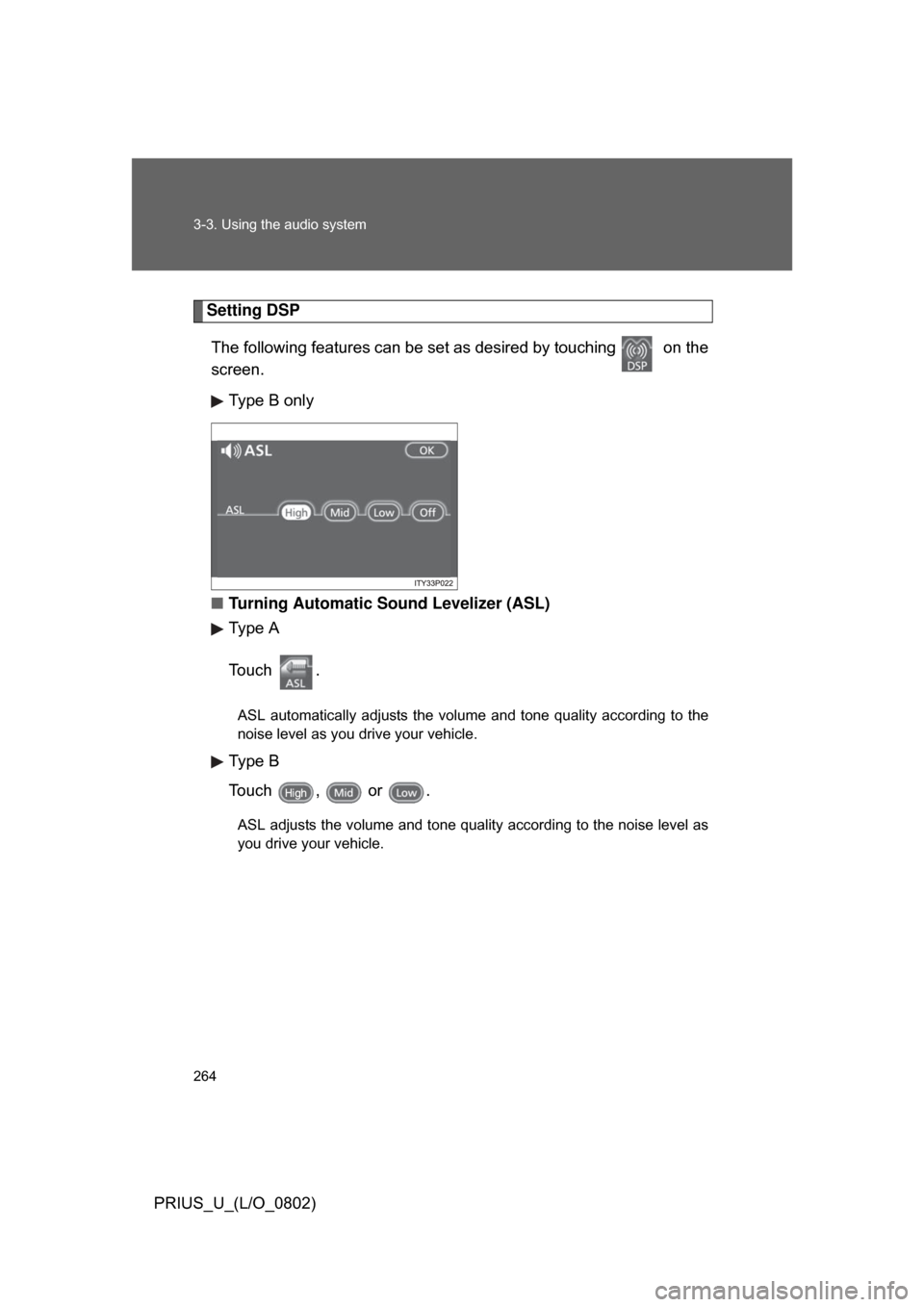
Setting DSPThe following features can be se t as desired by touching on the
screen.
Type B only
■ Turning Automatic Sound Levelizer (ASL)
Type A
To u c h .
ASL automatically adjusts the volume and tone quality according to the
noise level as you drive your vehicle.
Type B
Touch , or .
ASL adjusts the volume and tone quality according to the noise level as
you drive your vehicle.
Page 265 of 512
265
3-3. Using the audio system
3
Interior features
PRIUS_U_(L/O_0802)
■
Trademark owned by SRS Labs, Inc.
The audio systems utilize SRS FOCUS
and SRS TruBass audio
enhancement technologies, under license from SRS Labs, Inc., in all mode
except AM radio mode.
FOCUS, TruBass, SRS and
symbols are trademarks of SRS
Labs, Inc.
FOCUS and TruBass technologies are incorporated under license from
SRS Labs, Inc.
Page 266 of 512
266
3-3. Using the audio system
PRIUS_U_(L/O_0802)
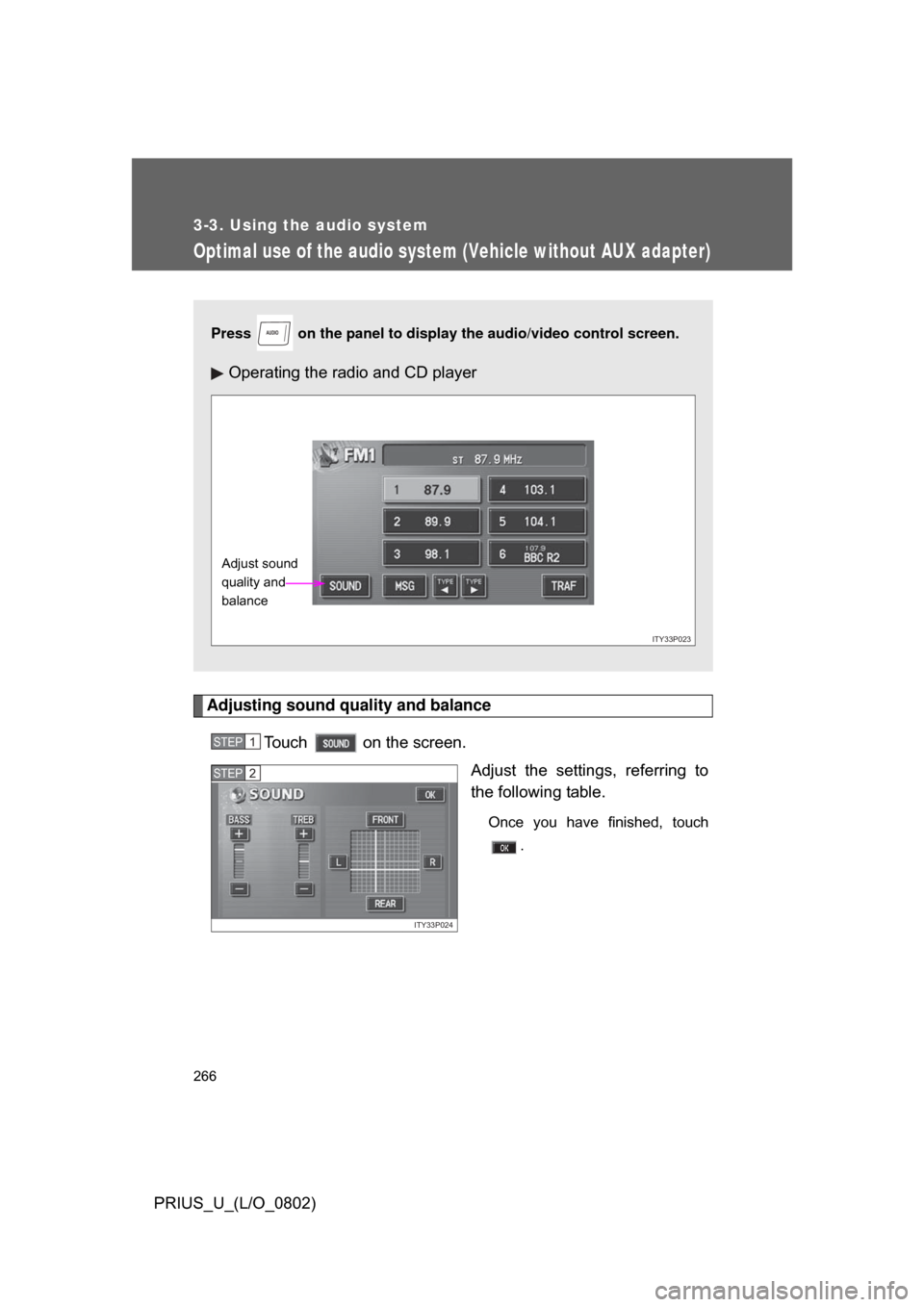
Optimal use of the audio system (Vehicle without AUX adapter)
Adjusting sound quality and balanceTouch on the screen. Adjust the settings, referring to
the following table.
Once you have finished, touch.
Press on the panel to display the audio/video control screen.
Operating the radio and CD player
AUDIO
ITY33P023
Adjust sound
quality and
balance
STEP1
ITY33P024
STEP2
Page 267 of 512
267
3-3. Using the audio system
3
Interior features
PRIUS_U_(L/O_0802)
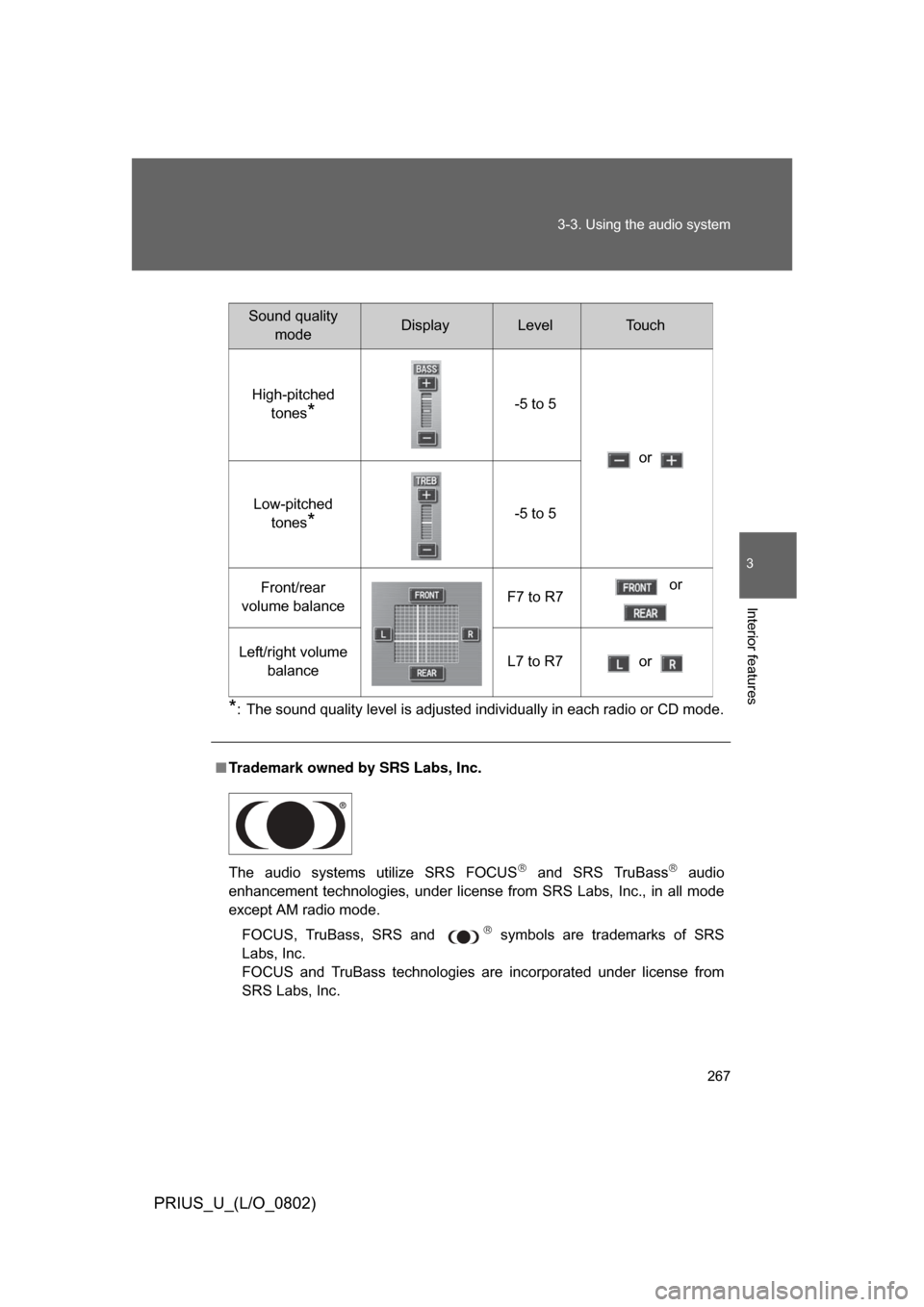
*: The sound quality level is adjusted individually in each radio or CD mode.
■
Trademark owned by SRS Labs, Inc.
The audio systems utilize SRS FOCUS
and SRS TruBass audio
enhancement technologies, under license from SRS Labs, Inc., in all mode
except AM radio mode.
FOCUS, TruBass, SRS and
symbols are trademarks of SRS
Labs, Inc.
FOCUS and TruBass technologies are incorporated under license from
SRS Labs, Inc.
Sound quality modeDisplayLevelTo u c h
High-pitched tones
*-5 to 5
or
Low-pitched tones
*-5 to 5
Front/rear
volume balance F7 to R7 or
Left/right volume balance L7 to R7 or
Page 268 of 512
268
3-3. Using the audio system
PRIUS_U_(L/O_0802)
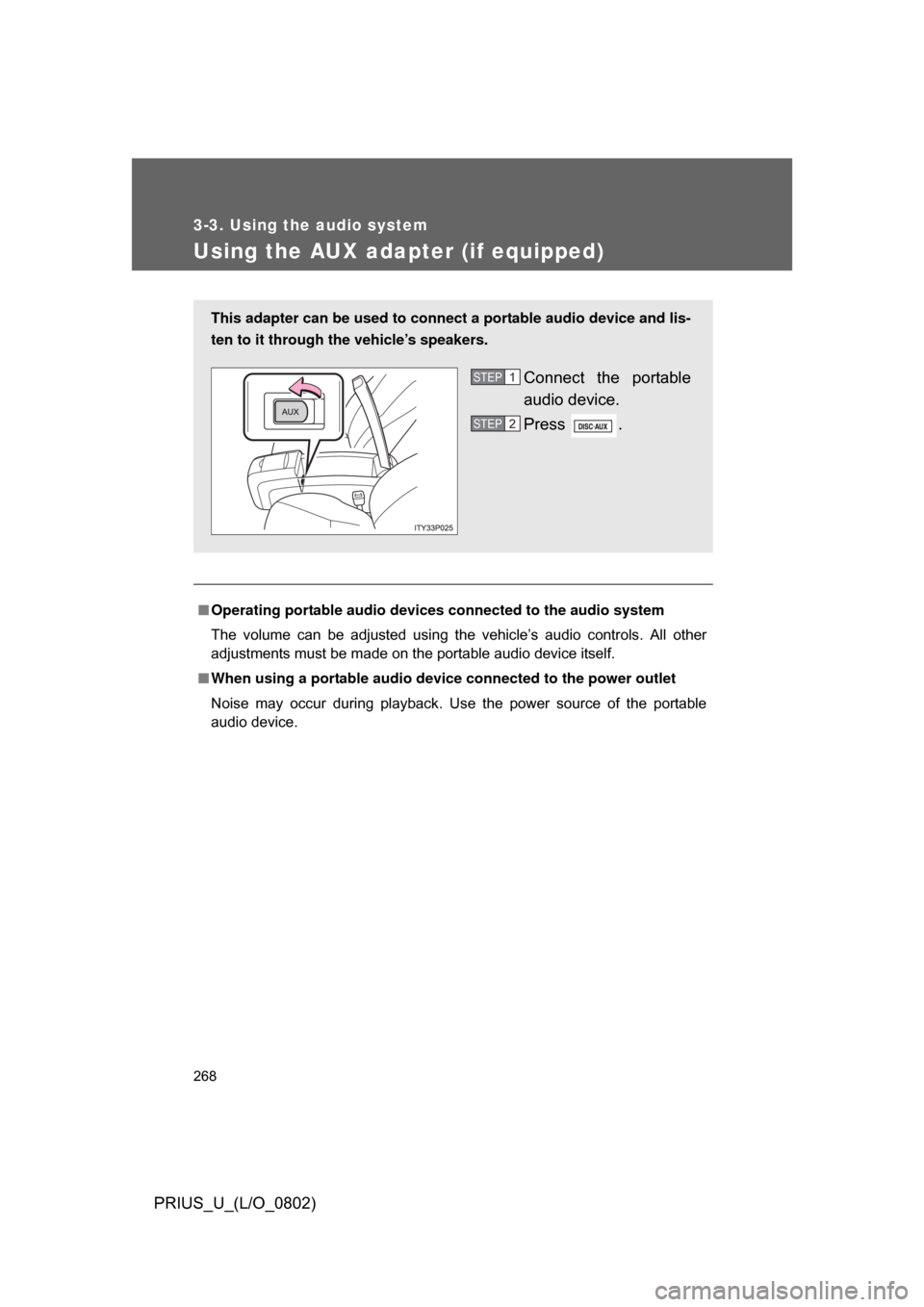
Using the AUX adapter (if equipped)
■Operating portable audio devices connected to the audio system
The volume can be adjusted using the vehicle’s audio controls. All other
adjustments must be made on the portable audio device itself.
■ When using a portable audio device connected to the power outlet
Noise may occur during playback. Use the power source of the portable
audio device.
This adapter can be used to connect a portable audio device and lis-
ten to it through the vehicle’s speakers.
Connect the portable
audio device.
Press .STEP1
STEP2