sensor TOYOTA PRIUS 2010 3.G User Guide
[x] Cancel search | Manufacturer: TOYOTA, Model Year: 2010, Model line: PRIUS, Model: TOYOTA PRIUS 2010 3.GPages: 616, PDF Size: 10.45 MB
Page 116 of 616

116 1-8. Safety information
PRIUS_U (OM47668U) U.S.A.Your vehicle is equipped with “ADVANCED AIRBAGS” designed
based on US motor vehicle safety standards (FMVSS208). The air-
bag system controls airbag deploym
ent power for the driver and front
passenger. The driver airbag system consists of the driver seat’s
position sensor etc. The front pass enger’s airbag system consists of
the front passenger occupant classification sensor etc.
The main SRS airbag system components are shown above. The
SRS airbag system is controlled by the airbag sensor assembly. The
airbag sensor assembly consists of a safing sensor and an airbag
sensor.
In certain types of severe frontal or side impacts, the SRS airbag sys-
tem triggers the airbag inflators. A chemical reaction in the inflators
quickly fills the airbags with non-toxic gas to hel p restrain the motion
of the occupants.
■ If the SRS airbags deploy (inflate)
● Bruising and slight abrasions may result from contact with a deploying
(inflating) SRS airbag.
● A loud noise and white powder will be emitted.
● Parts of the airbag module (steering wheel hub, airbag cover and inflator)
as well as the front seats, and parts of the front and rear pillars and roof
side rail, may be hot for several minutes. The airbag itself may also be
hot.
● The windshield may crack.
● For Safety Connect subscribers, if the SRS airbags deploy or in the event
of a severe rear-end collision, the system is designed to send an emer-
gency call to the response center, notifying them of the vehicle’s location
(without needing to push the “SOS” button) and an agent will attempt to
speak with the occupants to ascertain the level of emergency and assis-
tance required. If the occupants are unable to communicate, the agent
automatically treats the call as an emergency and helps to dispatch the
necessary emergency services. ( P. 395)
Page 125 of 616
125
1-8. Safety information
1
Before driving
PRIUS_U (OM47668U) U.S.A.
CAUTION
■
SRS airbag precautions
● If the areas where the SRS airbags are stored, such as the steering wheel
pad and front, center and rear pillar garnishes, are damaged or cracked,
have them replaced by your Toyota dealer.
● Do not place anything, such as a cushion, on the front passenger’s seat.
Doing so will disperse the passenger’s weight, which prevents the sensor
from detecting the passenger’s weight properly. As a result, the SRS front
passenger airbag may not deploy in the event of a collision.
■ Modification and disposal of SRS airbag system components
Do not dispose of your vehicle or perfo rm any of the following modifications
without consulting your Toyota dealer.
The SRS airbag may malfunction or deploy (inflate) accidentally, causing
death or serious injury.
● Installation, removal, disassembly and repair of the SRS airbags
● Repairs, modifications, removal or replacement of the steering wheel,
instrument panel, dashboard, seats or seat upholstery, front, center and
rear pillars or roof side rail
● Repairs or modifications of the front fender, front bumper, or side of the
occupant compartment
● Installation of snow plows, winches, etc. to the front grille (bull bars, kan-
garoo bar etc.)
● Modifications to the vehicle’s suspension system
● Installation of electronic devices such as mobile two-way radios or CD
players
● Modifications to your vehicle for a person with a physical disability
Page 207 of 616
207
2-3. Operating the lights and windshield wipers
2
When driving
PRIUS_U (OM47668U) U.S.A.
Turning on the high beam headlights
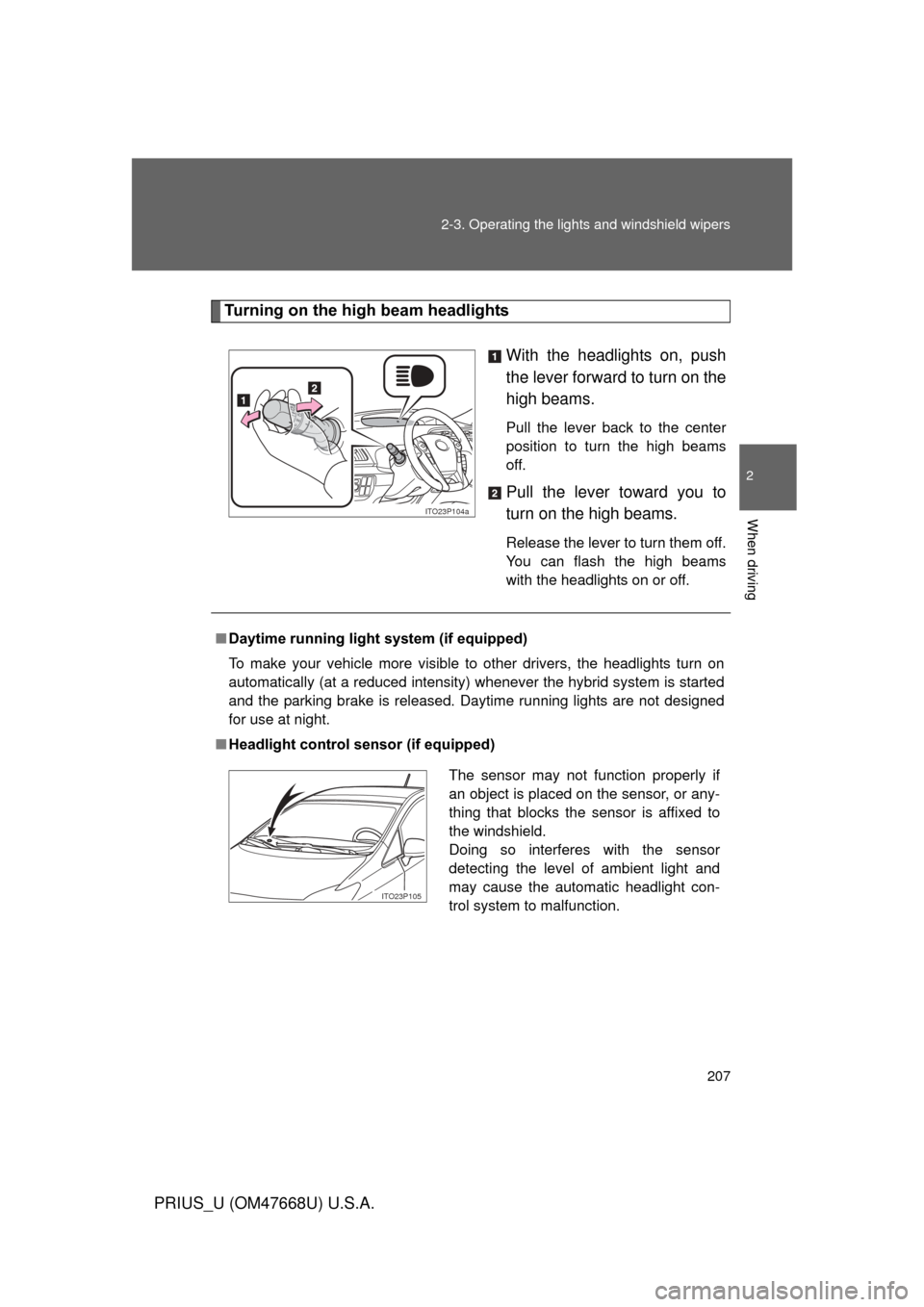
With the headlights on, push
the lever forward to turn on the
high beams.
Pull the lever back to the center
position to turn the high beams
off.
Pull the lever toward you to
turn on the high beams.
Release the lever to turn them off.
You can flash the high beams
with the headlights on or off.
ITO23P104a
■Daytime running light system (if equipped)
To make your vehicle more visible to other drivers, the headlights turn on
automatically (at a reduced intensity) whenever the hybrid system is started
and the parking brake is released. Daytime running lights are not designed
for use at night.
■ Headlight control sensor (if equipped)
The sensor may not function properly if
an object is placed on the sensor, or any-
thing that blocks the sensor is affixed to
the windshield.
Doing so interferes with the sensor
detecting the level of ambient light and
may cause the automatic headlight con-
trol system to malfunction.
ITO23P105
Page 208 of 616
208 2-3. Operating the lights and windshield wipers
PRIUS_U (OM47668U) U.S.A.
■Automatic light off system
● When the headlights are on: The headlights and tail lights turn off 30 sec-
onds after a door is opened and closed if the “POWER” switch has been
switched to ACCESSORY mode or OFF.
● When only the tail lights are on: The tail lights turn off automatically if the
“POWER” switch is switched to ACCESSORY mode or OFF and driver’s
door is opened.
To turn the lights on again, turn the “POWER” switch to ON mode, or turn the
light switch off once and then back to the
or position.
■ Automatic headlight leveling system (vehicles with LED headlights)
The level of the headlights is automatically adjusted according to the number
of passengers and the loading condition of the vehicle to ensure that the
headlights do not interfere with other road users.
■ If the indicator flashes... (vehicles with LED headlights)
It may indicate a malfunction in the system. Contact your Toyota dealer.
■ Customization that can be co nfigured at Toyota dealer
Settings (e.g. light sensor sensitivity) can be changed.
(Customizable features P. 587)
NOTICE
■To prevent 12 volt battery discharge
Do not leave the lights on longer than necessary if the hybrid system is not
operating.
Page 222 of 616
222 2-4. Using other driving systems
PRIUS_U (OM47668U) U.S.A.
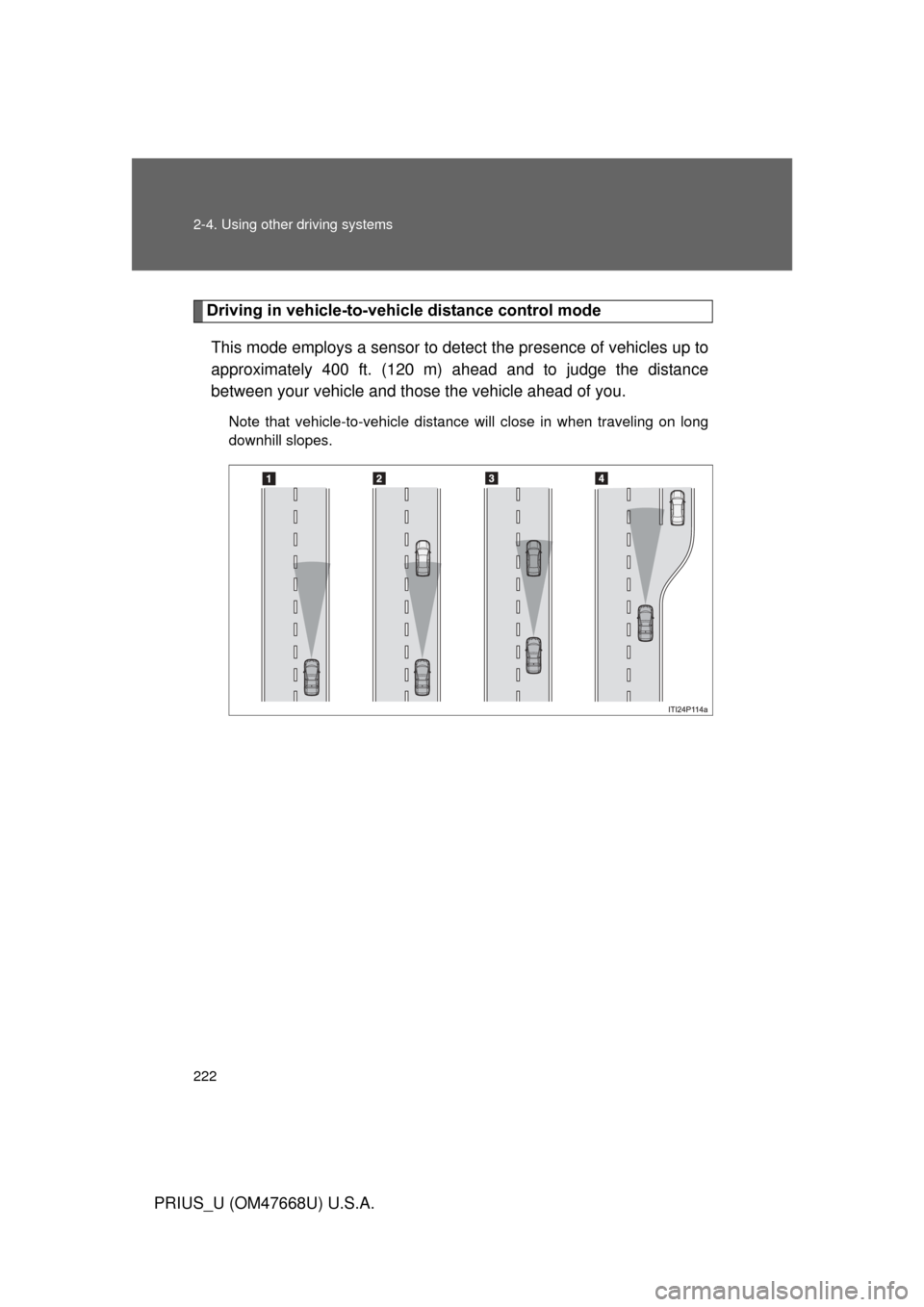
Driving in vehicle-to-vehicle distance control modeThis mode employs a sensor to detect the presence of vehicles up to
approximately 400 ft. (120 m) ahead and to judge the distance
between your vehicle and those the vehicle ahead of you.
Note that vehicle-to-vehicle distance will close in when traveling on long
downhill slopes.
Page 225 of 616

225
2-4. Using other
driving systems
2
When driving
PRIUS_U (OM47668U) U.S.A.
■Dynamic radar cruise control can be set when
● The shift position is in “D”.
● Vehicle speed is above approximately 30 mph (50 km/h).
■ Switching modes
The mode cannot be switched to constant speed control mode if vehicle-to-
vehicle distance control mode has been used. The mode also cannot be
switched from constant speed control to vehicle-to-vehicle distance control
mode. Turn the system off by pressing the “ON-OFF” button, and turn it on
again.
■ Accelerating
The vehicle can accelerate normally. After acceleration, the set speed
resumes. However, during vehicle-to-vehicle distance control mode, the
vehicle speed may decrease below the set speed in order to maintain the
distance to the vehicle ahead.
■ Automatic cancelation of vehicle-to-vehicle distance control
Vehicle-to-vehicle distance control driving is automatically canceled in the
following situations:
● Actual vehicle speed falls below approximately 25 mph (40 km/h).
● Enhanced VSC is activated.
● The sensor cannot operate correctly because it is covered in some way.
● The windshield wipers are operating at high speed.
If vehicle-to-vehicle distance control driving is automatically canceled for any
other reason, there may be a malfunction in the system. Contact your Toyota
dealer.
Page 226 of 616
226 2-4. Using other driving systems
PRIUS_U (OM47668U) U.S.A.
■Automatic cancelation of constant speed control
The cruise control will stop maintaining the vehicle speed in the following sit-
uations:
● Actual vehicle speed is more than approximately 10 mph (16 km/h)
below the set vehicle speed.
At this time, the memorized set speed is not retained.
● Vehicle speed falls below 25 mph (40 km/h).
● Enhanced VSC is activated.
■ Vehicle-to-vehicle distance settings
Select a distance from the table below. Note that the distances shown corre-
spond to a vehicle speed of 50 mph (80 km/h). Vehicle-to-vehicle distance
increases/decreases in accordance with vehicle speed.
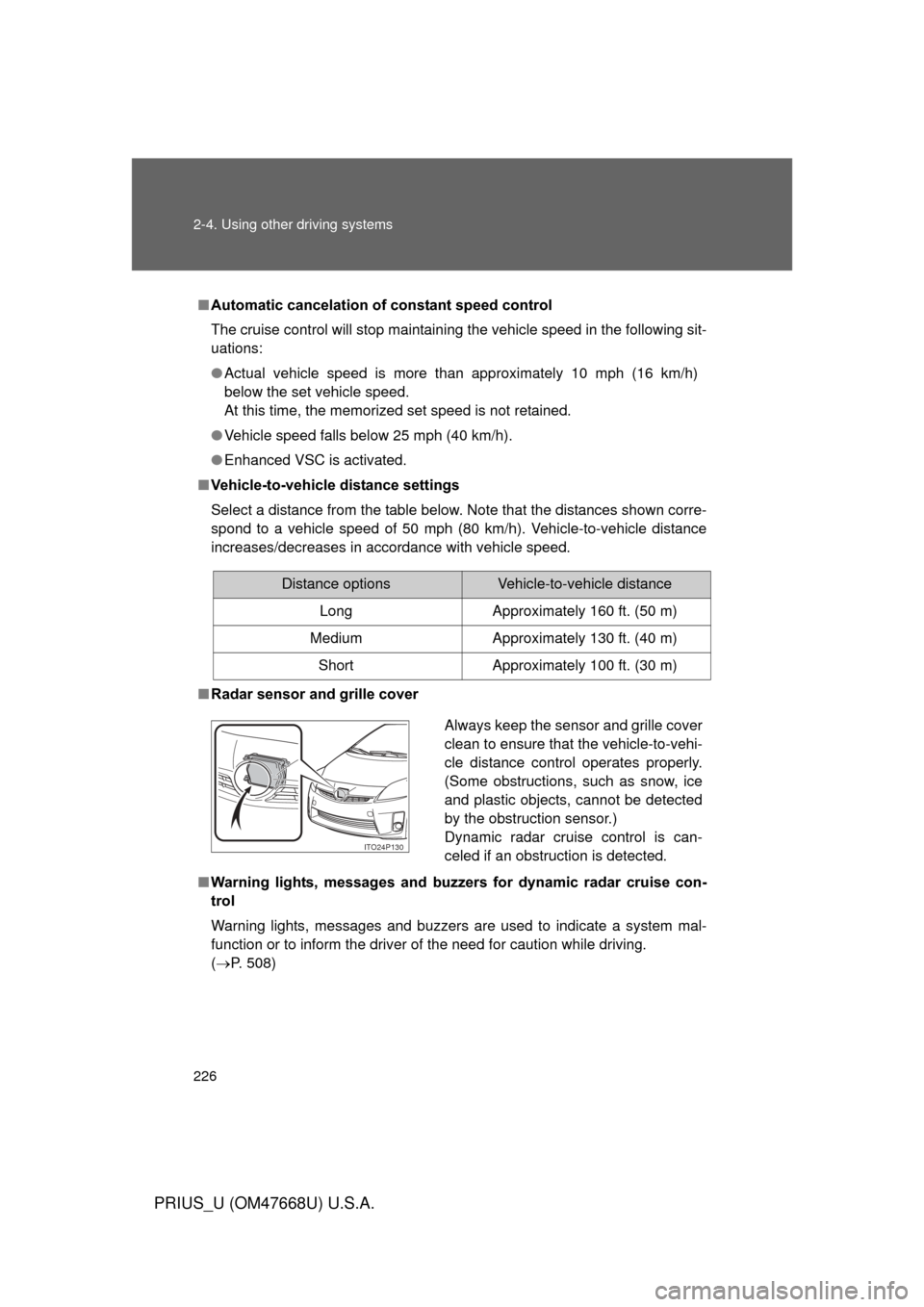
■ Radar sensor and grille cover
■ Warning lights, messages and buzze rs for dynamic radar cruise con-
trol
Warning lights, messages and buzzers are used to indicate a system mal-
function or to inform the driver of the need for caution while driving.
( P. 508)
Distance optionsVehicle-to-vehicle distance
Long Approximately 160 ft. (50 m)
Medium Approximately 130 ft. (40 m)
Short Approximately 100 ft. (30 m)
Always keep the sensor and grille cover
clean to ensure that the vehicle-to-vehi-
cle distance control operates properly.
(Some obstructions, such as snow, ice
and plastic objects, cannot be detected
by the obstruction sensor.)
Dynamic radar cruise control is can-
celed if an obstruction is detected.
ITO24P130
Page 229 of 616
229
2-4. Using other
driving systems
2
When driving
PRIUS_U (OM47668U) U.S.A.
CAUTION
■Situations unsuitable for dynamic radar cruise control
Do not use dynamic radar cruise control in any of the following situations.
Doing so may result in inappropriate speed control and could cause an acci-
dent resulting in death or serious injury.
● In heavy traffic
● On roads with sharp bends
● On winding roads
● On slippery roads, such as those covered with rain, ice and snow
● On steep downhills, or where there are sudden changes between sharp up
and down gradients
Vehicle speed may exceed the set speed when driving down a steep hill.
● At entrances to expressways
● When weather conditions are bad enough that they may prevent the sen-
sors from functioning correctly (fog, snow, sandstorm, heavy rain, etc.)
● When an approach warning buzzer can be heard often
■ When the sensor may not be corr ectly detecting the vehicle ahead
Apply the brakes as necessary when any of the following types of vehicles
are in front of you.
As the sensor may not be able to correctly detect these types of vehicles,
the approach warning ( P. 227) will not be activated, and a fatal or serious
accident may result.
● Vehicles that cut in suddenly
● Vehicles traveling at low speeds
● Vehicles that are not moving
● Vehicles with small rear ends (trailers with no load on board etc.)
● Motorcycles traveling in the same lane
Page 230 of 616

230 2-4. Using other driving systems
PRIUS_U (OM47668U) U.S.A.
CAUTION
■Conditions under which the vehicle -to-vehicle distance control may
not function correctly
Apply the brakes as necessary in the following conditions as the radar sen-
sor may not be able to correctly detect vehicles ahead, and a fatal or serious
accident may result:
● When water or snow thrown up by the surrounding vehicles hinders the
functioning of the sensor
● When your vehicle is pointing upwards (caused by a heavy load in the lug-
gage compartment etc.)
● When the road curves or when the lanes are narrow
● When steering wheel operation or your position in the lane is unstable
● When the vehicle ahead of you decelerates suddenly
■ Handling the radar sensor
Observe the following to ensure the cruise control system can function effec-
tively.
Otherwise, the system may not function correctly and could result in an acci-
dent.
● Keep the sensor and front grille cover clean at all times.
Clean the sensor and front grille cover with a soft cloth so you do not mark
or damage them.
● Do not subject the sensor or surrounding area to a strong impact .
If the sensor moves even slightly off position, the system may malfunction.
If the sensor or surrounding area is subject to a strong impact, always
have the area inspected and adjusted by a Toyota dealer.
● Do not disassemble the sensor.
● Do not attach accessories or stickers to the sensor, grille cover or sur-
rounding area.
● Do not modify or paint the sensor and grille cover.
● Do not replace them with non-genuine parts.
Page 235 of 616
235
2-4. Using other driving systems
2
When driving
PRIUS_U (OM47668U) U.S.A.
LKA (Lane-Keeping Assist)
: If equipped
While driving on a freeway or motor highway that has lane markings,
this system recognizes the lanes using a camera as a sensor to
assist the driver with staying in the lane. The LKA system has two
functions.
■ Lane departure warning function
If the system judges that the vehicle may deviate from its lane, it
alerts the driver using rapid be eping, indications on the multi-
information display, and a sensory warning
* given via the steer-
ing wheel.
*: A slight steering torque is applied for a short period of time in
the direction of the center of the lane.
■ Lane keeping assist function
This function will be active when the vehicle-to-vehicle distance
control mode of the cruise control ( P. 218) is set with vehicle
speed above approx. 50 mph (approx. 75 km/h) and while the
lane departure warning function is active. When the lane keep-
ing assist function is active, a slight steering torque will be
applied, to help the driver mainta in the vehicle inside the lane.