ECU TOYOTA PRIUS 2010 3.G Owner's Manual
[x] Cancel search | Manufacturer: TOYOTA, Model Year: 2010, Model line: PRIUS, Model: TOYOTA PRIUS 2010 3.GPages: 616, PDF Size: 10.45 MB
Page 159 of 616
159
2-1. Driving procedures
2
When driving
PRIUS_U (OM47668U) U.S.A.
CAUTION
■
When taking a nap in the vehicle
Always turn the hybrid system off. Otherwise, you may accidentally move the
shift lever or depress the accelerator pedal, which could cause an accident
or fire due to hybrid system overheating. Additionally, if the vehicle is parked
in a poorly ventilated area, exhaust gases may collect and enter the vehicle,
leading to death or a serious health hazard.
■ When braking the vehicle
● When the brakes are wet, drive more cautiously.
Braking distance increases when the brakes are wet, and may cause one
side of the vehicle to brake differently than the other side. Also the parking
brake may not securely hold the vehicle.
● If the power brake assist function does not operate, do not follow other
vehicles closely and avoid downhill or sharp turns that require braking.
In this case, braking is still possible, but it will require more force on the
pedal than usual. Braking distance may also increase.
● The brake system consists of 3 individual hydraulic systems: if one of the
systems fails, the other will still operate. In this case, the brake pedal
should be depressed more firmly than usual and braking distance
becomes longer.
Do not drive your vehicle with only a single brake system. Have your
brakes fixed immediately.
Page 180 of 616
180
2-1. Driving procedures
PRIUS_U (OM47668U) U.S.A.
Hor n
■After adjusting the steering wheel
Mark sure that the steering wheel is securely locked.
The horn may not sound if the steering wheel is not securely locked.
( P. 92)
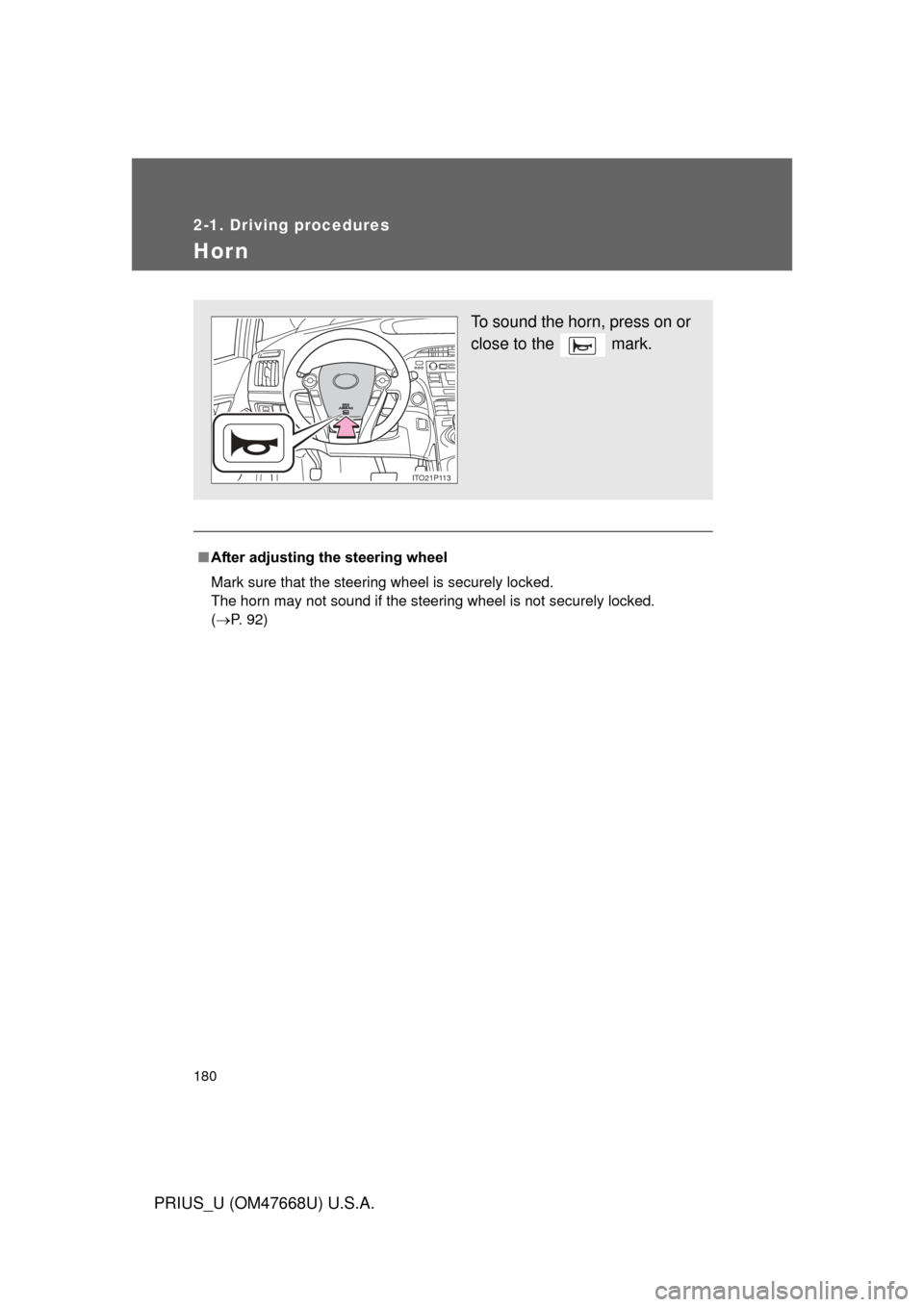
To sound the horn, press on or
close to the mark.
ITO21P113
Page 186 of 616
186 2-2. Instrument cluster
PRIUS_U (OM47668U) U.S.A.
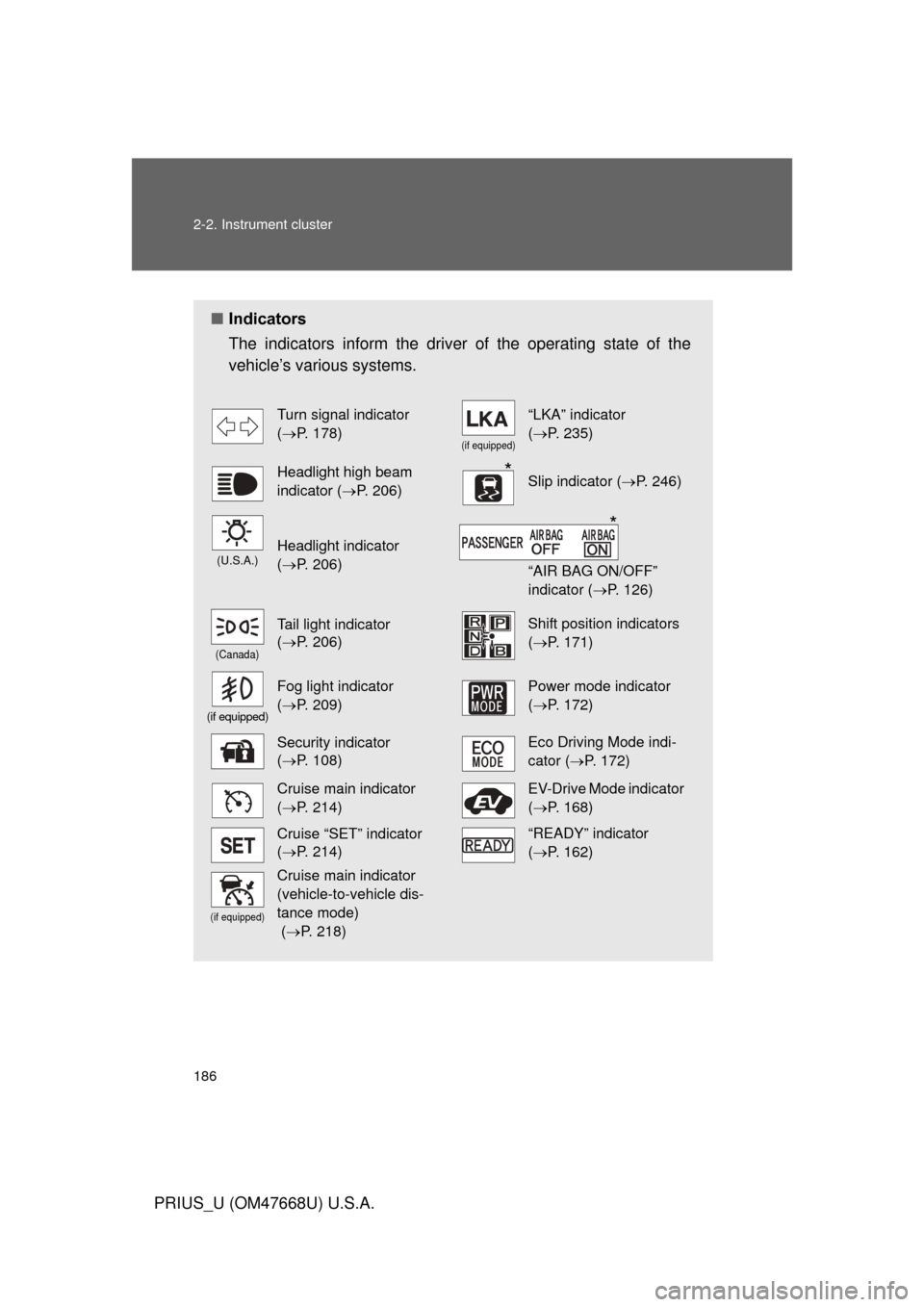
■Indicators
The indicators inform the driver of the operating state of the
vehicle’s various systems.
Turn signal indicator
( P. 178)
(if equipped)
“LKA” indicator
( P. 235)
Headlight high beam
indicator ( P. 206)Slip indicator ( P. 246)
(U.S.A.)Headlight indicator
( P. 206)
“AIR BAG ON/OFF”
indicator ( P. 126)
(Canada)
Tail light indicator
( P. 206) Shift position indicators
( P. 171)
(if equipped)
Fog light indicator
( P. 209) Power mode indicator
(P. 172)
Security indicator
( P. 108)Eco Driving Mode indi-
cator ( P. 172)
Cruise main indicator
( P. 214)EV-Drive Mode indicator
(P. 168)
Cruise “SET” indicator
( P. 214)“READY” indicator
( P. 162)
(if equipped)
Cruise main indicator
(vehicle-to-vehicle dis-
tance mode)
( P. 218)
*
*
Page 233 of 616
233
2-4. Using other
driving systems
2
When driving
PRIUS_U (OM47668U) U.S.A.
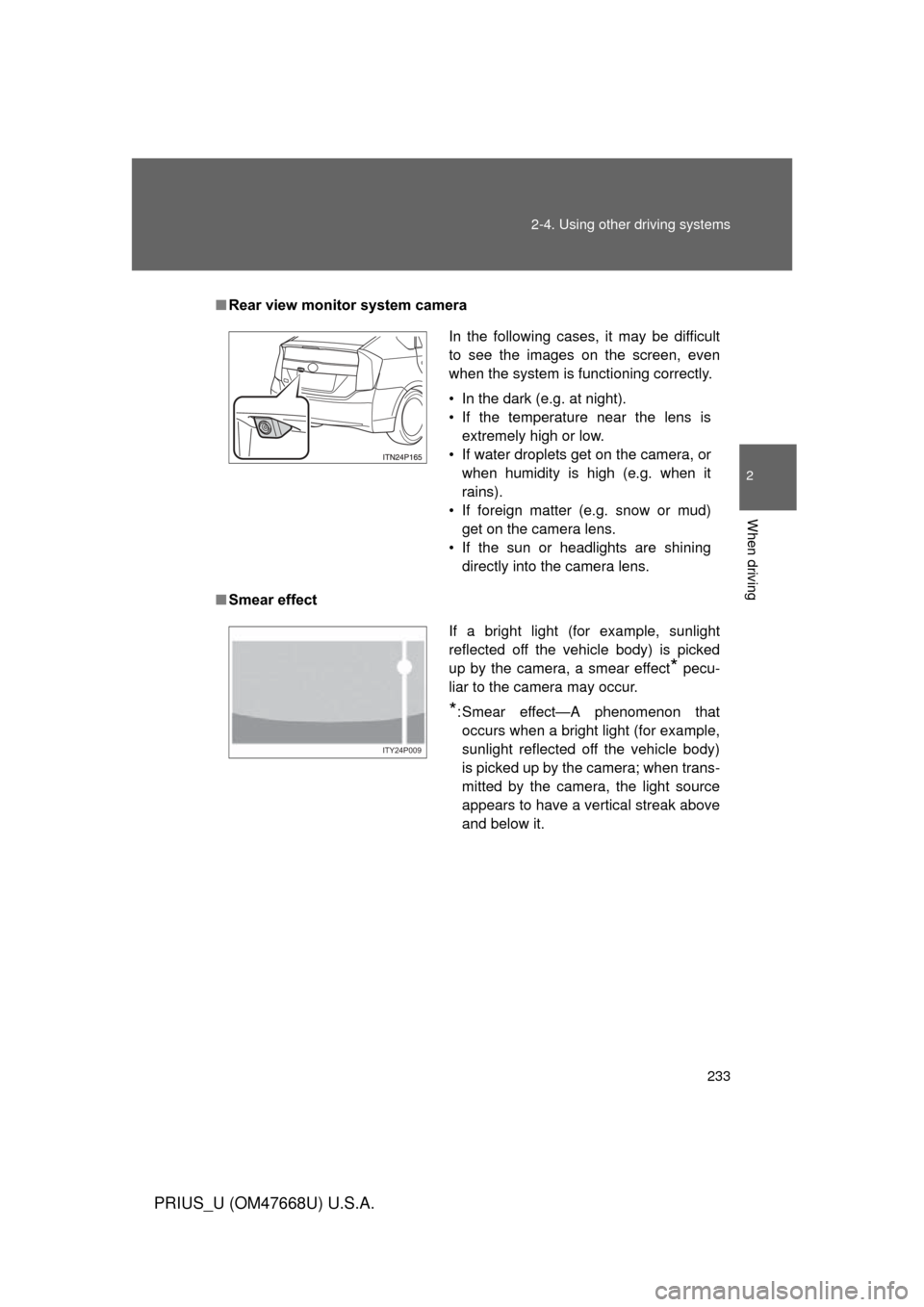
■Rear view monitor system camera
■ Smear effect
In the following cases, it may be difficult
to see the images on the screen, even
when the system is functioning correctly.
• In the dark (e.g. at night).
• If the temperature near the lens is
extremely high or low.
• If water droplets get on the camera, or when humidity is high (e.g. when it
rains).
• If foreign matter (e.g. snow or mud) get on the camera lens.
• If the sun or headlights are shining directly into the camera lens.
If a bright light (for example, sunlight
reflected off the vehicle body) is picked
up by the camera, a smear effect
* pecu-
liar to the camera may occur.
*: Smear effect—A phenomenon that occurs when a bright light (for example,
sunlight reflected off the vehicle body)
is picked up by the camera; when trans-
mitted by the camera, the light source
appears to have a vertical streak above
and below it.
ITY24P009
Page 255 of 616
255
2
When driving
PRIUS_U (OM47668U) U.S.A.
2-5. Driving information
Cargo and luggage
Take notice of the following information about storage precau-
tions, cargo capacity and load.
●Stow cargo and luggage in the luggage compartment when-
ever possible. Be sure all items are secured in place.
● Be careful to keep the vehicle le vel. Placing the weight as far
forward as possible helps maintain vehicle balance.
● For better fuel economy, do no t carry unnecessary weight.
Page 258 of 616
258 2-5. Driving information
PRIUS_U (OM47668U) U.S.A.
CAUTION
■Things that must not be carried in the luggage compartment
The following things may cause a fire if loaded in the luggage compart-
ment.
●Receptacles containing gasoline
●Aerosol cans
■Storage precautions
Observe the following precautions.
Failing to do so may result in death or serious injury.
●Do not place cargo or luggage in or on the following locations as the
item may get under the brake or accelerator pedal and prevent the
pedals from being depressed properly , block the driver’s vision, or hit
the driver or passengers, causing an accident.
• Driver’s feet
• Front passenger or rear seats (when stacking items)
• Luggage cover (if equipped)
• Instrument panel
• Dashboard
• Auxiliary box or tray that has no lid
●Secure all items in the occupant compartment, as they may shift and
injure someone during sudden braking, sudden swerving or an acci-
dent.
●Never allow anyone to ride in the luggage compartment. It is not
designed for passengers. They should ride in their seats with their seat
belts properly fastened. Otherwise, th ey are much more likely to suffer
death or serious injury, in the event of sudden braking, sudden swerv-
ing or an accident.
Page 269 of 616
Interior features3
269
PRIUS_U (OM47668U) U.S.A.
3-3. Using the hands-free system (for cellular phone)
Hands-free system
(for cellular phone) ......... 326
Using the hands-free
system ........................... 329
Making a phone call ......... 338
Setting a cellular phone ... 344
Security and system
setup .............................. 350
Using the phone book ...... 354
3-4. Using the interior lights Interior lights list ............... 363
• Personal/interior light main
switch ............................. 364
• Personal/interior lights ... 365
• Interior light .................... 365 3-5. Using the storage features
List of storage features .... 367
• Glove boxes ................... 368
• Console box ................... 369
• Overhead console .......... 370
• Card holder .................... 371
• Cup holders ................... 372
• Bottle holders ................. 374
• Auxiliary box .................. 375
3-6. Other interior features Sun visors ........................ 376
Vanity mirror..................... 377
Outside temperature
display............................ 378
Power outlets ................... 379
Seat heaters..................... 381
Armrest ............................ 383
Floor mats ........................ 384
Luggage compartment
features .......................... 385
Garage door opener......... 389
Safety Connect ................ 395
Page 287 of 616
287
3-1. Using the air conditioning system
and defogger
3
Interior features
PRIUS_U (OM47668U) U.S.A.
■Security feature
Any unlocked doors will be automatically locked when the system is operat-
ing. The buzzer will beep and the emergency flashers flash when the doors
have been locked or the system has been turned off.
(The doors locked: Once; The system turned off: Twice)
■ If the wireless remote cont rol does not function properly
P. 6 5
■ Customization that can be co nfigured at Toyota dealer
Setting (e.g.Operation using the on the wireless remote control) can
be changed.
(Customizable features P. 587)
Page 300 of 616
300 3-2. Using the audio system
PRIUS_U (OM47668U) U.S.A.
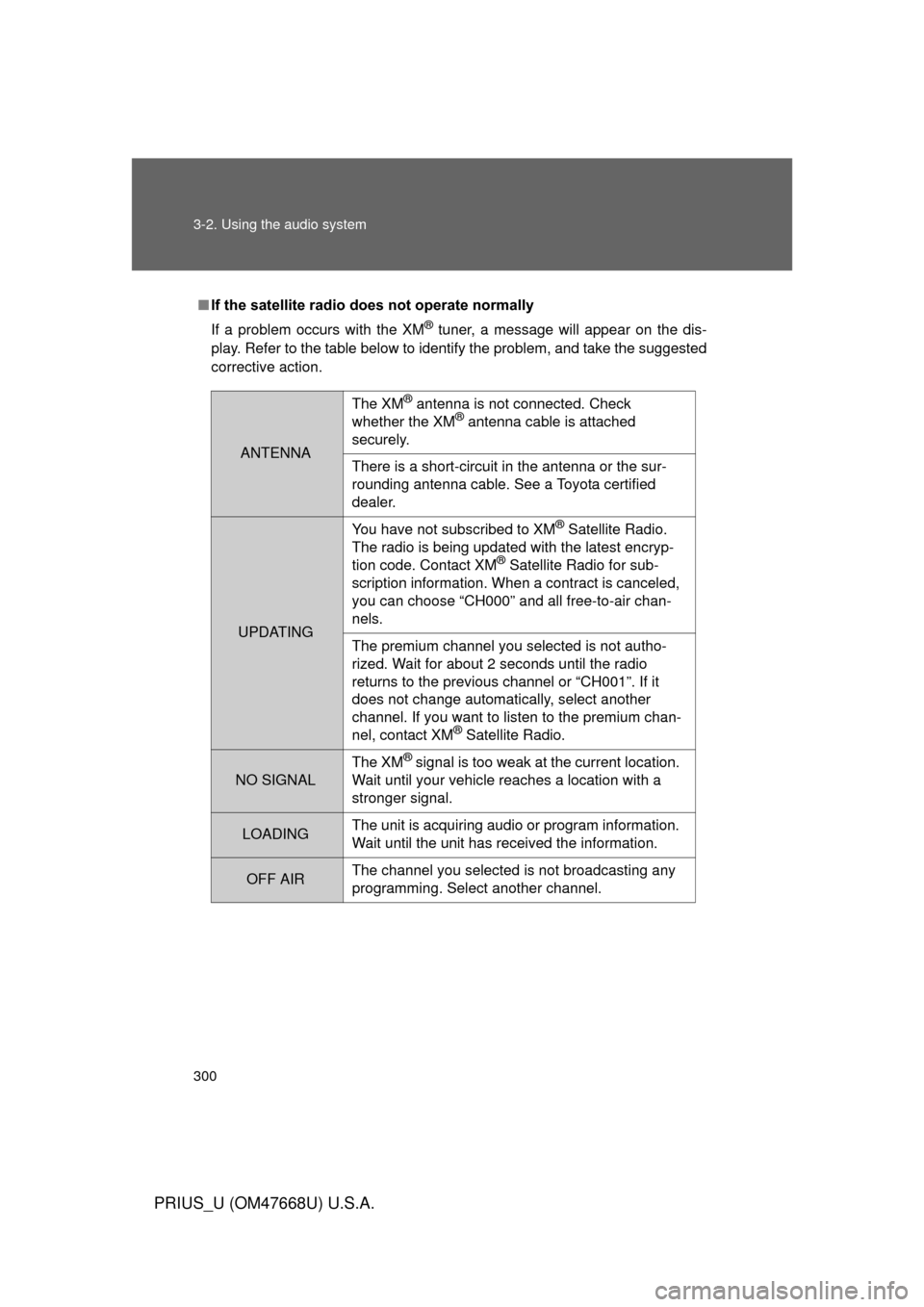
■If the satellite radio does not operate normally
If a problem occurs with the XM
® tuner, a message will appear on the dis-
play. Refer to the table below to identify the problem, and take the suggested
corrective action.
ANTENNA
The XM® antenna is not connected. Check
whether the XM® antenna cable is attached
securely.
There is a short-circuit in the antenna or the sur-
rounding antenna cable. See a Toyota certified
dealer.
UPDATING You have not subscribed to XM
® Satellite Radio.
The radio is being updated with the latest encryp-
tion code. Contact XM
® Satellite Radio for sub-
scription information. When a contract is canceled,
you can choose “CH000” and all free-to-air chan-
nels.
The premium channel you selected is not autho-
rized. Wait for about 2 seconds until the radio
returns to the previous channel or “CH001”. If it
does not change automatically, select another
channel. If you want to listen to the premium chan-
nel, contact XM
® Satellite Radio.
NO SIGNAL The XM
® signal is too weak at the current location.
Wait until your vehicle reaches a location with a
stronger signal.
LOADING The unit is acquiring audio or program information.
Wait until the unit has received the information.
OFF AIRThe channel you selected is not broadcasting any
programming. Select another channel.
Page 326 of 616
326
PRIUS_U (OM47668U) U.S.A.
3-3. Using the hands-free system (for cellular phone)
Hands-free system (for cellular phone)
: If equipped
■Conditions affecting operation
The hands-free phone system may not operate normally in the following situ-
ations:
● The cellular phone is turned off, or located outside the service area.
● The cellular phone has a low battery.
● The cellular phone is not connected to the system.
● The cellular phone is behind the seat or in the glove box, or metal mate-
rial covers or touches the phone.
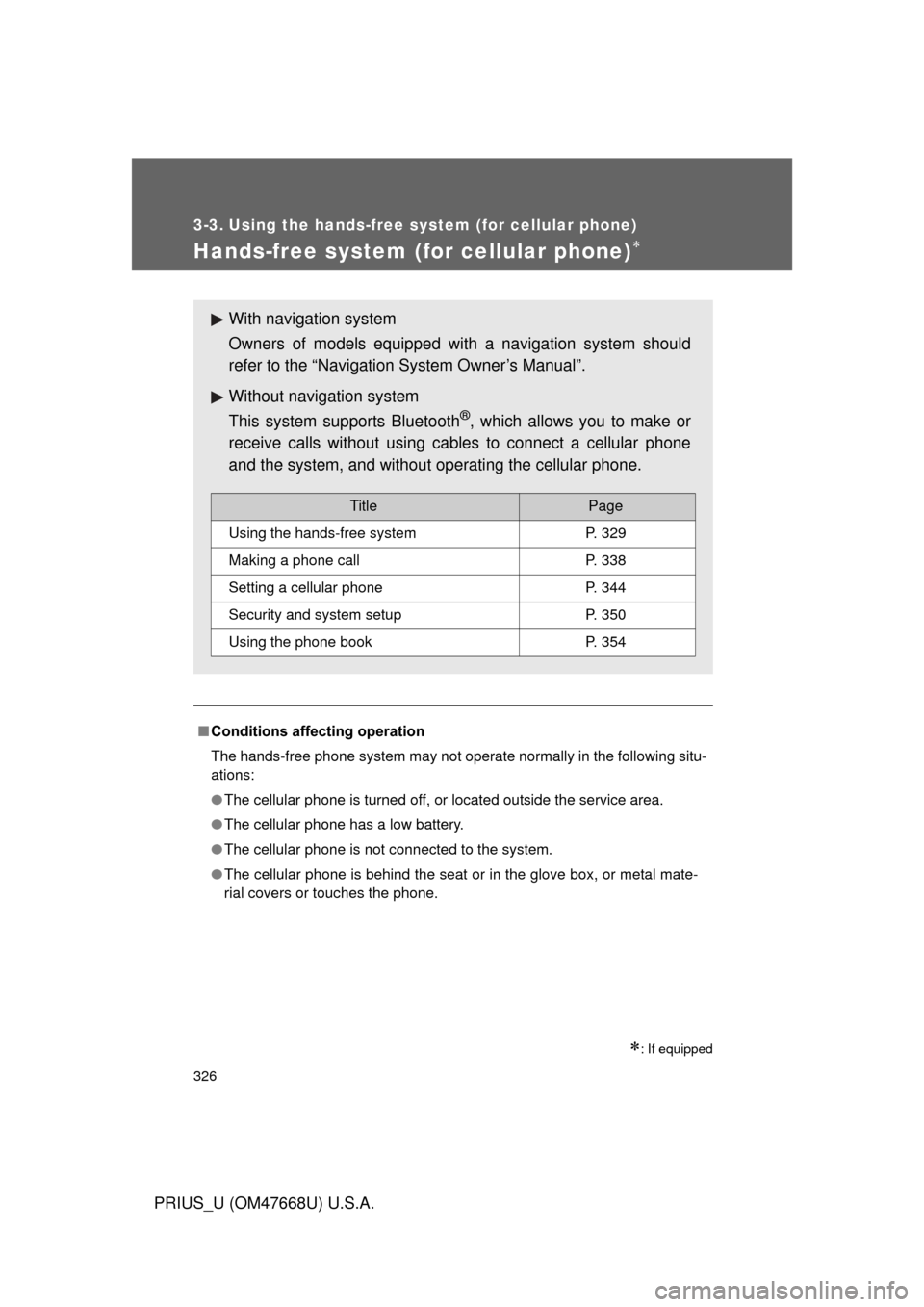
With navigation system
Owners of models equipped with a navigation system should
refer to the “Navigation System Owner’s Manual”.
Without navig ation system
This system supports Bluetooth
®, which allows you to make or
receive calls without using cables to connect a cellular phone
and the system, and without operating the cellular phone.
TitlePage
Using the hands-free systemP. 329
Making a phone callP. 338
Setting a cellular phoneP. 344
Security and system setupP. 350
Using the phone bookP. 354