ESP TOYOTA PRIUS 2010 3.G Owner's Manual
[x] Cancel search | Manufacturer: TOYOTA, Model Year: 2010, Model line: PRIUS, Model: TOYOTA PRIUS 2010 3.GPages: 616, PDF Size: 10.45 MB
Page 327 of 616
327
3-3. Using the hands-free
system (for cellular phone)
3
Interior features
PRIUS_U (OM47668U) U.S.A.
■When transferring ownership of the vehicle
Be sure to initialize the system to prevent the personal data from being
improperly accessed.
■ About Bluetooth
®
■Compatible models
Compatible with HFP (Hands Free Profile) Ver. 1.0 and OPP (Object Push
Profile) Ver. 1.1.
If your cellular phone does not support HFP, you cannot enter the Bluetooth
®
phone, and take OPP service individually.
■ Certification for the hands-free system
FCC ID: ACJ932C5ZZZ035
IC ID: 216J-C5ZZZ035
NOTE:
This device complies with Part 15 of the FCC Rules. Operation is subject to
the following two conditions: (1) this device may not cause harmful interfer-
ence, and (2) this device must accept any interference received, including
interference that may cause undesired operation.
FCC WARNING:
Changes or modifications not expressly approved by the party responsible
for compliance could void the user’s authority to operate the equipment.
Bluetooth is a registered trademark of
Bluetooth SIG. Inc.
Page 394 of 616
394 3-6. Other interior features
PRIUS_U (OM47668U) U.S.A.
■Before programming
● Install a new battery in the transmitter.
● The battery side of the transmitter must be pointed away from the
HomeLink
.
■ Certification for the garage door opener
FCC ID: NZLZTVHL3
IC ID: 4112A-ZTVHL3
This device complies with Part 15 of the FCC Rules and with RSS-210 of the
IC Rules.
Operation is subject to the following two conditions: (1) this device may not
cause harmful interference, and (2) this device must accept any interference
received, including interference that may cause undesired operation.
WARNING: This transmitter has been tested and complies with FCC and IC
rules. Changes or modifications not expressly approved by the party respon-
sible for compliance could void the user’s authority to operate the equip-
ment.
CAUTION
■ When programming a garage door or other remote control device
The garage door or other devices may operate, so ensure people and
objects are out of danger to prevent potential harm.
■ Conforming to federal safety standards
Do not use the HomeLink
Compatible Transceiver with any garage door
opener or device that lacks safety stop and reverse features as required by
federal safety standards.
This includes any garage door that cannot detect an obstruction object. A
door or device without these features increases the risk of death or serious
injury.
Page 395 of 616
395
3-6. Other interior features
3
Interior features
PRIUS_U (OM47668U) U.S.A.
Safety Connect
: If equipped
Safety Connect is a subscription-based telematics service that uses
Global Positioning System (GPS) data and embedded cellular tech-
nology to provide safety and security features to subscribers. Safety
Connect is supported by Toyota ’s designated response center,
which operates 24 hours per day, 7 days per week.
Safety Connect service is available by subscription on select,
telematics hardware-equipped vehicles.
By using the Safety Connect servi ce, you are agreeing to be bound
by the Telematics Subscription Service Agreement and its Terms and
Conditions, as in effect and amende d from time to time, a current
copy of which is available at Toyota.com. All use of the Safety Con-
nect service is subject to such then-applicable Terms and Condi-
tions.
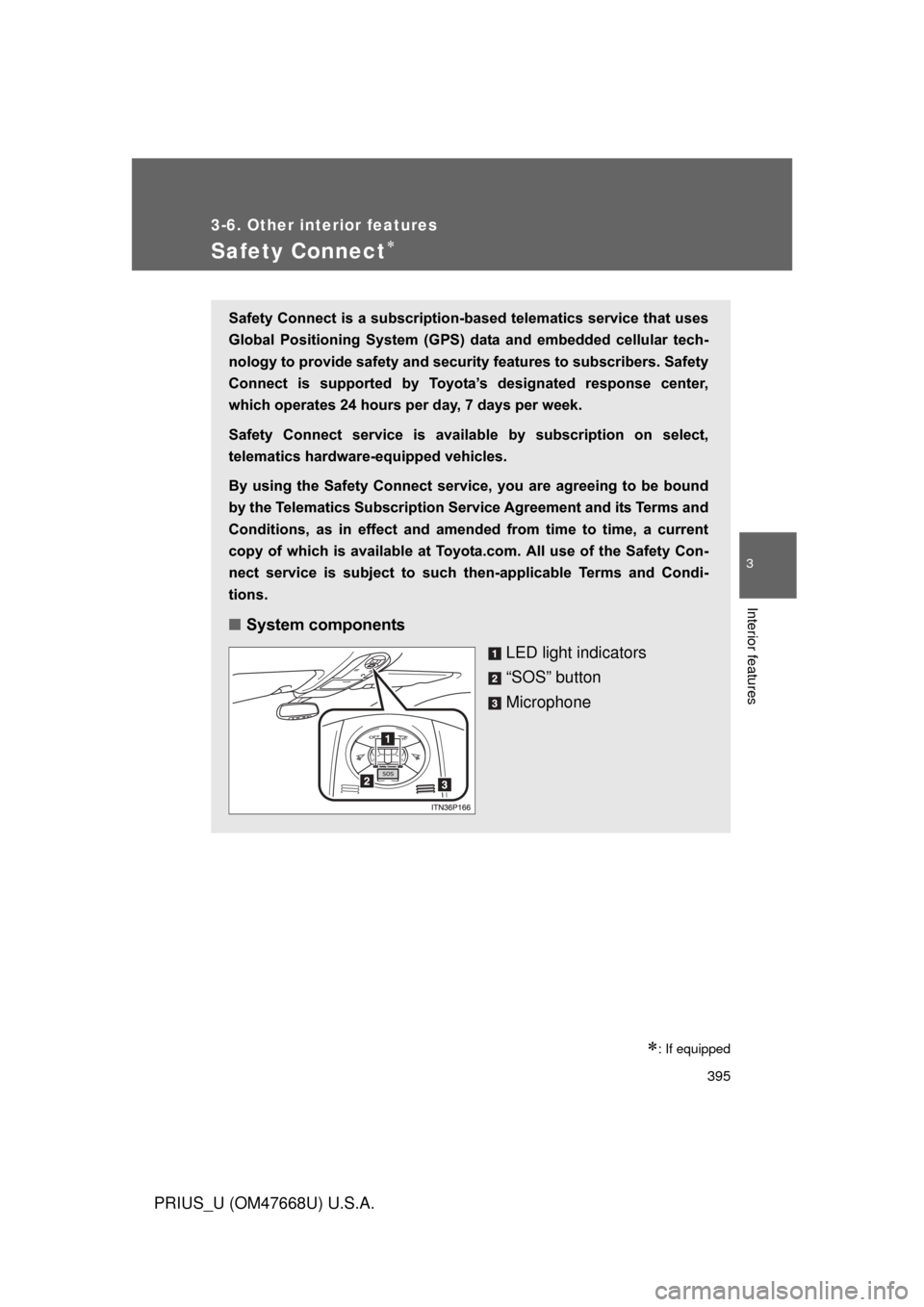
■ System components
LED light indicators
“SOS” button
Microphone
Page 396 of 616
396 3-6. Other interior features
PRIUS_U (OM47668U) U.S.A.
■Services
Subscribers have the following Sa fety Connect services avail-
able:
● Automatic Collision Notification
*
Helps drivers receive necessary response from emergency
service providers. ( P. 398)
*: U.S. Patent No. 7,508,298 B2
● Stolen Vehicle Location
Helps drivers in the event of vehicle theft. ( P. 399)
● Emergency Assistance Button (SOS)
Connects drivers to response-center support. ( P. 399)
● Roadside Assistance
Provides drivers various on-road assistance. ( P. 399)
■ Subscription
After you have signed the Telema tics Subscription Service
Agreement and are enrolled, you can begin receiving services.
A variety of subscription terms is available for purchase. Contact
your Toyota dealer, call 1-800-331-4331, or push the “SOS” but-
ton in your vehicle for further subscription details.
Page 397 of 616
397
3-6. Other interior features
3
Interior features
PRIUS_U (OM47668U) U.S.A.
■
Safety Connect Services Information
● Phone calls using the vehicles Bluetooth
® technology will not be possible
during Safety Connect.
● Safety Connect is available beginning Fall 2009 on select Toyota models.
Contact with the Safety Connect response center is dependent upon the
telematics device being in operative condition, cellular connection avail-
ability, and GPS satellite signal reception, which can limit the ability to
reach the response center or receive emergency service support. Enroll-
ment and Telematics Subscription Service Agreement required. A variety
of subscription terms is available; charges vary by subscription term
selected.
● Safety Connect services will function in the United States, including
Hawaii and Alaska, and in Canada. The services will not function outside
of the United States in countries other than Canada. For details about the
service, contact your Toyota dealer.
● Safety Connect services are not subject to section 255 of the Telecom-
munications Act and the device is not TTY compatible.
■ Languages
The Safety Connect response center will offer support in multiple languages.
The Safety Connect system will offer voice prompts in English and Spanish.
Please indicate your language of choice when enrolling.
■ When contacting the response center
You may be unable to contact the response center if the network is busy.
Page 398 of 616
398 3-6. Other interior features
PRIUS_U (OM47668U) U.S.A.
Safety Connect LED light IndicatorsWhen the “POWER” switch is turned to ON mode, the red indicator
light comes on for 2 seconds then turns off. Afterward, the green indi-
cator light comes on, indicating that the service is active.
The following indicator light patterns indicate specific system usage
conditions:
● Green indicator light on = Active service
● Green indicator light flashing = Safety Connect call in process
● Red indicator light (except at vehicle start-up) = System malfunc-
tion (contact your Toyota dealer)
● No indicator light (off) = Safe ty Connect service not active
Safety Connect services
■ Automatic Collision Notification
In case of either airbag deployment or severe rear-end collision,
the system is design ed to automatically call the response center.
The responding agent receives the vehicle’s location and attempts
to speak with the vehicle occup ants to assess the level of emer-
gency. If the occupants are unable to communicate, the agent
automatically treats the call as an emergency, contacts the nearest
emergency services provider to describe the situation, and
requests that assistance be sent to the location.
Page 399 of 616
399
3-6. Other interior features
3
Interior features
PRIUS_U (OM47668U) U.S.A.
■
Stolen Vehicle Location
If your vehicle is stolen, Safety Connect can work with local author-
ities to assist them in locating and recovering the vehicle. After fil-
ing a police report, call the Safe ty Connect response center at 1-
800-331-4331 and follow the prompts for Safety Connect to initiate
this service.
In addition to assisting law enforcem ent with recovery of a stolen
vehicle, Safety-Connect-equipped vehicle location data may, under
certain circumstances, be shared with third parties to locate your
vehicle. Further information is available at Toyota.com.
■ Emergency Assistance Button (“SOS”)
In the event of an emergency on the road, push the “SOS” button
to reach the Safety Connect response center. The answering
agent will determine your vehicl e’s location, assess the emer-
gency, and dispatch the necessary assistance required.
If you accidentally press the “SOS” button, tell the response-center agent
that you are not experiencing an emergency.
■ Roadside Assistance
Subscribers can press the “SOS” bu tton to reach a Safety Connect
response-center agent, who can help with a wide range of needs,
such as: towing, flat tire, fuel deliv ery, etc. For a description of the
Roadside Assistance services and th eir limitations, please see the
Safety Connect Terms and Condit ions, which are available at
To y o t a . c o m .
Page 409 of 616
409
4-1. Maintenance and care
4
Maintenance and care
PRIUS_U (OM47668U) U.S.A.
NOTICE
■
Cleaning detergents
Do not use the following types of detergent, as they may discolor the vehicle
interior or cause streaks or damage to painted surfaces.
● Non-seat portions: Organic substances such as benzine or gasoline, alka-
line or acidic solutions, dye, or bleach.
● Seats: Acidic solutions, such as thinner, benzine, or alcohol.
■ Preventing damage to leather surfaces
Observe the following precautions to avoid damage to and deterioration o\
f
leather surfaces.
● Remove any dust or dirt on leather surfaces immediately.
● Do not expose the vehicle to direct sunlight for extended periods of time.
Park the vehicle in the shade, especially during summer.
● Do not place items made of vinyl, plastic, or that contain wax on the uphol-
stery, as they may stick to the leather surface if the vehicle interior heats
up significantly.
■ Water on the floor
Do not wash the vehicle floor with water.
Vehicle systems such as the audio system may be damaged if water comes
into contact with electrical components under the floor of the vehicle, and
may also cause the body to rust.
■ Cleaning the inside of the rear window
● Do not use glass cleaner to clean the rear window, as this may cause
damage to the rear window defogger heater wires. Use a cloth dampened
with lukewarm water to gently wipe the window clean. Wipe the window in
strokes running parallel to the heater wires.
● Be careful not to scratch or damage the heater wires.
Page 410 of 616
410
PRIUS_U (OM47668U) U.S.A.
4-2. Maintenance
Maintenance requirements
■Repair and replacement
It is recommended that genuine Toyota parts be used for repair to ensure
performance of each system. If non-Toyota parts are used in replacement or
if a repair shop other than a Toyota dealer performs repairs, confirm the war-
ranty coverage.
To ensure safe and economical driv ing, day-to-day care and regular
maintenance is essential. It is the owner’s responsibility to perform
regular checks. Toyota recommen ds the following maintenance.
■General maintenance
Should be performed on a daily basis. This can be done by your-
self or by a Toyota dealer.
■ Scheduled maintenance
Should be performed at specified intervals according to the
maintenance schedule.
For details about maintenance items and schedules, refer to the
“Scheduled Maintenance Guide” or “Owner’s Manual Supplement”.
■Do-it-yourself maintenance
You can perform some maintenance procedures yourself.
Please be aware that do-it-yourself maintenance may affect war-
ranty coverage.
The use of Toyota Repair Manuals are recommended.
For details about warranty coverage, see the separate “Owner’s War-
ranty Information Booklet” or “Owner’s Manual Supplement”.
Page 448 of 616
448 4-3. Do-it-yourself maintenance
PRIUS_U (OM47668U) U.S.A.
■Tire pressure warning system certification
FCC ID: PAXPMV107J
FCC ID: PAXPMV108J
FCC ID: HYQ13BDE
IC ID: 3729A-PMV107J
IC ID: 3729A-PMV108J
IC ID: 1551A-13BDE
For vehicles sold in the U.S.A.
NOTE:
This device complies with Part 15 of the FCC Rules. Operation is sub-
ject to the following two conditions: (1) this device may not cause
harmful interference, and (2) this de vice must accept any interference
received, including interference that may cause undesired operation.
FCC WARNING:
Changes or modifications not expressly approved by the party
responsible for compliance could void the user’s authority to operate
the equipment.
For vehicles sold in Canada
NOTE:
Operation is subject to the followin g two conditions: (1) this device
may not cause interference, and (2) th is device must accept any inter-
ference, including interference that may cause undesired operation of
the device.