wheel TOYOTA PRIUS 2010 3.G Workshop Manual
[x] Cancel search | Manufacturer: TOYOTA, Model Year: 2010, Model line: PRIUS, Model: TOYOTA PRIUS 2010 3.GPages: 616, PDF Size: 10.45 MB
Page 267 of 616
267
2-5. Driving information
2
When driving
PRIUS_U (OM47668U) U.S.A.
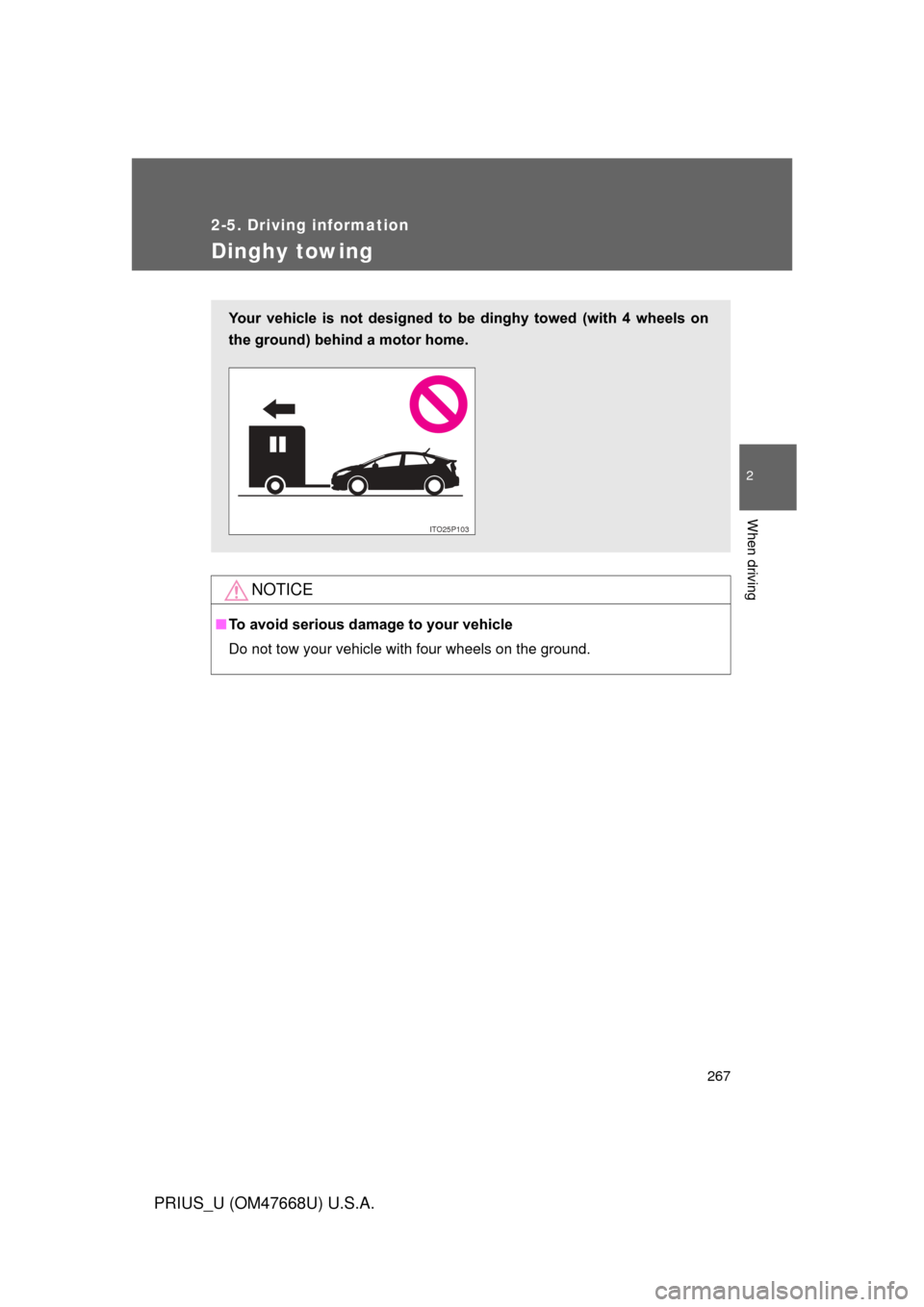
Dinghy towing
NOTICE
■To avoid serious damage to your vehicle
Do not tow your vehicle with four wheels on the ground.
Your vehicle is not designed to be dinghy towed (with 4 wheels on
the ground) behind a motor home.
ITO25P10P
Page 268 of 616
268
PRIUS_U (OM47668U) U.S.A.
3-1. Using the air conditioning system and defogger
Air conditioning system .... 270
Using the steering wheel climate remote control
switches ......................... 280
Solar Ventilation
System ........................... 282
Remote Air Conditioning System ........................... 285
Rear window and outside rear view mirror defoggers .... 289
3-2. Using the audio system Audio system type............ 291
Using the radio ................. 294
Using the CD player ......... 303
Playing back MP3 and WMA discs............................... 311
Optimal use of the audio
system ........................... 319
Using the AUX adapter .... 322
Using the steering
switches ......................... 323
Interior features3
Page 280 of 616
280
3-1. Using the air conditioning system and defogger
PRIUS_U (OM47668U) U.S.A.
Using the steering wheel climate remote control switches
Adjusting the temperature settingPress “ ” on to increase the temperature and “ ” to
decrease the temperature.
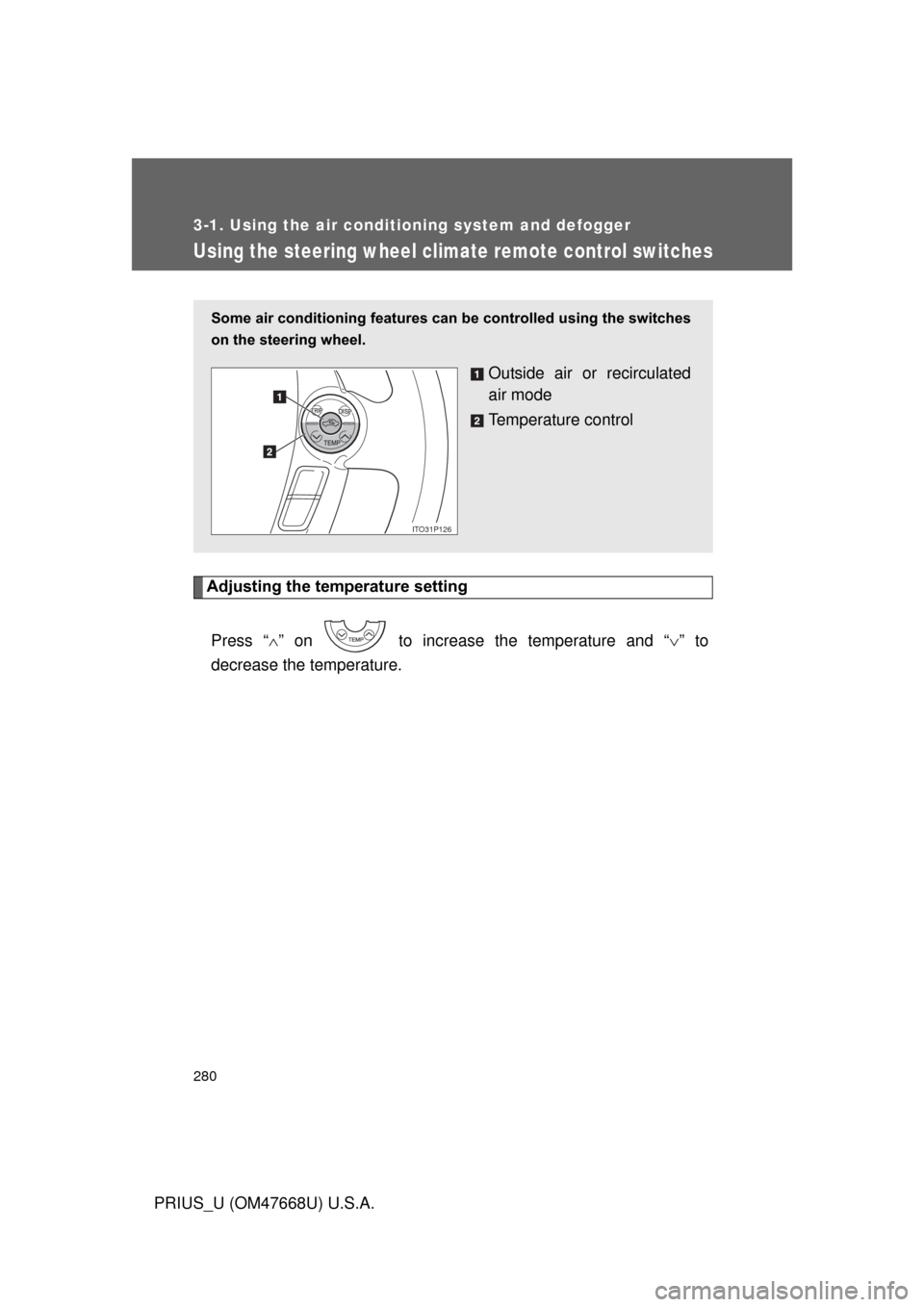
Some air conditioning features can be controlled using the switches
on the steering wheel.
Outside air or recirculated
air mode
Temperature control
ITO31P126
Page 281 of 616

281
3-1. Using the air conditioning system
and defogger
3
Interior features
PRIUS_U (OM47668U) U.S.A.
Changing the recirculated air mode
Press .
The mode switches between outside air mode and recirculated air
mode each time the switch is pressed.
■ When operating the steering switches
On vehicles with touch tracer display, the steering switches operation status
is displayed on the instrument cluster for confirmation purposes. ( P. 182)
CAUTION
■To reduce the risk of an accident
Exercise care when operating the air conditioning switches on the steering
wheel.
Page 323 of 616
323
3-2. Using the audio system
3
Interior features
PRIUS_U (OM47668U) U.S.A.
Using the steering switches
Turning on the powerPress when the audio system is turned off.
The audio system can be turned off by holding the switch down for 1 sec-
ond or more.
Changing the audio sourcePress when the audio system is turned on. The audio source
changes as follows each time the bu tton is pressed. If a CD is not
inserted, that mode will be skipped.
FM (1, 2) CD player AM SAT (1, 2, 3)
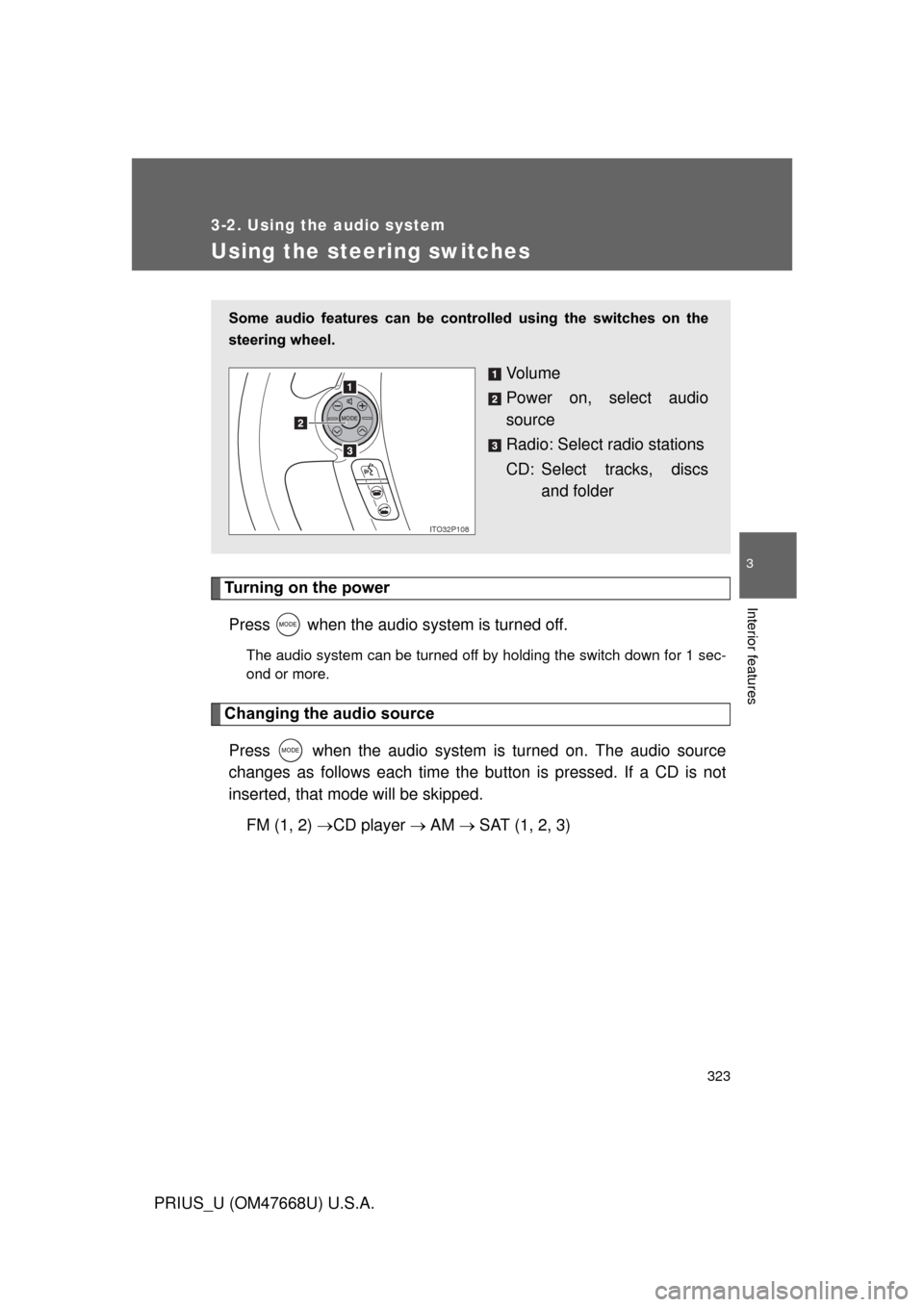
Some audio features can be cont rolled using the switches on the
steering wheel.
Vo l u m e
Power on, select audio
source
Radio: Select radio stations
CD: Select tracks, discs and folder
ITO32P108
Page 325 of 616

325
3-2. Using the audio system
3
Interior features
PRIUS_U (OM47668U) U.S.A.
■
Canceling automatic selection of a radio station
Push the same switch.
■ When operating the steering switches
On vehicles with touch tracer display, the steering switches operation status
is displayed on the instrument cluster for confirmation purposes. ( P. 182)
CAUTION
■To reduce the risk of an accident
Exercise care when operating the audio switches on the steering wheel.
Page 330 of 616
330 3-3. Using the hands-free system (for cellular phone)
PRIUS_U (OM47668U) U.S.A.
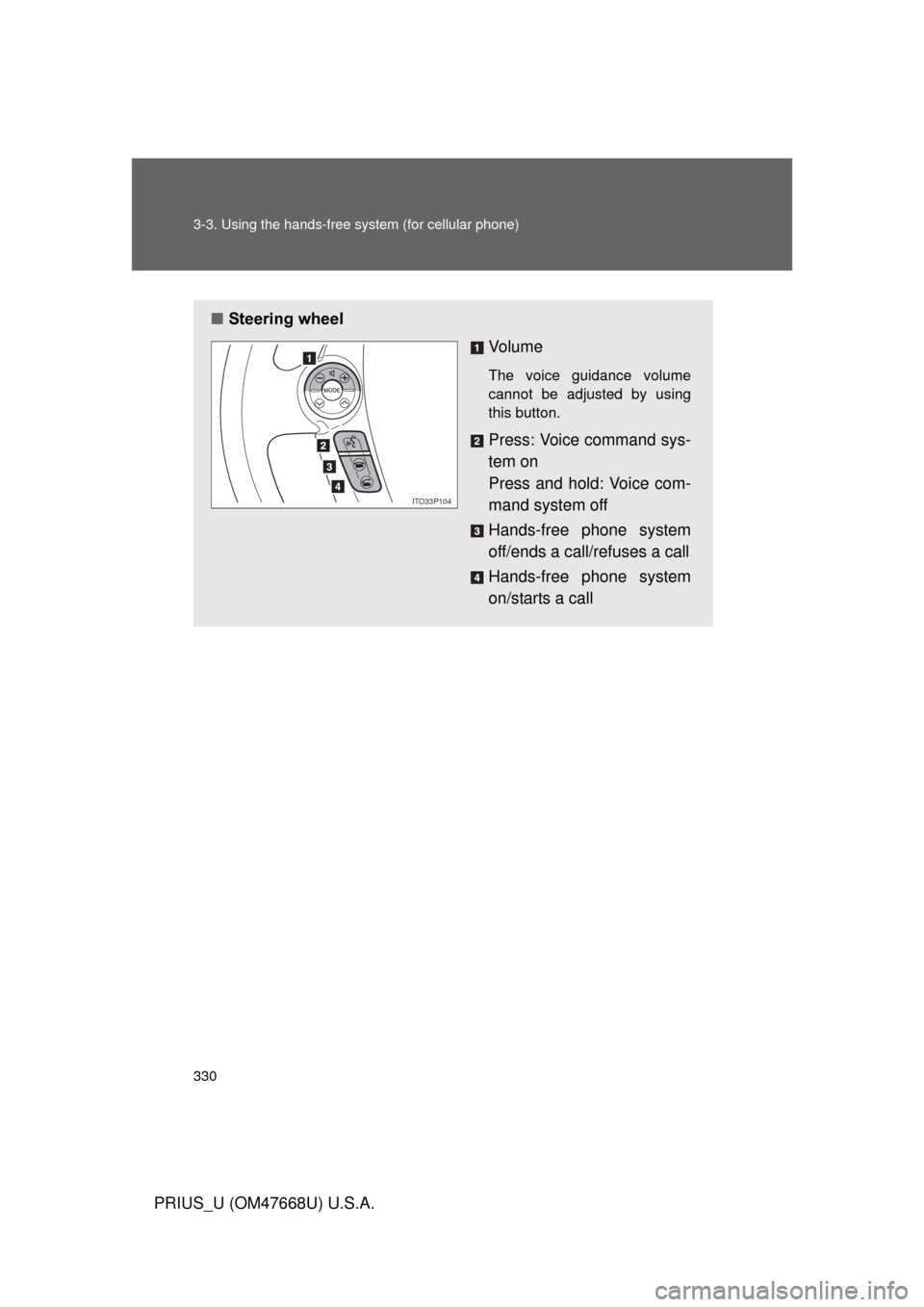
■Steering wheel
Vo l u m e
The voice guidance volume
cannot be adjusted by using
this button.
Press: Voice command sys-
tem on
Press and hold: Voice com-
mand system off
Hands-free phone system
off/ends a call/refuses a call
Hands-free phone system
on/starts a call
ITO33P104
Page 403 of 616
Maintenance and care4
403
PRIUS_U (OM47668U) U.S.A.
4-1. Maintenance and careCleaning and protecting
the vehicle’s exterior ...... 404
Cleaning and protecting
the vehicle’s interior ....... 407
4-2. Maintenance Maintenance
requirements .................. 410
General maintenance....... 412
Emission inspection and
maintenance (I/M)
programs ........................ 415
4-3. Do-it-yourself maintenance Do-it-yourself service
precautions .................... 416
Hood ................................ 420
Positioning a floor jack ..... 423
Engine compartment ........ 425
12 volt battery .................. 436
Tires ................................. 441
Tire inflation pressure ...... 451
Wheels ............................. 455
Air conditioning filter......... 457
Electronic key battery....... 460
Checking and replacing
fuses .............................. 462
Light bulbs........................ 472
Page 404 of 616
404
PRIUS_U (OM47668U) U.S.A.
4-1. Maintenance and care
Cleaning and protecting the vehicle’s exterior
Perform the following to protect the vehicle and maintain it in prime
condition.
● Working from top to bottom, liber ally apply water to the vehicle
body, wheel wells and underside of the vehicle to remove any
dirt and dust.
Wash the vehicle body using a sponge or soft cloth, such as a cham-
ois.
● For hard-to-remove marks, use car wash soap and rinse thor-
oughly with water.
● Wipe away any water.
● Wax the vehicle when the waterproof coating deteriorates.
If water does not bead on a clean surface, apply wax when the vehicle
body is cool.
Page 405 of 616

405
4-1. Maintenance and care
4
Maintenance and care
PRIUS_U (OM47668U) U.S.A.
■
Automatic car washes
● Before washing the vehicle, do the following.
• Fold the mirrors back.
• Remove the antenna.
● Brushes used in automatic car washes may scratch the vehicle surface
and harm your vehicle’s paint.
■ High pressure automatic car washes
● Do not allow the nozzles of the car wash to come within close proximity
of the windows.
● Before car wash, check that the fuel filler door on your vehicle is closed
properly.
■ Aluminum wheels
Remove any dirt immediately by using a neutral detergent. Do not use hard
brushes or abrasive cleaners. Do not use strong or harsh chemical cleaners.
Use the same mild detergent and wax as used on the paint.
■ Bumpers and side moldings
Do not scrub with abrasive cleaners.
■ To prevent paint deterioratio n and corrosion on the body
● Wash the vehicle immediately in the following cases:
• After driving near the sea coast
• After driving on salted roads
• If you see coal tar or tree sap on the paint surface
• If you see dead insects or insect droppings on the paint
• After driving in an area contaminated with soot, oily smoke, mine dust,
iron powder or chemical substances
• If the vehicle becomes heavily soiled in dust or mud
• If liquids such as benzine and gasoline are spilled on the paint surface
● If the paint is chipped or scratched, have it repaired immediately.