wheel TOYOTA PRIUS 2013 3.G Navigation Manual
[x] Cancel search | Manufacturer: TOYOTA, Model Year: 2013, Model line: PRIUS, Model: TOYOTA PRIUS 2013 3.GPages: 359, PDF Size: 7.65 MB
Page 150 of 359
150
1. PHONE OPERATION
PRIUS_Navi_OM47805U_(U)
12.08.07 17:59
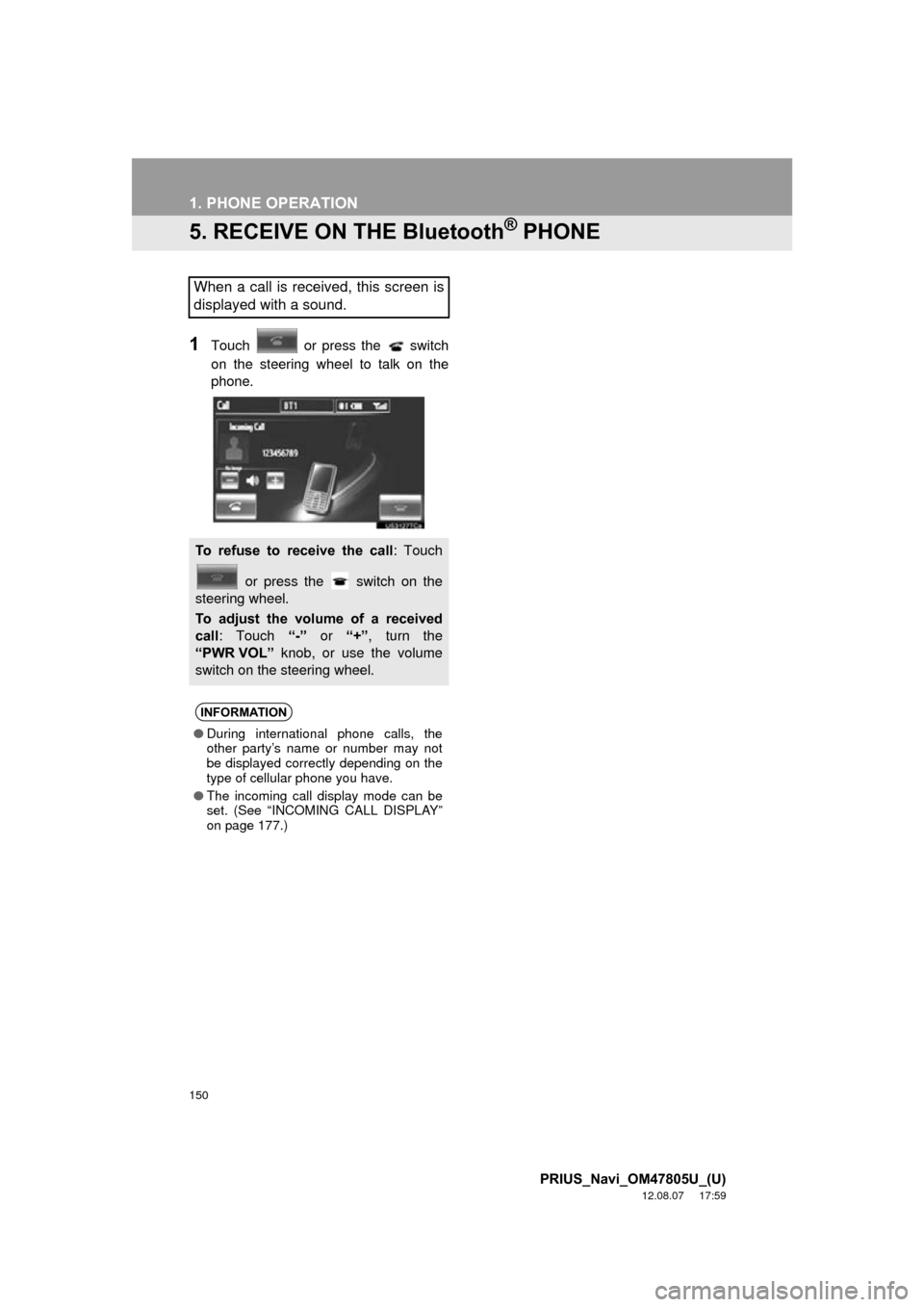
5. RECEIVE ON THE Bluetooth® PHONE
1Touch or press the switch
on the steering wheel to talk on the
phone.
When a call is received, this screen is
displayed with a sound.
To refuse to receive the call: Touch or press the switch on the
steering wheel.
To adjust the volume of a received
call : Touch “-” or “+”, turn the
“PWR VOL” knob, or use the volume
switch on the steering wheel.
INFORMATION
● During international phone calls, the
other party’s name or number may not
be displayed correctly depending on the
type of cellular phone you have.
● The incoming call display mode can be
set. (See “INCOMING CALL DISPLAY”
on page 177.)
Page 151 of 359
151
1. PHONE OPERATION
4
PHONE
PRIUS_Navi_OM47805U_(U)
12.08.07 17:59
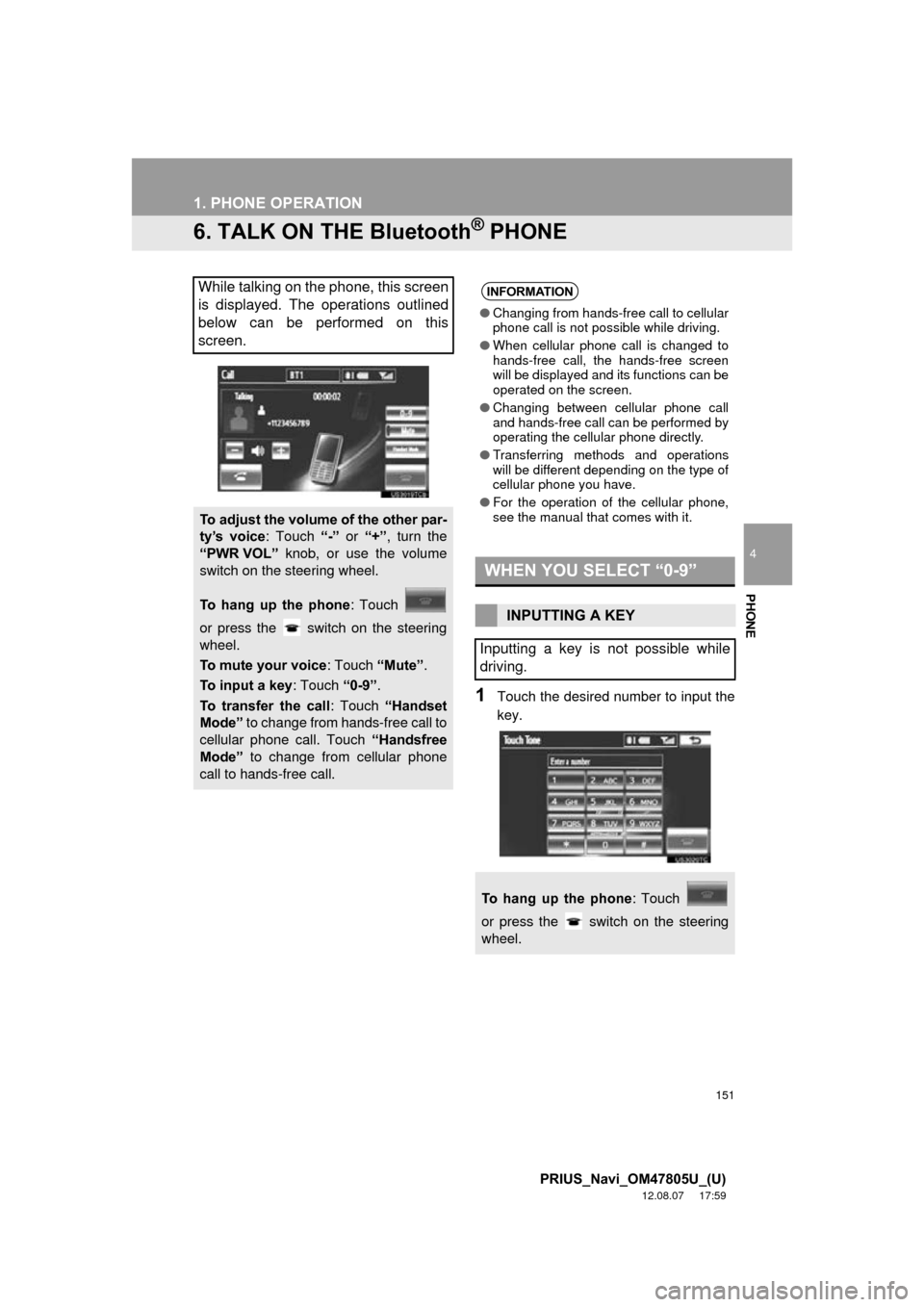
6. TALK ON THE Bluetooth® PHONE
1Touch the desired number to input the
key.
While talking on the phone, this screen
is displayed. The operations outlined
below can be performed on this
screen.
To adjust the volume of the other par-
ty’s voice: Touch “-” or “+” , turn the
“PWR VOL” knob, or use the volume
switch on the steering wheel.
To hang up the phone : Touch
or press the switch on the steering
wheel.
To mute your voice : Touch “Mute”.
To input a key : Touch “0-9”.
To transfer the call : Touch “Handset
Mode” to change from hands-free call to
cellular phone call. Touch “Handsfree
Mode” to change from cellular phone
call to hands-free call.
INFORMATION
● Changing from hands-free call to cellular
phone call is not possible while driving.
● When cellular phone call is changed to
hands-free call, the hands-free screen
will be displayed and its functions can be
operated on the screen.
● Changing between cellular phone call
and hands-free call can be performed by
operating the cellular phone directly.
● Transferring methods and operations
will be different depending on the type of
cellular phone you have.
● For the operation of the cellular phone,
see the manual that comes with it.
WHEN YOU SELECT “0-9”
INPUTTING A KEY
Inputting a key is not possible while
driving.
To hang up the phone : Touch
or press the switch on the steering
wheel.
Page 152 of 359
152
1. PHONE OPERATION
PRIUS_Navi_OM47805U_(U)
12.08.07 17:59
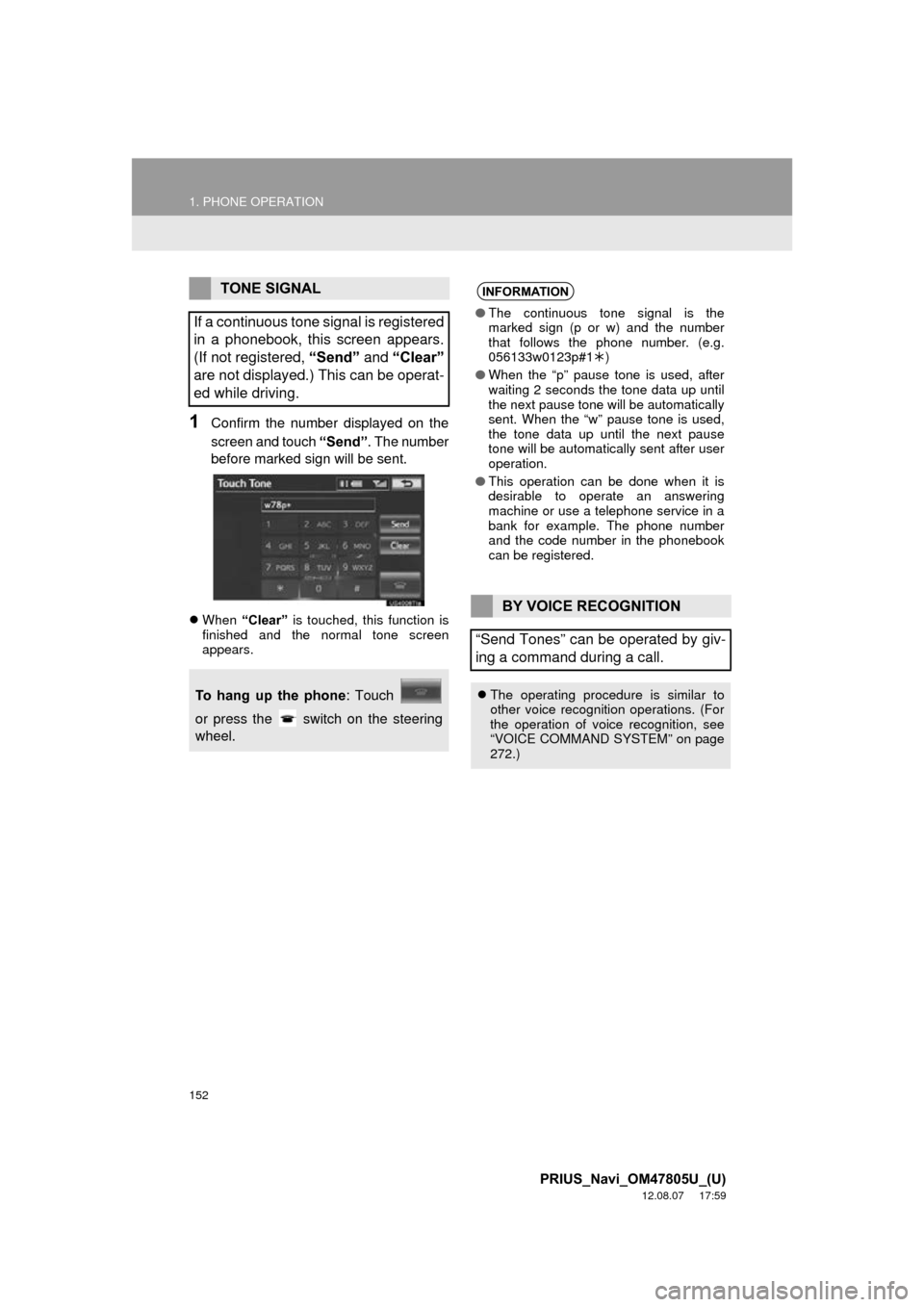
1Confirm the number displayed on the
screen and touch “Send”. The number
before marked sign will be sent.
When “Clear” is touched, this function is
finished and the normal tone screen
appears.
TONE SIGNAL
If a continuous tone signal is registered
in a phonebook, this screen appears.
(If not registered, “Send” and “Clear”
are not displayed.) This can be operat-
ed while driving.
To hang up the phone : Touch
or press the switch on the steering
wheel.
INFORMATION
● The continuous tone signal is the
marked sign (p or w) and the number
that follows the phone number. (e.g.
056133w0123p#1 )
● When the “p” pause tone is used, after
waiting 2 seconds the tone data up until
the next pause tone will be automatically
sent. When the “w” pause tone is used,
the tone data up until the next pause
tone will be automatically sent after user
operation.
● This operation can be done when it is
desirable to operate an answering
machine or use a telephone service in a
bank for example. The phone number
and the code number in the phonebook
can be registered.
BY VOICE RECOGNITION
“Send Tones” can be operated by giv-
ing a command during a call.
The operating procedure is similar to
other voice recognition operations. (For
the operation of voice recognition, see
“VOICE COMMAND SYSTEM” on page
272.)
Page 153 of 359
153
1. PHONE OPERATION
4
PHONE
PRIUS_Navi_OM47805U_(U)
12.08.07 17:59
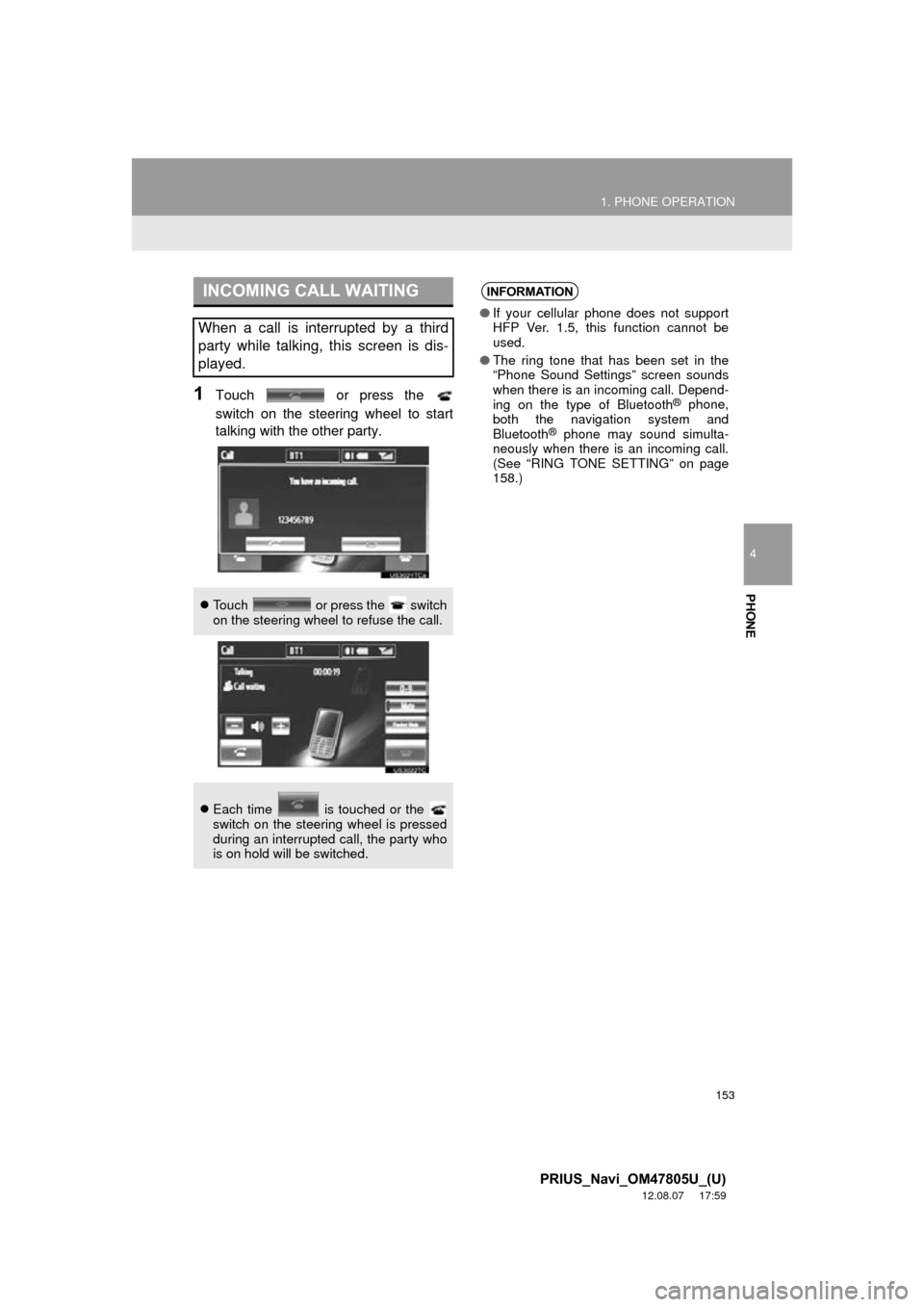
1Touch or press the
switch on the steering wheel to start
talking with the other party.
INCOMING CALL WAITING
When a call is interrupted by a third
party while talking, this screen is dis-
played.
Touch or press the switch
on the steering wheel to refuse the call.
Each time is touched or the
switch on the steering wheel is pressed
during an interrupted call, the party who
is on hold will be switched.
INFORMATION
●If your cellular phone does not support
HFP Ver. 1.5, this function cannot be
used.
● The ring tone that has been set in the
“Phone Sound Settings” screen sounds
when there is an incoming call. Depend-
ing on the type of Bluetooth
® phone,
both the navigation system and
Bluetooth
® phone may sound simulta-
neously when there is an incoming call.
(See “RING TONE SETTING” on page
158.)
Page 154 of 359
154
1. PHONE OPERATION
PRIUS_Navi_OM47805U_(U)
12.08.07 17:59
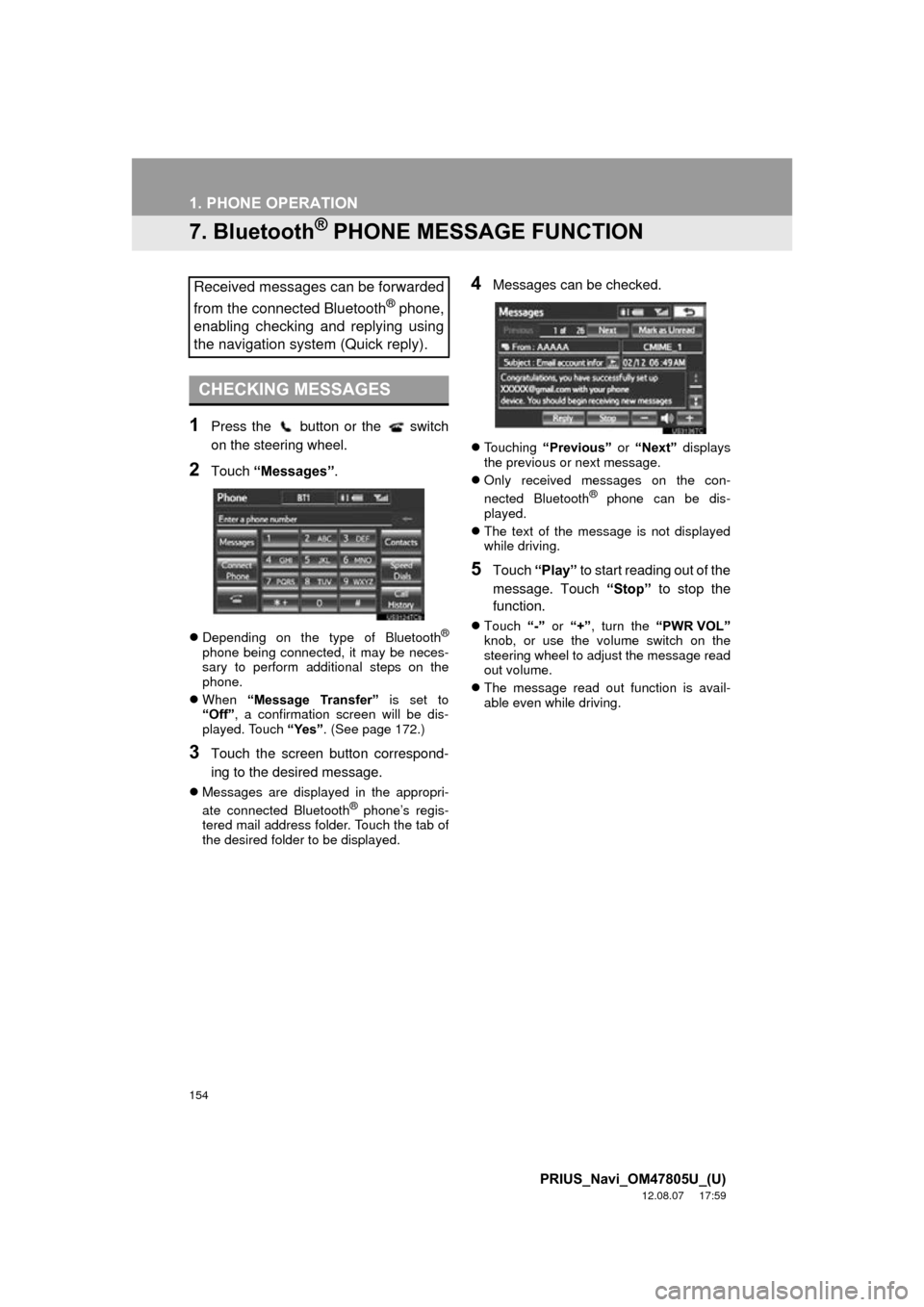
7. Bluetooth® PHONE MESSAGE FUNCTION
1Press the button or the switch
on the steering wheel.
2Touch “Messages” .
Depending on the type of Bluetooth®
phone being connected, it may be neces-
sary to perform additional steps on the
phone.
When “Message Transfer” is set to
“Off” , a confirmation screen will be dis-
played. Touch “Yes”. (See page 172.)
3Touch the screen button correspond-
ing to the desired message.
Messages are displayed in the appropri-
ate connected Bluetooth® phone’s regis-
tered mail address folder. Touch the tab of
the desired folder to be displayed.
4Messages can be checked.
Touching “Previous” or “Next” displays
the previous or next message.
Only received messages on the con-
nected Bluetooth
® phone can be dis-
played.
The text of the message is not displayed
while driving.
5Touch “Play” to start reading out of the
message. Touch “Stop” to stop the
function.
Touch “-” or “+” , turn the “PWR VOL”
knob, or use the volume switch on the
steering wheel to adjust the message read
out volume.
The message read out function is avail-
able even while driving.
Received messages can be forwarded
from the connected Bluetooth
® phone,
enabling checking and replying using
the navigation system (Quick reply).
CHECKING MESSAGES
Page 155 of 359
155
1. PHONE OPERATION
4
PHONE
PRIUS_Navi_OM47805U_(U)
12.08.07 17:59
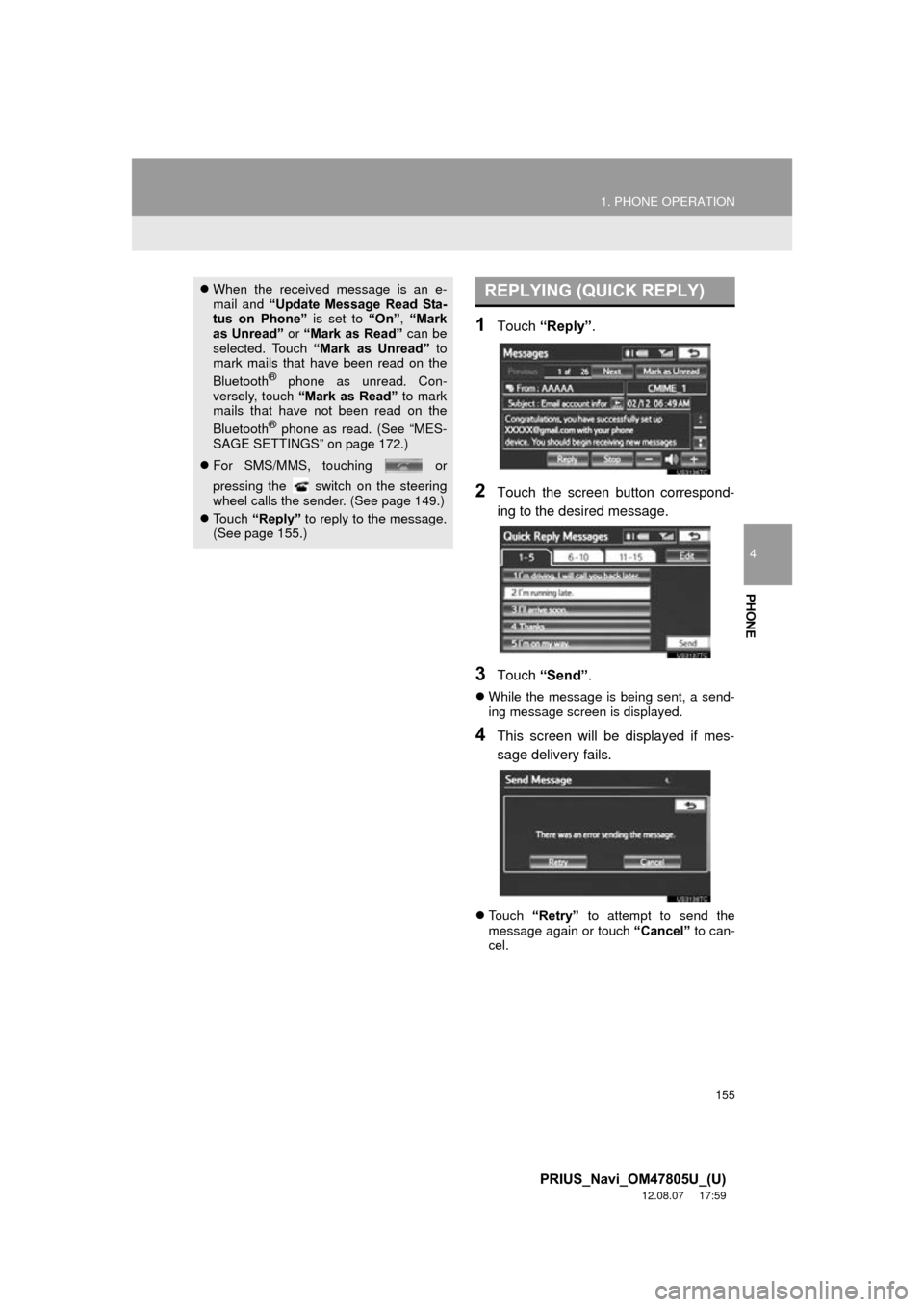
1Touch “Reply”.
2Touch the screen button correspond-
ing to the desired message.
3Touch “Send” .
While the message is being sent, a send-
ing message screen is displayed.
4This screen will be displayed if mes-
sage delivery fails.
Touch “Retry” to attempt to send the
message again or touch “Cancel” to can-
cel.
When the received message is an e-
mail and “Update Message Read Sta-
tus on Phone” is set to “On”, “Mark
as Unread” or “Mark as Read” can be
selected. Touch “Mark as Unread” to
mark mails that have been read on the
Bluetooth
® phone as unread. Con-
versely, touch “Mark as Read” to mark
mails that have not been read on the
Bluetooth
® phone as read. (See “MES-
SAGE SETTINGS” on page 172.)
For SMS/MMS, touching or
pressing the switch on the steering
wheel calls the sender. (See page 149.)
Touch “Reply” to reply to the message.
(See page 155.)
REPLYING (QUICK REPLY)
Page 156 of 359
156
1. PHONE OPERATION
PRIUS_Navi_OM47805U_(U)
12.08.07 17:59
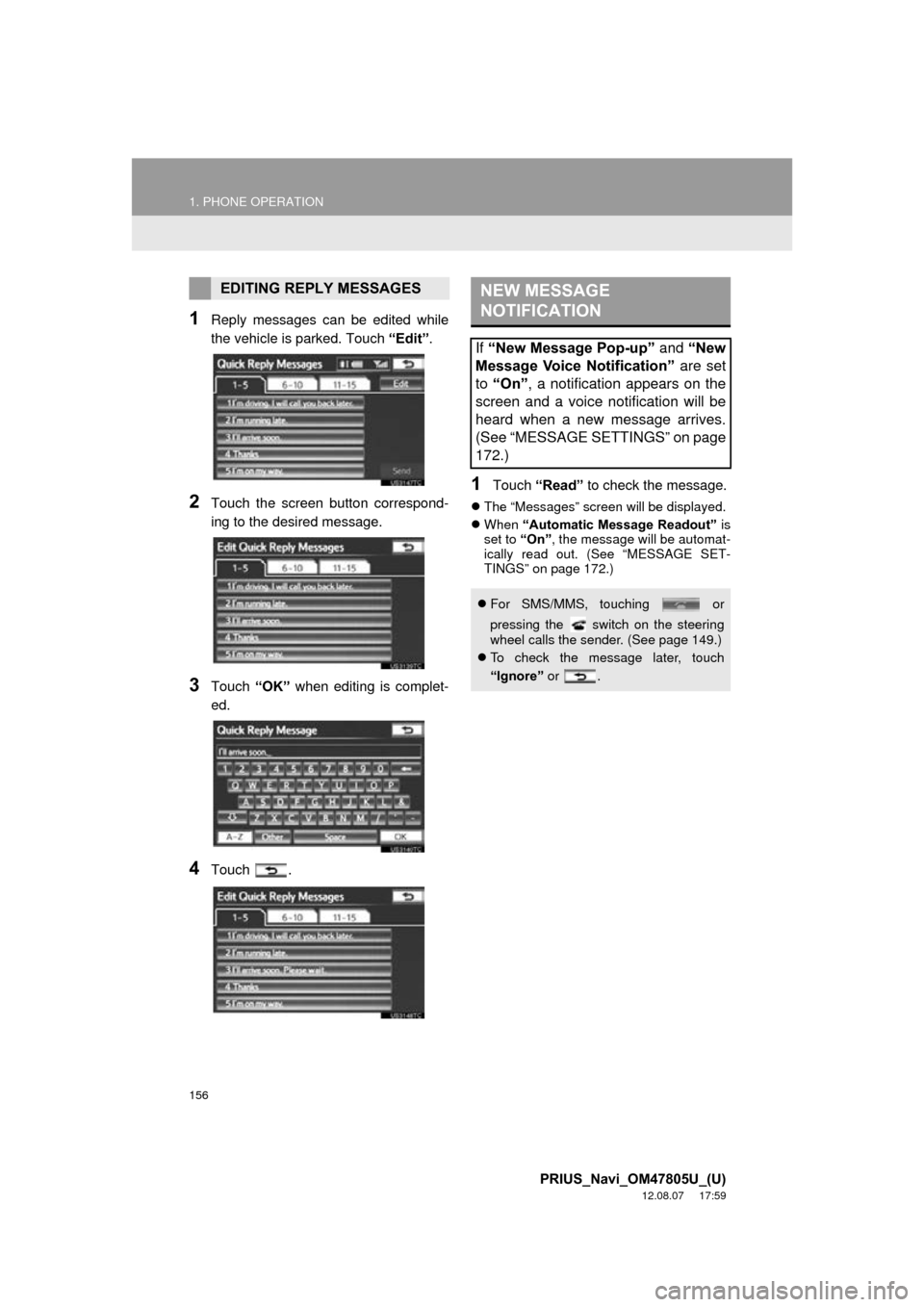
1Reply messages can be edited while
the vehicle is parked. Touch “Edit”.
2Touch the screen button correspond-
ing to the desired message.
3Touch “OK” when editing is complet-
ed.
4Touch .
1Touch “Read” to check the message.
The “Messages” screen will be displayed.
When “Automatic Message Readout” is
set to “On”, the message will be automat-
ically read out. (See “MESSAGE SET-
TINGS” on page 172.)
EDITING REPLY MESSAGESNEW MESSAGE
NOTIFICATION
If “New Message Pop-up” and “New
Message Voice Notification” are set
to “On” , a notification appears on the
screen and a voice notification will be
heard when a new message arrives.
(See “MESSAGE SETTINGS” on page
172.)
For SMS/MMS, touching or
pressing the switch on the steering
wheel calls the sender. (See page 149.)
To check the message later, touch
“Ignore” or .
Page 160 of 359
160
2. SETUP
PRIUS_Navi_OM47805U_(U)
12.08.07 17:59
■THE “Contacts” SCREEN CAN
ALSO BE DISPLAYED
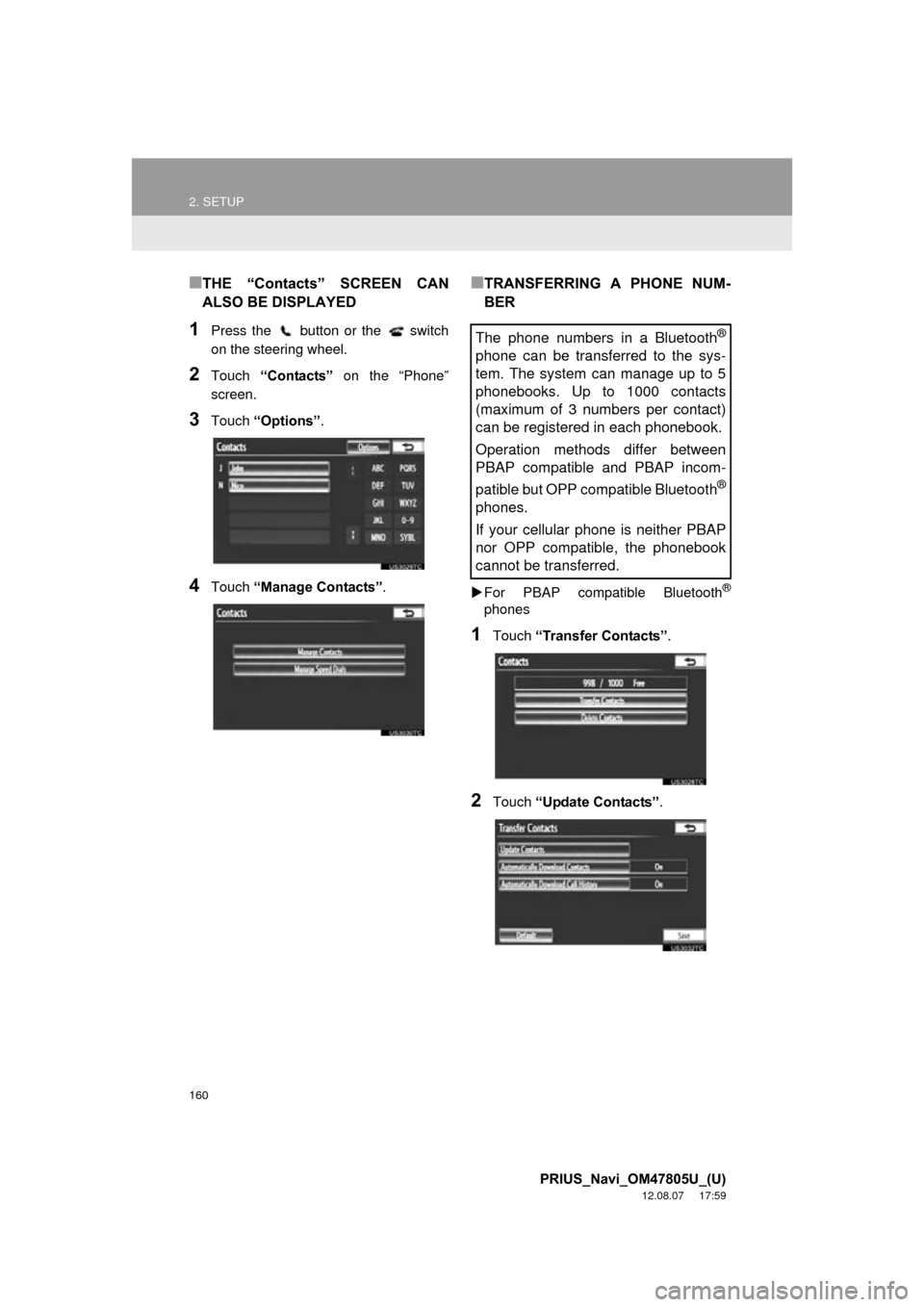
1Press the button or the switch
on the steering wheel.
2Touch “Contacts” on the “Phone”
screen.
3Touch “Options”.
4Touch “Manage Contacts” .
■TRANSFERRING A PHONE NUM-
BER
For PBAP compatible Bluetooth®
phones
1Touch “Transfer Contacts” .
2Touch “Update Contacts” .
The phone numbers in a Bluetooth®
phone can be transferred to the sys-
tem. The system can manage up to 5
phonebooks. Up to 1000 contacts
(maximum of 3 numbers per contact)
can be registered in each phonebook.
Operation methods differ between
PBAP compatible and PBAP incom-
patible but OPP compatible Bluetooth
®
phones.
If your cellular phone is neither PBAP
nor OPP compatible, the phonebook
cannot be transferred.
Page 163 of 359
163
2. SETUP
4
PHONE
PRIUS_Navi_OM47805U_(U)
12.08.07 17:59
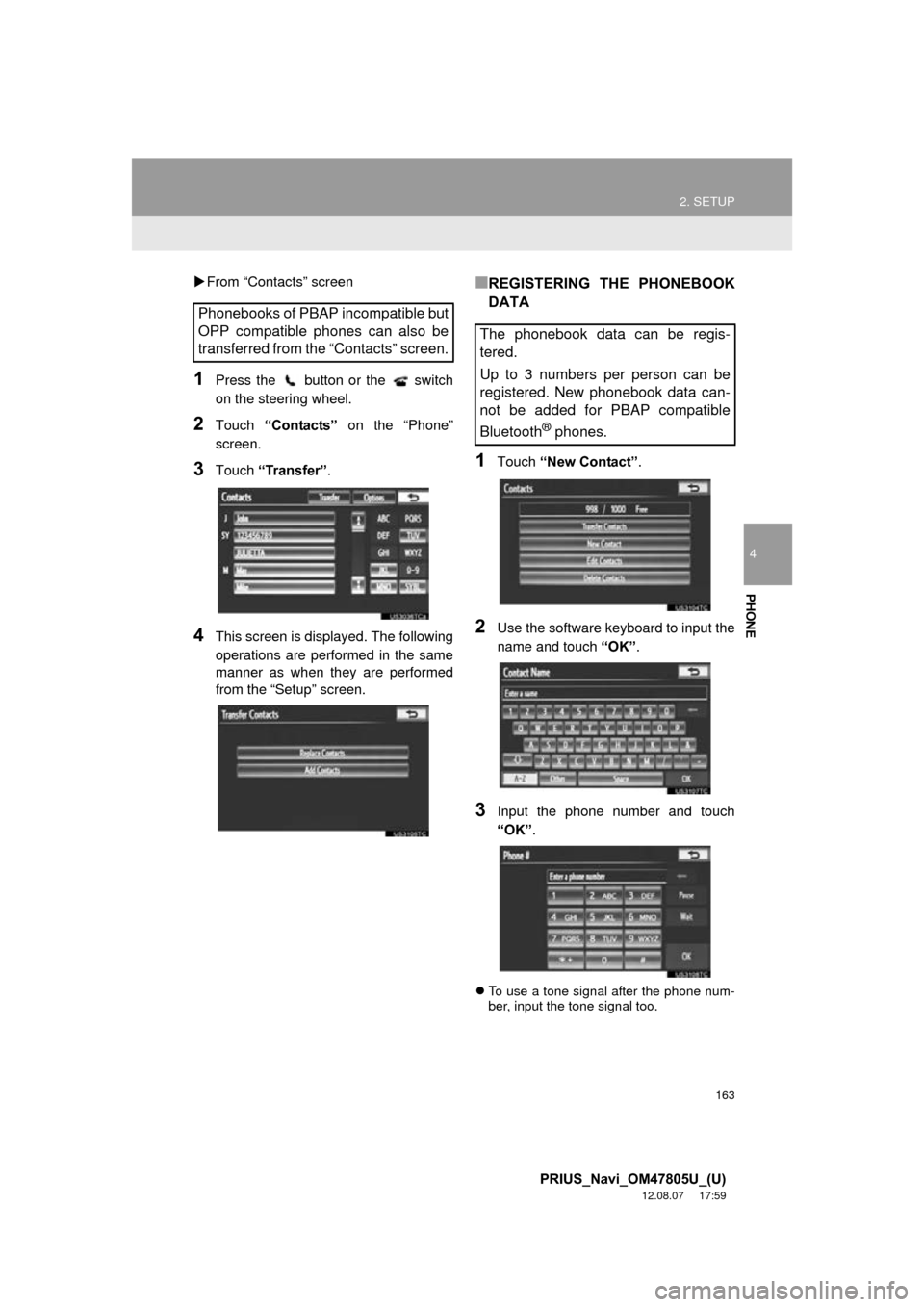
From “Contacts” screen
1Press the button or the switch
on the steering wheel.
2Touch “Contacts” on the “Phone”
screen.
3Touch “Transfer” .
4This screen is displayed. The following
operations are performed in the same
manner as when they are performed
from the “Setup” screen.
■REGISTERING THE PHONEBOOK
DATA
1Touch “New Contact” .
2Use the software keyboard to input the
name and touch “OK”.
3Input the phone number and touch
“OK”.
To use a tone signal after the phone num-
ber, input the tone signal too.
Phonebooks of PBAP incompatible but
OPP compatible phones can also be
transferred from the “Contacts” screen.
The phonebook data can be regis-
tered.
Up to 3 numbers per person can be
registered. New phonebook data can-
not be added for PBAP compatible
Bluetooth
® phones.
Page 165 of 359
165
2. SETUP
4
PHONE
PRIUS_Navi_OM47805U_(U)
12.08.07 17:59
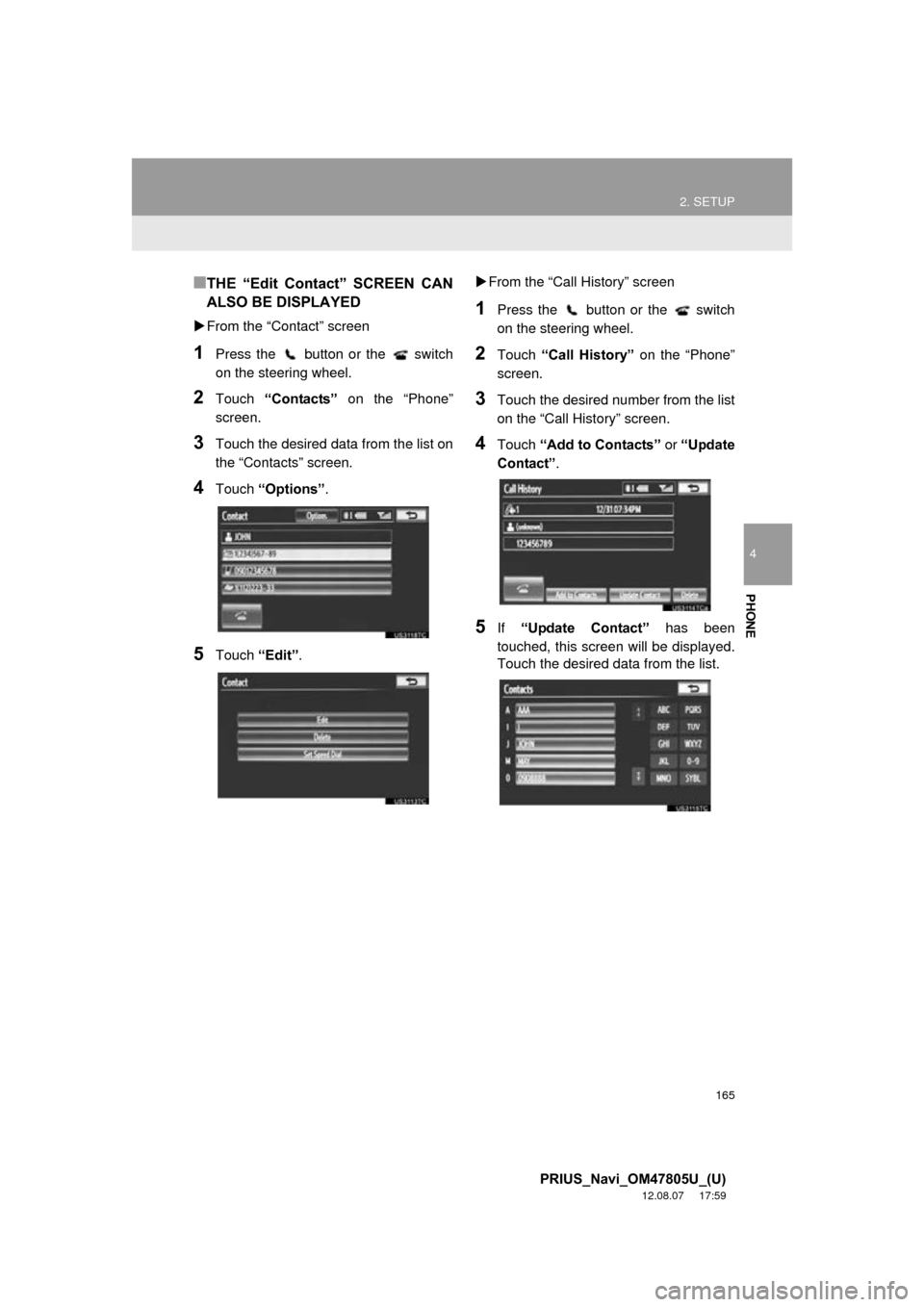
■THE “Edit Contact” SCREEN CAN
ALSO BE DISPLAYED
From the “Contact” screen
1Press the button or the switch
on the steering wheel.
2Touch “Contacts” on the “Phone”
screen.
3Touch the desired data from the list on
the “Contacts” screen.
4Touch “Options” .
5Touch “Edit”.
From the “Call History” screen
1Press the button or the switch
on the steering wheel.
2Touch “Call History” on the “Phone”
screen.
3Touch the desired number from the list
on the “Call History” screen.
4Touch “Add to Contacts” or “Update
Contact” .
5If “Update Contact” has been
touched, this screen will be displayed.
Touch the desired data from the list.