change time TOYOTA PRIUS 2013 3.G Navigation Manual
[x] Cancel search | Manufacturer: TOYOTA, Model Year: 2013, Model line: PRIUS, Model: TOYOTA PRIUS 2013 3.GPages: 359, PDF Size: 7.65 MB
Page 227 of 359
227
1. AUDIO/VIDEO SYSTEM OPERATION
5
AUDIO/VIDEO SYSTEM
PRIUS_Navi_OM47805U_(U)
12.08.08 13:01
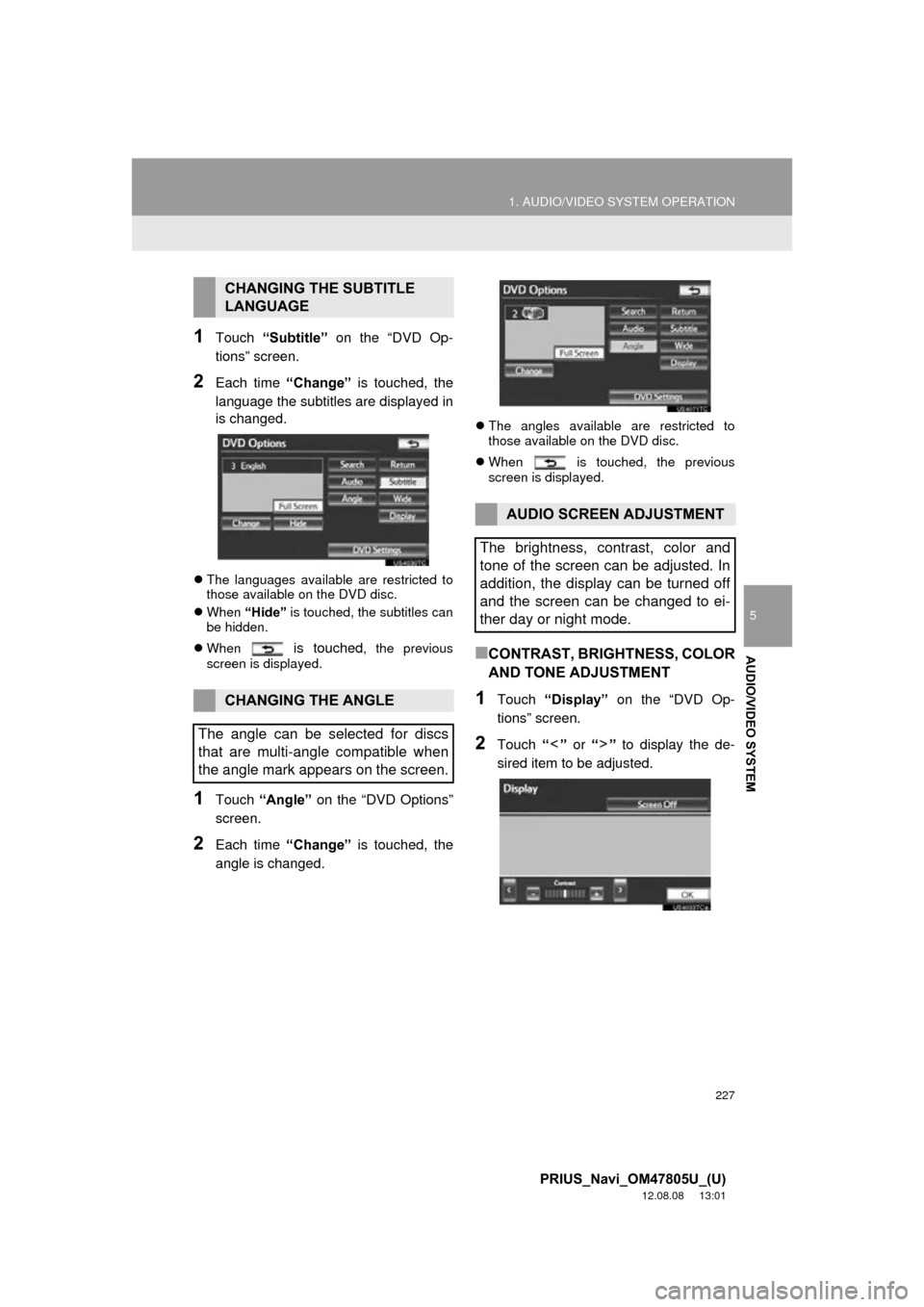
1Touch “Subtitle” on the “DVD Op-
tions” screen.
2Each time “Change” is touched, the
language the subtitles are displayed in
is changed.
The languages available are restricted to
those available on the DVD disc.
When “Hide” is touched, the subtitles can
be hidden.
When
is touched, the previous
screen is displayed.
1Touch “Angle” on the “DVD Options”
screen.
2Each time “Change” is touched, the
angle is changed.
The angles available are restricted to
those available on the DVD disc.
When is touched, the previous
screen is displayed.
■CONTRAST, BRIGHTNESS, COLOR
AND TONE ADJUSTMENT
1Touch “Display” on the “DVD Op-
tions” screen.
2Touch “” or “” to display the de-
sired item to be adjusted.
CHANGING THE SUBTITLE
LANGUAGE
CHANGING THE ANGLE
The angle can be selected for discs
that are multi-angle compatible when
the angle mark appears on the screen.
AUDIO SCREEN ADJUSTMENT
The brightness, contrast, color and
tone of the screen can be adjusted. In
addition, the display can be turned off
and the screen can be changed to ei-
ther day or night mode.
Page 241 of 359
241
1. AUDIO/VIDEO SYSTEM OPERATION
5
AUDIO/VIDEO SYSTEM
PRIUS_Navi_OM47805U_(U)
12.08.08 13:01
■REPEATING A FILE/TRACK
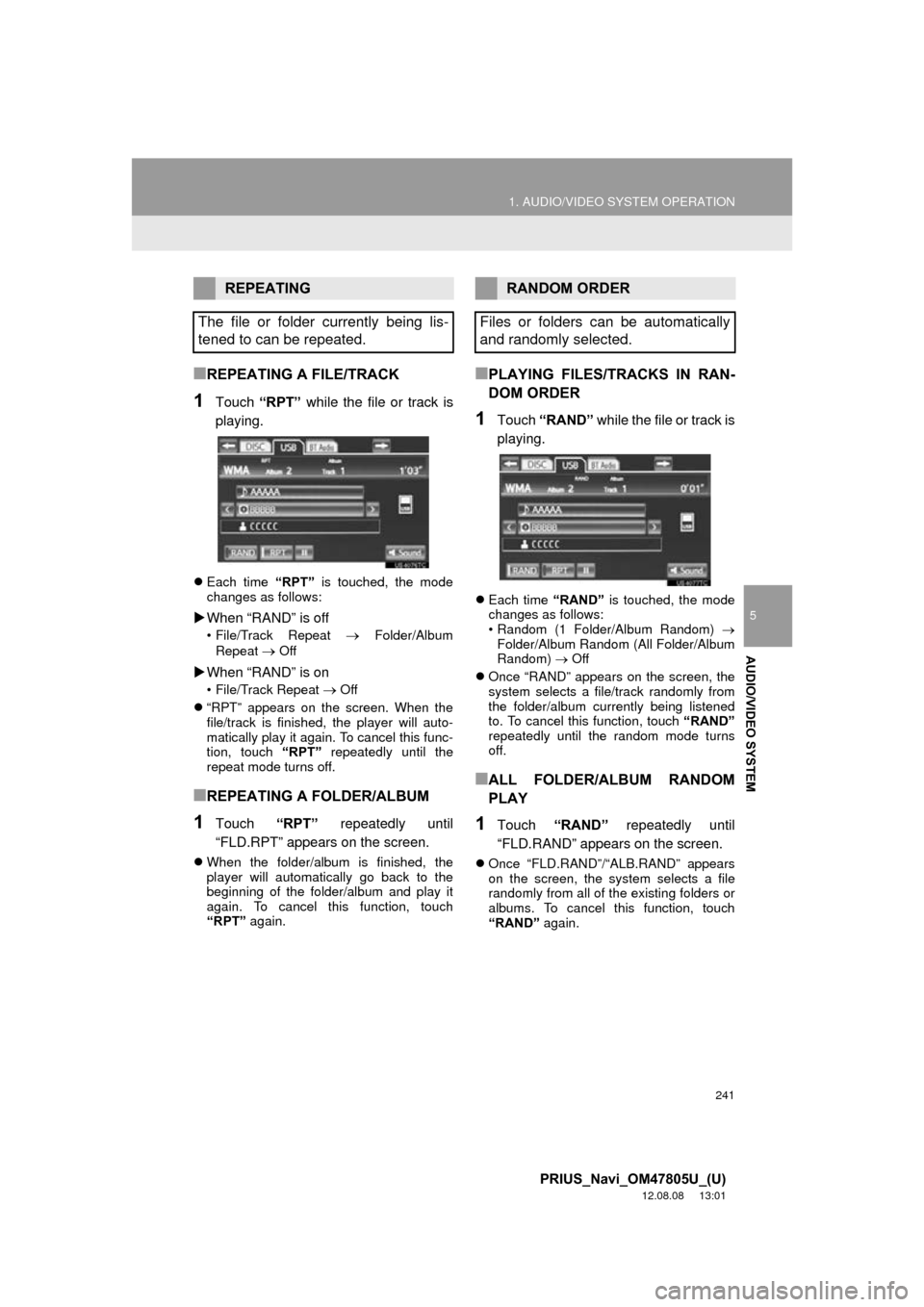
1Touch “RPT” while the file or track is
playing.
Each time “RPT” is touched, the mode
changes as follows:
When “RAND” is off
• File/Track Repeat Folder/Album
Repeat
Off
When “RAND” is on
• File/Track Repeat Off
“RPT” appears on the screen. When the
file/track is finished, the player will auto-
matically play it again. To cancel this func-
tion, touch “RPT” repeatedly until the
repeat mode turns off.
■REPEATING A FOLDER/ALBUM
1Touch “RPT” repeatedly until
“FLD.RPT” appears on the screen.
When the folder/album is finished, the
player will automatically go back to the
beginning of the folder/album and play it
again. To cancel this function, touch
“RPT” again.
■PLAYING FILES/TRACKS IN RAN-
DOM ORDER
1Touch “RAND” while the file or track is
playing.
Each time “RAND” is touched, the mode
changes as follows:
• Random (1 Folder/Album Random)
Folder/Album Random (All Folder/Album
Random) Off
Once “RAND” appears on the screen, the
system selects a file/track randomly from
the folder/album currently being listened
to. To cancel this function, touch “RAND”
repeatedly until the random mode turns
off.
■ALL FOLDER/ALBUM RANDOM
PLAY
1Touch “RAND” repeatedly until
“FLD.RAND” appears on the screen.
Once “FLD.RAND”/“ALB.RAND” appears
on the screen, the system selects a file
randomly from all of the existing folders or
albums. To cancel this function, touch
“RAND” again.
REPEATING
The file or folder currently being lis-
tened to can be repeated.RANDOM ORDER
Files or folders can be automatically
and randomly selected.
Page 243 of 359
243
1. AUDIO/VIDEO SYSTEM OPERATION
5
AUDIO/VIDEO SYSTEM
PRIUS_Navi_OM47805U_(U)
12.08.08 13:01
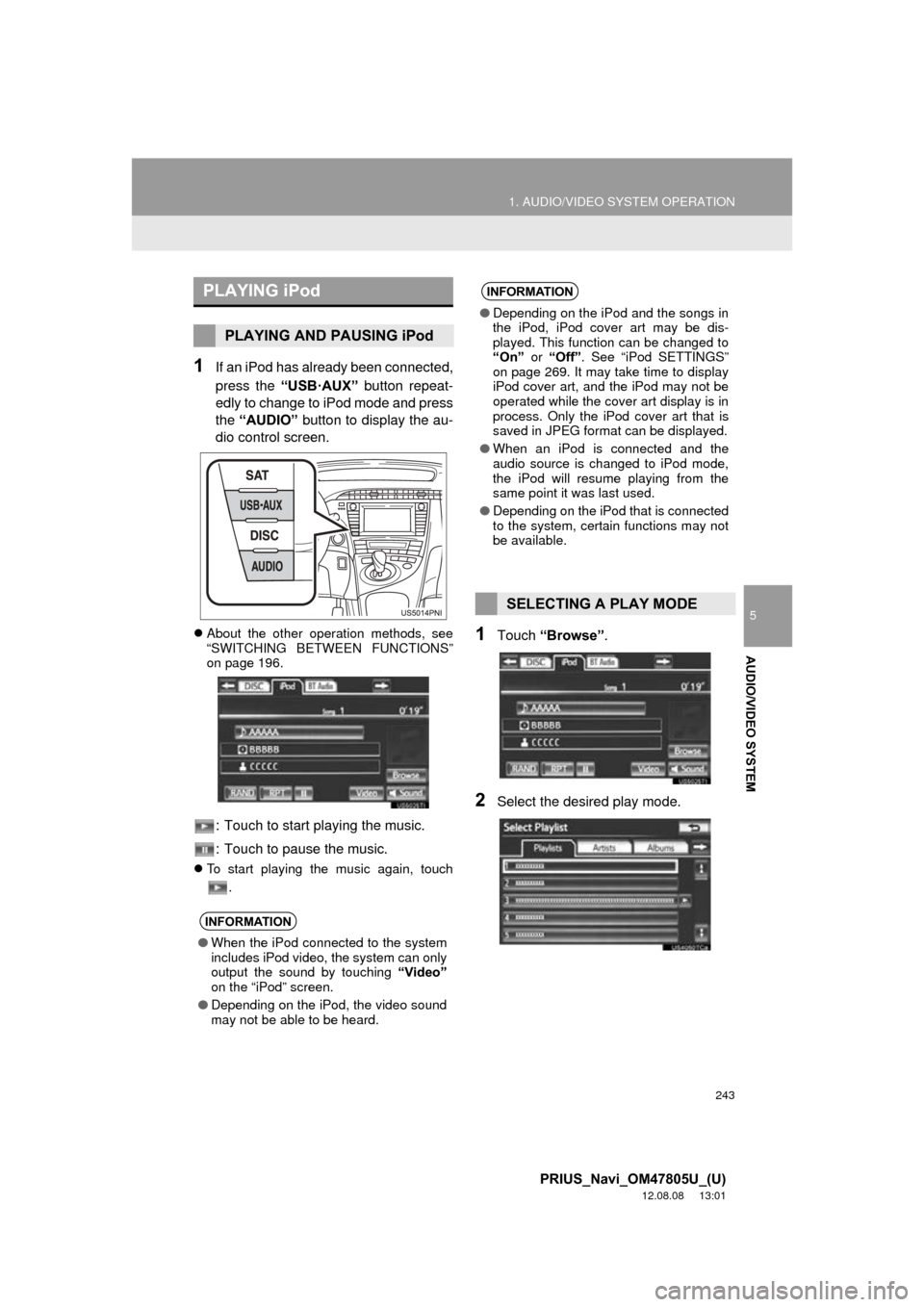
1If an iPod has already been connected,
press the “USB·AUX” button repeat-
edly to change to iPod mode and press
the “AUDIO” button to display the au-
dio control screen.
About the other operation methods, see
“SWITCHING BETWEEN FUNCTIONS”
on page 196.
: Touch to start playing the music.
: Touch to pause the music.
To start playing the music again, touch
.
1Touch “Browse” .
2Select the desired play mode.
PLAYING iPod
PLAYING AND PAUSING iPod
INFORMATION
●When the iPod connected to the system
includes iPod video, the system can only
output the sound by touching “Video”
on the “iPod” screen.
● Depending on the iPod, the video sound
may not be able to be heard.
INFORMATION
● Depending on the iPod and the songs in
the iPod, iPod cover art may be dis-
played. This function can be changed to
“On” or “Off” . See “iPod SETTINGS”
on page 269. It may take time to display
iPod cover art, and the iPod may not be
operated while the cover art display is in
process. Only the iPod cover art that is
saved in JPEG format can be displayed.
● When an iPod is connected and the
audio source is changed to iPod mode,
the iPod will resume playing from the
same point it was last used.
● Depending on the iPod that is connected
to the system, certain functions may not
be available.
SELECTING A PLAY MODE
Page 245 of 359
245
1. AUDIO/VIDEO SYSTEM OPERATION
5
AUDIO/VIDEO SYSTEM
PRIUS_Navi_OM47805U_(U)
12.08.08 13:01
■FAST FORWARDING OR REWIND-
ING
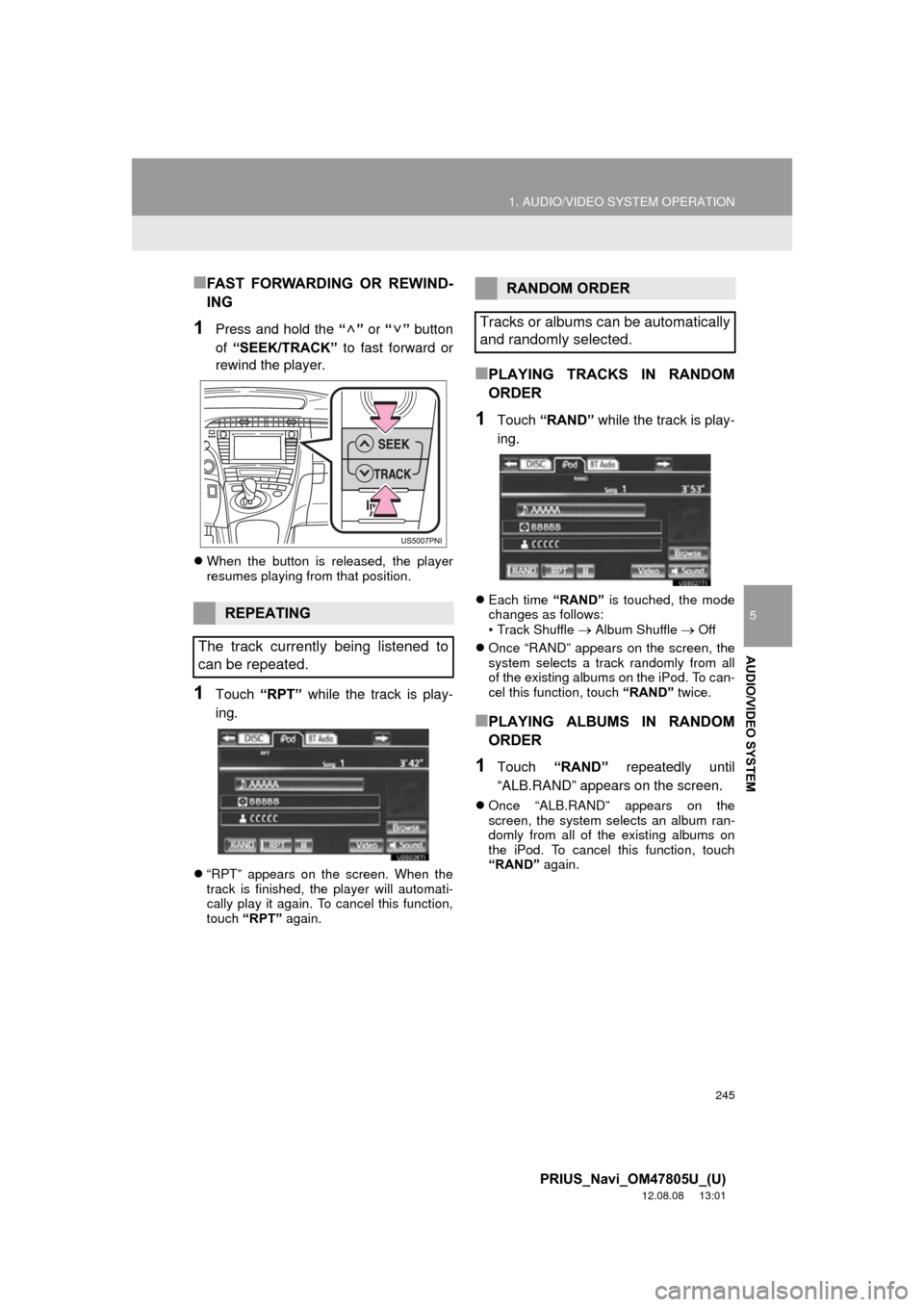
1Press and hold the “” or “” button
of “SEEK/TRACK” to fast forward or
rewind the player.
When the button is released, the player
resumes playing from that position.
1Touch “RPT” while the track is play-
ing.
“RPT” appears on the screen. When the
track is finished, the player will automati-
cally play it again. To cancel this function,
touch “RPT” again.
■PLAYING TRACKS IN RANDOM
ORDER
1Touch “RAND” while the track is play-
ing.
Each time “RAND” is touched, the mode
changes as follows:
• Track Shuffle
Album Shuffle Off
Once “RAND” appears on the screen, the
system selects a track randomly from all
of the existing albums on the iPod. To can-
cel this function, touch “RAND” twice.
■PLAYING ALBUMS IN RANDOM
ORDER
1Touch “RAND” repeatedly until
“ALB.RAND” appears on the screen.
Once “ALB.RAND” appears on the
screen, the system selects an album ran-
domly from all of the existing albums on
the iPod. To cancel this function, touch
“RAND” again.
REPEATING
The track currently being listened to
can be repeated.
RANDOM ORDER
Tracks or albums can be automatically
and randomly selected.
Page 254 of 359
254
1. AUDIO/VIDEO SYSTEM OPERATION
PRIUS_Navi_OM47805U_(U)
12.08.08 13:01
2Touch the desired track number. The
player will start playing the selected
track from the beginning.
, : Touch to move the list up or down
by 5 track groups. If either of these screen
buttons is touched when the top/bottom
page of the list is displayed, the last/first
page is displayed.
“SEEK/TRACK” button: Press the “” or
“” button of “SEEK/TRACK” to scroll
through the track list one by one.
“TUNE SCROLL” knob: Turn the knob
clockwise or counterclockwise to quickly
scroll up or down the track list. To select
the desired track, press the knob.
, : If appears to the right of an item
name, the complete name is too long for
the screen. Touch to scroll to the end of
the name. Touch to move to the begin-
ning of the name.■FAST FORWARDING OR REWIND-
ING
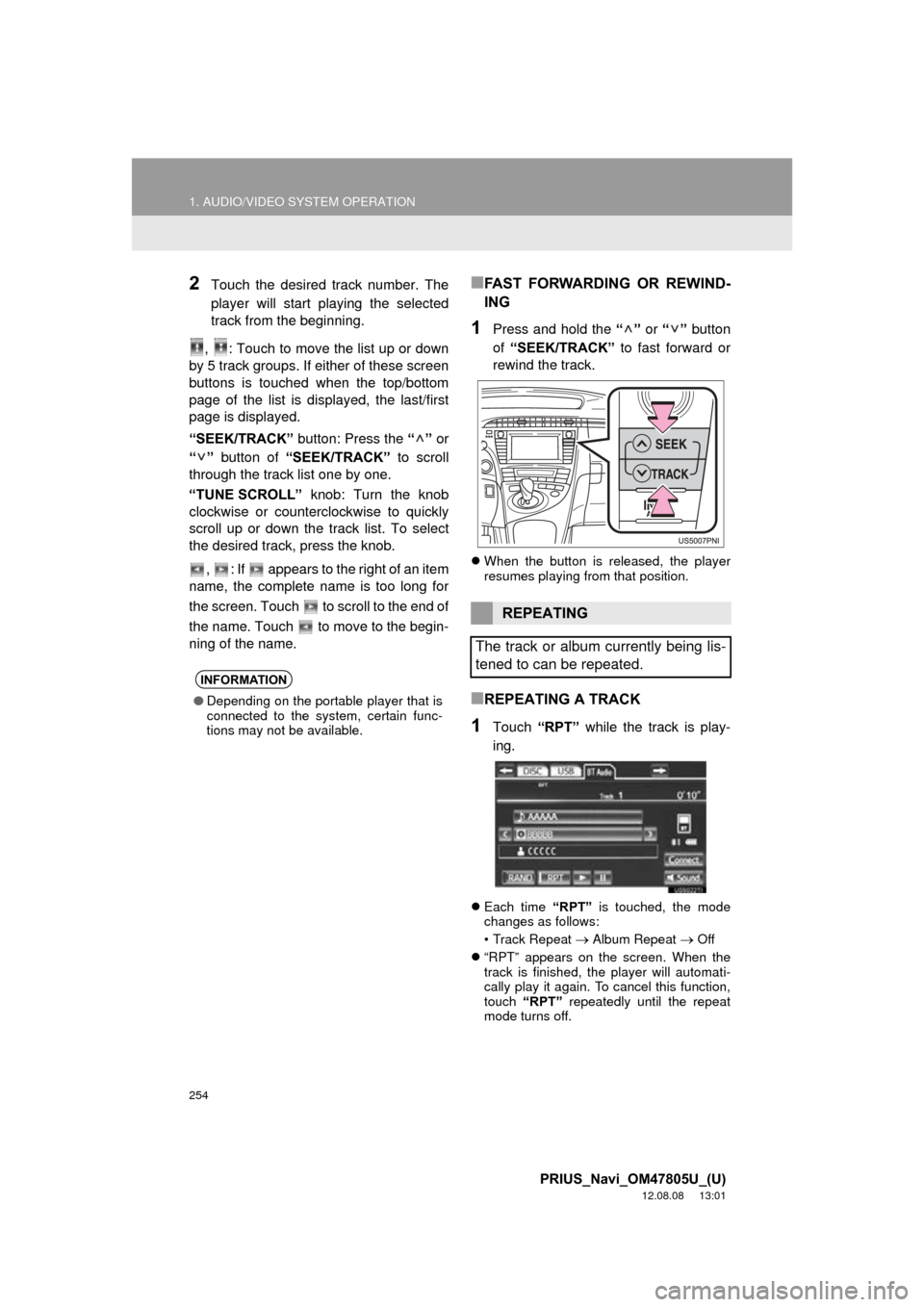
1Press and hold the “” or “” button
of “SEEK/TRACK” to fast forward or
rewind the track.
When the button is released, the player
resumes playing from that position.
■REPEATING A TRACK
1Touch “RPT” while the track is play-
ing.
Each time “RPT” is touched, the mode
changes as follows:
• Track Repeat
Album Repeat Off
“RPT” appears on the screen. When the
track is finished, the player will automati-
cally play it again. To cancel this function,
touch “RPT” repeatedly until the repeat
mode turns off.
INFORMATION
● Depending on the portable player that is
connected to the system, certain func-
tions may not be available.
REPEATING
The track or album currently being lis-
tened to can be repeated.
Page 255 of 359
255
1. AUDIO/VIDEO SYSTEM OPERATION
5
AUDIO/VIDEO SYSTEM
PRIUS_Navi_OM47805U_(U)
12.08.08 13:01
■REPEATING AN ALBUM
1Touch “RPT” repeatedly until
“ALB.RPT” appears on the screen.
When the album is finished, the player will
automatically go back to the beginning of
the album and play it again. To cancel this
function, touch “RPT” again.
■PLAYING THE TRACKS ON THE
ALBUM IN RANDOM ORDER
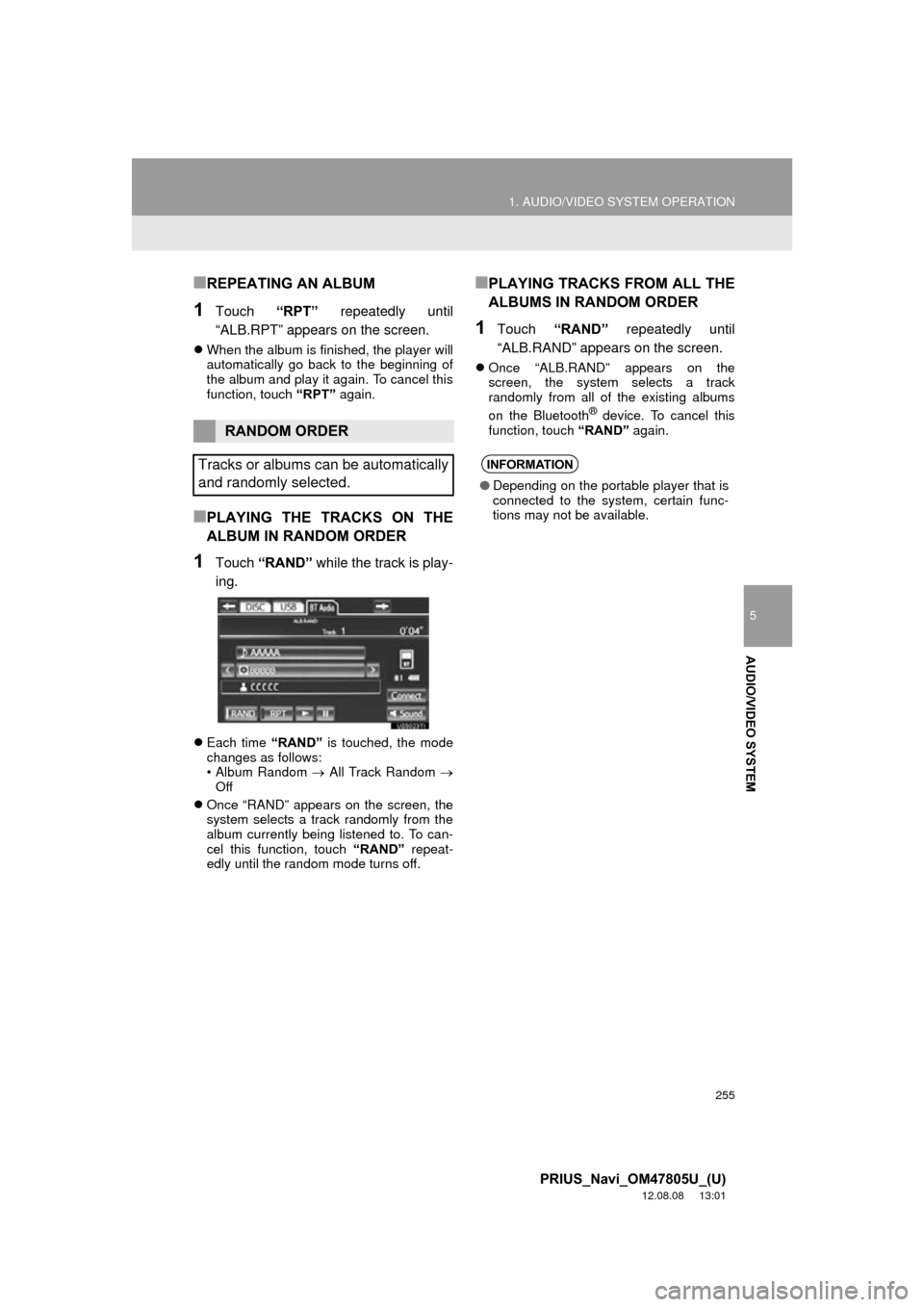
1Touch “RAND” while the track is play-
ing.
Each time “RAND” is touched, the mode
changes as follows:
• Album Random All Track Random
Off
Once “RAND” appears on the screen, the
system selects a track randomly from the
album currently being listened to. To can-
cel this function, touch “RAND” repeat-
edly until the random mode turns off.
■PLAYING TRACKS FROM ALL THE
ALBUMS IN RANDOM ORDER
1Touch “RAND” repeatedly until
“ALB.RAND” appears on the screen.
Once “ALB.RAND” appears on the
screen, the system selects a track
randomly from all of the existing albums
on the Bluetooth
® device. To cancel this
function, touch “RAND” again.
RANDOM ORDER
Tracks or albums can be automatically
and randomly selected.
INFORMATION
● Depending on the portable player that is
connected to the system, certain func-
tions may not be available.
Page 258 of 359
258
1. AUDIO/VIDEO SYSTEM OPERATION
PRIUS_Navi_OM47805U_(U)
12.08.08 13:01
12. AUDIO/VIDEO SYST EM OPERATING HINTS
Fading and drifting stations: Generally, the
effective range of FM is about 25 miles (40
km). Once outside this range, you may no-
tice fading and drifting, which increase with
the distance from the radio transmitter.
They are often accompanied by distortion.
Multi-path: FM signals are reflective, mak-
ing it possible for 2 signals to reach the ve-
hicle’s antenna at the same time. If this
happens, the signals will cancel each other
out, causing a momentary flutter or loss of
reception.
Static and fluttering: These occur when
signals are blocked by buildings, trees or
other large objects. Increasing the bass
level may reduce static and fluttering.
Station swapping: If the FM signal being
listened to is interrupted or weakened, and
there is another strong station nearby on
the FM band, the radio may tune in the
second station until the original signal can
be picked up again.
NOTICE
●To ensure correct audio/video system
operations:
• Be careful not to spill beverages over
the audio/video system.
• Do not put anything other than an appropriate disc into the disc slot.
• The use of a cellular phone inside or near the vehicle may cause a noise
from the speakers of the audio/video
system which you are listening to.
However, this does not indicate a
malfunction.
RADIO RECEPTION
Usually, a problem with radio reception
does not mean there is a problem with
the radio — it is just the normal result
of conditions outside the vehicle.
For example, nearby buildings and ter-
rain can interfere with FM reception.
Power lines or phone wires can inter-
fere with AM signals. And of course, ra-
dio signals have a limited range. The
farther the vehicle is from a station, the
weaker its signal will be. In addition, re-
ception conditions change constantly
as the vehicle moves.
Here, some common reception prob-
lems that probably do not indicate a
problem with the radio are described.
FM
Page 267 of 359

267
1. AUDIO/VIDEO SYSTEM OPERATION
5
AUDIO/VIDEO SYSTEM
PRIUS_Navi_OM47805U_(U)
12.08.08 13:01
The Gracenote Software and each
item of Gracenote Data are licensed to
you “AS IS.” Gracenote makes no
representations or warranties,
express or implied, regarding the
accuracy of any Gracenote Data from
in the Gracenote Servers. Gracenote
reserves the right to delete data from
the Gracenote Servers or to change
data categories for any cause that
Gracenote deems sufficient. No
warranty is made that the Gracenote
Software or Gracenote Servers are
error-free or that functioning of
Gracenote Software or Gracenote
Servers will be uninterrupted.
Gracenote is not obligated to provide
you with new enhanced or additional
data types or categories that
Gracenote may provide in the future
and is free to discontinue its services
at any time.GRACENOTE DISCLAIMS ALL
WARRANTIES EXPRESS OR
IMPLIED, INCLUDING, BUT NOT
LIMITED TO, IMPLIED
WARRANTIES OF
MERCHANTABILITY, FITNESS FOR
A PARTICULAR PURPOSE, TITLE,
AND NON-INFRINGEMENT.
GRACENOTE DOES NOT
WARRANT THE RESULTS THAT
WILL BE OBTAINED BY YOUR USE
OF THE GRACENOTE SOFTWARE
OR ANY GRACENOTE SERVER. IN
NO CASE WILL GRACENOTE BE
LIABLE FOR ANY CONSEQUENTIAL
OR INCIDENTAL DAMAGES OR
FOR ANY LOST PROFITS OR LOST
REVENUES.
copyright
© 2000 to present
Gracenote
Page 273 of 359
273
1. VOICE COMMAND SYSTEM OPERATION
6
VOICE COMMAND SYSTEM
PRIUS_Navi_OM47805U_(U)
12.08.07 17:59
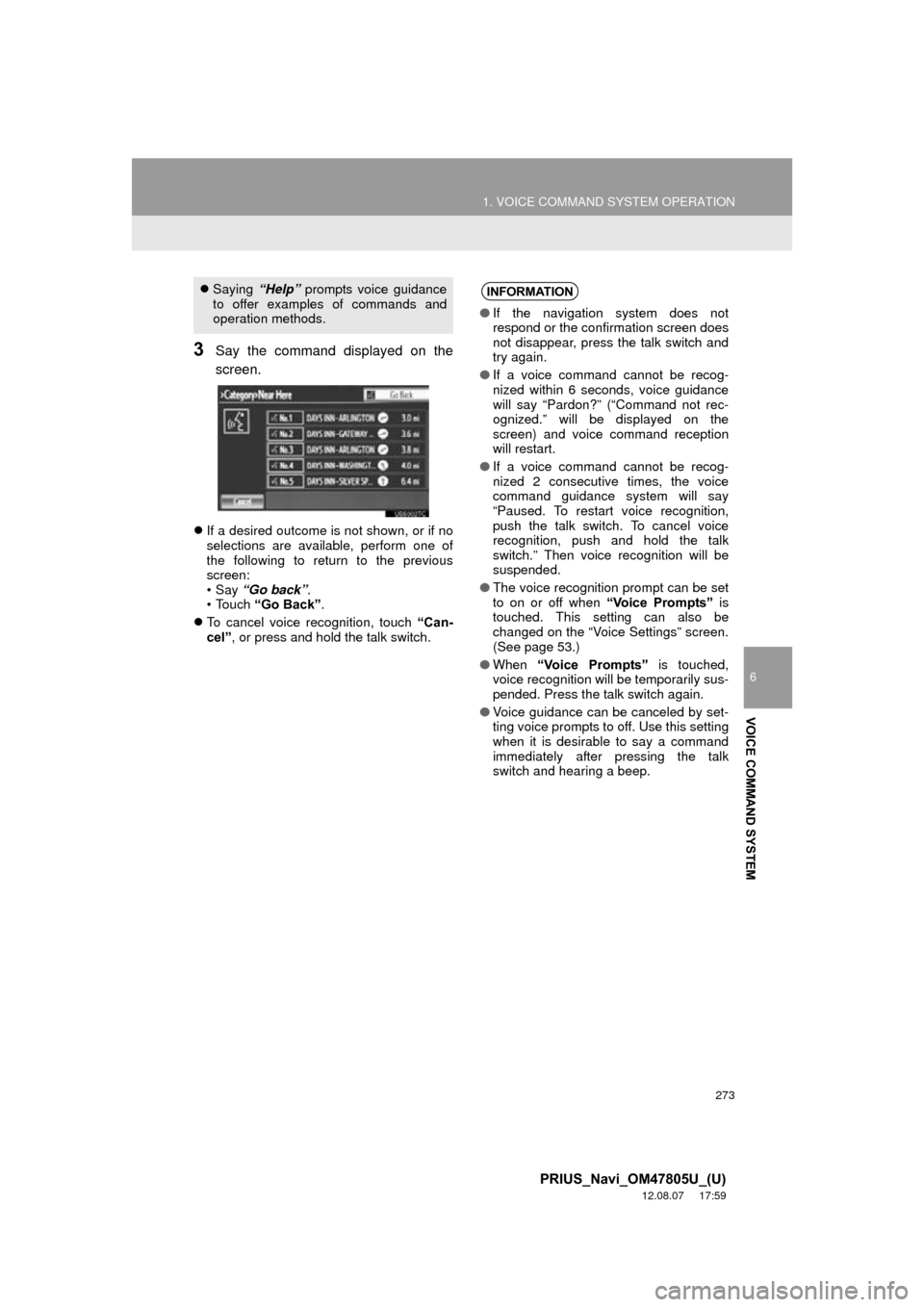
3Say the command displayed on the
screen.
If a desired outcome is not shown, or if no
selections are available, perform one of
the following to return to the previous
screen:
•Say “Go back” .
• Touch “Go Back” .
To cancel voice recognition, touch “Can-
cel” , or press and hold the talk switch.
Saying “Help” prompts voice guidance
to offer examples of commands and
operation methods.INFORMATION
● If the navigation system does not
respond or the confirmation screen does
not disappear, press the talk switch and
try again.
● If a voice command cannot be recog-
nized within 6 seconds, voice guidance
will say “Pardon?” (“Command not rec-
ognized.” will be displayed on the
screen) and voice command reception
will restart.
● If a voice command cannot be recog-
nized 2 consecutive times, the voice
command guidance system will say
“Paused. To restart voice recognition,
push the talk switch. To cancel voice
recognition, push and hold the talk
switch.” Then voice recognition will be
suspended.
● The voice recognition prompt can be set
to on or off when “Voice Prompts” is
touched. This setting can also be
changed on the “Voice Settings” screen.
(See page 53.)
● When “Voice Prompts” is touched,
voice recognition will be temporarily sus-
pended. Press the talk switch again.
● Voice guidance can be canceled by set-
ting voice prompts to off. Use this setting
when it is desirable to say a command
immediately after pressing the talk
switch and hearing a beep.
Page 291 of 359
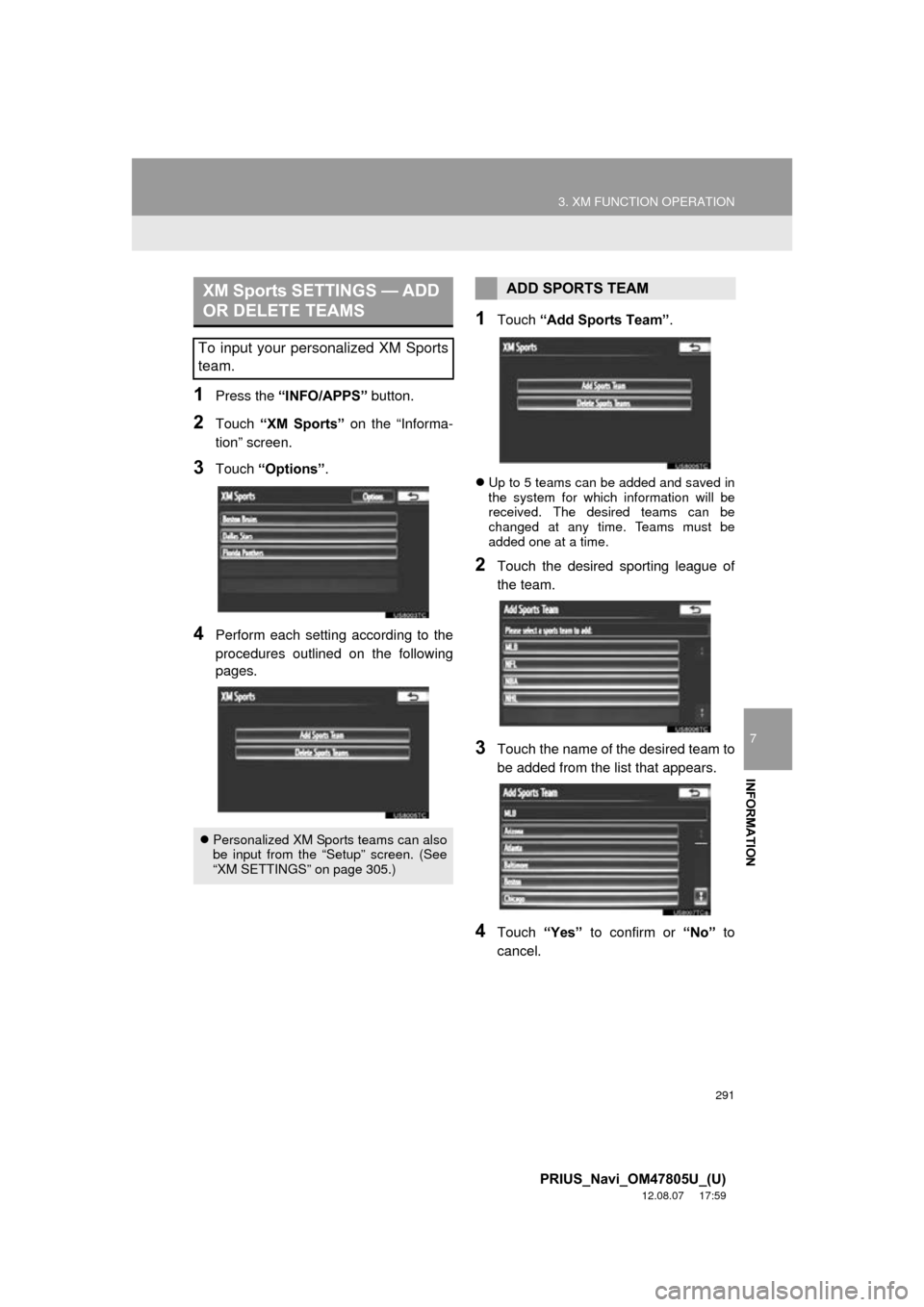
291
3. XM FUNCTION OPERATION
7
INFORMATION
PRIUS_Navi_OM47805U_(U)
12.08.07 17:59
1Press the “INFO/APPS” button.
2Touch “XM Sports” on the “Informa-
tion” screen.
3Touch “Options” .
4Perform each setting according to the
procedures outlined on the following
pages.
1Touch “Add Sports Team” .
Up to 5 teams can be added and saved in
the system for which information will be
received. The desired teams can be
changed at any time. Teams must be
added one at a time.
2Touch the desired sporting league of
the team.
3Touch the name of the desired team to
be added from the list that appears.
4Touch “Yes” to confirm or “No” to
cancel.
XM Sports SETTINGS — ADD
OR DELETE TEAMS
To input your personalized XM Sports
team.
Personalized XM Sports teams can also
be input from the “Setup” screen. (See
“XM SETTINGS” on page 305.)
ADD SPORTS TEAM