steering TOYOTA PRIUS 2013 3.G Navigation Manual
[x] Cancel search | Manufacturer: TOYOTA, Model Year: 2013, Model line: PRIUS, Model: TOYOTA PRIUS 2013 3.GPages: 359, PDF Size: 7.65 MB
Page 163 of 359
163
2. SETUP
4
PHONE
PRIUS_Navi_OM47805U_(U)
12.08.07 17:59
From “Contacts” screen
1Press the button or the switch
on the steering wheel.
2Touch “Contacts” on the “Phone”
screen.
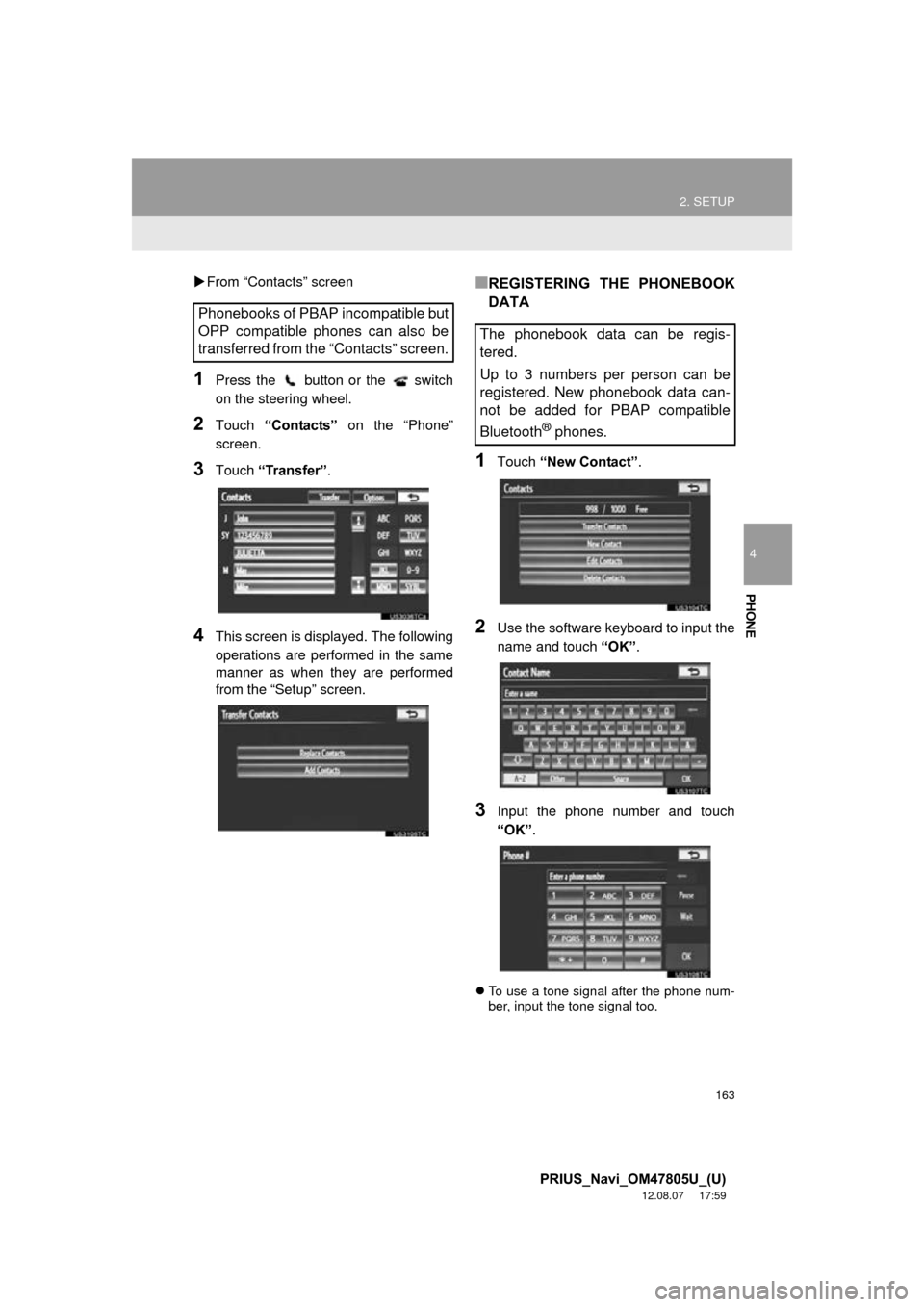
3Touch “Transfer” .
4This screen is displayed. The following
operations are performed in the same
manner as when they are performed
from the “Setup” screen.
■REGISTERING THE PHONEBOOK
DATA
1Touch “New Contact” .
2Use the software keyboard to input the
name and touch “OK”.
3Input the phone number and touch
“OK”.
To use a tone signal after the phone num-
ber, input the tone signal too.
Phonebooks of PBAP incompatible but
OPP compatible phones can also be
transferred from the “Contacts” screen.
The phonebook data can be regis-
tered.
Up to 3 numbers per person can be
registered. New phonebook data can-
not be added for PBAP compatible
Bluetooth
® phones.
Page 165 of 359
165
2. SETUP
4
PHONE
PRIUS_Navi_OM47805U_(U)
12.08.07 17:59
■THE “Edit Contact” SCREEN CAN
ALSO BE DISPLAYED
From the “Contact” screen
1Press the button or the switch
on the steering wheel.
2Touch “Contacts” on the “Phone”
screen.
3Touch the desired data from the list on
the “Contacts” screen.
4Touch “Options” .
5Touch “Edit”.
From the “Call History” screen
1Press the button or the switch
on the steering wheel.
2Touch “Call History” on the “Phone”
screen.
3Touch the desired number from the list
on the “Call History” screen.
4Touch “Add to Contacts” or “Update
Contact” .
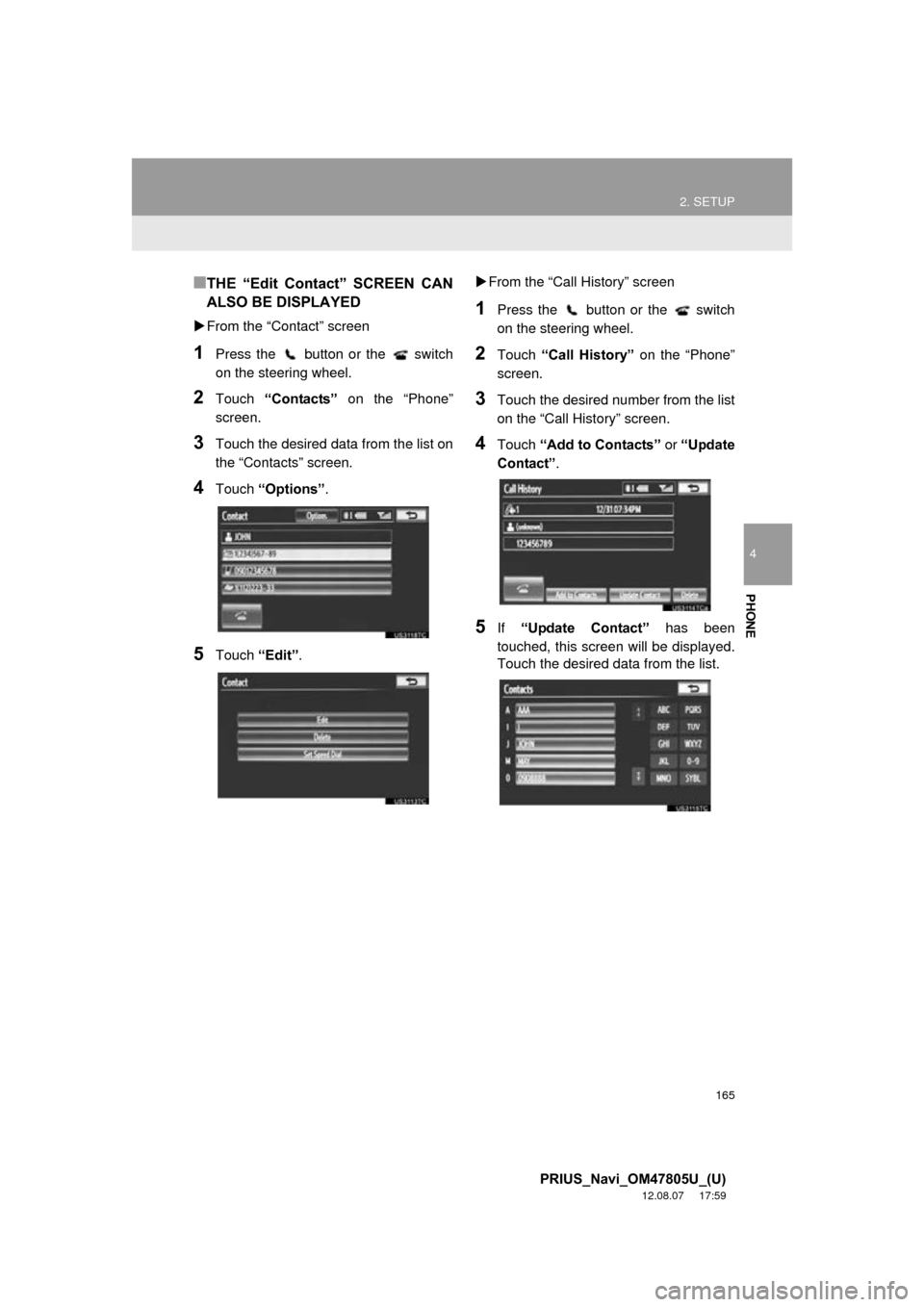
5If “Update Contact” has been
touched, this screen will be displayed.
Touch the desired data from the list.
Page 166 of 359
166
2. SETUP
PRIUS_Navi_OM47805U_(U)
12.08.07 17:59
■DELETING THE PHONEBOOK
DATA
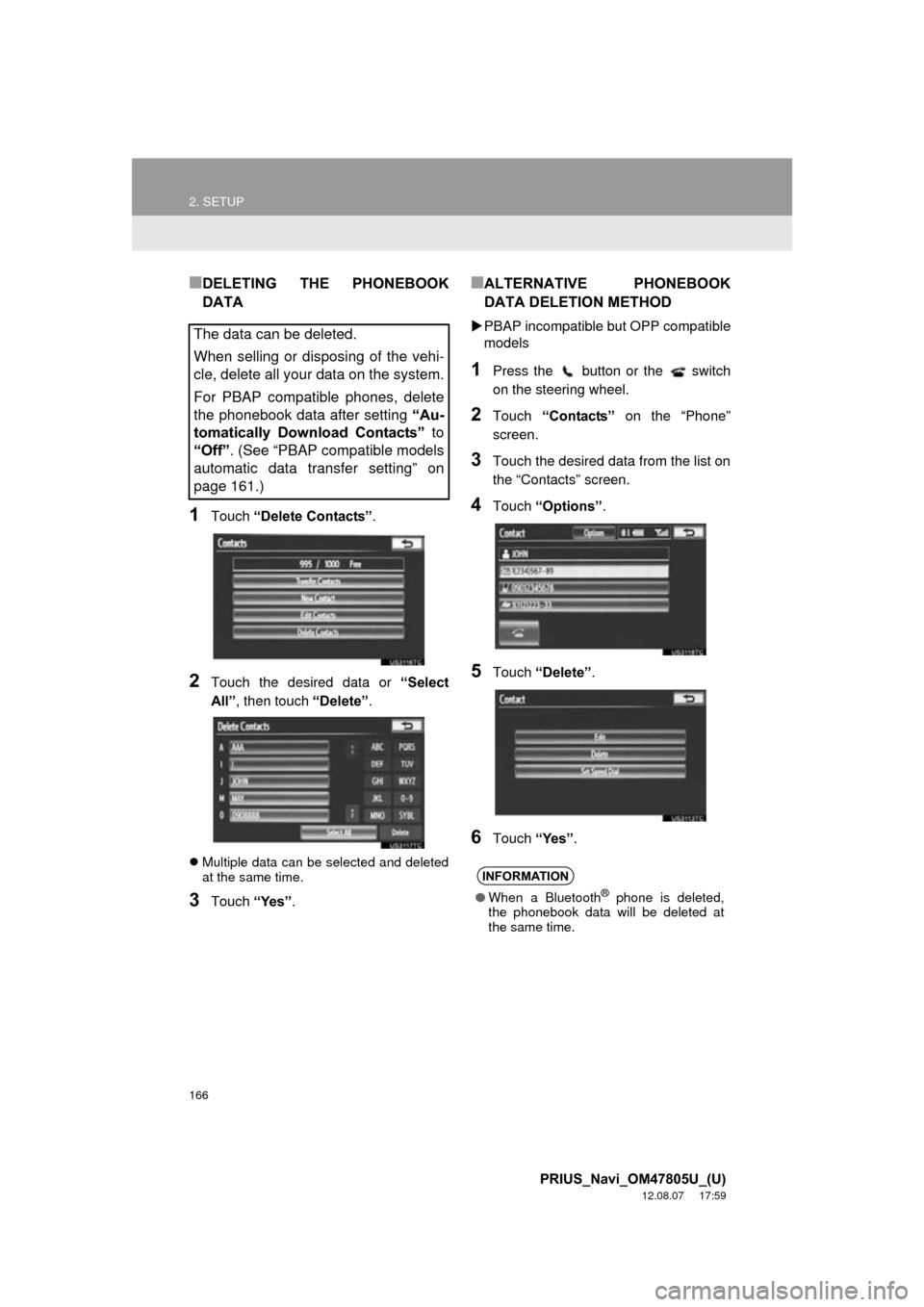
1Touch “Delete Contacts” .
2Touch the desired data or “Select
All” , then touch “Delete”.
Multiple data can be selected and deleted
at the same time.
3Touch “Yes”.
■ALTERNATIVE PHONEBOOK
DATA DELETION METHOD
PBAP incompatible but OPP compatible
models
1Press the button or the switch
on the steering wheel.
2Touch “Contacts” on the “Phone”
screen.
3Touch the desired data from the list on
the “Contacts” screen.
4Touch “Options” .
5Touch “Delete” .
6Touch “Yes”.
The data can be deleted.
When selling or disposing of the vehi-
cle, delete all your data on the system.
For PBAP compatible phones, delete
the phonebook data after setting “Au-
tomatically Download Contacts” to
“Off” . (See “PBAP compatible models
automatic data transfer setting” on
page 161.)
INFORMATION
● When a Bluetooth® phone is deleted,
the phonebook data will be deleted at
the same time.
Page 167 of 359
167
2. SETUP
4
PHONE
PRIUS_Navi_OM47805U_(U)
12.08.07 17:59
1Press the “SETUP” button.
2Touch “Phone” on the “Setup” screen.
3Touch “Phonebook” on the “Phone
Settings” screen.
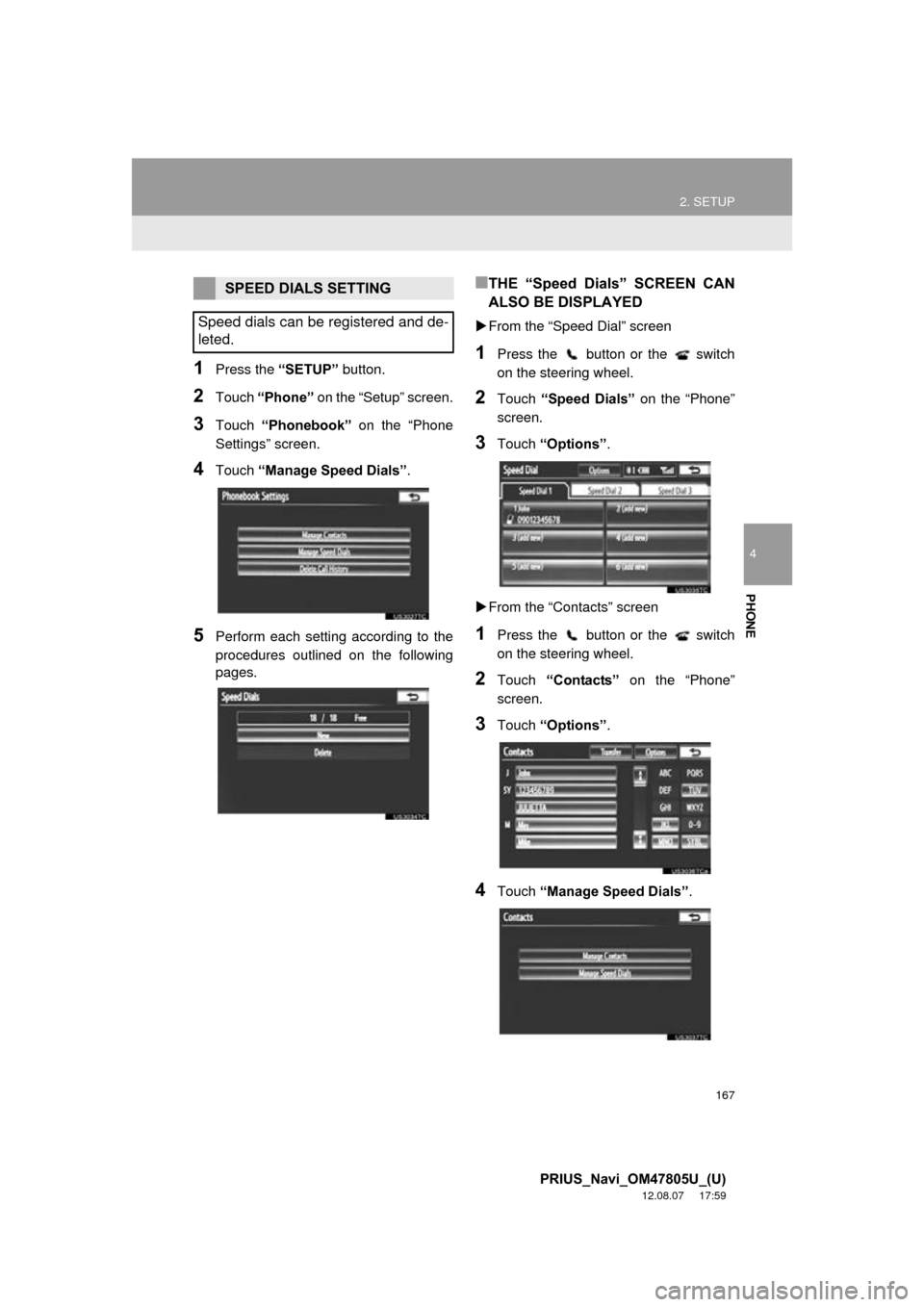
4Touch “Manage Speed Dials” .
5Perform each setting according to the
procedures outlined on the following
pages.
■THE “Speed Dials” SCREEN CAN
ALSO BE DISPLAYED
From the “Speed Dial” screen
1Press the button or the switch
on the steering wheel.
2Touch “Speed Dials” on the “Phone”
screen.
3Touch “Options”.
From the “Contacts” screen
1Press the button or the switch
on the steering wheel.
2Touch “Contacts” on the “Phone”
screen.
3Touch “Options”.
4Touch “Manage Speed Dials” .
SPEED DIALS SETTING
Speed dials can be registered and de-
leted.
Page 169 of 359
169
2. SETUP
4
PHONE
PRIUS_Navi_OM47805U_(U)
12.08.07 17:59
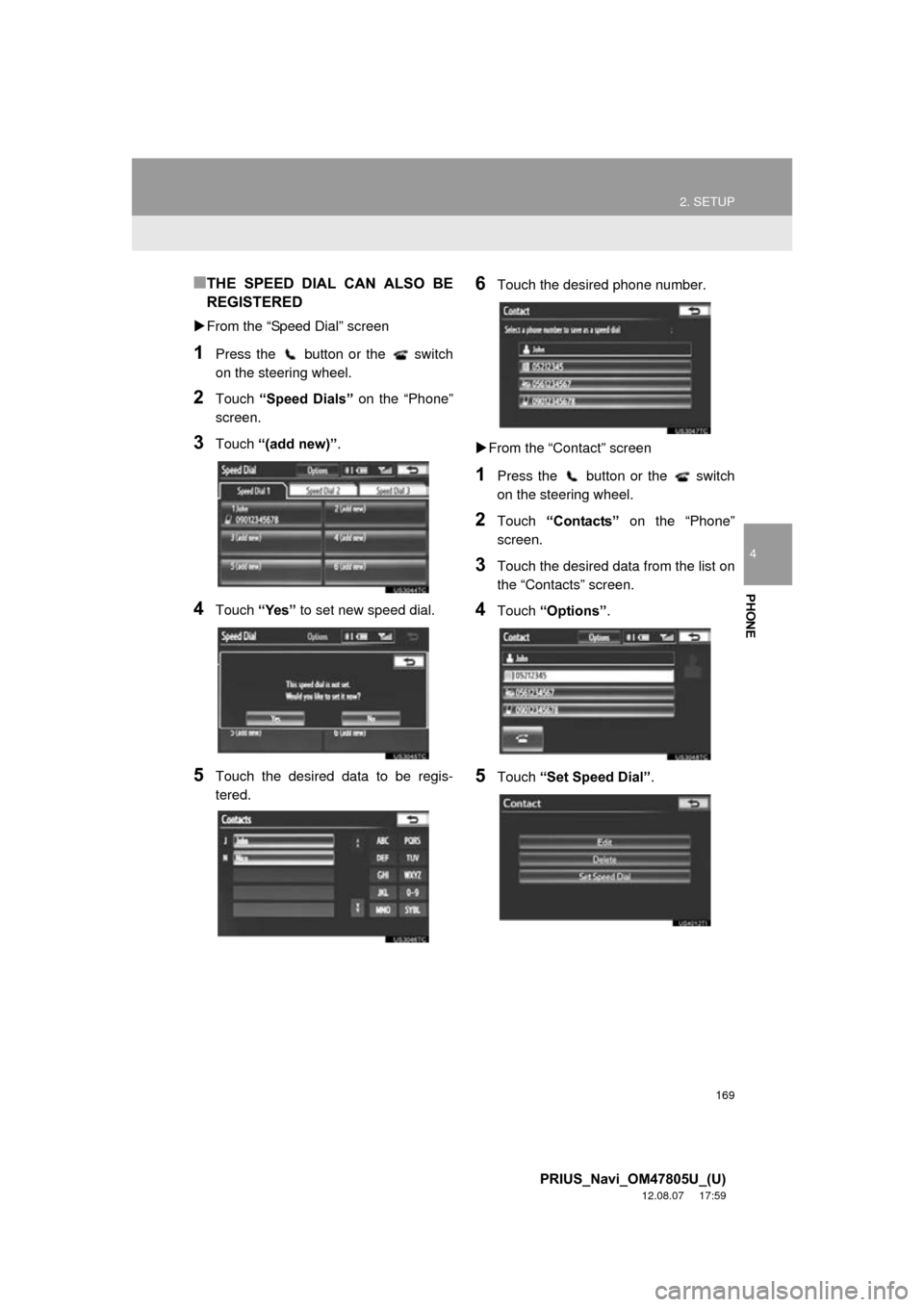
■THE SPEED DIAL CAN ALSO BE
REGISTERED
From the “Speed Dial” screen
1Press the button or the switch
on the steering wheel.
2Touch “Speed Dials” on the “Phone”
screen.
3Touch “(add new)” .
4Touch “Yes” to set new speed dial.
5Touch the desired data to be regis-
tered.
6Touch the desired phone number.
From the “Contact” screen
1Press the button or the switch
on the steering wheel.
2Touch “Contacts” on the “Phone”
screen.
3Touch the desired data from the list on
the “Contacts” screen.
4Touch “Options”.
5Touch “Set Speed Dial” .
Page 171 of 359
171
2. SETUP
4
PHONE
PRIUS_Navi_OM47805U_(U)
12.08.07 17:59
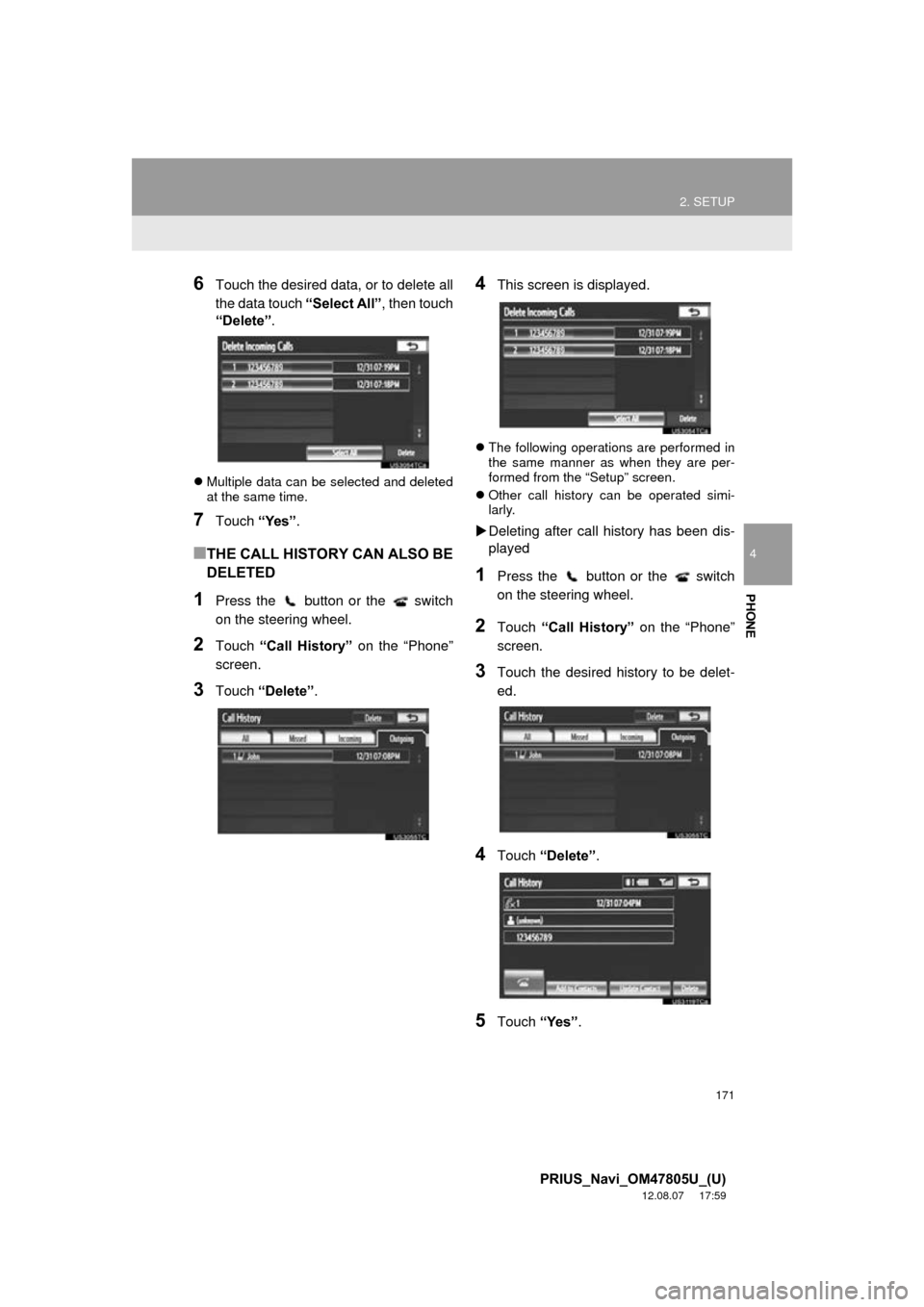
6Touch the desired data, or to delete all
the data touch “Select All”, then touch
“Delete” .
Multiple data can be selected and deleted
at the same time.
7Touch “Yes”.
■THE CALL HISTORY CAN ALSO BE
DELETED
1Press the button or the switch
on the steering wheel.
2Touch “Call History” on the “Phone”
screen.
3Touch “Delete” .
4This screen is displayed.
The following operations are performed in
the same manner as when they are per-
formed from the “Setup” screen.
Other call history can be operated simi-
larly.
Deleting after call history has been dis-
played
1Press the button or the switch
on the steering wheel.
2Touch “Call History” on the “Phone”
screen.
3Touch the desired history to be delet-
ed.
4Touch “Delete” .
5Touch “Yes”.
Page 172 of 359
172
2. SETUP
PRIUS_Navi_OM47805U_(U)
12.08.07 17:59
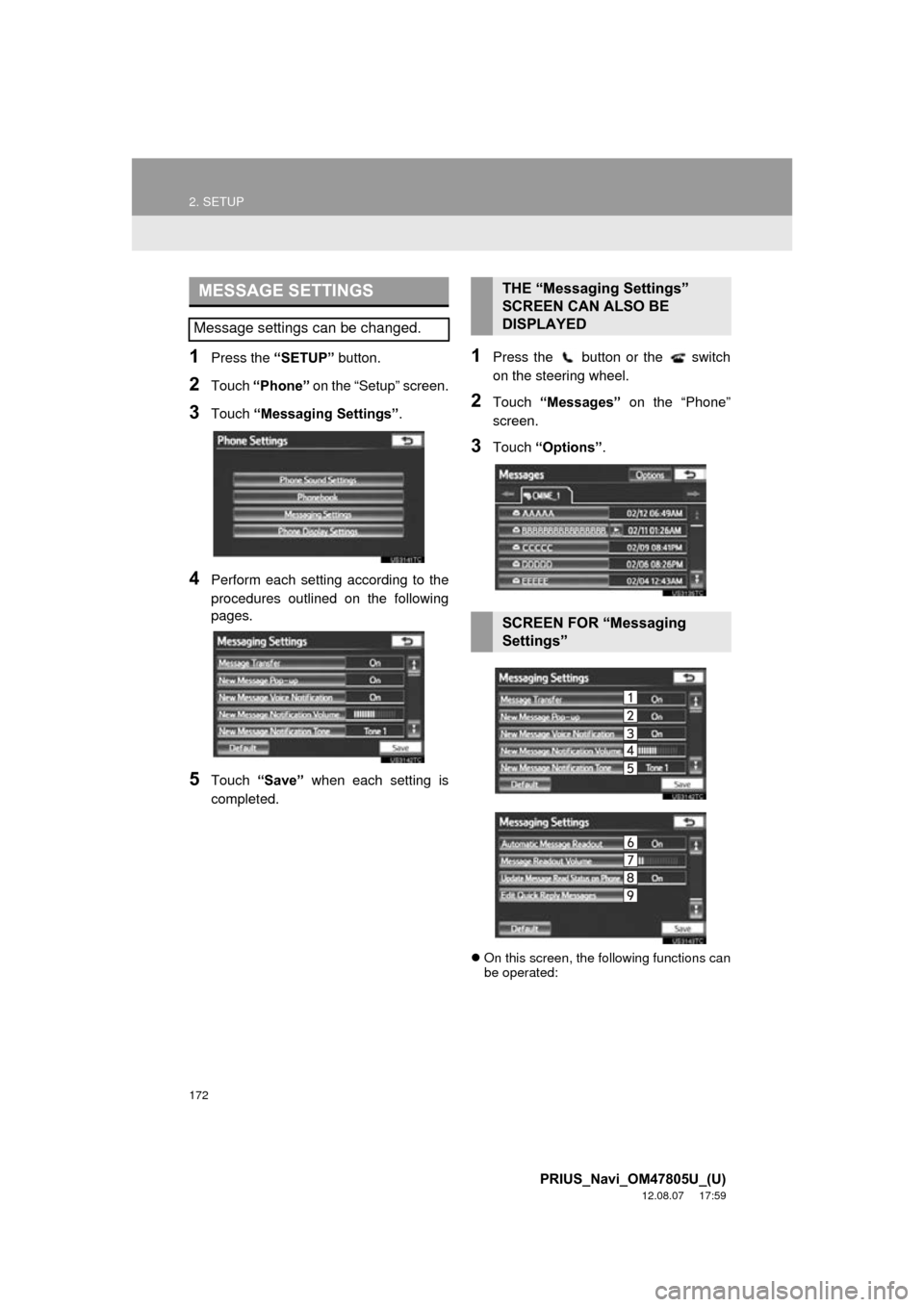
1Press the “SETUP” button.
2Touch “Phone” on the “Setup” screen.
3Touch “Messaging Settings” .
4Perform each setting according to the
procedures outlined on the following
pages.
5Touch “Save” when each setting is
completed.
1Press the button or the switch
on the steering wheel.
2Touch “Messages” on the “Phone”
screen.
3Touch “Options” .
On this screen, the following functions can
be operated:
MESSAGE SETTINGS
Message settings can be changed.
THE “Messaging Settings”
SCREEN CAN ALSO BE
DISPLAYED
SCREEN FOR “Messaging
Settings”
Page 177 of 359
177
2. SETUP
4
PHONE
PRIUS_Navi_OM47805U_(U)
12.08.07 17:59
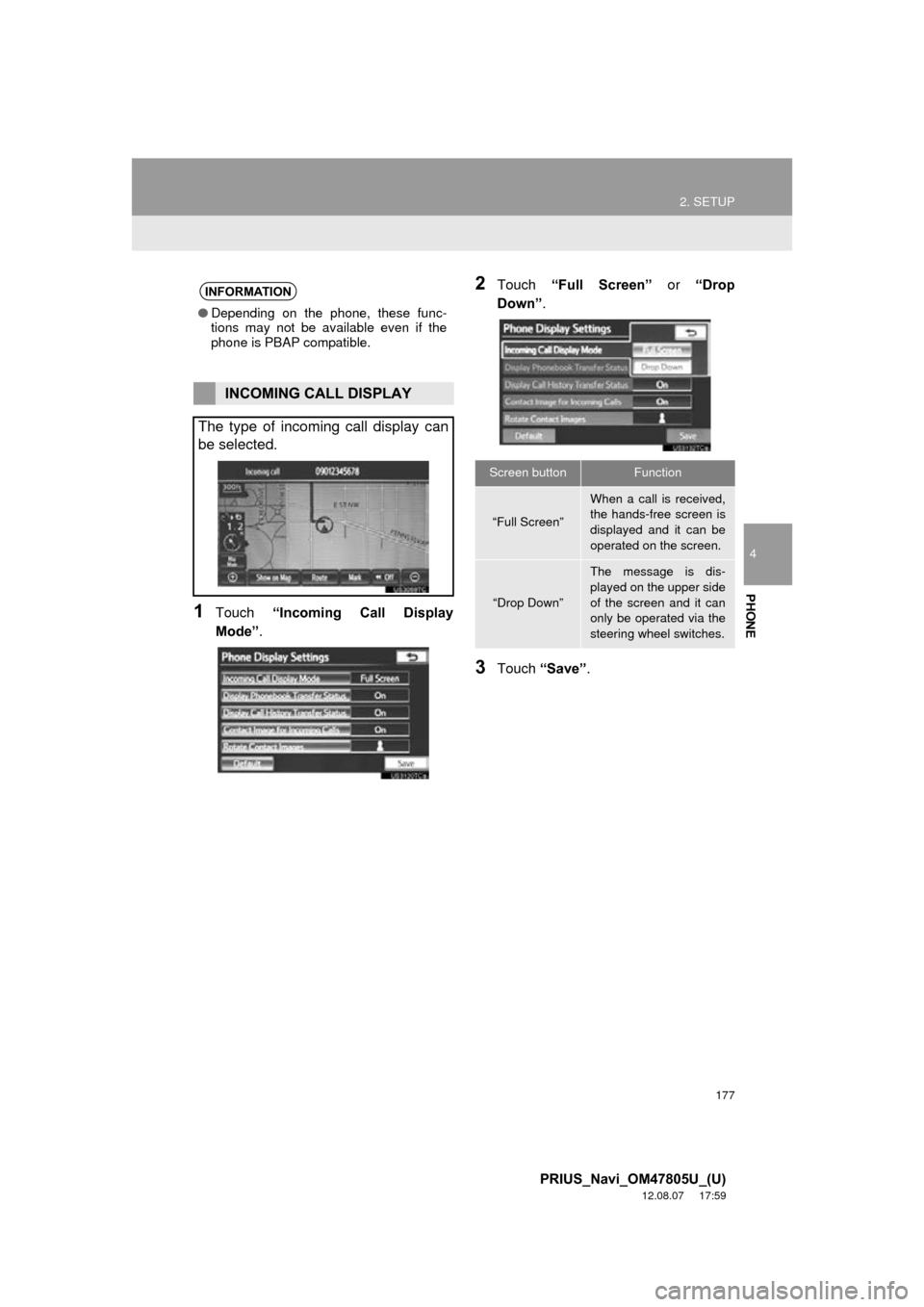
1Touch “Incoming Call Display
Mode” .
2Touch “Full Screen” or “Drop
Down”.
3Touch “Save” .
INFORMATION
●Depending on the phone, these func-
tions may not be available even if the
phone is PBAP compatible.
INCOMING CALL DISPLAY
The type of incoming call display can
be selected.
Screen buttonFunction
“Full Screen”
When a call is received,
the hands-free screen is
displayed and it can be
operated on the screen.
“Drop Down”
The message is dis-
played on the upper side
of the screen and it can
only be operated via the
steering wheel switches.
Page 191 of 359
5
191
1
2
3
4
5
6
7
8
9
PRIUS_Navi_OM47805U_(U)
12.08.07 17:59
5. RADIO OPERATION (XM Satellite Radio
BROADCAST) ........... ................ 209
HOW TO SUBSCRIBE TO AN
XM Satellite Radio............................. 209
DISPLAYING THE RADIO ID .............. 210
LISTENING TO SATELLITE RADIO ... 210
CHANNEL CATEGORY ...................... 211
PRESETTING A CHANNEL ................ 211
SELECTING A CHANNEL................... 211
DISPLAYING THE TITLE AND NAME 212
IF THE SATELLITE RADIO TUNER MALFUNCTIONS .............................. 213
6. RADIO OPERATION (INTERNET RADIO BROADCAST)............... 215
LISTENING TO INTERNET RADIO .... 215
7. DVD PLAYER OPERATION ........ 216
INSERTING A DISC ............................ 216
EJECTING A DISC .............................. 216
PLAYING A DISC ................................ 217
PLAYING AN AUDIO DISC ................. 218
PLAYING AN MP3/WMA DISC ........... 220
OPERATING A DVD DISC .................. 223
PLAYING A DVD DISC ....................... 224
DVD OPTIONS .................................... 225
IF THE PLAYER MALFUNCTIONS..... 234
DVD PLAYER AND DVD VIDEO DISC
INFORMATION ................................. 234
8. USB MEMORY OPERATION ...... 237
CONNECTING A USB MEMORY ........ 237
PLAYING A USB MEMORY ................ 238
9. iPod OPERATION ....................... 242
CONNECTING iPod ............................. 242
PLAYING iPod ..................................... 243
10. Bluetooth® AUDIO
OPERATION ............................. 246
CONNECTING A Bluetooth®
AUDIO PLAYER ................................ 249
PLAYING Bluetooth
® AUDIO ............... 251
11. AUDIO/VIDEO REMOTE CONTROLS (STEERING
SWITCHES)............................... 256
12. AUDIO/VIDEO SYSTEM OPERATING HINTS.................. 258
RADIO RECEPTION ............................ 258
iPod ...................................................... 259
USB MEMORY .................................... 260
CARING FOR YOUR DVD PLAYER
AND DISC ......................................... 260
MP3/WMA FILES ................................. 262
CD-R AND CD-RW DISCS .................. 264
TERMS ................................................ 264
1. AUDIO SETTINGS ...................... 268
HD Radio™ SYSTEM SETTINGS ....... 268
iPod SETTINGS ................................... 269
2SETUP
AUDIO/VIDEO SYSTEM
Page 215 of 359
215
1. AUDIO/VIDEO SYSTEM OPERATION
5
AUDIO/VIDEO SYSTEM
PRIUS_Navi_OM47805U_(U)
12.08.08 13:01
6. RADIO OPERATION (INTERNET RADIO BROADCAST)
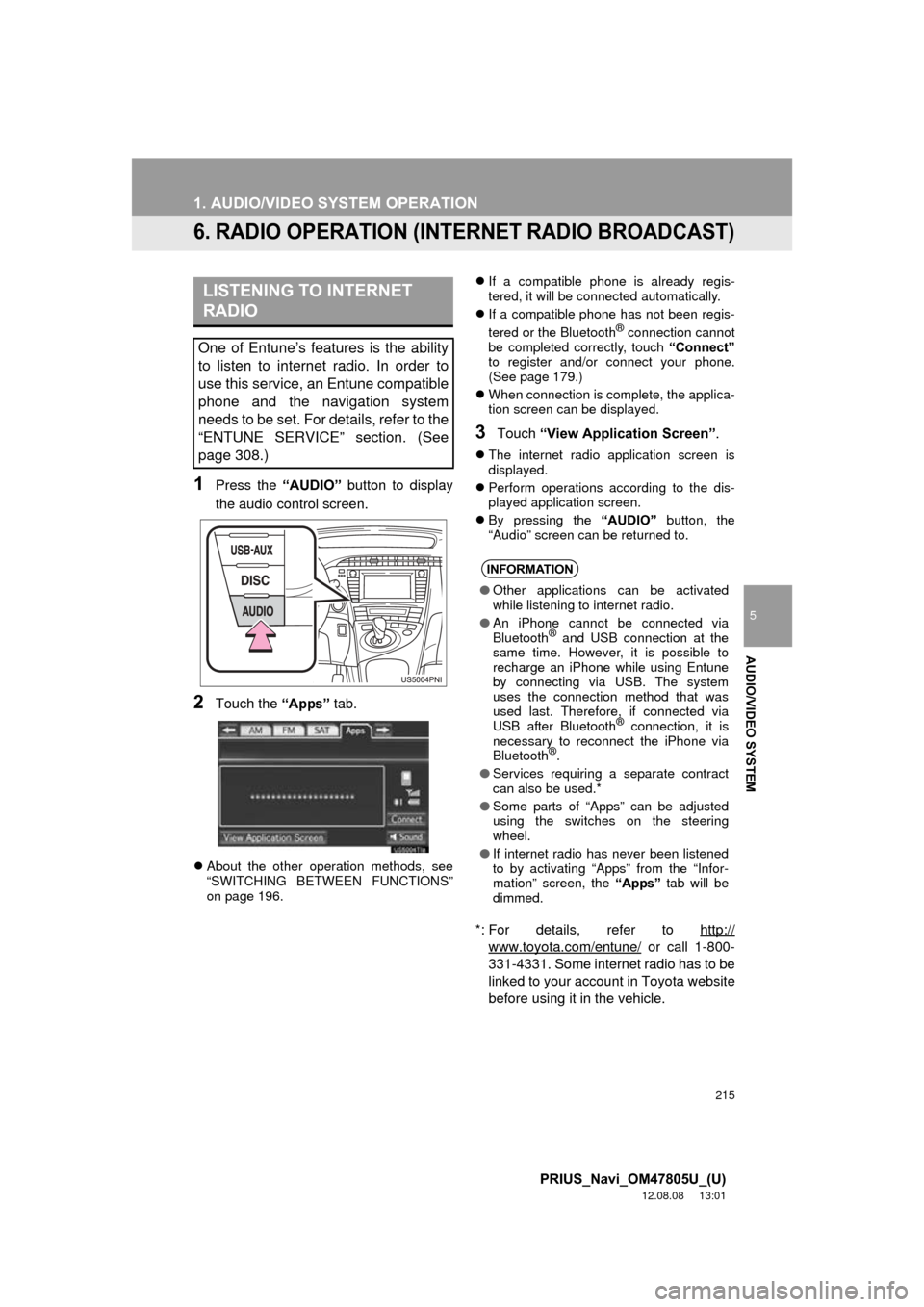
1Press the “AUDIO” button to display
the audio control screen.
2Touch the “Apps” tab.
About the other operation methods, see
“SWITCHING BETWEEN FUNCTIONS”
on page 196.
If a compatible phone is already regis-
tered, it will be connected automatically.
If a compatible phone has not been regis-
tered or the Bluetooth
® connection cannot
be completed correctly, touch “Connect”
to register and/or connect your phone.
(See page 179.)
When connection is complete, the applica-
tion screen can be displayed.
3Touch “View Application Screen” .
The internet radio application screen is
displayed.
Perform operations according to the dis-
played application screen.
By pressing the “AUDIO” button, the
“Audio” screen can be returned to.
*: For details, refer to http://
www.toyota.com/entune/ or call 1-800-
331-4331. Some internet radio has to be
linked to your account in Toyota website
before using it in the vehicle.
LISTENING TO INTERNET
RADIO
One of Entune’s features is the ability
to listen to internet radio. In order to
use this service, an Entune compatible
phone and the navigation system
needs to be set. For details, refer to the
“ENTUNE SERVICE” section. (See
page 308.)
INFORMATION
● Other applications can be activated
while listening to internet radio.
● An iPhone cannot be connected via
Bluetooth
® and USB connection at the
same time. However, it is possible to
recharge an iPhone while using Entune
by connecting via USB. The system
uses the connection method that was
used last. Therefore, if connected via
USB after Bluetooth
® connection, it is
necessary to reconnect the iPhone via
Bluetooth
®.
● Services requiring a separate contract
can also be used.*
● Some parts of “Apps” can be adjusted
using the switches on the steering
wheel.
● If internet radio has never been listened
to by activating “Apps” from the “Infor-
mation” screen, the “Apps” tab will be
dimmed.