Interior features TOYOTA PRIUS 2013 3.G User Guide
[x] Cancel search | Manufacturer: TOYOTA, Model Year: 2013, Model line: PRIUS, Model: TOYOTA PRIUS 2013 3.GPages: 640, PDF Size: 11.67 MB
Page 343 of 640
343
3-1. Using the air conditioning system and defogger
PRIUS_OM_OM47791U_(U)
3
Interior features
Solar Ventilation System
: If equipped
The Solar Ventilation System uses energy provided by solar panel
built into the roof to operate a fa n contained within the air condition-
ing system, allowing ventilation of the vehicle interior when the vehi-
cle is parked in direct sunlight.
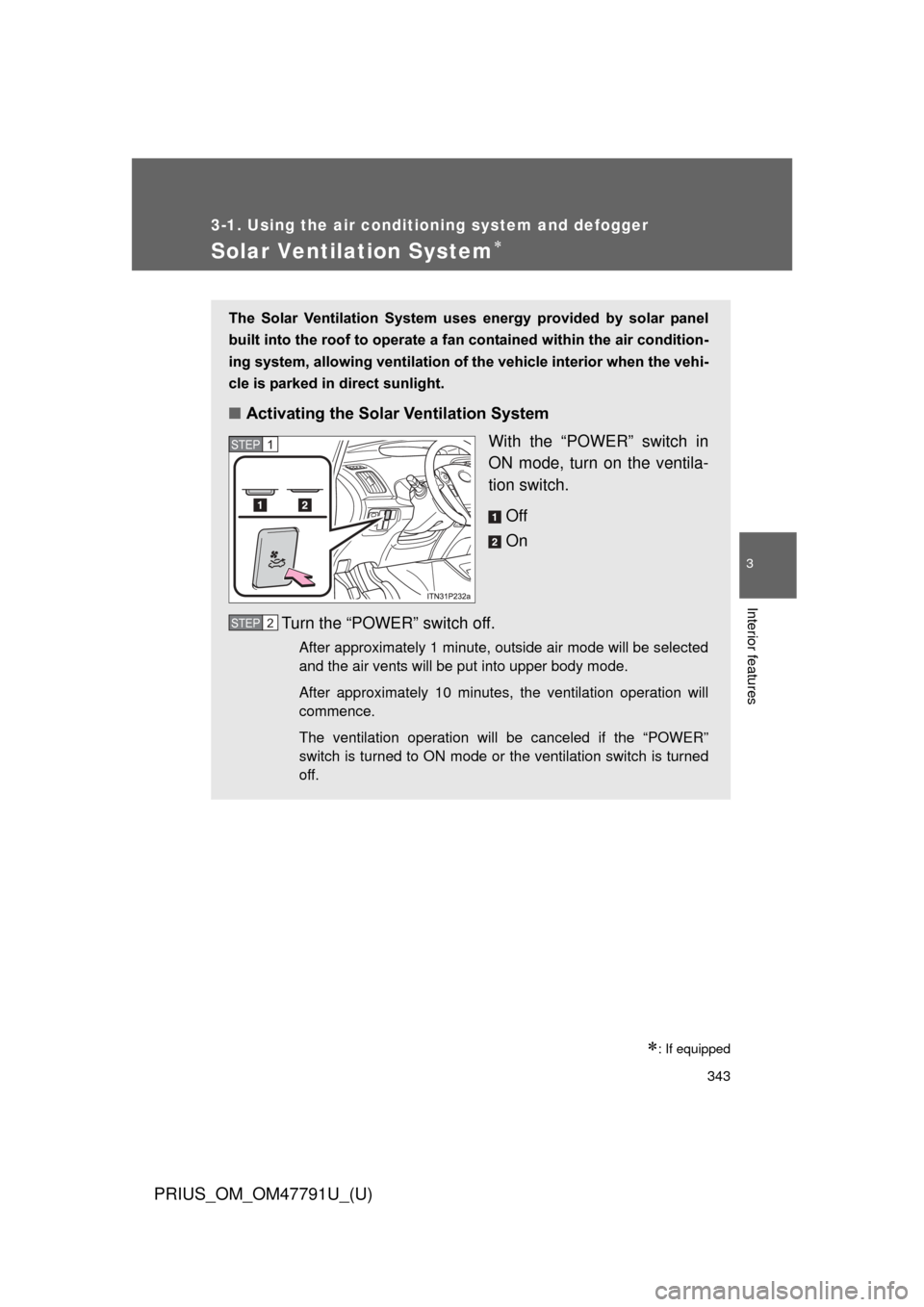
■ Activating the Solar Ventilation System
With the “POWER” switch in
ON mode, turn on the ventila-
tion switch.
Off
On
Turn the “POWER” switch off.
After approximately 1 minute, outside air mode will be selected
and the air vents will be put into upper body mode.
After approximately 10 minutes, the ventilation operation will
commence.
The ventilation operation will be canceled if the “POWER”
switch is turned to ON mode or the ventilation switch is turned
off.
STEP 1
STEP 2
Page 345 of 640
345
3-1. Using the air conditioning system
and defogger
PRIUS_OM_OM47791U_(U)
3
Interior features
CAUTION
■Solar Ventilation System precautions
● Do not use the system if people are inside the vehicle.
The Solar Ventilation System is not intended to ensure the performance of
the air conditioning system. Do not leave children or pets in the vehicle.
The temperature of the interior will remain high, possibly resulting in heat-
stroke, dehydration, or even death.
● This system should be used only for the relief of discomfort when entering
the vehicle, and should not be used for other purposes.
■ Precautions for moon roof with Solar Panel
P. 132
Page 347 of 640
347
3-1. Using the air conditioning system
and defogger
PRIUS_OM_OM47791U_(U)
3
Interior features
■Using the Remote Air Conditioning System effectively
Efficiency can be increased by using the system in conjunction with the
Solar Ventilation System. ( P. 343)
■ When leaving the vehicle
● Check that the headlights are switched to either off or “AUTO”.
● Check that the wiper switch is turned off.
● Check that all windows are closed.
■ Remote Air Conditioning System automatic shut-off
The system will automatically shut off under the following conditions:
● About 3 minutes have passed since operation began
● Any one of the operating conditions is not met
The system may also shut off if the charge level of the hybrid battery (trac-
tion battery) drops to low. ( P. 44)
■ Conditions aff ecting operation
The system may not start in the following situations:
● The charge level of the hybrid battery (traction battery) is low ( P. 44)
● The air conditioning temperature is set at a high level or outside tempera-
ture is low
● When the vehicle has been left parked for a number of days
● When the hybrid system is cool (for example, after being left for a long
time in low temperatures)
Page 349 of 640
349
3-1. Using the air conditioning system
and defogger
PRIUS_OM_OM47791U_(U)
3
Interior features
CAUTION
■Precautions for the Remote Air Conditioning System
● Do not use the system if people are in the vehicle.
• Even when the system is in use, the internal temperature may still
reach a high level due to features such as the automatic shut-off. Chil-
dren and pets left inside the vehicle may suffer heatstroke or dehydra-
tion, or could result in death or serious injury.
• The wipers can be operated during system operation. Children or pets left inside the vehicle may mistakenly operate these and cause an acci-
dent.
● Depending on the surrounding environment, signals from the wireless
switch may transmit further than expected. Pay appropriate attention to
the vehicle’s surroundings and use the switch only when necessary.
● Turn the wipers off. If the Remote Air Conditioning System operates while
the wiper switch is in the on position, the wipers may operate and objects
may get caught in the wiper blades.
● Do not operate the if the hood is open. The air conditioning may
operate unintentionally and objects may be drawn into the electrical cool-
ing fan.
NOTICE
■ To prevent the hybrid battery (tractio n battery) from being discharged
through incorrect operation
Use the only when necessary.
Page 351 of 640
351
PRIUS_OM_OM47791U_(U)
3
Interior features
3-2. Using the audio system
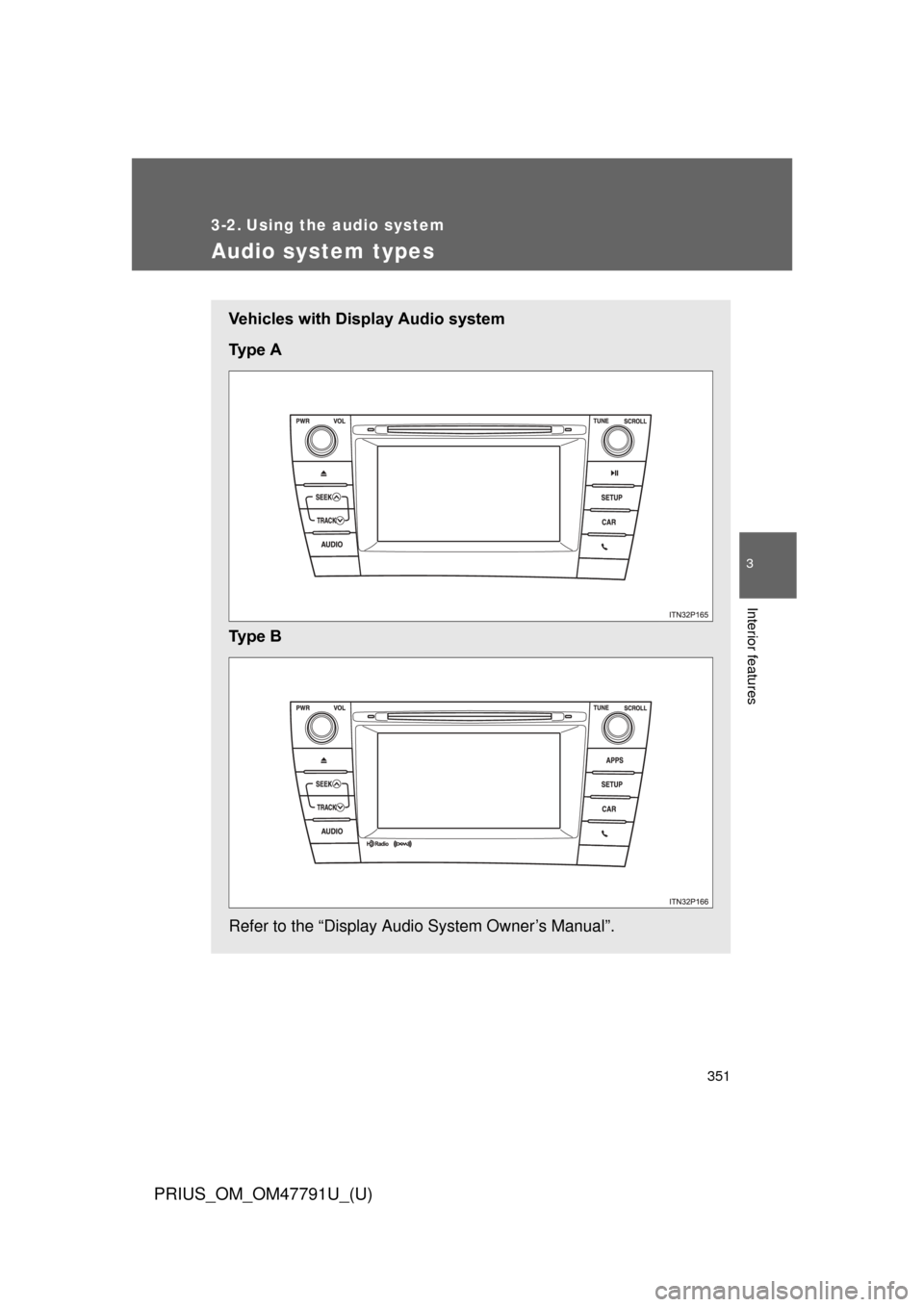
Audio system types
Vehicles with Display Audio system
Ty p e A
Ty p e B
Refer to the “Display Audio System Owner’s Manual”.
Page 353 of 640
353
3-2. Using the audio system
PRIUS_OM_OM47791U_(U)
3
Interior features
■
About Bluetooth® (vehicles with Display Audio system)
CAUTION
■Certification for the Display Audio system
FCC ID: ACJ932CQ-US70G0
● Part 15 of the FCC Rules
FCC Warning:
Any unauthorized changes or modifications to this equipment will void the
user’s authority to operate this device.
● Laser products
• Do not take this unit apart or attempt to make any changes by yourself.
This is an intricate unit that uses a laser pickup to retrieve information
from the surface of compact discs. The laser is carefully shielded so
that its rays remain inside the cabinet. Therefore, never try to disas-
semble the player or alter any of its parts since you may be exposed to
laser rays and dangerous voltages.
• This product utilizes a laser. Use of controls or adjustments or performance of procedures other
than those specified herein may result in hazardous radiation expo-
sure.
Bluetooth is a registered trade mark of
Bluetooth SIG. Inc.
The Bluetooth word mark and logos are
owned by the Bluetooth SIG, Inc. and any
use of such marks by Panasonic Corpo-
ration is under license.
Other trademarks and trade names are
those of their respective owners.
Page 355 of 640
355
3-2. Using the audio system
PRIUS_OM_OM47791U_(U)
3
Interior features
CAUTION
Under Industry Canada regulations, this radio transmitter may only operate
using an antenna of a type and maximum (or lesser) gain approved for the
transmitter by Industry Canada. To reduce potential radio interference to
other users, the antenna type and its gain should be so chosen that the equi-
valent isotropically radiated power (e.i.r.p.) is not more than that necessary
for successful communication.
Conformément à la réglementation d’Industrie Canada, le présent émetteur
radio peut fonctionner avec une antenne d’un type et d’un gain maximal (ou
inférieur) approuvé pour l’émetteur par Industrie Canada. Dans le but de
réduire les risques de brouillage radioélectrique à l’intention des autres utili-
sateurs, il faut choisir le type d’antenne et son gain de sorte que la puis-
sance isotrope rayonnée équivalente (p.i.r.e.) ne dépasse pas l’intensité
nécessaire à l’établissement d’une communication satisfaisante.
Page 357 of 640
357
PRIUS_OM_OM47791U_(U)
3
Interior features
3-3. Using the interior lights
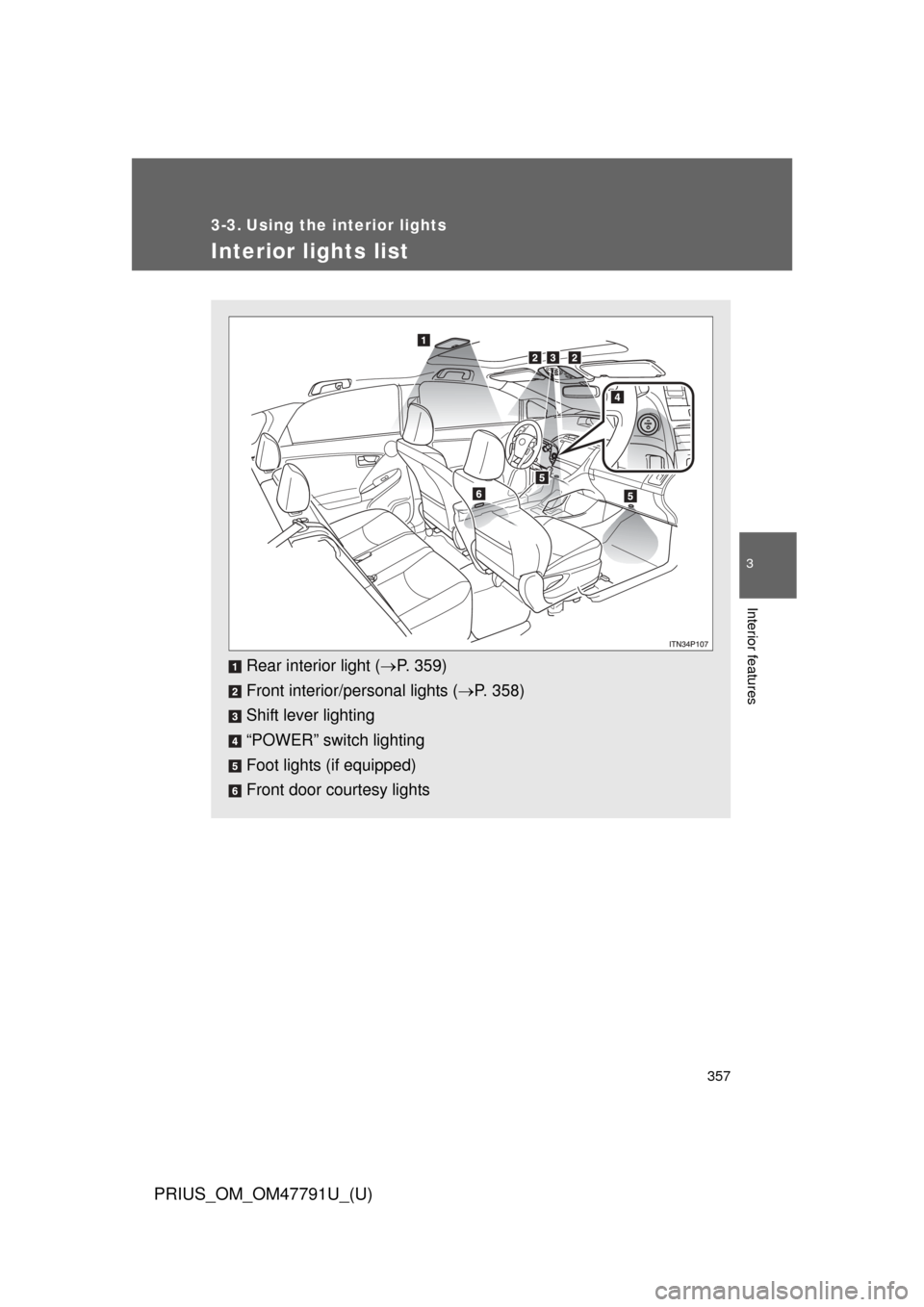
Interior lights list
Rear interior light (P. 359)
Front interior/personal lights ( P. 358)
Shift lever lighting
“POWER” switch lighting
Foot lights (if equipped)
Front door courtesy lights
Page 359 of 640
359
3-3. Using the interior lights
PRIUS_OM_OM47791U_(U)
3
Interior features
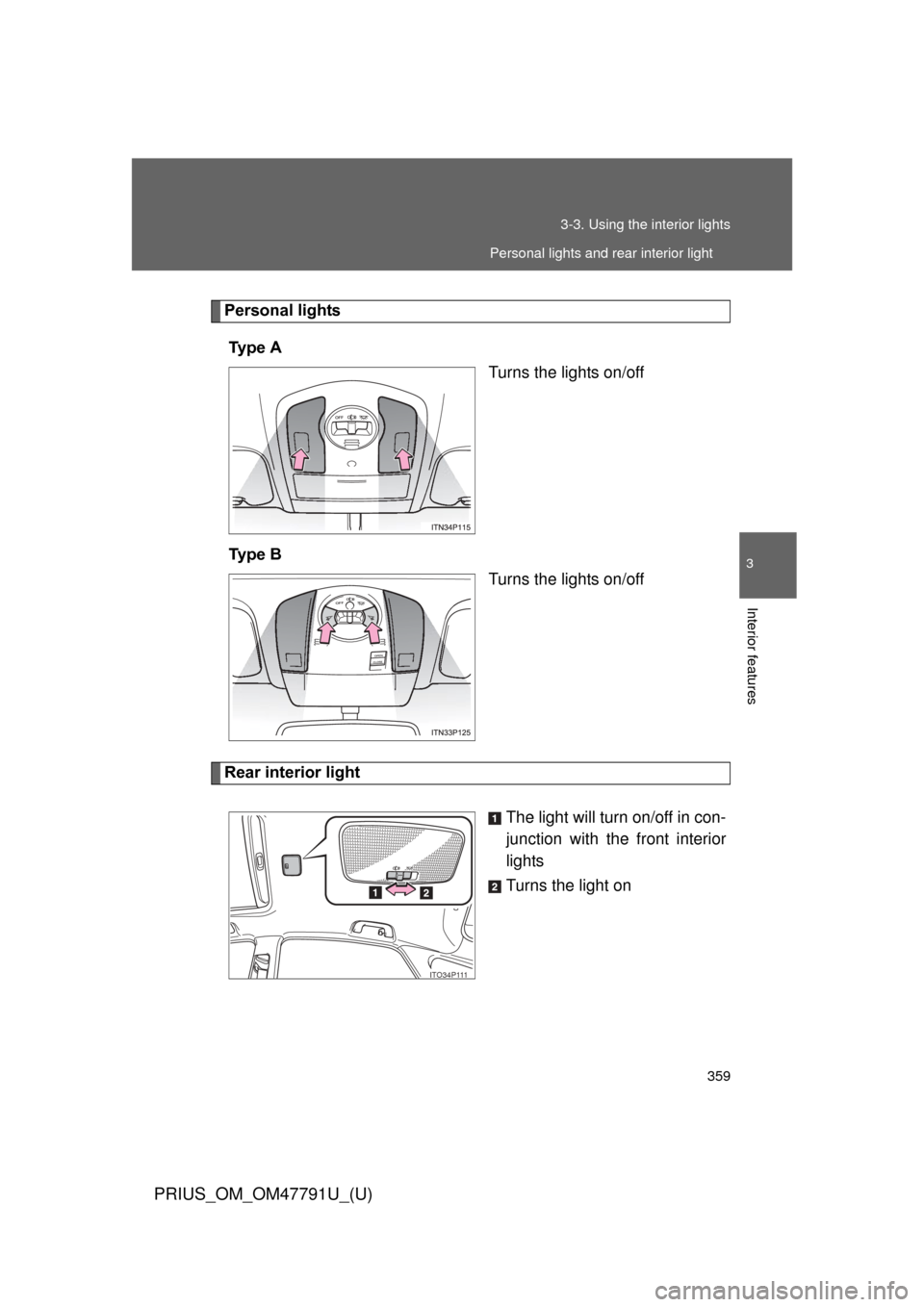
Personal lights
Ty p e A Turns the lights on/off
Ty p e B Turns the lights on/off
Rear interior light
The light will turn on/off in con-
junction with the front interior
lights
Turns the light on
ITO34P111
Personal lights and rear interior light
Page 360 of 640

360 3-3. Using the interior lights
PRIUS_OM_OM47791U_(U)
■Illuminated entry system
The lights automatically turn on/off according to “POWER” switch mode, the
presence of the electronic key, whether the doors are locked/unlocked, and
whether the doors are opened/closed.
■ To prevent 12-volt battery discharge
If the interior lights remain on when the door is not fully closed and the inte-
rior light switch (door position on/off) is on, the lights will go off automatically
after 20 minutes.
■ Customization
Setting (e.g. The time elapsed before lights turn off) can be changed.
(Customizable features P. 600)
NOTICE
■To prevent 12-volt battery discharge
Do not leave the lights on longer than necessary when the hybrid system is
off.
Rear interior light