air conditioning TOYOTA PRIUS 2013 3.G User Guide
[x] Cancel search | Manufacturer: TOYOTA, Model Year: 2013, Model line: PRIUS, Model: TOYOTA PRIUS 2013 3.GPages: 640, PDF Size: 11.67 MB
Page 256 of 640
256 2-3. Operating the lights and windshield wipers
PRIUS_OM_OM47791U_(U)
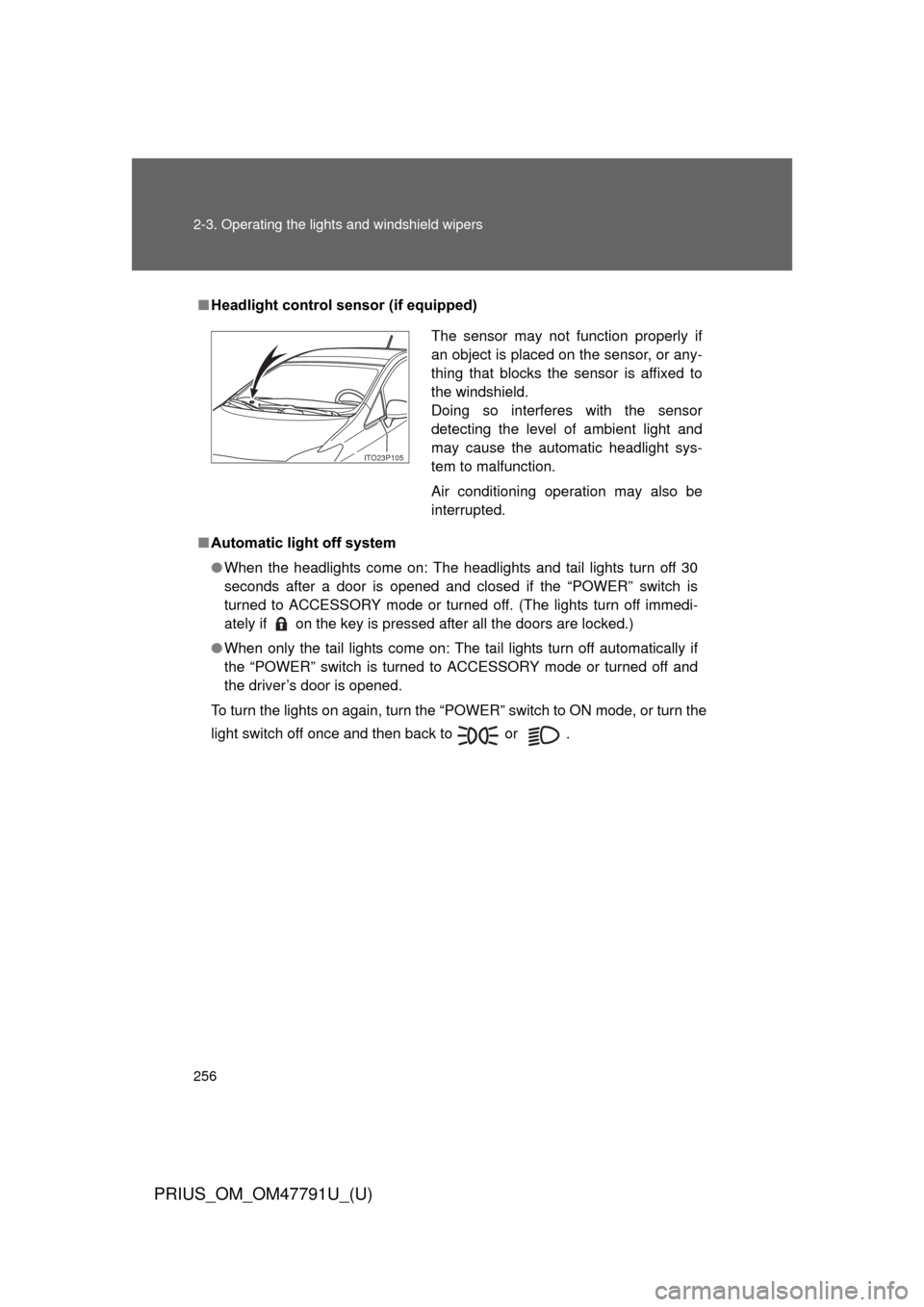
■Headlight control sensor (if equipped)
■ Automatic light off system
● When the headlights come on: The headlights and tail lights turn off 30
seconds after a door is opened and closed if the “POWER” switch is
turned to ACCESSORY mode or turned off. (The lights turn off immedi-
ately if on the key is pressed after all the doors are locked.)
● When only the tail lights come on: The tail lights turn off automatically if
the “POWER” switch is turned to ACCESSORY mode or turned off and
the driver’s door is opened.
To turn the lights on again, turn the “POWER” switch to ON mode, or turn the
light switch off once and then back to or .
The sensor may not function properly if
an object is placed on the sensor, or any-
thing that blocks the sensor is affixed to
the windshield.
Doing so interferes with the sensor
detecting the level of ambient light and
may cause the automatic headlight sys-
tem to malfunction.
Air conditioning operation may also be
interrupted.
ITO23P105
Page 329 of 640
Interior features3
329
PRIUS_OM_OM47791U_(U)
3-1. Using the air conditioning system and defogger
Air conditioning system .... 330
Using the steering wheel climate remote control
switches ......................... 341
Solar Ventilation System ........................... 343
Remote Air Conditioning System ........................... 346
Rear window and outside rear view mirror
defoggers switch ............ 350 3-2. Using the audio system
Audio system types .......... 351
Using the AUX port/USB port ................................. 356
3-3. Using the interior lights Interior lights list ............... 357
• Front interior lights ......... 358
• Personal lights ............... 359
• Rear interior light ........... 359
3-4. Using the storage features List of storage features .... 361
• Glove boxes ................... 362
• Console box ................... 363
• Cup holders ................... 364
• Bottle holders ................. 366
• Auxiliary boxes ............... 367
3-5. Other interior features Sun visors ........................ 368
Vanity mirrors ................... 369
Outside temperature display............................ 370
Power outlets ................... 371
Seat heaters..................... 373
Armrest ............................ 375
Assist grips....................... 376
Floor mats ........................ 377
Luggage compartment features .......................... 379
Garage door opener......... 385
Safety Connect ................ 393
Page 330 of 640
330
PRIUS_OM_OM47791U_(U)
3-1. Using the air conditioning system and defogger
Air conditioning system
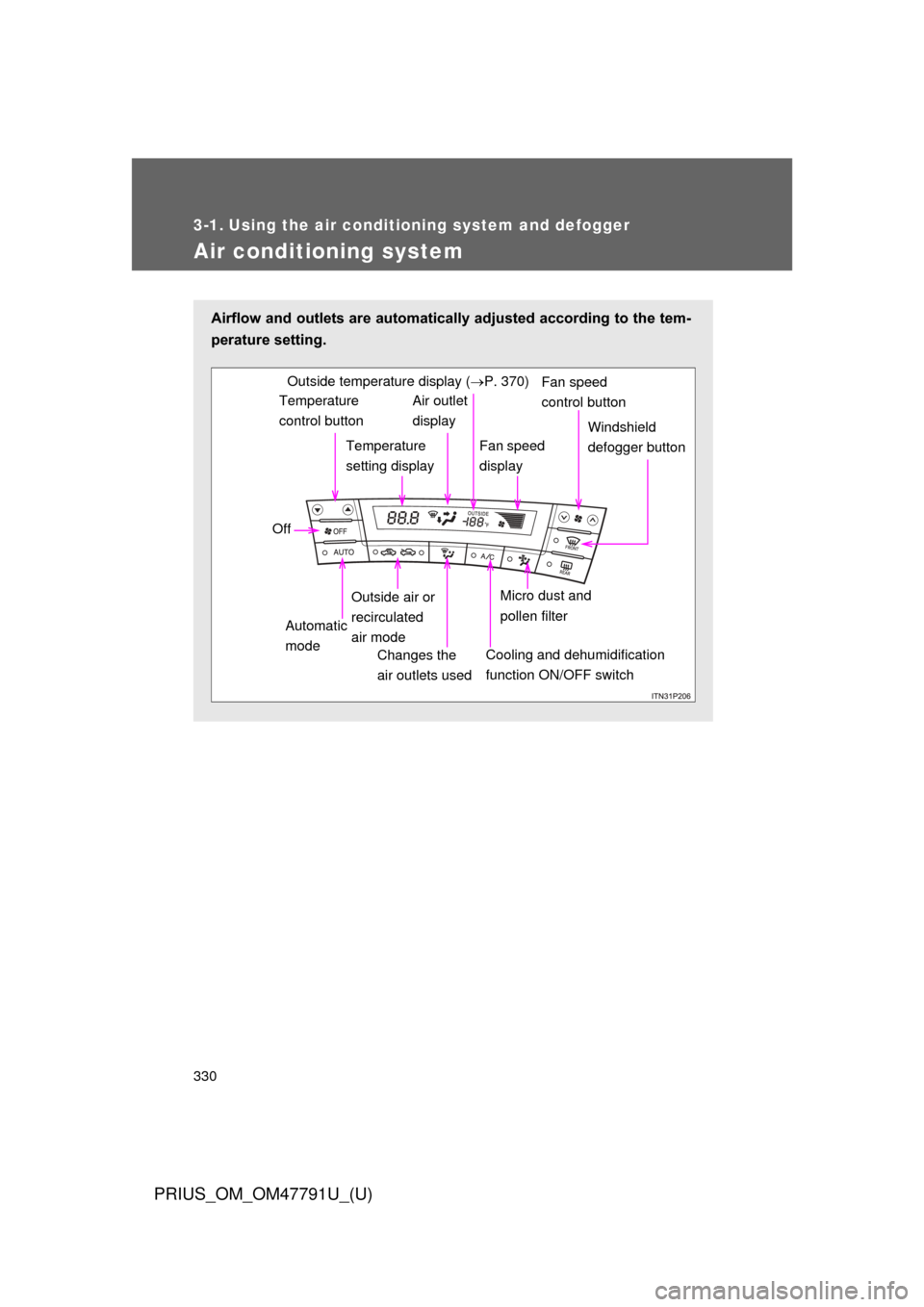
Airflow and outlets are automatically adjusted according to the tem-
perature setting.
Temperature
control buttonTemperature
setting displayAir outlet
display
Fan speed
display Windshield
defogger button
Off
Automatic
mode Outside air or
recirculated
air mode
Changes the
air outlets used
Fan speed
control buttonOutside temperature display ( P. 370)
Micro dust and
pollen filter
Cooling and dehumidification
function ON/OFF switch
Page 331 of 640
331
3-1. Using the air conditioning system
and defogger
PRIUS_OM_OM47791U_(U)
3
Interior features
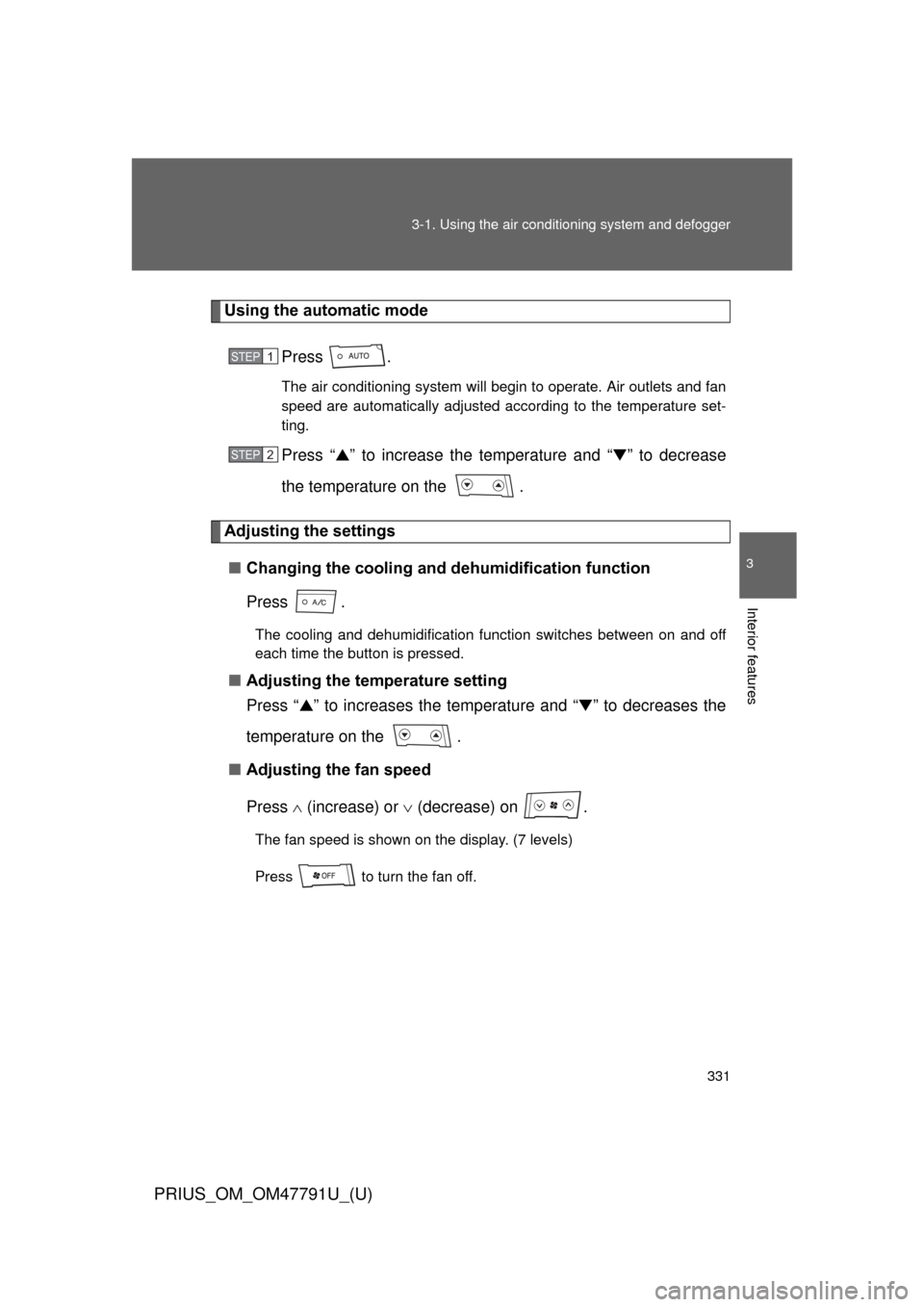
Using the automatic mode
Press .
The air conditioning system will begin to operate. Air outlets and fan
speed are automatically adjusted according to the temperature set-
ting.
Press “▲” to increase the temperature and “ ▼” to decrease
the temperature on the .
Adjusting the settings
■ Changing the cooling and dehumidification function
Press .
The cooling and dehumidification function switches between on and off
each time the button is pressed.
■Adjusting the temperature setting
Press “ ▲” to increases the temperature and “ ▼” to decreases the
temperature on the .
■ Adjusting the fan speed
Press (increase) or (decrease) on .
The fan speed is shown on the display. (7 levels)
Press to turn the fan off.
STEP 1
STEP 2
Page 332 of 640
332 3-1. Using the air conditioning system and defogger
PRIUS_OM_OM47791U_(U)
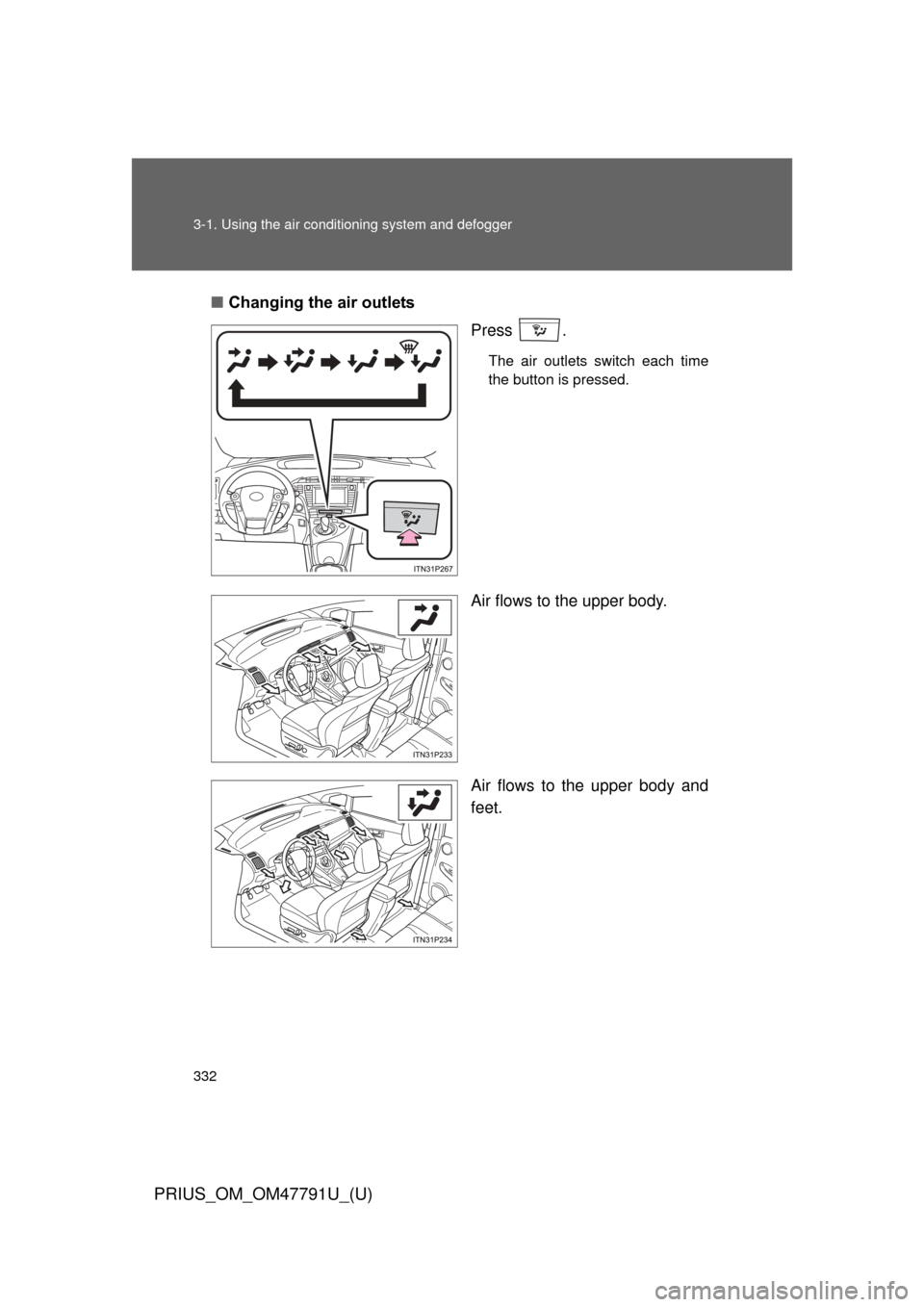
■Changing the air outlets
Press .
The air outlets switch each time
the button is pressed.
Air flows to the upper body.
Air flows to the upper body and
feet.
ITO31P105
Page 333 of 640
333
3-1. Using the air conditioning system
and defogger
PRIUS_OM_OM47791U_(U)
3
Interior features
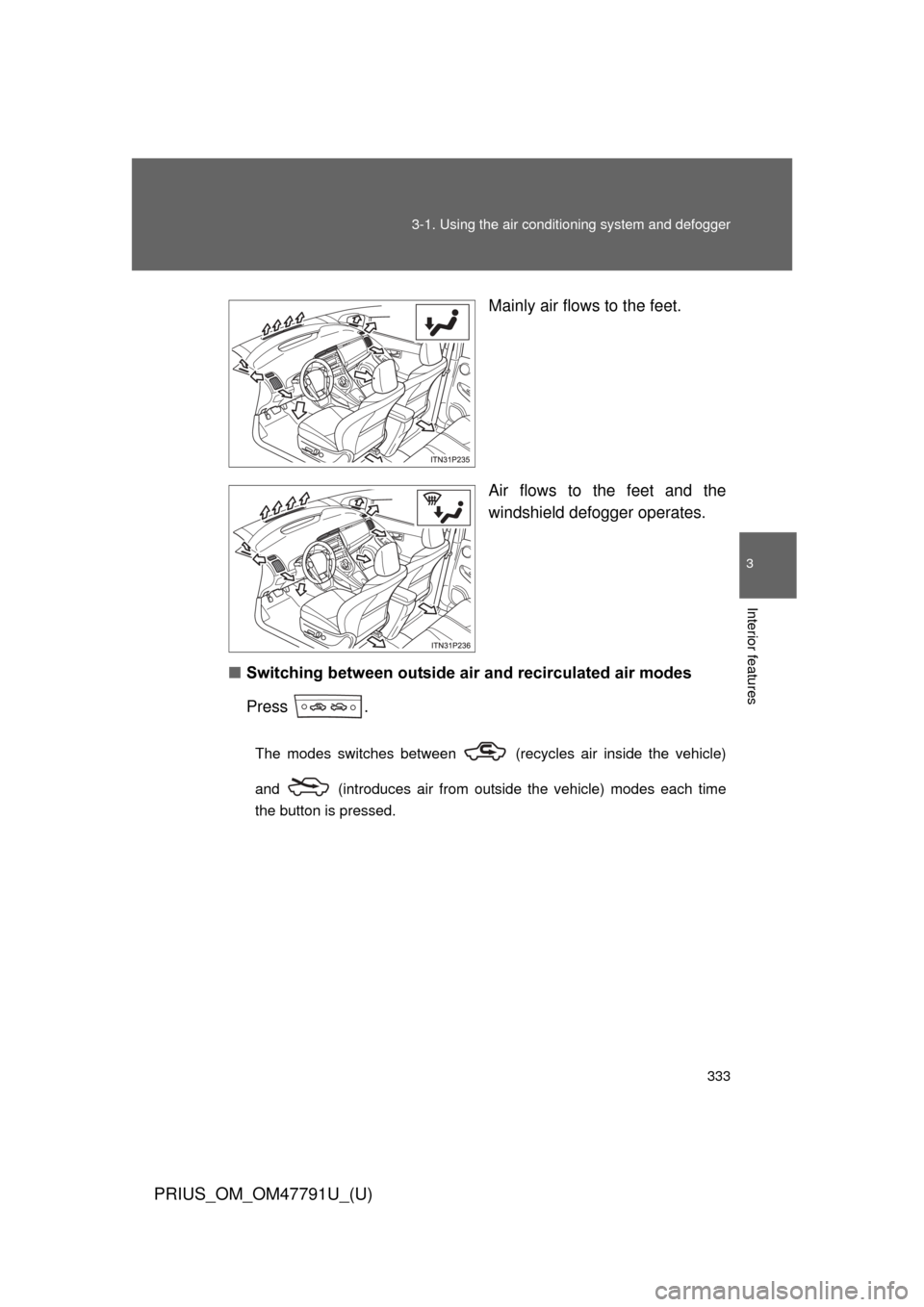
Mainly air flows to the feet.
Air flows to the feet and the
windshield defogger operates.
■ Switching between outside air and recirculated air modes
Press .
The modes switches between (recycles air inside the vehicle)
and (introduces air from outside the vehicle) modes each time
the button is pressed.
Page 334 of 640
334 3-1. Using the air conditioning system and defogger
PRIUS_OM_OM47791U_(U)
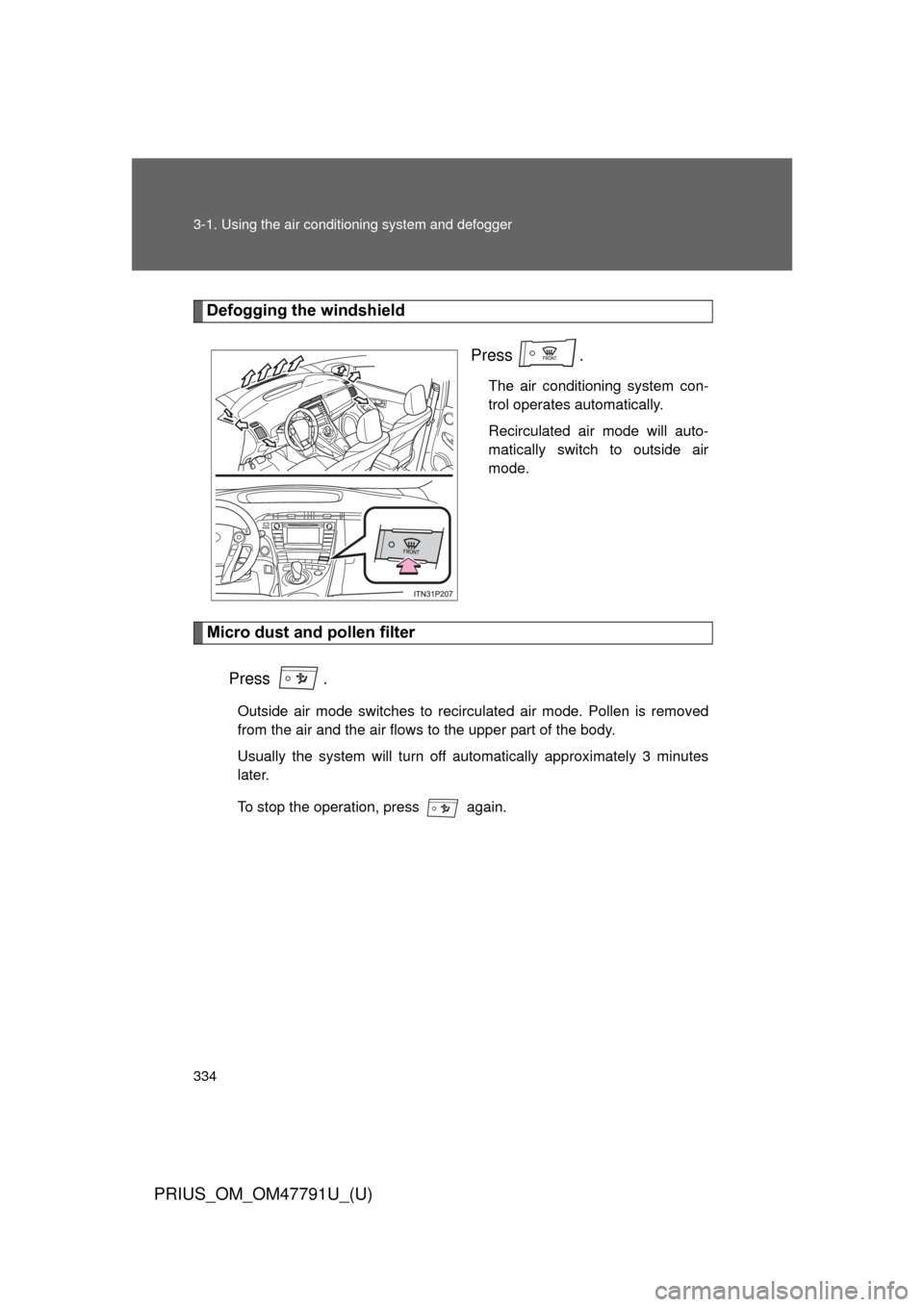
Defogging the windshield
Press .
The air conditioning system con-
trol operates automatically.
Recirculated air mode will auto-
matically switch to outside air
mode.
Micro dust and pollen filter
Press .
Outside air mode switches to recirculated air mode. Pollen is removed
from the air and the air flows to the upper part of the body.
Usually the system will turn off automatically approximately 3 minutes
later.
To stop the operation, press again.
Page 335 of 640
335
3-1. Using the air conditioning system
and defogger
PRIUS_OM_OM47791U_(U)
3
Interior features
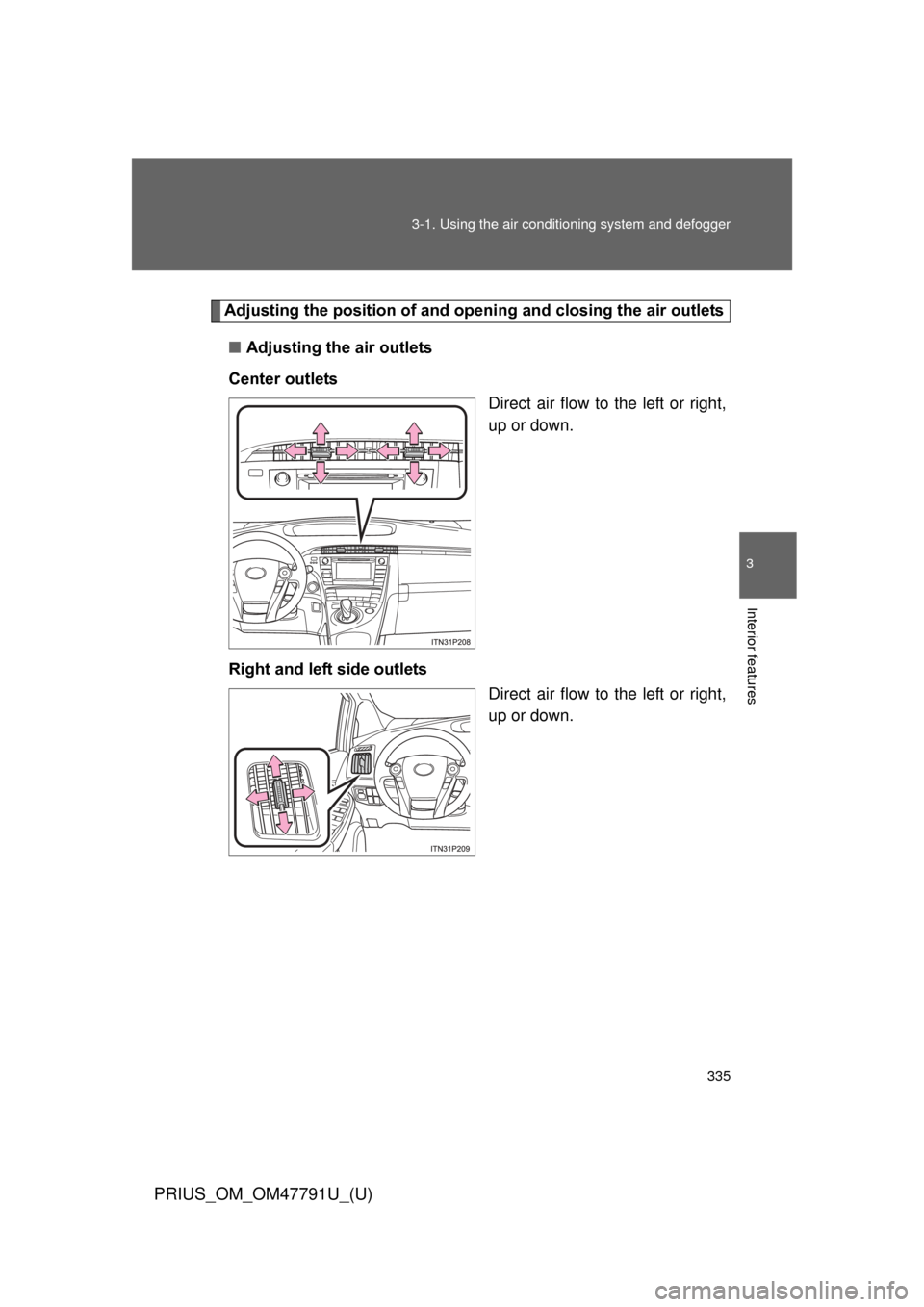
Adjusting the position of and opening and closing the air outlets
■ Adjusting the air outlets
Center outlets Direct air flow to the left or right,
up or down.
Right and left side outlets Direct air flow to the left or right,
up or down.
Page 336 of 640
336 3-1. Using the air conditioning system and defogger
PRIUS_OM_OM47791U_(U)
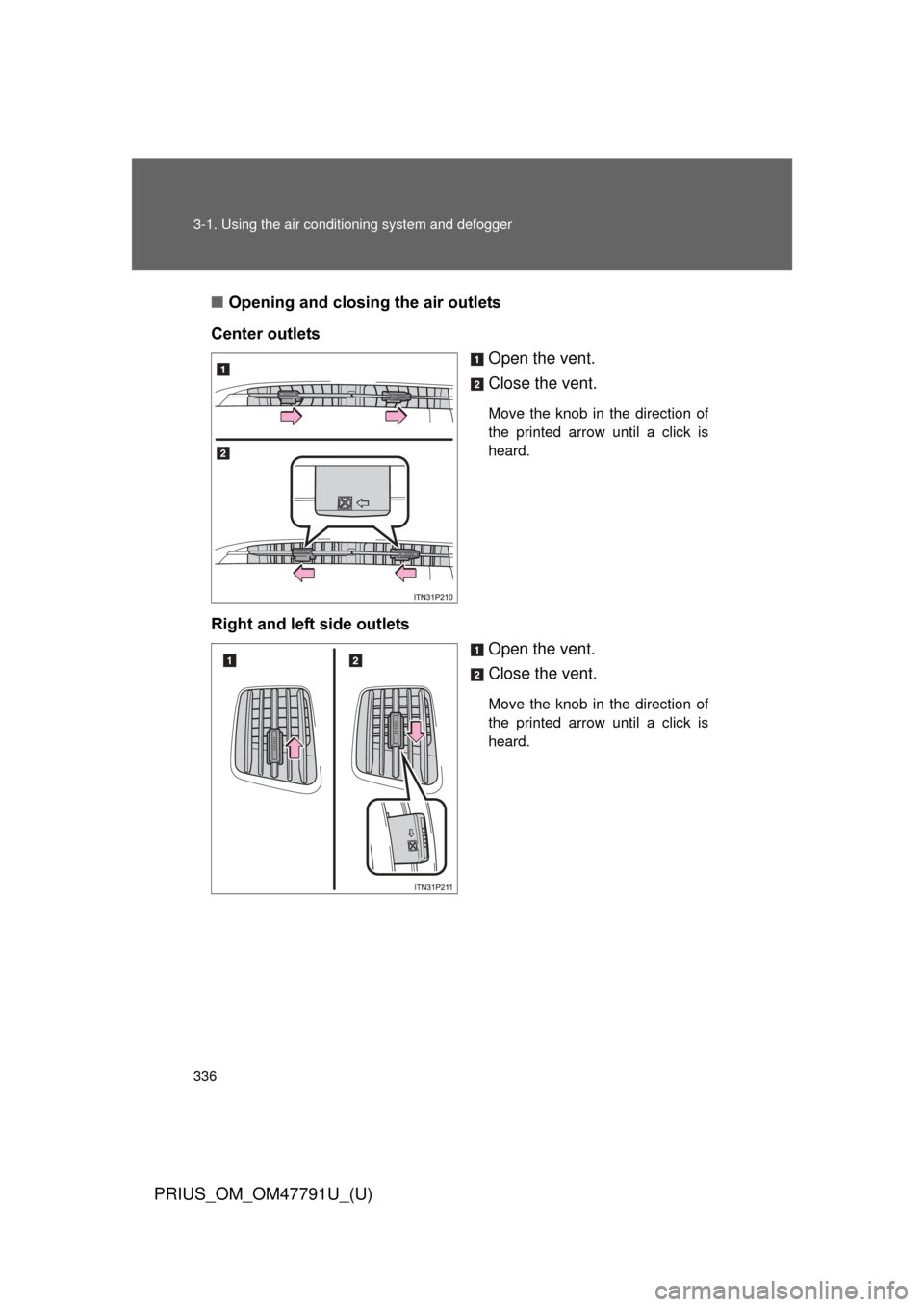
■Opening and closing the air outlets
Center outlets Open the vent.
Close the vent.
Move the knob in the direction of
the printed arrow until a click is
heard.
Right and left side outletsOpen the vent.
Close the vent.
Move the knob in the direction of
the printed arrow until a click is
heard.
Page 337 of 640
337
3-1. Using the air conditioning system
and defogger
PRIUS_OM_OM47791U_(U)
3
Interior features
■Using the automatic mode
Fan speed is adjusted automatically in accordance with the temperature set-
ting and ambient conditions. As a result, the following may occur.
● Immediately after
is pressed, the fan may stop for a while until
warm or cool air is ready to flow.
● Cool air may flow to the area around the upper body when the heater is
on.
■ Switching between outside air and recirculated air modes
Recirculated air mode or outside air mode may be automatically switched to
in accordance with under these condition, such as temperature setting and
inside temperature.
Also, outside air mode may be automatically switched to when the outside
temperature is low.
■ When the outside temperature exceeds 75
F (24C) and the air condi-
tioning system is on
● In order to reduce the air conditioning power consumption, the air condi-
tioning system may switch to recirculated air mode automatically. This
may also reduce fuel consumption.
● Recirculated air mode is selected as a default mode when the “POWER”
switch is turned to ON mode.
● It is possible to switch to outside air mode at any time by pressing
.
■ Using the system in recirculated air mode
The windows will fog up more easily if the recirculated air mode is used.
■ Window defogger feature
● Recirculated air mode may automatically switch to outside air mode in
situations where the windows need to be defogged.
● When the outside air temperature is low, it may take a while for the con-
densation to clear from the windshield.