driver TOYOTA PRIUS 2013 3.G Manual Online
[x] Cancel search | Manufacturer: TOYOTA, Model Year: 2013, Model line: PRIUS, Model: TOYOTA PRIUS 2013 3.GPages: 640, PDF Size: 11.67 MB
Page 511 of 640

5
When trouble arises
511
5-2. Steps to take in an emergency
PRIUS_OM_OM47791U_(U)
CAUTION
As an added safety feature, your
vehicle has been equipped with a tire
pressure monitoring system (TPMS-ti re pressure warning system) that
illuminates a low tire pressure telltal e (tire pressure warning light) when
one or more of your tires is significantly under-inflated. Accordingly,
when the low tire pressure telltale (tire pre ssure warning light) illumi-
nates, you should stop and check your tires as soon as possible, and
inflate them to the proper pressure. Driving on a significantly under-
inflated tire causes the tire to overheat and can lead to tire failure.
Under-inflation also reduces fuel effi ciency and tire tread life, and may
affect the vehicle’s handling and stopping ability.
Please note that the TPMS (tire pressure warning system) is not a sub-
stitute for proper tire ma intenance, and it is the driver’s responsibility to
maintain correct tire pressure, even if under-inflation has not reached the
level to trigger illu mination of the TPMS low tire pressure telltale (tire
pressure warning light).
Your vehicle has also been equipped with a TPMS (tire pressure warning
system) malfunction indicator to indi cate when the system is not operat-
ing properly. The TPMS (tire pressure warning system) malfunction indi-
cator is combined with the low tire pressure telltale (tire pressure
warning light). When the system det ects a malfunction, the telltale will
flash for approximately one minute an d then remain continuously illumi-
nated. This sequence will continue upon subsequent vehicle start-ups as
long as the malfunction exists. When the malfunction indi cator is illumi-
nated, the system may not be able to detect or signal low tire pressure
as intended.
Page 520 of 640
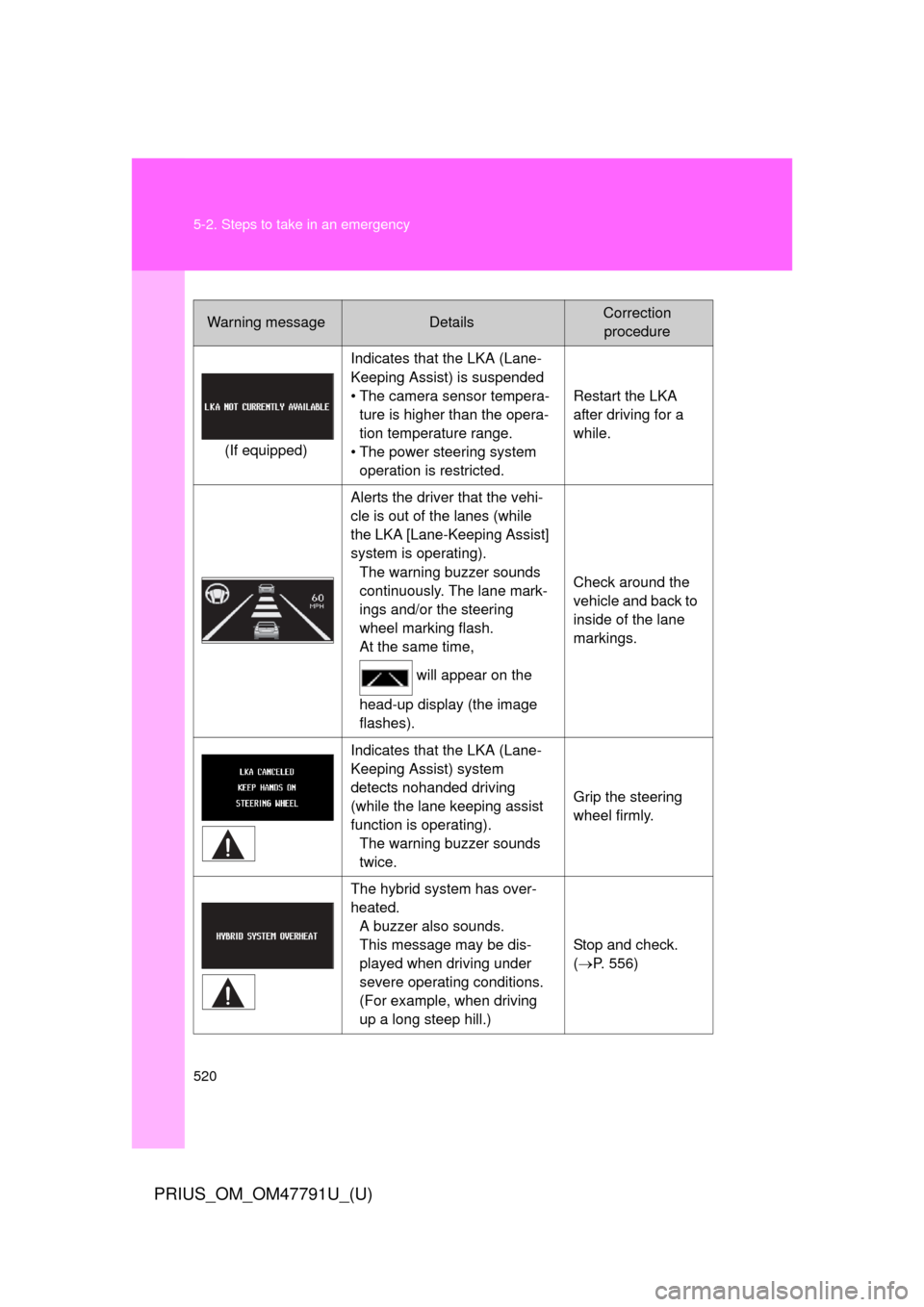
520 5-2. Steps to take in an emergency
PRIUS_OM_OM47791U_(U)
Warning messageDetailsCorrection procedure
(If equipped) Indicates that the LKA (Lane-
Keeping Assist) is suspended
• The camera sensor tempera-
ture is higher than the opera-
tion temperature range.
• The power steering system operation is restricted. Restart the LKA
after driving for a
while.
Alerts the driver that the vehi-
cle is out of the lanes (while
the LKA [Lane-Keeping Assist]
system is operating). The warning buzzer sounds
continuously. The lane mark-
ings and/or the steering
wheel marking flash.
At the same time,
will appear on the
head-up display (the image
flashes). Check around the
vehicle and back to
inside of the lane
markings.
Indicates that the LKA (Lane-
Keeping Assist) system
detects nohanded driving
(while the lane keeping assist
function is operating). The warning buzzer sounds
twice. Grip the steering
wheel firmly.
The hybrid system has over-
heated. A buzzer also sounds.
This message may be dis-
played when driving under
severe operating conditions.
(For example, when driving
up a long steep hill.) Stop and check.
(
P. 556)
Page 521 of 640
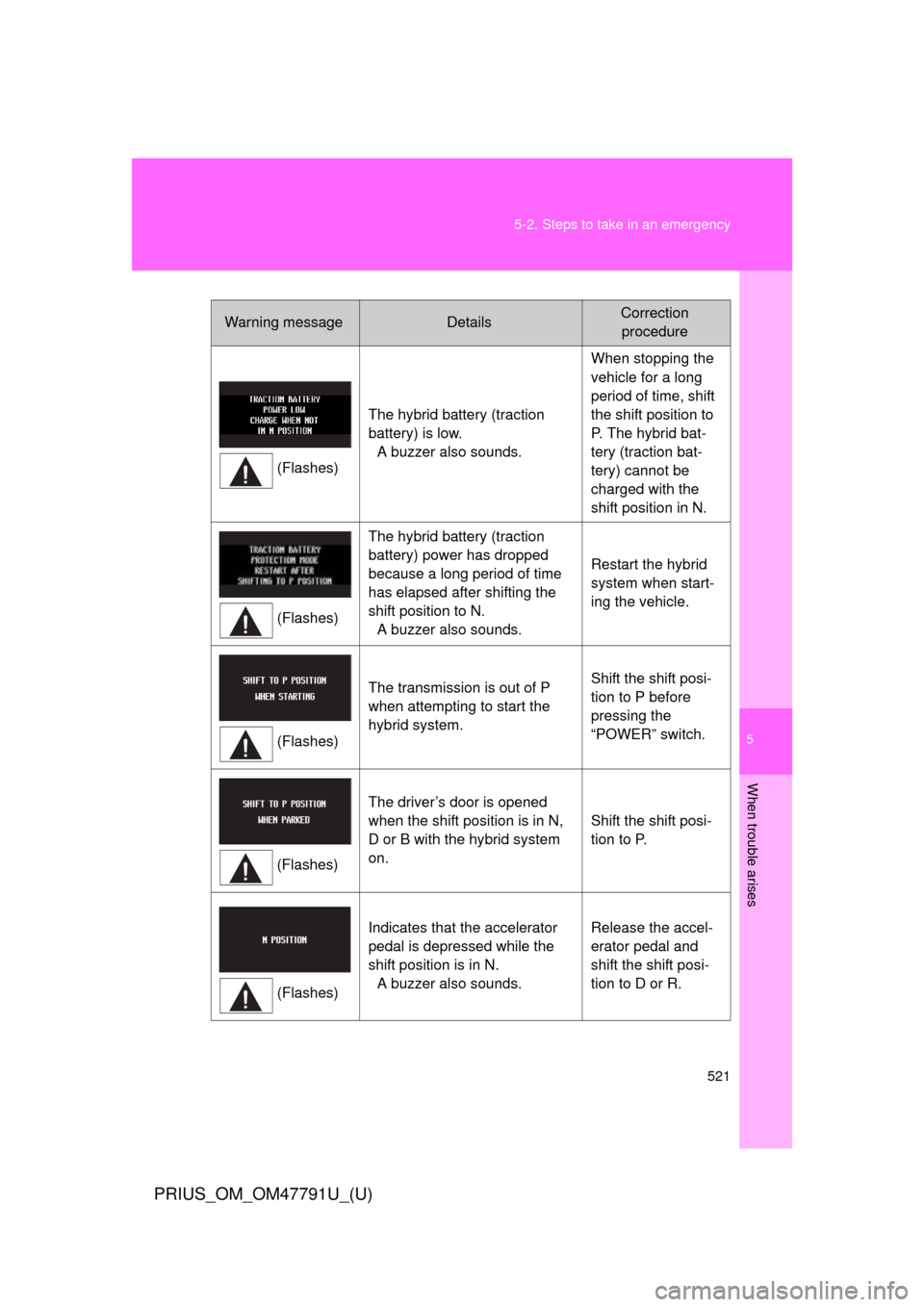
5
When trouble arises
521
5-2. Steps to take in an emergency
PRIUS_OM_OM47791U_(U)
Warning messageDetailsCorrection
procedure
(Flashes) The hybrid battery (traction
battery) is low.
A buzzer also sounds. When stopping the
vehicle for a long
period of time, shift
the shift position to
P. The hybrid bat-
tery (traction bat-
tery) cannot be
charged with the
shift position in N.
(Flashes) The hybrid battery (traction
battery) power has dropped
because a long period of time
has elapsed after shifting the
shift position to N.
A buzzer also sounds. Restart the hybrid
system when start-
ing the vehicle.
(Flashes) The transmission is out of P
when attempting to start the
hybrid system.
Shift the shift posi-
tion to P before
pressing the
“POWER” switch.
(Flashes) The driver’s door is opened
when the shift position is in N,
D or B with the hybrid system
on.
Shift the shift posi-
tion to P.
(Flashes) Indicates that the accelerator
pedal is depressed while the
shift position is in N.
A buzzer also sounds. Release the accel-
erator pedal and
shift the shift posi-
tion to D or R.
Page 524 of 640
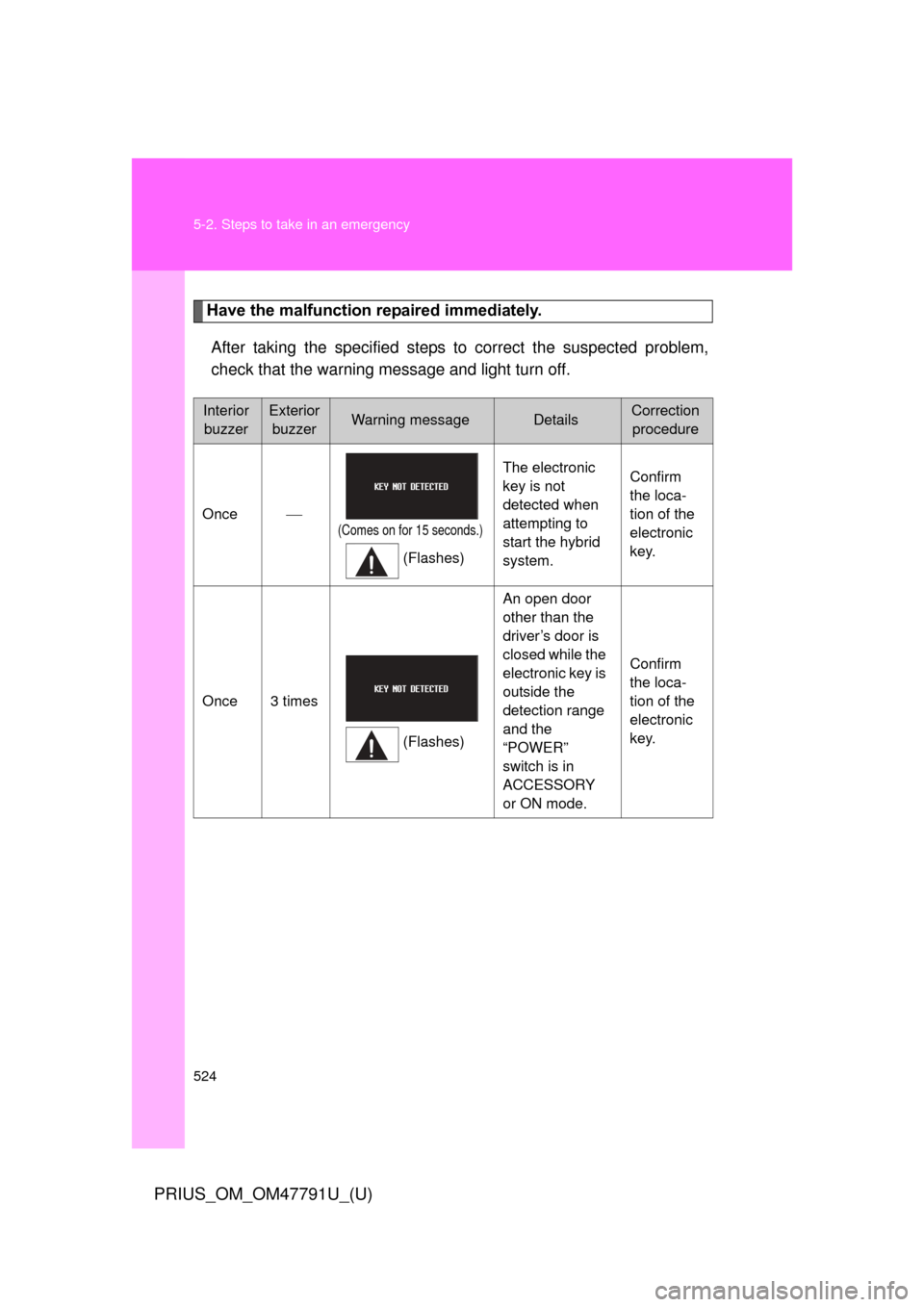
524 5-2. Steps to take in an emergency
PRIUS_OM_OM47791U_(U)
Have the malfunction repaired immediately.After taking the specified steps to correct the suspected problem,
check that the warning message and light turn off.
Interior buzzerExterior buzzerWarning messageDetailsCorrection procedure
Once
(Comes on for 15 seconds.)
(Flashes) The electronic
key is not
detected when
attempting to
start the hybrid
system.
Confirm
the loca-
tion of the
electronic
key.
Once 3 times (Flashes)An open door
other than the
driver’s door is
closed while the
electronic key is
outside the
detection range
and the
“POWER”
switch is in
ACCESSORY
or ON mode.
Confirm
the loca-
tion of the
electronic
key.
Page 525 of 640
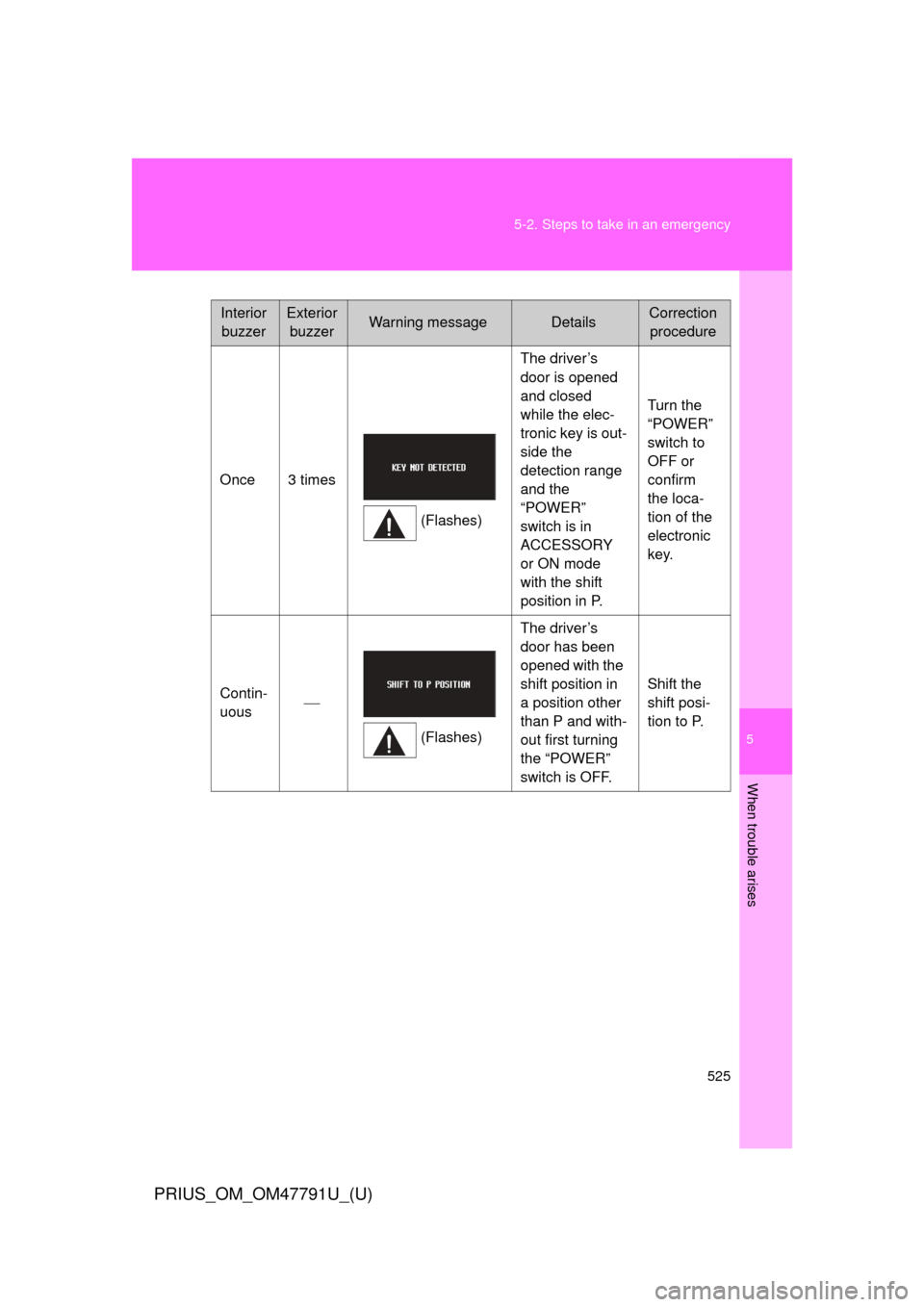
5
When trouble arises
525
5-2. Steps to take in an emergency
PRIUS_OM_OM47791U_(U)
Interior
buzzerExterior buzzerWarning messageDetailsCorrection procedure
Once 3 times (Flashes)The driver’s
door is opened
and closed
while the elec-
tronic key is out-
side the
detection range
and the
“POWER”
switch is in
ACCESSORY
or ON mode
with the shift
position in P. Turn the
“POWER”
switch to
OFF or
confirm
the loca-
tion of the
electronic
key.
Contin-
uous
(Flashes)The driver’s
door has been
opened with the
shift position in
a position other
than P and with-
out first turning
the “POWER”
switch is OFF.
Shift the
shift posi-
tion to P.
Page 528 of 640
528 5-2. Steps to take in an emergency
PRIUS_OM_OM47791U_(U)
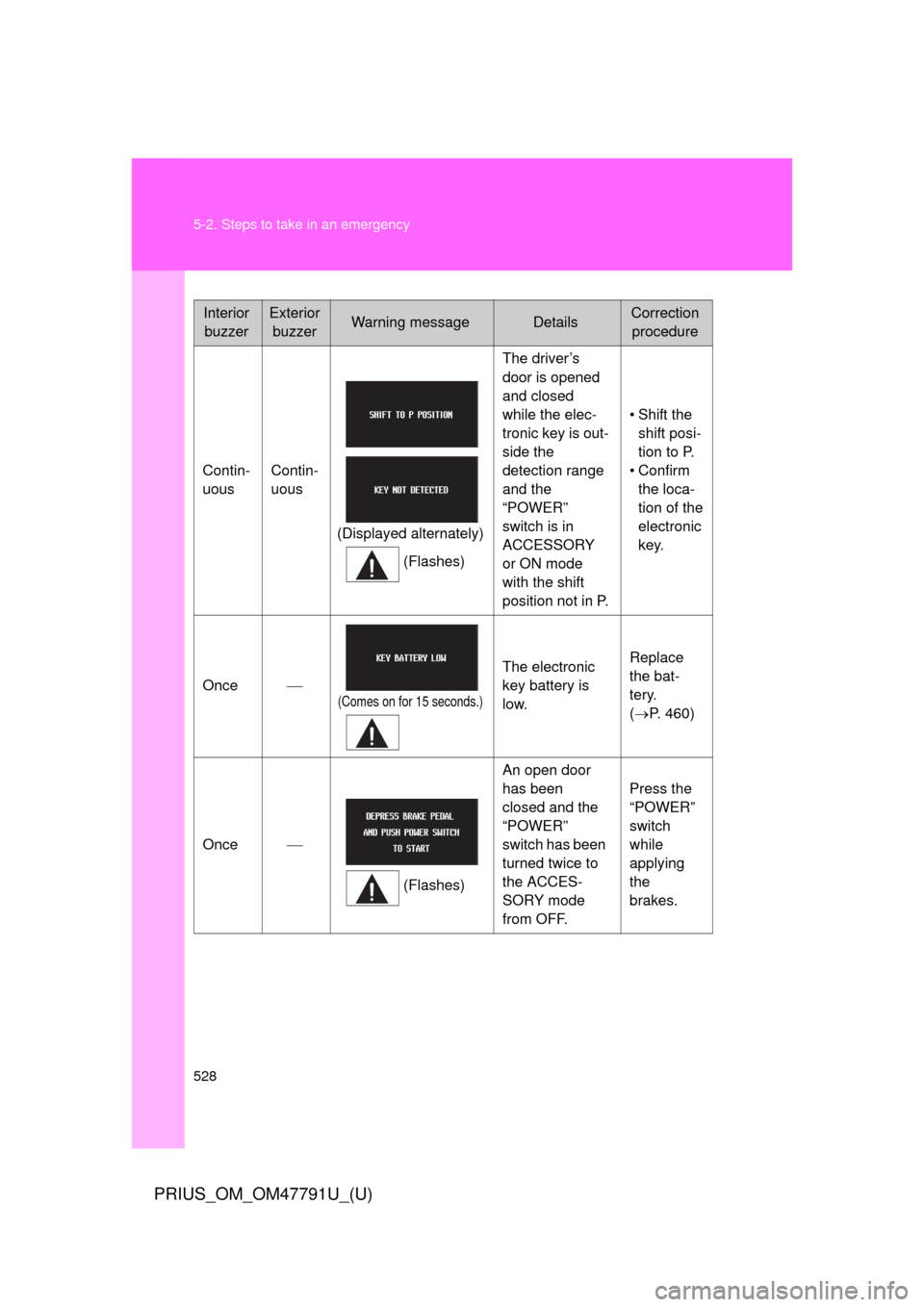
InteriorbuzzerExterior buzzerWarning messageDetailsCorrection procedure
Contin-
uous Contin-
uous
(Displayed alternately) (Flashes) The driver’s
door is opened
and closed
while the elec-
tronic key is out-
side the
detection range
and the
“POWER”
switch is in
ACCESSORY
or ON mode
with the shift
position not in P.
• Shift the
shift posi-
tion to P.
• Confirm the loca-
tion of the
electronic
key.
Once
(Comes on for 15 seconds.)
The electronic
key battery is
low. Replace
the bat-
tery.
(
P. 460)
Once
(Flashes)An open door
has been
closed and the
“POWER”
switch has been
turned twice to
the ACCES-
SORY mode
from OFF. Press the
“POWER”
switch
while
applying
the
brakes.
Page 548 of 640
548
5-2. Steps to take in an emergency
PRIUS_OM_OM47791U_(U)
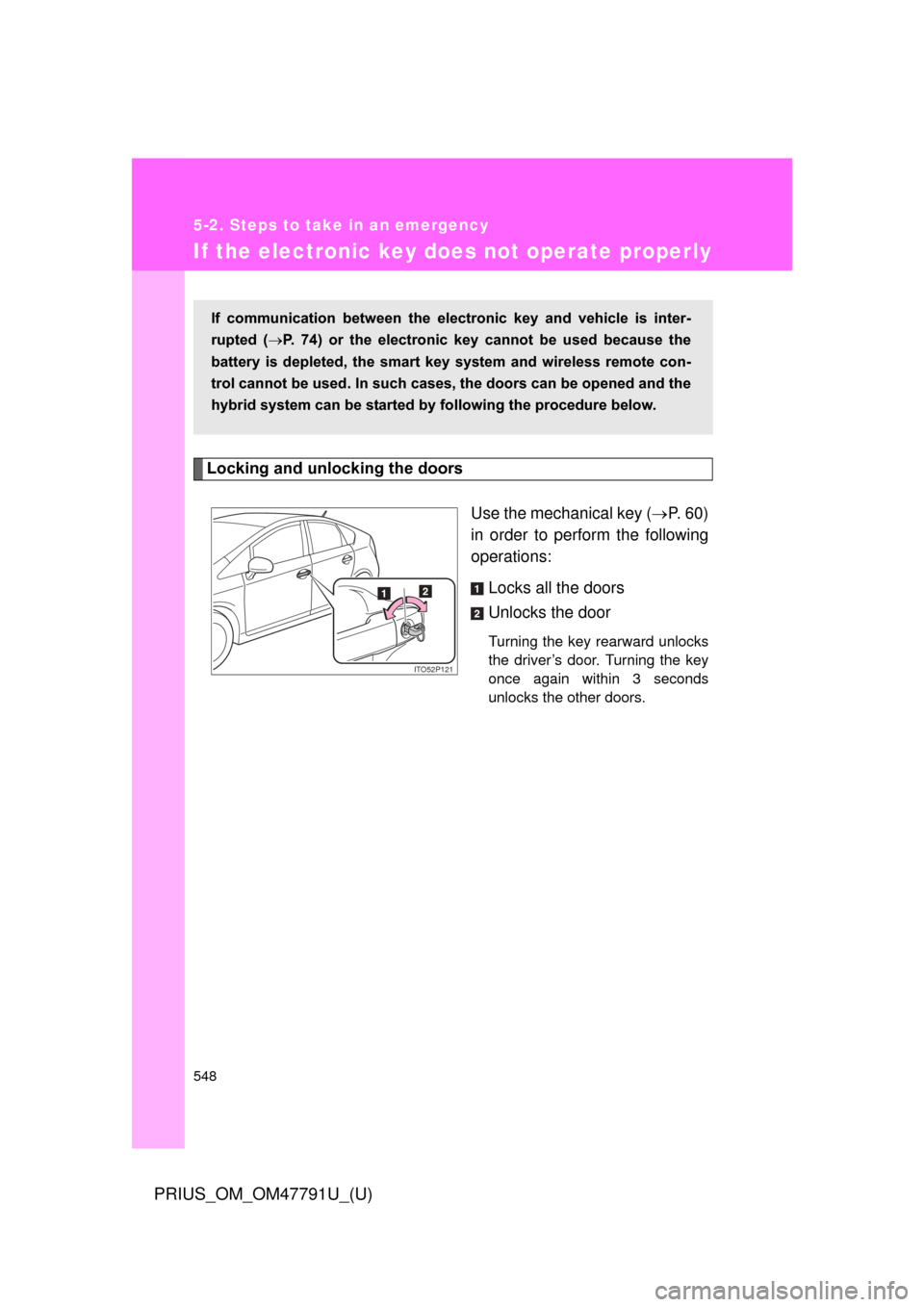
If the electronic key does not operate properly
Locking and unlocking the doorsUse the mechanical key (P. 60)
in order to perform the following
operations:
Locks all the doors
Unlocks the door
Turning the key rearward unlocks
the driver’s door. Turning the key
once again within 3 seconds
unlocks the other doors.
If communication between the electronic key and vehicle is inter-
rupted ( P. 74) or the electronic key cannot be used because the
battery is depleted, the smart key system and wireless remote con-
trol cannot be used. In such cases, the doors can be opened and the
hybrid system can be started by following the procedure below.
ITO52P12N
Page 597 of 640
597
6-2. Customization
6
Vehicle specifications
PRIUS_OM_OM47791U_(U)
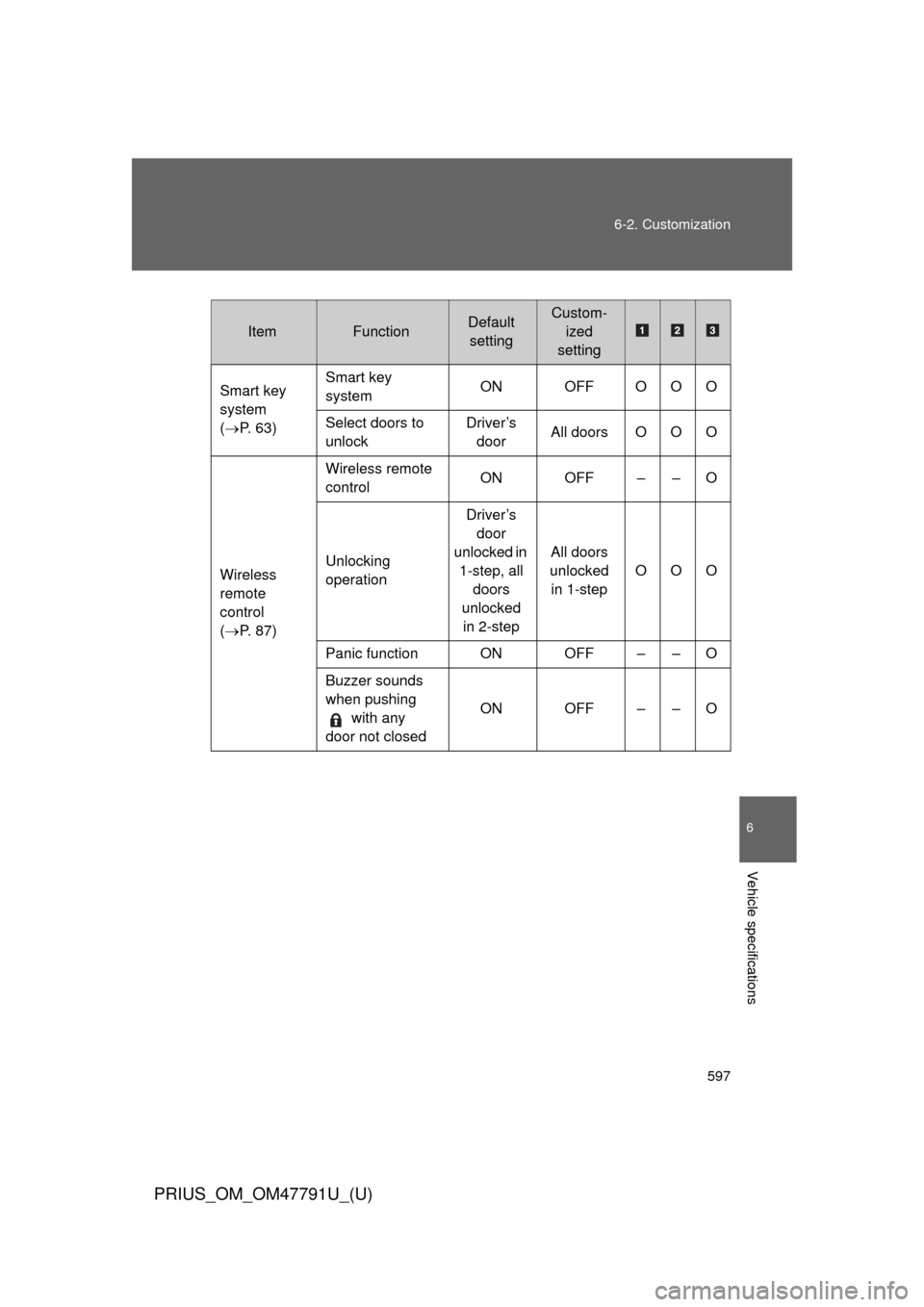
ItemFunctionDefault
settingCustom- ized
setting
Smart key
system
( P. 63) Smart key
system
ON OFF OOO
Select doors to
unlock Driver’s
door All doors O O O
Wireless
remote
control
( P. 87) Wireless remote
control
ON OFF – – O
Unlocking
operation Driver’s
door
unlocked in 1-step, all doors
unlocked in 2-step All doors
unlocked in 1-step OOO
Panic function ON OFF – – O
Buzzer sounds
when pushing with any
door not closed ON OFF – – O
Page 599 of 640
599
6-2. Customization
6
Vehicle specifications
PRIUS_OM_OM47791U_(U)
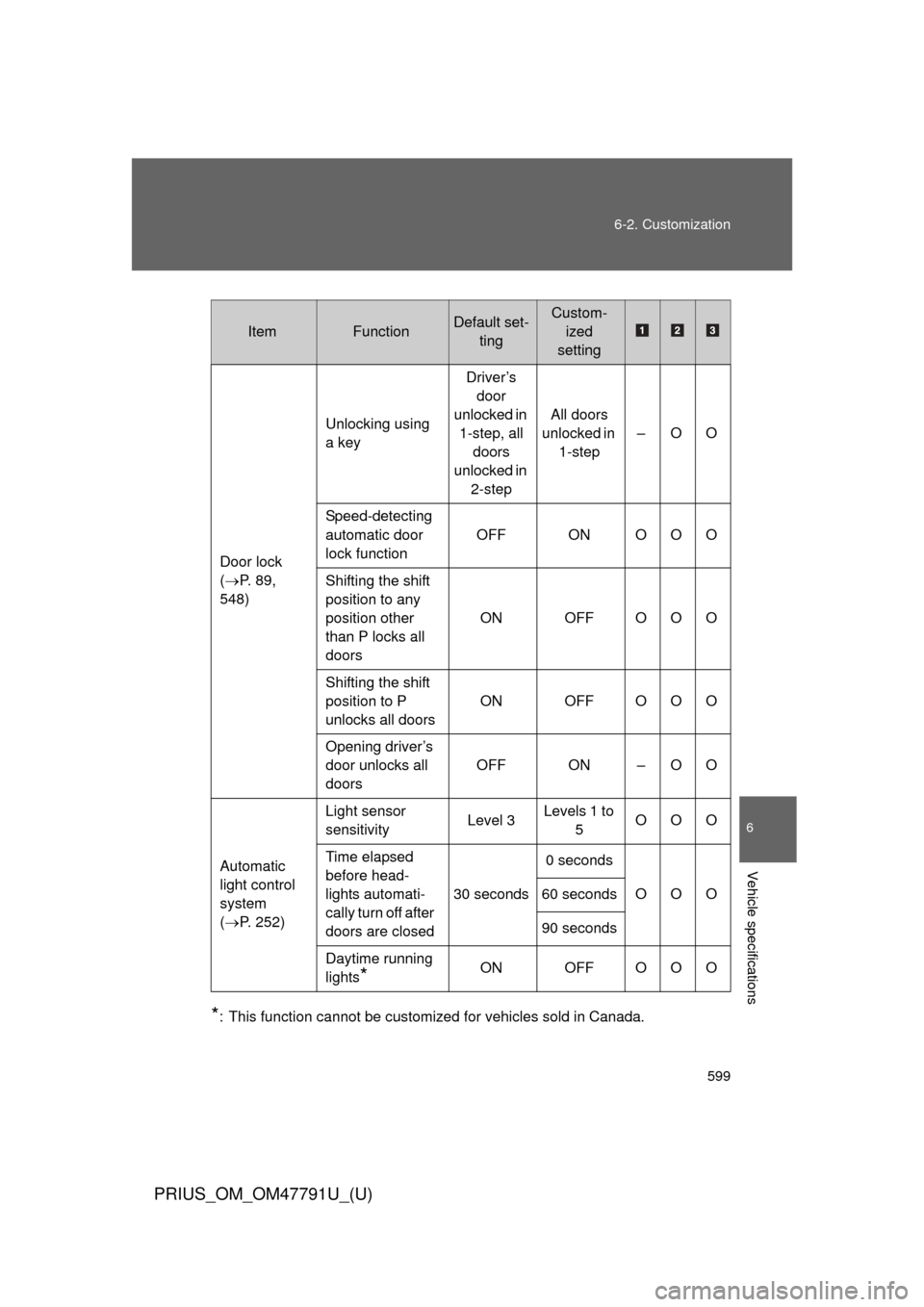
*: This function cannot be customized for vehicles sold in Canada.
ItemFunctionDefault set-
tingCustom-ized
setting
Door lock
( P. 89,
548) Unlocking using
a key
Driver’s
door
unlocked in 1-step, all doors
unlocked in 2-step All doors
unlocked in 1-step –OO
Speed-detecting
automatic door
lock function OFF ON OOO
Shifting the shift
position to any
position other
than P locks all
doors ON OFF OOO
Shifting the shift
position to P
unlocks all doors ON OFF OOO
Opening driver’s
door unlocks all
doors OFF ON – O O
Automatic
light control
system
( P. 252) Light sensor
sensitivity
Level 3Levels 1 to
5 OOO
Time elapsed
before head-
lights automati-
cally turn off after
doors are closed 30 seconds
0 seconds
OOO
60 seconds
90 seconds
Daytime running
lights
*ON OFF OOO
Page 600 of 640

600 6-2. Customization
PRIUS_OM_OM47791U_(U)
ItemFunctionDefault set-tingCustom-ized
setting
Power
windows
( P. 126) The one-touch
closing operation
except for
driver’s seat
ON OFF – – O
Illumination
( P. 357) Time elapsed
before lights turn
off
15 secondsOFF
–OO
7.5
seconds
30 seconds
Operation when
the doors are
unlocked ON OFF – – O
Operation after
the “POWER”
switch turned
OFF ON OFF – – O
Operation when
you approach
the vehicle with
the electric key
on your person
(When the per-
sonal/interior
light main switch
is door position) ON OFF – – O
Foot lights ON OFF – – O
Foot lights oper-
ation when the
vehicle is run-
ning ON OFF – – O