driver TOYOTA PRIUS 2013 3.G Owners Manual
[x] Cancel search | Manufacturer: TOYOTA, Model Year: 2013, Model line: PRIUS, Model: TOYOTA PRIUS 2013 3.GPages: 640, PDF Size: 11.67 MB
Page 15 of 640
15
PRIUS_OM_OM47791U_(U)
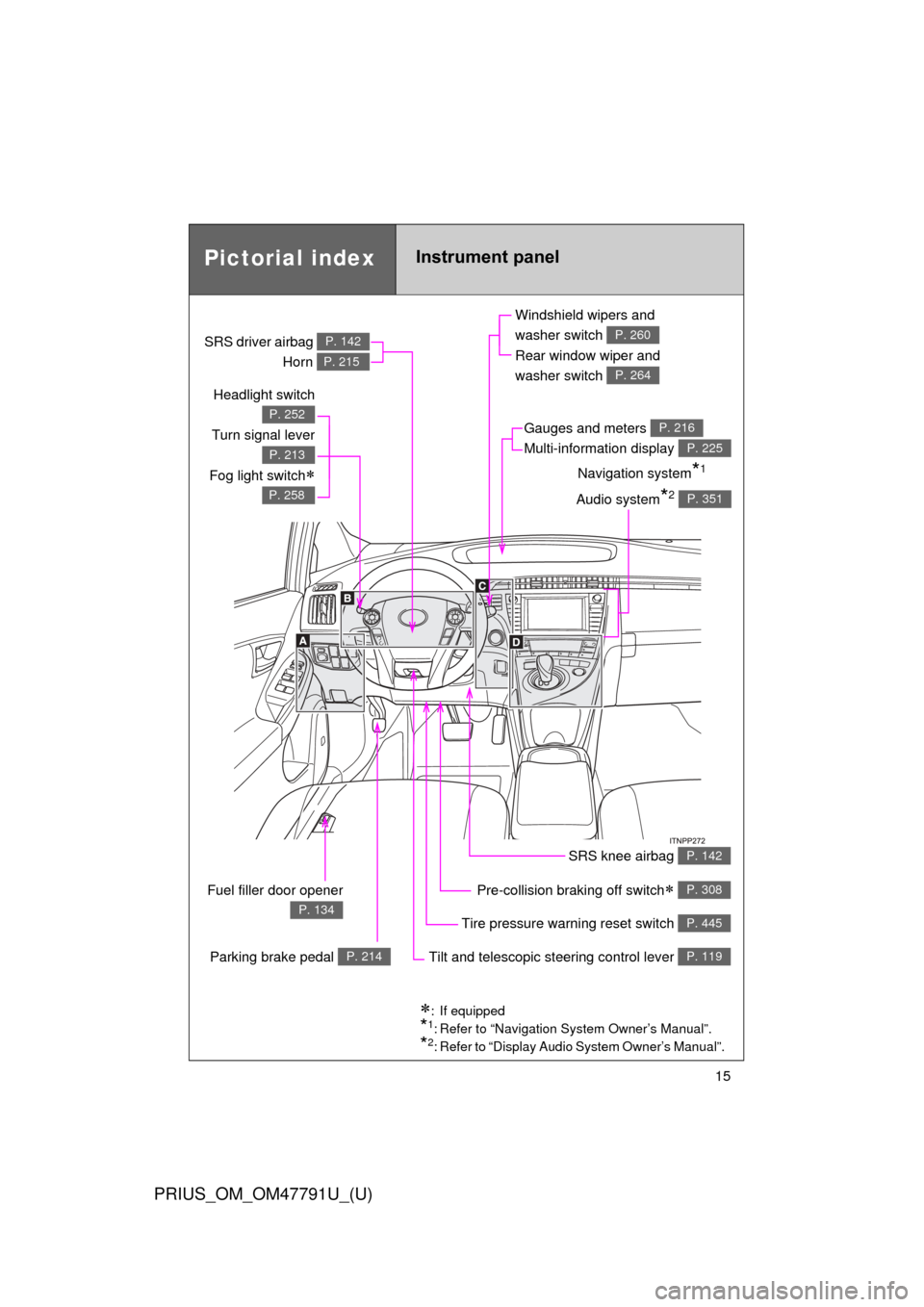
Pictorial indexInstrument panel
Headlight switch
Turn signal lever
Fog light switch
P. 252
P. 213
P. 258
Pre-collision braking off switch P. 308
Parking brake pedal P. 214
Fuel filler door opener
P. 134Tire pressure warning reset switch P. 445
Windshield wipers and
washer switch
Rear window wiper and
washer switch
P. 260
P. 264
Gauges and meters
Multi-information display P. 216
P. 225
Audio system*2 P. 351
Navigation system*1
SRS driver airbag
Horn
P. 142
P. 215
SRS knee airbag P. 142
Tilt and telescopic steering control lever P. 119
: If equipped
*1: Refer to “Navigation System Owner’s Manual”.
*2: Refer to “Display Audio System Owner’s Manual”.
Page 25 of 640

25
PRIUS_OM_OM47791U_(U)
Event data recorder
This vehicle is equipped with an event data recorder (EDR). The main pur-
pose of an EDR is to record, in certain crash or near crash-like situations,
such as an air bag deployment or hitting a road obstacle, data that will assist
in understanding how a vehicle’s systems performed. The EDR is designed
to record data related to vehicle dynamics and safety systems for a short
period of time, typically 30 seconds or less.
The EDR in this vehicle is designed to record such data as:
• How various systems in your vehicle were operating;
• Whether or not the driver and passenger safety belts were buckled/fas-tened;
• How far (if at all) the driver was depressing the accelerator and/or brake pedal; and,
• How fast the vehicle was traveling.
These data can help provide a better understanding of the circumstances in
which crashes and injuries occur.
NOTE: EDR data are recorded by your vehicle only if a nontrivial crash situa-
tion occurs; no data are recorded by the EDR under normal driving condi-
tions and no personal data (e.g., name, gender, age, and crash location) are
recorded. However, other parties, such as law enforcement, could combine
the EDR data with the type of personally identifying data routinely acquired
during a crash investigation.
To read data recorded by an EDR, special equipment is required, and access
to the vehicle or the EDR is needed. In addition to the vehicle manufacturer,
other parties, such as law enforcement, that have the special equipment, can
read the information if they have access to the vehicle or the EDR.
Page 27 of 640

27
PRIUS_OM_OM47791U_(U)
CAUTION
■General precautions while driving
Driving under the influence: Never drive your vehicle when under the influ-
ence of alcohol or drugs that have impaired your ability to operate your vehi-
cle. Alcohol and certain drugs delay reaction time, impair judgment and
reduce coordination, which could lead to an accident that could result in
death or serious injury.
Defensive driving: Always drive defensively. Anticipate mistakes that other
drivers or pedestrians might make and be ready to avoid accidents.
Driver distraction: Always give your full attention to driving. Anything that dis-
tracts the driver, such as adjusting controls, talking on a cellular phone or
reading can result in a collision with resulting death or serious injury to you,
your occupants or others.
■ General precaution regarding children’s safety
Never leave children unattended in the vehicle, and never allow children to
have or use the key.
Children may be able to start the vehicle or shift the vehicle into neutral.
There is also a danger that children may injure themselves by playing with
the windows, the moon roof, or other features of the vehicle. In addition, heat
build-up or extremely cold temperatures inside the vehicle can be fatal to
children.
Page 36 of 640

36 1-1. Hybrid system
PRIUS_OM_OM47791U_(U)
■Sounds and vibrations specific to a hybrid vehicle
There may be no engine sounds or vibration even though the vehicle is able
to move. For safety, apply the parking brake and make sure to shift the shift
position to P when parked.
The following sounds or vibrations may occur when the hybrid system is
operating and are not a malfunction:
● The brake system operation sound heard from the front of the vehicle
when the driver’s door is opened.
● Motor sounds may be heard from the engine compartment.
● Sounds may be heard from the hybrid battery (traction battery) when the
hybrid system starts or stops.
● Sounds may be heard from the transmission when the gasoline engine
starts or stops, when driving at low speeds, or during idling.
● Engine sounds may be heard when accelerating sharply.
● Sounds may be heard due to regenerative braking when the brake pedal
is depressed and accelerator is loosened.
● Other sounds, such as motors and mechanical noises, may be heard
from the brake system when the brake pedal is depressed.
● Vibration may be felt when the gasoline engine starts or stops.
● Cooling fan sounds may be heard from the air intake vent. (
P. 39)
● The operation sound of the air conditioning system (air conditioning com-
pressor, blower motor).
Page 63 of 640
63
1
Before driving
PRIUS_OM_OM47791U_(U)
1-3. Opening, closing and locking the doors
Smart key system (with entr y function)
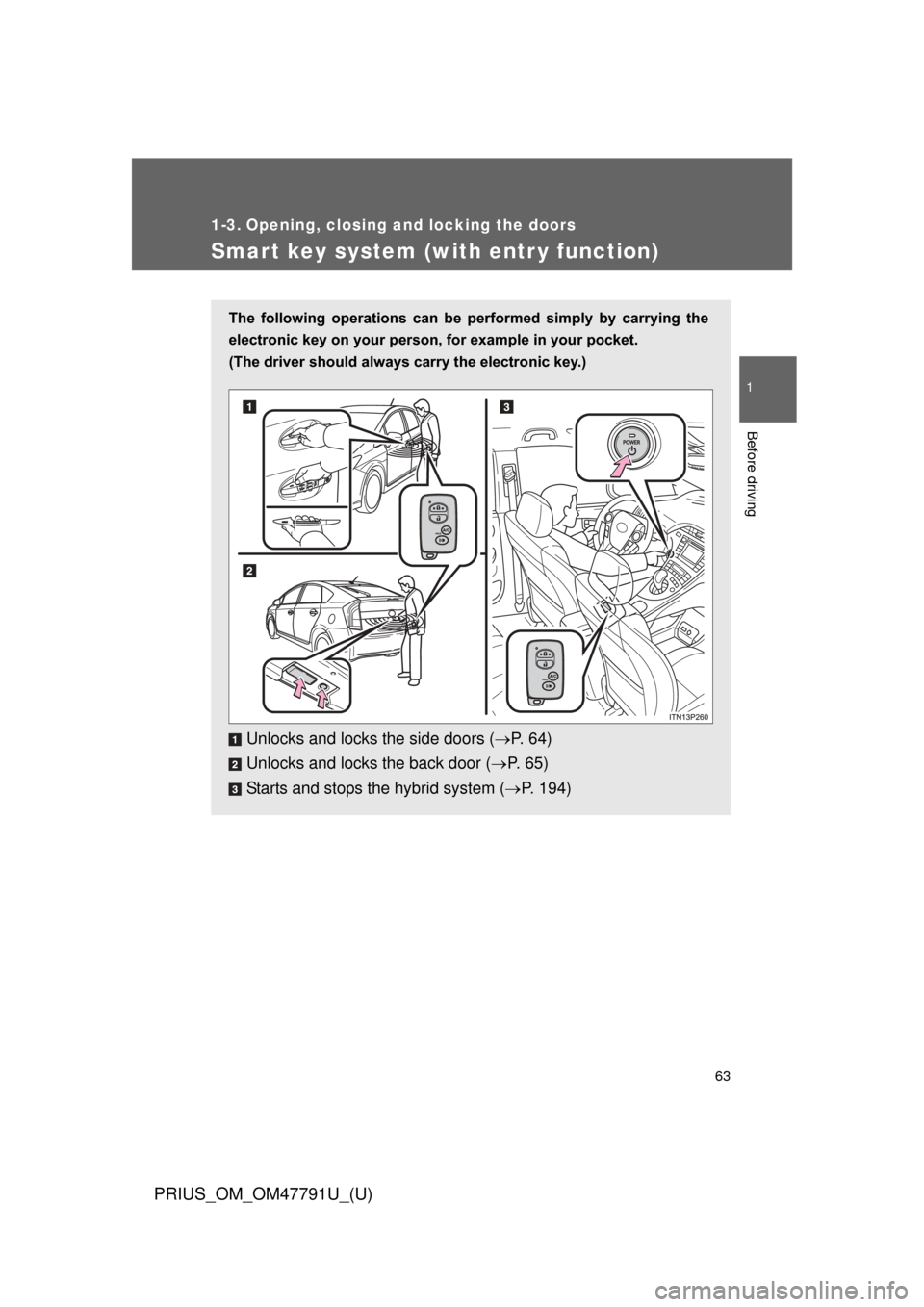
The following operations can be performed simply by carrying the
electronic key on your person, for example in your pocket.
(The driver should always carry the electronic key.)
Unlocks and locks the side doors ( P. 6 4 )
Unlocks and locks the back door ( P. 65)
Starts and stops the hybrid system ( P. 194)
Page 64 of 640
64 1-3. Opening, closing and locking the doors
PRIUS_OM_OM47791U_(U)
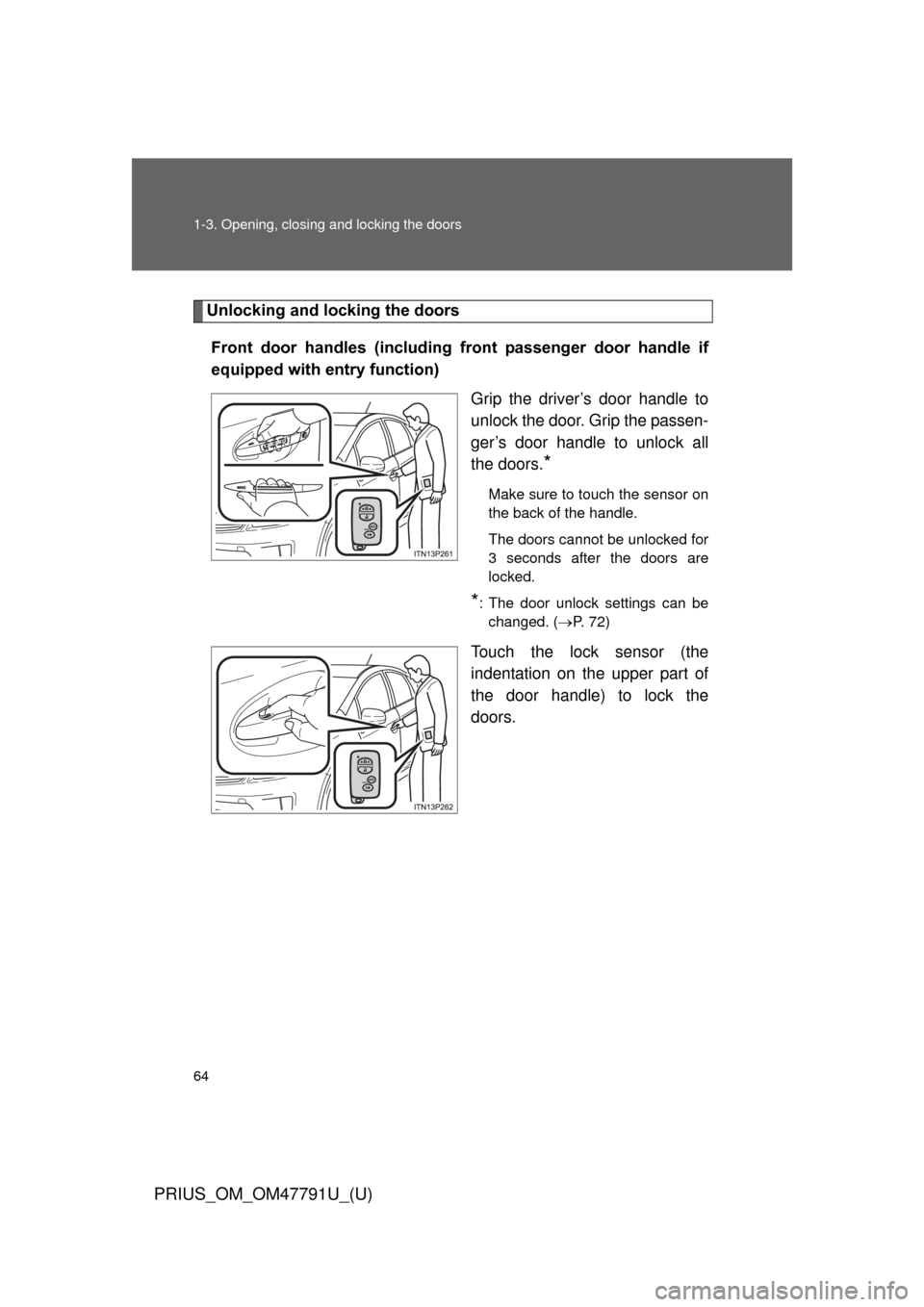
Unlocking and locking the doorsFront door handles (including front passenger door handle if
equipped with entry function) Grip the driver’s door handle to
unlock the door. Grip the passen-
ger’s door handle to unlock all
the doors.
*
Make sure to touch the sensor on
the back of the handle.
The doors cannot be unlocked for
3 seconds after the doors are
locked.
*: The door unlock settings can bechanged. ( P. 72)
Touch the lock sensor (the
indentation on the upper part of
the door handle) to lock the
doors.
Page 66 of 640
66 1-3. Opening, closing and locking the doors
PRIUS_OM_OM47791U_(U)
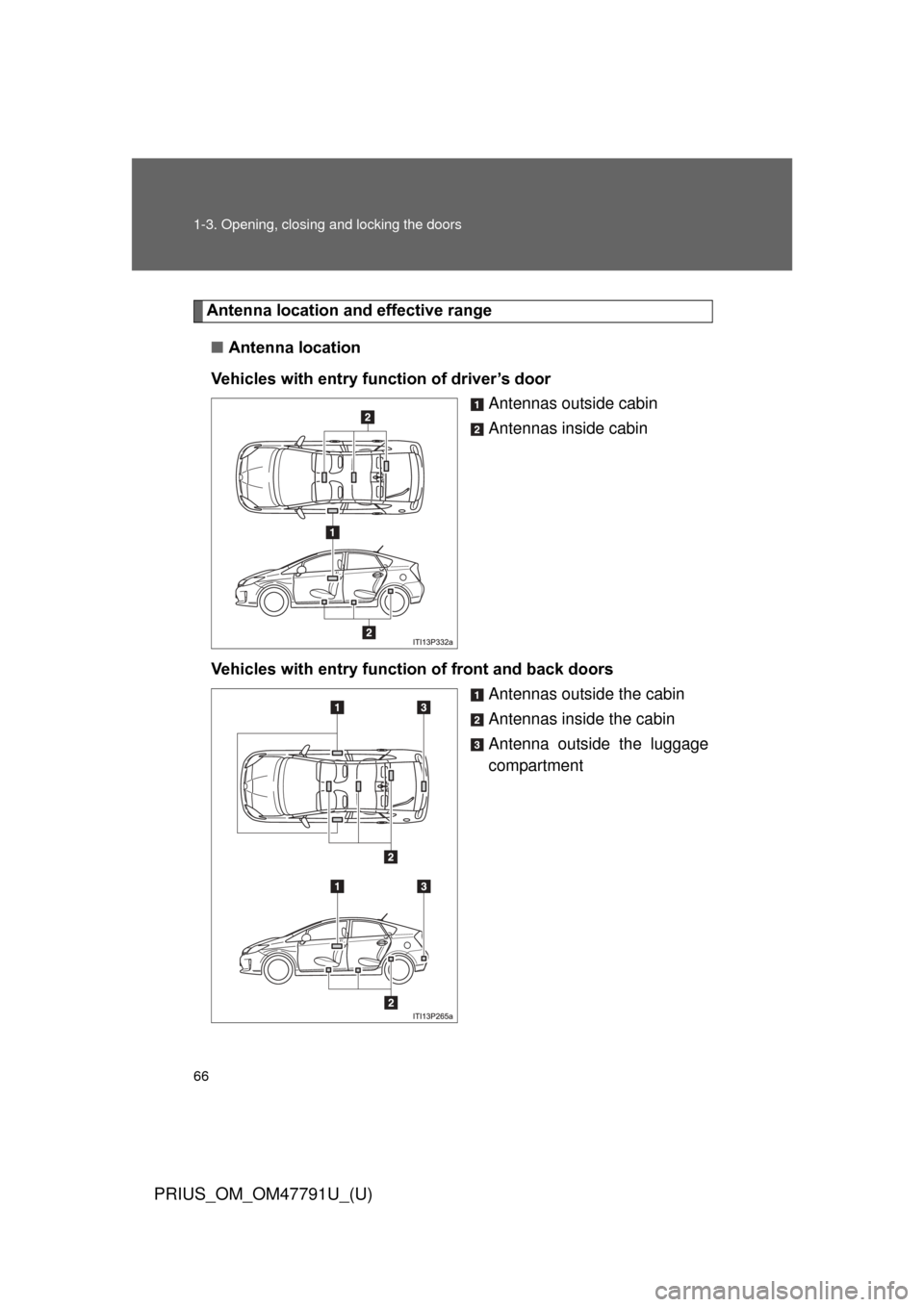
Antenna location and effective range
■ Antenna location
Vehicles with entry function of driver’s door Antennas outside cabin
Antennas inside cabin
Vehicles with entry function of front and back doors Antennas outside the cabin
Antennas inside the cabin
Antenna outside the luggage
compartment
Page 67 of 640
67
1-3. Opening, closing and locking the doors
1
Before driving
PRIUS_OM_OM47791U_(U)
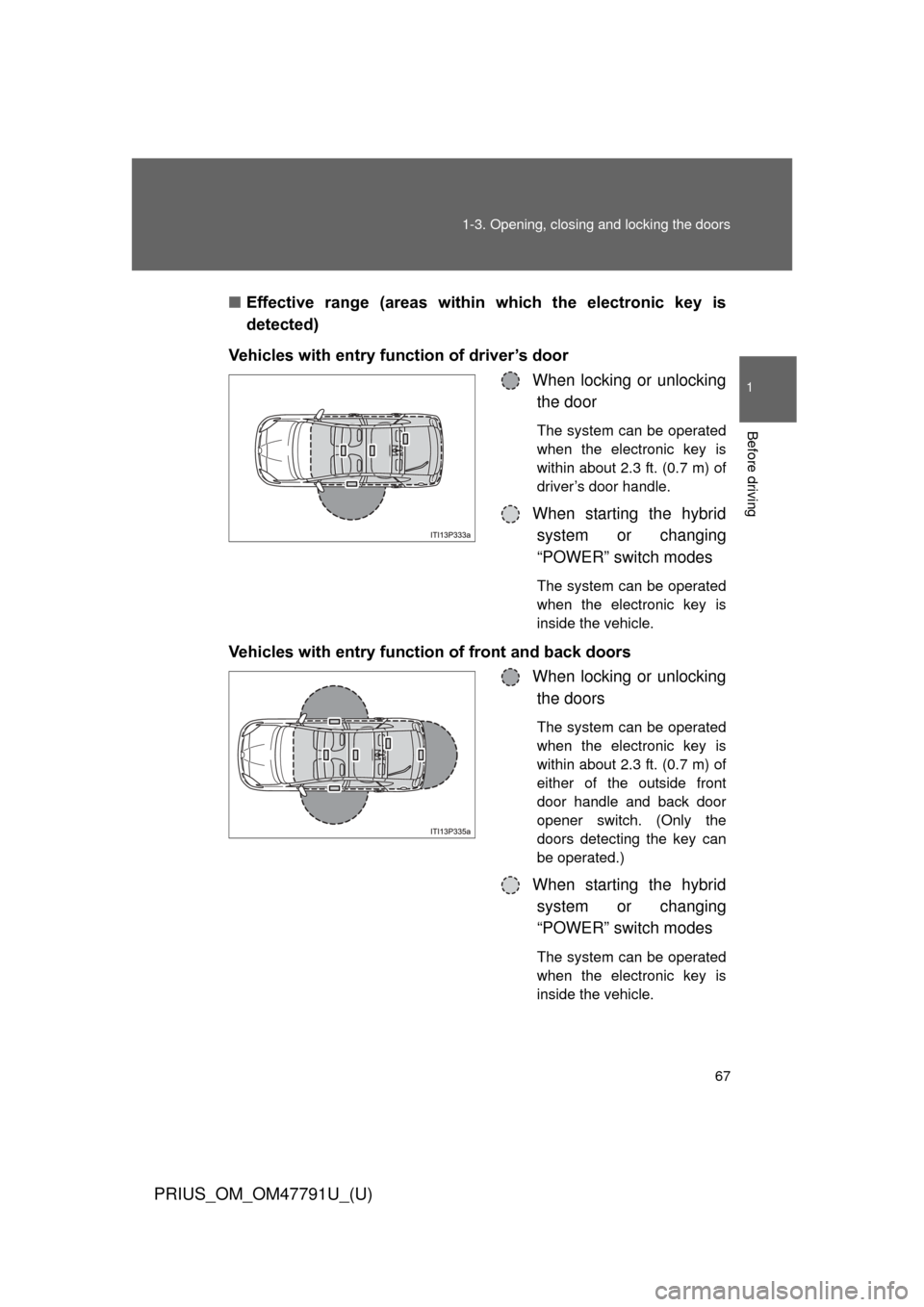
■
Effective range (areas within which the electronic key is
detected)
Vehicles with entry function of driver’s door When locking or unlockingthe door
The system can be operated
when the electronic key is
within about 2.3 ft. (0.7 m) of
driver’s door handle.
When starting the hybridsystem or changing
“POWER” switch modes
The system can be operated
when the electronic key is
inside the vehicle.
Vehicles with entry function of front and back doors
When locking or unlockingthe doors
The system can be operated
when the electronic key is
within about 2.3 ft. (0.7 m) of
either of the outside front
door handle and back door
opener switch. (Only the
doors detecting the key can
be operated.)
When starting the hybrid
system or changing
“POWER” switch modes
The system can be operated
when the electronic key is
inside the vehicle.
Page 70 of 640

70 1-3. Opening, closing and locking the doors
PRIUS_OM_OM47791U_(U)
AlarmSituationCorrection procedure
Interior alarm
pings continu-
ously
*1
The “POWER” switch was
turned to ACCESSORY
mode while the driver’s
door was open (or the
driver’s door was opened
while the “POWER” switch
was in ACCESSORY
mode) Turn the “POWER”
switch off and close
the driver’s door
Interior alarm
sounds continu-
ously
*1
When the “POWER”
switch is in ON mode or
ACCESSORY mode, an
attempt was made to open
the door and exit the vehi-
cle, and the shift position
was not in P Shift the shift position
to P and turn the
“POWER” switch off
Interior and exte-
rior alarms sound
continuously
*1
When the “POWER”
switch is in ON mode or
ACCESSORY mode, the
driver’s door was closed
after the key was carried
outside the vehicle, and
the shift position not in P Shift the shift position
to P, turn the
“POWER” switch off
and close the driver’s
door again
Page 71 of 640

71
1-3. Opening, closing and locking the doors
1
Before driving
PRIUS_OM_OM47791U_(U)
*1: A message will be shown on the multi-information display in the instru-
ment cluster.
*2: If the hybrid system does not start when the electronic key is inside thevehicle, the electronic key battery may be depleted or there may be dif-
ficulties receiving signal from the key. ( P. 548)
AlarmSituationCorrection procedure
Interior alarm
pings once
*1
The electronic key has a
low battery Replace the electronic
key battery
An attempt was made to
start the hybrid system
without the electronic key
being present, or the elec-
tronic key was not func-
tioning normally Start the hybrid sys-
tem with the elec-
tronic key present
*2
Interior alarm
pings once and
exterior alarm
sounds 3 times
*1
The driver’s door was
closed after the key was
carried outside the vehicle,
and the “POWER” switch
was not turned OFF
Turn the “POWER”
switch off and close
the driver’s door again
An occupant carried the
electronic key outside the
vehicle and closed the
door while the “POWER”
switch was not OFF Bring the electronic
key back into the vehi-
cle