AUX TOYOTA PRIUS 2015 4.G Navigation Manual
[x] Cancel search | Manufacturer: TOYOTA, Model Year: 2015, Model line: PRIUS, Model: TOYOTA PRIUS 2015 4.GPages: 356, PDF Size: 6 MB
Page 285 of 356
285
1. VOICE COMMAND SYSTEM OPERATION
6
VOICE COMMAND SYSTEM
PRIUS_Navi_OM47A72U_(U)
14.06.16 20:56
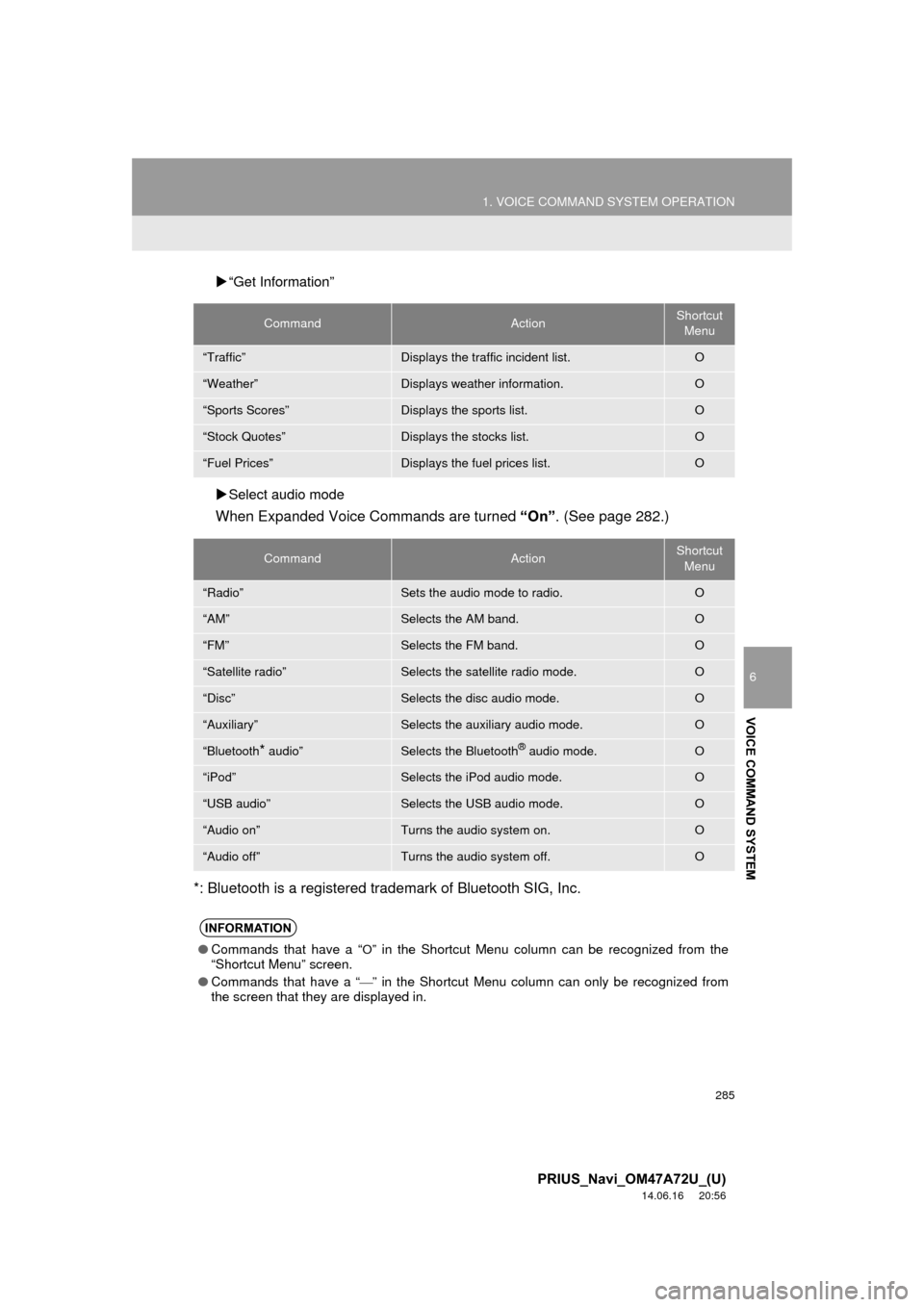
“Get Information”
Select audio mode
When Expanded Voice Commands are turned “On”. (See page 282.)
*: Bluetooth is a registered trademark of Bluetooth SIG, Inc.
CommandActionShortcut Menu
“Traffic”Displays the traffic incident list.O
“Weather”Displays weather information.O
“Sports Scores”Displays the sports list.O
“Stock Quotes”Displays the stocks list.O
“Fuel Prices”Displays the fuel prices list.O
CommandActionShortcut Menu
“Radio”Sets the audio mode to radio.O
“AM”Selects the AM band.O
“FM”Selects the FM band.O
“Satellite radio”Selects the satellite radio mode.O
“Disc”Selects the disc audio mode.O
“Auxiliary”Selects the auxiliary audio mode.O
“Bluetooth* audio”Selects the Bluetooth® audio mode.O
“iPod”Selects the iPod audio mode.O
“USB audio”Selects the USB audio mode.O
“Audio on”Turns the audio system on.O
“Audio off”Turns the audio system off.O
INFORMATION
● Commands that have a “O” in the Shortcut Menu column can be recognized from the
“Shortcut Menu” screen.
● Commands that have a “
” in the Shortcut Menu column can only be recognized from
the screen that they are displayed in.
Page 290 of 356
290
1. INFORMATION DISPLAY
PRIUS_Navi_OM47A72U_(U)
14.06.11 16:10
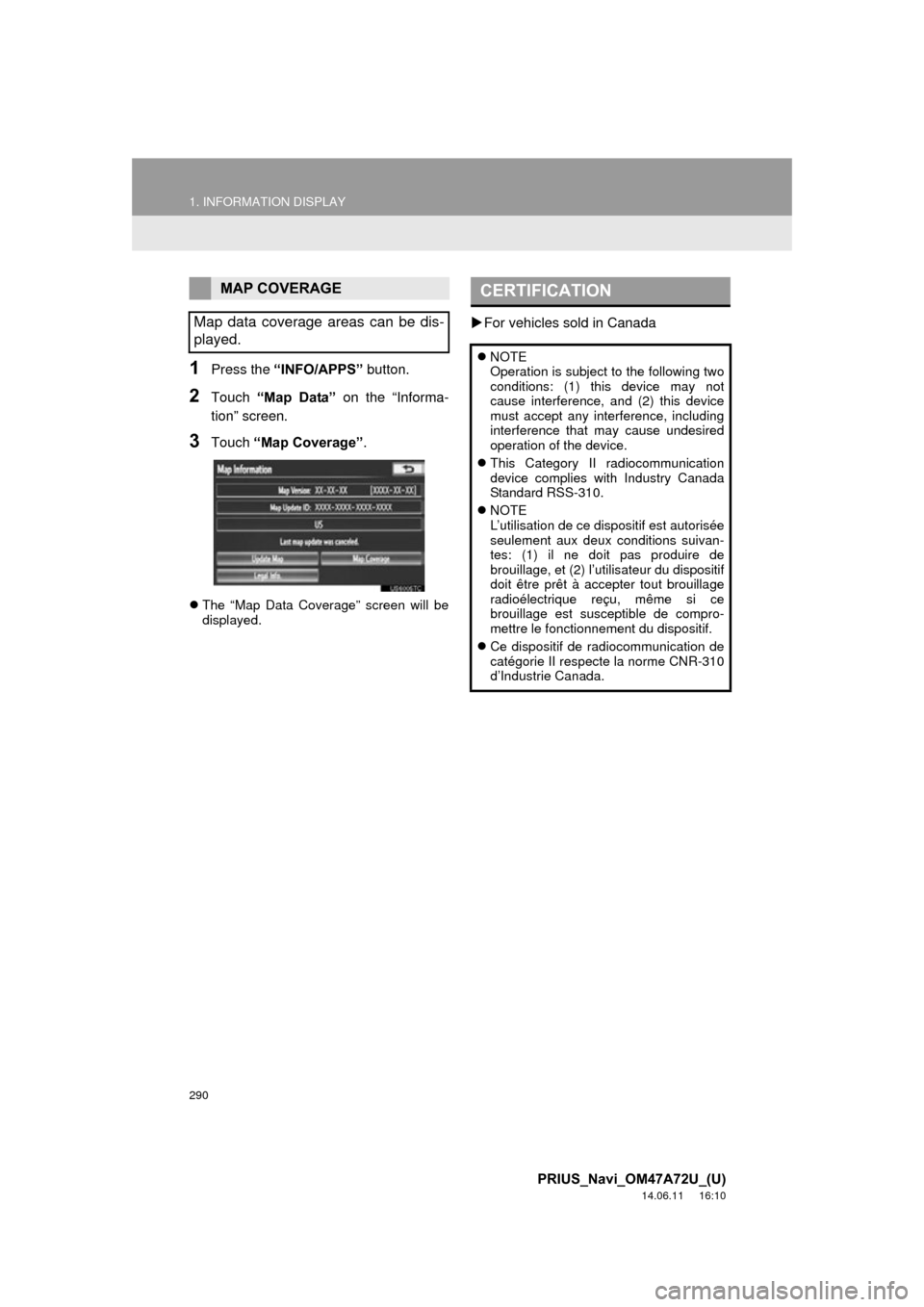
1Press the “INFO/APPS” button.
2Touch “Map Data” on the “Informa-
tion” screen.
3Touch “Map Coverage”.
The “Map Data Coverage” screen will be
displayed.
For vehicles sold in Canada
MAP COVERAGE
Map data coverage areas can be dis-
played.CERTIFICATION
NOTE
Operation is subject to the following two
conditions: (1) this device may not
cause interference, and (2) this device
must accept any interference, including
interference that may cause undesired
operation of the device.
This Category II radiocommunication
device complies with Industry Canada
Standard RSS-310.
NOTE
L’utilisation de ce dispositif est autorisée
seulement aux deux conditions suivan-
tes: (1) il ne doit pas produire de
brouillage, et (2) l’utilisateur du dispositif
doit être prêt à accepter tout brouillage
radioélectrique reçu, même si ce
brouillage est susceptible de compro-
mettre le fonctionnement du dispositif.
Ce dispositif de radiocommunication de
catégorie II respecte la norme CNR-310
d’Industrie Canada.
Page 328 of 356
328
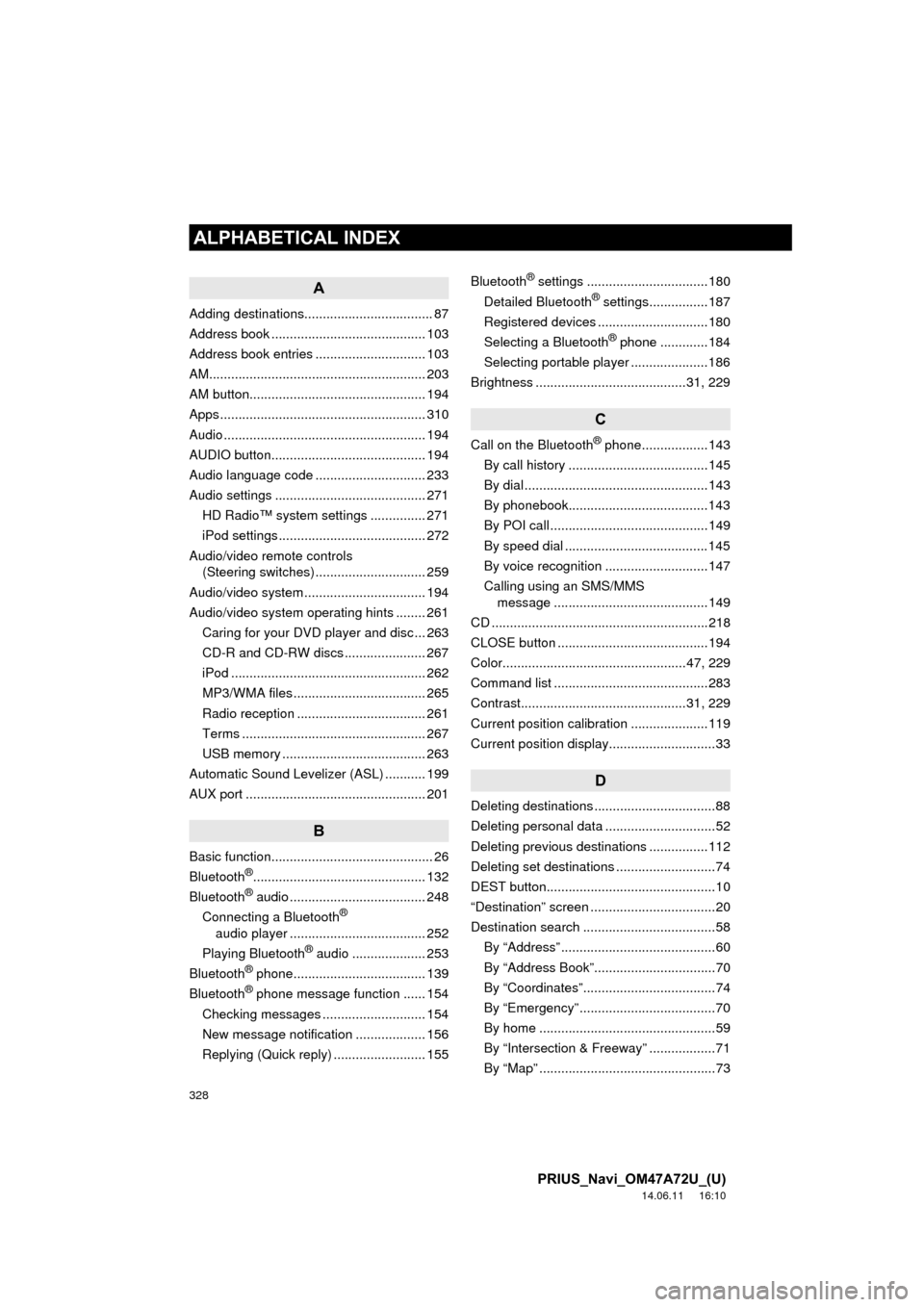
ALPHABETICAL INDEX
PRIUS_Navi_OM47A72U_(U)
14.06.11 16:10
A
Adding destinations................................... 87
Address book .......................................... 103
Address book entries .............................. 103
AM........................................................... 203
AM button................................................ 194
Apps ........................................................ 310
Audio ....................................................... 194
AUDIO button.......................................... 194
Audio language code .............................. 233
Audio settings ......................................... 271HD Radio™ system sett ings ............... 271
iPod settings ........................................ 272
Audio/video remote controls (Steering switches) .............................. 259
Audio/video system ......... ..................... ... 194
Audio/video system operating hints ........ 261
Caring for your DVD player and disc ... 263
CD-R and CD-RW discs ...................... 267
iPod ..................................................... 262
MP3/WMA files .................................... 265
Radio reception ................................... 261
Terms .................................................. 267
USB memory ....................................... 263
Automatic Sound Levelizer (ASL) ........... 199
AUX port ................................................. 201
B
Basic function............................................ 26
Bluetooth®............................................... 132
Bluetooth® audio ..................................... 248
Connecting a Bluetooth®
audio player ..................................... 252
Playing Bluetooth
® audio .................... 253
Bluetooth® phone.................................... 139
Bluetooth® phone message function ...... 154
Checking messages ............................ 154
New message notification ................... 156
Replying (Quick reply) ......................... 155 Bluetooth
® settings .................................180
Detailed Bluetooth® settings................187
Registered devices ..............................180
Selecting a Bluetooth
® phone .............184
Selecting portable player .....................186
Brightness .........................................31, 229
C
Call on the Bluetooth® phone..................143
By call history ......................................145
By dial ..................................................143
By phonebook......................................143
By POI call ...........................................149
By speed dial .......................................145
By voice recognition ............................147
Calling using an SMS/MMS message ..........................................149
CD ...........................................................218
CLOSE button .........................................194
Color..................................................47, 229
Command list ..........................................283
Contrast.............................................31, 229
Current position calibration .....................119
Current position display.............................33
D
Deleting destinations .................................88
Deleting personal data ..............................52
Deleting previous destinations ................112
Deleting set destinations ...........................74
DEST button..............................................10
“Destination” screen ..................................20
Destination search ....................................58 By “Address” ..........................................60
By “Address Book”.................................70
By “Coordinates”....................................74
By “Emergency” .....................................70
By home ................................................59
By “Intersection & Freeway” ..................71
By “Map” ................................................73
ALPHABETICAL INDEX
Page 331 of 356
331
PRIUS_Navi_OM47A72U_(U)
14.06.11 16:10
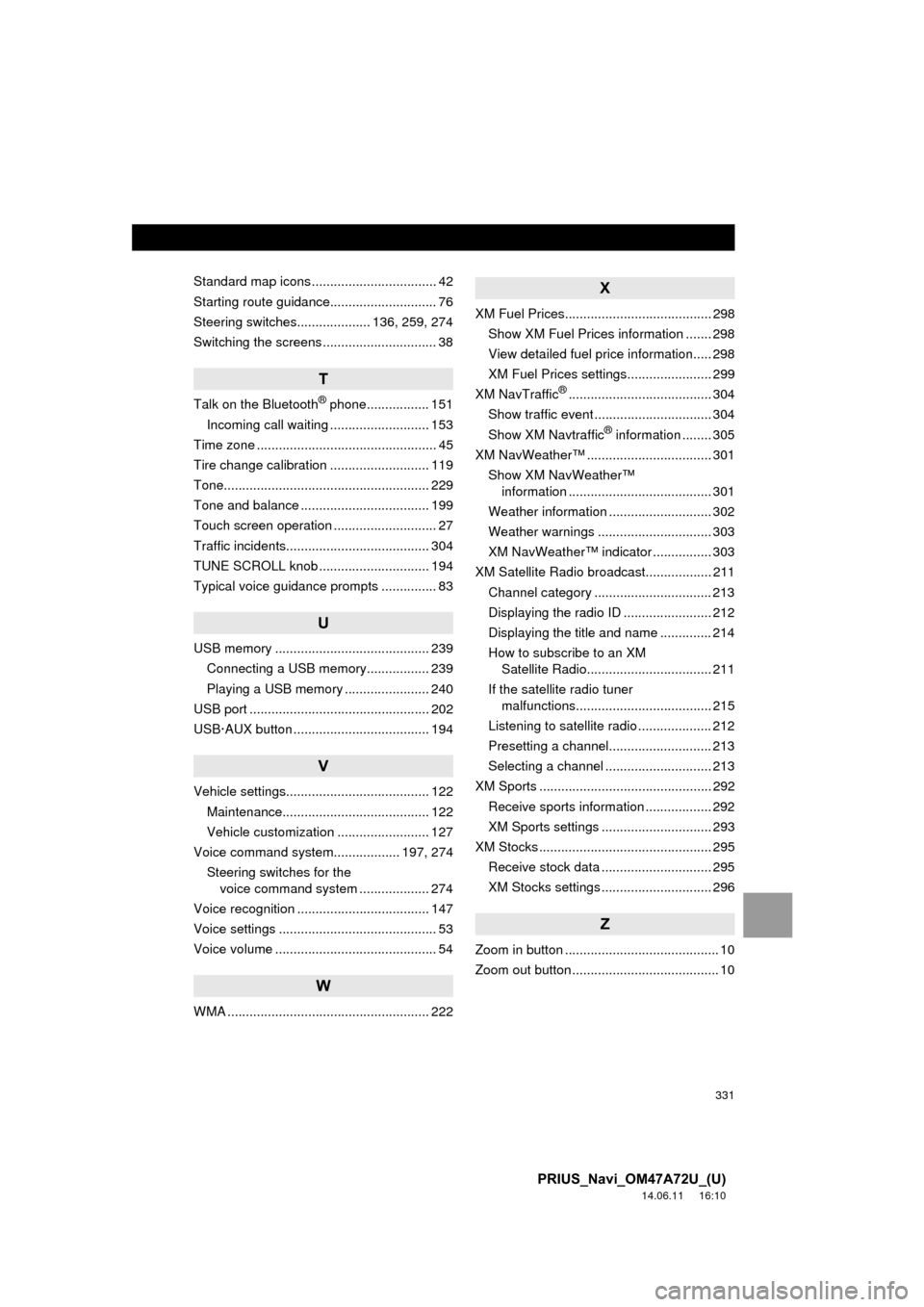
Standard map icons .................................. 42
Starting route guidance............................. 76
Steering switches.................... 136, 259, 274
Switching the screens ............................... 38
T
Talk on the Bluetooth® phone................. 151
Incoming call waiting ........................... 153
Time zone ................................................. 45
Tire change calibration ........................... 119
Tone........................................................ 229
Tone and balance ................................... 199
Touch screen operation ............................ 27
Traffic incidents....................................... 304
TUNE SCROLL knob .............................. 194
Typical voice guidance prompts ............... 83
U
USB memory .......................................... 239 Connecting a USB memory................. 239
Playing a USB memory ....................... 240
USB port ................................................. 202
USB·AUX button ..................................... 194
V
Vehicle settings....................................... 122 Maintenance........................................ 122
Vehicle customization ......................... 127
Voice command system.................. 197, 274 Steering switches for the voice command system ................... 274
Voice recognition .................................... 147
Voice settings ........................................... 53
Voice volume ............................................ 54
W
WMA ....................................................... 222
X
XM Fuel Prices........................................ 298
Show XM Fuel Prices information ....... 298
View detailed fuel price information..... 298
XM Fuel Prices settings....................... 299
XM NavTraffic
®....................................... 304
Show traffic event ................................ 304
Show XM Navtraffic
® information ........ 305
XM NavWeather™ .................................. 301 Show XM NavWeather™ information ....................................... 301
Weather information ............................ 302
Weather warnings ............................... 303
XM NavWeather™ indicator ................ 303
XM Satellite Radio broadcast.................. 211 Channel category ................................ 213
Displaying the radio ID ........................ 212
Displaying the title and name .............. 214
How to subscribe to an XM Satellite Radio.................................. 211
If the satellite radio tuner malfunctions..................................... 215
Listening to satellite radio .................... 212
Presetting a channel............................ 213
Selecting a channel ............................. 213
XM Sports ............................................... 292
Receive sports information .................. 292
XM Sports settings .............................. 293
XM Stocks ............................................... 295
Receive stock data .............................. 295
XM Stocks settings .............................. 296
Z
Zoom in button .......................................... 10
Zoom out button ........................................ 10