ad blue TOYOTA PRIUS 2015 4.G Navigation Manual
[x] Cancel search | Manufacturer: TOYOTA, Model Year: 2015, Model line: PRIUS, Model: TOYOTA PRIUS 2015 4.GPages: 356, PDF Size: 6 MB
Page 151 of 356
151
1. PHONE OPERATION
4
PHONE
PRIUS_Navi_OM47A72U_(U)
14.06.16 20:56
6. TALK ON THE Bluetooth® PHONE
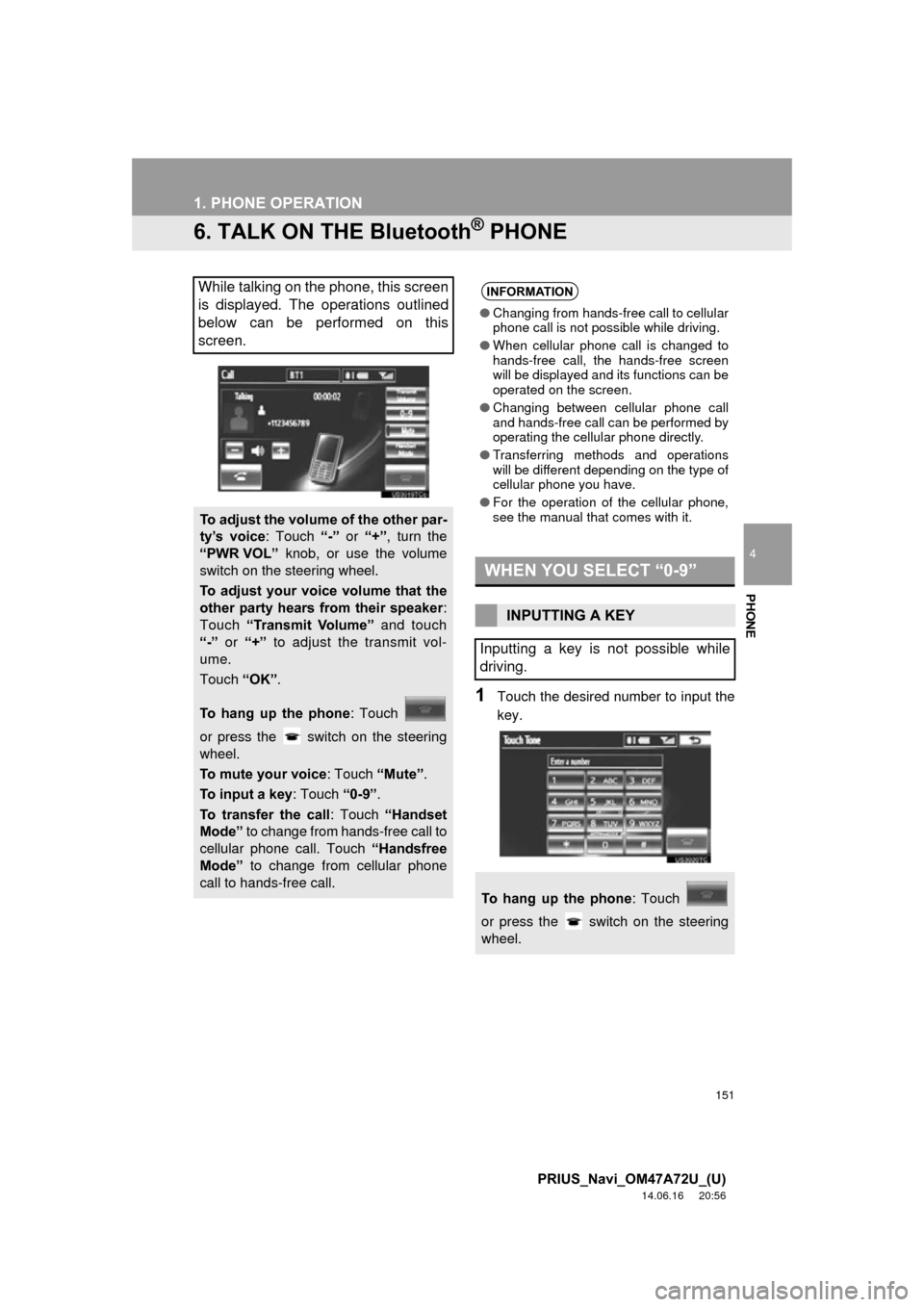
1Touch the desired number to input the
key.
While talking on the phone, this screen
is displayed. The operations outlined
below can be performed on this
screen.
To adjust the volume of the other par-
ty’s voice: Touch “-” or “+” , turn the
“PWR VOL” knob, or use the volume
switch on the steering wheel.
To adjust your voice volume that the
other party hears from their speaker :
Touch “Transmit Volume” and touch
“-” or “+” to adjust the transmit vol-
ume.
Touch “OK”.
To hang up the phone : Touch
or press the switch on the steering
wheel.
To mute your voice : Touch “Mute”.
To input a key : Touch “0-9”.
To transfer the call : Touch “Handset
Mode” to change from hands-free call to
cellular phone call. Touch “Handsfree
Mode” to change from cellular phone
call to hands-free call.
INFORMATION
● Changing from hands-free call to cellular
phone call is not possible while driving.
● When cellular phone call is changed to
hands-free call, the hands-free screen
will be displayed and its functions can be
operated on the screen.
● Changing between cellular phone call
and hands-free call can be performed by
operating the cellular phone directly.
● Transferring methods and operations
will be different depending on the type of
cellular phone you have.
● For the operation of the cellular phone,
see the manual that comes with it.
WHEN YOU SELECT “0-9”
INPUTTING A KEY
Inputting a key is not possible while
driving.
To hang up the phone : Touch
or press the switch on the steering
wheel.
Page 153 of 356
153
1. PHONE OPERATION
4
PHONE
PRIUS_Navi_OM47A72U_(U)
14.06.16 20:56
1Touch or press the
switch on the steering wheel to start
talking with the other party.
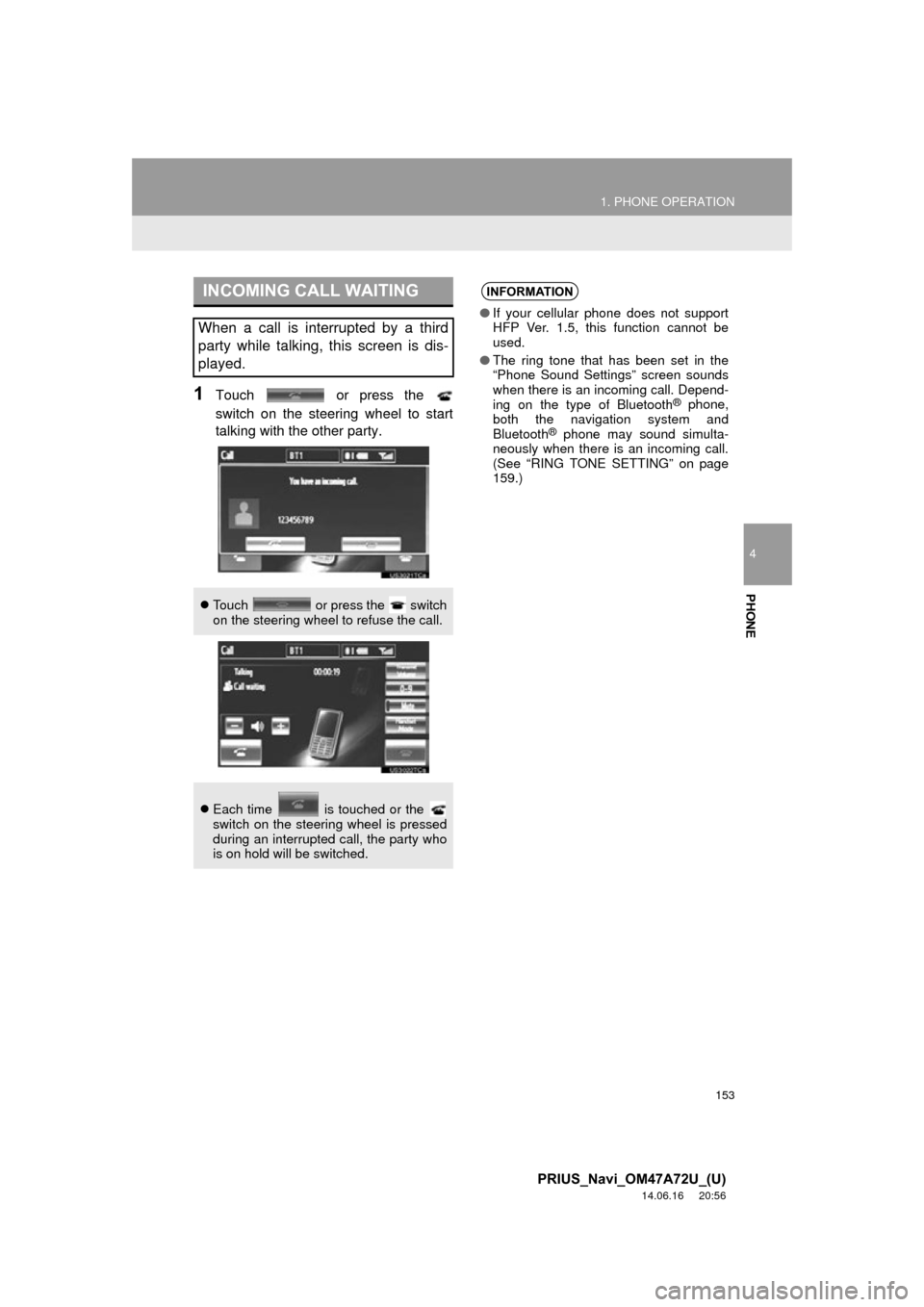
INCOMING CALL WAITING
When a call is interrupted by a third
party while talking, this screen is dis-
played.
Touch or press the switch
on the steering wheel to refuse the call.
Each time is touched or the
switch on the steering wheel is pressed
during an interrupted call, the party who
is on hold will be switched.
INFORMATION
● If your cellular phone does not support
HFP Ver. 1.5, this function cannot be
used.
● The ring tone that has been set in the
“Phone Sound Settings” screen sounds
when there is an incoming call. Depend-
ing on the type of Bluetooth
® phone,
both the navigation system and
Bluetooth
® phone may sound simulta-
neously when there is an incoming call.
(See “RING TONE SETTING” on page
159.)
Page 154 of 356
154
1. PHONE OPERATION
PRIUS_Navi_OM47A72U_(U)
14.06.16 20:56
7. Bluetooth® PHONE MESSAGE FUNCTION
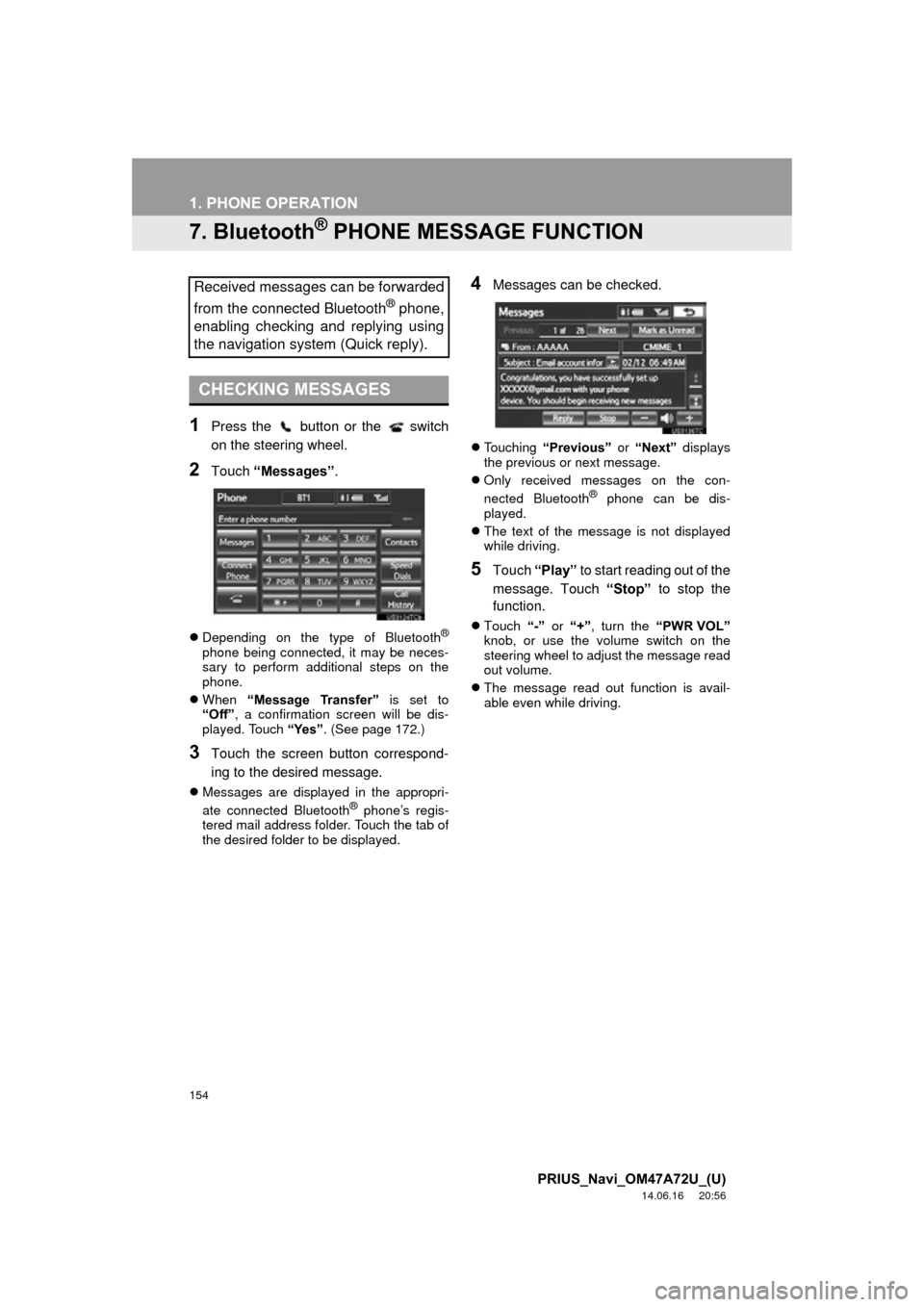
1Press the button or the switch
on the steering wheel.
2Touch “Messages” .
Depending on the type of Bluetooth®
phone being connected, it may be neces-
sary to perform additional steps on the
phone.
When “Message Transfer” is set to
“Off”, a confirmation screen will be dis-
played. Touch “Yes”. (See page 172.)
3Touch the screen button correspond-
ing to the desired message.
Messages are displayed in the appropri-
ate connected Bluetooth® phone’s regis-
tered mail address folder. Touch the tab of
the desired folder to be displayed.
4Messages can be checked.
Touching “Previous” or “Next” displays
the previous or next message.
Only received messages on the con-
nected Bluetooth
® phone can be dis-
played.
The text of the message is not displayed
while driving.
5Touch “Play” to start reading out of the
message. Touch “Stop” to stop the
function.
Touch “-” or “+”, turn the “PWR VOL”
knob, or use the volume switch on the
steering wheel to adjust the message read
out volume.
The message read out function is avail-
able even while driving.
Received messages can be forwarded
from the connected Bluetooth
® phone,
enabling checking and replying using
the navigation system (Quick reply).
CHECKING MESSAGES
Page 155 of 356
155
1. PHONE OPERATION
4
PHONE
PRIUS_Navi_OM47A72U_(U)
14.06.16 20:56
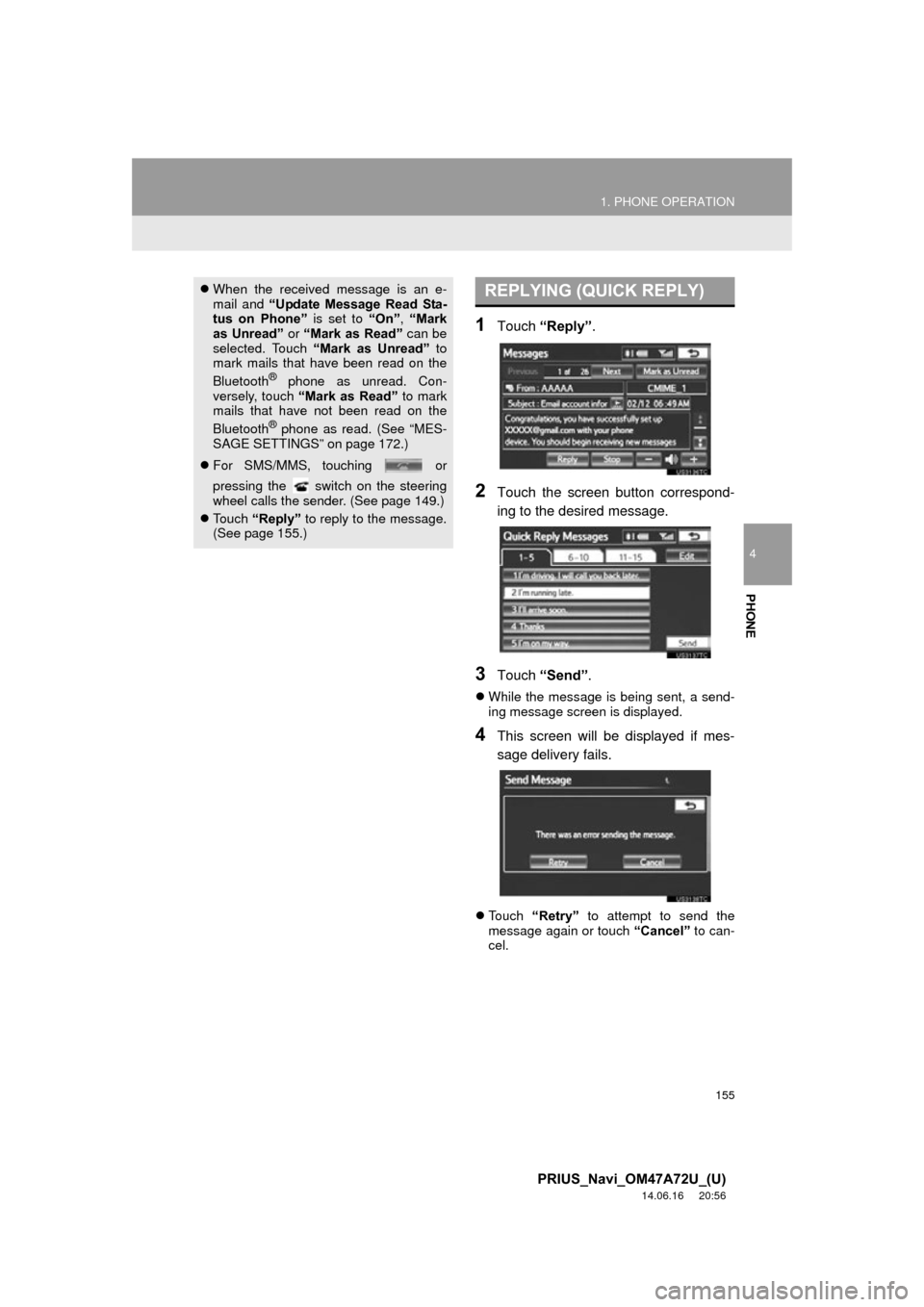
1Touch “Reply”.
2Touch the screen button correspond-
ing to the desired message.
3Touch “Send” .
While the message is being sent, a send-
ing message screen is displayed.
4This screen will be displayed if mes-
sage delivery fails.
Touch “Retry” to attempt to send the
message again or touch “Cancel” to can-
cel.
When the received message is an e-
mail and “Update Message Read Sta-
tus on Phone” is set to “On”, “Mark
as Unread” or “Mark as Read” can be
selected. Touch “Mark as Unread” to
mark mails that have been read on the
Bluetooth
® phone as unread. Con-
versely, touch “Mark as Read” to mark
mails that have not been read on the
Bluetooth
® phone as read. (See “MES-
SAGE SETTINGS” on page 172.)
For SMS/MMS, touching or
pressing the switch on the steering
wheel calls the sender. (See page 149.)
Touch “Reply” to reply to the message.
(See page 155.)
REPLYING (QUICK REPLY)
Page 160 of 356
160
2. SETUP
PRIUS_Navi_OM47A72U_(U)
14.06.16 20:56
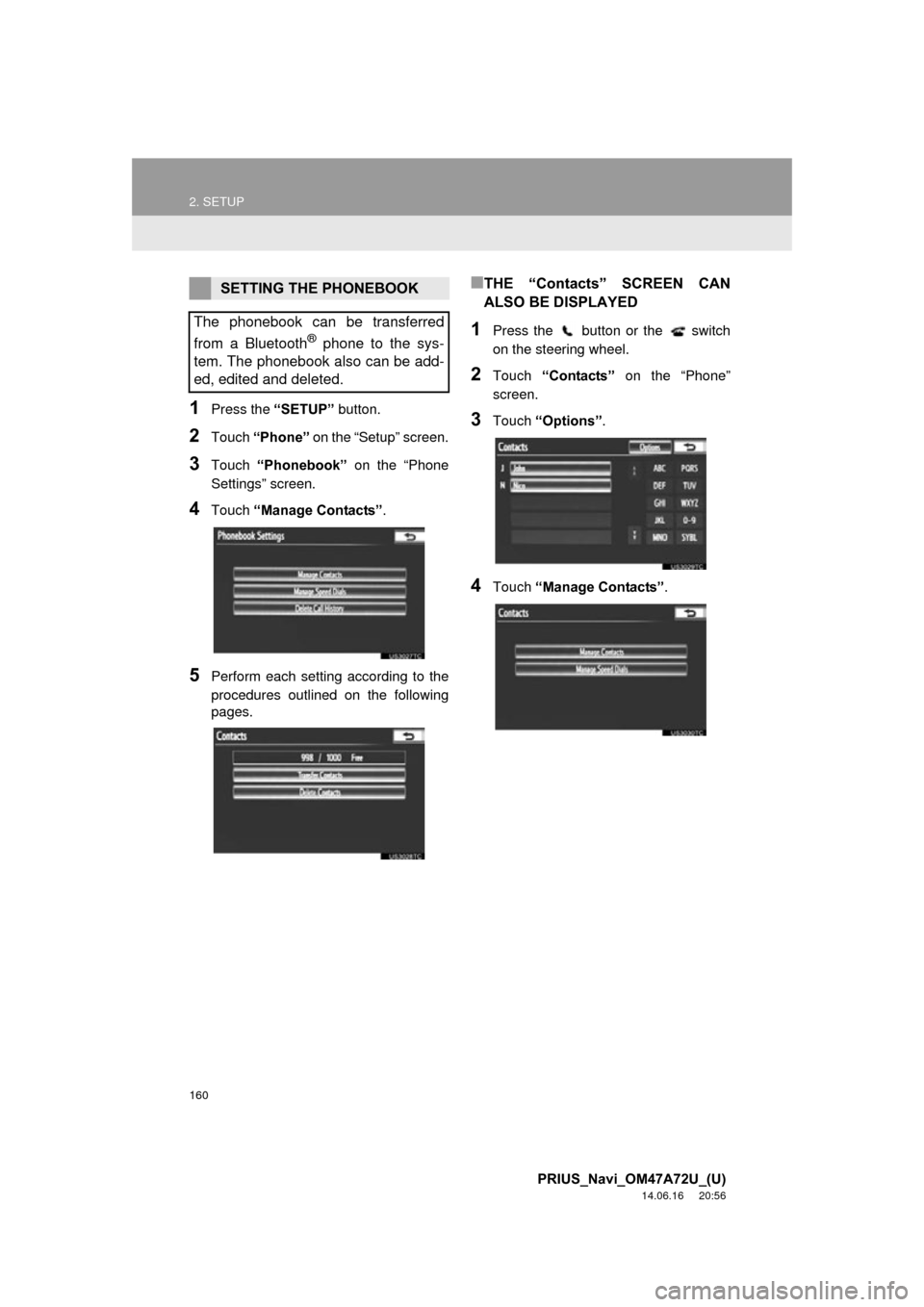
1Press the “SETUP” button.
2Touch “Phone” on the “Setup” screen.
3Touch “Phonebook” on the “Phone
Settings” screen.
4Touch “Manage Contacts”.
5Perform each setting according to the
procedures outlined on the following
pages.
■THE “Contacts” SCREEN CAN
ALSO BE DISPLAYED
1Press the button or the switch
on the steering wheel.
2Touch “Contacts” on the “Phone”
screen.
3Touch “Options” .
4Touch “Manage Contacts” .
SETTING THE PHONEBOOK
The phonebook can be transferred
from a Bluetooth
® phone to the sys-
tem. The phonebook also can be add-
ed, edited and deleted.
Page 161 of 356
161
2. SETUP
4
PHONE
PRIUS_Navi_OM47A72U_(U)
14.06.16 20:56
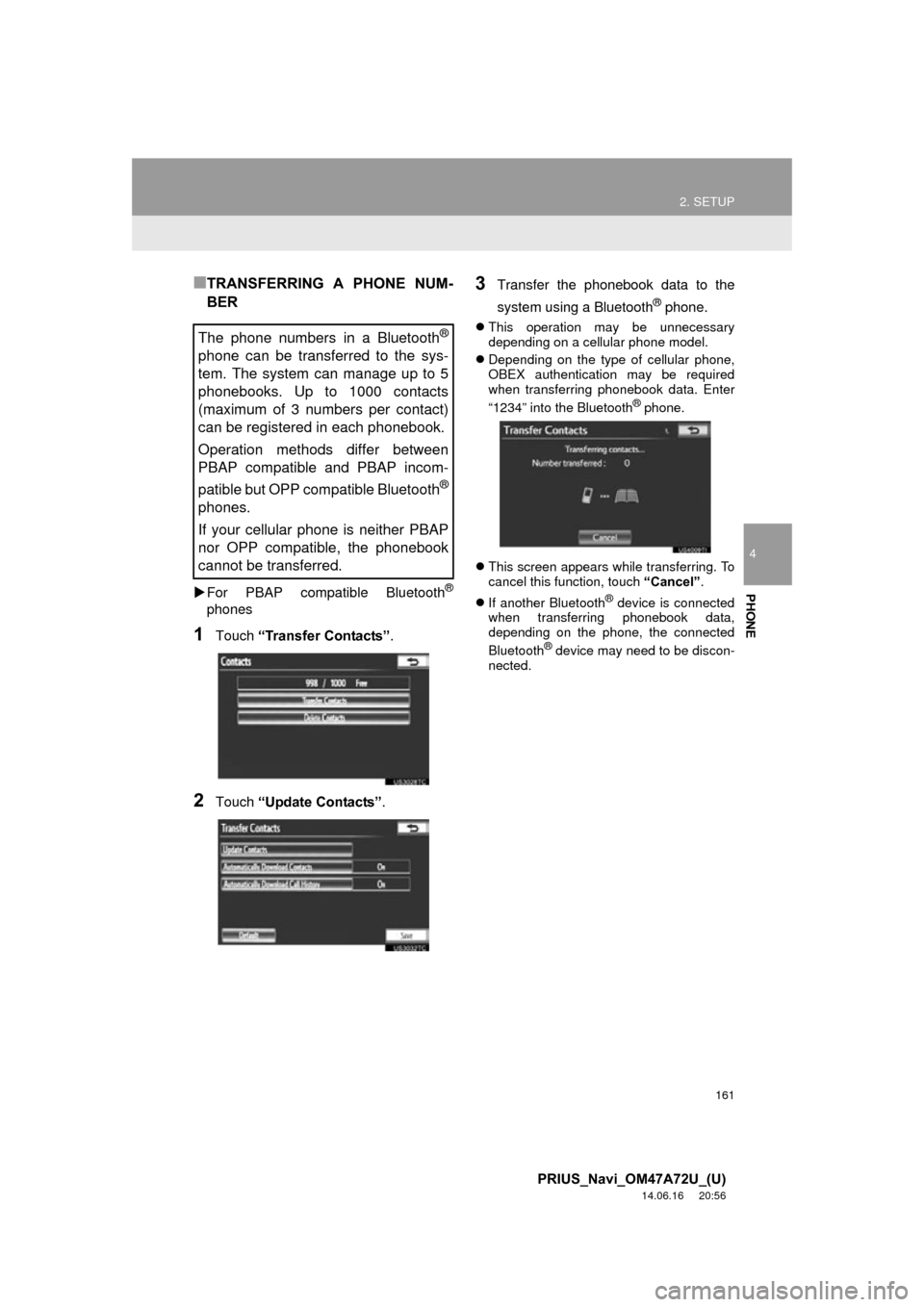
■TRANSFERRING A PHONE NUM-
BER
For PBAP compatible Bluetooth®
phones
1Touch “Transfer Contacts” .
2Touch “Update Contacts” .
3Transfer the phonebook data to the
system using a Bluetooth
® phone.
This operation may be unnecessary
depending on a cellular phone model.
Depending on the type of cellular phone,
OBEX authentication may be required
when transferring phonebook data. Enter
“1234” into the Bluetooth
® phone.
This screen appears while transferring. To
cancel this function, touch “Cancel”.
If another Bluetooth
® device is connected
when transferring phonebook data,
depending on the phone, the connected
Bluetooth
® device may need to be discon-
nected.
The phone numbers in a Bluetooth®
phone can be transferred to the sys-
tem. The system can manage up to 5
phonebooks. Up to 1000 contacts
(maximum of 3 numbers per contact)
can be registered in each phonebook.
Operation methods differ between
PBAP compatible and PBAP incom-
patible but OPP compatible Bluetooth
®
phones.
If your cellular phone is neither PBAP
nor OPP compatible, the phonebook
cannot be transferred.
Page 162 of 356
162
2. SETUP
PRIUS_Navi_OM47A72U_(U)
14.06.16 20:56
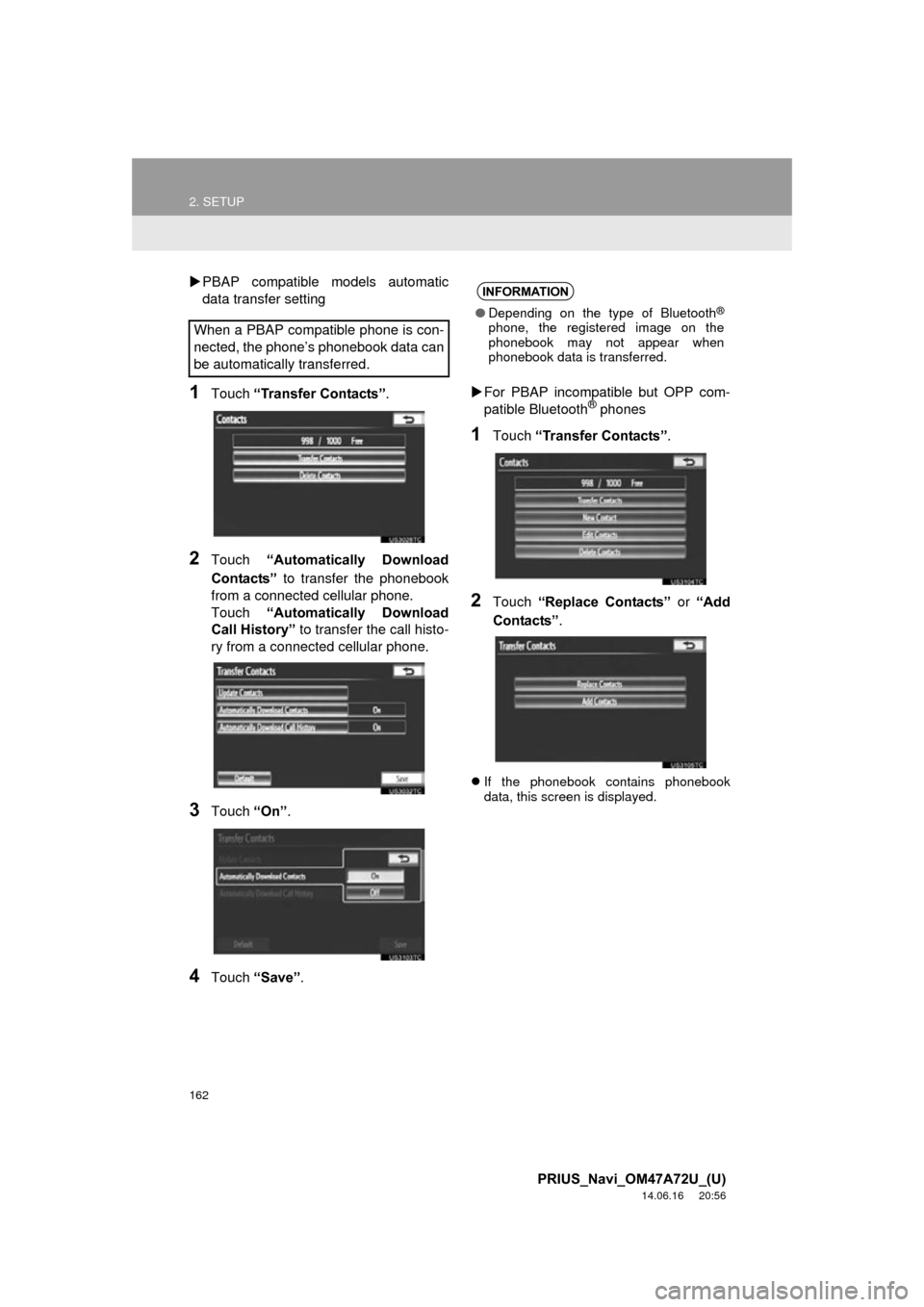
PBAP compatible models automatic
data transfer setting
1Touch “Transfer Contacts”.
2Touch “Automatically Download
Contacts” to transfer the phonebook
from a connected cellular phone.
Touch “Automatically Download
Call History” to transfer the call histo-
ry from a connected cellular phone.
3Touch “On”.
4Touch “Save” .
For PBAP incompatible but OPP com-
patible Bluetooth
® phones
1Touch “Transfer Contacts” .
2Touch “Replace Contacts” or “Add
Contacts” .
If the phonebook contains phonebook
data, this screen is displayed.
When a PBAP compatible phone is con-
nected, the phone’s phonebook data can
be automatically transferred.
INFORMATION
●Depending on the type of Bluetooth®
phone, the registered image on the
phonebook may not appear when
phonebook data is transferred.
Page 163 of 356
163
2. SETUP
4
PHONE
PRIUS_Navi_OM47A72U_(U)
14.06.16 20:56
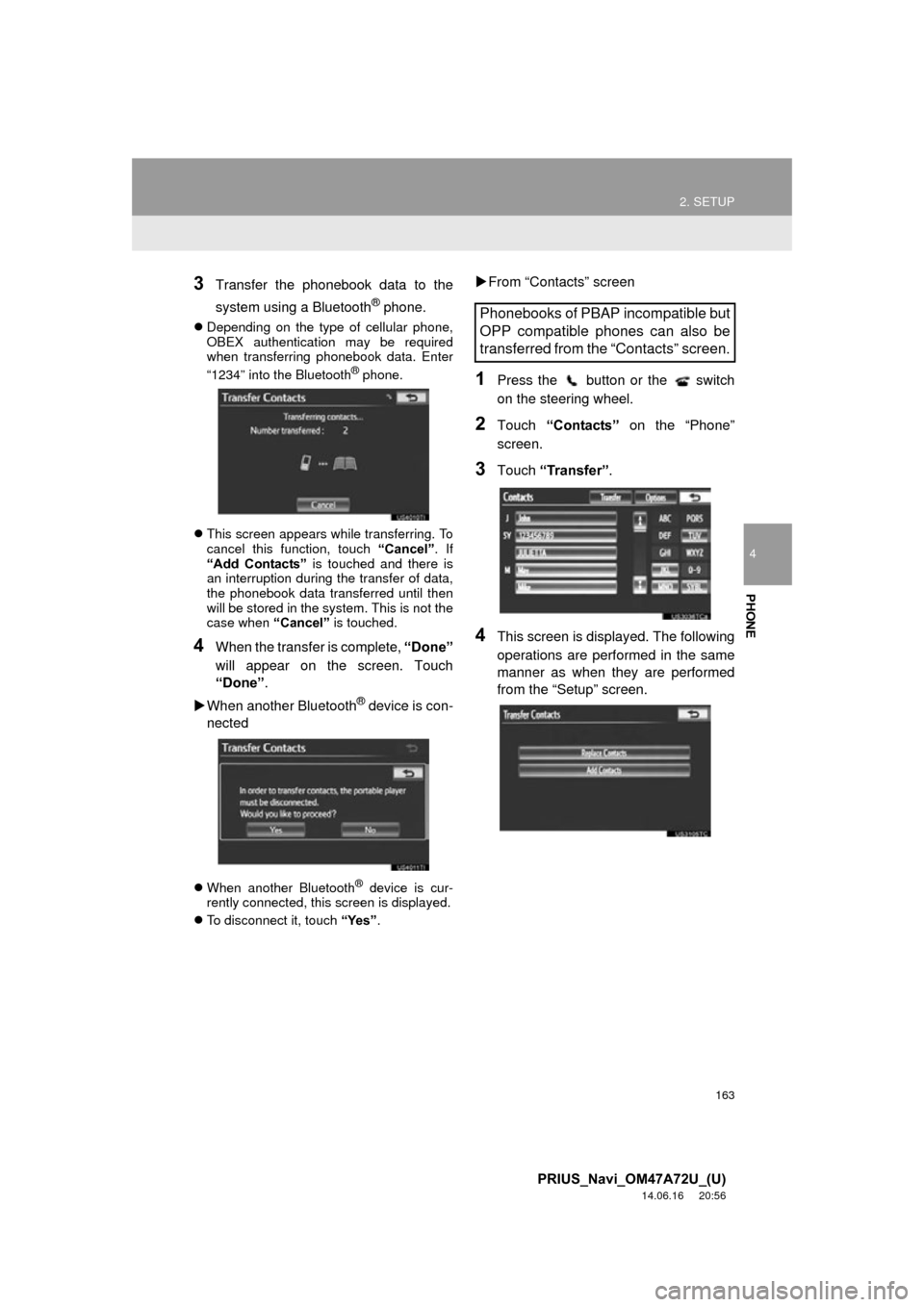
3Transfer the phonebook data to the
system using a Bluetooth
® phone.
Depending on the type of cellular phone,
OBEX authentication may be required
when transferring phonebook data. Enter
“1234” into the Bluetooth
® phone.
This screen appears while transferring. To
cancel this function, touch “Cancel” . If
“Add Contacts” is touched and there is
an interruption during the transfer of data,
the phonebook data transferred until then
will be stored in the system. This is not the
case when “Cancel” is touched.
4When the transfer is complete, “Done”
will appear on the screen. Touch
“Done” .
When another Bluetooth
® device is con-
nected
When another Bluetooth® device is cur-
rently connected, this screen is displayed.
To disconnect it, touch “Yes”.
From “Contacts” screen
1Press the button or the switch
on the steering wheel.
2Touch “Contacts” on the “Phone”
screen.
3Touch “Transfer”.
4This screen is displayed. The following
operations are performed in the same
manner as when they are performed
from the “Setup” screen.
Phonebooks of PBAP incompatible but
OPP compatible phones can also be
transferred from the “Contacts” screen.
Page 164 of 356
164
2. SETUP
PRIUS_Navi_OM47A72U_(U)
14.06.16 20:56
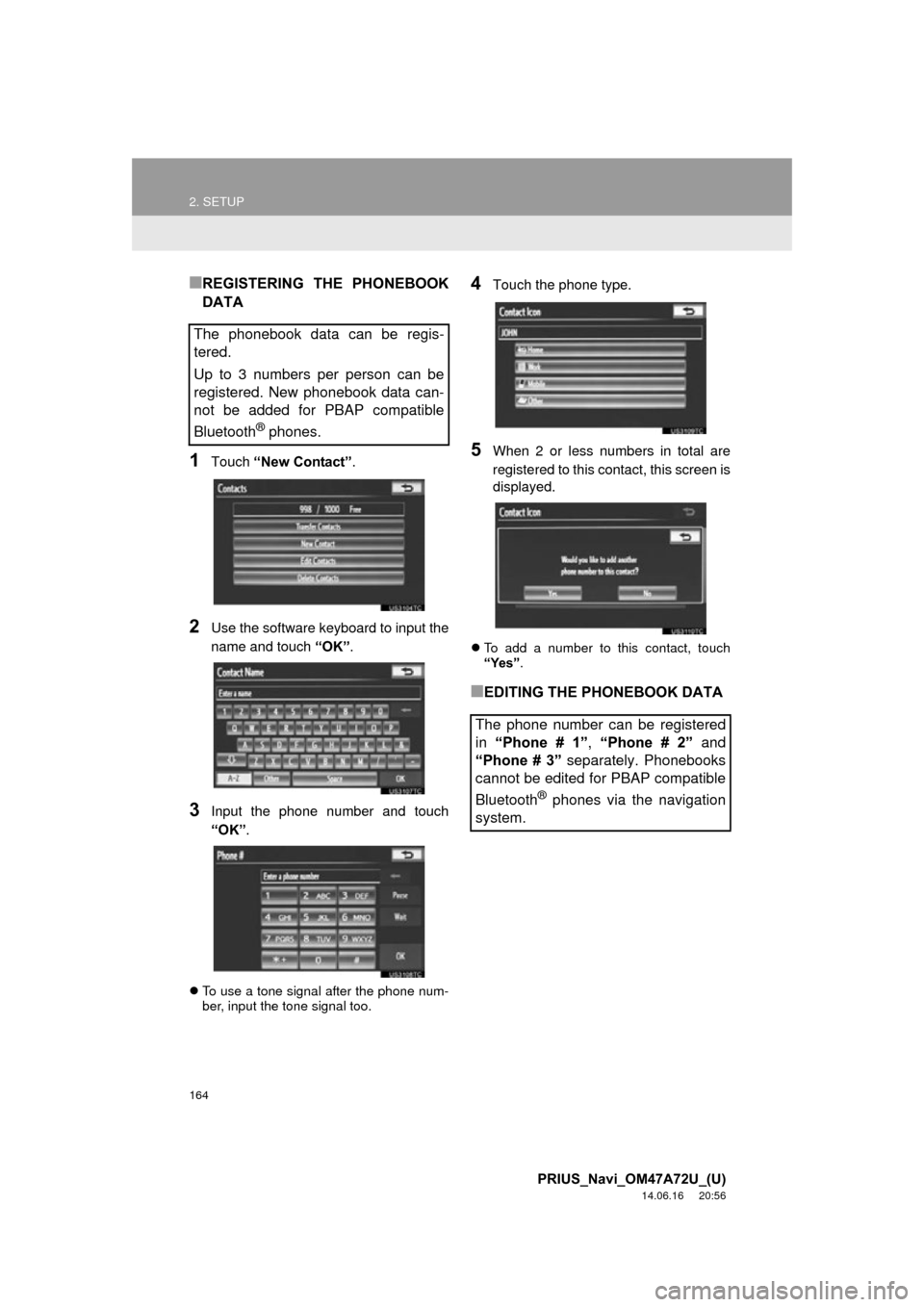
■REGISTERING THE PHONEBOOK
DATA
1Touch “New Contact” .
2Use the software keyboard to input the
name and touch “OK”.
3Input the phone number and touch
“OK”.
To use a tone signal after the phone num-
ber, input the tone signal too.
4Touch the phone type.
5When 2 or less numbers in total are
registered to this contact, this screen is
displayed.
To add a number to this contact, touch
“Yes”.
■EDITING THE PHONEBOOK DATA
The phonebook data can be regis-
tered.
Up to 3 numbers per person can be
registered. New phonebook data can-
not be added for PBAP compatible
Bluetooth
® phones.
The phone number can be registered
in
“Phone # 1” , “Phone # 2” and
“Phone # 3” separately. Phonebooks
cannot be edited for PBAP compatible
Bluetooth
® phones via the navigation
system.
Page 167 of 356
167
2. SETUP
4
PHONE
PRIUS_Navi_OM47A72U_(U)
14.06.16 20:56
■ALTERNATIVE PHONEBOOK
DATA DELETION METHOD
PBAP incompatible but OPP compatible
models
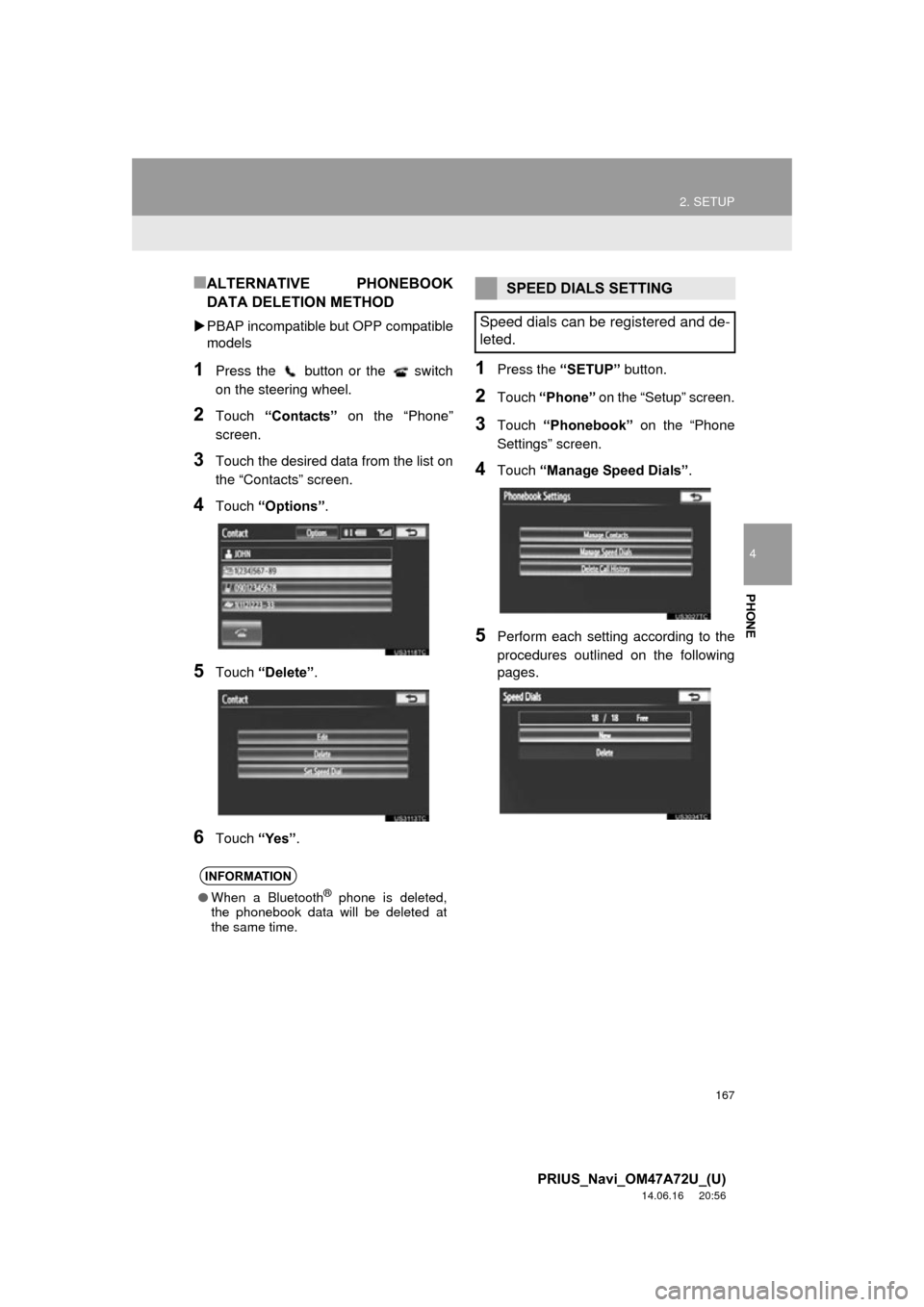
1Press the button or the switch
on the steering wheel.
2Touch “Contacts” on the “Phone”
screen.
3Touch the desired data from the list on
the “Contacts” screen.
4Touch “Options”.
5Touch “Delete” .
6Touch “Yes”.
1Press the “SETUP” button.
2Touch “Phone” on the “Setup” screen.
3Touch “Phonebook” on the “Phone
Settings” screen.
4Touch “Manage Speed Dials” .
5Perform each setting according to the
procedures outlined on the following
pages.
INFORMATION
●When a Bluetooth® phone is deleted,
the phonebook data will be deleted at
the same time.
SPEED DIALS SETTING
Speed dials can be registered and de-
leted.