light TOYOTA PRIUS 2016 4.G Owners Manual
[x] Cancel search | Manufacturer: TOYOTA, Model Year: 2016, Model line: PRIUS, Model: TOYOTA PRIUS 2016 4.GPages: 800, PDF Size: 16.69 MB
Page 519 of 800
PRIUS_OM_OM47A29U_(U)
5196-1. Using the air conditioning system and defogger
6
Interior features
■Using automatic mode
Fan speed is adjusted automatically according to the temperature setting and
the ambient conditions.
Therefore, the fan may stop for a while until warm or cool air is ready to flow
immediately after the button is pressed.
■ S-FLOW mode operation
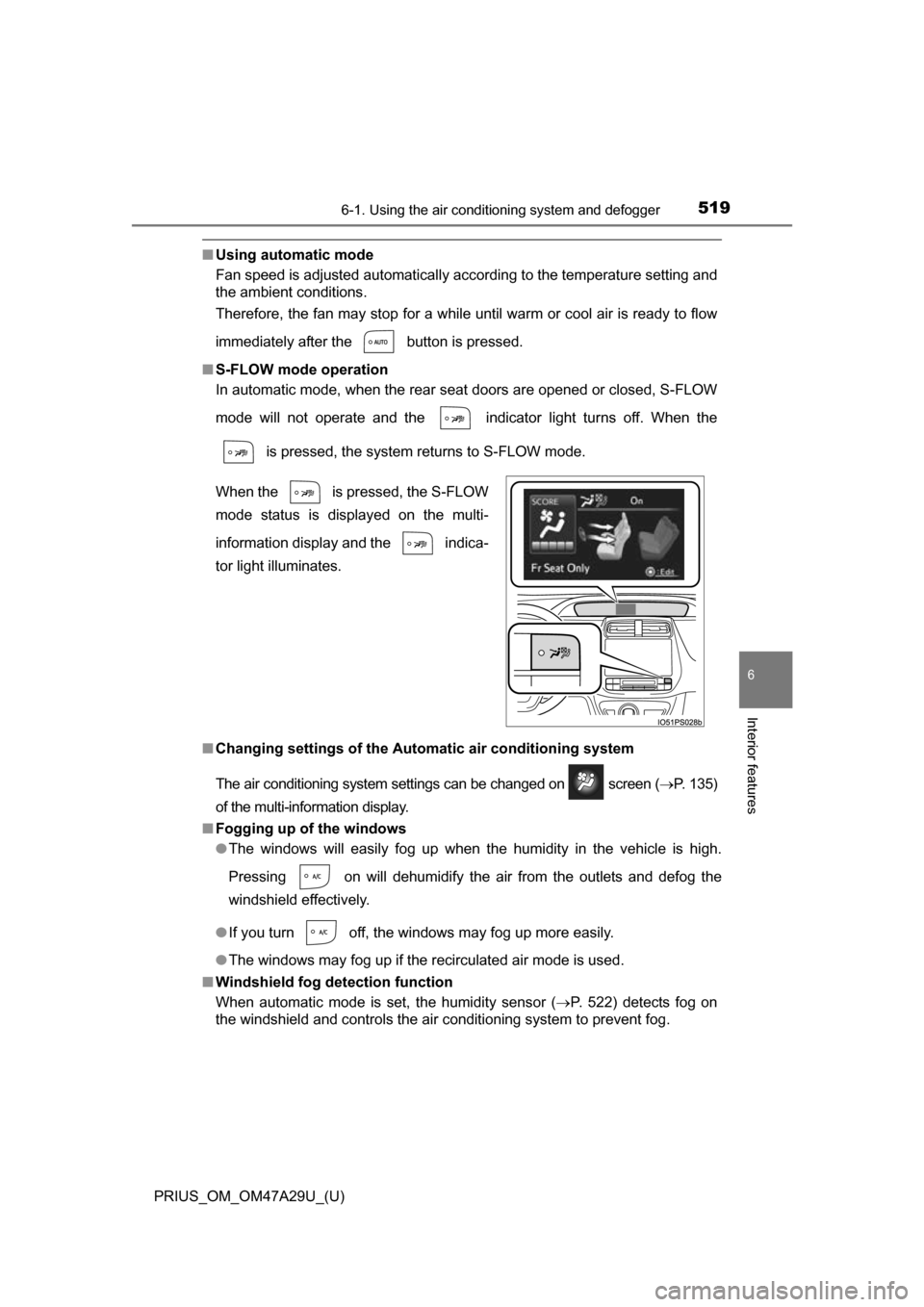
In automatic mode, when the rear seat doors are opened or closed, S-FLOW
mode will not operate and the indicator light turns off. When the
is pressed, the system returns to S-FLOW mode.
■ Changing settings of the Automatic air conditioning system
The air conditioning system settings can be changed on screen ( P. 135)
of the multi-information display.
■ Fogging up of the windows
●The windows will easily fog up when the humidity in the vehicle is high.
Pressing on will dehumidify the air from the outlets and defog the
windshield effectively.
● If you turn off, the windows may fog up more easily.
● The windows may fog up if the recirculated air mode is used.
■ Windshield fog detection function
When automatic mode is set, the humidity sensor (P. 522) detects fog on
the windshield and controls the air conditioning system to prevent fog. When the is pressed, the S-FLOW
mode status is displayed on the multi-
information display and the indica-
tor light illuminates.
Page 524 of 800
5246-1. Using the air conditioning system and defogger
PRIUS_OM_OM47A29U_(U)
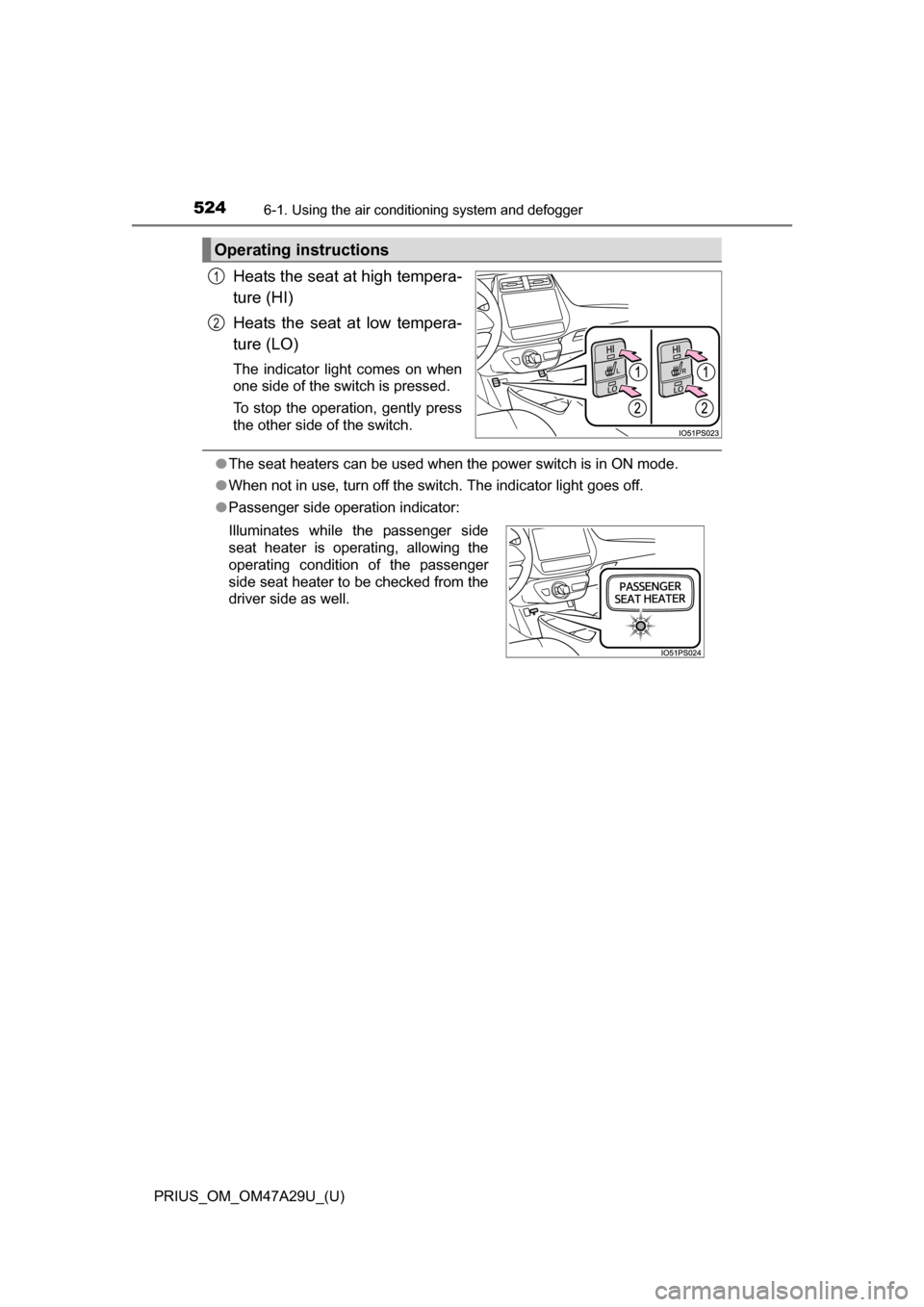
Heats the seat at high tempera-
ture (HI)
Heats the seat at low tempera-
ture (LO)
The indicator light comes on when
one side of the switch is pressed.
To stop the operation, gently press
the other side of the switch.
●The seat heaters can be used when the power switch is in ON mode.
● When not in use, turn off the switch. The indicator light goes off.
● Passenger side operation indicator:
Operating instructions
1
2
Illuminates while the passenger side
seat heater is operating, allowing the
operating condition of the passenger
side seat heater to be checked from the
driver side as well.
Page 525 of 800
525
PRIUS_OM_OM47A29U_(U)
6-2. Using the interior lights
6
Interior features
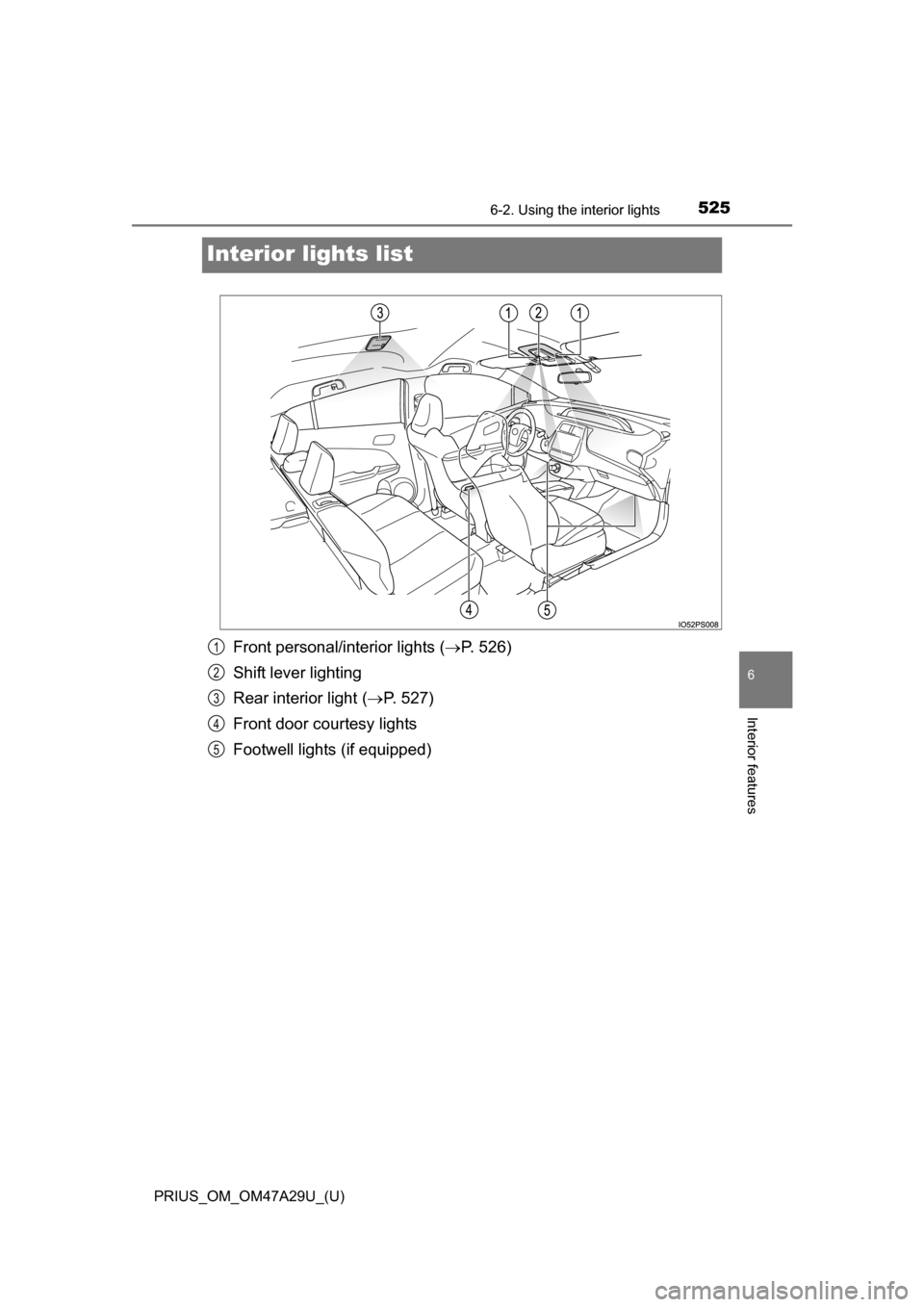
Interior lights list
Front personal/interior lights ( P. 526)
Shift lever lighting
Rear interior light ( P. 527)
Front door courtesy lights
Footwell lights (if equipped)1
2
3
4
5
Page 526 of 800
526
PRIUS_OM_OM47A29U_(U)
6-2. Using the interior lights
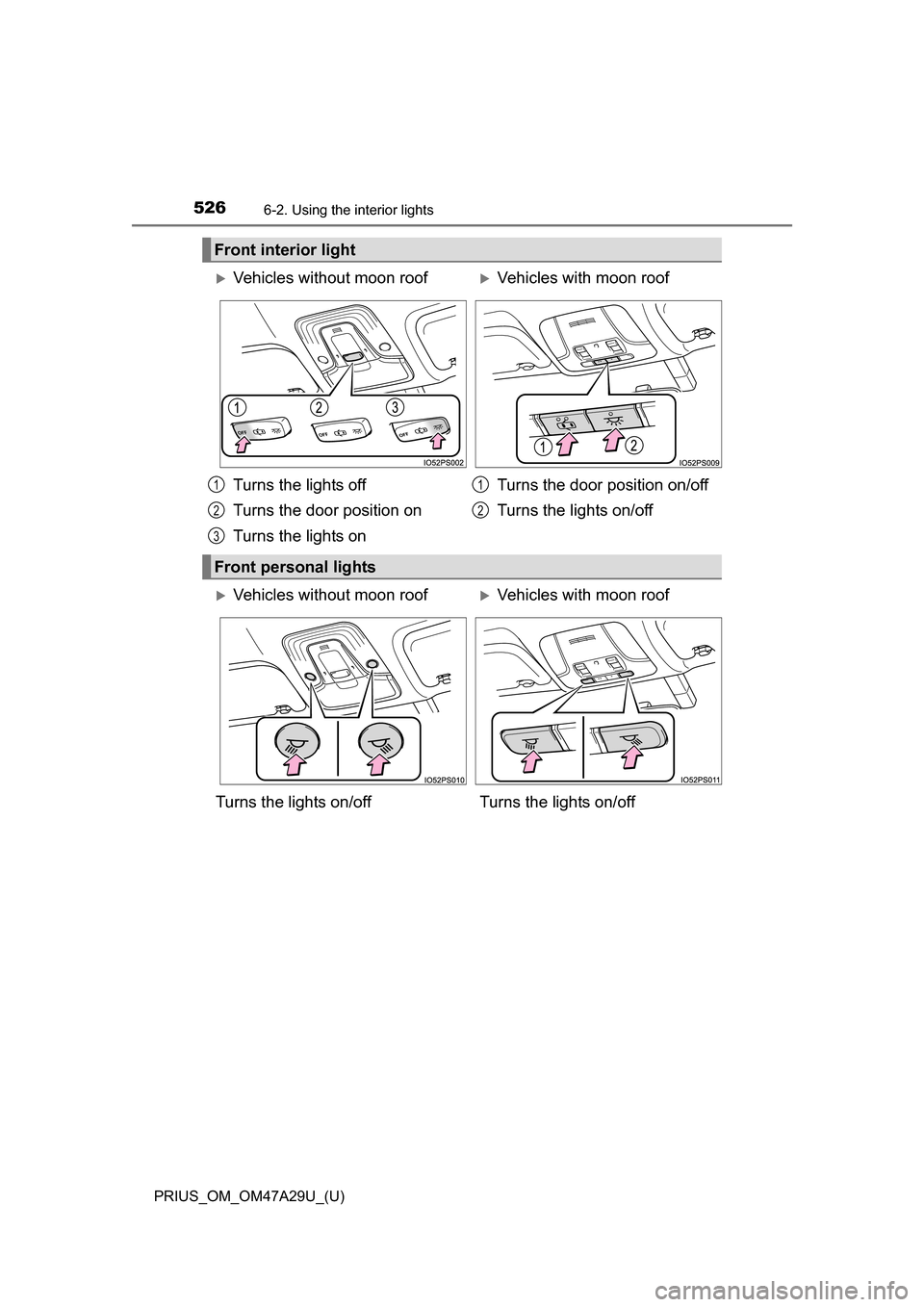
Front interior light
Vehicles without moon roofVehicles with moon roof
Turns the lights off
Turns the door position on
Turns the lights on Turns the door position on/off
Turns the lights on/off
Front personal lights
1
2
3
1
2
Vehicles without moon roofVehicles with moon roof
Turns the lights on/off Turns the lights on/off
Page 527 of 800
PRIUS_OM_OM47A29U_(U)
5276-2. Using the interior lights
6
Interior features
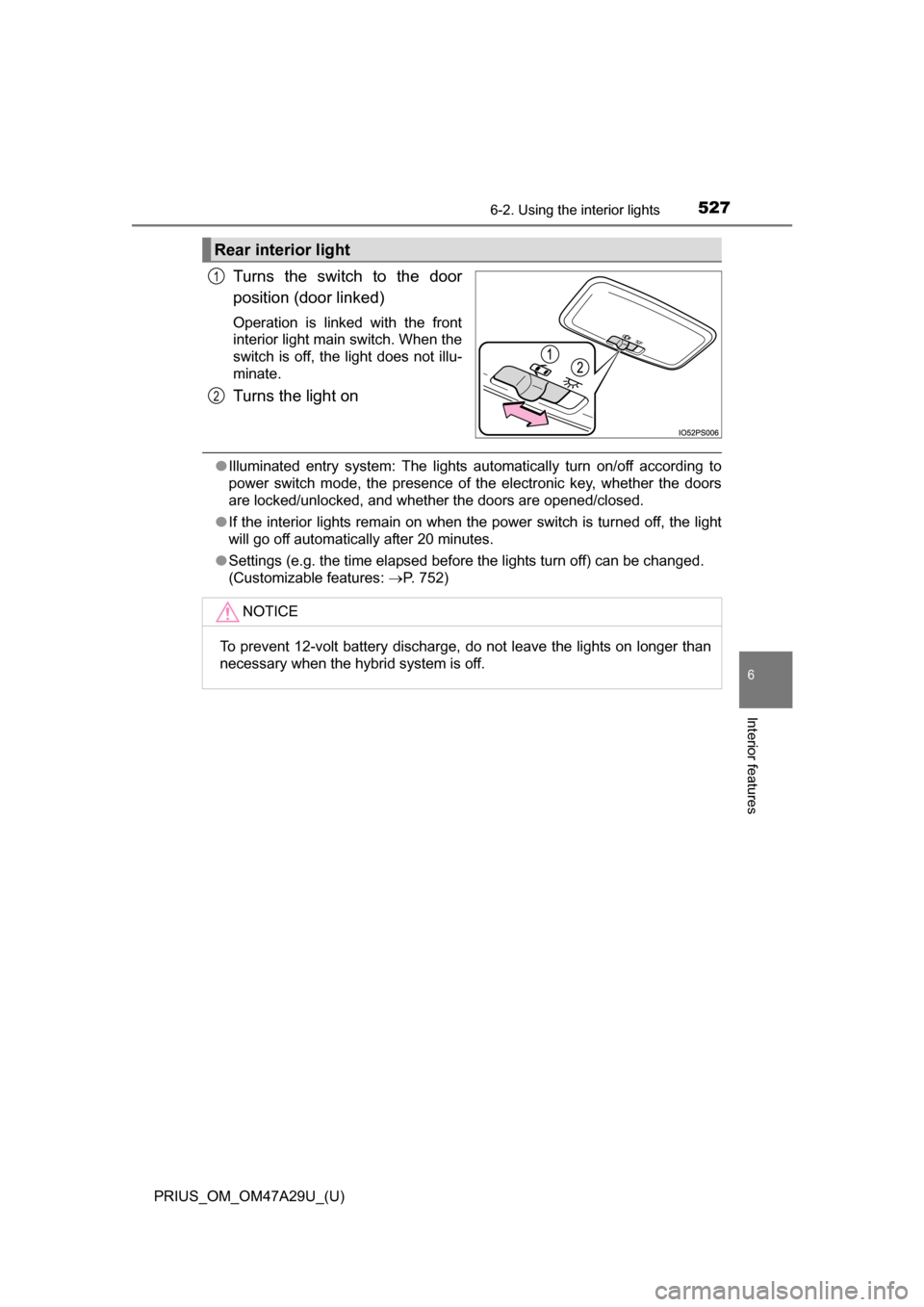
Turns the switch to the door
position (door linked)
Operation is linked with the front
interior light main switch. When the
switch is off, the light does not illu-
minate.
Turns the light on
●Illuminated entry system: The lights automatically turn on/off according to
power switch mode, the presence of the electronic key, whether the doors
are locked/unlocked, and whether the doors are opened/closed.
● If the interior lights remain on when the power switch is turned off, the light
will go off automatically after 20 minutes.
● Settings (e.g. the time elapsed before the lights turn off) can be changed.
(Customizable features: P. 752)
Rear interior light
1
2
NOTICE
To prevent 12-volt battery discharge, do not leave the lights on longer than
necessary when the hybrid system is off.
Page 528 of 800
528
PRIUS_OM_OM47A29U_(U)
6-3. Using the storage features
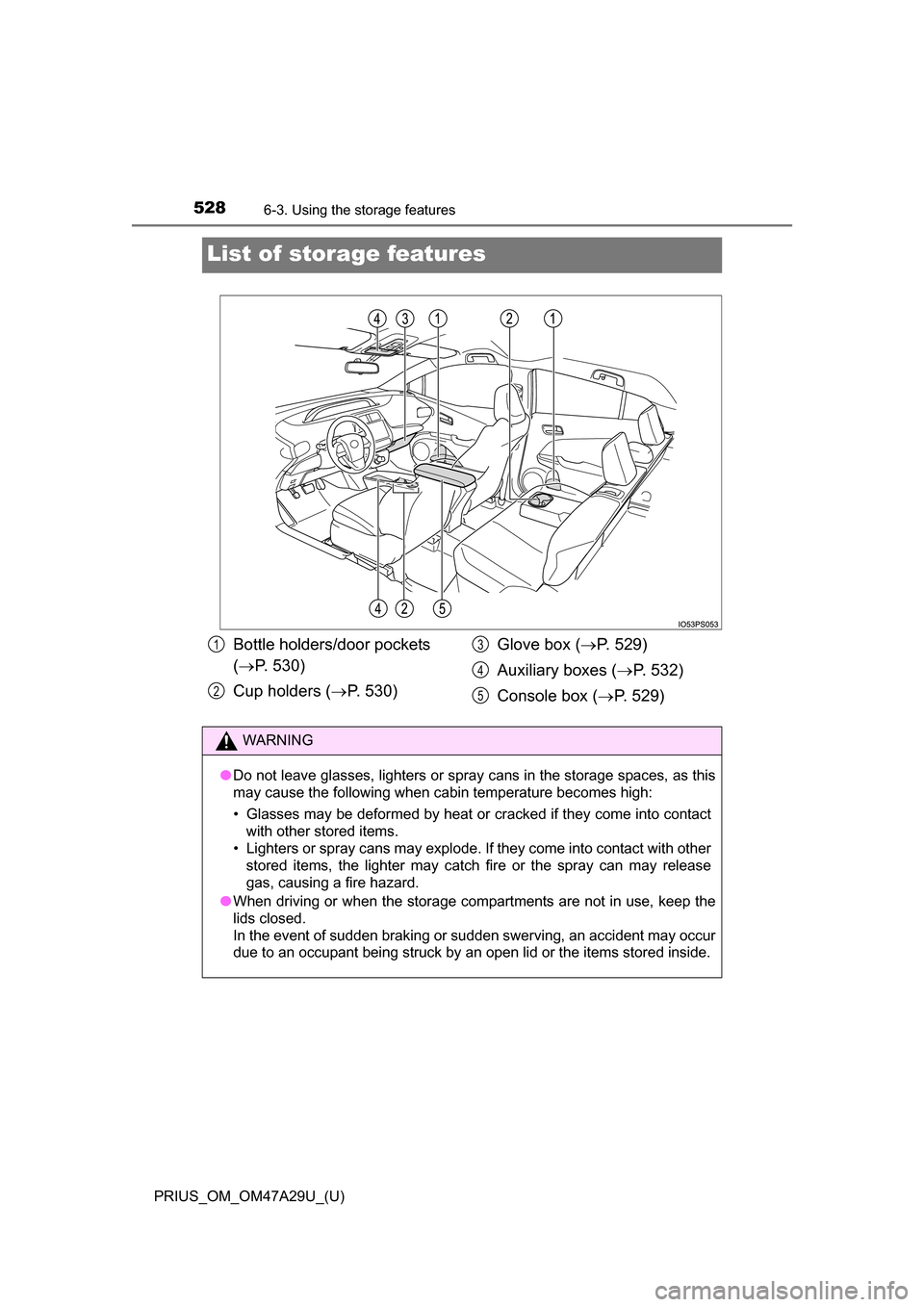
List of storage features
Bottle holders/door pockets
( P. 530)
Cup holders ( P. 530) Glove box (
P. 529)
Auxiliary boxes ( P. 532)
Console box ( P. 529)1
2
3
4
5
WARNING
●Do not leave glasses, lighters or spray cans in the storage spaces, as this
may cause the following when cabin temperature becomes high:
• Glasses may be deformed by heat or cracked if they come into contact
with other stored items.
• Lighters or spray cans may explode. If they come into contact with other
stored items, the lighter may catch fire or the spray can may release
gas, causing a fire hazard.
● When driving or when the storage compartments are not in use, keep the
lids closed.
In the event of sudden braking or sudden swerving, an accident may occur
due to an occupant being struck by an open lid or the items stored inside.
Page 529 of 800
PRIUS_OM_OM47A29U_(U)
5296-3. Using the storage features
6
Interior features
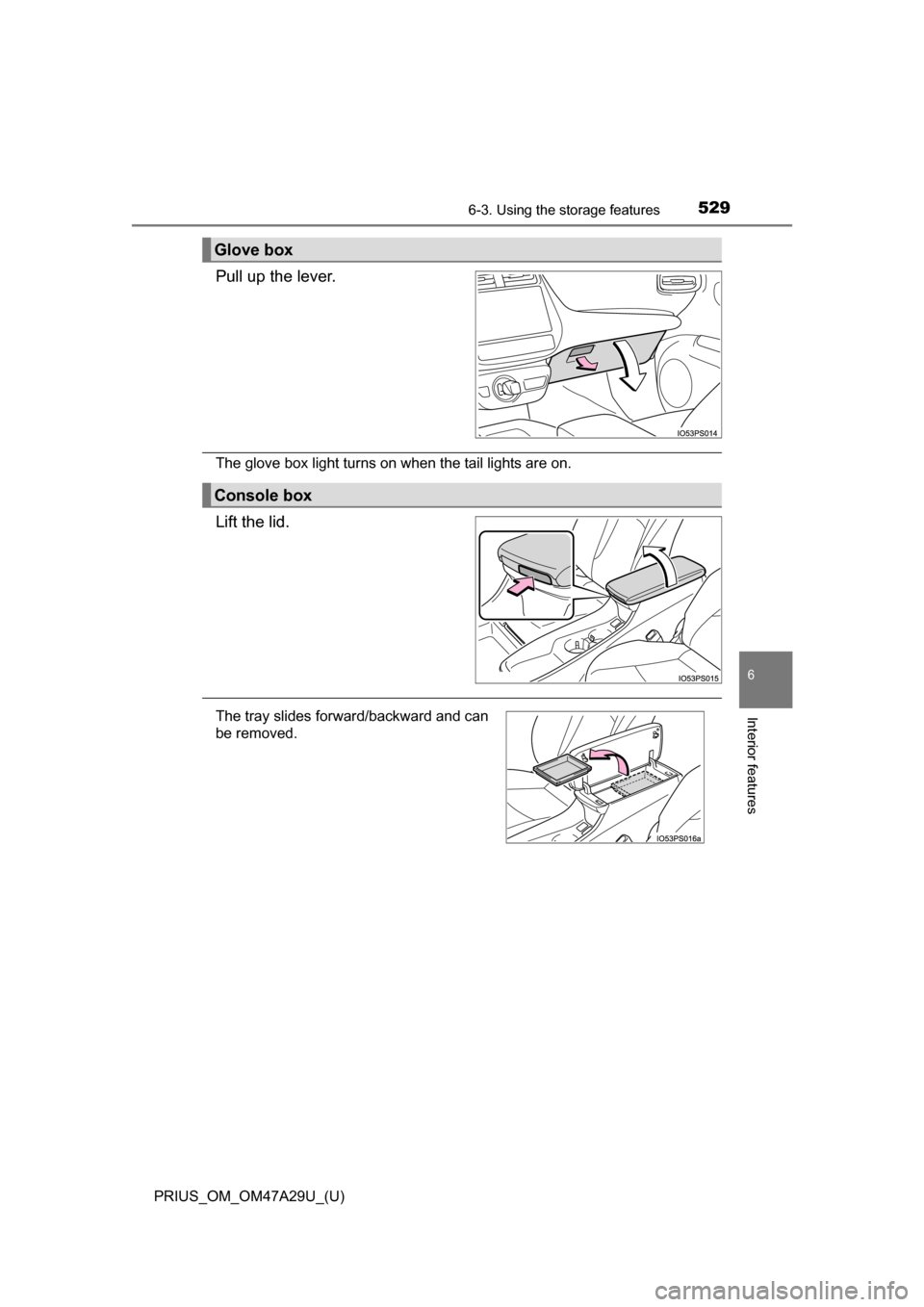
Pull up the lever.
The glove box light turns on when the tail lights are on.
Lift the lid.
Glove box
Console box
The tray slides forward/backward and can
be removed.
Page 542 of 800
542
PRIUS_OM_OM47A29U_(U)
6-4. Using the other interior features
Other interior features
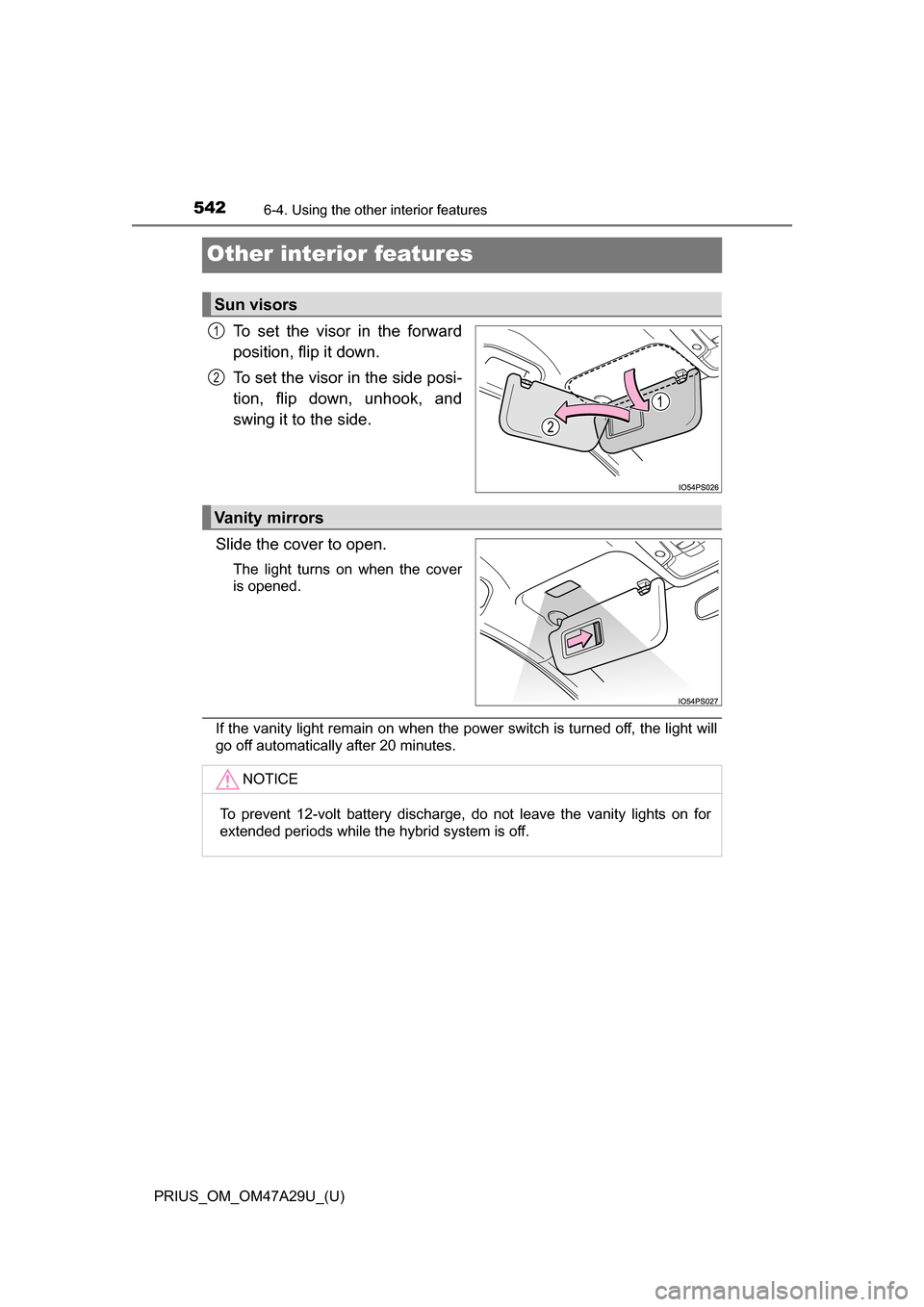
To set the visor in the forward
position, flip it down.
To set the visor in the side posi-
tion, flip down, unhook, and
swing it to the side.
Slide the cover to open.
The light turns on when the cover
is opened.
If the vanity light remain on when the power switch is turned off, the light will
go off automatically after 20 minutes.
Sun visors
1
2
Vanity mirrors
NOTICE
To prevent 12-volt battery discharge, do not leave the vanity lights on for
extended periods while the hybrid system is off.
Page 544 of 800
544
PRIUS_OM_OM47A29U_(U)
6-4. Using the other interior features
A portable device can be charged by just placing Qi standard wireless
charge compatible portable devices according to the Wireless Power
Consortium, such as smart phones an d mobile batteries, etc., on the
charge area.
This function cannot be used with portable devices that are larger
than the charging area. Also, dependin g on the portable device, it may
not operate as normal. Please read the operation manual for portable
devices to be used.
■The “Qi” symbol
The “Qi” symbol is a trademark of the Wireless Power Consortium.
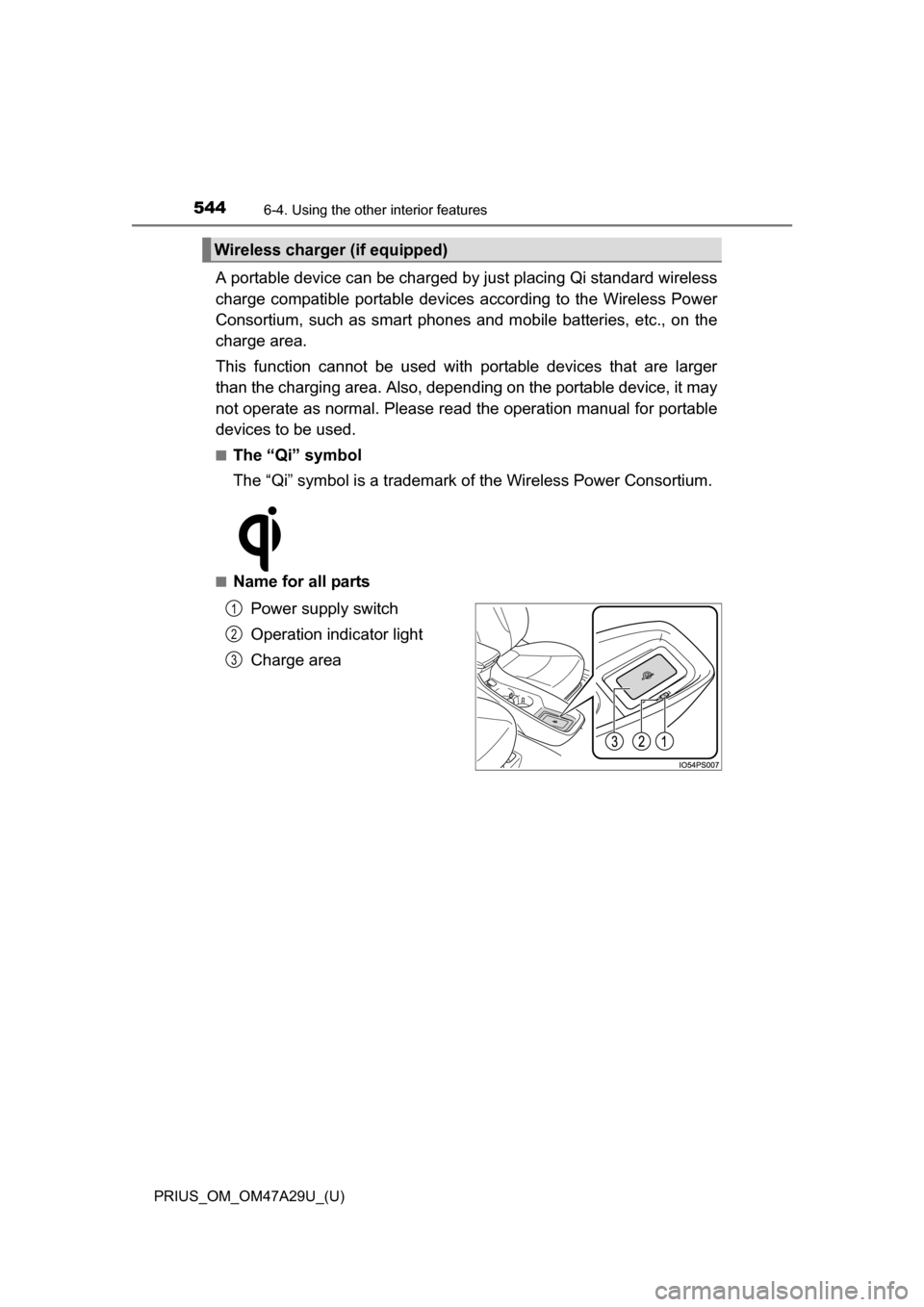
■Name for all parts
Power supply switch
Operation indicator light
Charge area
Wireless charger (if equipped)
1
2
3
Page 545 of 800
PRIUS_OM_OM47A29U_(U)
5456-4. Using the other interior features
6
Interior features
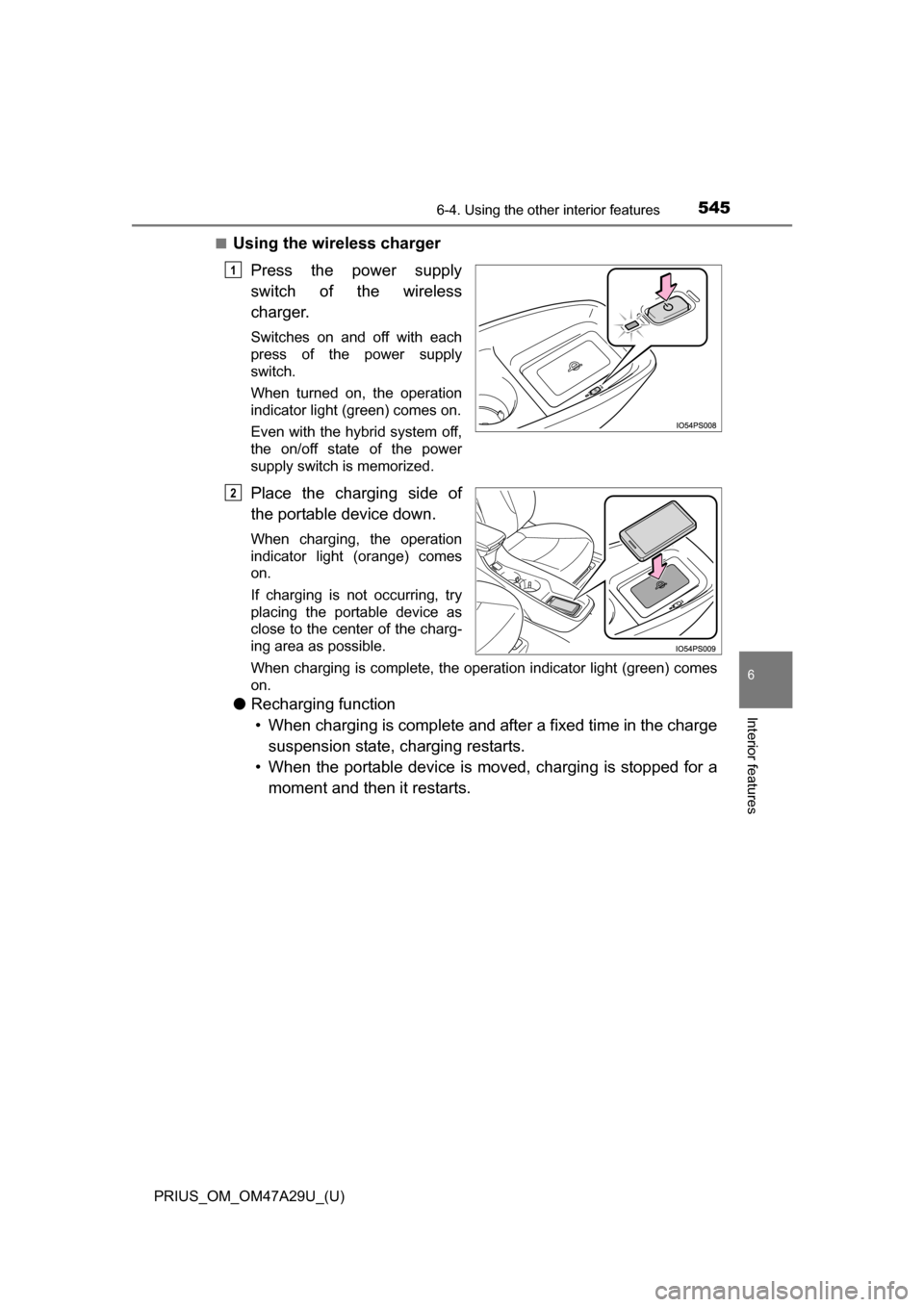
■Using the wireless chargerPress the power supply
switch of the wireless
charger.
Switches on and off with each
press of the power supply
switch.
When turned on, the operation
indicator light (green) comes on.
Even with the hybrid system off,
the on/off state of the power
supply switch is memorized.
Place the charging side of
the portable device down.
When charging, the operation
indicator light (orange) comes
on.
If charging is not occurring, try
placing the portable device as
close to the center of the charg-
ing area as possible.
When charging is complete, the operation indicator light (green) comes
on.
●Recharging function
• When charging is complete and after a fixed time in the charge suspension state, charging restarts.
• When the portable device is moved, charging is stopped for a moment and then it restarts.
1
2