mirror TOYOTA PRIUS 2016 4.G Owner's Manual
[x] Cancel search | Manufacturer: TOYOTA, Model Year: 2016, Model line: PRIUS, Model: TOYOTA PRIUS 2016 4.GPages: 800, PDF Size: 16.69 MB
Page 327 of 800
PRIUS_OM_OM47A29U_(U)
3274-5. Using the driving support systems
4
Driving
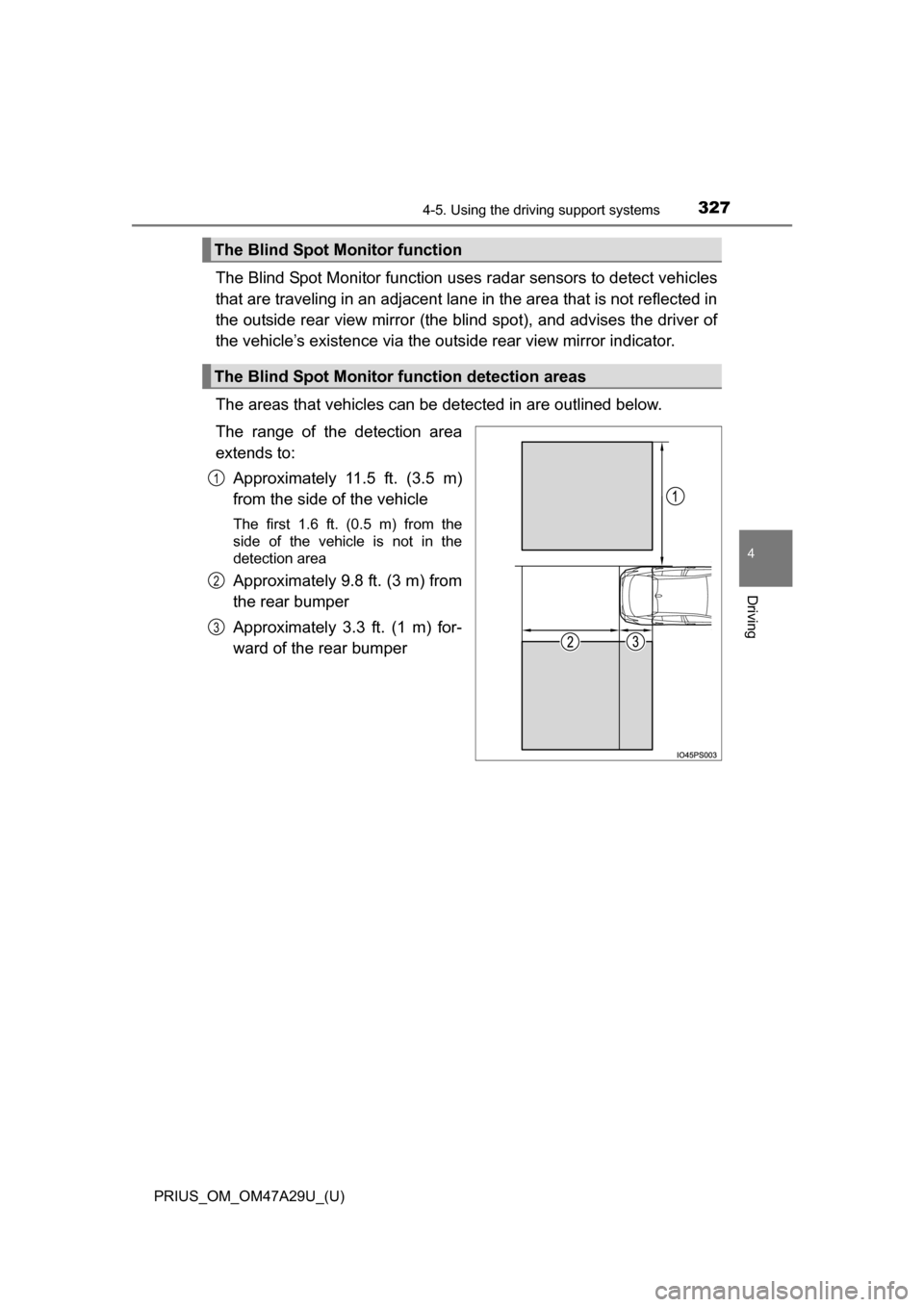
The Blind Spot Monitor function uses radar sensors to detect vehicles
that are traveling in an adjacent lane in the area that is not reflected in
the outside rear view mirror (the b lind spot), and advises the driver of
the vehicle’s existence via the outside rear view mirror indicator.
The areas that vehicles can be detected in are outlined below.
The range of the detection area
extends to: Approximately 11.5 ft. (3.5 m)
from the side of the vehicle
The first 1.6 ft. (0.5 m) from the
side of the vehicle is not in the
detection area
Approximately 9.8 ft. (3 m) from
the rear bumper
Approximately 3.3 ft. (1 m) for-
ward of the rear bumper
The Blind Spot Monitor function
The Blind Spot Monitor function detection areas
1
2
3
Page 330 of 800
330
PRIUS_OM_OM47A29U_(U)
4-5. Using the driving support systems
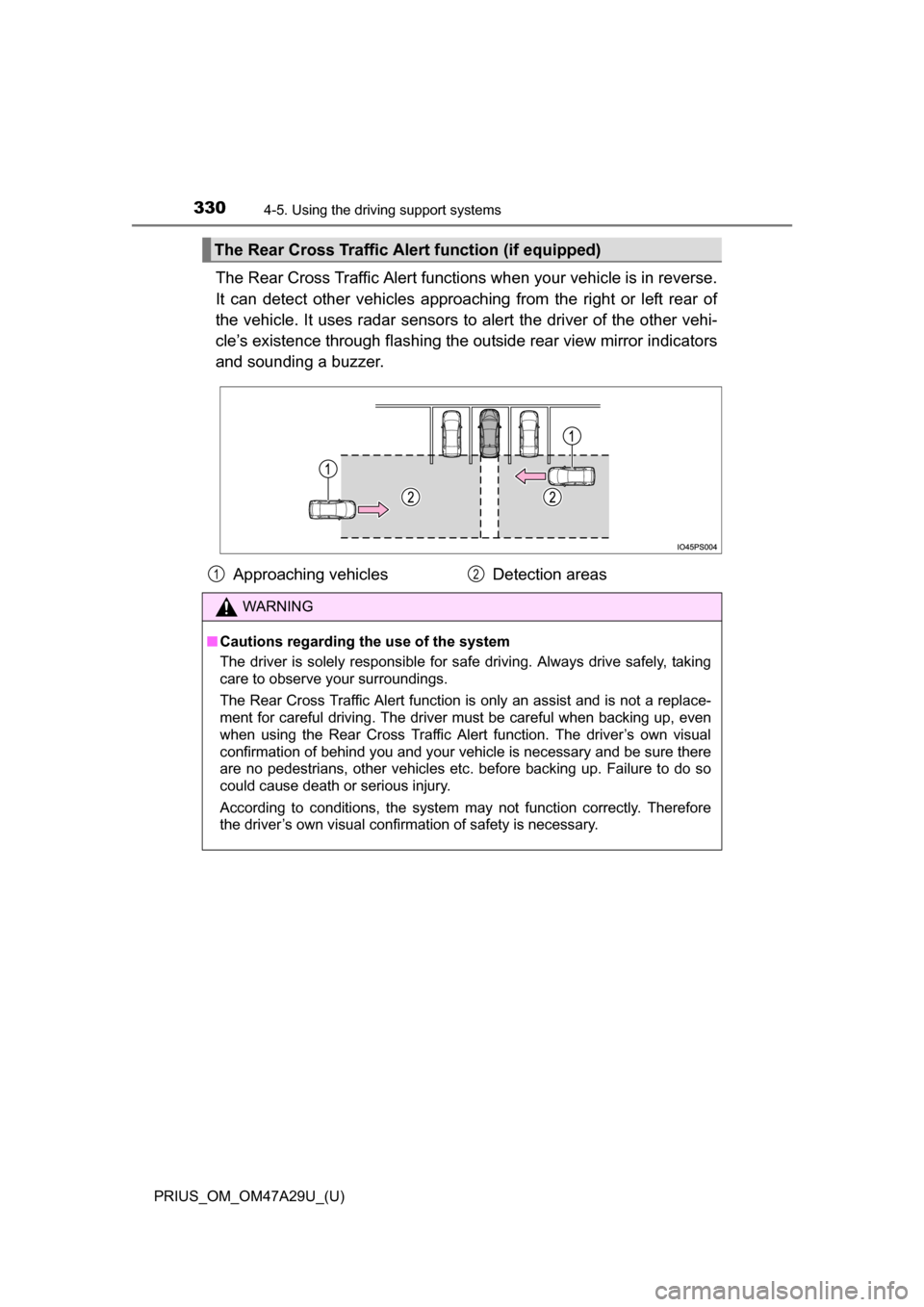
The Rear Cross Traffic Alert functions when your vehicle is in reverse.
It can detect other vehicles approaching from the right or left rear of
the vehicle. It uses radar sensors to alert the driver of the other vehi-
cle’s existence through fl ashing the outside rear view mirror indicators
and sounding a buzzer.
The Rear Cross Traffic Alert function (if equipped)
Approaching vehicles Detection areas
WARNING
■Cautions regarding the use of the system
The driver is solely responsible for safe driving. Always drive safely, taking
care to observe your surroundings.
The Rear Cross Traffic Alert function is only an assist and is not a replace-
ment for careful driving. The driver must be careful when backing up, even
when using the Rear Cross Traffic Alert function. The driver’s own visual
confirmation of behind you and your vehicle is necessary and be sure there
are no pedestrians, other vehicles etc. before backing up. Failure to do so
could cause death or serious injury.
According to conditions, the system may not function correctly. Therefore
the driver’s own visual confirmation of safety is necessary.
12
Page 369 of 800
PRIUS_OM_OM47A29U_(U)
3694-5. Using the driving support systems
4
Driving
Assume an ordinary posture for backing up, rest your hands
lightly on the steering wheel wi thout applying any force, directly
confirm the safety of the area to the rear and around the vehicle
slowly back up while adjusting your speed by depressing the
brake pedal.
Depending on the condition of the parking space, steps to may
need to be repeated.
When the vehicle is almost entirely within the target parking spot,
a high-pitched beep is emitted and the stop indicator is shown on
the display ( P. 363), stop the vehicle.
This completes the back-in parking assist mode.
● For safety, the buzzer sounds slightly before the vehicle is
completely entered within the target parking spot. Further-
more, at that point, system o peration will also finish. Firmly
hold the steering wheel and slowly back up while adjusting
your speed by depressing the brake pedal to reach the desired
parking spot.
● Be sure to back up while checking the area to the front and
rear of the vehicle directly and by using the mirrors.
11
611
12
Page 377 of 800
PRIUS_OM_OM47A29U_(U)
3774-5. Using the driving support systems
4
Driving
When the vehicle is almost entirely within the target parking spot,
a high-pitched beep is emitted and the stop indicator is shown on
the display, stop the vehicle.
This completes the paralle l parking assist mode.
● After stopping, feel free to maneuver the vehicle to reach the
desired parking spot.
● Be sure to back up while checking the area to the front and
rear of the vehicle directly and by using the mirrors.
■Parallel parking assist mode operating conditions
●In order to operate the parallel parking assist mode correctly, drive slowly (at
a speed at which the vehicle can be quickly stopped) parallel to the road (or
shoulder) while maintaining a distance of approximately 3 ft. (1 m) to any
parked vehicles.
● The function cannot be used when the vehicle speed is approximately
19 mph (30 km/h) or higher.
● The front side sensors and rear side sensors are used to detect parked
vehicles and determine the parking spot. Therefore, when detection is not
possible ( P. 393), guidance is not issued.
● If there are no parked vehicles, the parking spot cannot be determined.
Therefore, the parallel parking assist mode cannot be operated.
● If unable to detect the environment surrounding the parking space, the par-
allel parking assist mode may not be able to operate.
● Guidance will continue until the vehicle speed meets or exceeds approxi-
mately 19 mph (30 km/h) or the function is turned OFF using the S-APGS
switch.
■ Timing for pressing the S-APGS switch
In the following cases, the assist mode may also operate during the step\
s
taken to park using the parallel parking assist mode. However, in these
cases, conduct parking procedures according to the information on the multi-
information display.
●In step the S-APGS switch is pressed after already passing over the tar-
get parking spot.
● If the vehicle is not stopped in step , pressing the S-APGS switch 1 time
while the vehicle is in motion allows you to select “Parallel Parking” and pro-
ceed directly to step .
● The vehicle is moved up to the position in step without the S-APGS
switch being pressed. Then the S-APGS switch is pressed after having
changed the shift position to R.
12
1
1
2
3
Page 391 of 800
PRIUS_OM_OM47A29U_(U)
3914-5. Using the driving support systems
4
Driving
WARNING
●Do not rely solely upon the Simple Advanced Parking Guidance System.
As with unequipped vehicles, move forward and back up carefully while
directly confirming the safety of your surroundings and the area to the rear
of the vehicle.
● Do not back up while viewing the multi-information display. Backing up
while only viewing the monitor screen may cause a collision or lead to an
accident, as the image displayed on the monitor screen may differ from
actual conditions. Make sure to visually check the surrounding areas and
the area to the rear of the vehicle with and without the mirror while backing
up.
● Drive slowly while adjusting your speed by depressing the brake pedal
when backing up or moving forward.
● If it seems the vehicle may make contact with a pedestrian, another vehi-
cle or any other obstacles, stop the vehicle by depressing the brake pedal,
and then press the S-APGS switch to turn OFF the system.
● Use the system in a parking lot with a flat surface.
● Observe the following precautions, as the steering wheel automatically
turns during use.
• There is risk of a necktie, scarf, your arm, etc. being caught on the
steering wheel. Please do not allow your upper body to be close to the
steering wheel. Also, do not allow children close to the steering wheel.
• There is a possibility of injury when the steering wheel turns if you have long fingernails.
• In case of an emergency, stop the vehicle by depressing the brake pedal, and then press the S-APGS switch to turn OFF the system.
● Always confirm that there is appropriate space before attempting to park
the vehicle and operate the system.
Page 402 of 800
402
PRIUS_OM_OM47A29U_(U)
4-5. Using the driving support systems
WARNING
■When using the rear view monitor system
The rear view monitor system is a supplemental device intended to assist
the driver when backing up. When backing up, be sure to visually check all
around the vehicle both directly and using the mirrors before proceeding.
Observe the following precautions to avoid an accident that could result in
death or serious injuries.
● Never depend on the rear view monitor system entirely when backing up.
The image and the position of the guide lines displayed on the screen may
differ from the actual state.
Use caution, just as you would when backing up any vehicle.
● Be sure to back up slowly, depressing the brake pedal to control vehicle
speed.
● The instructions given are only guide lines.
When and how much to turn the steering wheel will vary according to traf-
fic conditions, road surface conditions, vehicle condition, etc. when park-
ing. It is necessary to be fully aware of this before using the rear view
monitor system.
● When parking, be sure to check that the parking space will accommodate
your vehicle before maneuvering into it.
● Do not use the rear view monitor system in the following cases:
• On icy or slick road surfaces, or in snow
• When using tire chains or emergency tires
• When the back door is not closed completely
• On roads that are not flat or straight, such as curves or slopes
● In low temperatures, the screen may darken or the image may become
faint. The image could distort when the vehicle is moving, or you may
become unable to see the image on the screen. Be sure to visually check
all around the vehicle both directly and using the mirrors before proceed-
ing.
● If the tire sizes are changed, the position of the fixed guide lines displayed
on the screen may change.
● The camera uses a special lens. The distances between objects and
pedestrians that appear in the image displayed on the screen will differ
from the actual distances. ( P. 397)
Page 511 of 800
511
PRIUS_OM_OM47A29U_(U)
6Interior features
6-1. Using the air conditioning system and defogger
Automatic air conditioning system ............................ 512
Seat heaters...................... 523
6-2. Using the interior lights Interior lights list ................ 525• Front interior light .......... 526
• Front personal lights ..... 526
• Rear interior light .......... 527
6-3. Using the storage features List of storage features ..... 528• Glove box...................... 529
• Console box .................. 529
• Cup holders/ bottle holders/
door pockets ................. 530
• Auxiliary boxes.............. 532
Luggage compartment features ........................... 533
6-4. Using the other interior features
Other interior features ....... 542 • Sun visors ..................... 542
• Vanity mirrors................ 542
• Power outlets ................ 543
• Wireless charger ........... 544
• Armrest ......................... 552
• Coat hooks.................... 552
• Assist grips ................... 553
Garage door opener.......... 554
Safety Connect ................. 561
Page 514 of 800
5146-1. Using the air conditioning system and defogger
PRIUS_OM_OM47A29U_(U)■
S-FLOW mode
In S-FLOW mode, priority for the airflow is given to the front seats,
reducing the airflow and air conditioning effect on the rear seats.
If a passenger is not detected in
the front passenger seat, priority
for the airflow will be given to the driver’s seat only.
However, air will always be blown from the side outlet of the front pas-
senger seat.
In S-FLOW mode, the system automatically operates according to
the set temperature and outside temperature. ( P. 519)
The indicator comes on when S-FLOW mode is on.
■
Other functions
● Switching between outside air and recirculated air modes
( P. 516)
● Fresh air intake system while parking ( P. 516)
● Defogging the windshield ( P. 517)
● Defogging the rear window and outside rear view mirrors
( P. 517)
Page 517 of 800
PRIUS_OM_OM47A29U_(U)
5176-1. Using the air conditioning system and defogger
6
Interior features
■Defogging the windshield
Defoggers are used to defog the windshield and front side win-
dows.
Press .
Set to outside air mode if the recirculated air mode is used. (It
may switch automatically.)
To defog the windshield and the side windows early, turn the air flow and
temperature up.
To return to the previous mode, press again when the wind-
shield is defogged.
■
Defogging the rear window and outside rear view mirrors
Defoggers are used to defog the rear window and to remove rain-
drops, dew and frost from the outside rear view mirrors.
Press .
The defoggers will automatically turn off after a period of time.
■
Eco score (A/C score)
P. 1 2 1
Page 521 of 800
PRIUS_OM_OM47A29U_(U)
5216-1. Using the air conditioning system and defogger
6
Interior features
WARNING
■To prevent the windshield from fogging up
●Do not use
during cool air operation in extremely humid weather.
The difference between the temperature of the outside air and that of the
windshield can cause the outer surface of the windshield to fog up, block-
ing your vision.
■ To prevent burns
Do not touch the rear view mirror surfaces when the outside rear view mirror
defoggers are on.
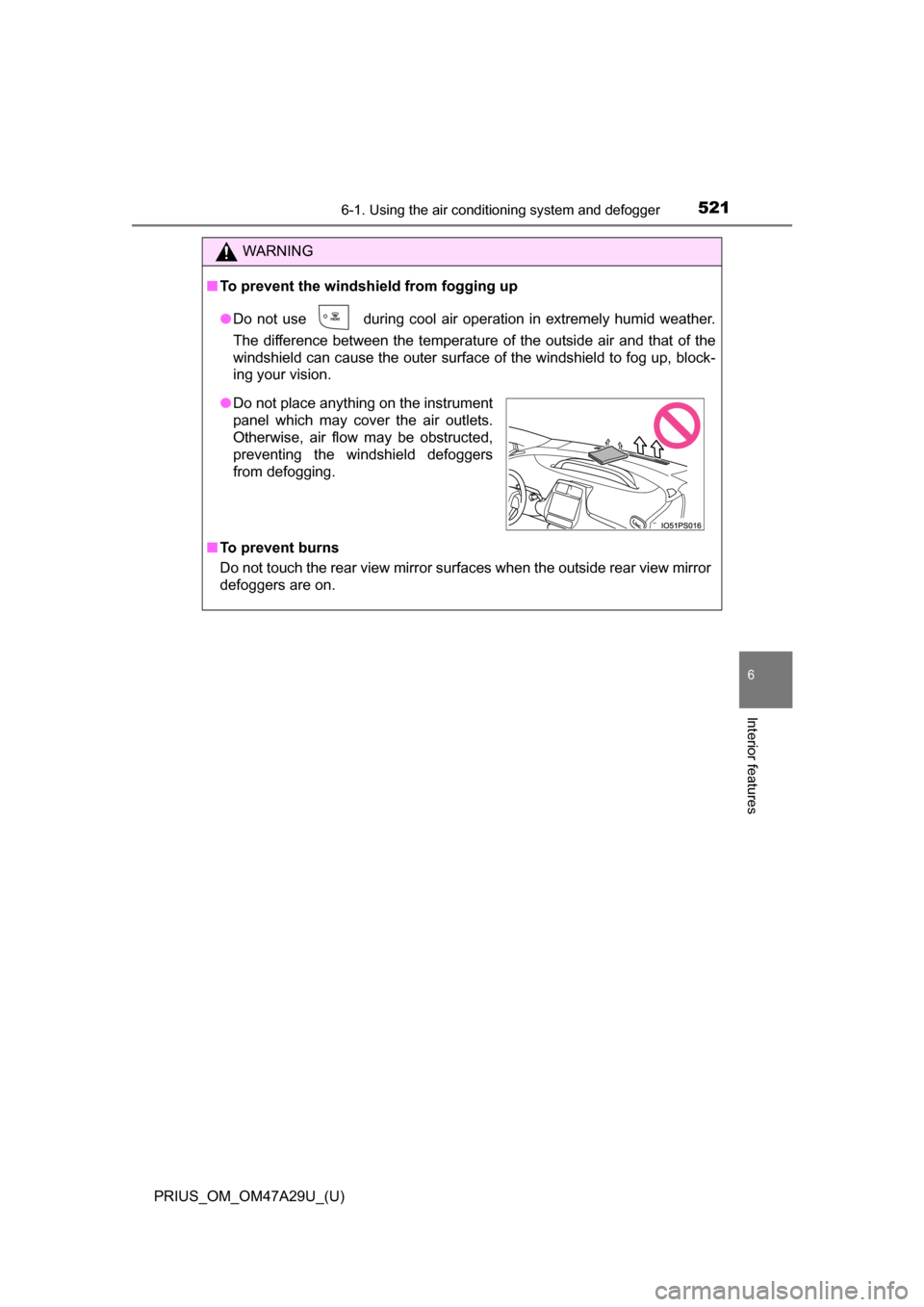
●Do not place anything on the instrument
panel which may cover the air outlets.
Otherwise, air flow may be obstructed,
preventing the windshield defoggers
from defogging.