light TOYOTA PRIUS 2016 4.G Workshop Manual
[x] Cancel search | Manufacturer: TOYOTA, Model Year: 2016, Model line: PRIUS, Model: TOYOTA PRIUS 2016 4.GPages: 800, PDF Size: 16.69 MB
Page 172 of 800
172
PRIUS_OM_OM47A29U_(U)
3-2. Opening, closing and locking the doors
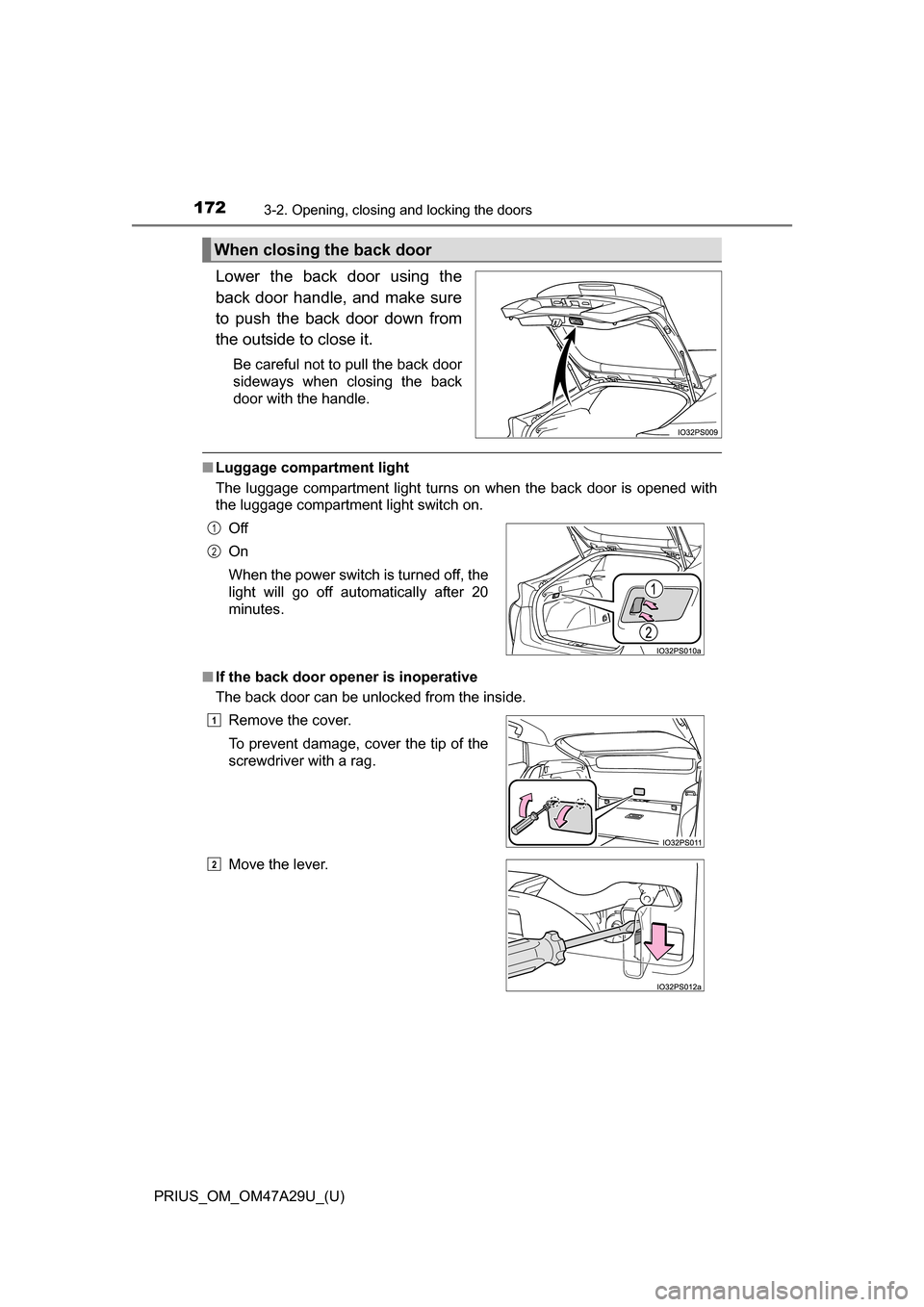
Lower the back door using the
back door handle, and make sure
to push the back door down from
the outside to close it.
Be careful not to pull the back door
sideways when closing the back
door with the handle.
■Luggage compartment light
The luggage compartment light turns on when the back door is opened with
the luggage compartment light switch on.
■ If the back door open er is inoperative
The back door can be unlocked from the inside.
When closing the back door
Off
On
When the power switch is turned off, the
light will go off automatically after 20
minutes.
Remove the cover.
To prevent damage, cover the tip of the
screwdriver with a rag.
Move the lever.1
2
1
2
Page 174 of 800
174
PRIUS_OM_OM47A29U_(U)
3-2. Opening, closing and locking the doors
WARNING
■Operating the back door
Observe the following precautions.
Failure to do so may cause parts of the body to be caught, resulting in death
or serious injury.
●Remove any heavy loads, such as snow and ice, from the back door
before opening it. Failure to do so may cause the back door to suddenly
shut again after it is opened.
● When opening or closing the back door, thoroughly check to make sure
the surrounding area is safe.
● If anyone is in the vicinity, make sure they are safe and let them know that
the back door is about to open or close.
● Use caution when opening or closing the back door in windy weather as it
may move abruptly in strong wind.
● Do not pull on the back door damper stay to close the back door, and do
not hang on the back door damper stay.
Doing so may cause hands to be caught or the back door damper stay to
break, causing an accident.
● If a bicycle carrier or similar heavy object is attached to the back door, it
may suddenly shut again after being opened, causing someone’s hands,
head or neck to be caught and injured. When installing an accessory part
to the back door, using a genuine Toyota part is recommended.
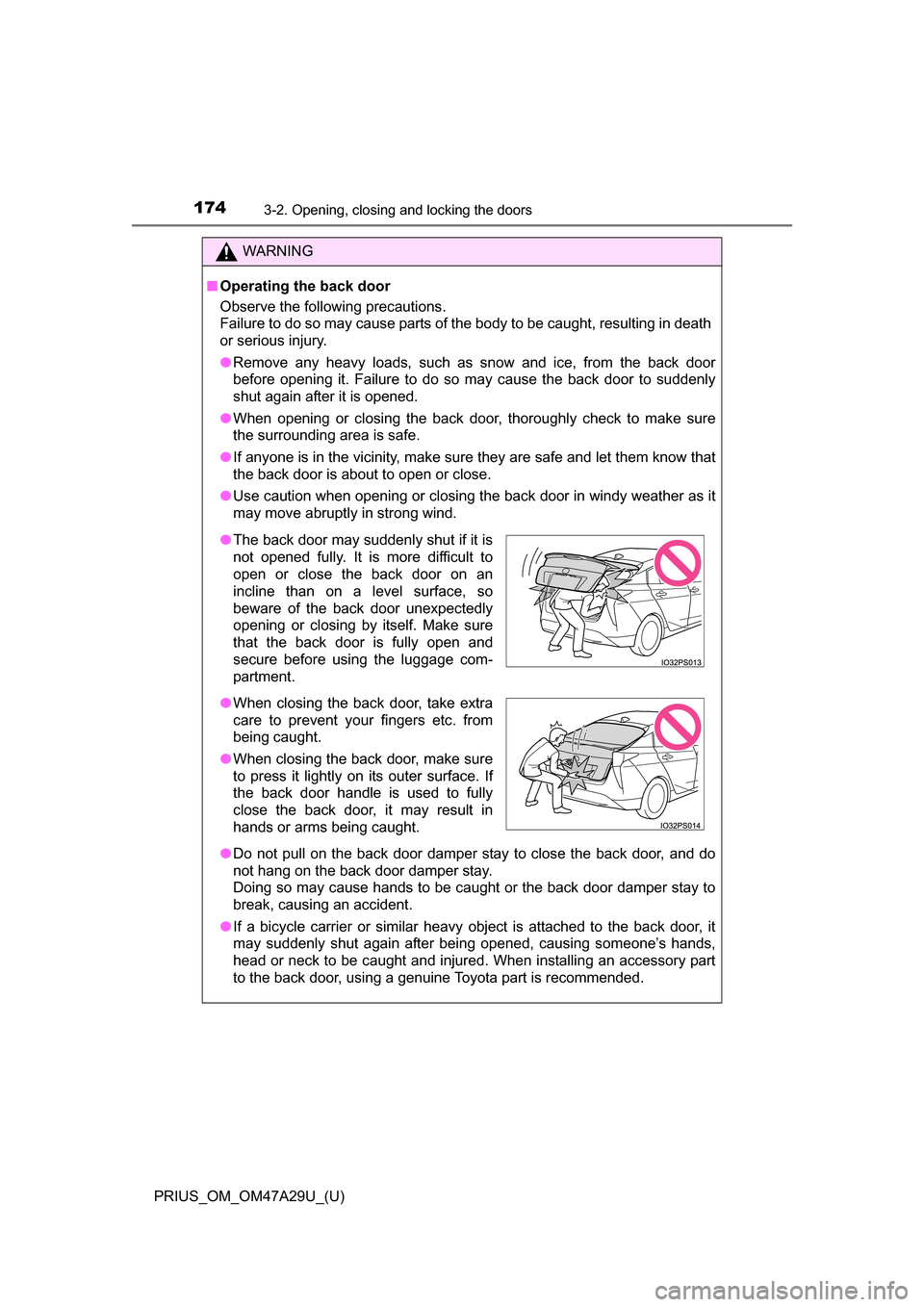
●The back door may suddenly shut if it is
not opened fully. It is more difficult to
open or close the back door on an
incline than on a level surface, so
beware of the back door unexpectedly
opening or closing by itself. Make sure
that the back door is fully open and
secure before using the luggage com-
partment.
● When closing the back door, take extra
care to prevent your fingers etc. from
being caught.
● When closing the back door, make sure
to press it lightly on its outer surface. If
the back door handle is used to fully
close the back door, it may result in
hands or arms being caught.
Page 180 of 800
180
PRIUS_OM_OM47A29U_(U)
3-2. Opening, closing and locking the doors
●The lock sensor may not work properly if it comes into contact with ice,
snow, mud, etc. Clean the lock sensor and attempt to operate it again.
● A sudden approach to the effective range or door handle may prevent the
doors from being unlocked. In this case, return the door handle to the origi-
nal position and check that the doors unlock before pulling the door handle
again.
● If there is another electronic key in the detection area, it may take slightly
longer to unlock the doors after the door handle is gripped.
■ When the vehicle is not driven for extended periods
●To prevent theft of the vehicle, do not leave the electronic key within 6 ft.
(2 m) of the vehicle.
● The smart key system can be deactivated in advance. ( P. 752)
■ To operate the system properly
Make sure to carry the electronic key when operating the system. Do not get
the electronic key too close to the vehicle when operating the system from the
outside of the vehicle.
Depending on the position and holding condition of the electronic key, the key
may not be detected correctly and the system may not operate properly. (The
alarm may go off accidentally, or the door lock prevention may not operate.)
■ If the smart key system do es not operate properly
● Locking and unlocking the doors: Use the mechanical key. ( P. 708)
● Starting the hybrid system: P. 709
■ Customization
Settings (e.g. smart key system) can be changed.
(Customizable features: P. 752)
■ If the smart key system has been deactivated in a customized setting
●Unlocking and locking the doors:
Use the wireless remote control or mechanical key. ( P. 166, 708)
● Starting the hybrid system and changing power switch modes: P. 7 0 9
● Stopping the hybrid system: P. 226
Page 188 of 800
188
PRIUS_OM_OM47A29U_(U)
3-3. Adjusting the seats
WARNING
■After returning the seatback to the upright position
Observe the following precautions. Failure to do so may result in death or
serious injury.
●Check that the seat belts are not twisted or caught in the seatback.
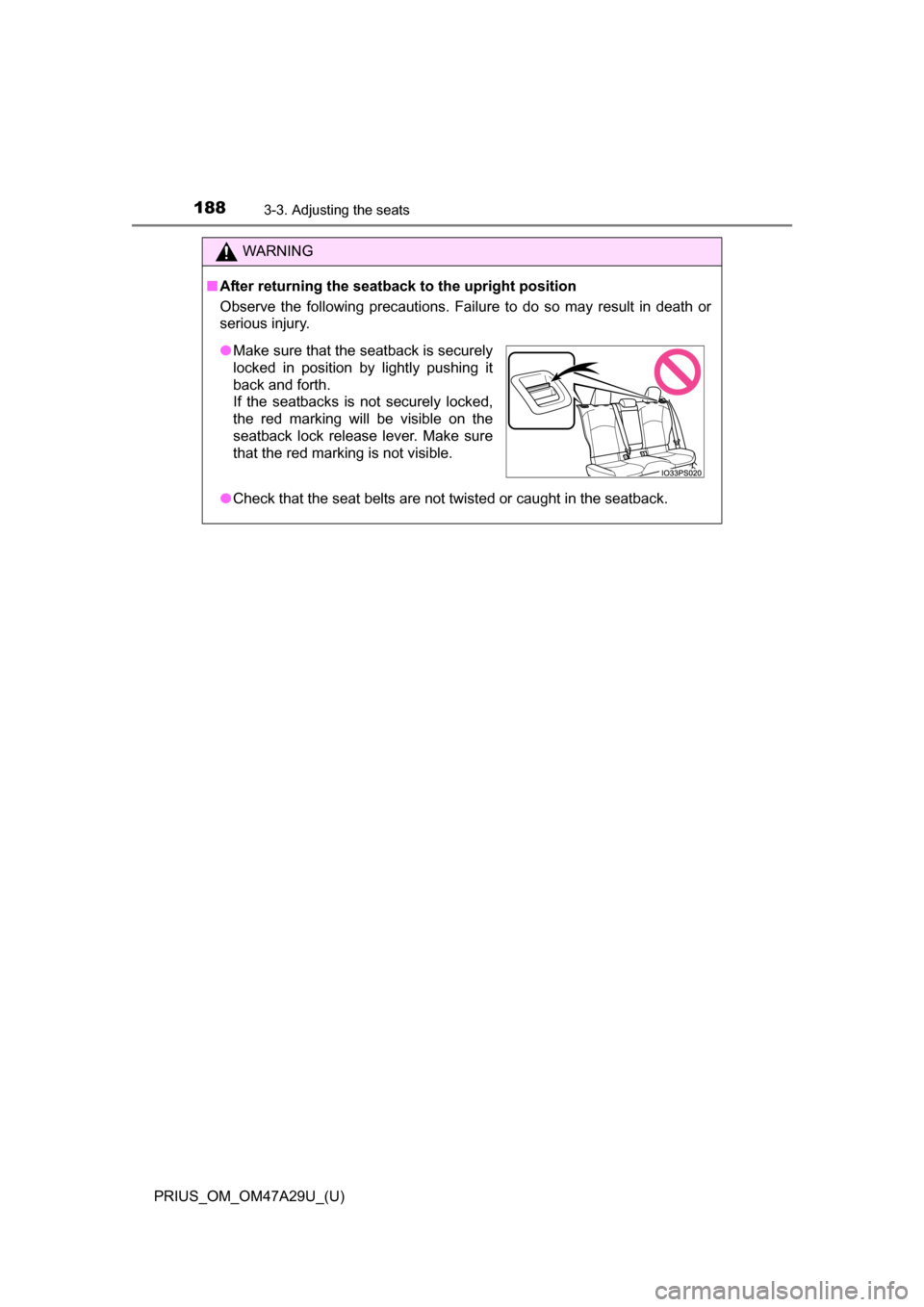
●Make sure that the seatback is securely
locked in position by lightly pushing it
back and forth.
If the seatbacks is not securely locked,
the red marking will be visible on the
seatback lock release lever. Make sure
that the red marking is not visible.
Page 194 of 800
1943-4. Adjusting the steering wheel and mirrors
PRIUS_OM_OM47A29U_(U)
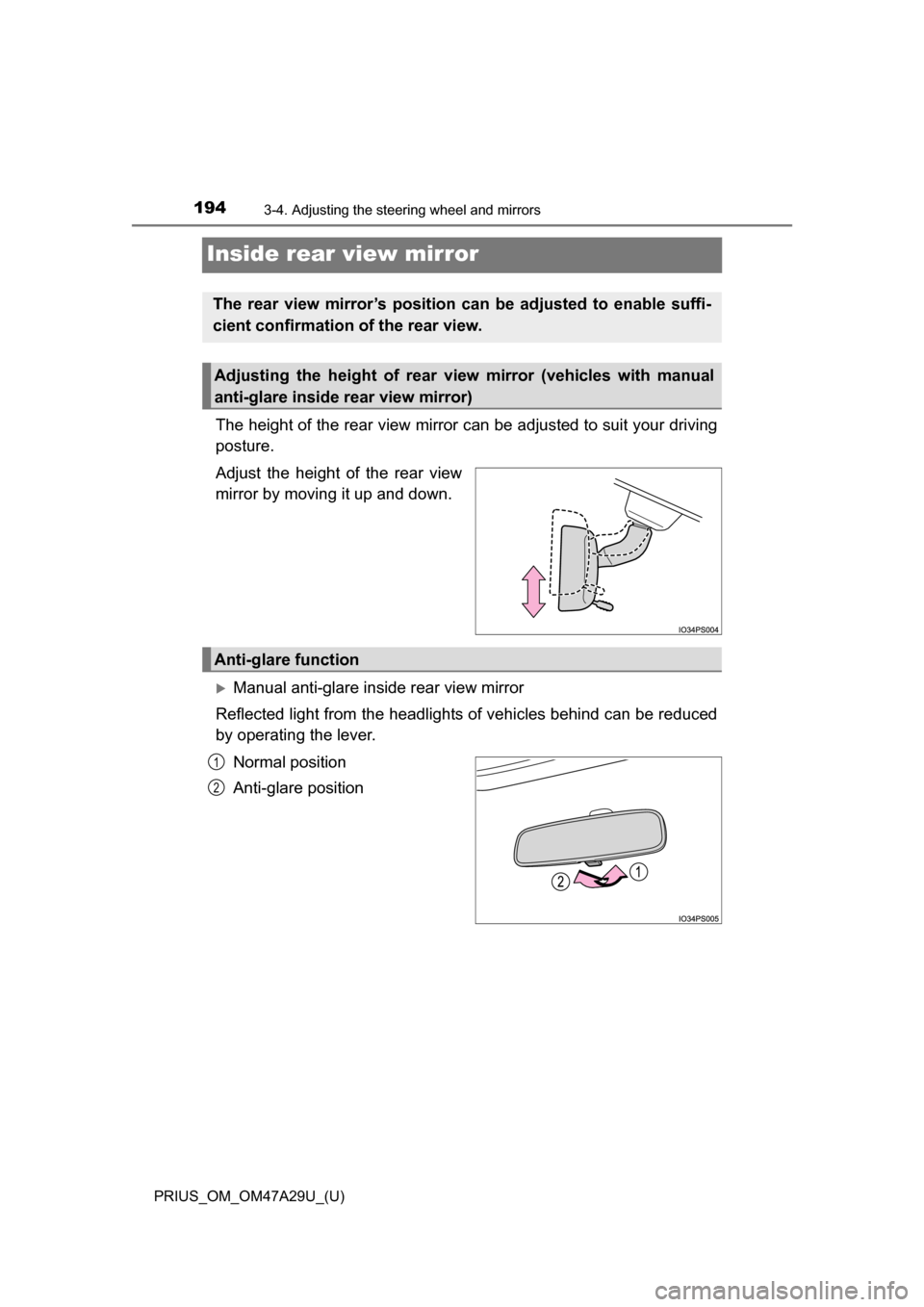
Inside rear view mirror
The height of the rear view mirror can be adjusted to suit your driving
posture.
Adjust the height of the rear view
mirror by moving it up and down.
Manual anti-glare inside rear view mirror
Reflected light from the headlights of vehicles behind can be reduced
by operating the lever.
Normal position
Anti-glare position
The rear view mirror’s position can be adjusted to enable suffi-
cient confirmation of the rear view.
Adjusting the height of rear view mirror (vehicles with manual
anti-glare inside rear view mirror)
Anti-glare function
1
2
Page 195 of 800
1953-4. Adjusting the steering wheel and mirrors
3
Operation of each component
PRIUS_OM_OM47A29U_(U)
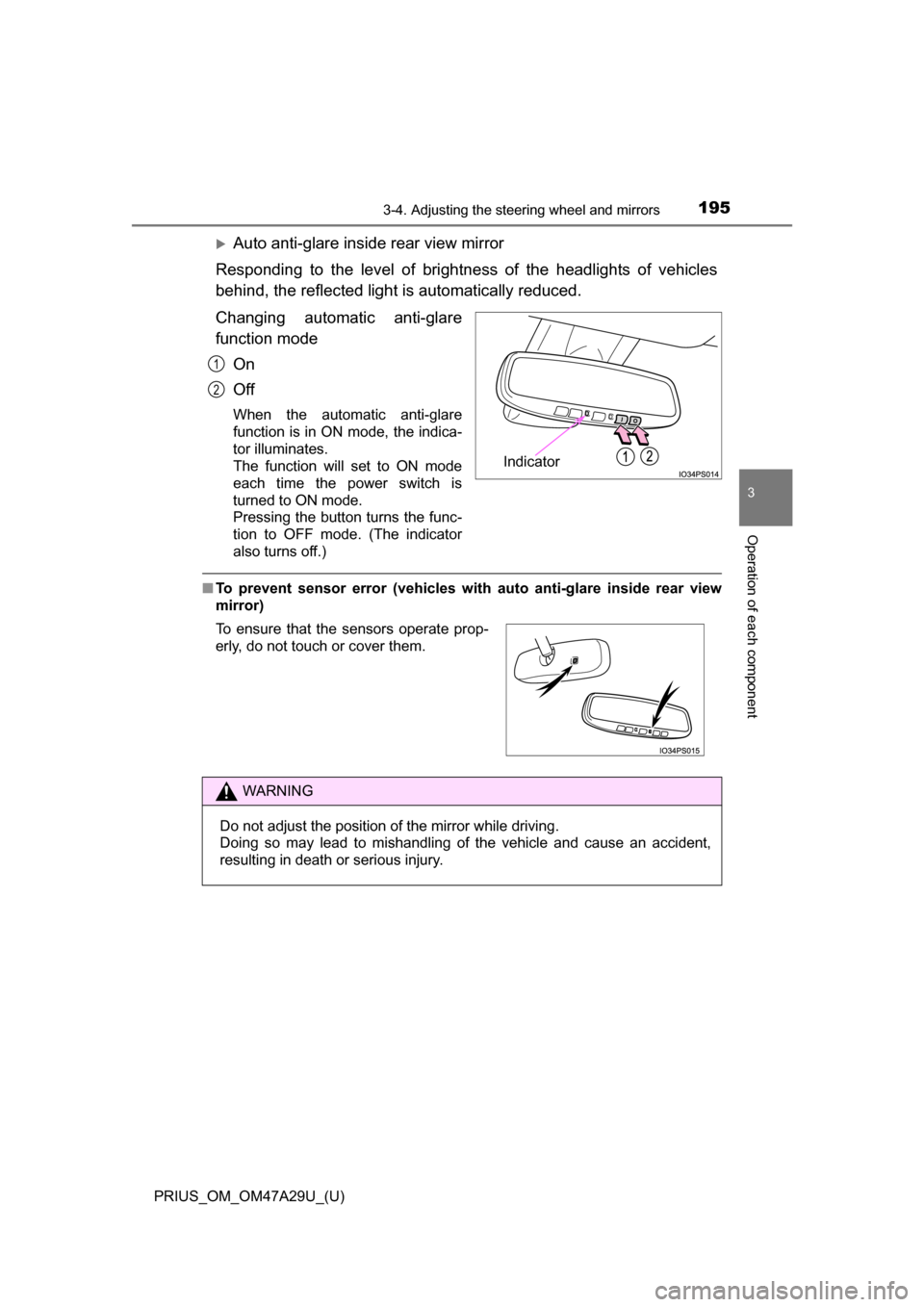
Auto anti-glare inside rear view mirror
Responding to the level of brightness of the headlights of vehicles
behind, the reflected light is automatically reduced.
Changing automatic anti-glare
function mode On
Off
When the automatic anti-glare
function is in ON mode, the indica-
tor illuminates.
The function will set to ON mode
each time the power switch is
turned to ON mode.
Pressing the button turns the func-
tion to OFF mode. (The indicator
also turns off.)
■To prevent sensor error (vehicles with auto anti-glare inside rear view
mirror)
Indicator
1
2
To ensure that the sensors operate prop-
erly, do not touch or cover them.
WARNING
Do not adjust the position of the mirror while driving.
Doing so may lead to mishandling of the vehicle and cause an accident,
resulting in death or serious injury.
Page 199 of 800
PRIUS_OM_OM47A29U_(U)
1993-5. Opening and closing the windows and moon roof
3
Operation of each component
■Jam protection function
If an object becomes jammed between the side window and the window
frame while the side window is closing, side window movement is stopped
and the side window is opened slightly.
■ Catch protection function
If an object becomes caught between the door and side window while the
side window is opening, side window movement is stopped.
■ When opening and closing th e power window cannot be done
When the jam protection function or catch protection function operates
unusually or the side window cannot be fully opened and closed, perform the
following operations with the power window switch of that door.
● Stop the vehicle, with the power switch in ON mode, continually operate the
power window switch in the one-touch closing position within 4 seconds
after the jam protection function or catch protection function was activated.
Otherwise, by continually operating the power window switch in the one-
touch opening position, the side window can be opened and closed.
● If the side window cannot be opened and closed even when performing the
above operations, implement the following procedure for function initializa-
tion.
Turn the power switch to ON mode.
Pull and hold the power window switch in the one-touch closing position
and completely close the side window.
Release the power window switch for a moment and then resume pulling
and holding the switch in the one-touch closing position for approximately
6 seconds.
Release the power window switch for a moment, press and hold the
power window switch in the one-touch opening position and after the side
window is completely opened, continue holding the switch for a further 1
second or more.
Release the power window switch for a moment and then resume press-
ing and holding the switch in the one-touch opening position for approxi-
mately 4 seconds.
Release the power window switch for a moment, pull and hold the power
window switch in the one-touch closing position, once more, and after the
side window is completely closed, continue holding the switch for a fur-
ther 1 second or more.
If you release the switch while the side window is moving, start again from
the beginning.
If the side window reverses and cannot be closed or completely open, have
the vehicle inspected by your Toyota dealer.
1
2
3
4
5
6
Page 202 of 800
202
PRIUS_OM_OM47A29U_(U)
3-5. Opening and closing the windows and moon roof
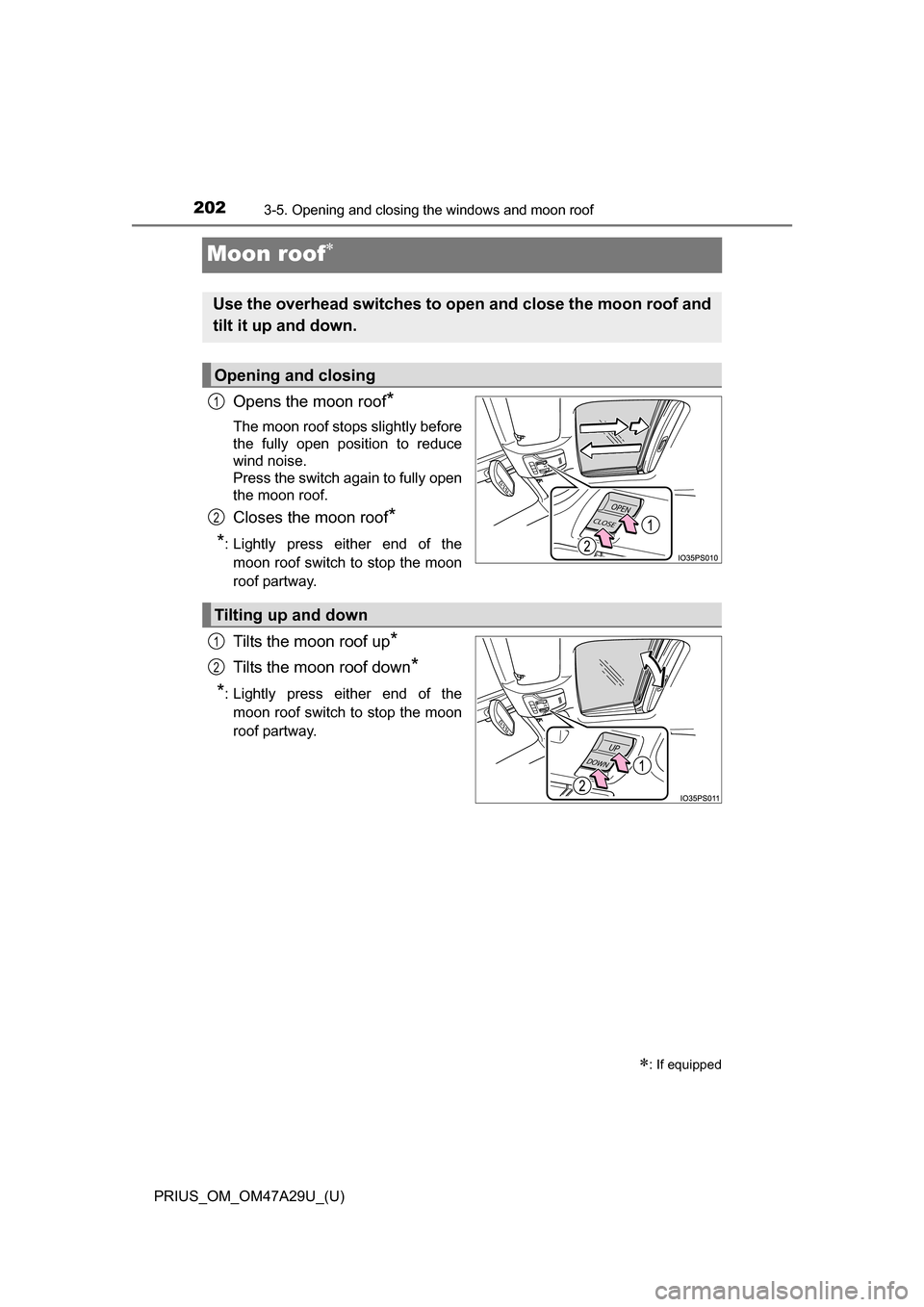
Moon roof
Opens the moon roof*
The moon roof stops slightly before
the fully open position to reduce
wind noise.
Press the switch again to fully open
the moon roof.
Closes the moon roof*
*
: Lightly press either end of the moon roof switch to stop the moon
roof partway.
Tilts the moon roof up*
Tilts the moon roof down*
*
: Lightly press either end of the moon roof switch to stop the moon
roof partway.
: If equipped
Use the overhead switches to ope n and close the moon roof and
tilt it up and down.
Opening and closing
1
2
Tilting up and down
1
2
Page 203 of 800
PRIUS_OM_OM47A29U_(U)
2033-5. Opening and closing the windows and moon roof
3
Operation of each component
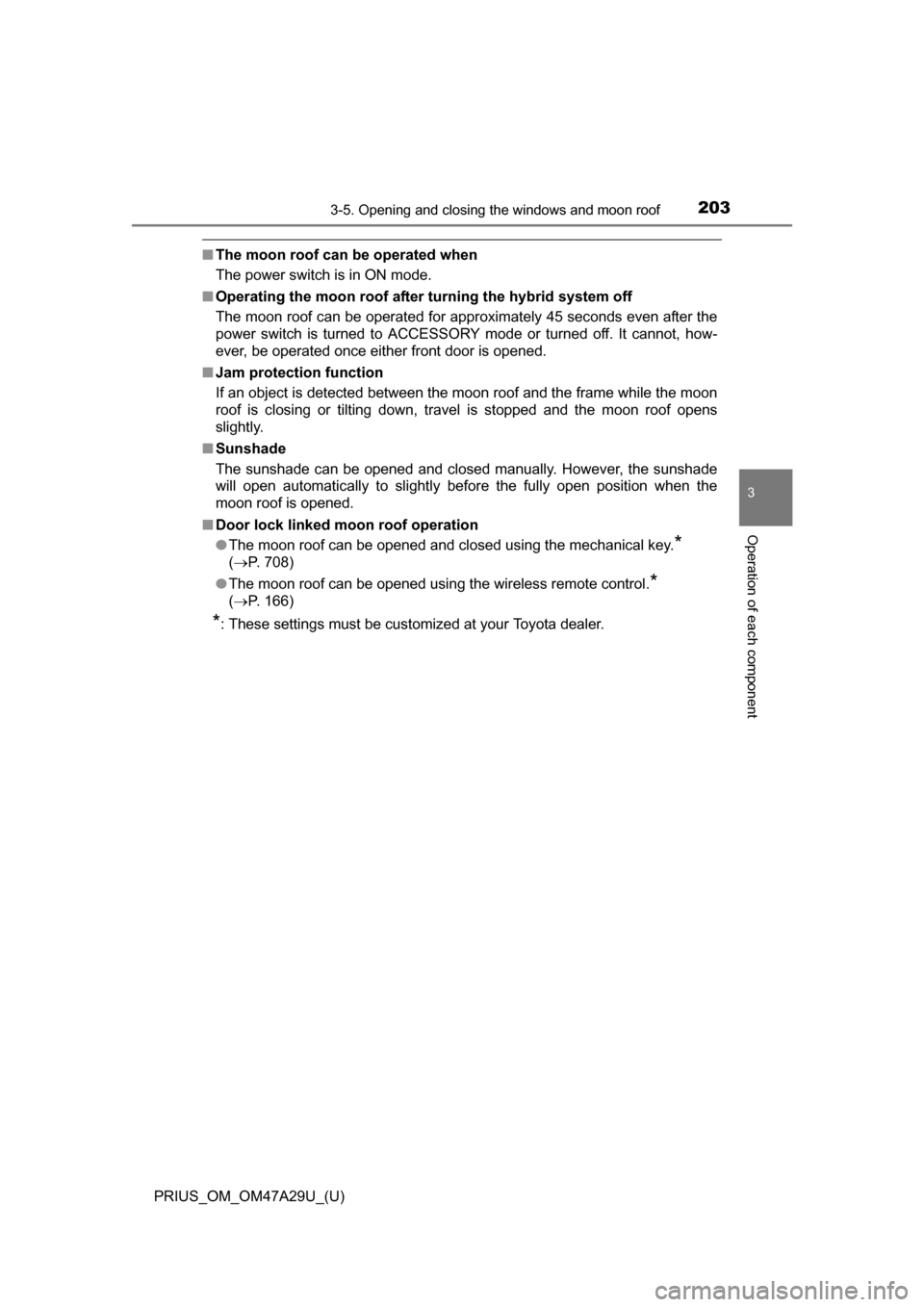
■The moon roof can be operated when
The power switch is in ON mode.
■ Operating the moon roof after turning the hybrid system off
The moon roof can be operated for approximately 45 seconds even after the
power switch is turned to ACCESSORY mode or turned off. It cannot, how-
ever, be operated once either front door is opened.
■ Jam protection function
If an object is detected between the moon roof and the frame while the moon
roof is closing or tilting down, travel is stopped and the moon roof opens
slightly.
■ Sunshade
The sunshade can be opened and closed manually. However, the sunshade
will open automatically to slightly before the fully open position when the
moon roof is opened.
■ Door lock linked mo on roof operation
● The moon roof can be opened and closed using the mechanical key.
*
( P. 708)
● The moon roof can be opened using the wireless remote control.
*
( P. 166)
*: These settings must be customized at your Toyota dealer.
Page 207 of 800
207
PRIUS_OM_OM47A29U_(U)
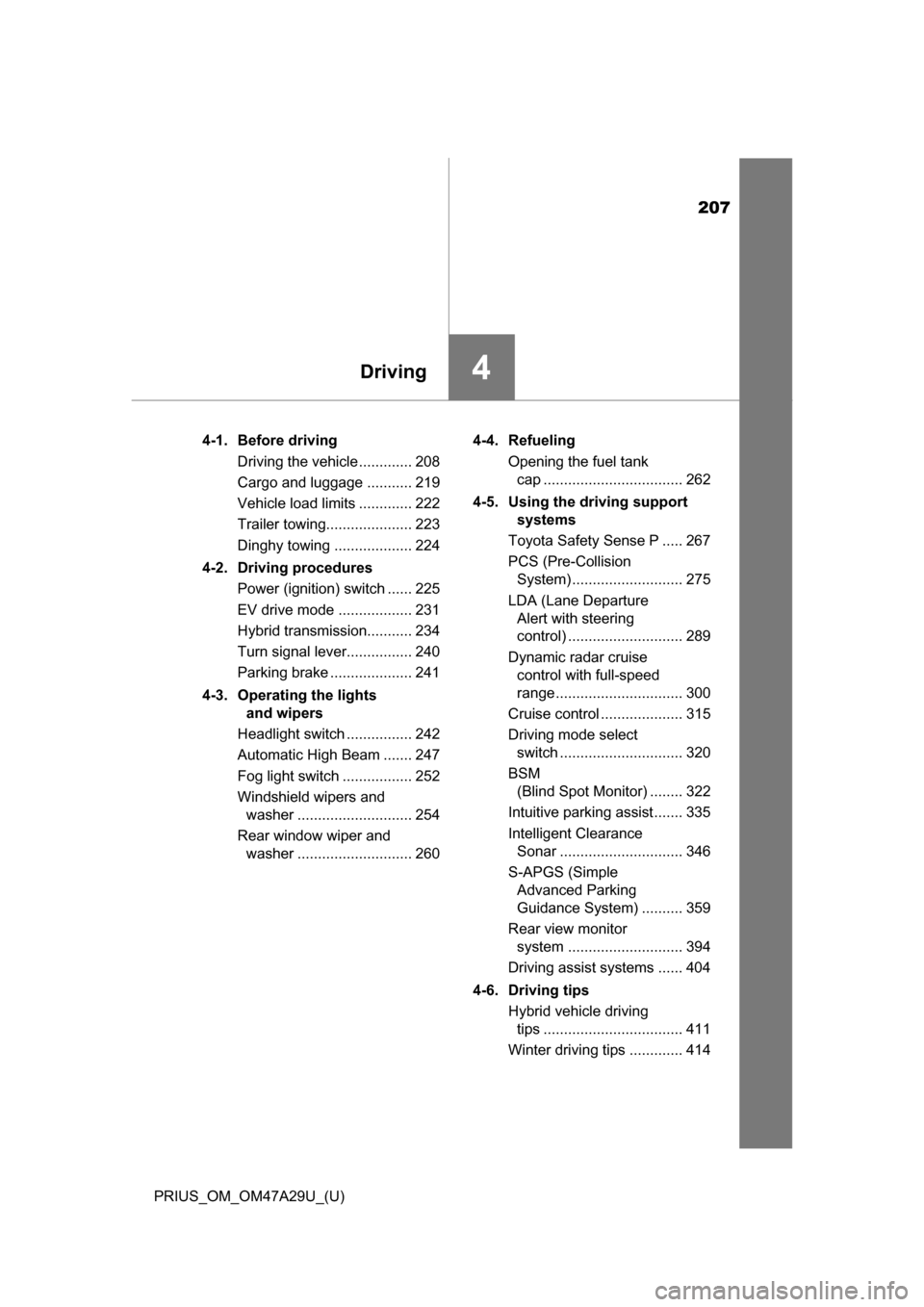
4Driving
4-1. Before drivingDriving the vehicle ............. 208
Cargo and luggage ........... 219
Vehicle load limits ............. 222
Trailer towing..................... 223
Dinghy towing ................... 224
4-2. Driving procedures Power (ignition) switch ...... 225
EV drive mode .................. 231
Hybrid transmission........... 234
Turn signal lever................ 240
Parking brake .................... 241
4-3. Operating the lights and wipers
Headlight switch ................ 242
Automatic High Beam ....... 247
Fog light switch ................. 252
Windshield wipers and washer ............................ 254
Rear window wiper and washer ............................ 260 4-4. Refueling
Opening the fuel tank cap .................................. 262
4-5. Using the driving support systems
Toyota Safety Sense P ..... 267
PCS (Pre-Collision System) ........................... 275
LDA (Lane Departure Alert with steering
control) ............................ 289
Dynamic radar cruise control with full-speed
range ............................... 300
Cruise control .................... 315
Driving mode select switch .............................. 320
BSM (Blind Spot Monitor) ........ 322
Intuitive parking assist....... 335
Intelligent Clearance Sonar .............................. 346
S-APGS (Simple Advanced Parking
Guidance System) .......... 359
Rear view monitor system ............................ 394
Driving assist systems ...... 404
4-6. Driving tips Hybrid vehicle driving tips .................................. 411
Winter driving tips ............. 414