bluetooth TOYOTA PRIUS 2016 4.G Owners Manual
[x] Cancel search | Manufacturer: TOYOTA, Model Year: 2016, Model line: PRIUS, Model: TOYOTA PRIUS 2016 4.GPages: 800, PDF Size: 16.69 MB
Page 4 of 800
TABLE OF CONTENTS4
PRIUS_OM_OM47A29U_(U)5-1. Basic Operations
Audio system types .......... 420
Audio system .................... 421
Using the steering wheel audio switches ................ 424
AUX Port/USB Port........... 425
Basic audio operations ..... 426
5-2. Setup Setup menu ...................... 428
General settings ............... 429
Audio settings ................... 431
Display settings ................ 432
Voice settings ................... 433
5-3. Using the Multimedia system
Selecting the audio source ............................. 434
List screen operation ........ 435
Optimal use of the audio system ............................ 437 5-4. Using the radio
Radio operation................. 438
5-5. Playing an audio CD and MP3/WMA/AAC discs
CD player operation .......... 440
5-6. Using an external device iPod player operation ........ 446
USB memory device player operation .............. 451
Using the AUX .................. 456
5-7. Connecting Bluetooth
®
Preparations to use wireless
communication ................ 457
Registering a Bluetooth
®
audio player for the
first time .......................... 460
Registering a Bluetooth
®
phone for the first time .... 461
Registering a Bluetooth
® device ........... 462
Connecting a Bluetooth
® device ........... 464
Displaying a Bluetooth®
device details .................. 466
Detailed Bluetooth
®
settings ........................... 467
5-8. Bluetooth
® Audio
Listening to Bluetooth®
Audio ............................... 468
5Audio system
Page 5 of 800
5
1
9 8
7
6 4 3
2
PRIUS_OM_OM47A29U_(U)
10
5
5-9. Bluetooth® phone
Using a Bluetooth®
Phone ............................. 470
Making a call..................... 473
Receiving a call ................ 476
Speaking on the phone..... 477
Bluetooth
® phone
message function ........... 480
Using the steering wheel switches.......................... 484
Bluetooth
® phone
settings ........................... 485
Contact/Call History Settings .......................... 486
What to do if... (Troubleshooting) ........... 495
5-10. Bluetooth
®
Bluetooth®........................ 499
5-11. Using the voice command system
Voice command system ... 505 6-1. Using the air conditioning
system and defogger
Automatic air conditioning system ............................. 512
Seat heaters ...................... 523
6-2. Using the interior lights Interior lights list................. 525• Front interior light .......... 526
• Front personal lights...... 526
• Rear interior light ........... 527
6-3. Using the storage features List of storage features ...... 528• Glove box ...................... 529
• Console box .................. 529
• Cup holders/ bottle holders/
door pockets.................. 530
• Auxiliary boxes .............. 532
Luggage compartment features ........................... 533
6Interior features
Page 419 of 800
419
PRIUS_OM_OM47A29U_(U)
5Audio system
5-5. Playing an audio CD and MP3/WMA/AAC discs
CD player operation.......... 440
5-6. Using an external device iPod player operation........ 446
USB memory device player operation.............. 451
Using the AUX .................. 456
5-7. Connecting Bluetooth
®
Preparations to use wireless
communication ............... 457
Registering a Bluetooth
®
audio player for the
first time .......................... 460
Registering a Bluetooth
®
phone for the first time.... 461
Registering a Bluetooth
® device ........... 462
Connecting a Bluetooth
® device ........... 464
Displaying a Bluetooth®
device details.................. 466
Detailed Bluetooth
®
settings ........................... 467 5-8. Bluetooth
® Audio
Listening to Bluetooth®
Audio .............................. 468
5-9. Bluetooth
® phone
Using a Bluetooth®
Phone ............................. 470
Making a call .................... 473
Receiving a call ................ 476
Speaking on the phone .... 477
Bluetooth
® phone
message function ........... 480
Using the steering wheel switches.......................... 484
Bluetooth
® phone
settings ........................... 485
Contact/Call History Settings .......................... 486
What to do if... (Troubleshooting) ........... 495
5-10. Bluetooth
®
Bluetooth®........................ 499
5-11. Using the voice command system
Voice command system ... 505
Page 421 of 800
421
PRIUS_OM_OM47A29U_(U)
5-1. Basic Operations
5
Audio system
Audio system
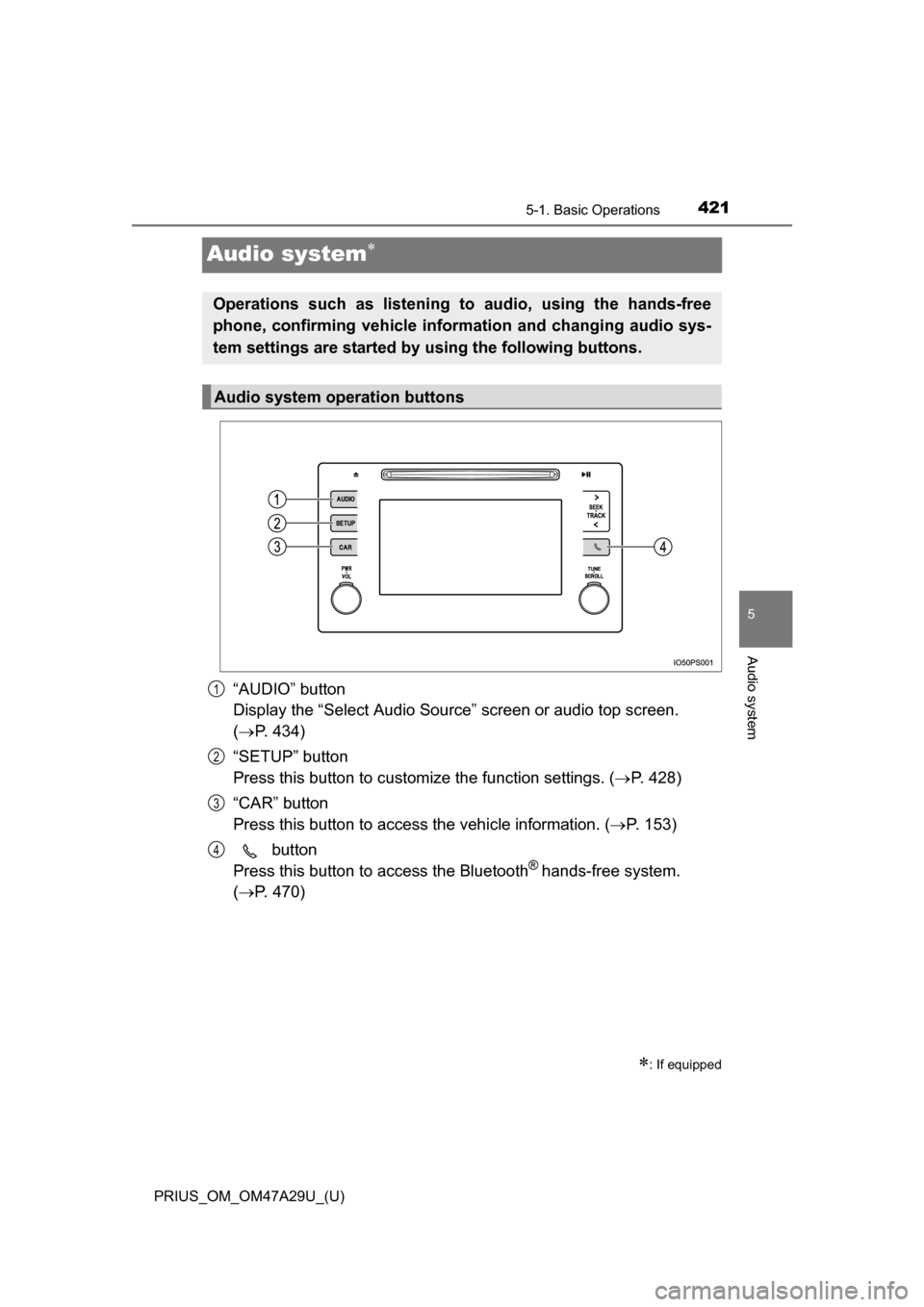
“AUDIO” button
Display the “Select Audio Source” screen or audio top screen.
( P. 434)
“SETUP” button
Press this button to customize the function settings. ( P. 428)
“CAR” button
Press this button to access the vehicle information. ( P. 153)
button
Press this button to access the Bluetooth
® hands-free system.
( P. 470)
: If equipped
Operations such as listening to audio, using the hands-free
phone, confirming vehicle inform ation and changing audio sys-
tem settings are started by using the following buttons.
Audio system operation buttons
1
2
3
4
Page 424 of 800
424
PRIUS_OM_OM47A29U_(U)
5-1. Basic Operations
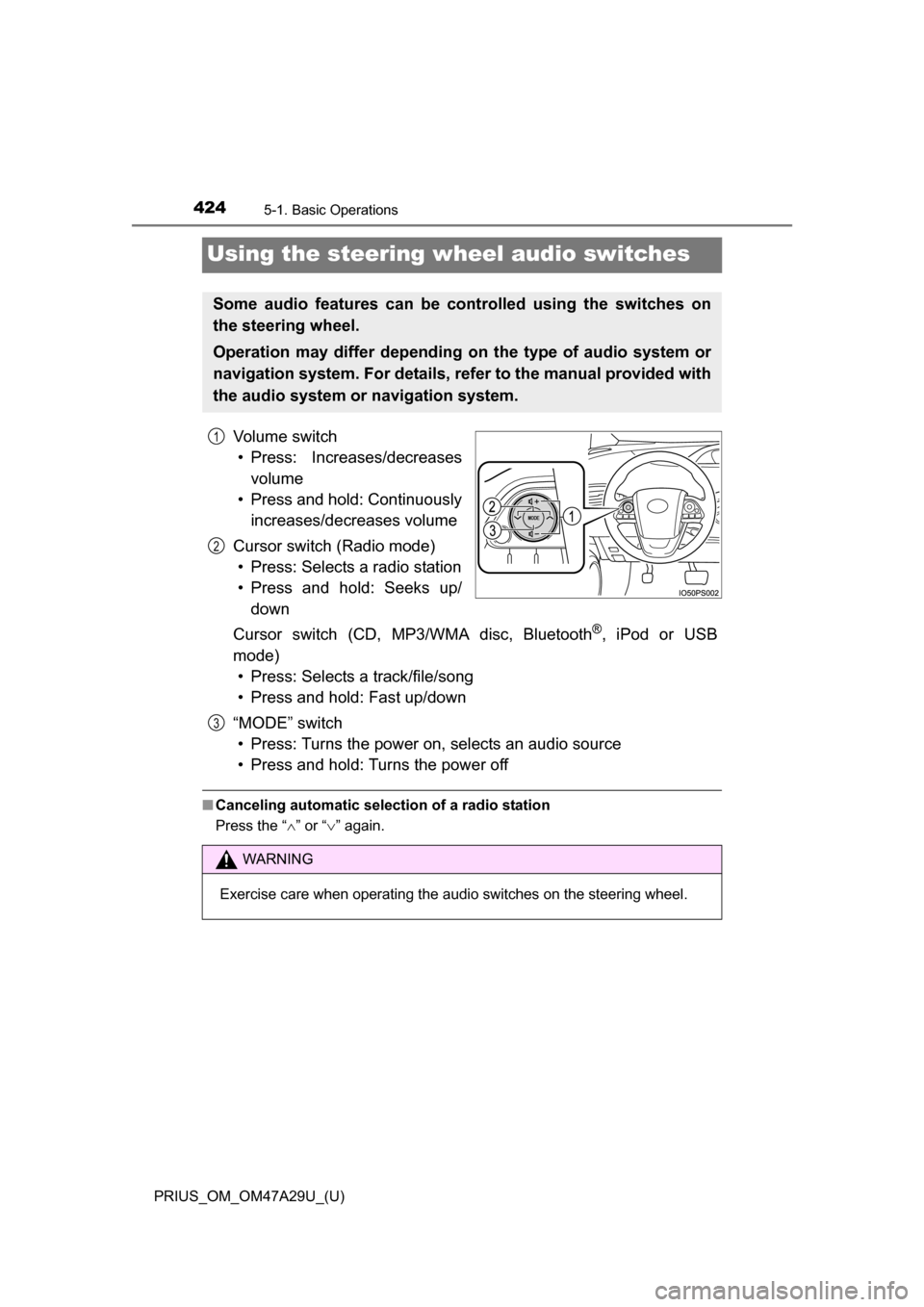
Using the steering wheel audio switches
Vo l u m e s w i t c h• Press: Increases/decreases volume
• Press and hold: Continuously increases/decreases volume
Cursor switch (Radio mode) • Press: Selects a radio station
• Press and hold: Seeks up/ down
Cursor switch (CD, MP3/WMA disc, Bluetooth
®, iPod or USB
mode) • Press: Selects a track/file/song
• Press and hold: Fast up/down
“MODE” switch • Press: Turns the power on, selects an audio source
• Press and hold: Turns the power off
■ Canceling automatic selection of a radio station
Press the “ ” or “ ” again.
Some audio features can be c ontrolled using the switches on
the steering wheel.
Operation may differ depending on the type of audio system or
navigation system. For details, refer to the manual provided with
the audio system or navigation system.
1
2
WARNING
Exercise care when operating the audio switches on the steering wheel.
3
Page 428 of 800
428
PRIUS_OM_OM47A29U_(U)
5-2. Setup
Setup menu
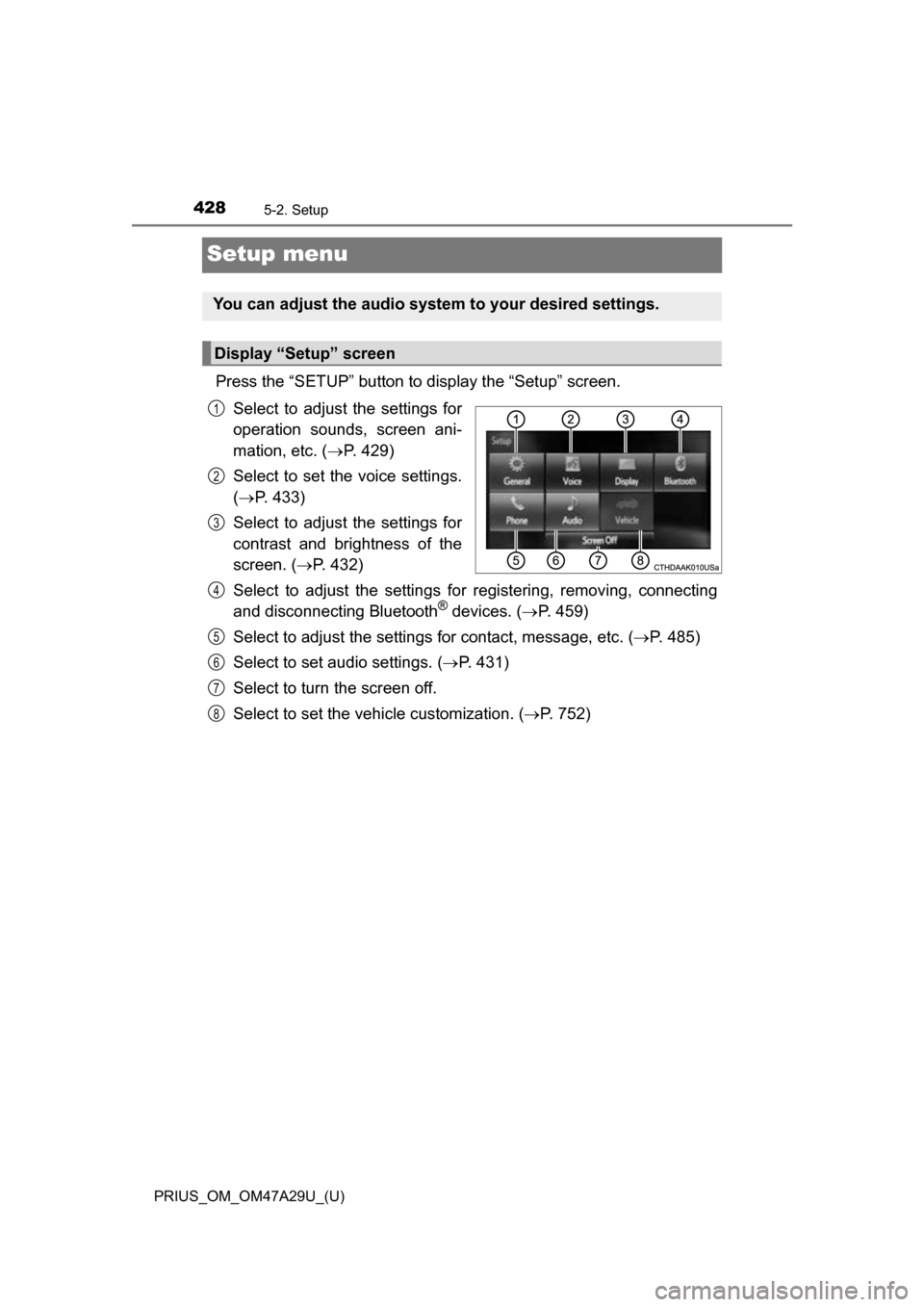
Press the “SETUP” button to display the “Setup” screen.Select to adjust the settings for
operation sounds, screen ani-
mation, etc. ( P. 429)
Select to set the voice settings.
( P. 433)
Select to adjust the settings for
contrast and brightness of the
screen. ( P. 432)
Select to adjust the settings for registering, removing, connecting
and disconnecting Bluetooth
® devices. ( P. 459)
Select to adjust the settings for contact, message, etc. (P. 485)
Select to set audio settings. ( P. 431)
Select to turn the screen off.
Select to set the vehicle customization. ( P. 752)
You can adjust the audio system to your desired settings.
Display “Setup” screen
1
2
3
4
5
6
7
8
Page 436 of 800
4365-3. Using the Multimedia system
PRIUS_OM_OM47A29U_(U)■
Selecting a track/file/song
Press the “
” or “” button on “SEEK•TRACK” or turn the
“TUNE•SCROLL” knob to select the desired track/file/song number.
To fast-forward or reverse, press and hold the “ ” or “” button on
“SEEK•TRACK”.
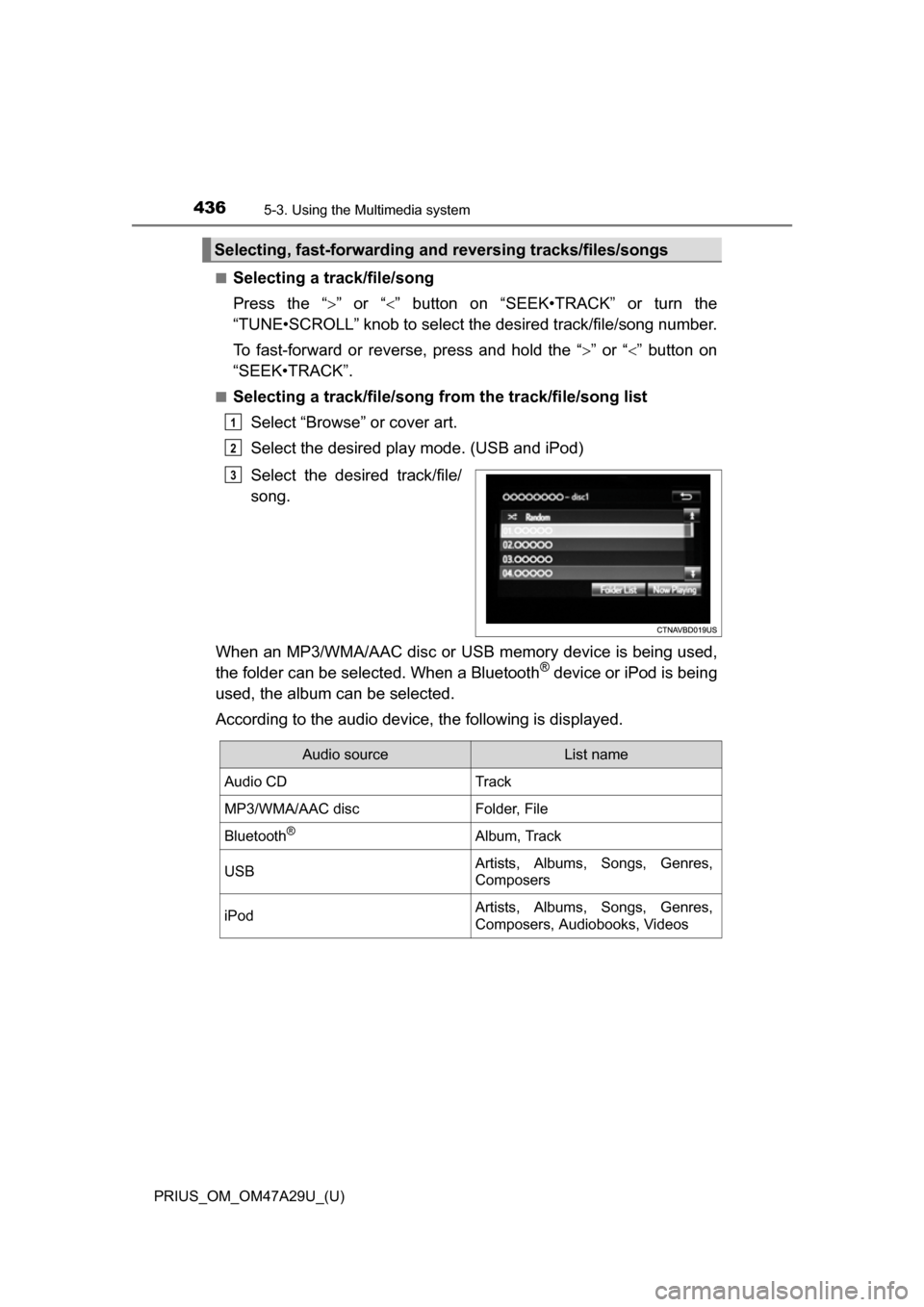
■Selecting a track/file/song from the track/file/song list
Select “Browse” or cover art.
Select the desired play mode. (USB and iPod)
Select the desired track/file/
song.
When an MP3/WMA/AAC disc or USB memory device is being used,
the folder can be selected. When a Bluetooth
® device or iPod is being
used, the album can be selected.
According to the audio device, the following is displayed.
Selecting, fast-forwarding a nd reversing tracks/files/songs
1
2
3
Audio sourceList name
Audio CDTrack
MP3/WMA/AAC discFolder, File
Bluetooth®Album, Track
USBArtists, Albums, Songs, Genres,
Composers
iPodArtists, Albums, Songs, Genres,
Composers, Audiobooks, Videos
Page 457 of 800
457
PRIUS_OM_OM47A29U_(U)
5-7. Connecting Bluetooth®
5
Audio system
Preparations to use wireless communication
The following can be performed using Bluetooth® wireless com-
munication:
■A portable audio player can be operated and listened to via
audio system
■Hands-free phone calls can be made via a cellular phone
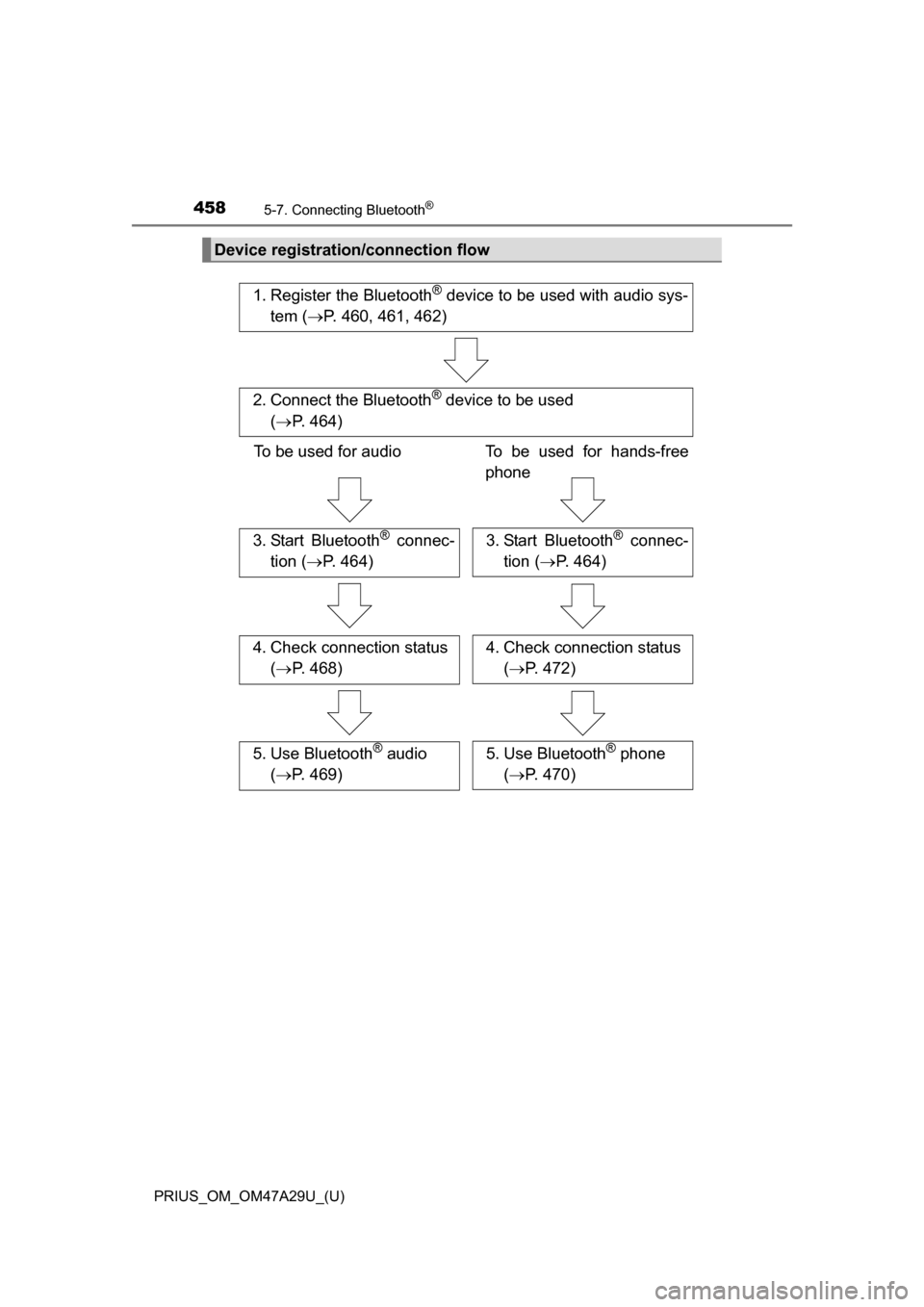
In order to use wireless communication, register and connect a
Bluetooth
® device by performing the following procedures.
Page 458 of 800
4585-7. Connecting Bluetooth®
PRIUS_OM_OM47A29U_(U)
Device registration/connection flow
1. Register the Bluetooth® device to be used with audio sys-
tem ( P. 460, 461, 462)
2. Connect the Bluetooth® device to be used
( P. 464)
To be used for audio To be used for hands-free
phone
3. Start Bluetooth® connec-
tion ( P. 464)3. Start Bluetooth® connec-
tion ( P. 464)
4. Check connection status
( P. 468)4. Check connection status
( P. 472)
5. Use Bluetooth® audio
( P. 469)5. Use Bluetooth® phone
( P. 470)
Page 459 of 800
PRIUS_OM_OM47A29U_(U)
4595-7. Connecting Bluetooth®
5
Audio system
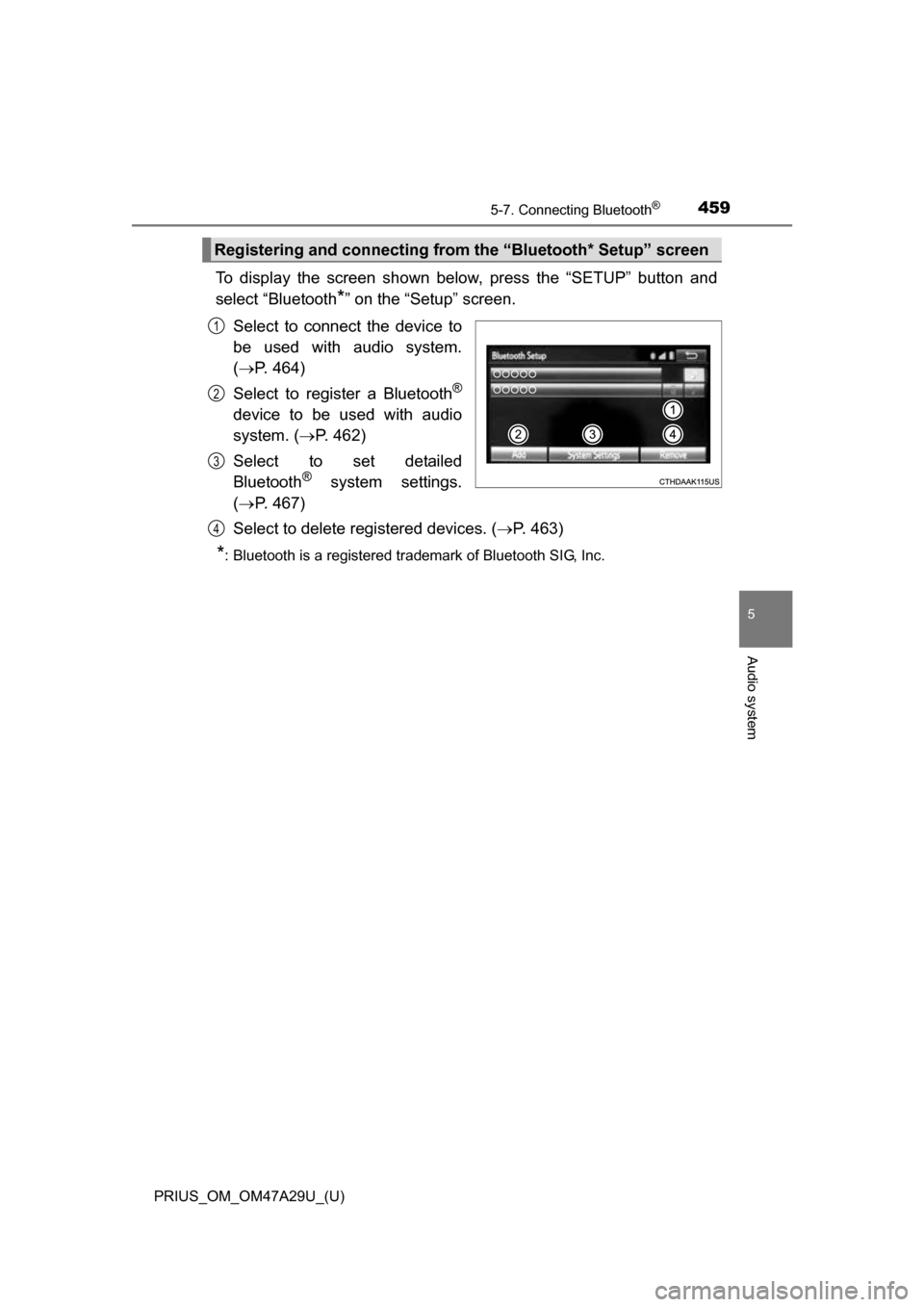
To display the screen shown below, press the “SETUP” button and
select “Bluetooth
*” on the “Setup” screen.
Select to connect the device to
be used with audio system.
( P. 464)
Select to register a Bluetooth
®
device to be used with audio
system. ( P. 462)
Select to set detailed
Bluetooth
® system settings.
( P. 467)
Select to delete registered devices. ( P. 463)
*: Bluetooth is a registered trademark of Bluetooth SIG, Inc.
Registering and connecting from the “Bluetooth* Setup” screen
1
2
3
4