reset TOYOTA PRIUS 2017 4.G User Guide
[x] Cancel search | Manufacturer: TOYOTA, Model Year: 2017, Model line: PRIUS, Model: TOYOTA PRIUS 2017 4.GPages: 796, PDF Size: 20.13 MB
Page 132 of 796
132
PRIUS_OM_OM47B54U_(U)
2. Instrument cluster
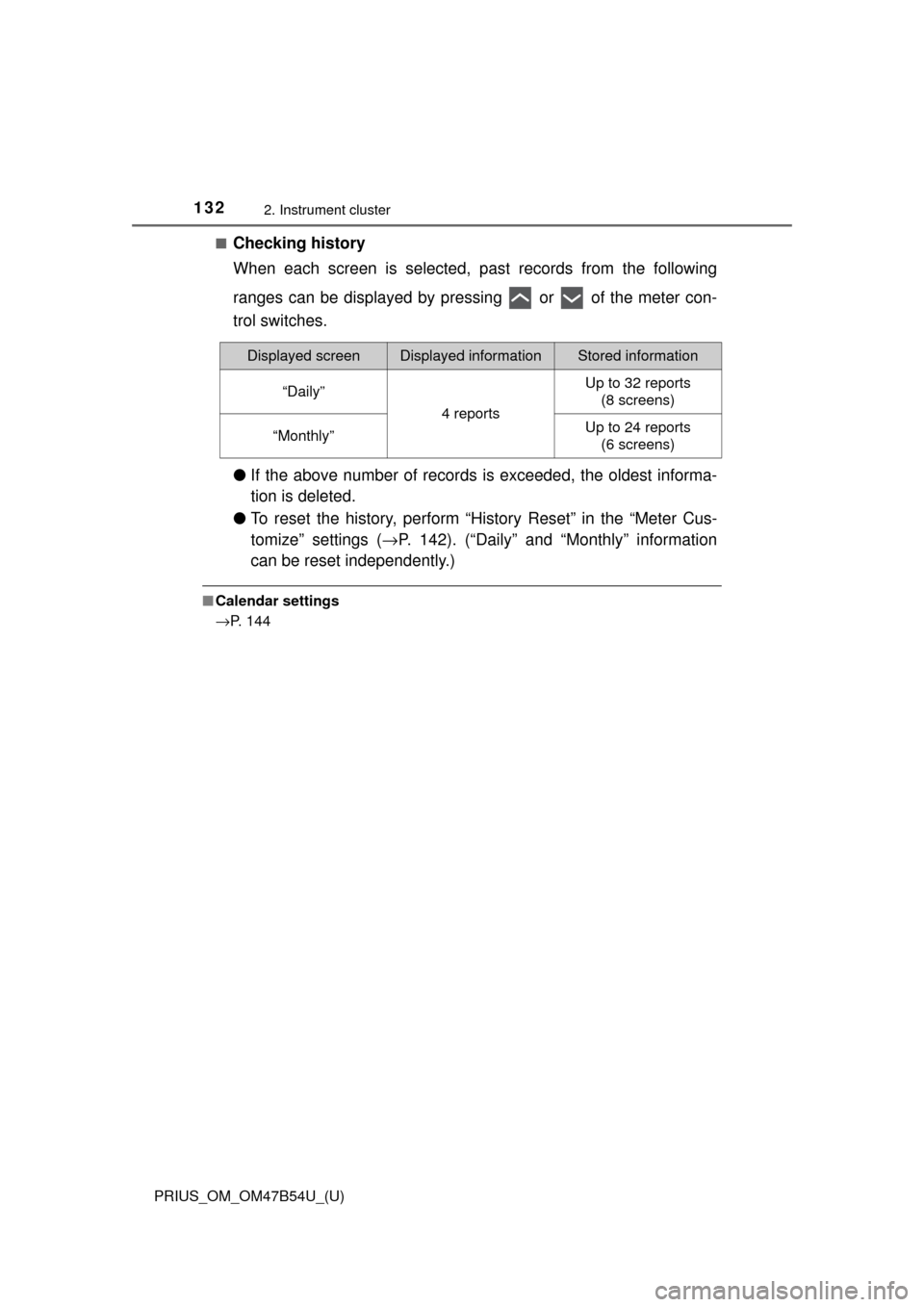
■Checking history
When each screen is selected, past records from the following
ranges can be displayed by pressing or of the meter con-
trol switches.
●If the above number of records is exceeded, the oldest informa-
tion is deleted.
● To reset the history, perform “History Reset” in the “Meter Cus-
tomize” settings ( →P. 142). (“Daily” and “Monthly” information
can be reset independently.)
■ Calendar settings
→P. 144
Displayed screenDisplayed informationStored information
“Daily”
4 reports
Up to 32 reports
(8 screens)
“Monthly”Up to 24 reports (6 screens)
Page 143 of 796
PRIUS_OM_OM47B54U_(U)
1432. Instrument cluster
2
Instrument cluster
*1: When the screen is turned off, pressing displays the setting screenagain.
*2: If equipped
*3: U.S.A. only
*4: Except for Canada
*5: For Canada
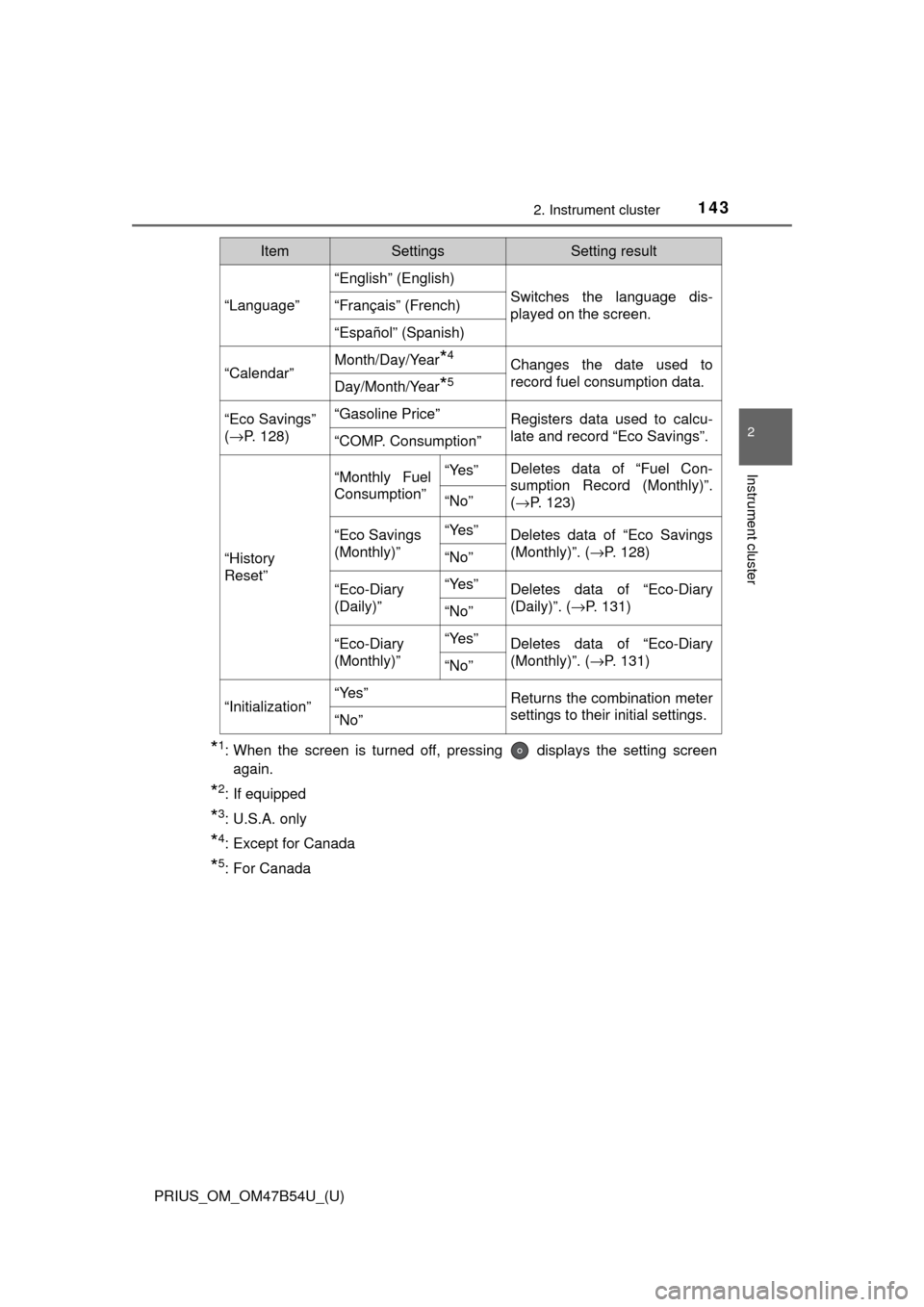
“Language”
“English” (English)
Switches the language dis-
played on the screen.“Français” (French)
“Español” (Spanish)
“Calendar”
Month/Day/Year*4Changes the date used to
record fuel consumption data.
Day/Month/Year*5
“Eco Savings”
( → P. 128)“Gasoline Price”Registers data used to calcu-
late and record “Eco Savings”.
“COMP. Consumption”
“History
Reset”
“Monthly Fuel
Consumption”“Yes”Deletes data of “Fuel Con-
sumption Record (Monthly)”.
(→ P. 123)
“No”
“Eco Savings
(Monthly)”“Yes”Deletes data of “Eco Savings
(Monthly)”. ( →P. 128)
“No”
“Eco-Diary
(Daily)”“Yes”Deletes data of “Eco-Diary
(Daily)”. (→P. 131)
“No”
“Eco-Diary
(Monthly)”“Yes”Deletes data of “Eco-Diary
(Monthly)”. ( →P. 131)
“No”
“Initialization”“Yes”Returns the combination meter
settings to their initial settings.
“No”
ItemSettingsSetting result
Page 151 of 796

PRIUS_OM_OM47B54U_(U)
1512. Instrument cluster
2
Instrument cluster
■Enabling/disabling of the head-up display
When the head-up display is turned off with the “HUD” switch, it is not dis-
played until the “HUD” switch is used to turn the head-up display on again.
(Operation of the head-up display is not linked with the power switch.)
■ Display brightness
●The brightness of the head-up display is automatically adjusted according to
the operation status of the headlights (on/off) and the brightness of the sur-
roundings.
● When the brightness of the head-up display is adjusted to a certain level or
higher, the display automatically dims when the vehicle is stopped. Once the
vehicle starts off and the vehicle speed reaches approximately 3.1 mph
(5 km/h) or more, the display automatically returns to its previous bright-
ness.
■ Vehicle speed display
In extremely cold environments, the display of the speedometer and the vehi-
cle speed of the head-up display may slightly differ.
■ Head-up display
The head-up display may seem dark and hard to see when viewed through
sunglasses, especially polarized sunglasses.
■ When the 12-volt battery is disconnected
The customize settings of the head-up display will be reset.
■ Route guidance display (vehicles with navigation system)
The route guidance is not displayed on both the head-up display and multi-
information display simultaneously. When the route guidance is displayed on
the head-up display, the multi-information display does not display the route
guidance even if the navigation system-linked display ( →P. 133) is selected
on the multi-information display.
Page 156 of 796
156
PRIUS_OM_OM47B54U_(U)
2. Instrument cluster
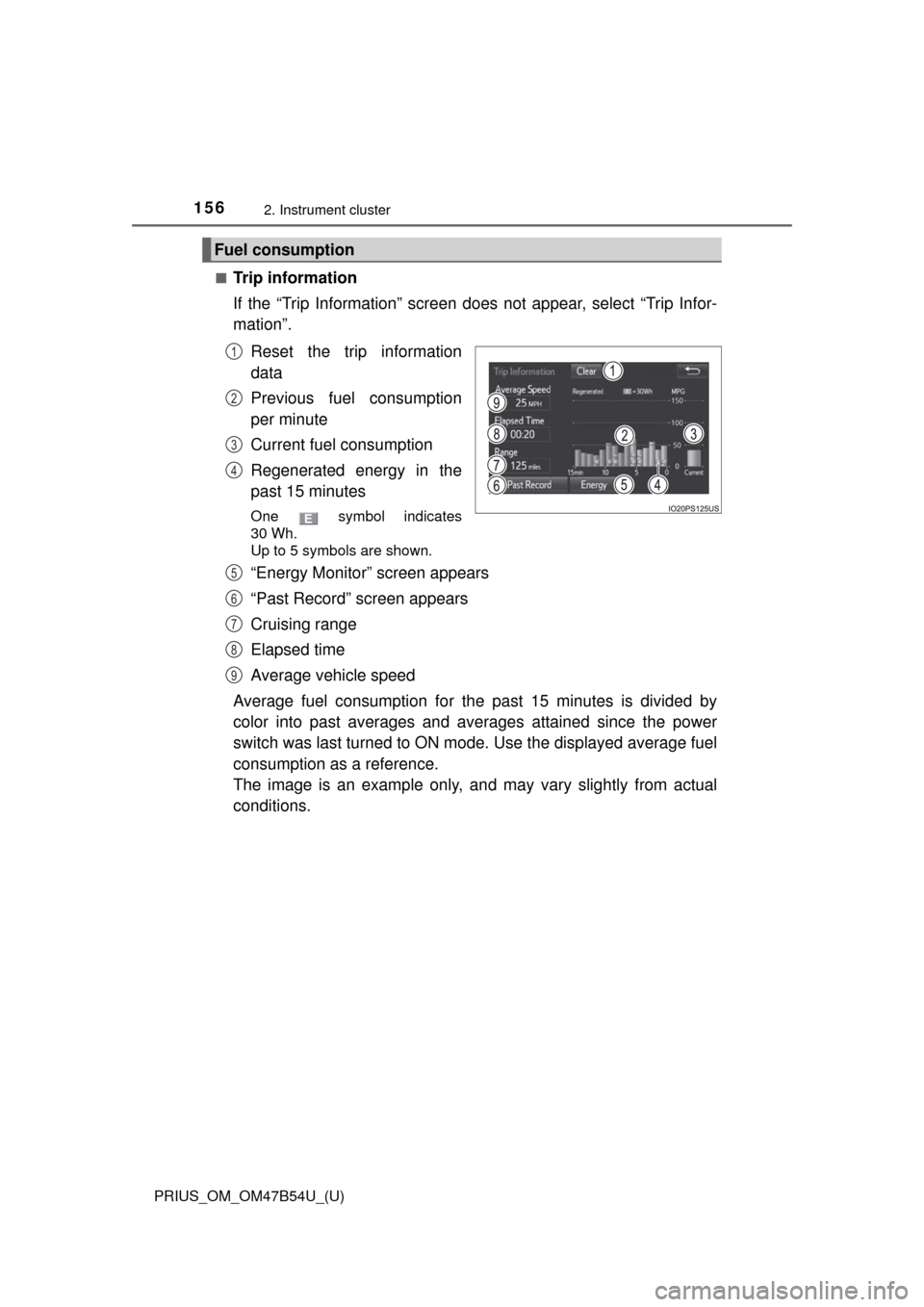
■Trip information
If the “Trip Information” screen does not appear, select “Trip Infor-
mation”.Reset the trip information
data
Previous fuel consumption
per minute
Current fuel consumption
Regenerated energy in the
past 15 minutes
One symbol indicates
30 Wh.
Up to 5 symbols are shown.
“Energy Monitor” screen appears
“Past Record” screen appears
Cruising range
Elapsed time
Average vehicle speed
Average fuel consumption for the past 15 minutes is divided by
color into past averages and av erages attained since the power
switch was last turned to ON mode. Use the displayed average fuel
consumption as a reference.
The image is an example only, an d may vary slightly from actual
conditions.
Fuel consumption
1
2
3
4
5
6
7
8
9
Page 157 of 796
PRIUS_OM_OM47B54U_(U)
1572. Instrument cluster
2
Instrument cluster
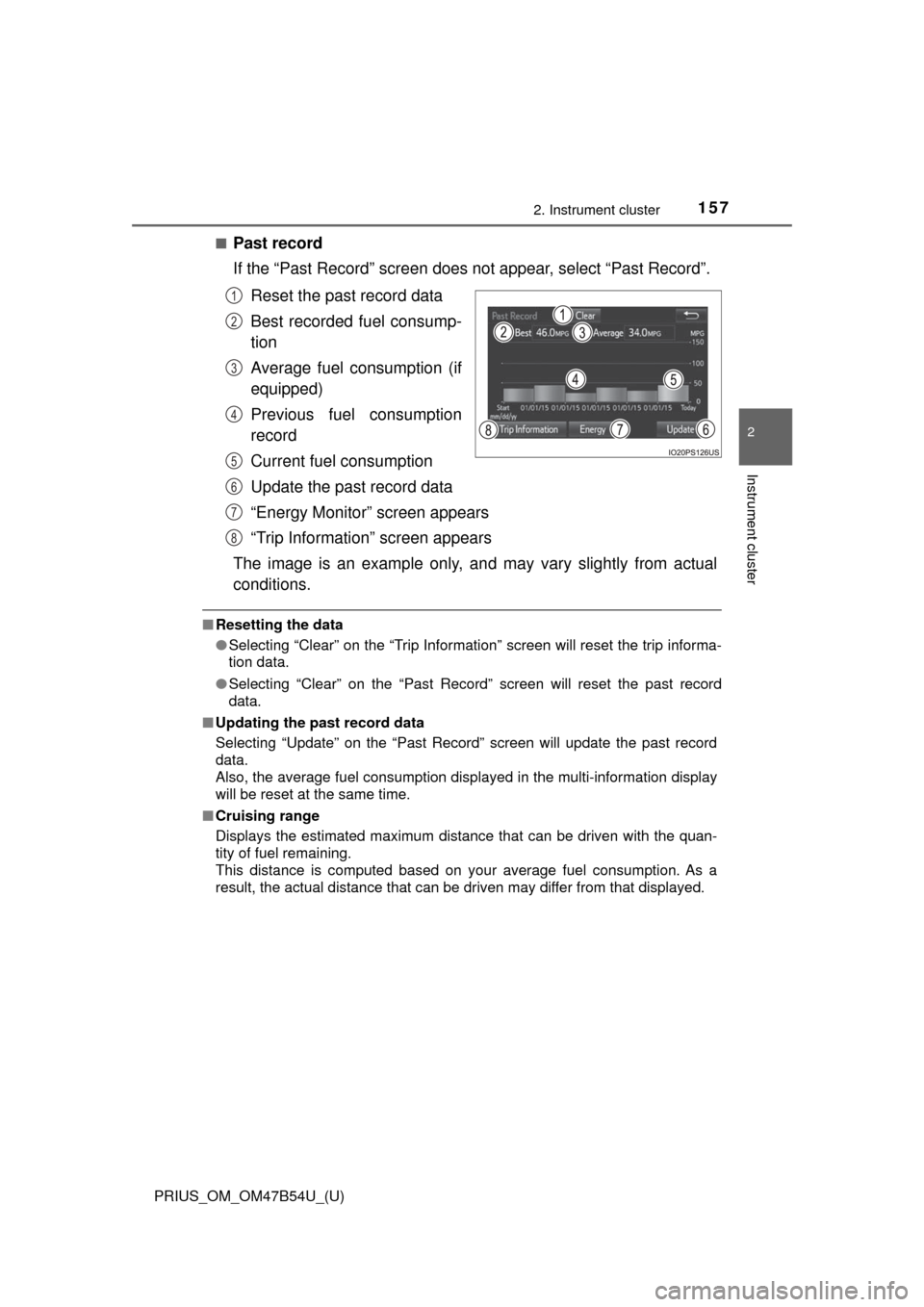
■Past record
If the “Past Record” screen does not appear, select “Past Record”.
Reset the past record data
Best recorded fuel consump-
tion
Average fuel consumption (if
equipped)
Previous fuel consumption
record
Current fuel consumption
Update the past record data
“Energy Monitor” screen appears
“Trip Information” screen appears
The image is an example only, an d may vary slightly from actual
conditions.
■ Resetting the data
●Selecting “Clear” on the “Trip Information” screen will reset the trip informa-
tion data.
● Selecting “Clear” on the “Past Record” screen will reset the past record
data.
■ Updating the past record data
Selecting “Update” on the “Past Record” screen will update the past record
data.
Also, the average fuel consumption displa yed in the multi-information display
will be reset at the same time.
■ Cruising range
Displays the estimated maximum distance that can be driven with the quan-
tity of fuel remaining.
This distance is computed based on your average fuel consumption. As a
result, the actual distance that can be driven may differ from that displayed.
1
2
3
4
5
6
7
8
Page 429 of 796
429
PRIUS_OM_OM47B54U_(U)
5-2. Setup
5
Audio system
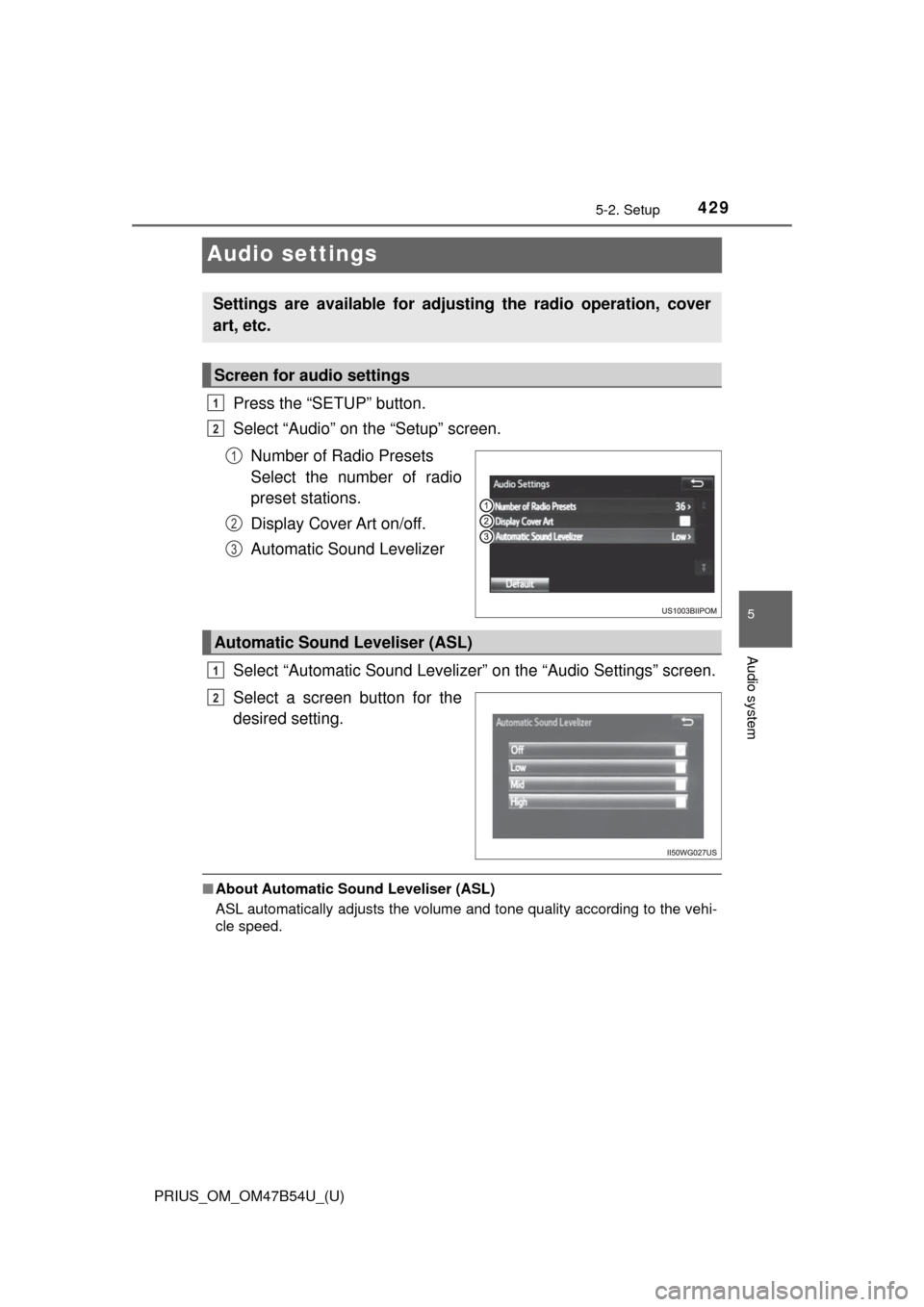
Audio settings
Press the “SETUP” button.
Select “Audio” on the “Setup” screen.Number of Radio Presets
Select the number of radio
preset stations.
Display Cover Art on/off.
Automatic Sound Levelizer
Select “Automatic Sound Levelizer” on the “Audio Settings” screen.
Select a screen button for the
desired setting.
■ About Automatic Sou nd Leveliser (ASL)
ASL automatically adjusts the volume and tone quality according to the vehi-
cle speed.
Settings are available for adjusting the radio operation, cover
art, etc.
Screen for audio settings
1
2
1
2
3
Automatic Sound Leveliser (ASL)
1
2
Page 436 of 796
436
PRIUS_OM_OM47B54U_(U)
5-4. Using the radio
Radio operation
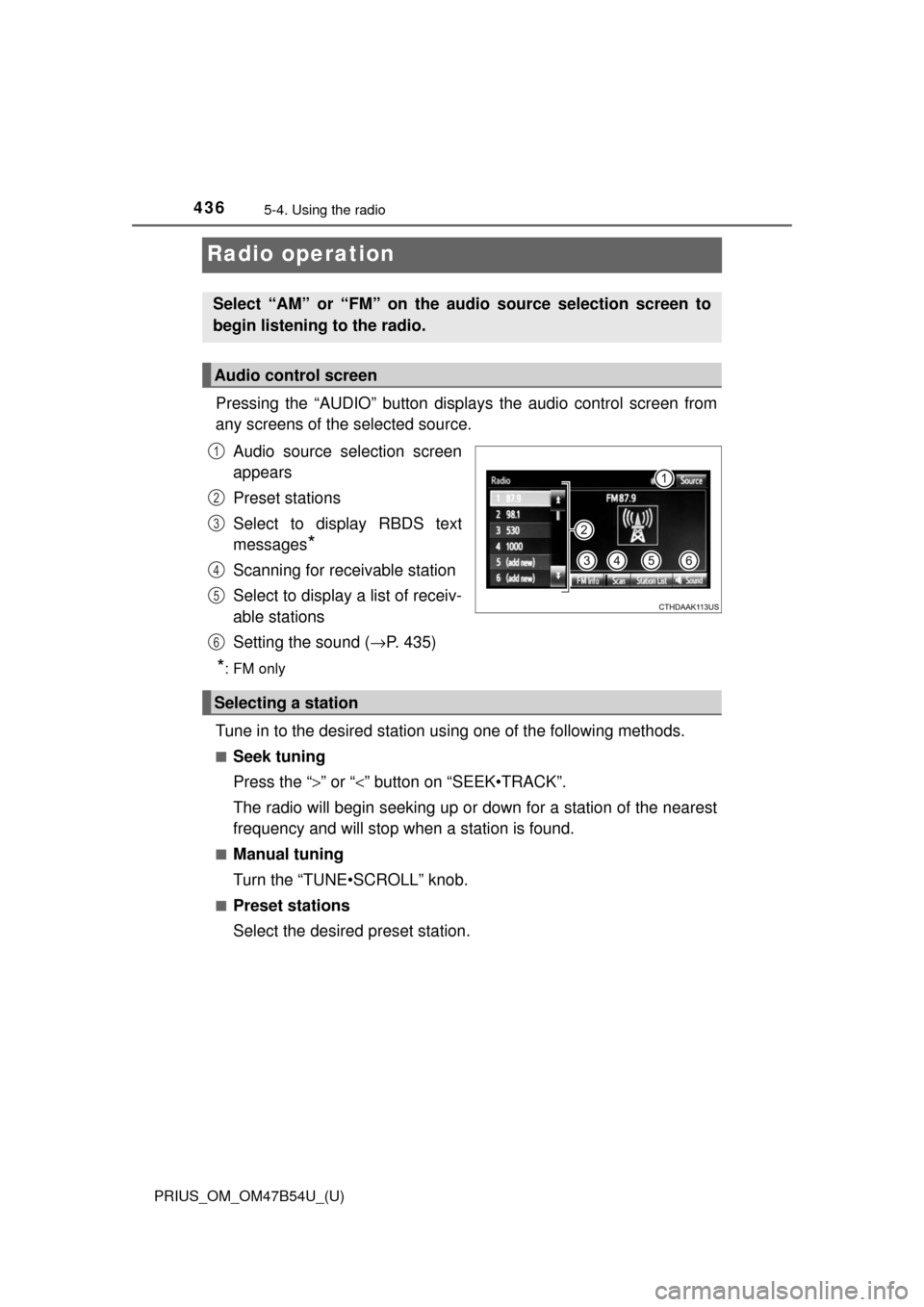
Pressing the “AUDIO” button displays the audio control screen from
any screens of the selected source.
Audio source selection screen
appears
Preset stations
Select to display RBDS text
messages
*
Scanning for receivable station
Select to display a list of receiv-
able stations
Setting the sound ( →P. 435)
*:FM only
Tune in to the desired station us ing one of the following methods.
■Seek tuning
Press the “>” or “<” button on “SEEK•TRACK”.
The radio will begin seeking up or down for a station of the nearest
frequency and will stop when a station is found.
■Manual tuning
Turn the “TUNE•SCROLL” knob.
■Preset stations
Select the desired preset station.
Select “AM” or “FM” on the audio source selection screen to
begin listening to the radio.
Audio control screen
1
2
3
4
5
6
Selecting a station
Page 437 of 796
PRIUS_OM_OM47B54U_(U)
4375-4. Using the radio
5
Audio system
Search for desired stations by turning the “TUNE•SCROLL” knob or
pressing the “>” or “<” button on “SEEK•TRACK”.
Select “(add new)”.
To change the preset station to a different one, select and hold the preset
station.
Select “Yes”.
Select “OK” after setting the new preset station.
■Refreshing the station list
Select “Refresh” on the “Station List” screen.
To cancel the refresh, select “Cancel Refresh”.
■ Reception sensitivity
Maintaining perfect radio reception at all times is difficult due to the continu-
ally changing position of the antenna, differences in signal strength and sur-
rounding objects, such as trains, transmitters, etc.
Setting station presets
1
2
3
4
Page 447 of 796
PRIUS_OM_OM47B54U_(U)
4475-6. Using an external device
5
Audio system
■iPod problems
To resolve most problems encountered when using your iPod, disconnect
your iPod from the vehicle iPod connection and reset it. For instructions on
how to reset your iPod, refer to your iPod Owner’s Manual.
■ Error messages
If an error message is displayed, refer to the following table and take the
appropriate measures. If the problem is not rectified, take the vehicle to your
Toyota dealer.
MessageCause/Correction procedures
“Connection error. Please
consult your Owner’s
Manual for instructions on
how to connect the iPod.”
This indicates a problem in the iPod or its con-
nection.
“There are no songs avail-
able for playback. Please
add compatible files to
your iPod.”
This indicates that there is no music data in
the iPod.
“Please check the iPod
firmware version.”
This indicates that the software version is not
compatible.
Please check the compatible models.
(→P. 448)
“iPod authorization
unsuccessful.”This indicates that the display audio system
failed to authorize the iPod.
Please check your iPod.
Page 484 of 796
484
PRIUS_OM_OM47B54U_(U)
5-9. Bluetooth® phone
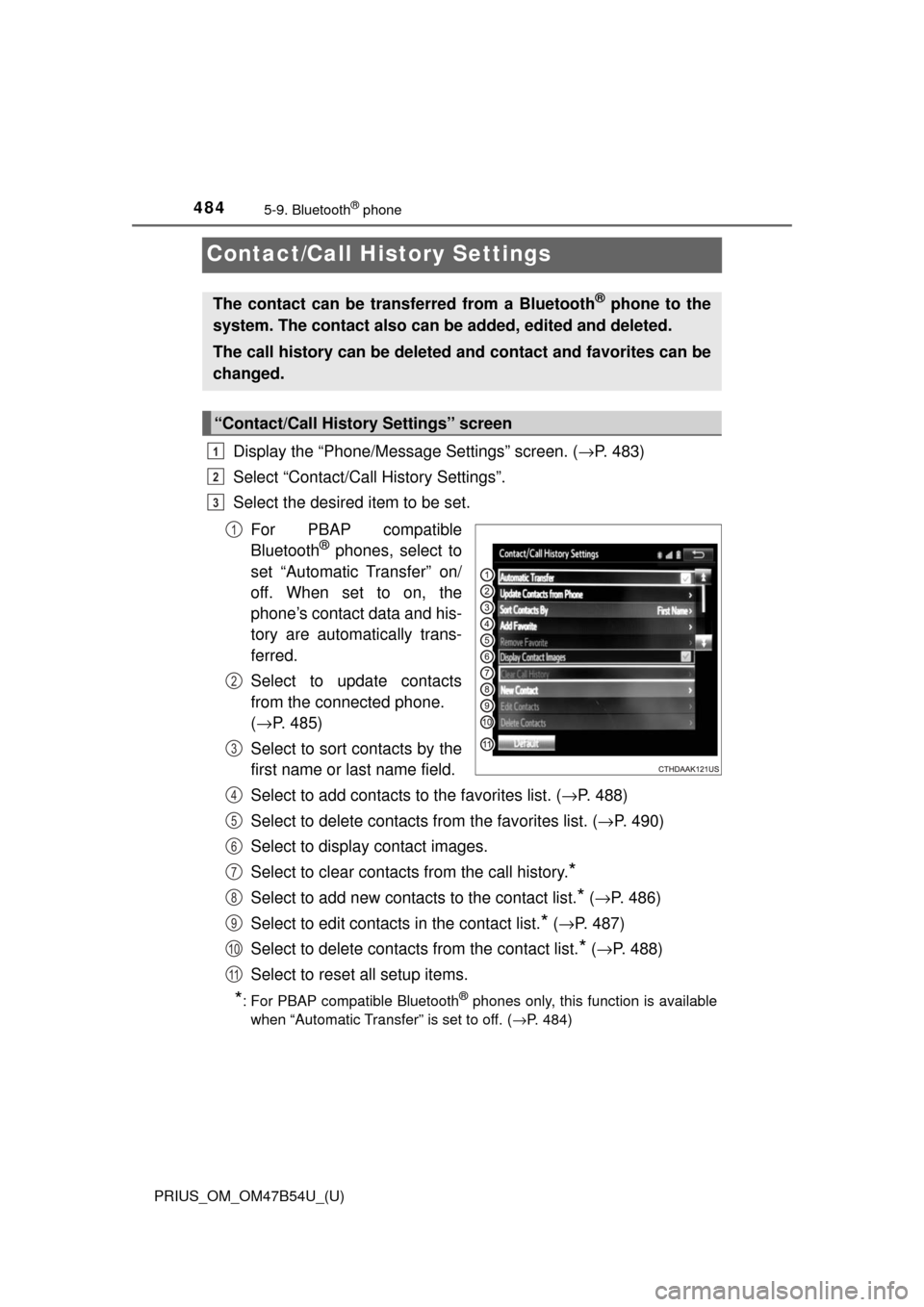
Contact/Call History Settings
Display the “Phone/Message Settings” screen. (→P. 483)
Select “Contact/Call History Settings”.
Select the desired item to be set.
For PBAP compatible
Bluetooth
® phones, select to
set “Automatic Transfer” on/
off. When set to on, the
phone’s contact data and his-
tory are automatically trans-
ferred.
Select to update contacts
from the connected phone.
( → P. 485)
Select to sort contacts by the
first name or last name field.
Select to add contacts to the favorites list. ( →P. 488)
Select to delete contacts from the favorites list. ( →P. 490)
Select to display contact images.
Select to clear contacts from the call history.
*
Select to add new contacts to the contact list.* ( → P. 486)
Select to edit contacts in the contact list.
* (→ P. 487)
Select to delete contacts from the contact list.
* ( → P. 488)
Select to reset all setup items.
*: For PBAP compatible Bluetooth® phones only, this function is available
when “Automatic Transfer” is set to off.
( →P. 484)
The contact can be transferred from a Bluetooth® phone to the
system. The contact also can be added, edited and deleted.
The call history can be deleted and contact and favorites can be
changed.
“Contact/Call History Settings” screen
1
2
3
1
2
3
4
5
6
7
8
9
10
11