steering TOYOTA PRIUS 2017 4.G User Guide
[x] Cancel search | Manufacturer: TOYOTA, Model Year: 2017, Model line: PRIUS, Model: TOYOTA PRIUS 2017 4.GPages: 796, PDF Size: 20.13 MB
Page 93 of 796
PRIUS_OM_OM47B54U_(U)
932. Instrument cluster
2
Instrument cluster
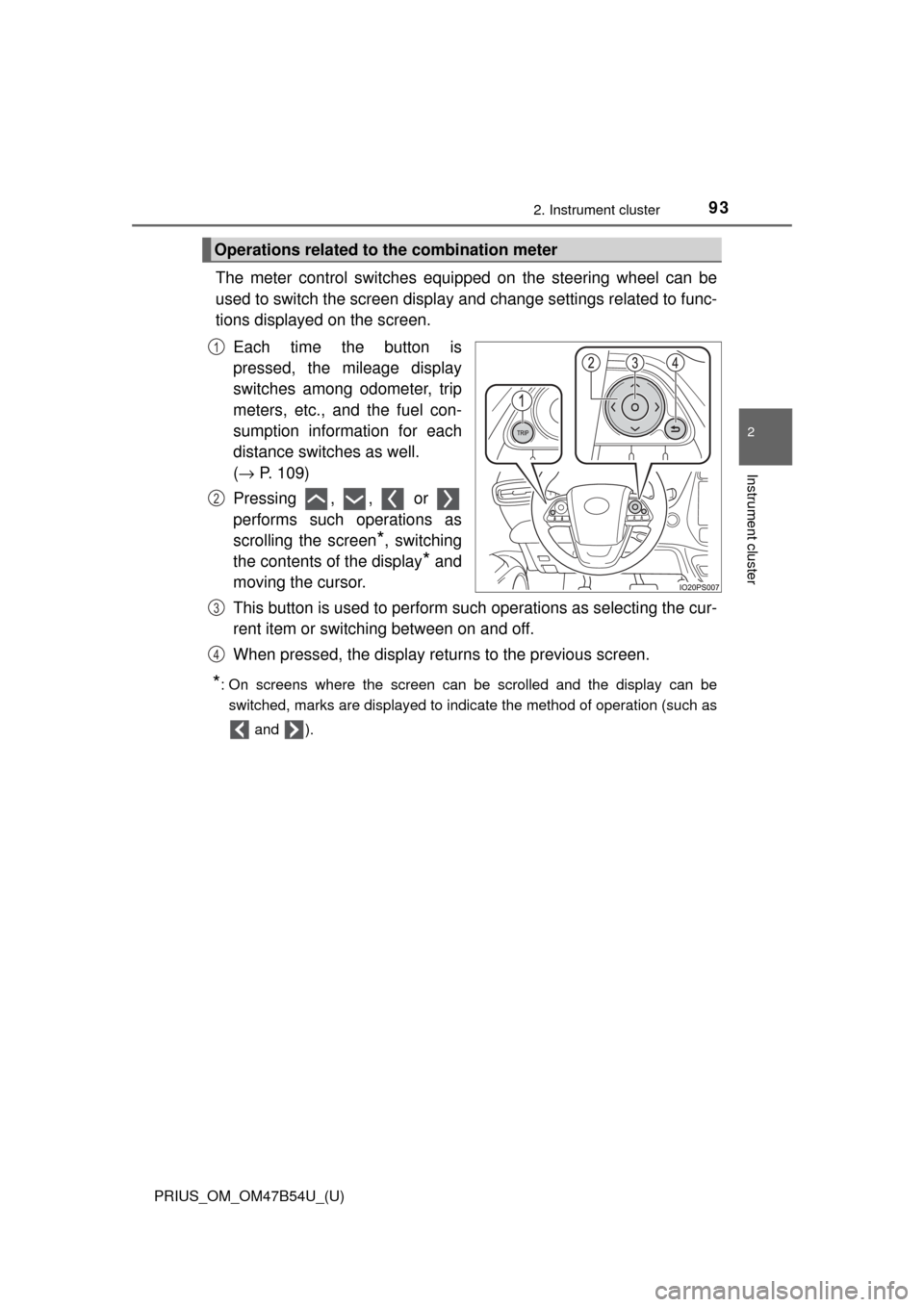
The meter control switches equipped on the steering wheel can be
used to switch the screen display and change settings related to func-
tions displayed on the screen.
Each time the button is
pressed, the mileage display
switches among odometer, trip
meters, etc., and the fuel con-
sumption information for each
distance switches as well.
(→ P. 109)
Pressing , , or
performs such operations as
scrolling the screen
*, switching
the contents of the display
* and
moving the cursor.
This button is used to perform such operations as selecting the cur-
rent item or switching between on and off.
When pressed, the display returns to the previous screen.
*: On screens where the screen can be scrolled and the display can be
switched, marks are displayed to indicate the method of operation (such as
and ).
Operations related to the combination meter
1
2
3
4
Page 99 of 796
PRIUS_OM_OM47B54U_(U)
992. Instrument cluster
2
Instrument cluster
■Liquid crystal display
Small spots or light spots may appear on the display. This phenomenon is
characteristic of liquid crystal displays, and there is no problem continuing to
use the display.
■ Pop-up display
Some functions, such as the driving mode select switch and air conditioning
system, are operation-linked and display pop-up screens on the multi-infor-
mation display. If the pop-up screens of these functions are not desired, they
can be turned off in the “Meter Customize” settings. ( →P. 142)
WARNING
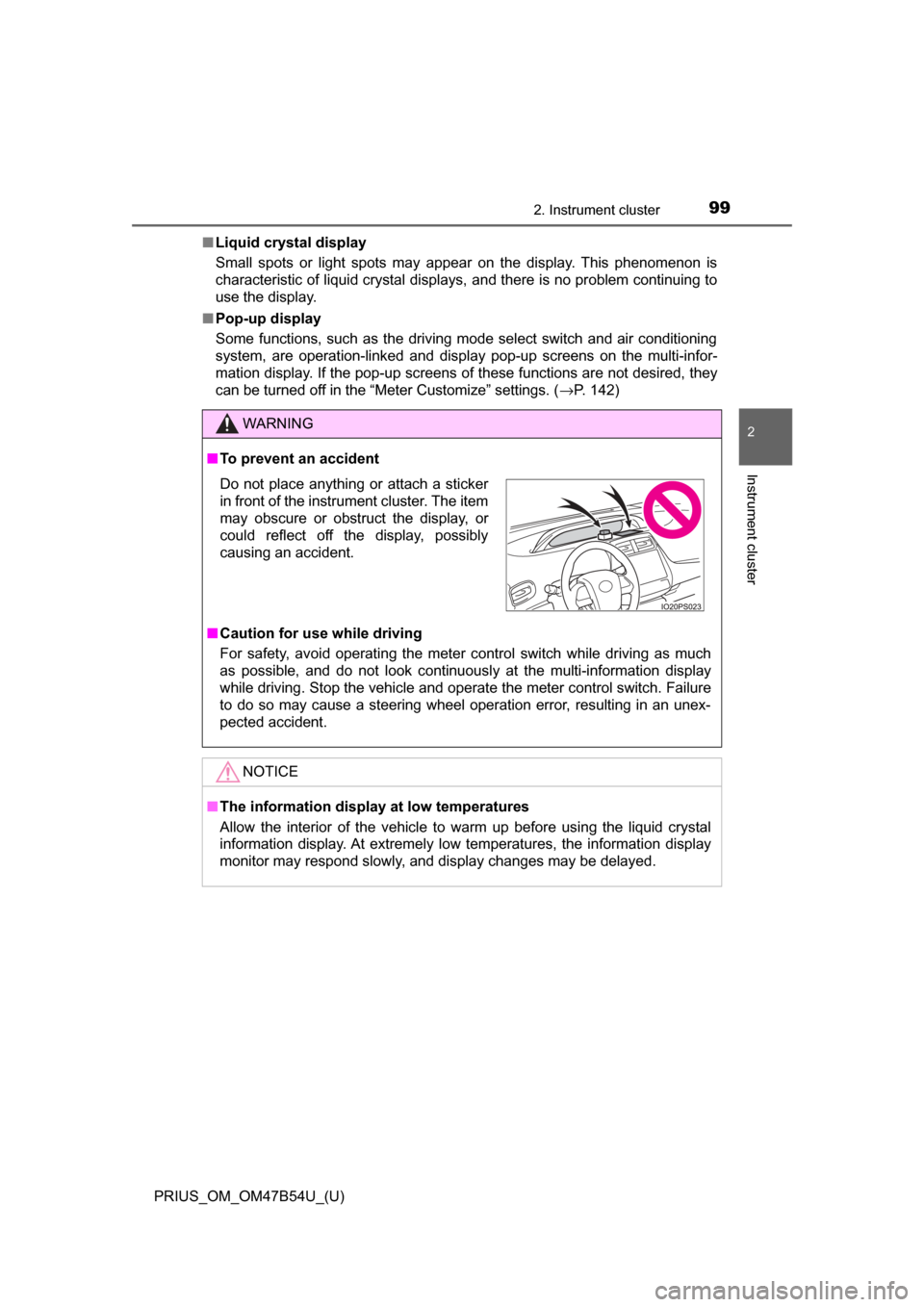
■To prevent an accident
■ Caution for use while driving
For safety, avoid operating the meter control switch while driving as much
as possible, and do not look continuously at the multi-information display
while driving. Stop the vehicle and operate the meter control switch. Failure
to do so may cause a steering wheel operation error, resulting in an unex-
pected accident.
NOTICE
■The information display at low temperatures
Allow the interior of the vehicle to warm up before using the liquid crystal
information display. At extremely low temperatures, the information display
monitor may respond slowly, and display changes may be delayed.
Do not place anything or attach a sticker
in front of the instrument cluster. The item
may obscure or obstruct the display, or
could reflect off the display, possibly
causing an accident.
Page 101 of 796
PRIUS_OM_OM47B54U_(U)
1012. Instrument cluster
2
Instrument cluster
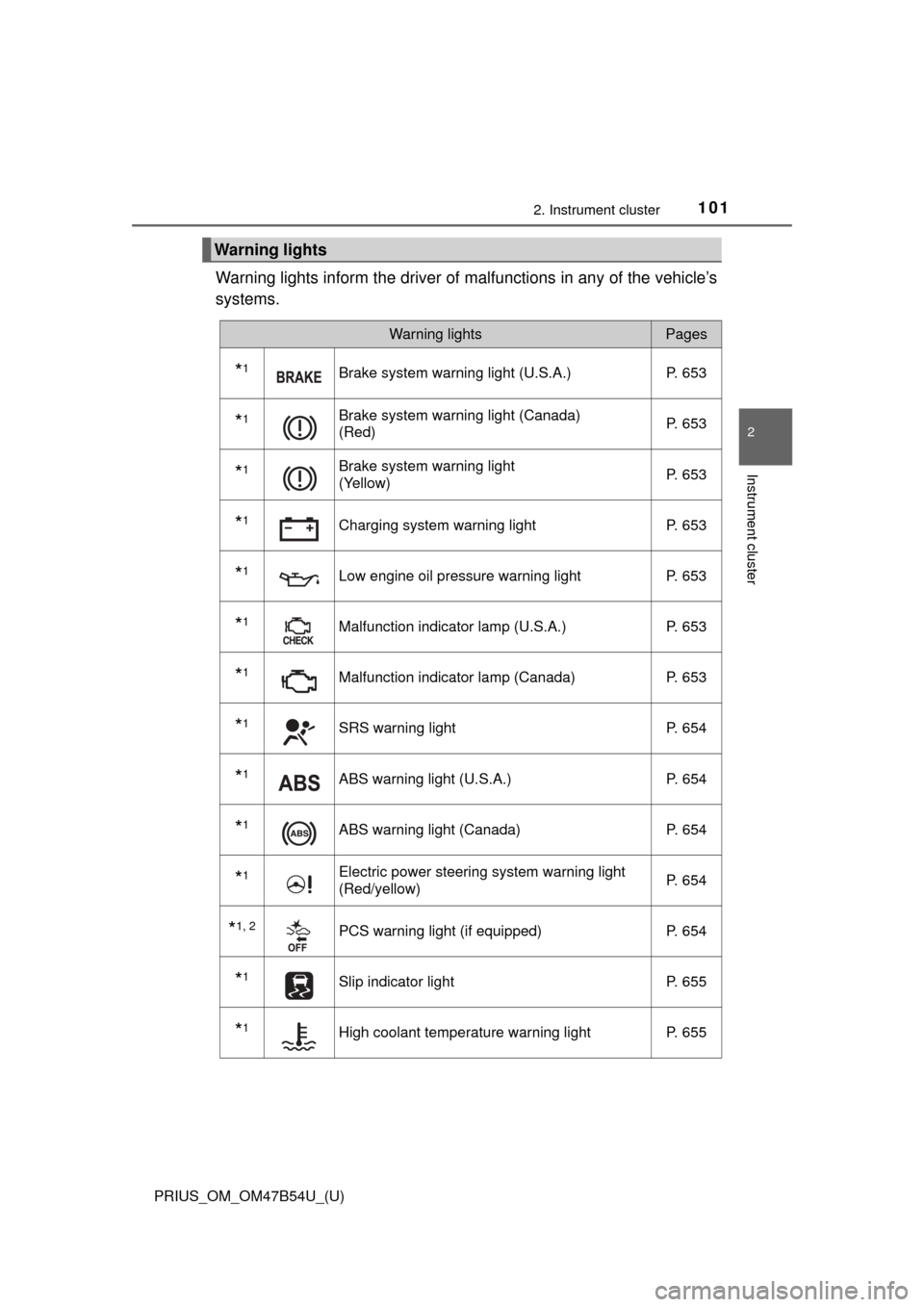
Warning lights inform the driver of malfunctions in any of the vehicle’s
systems.
Warning lights
Warning lightsPages
*1Brake system warning light (U.S.A.) P. 653
*1Brake system warning light (Canada)
(Red)P. 653
*1Brake system warning light
(Yellow)P. 653
*1Charging system warning light
P. 653
*1Low engine oil pressure warning lightP. 653
*1Malfunction indicator lamp (U.S.A.) P. 653
*1Malfunction indicator lamp (Canada) P. 653
*1SRS warning lightP. 654
*1ABS warning light (U.S.A.) P. 654
*1ABS warning light (Canada)P. 654
*1Electric power steering system warning light
(Red/yellow)P. 654
*1, 2PCS warning light (if equipped)
P. 654
*1Slip indicator light P. 655
*1High coolant temperature warning lightP. 655
Page 104 of 796
104
PRIUS_OM_OM47B54U_(U)
2. Instrument cluster
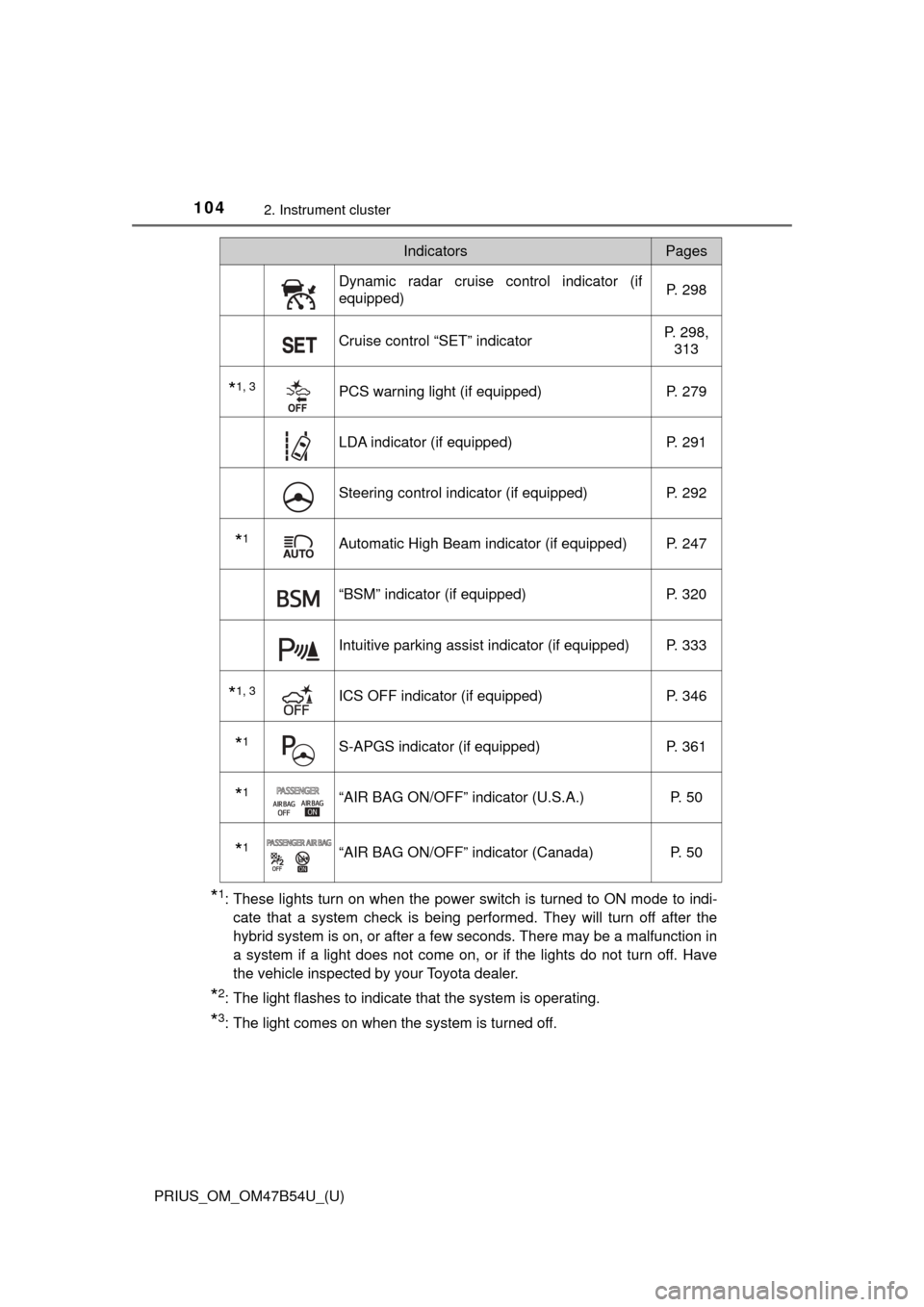
*1: These lights turn on when the power switch is turned to ON mode to indi-cate that a system check is being performed. They will turn off after the
hybrid system is on, or after a few seconds. There may be a malfunction in
a system if a light does not come on, or if the lights do not turn off. Have
the vehicle inspected by your Toyota dealer.
*2: The light flashes to indicate that the system is operating.
*3: The light comes on when the system is turned off.
Dynamic radar cruise control indicator (if
equipped) P. 298
Cruise control “SET” indicatorP. 298,
313
*1, 3PCS warning light (if equipped) P. 279
LDA indicator (if equipped)P. 291
Steering control indicator (if equipped)P. 292
*1Automatic High Beam indicator (if equipped) P. 247
“BSM” indicator (if equipped)P. 320
Intuitive parking assist indicator (if equipped) P. 333
*1, 3ICS OFF indicator (if equipped) P. 346
*1S-APGS indicator (if equipped)P. 361
*1“AIR BAG ON/OFF” indicator (U.S.A.) P. 50
*1“AIR BAG ON/OFF” indicator (Canada)P. 50
IndicatorsPages
Page 105 of 796
PRIUS_OM_OM47B54U_(U)
1052. Instrument cluster
2
Instrument cluster
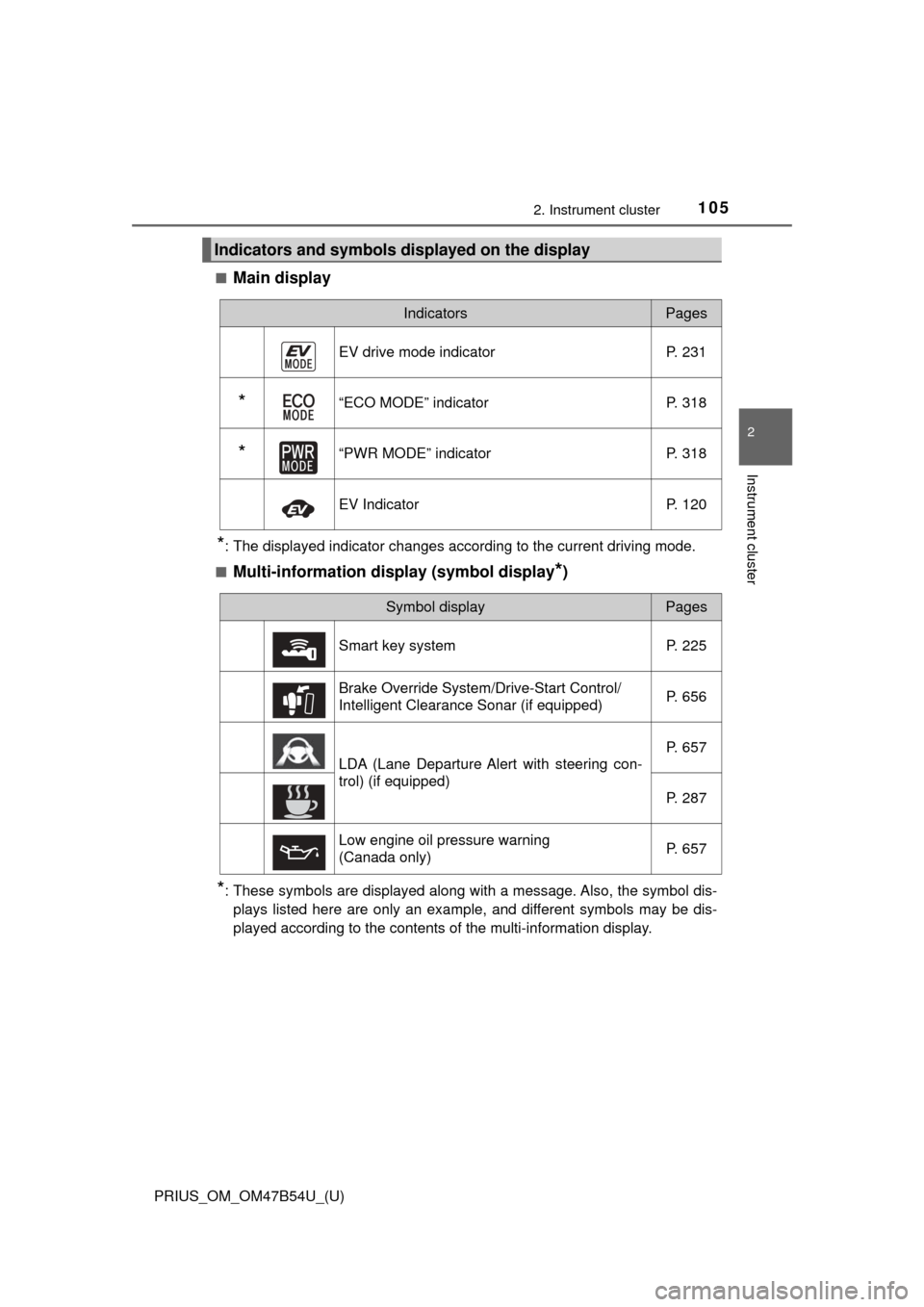
■Main display
*: The displayed indicator changes according to the current driving mode.
■
Multi-information display (symbol display*)
*: These symbols are displayed along with a message. Also, the symbol dis- plays listed here are only an example, and different symbols may be dis-
played according to the contents of the multi-information display.
Indicators and symbols displayed on the display
IndicatorsPages
EV drive mode indicator P. 231
*“ECO MODE” indicator P. 318
*“PWR MODE” indicatorP. 318
EV IndicatorP. 120
Symbol displayPages
Smart key system P. 225
Brake Override System/Drive-Start Control/
Intelligent Clearance Sonar (if equipped) P. 656
LDA (Lane Departure Alert with steering con-
trol) (if equipped)P. 657
P. 287
Low engine oil pressure warning
(Canada only) P. 657
Page 115 of 796
PRIUS_OM_OM47B54U_(U)
1152. Instrument cluster
2
Instrument cluster
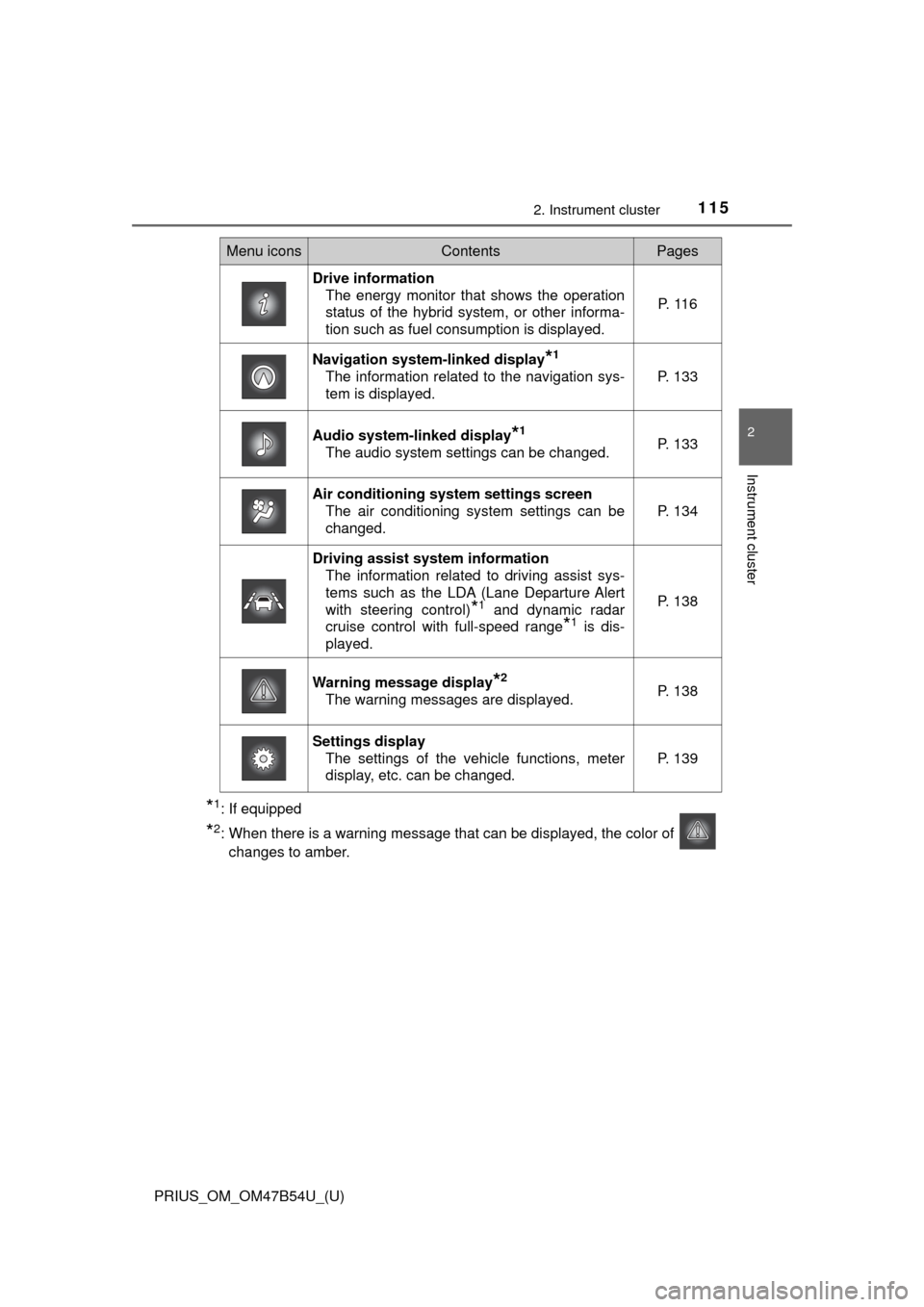
*1: If equipped
*2: When there is a warning message that can be displayed, the color of changes to amber.
Menu iconsContentsPages
Drive information The energy monitor that shows the operation
status of the hybrid system, or other informa-
tion such as fuel consumption is displayed. P. 1 1 6
Navigation system-linked display*1
The information related to the navigation sys-
tem is displayed.P. 133
Audio system-linked display*1
The audio system settings can be changed.P. 133
Air conditioning system settings screen
The air conditioning system settings can be
changed.
P. 134
Driving assist system informationThe information related to driving assist sys-
tems such as the LDA (Lane Departure Alert
with steering control)
*1 and dynamic radar
cruise control with full-speed range
*1 is dis-
played.
P. 138
Warning message display*2
The warning messages are displayed.P. 138
Settings display The settings of the vehicle functions, meter
display, etc. can be changed.
P. 139
Page 139 of 796
PRIUS_OM_OM47B54U_(U)
1392. Instrument cluster
2
Instrument cluster
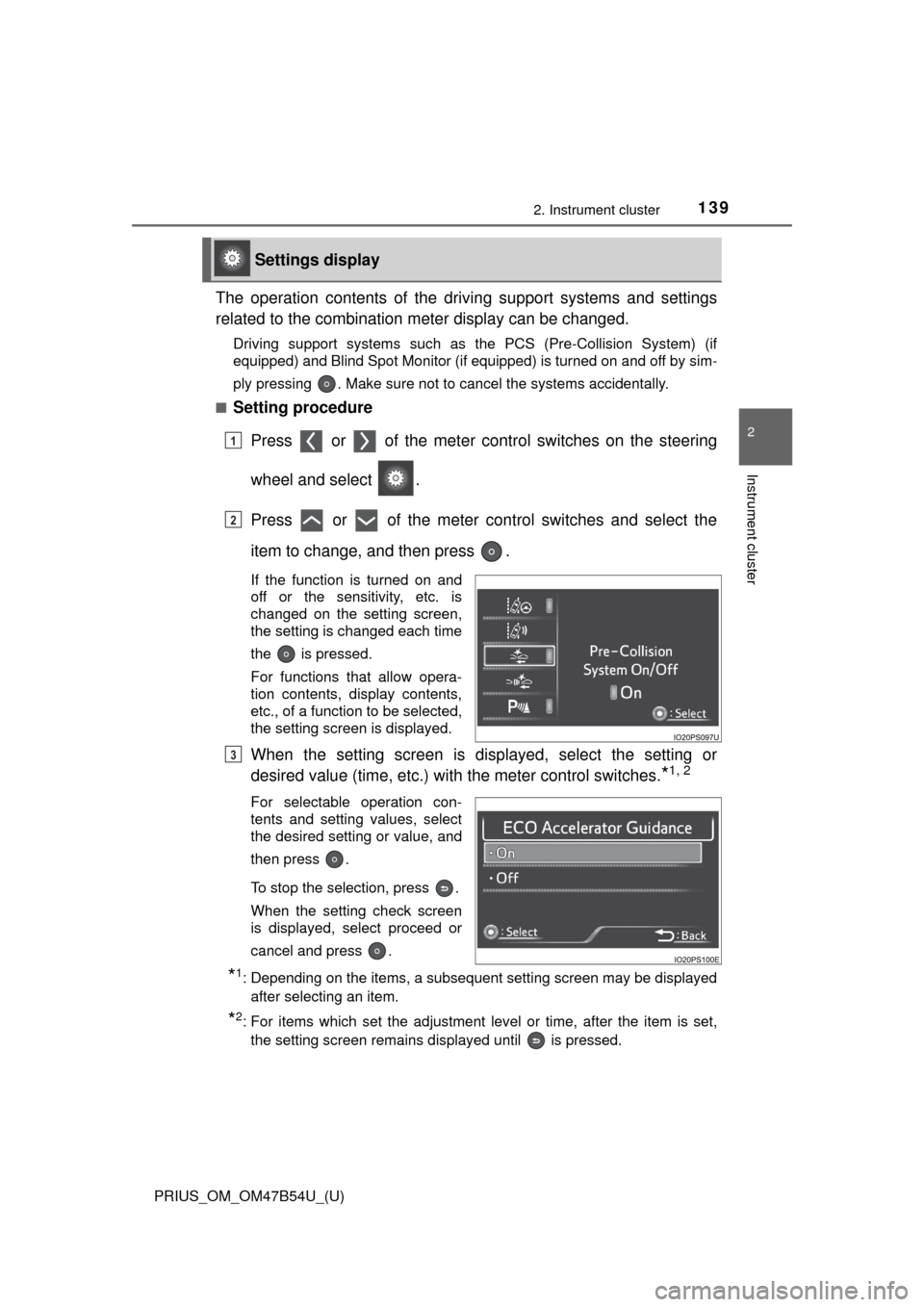
The operation contents of the driving support systems and settings
related to the combination meter display can be changed.
Driving support systems such as the PCS (Pre-Collision System) (if
equipped) and Blind Spot Monitor (if equipped) is turned on and off by sim-
ply pressing . Make sure not to cancel the systems accidentally.
■
Setting procedure
Press or of the meter cont rol switches on the steering
wheel and select .
Press or of the meter control switches and select the
item to change, and then press .
If the function is turned on and
off or the sensitivity, etc. is
changed on the setting screen,
the setting is changed each time
the is pressed.
For functions that allow opera-
tion contents, display contents,
etc., of a function to be selected,
the setting screen is displayed.
When the setting screen is displayed, select the setting or
desired value (time, etc.) with the meter control switches.
*1, 2
For selectable operation con-
tents and setting values, select
the desired setting or value, and
then press .
To stop the selection, press .
When the setting check screen
is displayed, select proceed or
cancel and press .
*1: Depending on the items, a subsequent setting screen may be displayed
after selecting an item.
*2: For items which set the adjustment level or time, after the item is set,the setting screen remains displayed until is pressed.
Settings display
1
2
3
Page 140 of 796
140
PRIUS_OM_OM47B54U_(U)
2. Instrument cluster
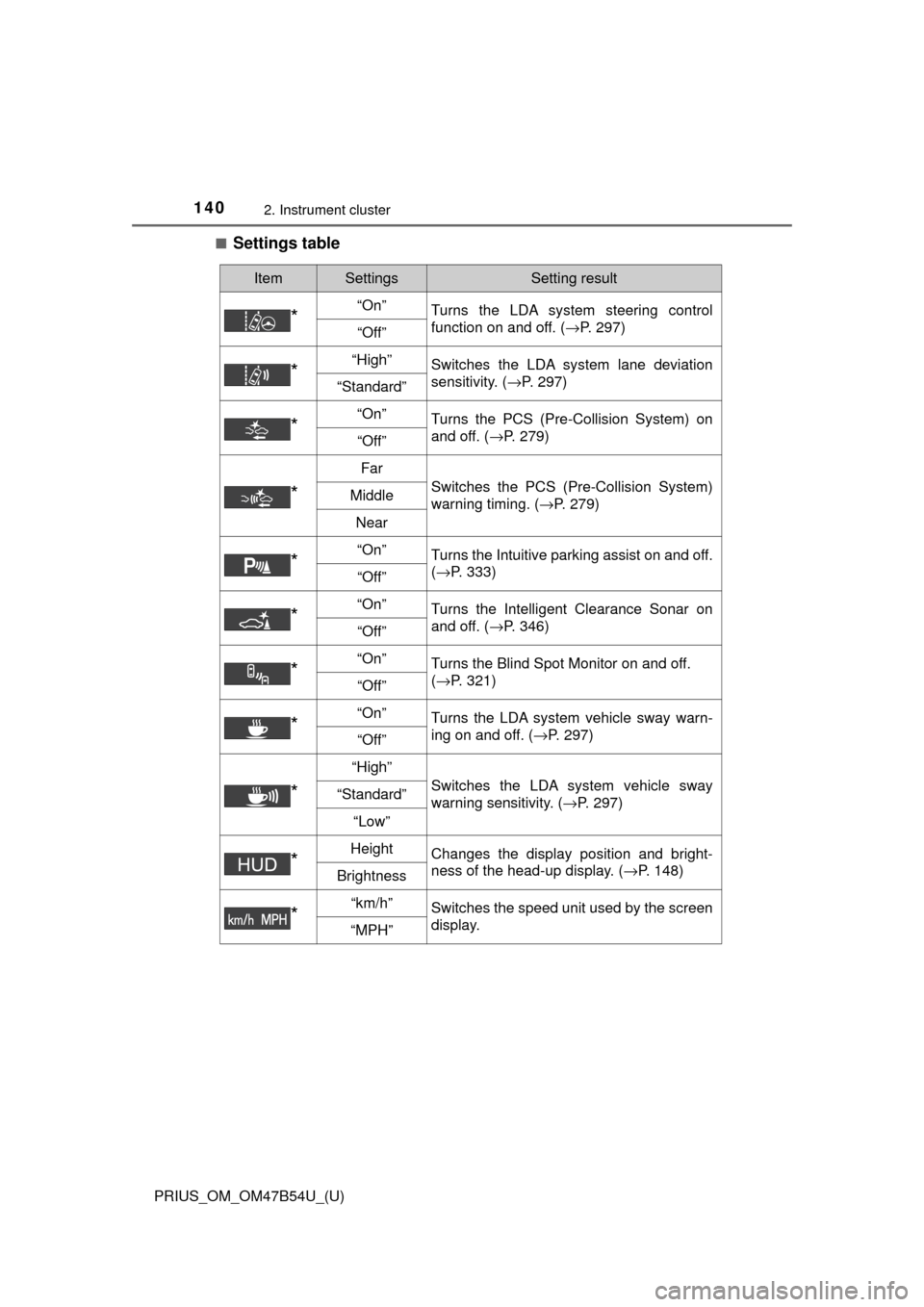
■Settings table
ItemSettingsSetting result
*“On”Turns the LDA system steering control
function on and off. ( →P. 297)
“Off”
*“High”Switches the LDA system lane deviation
sensitivity. (→P. 297)
“Standard”
*“On”Turns the PCS (Pre-Collision System) on
and off. (→P. 279)
“Off”
*
Far
Switches the PCS (Pre-Collision System)
warning timing. ( →P. 279)Middle
Near
*“On”Turns the Intuitive parking assist on and off.
(→P. 333)
“Off”
*“On”Turns the Intelligent Clearance Sonar on
and off. ( →P. 346)
“Off”
*“On”Turns the Blind Spot Monitor on and off.
(→P. 321)
“Off”
*“On”Turns the LDA system vehicle sway warn-
ing on and off. ( →P. 297)
“Off”
*
“High”
Switches the LDA system vehicle sway
warning sensitivity. ( →P. 297)“Standard”
“Low”
*HeightChanges the display position and bright-
ness of the head-up display. ( →P. 148)
Brightness
*“km/h”Switches the speed unit used by the screen
display.
“MPH”
Page 149 of 796
PRIUS_OM_OM47B54U_(U)
1492. Instrument cluster
2
Instrument cluster
■Insert displays of the driving support systems
Insert displays are linked with the operation of the following sys-
tems and used to show some of the information shown on the multi-
information display on the head-up display.
*: If equipped
■
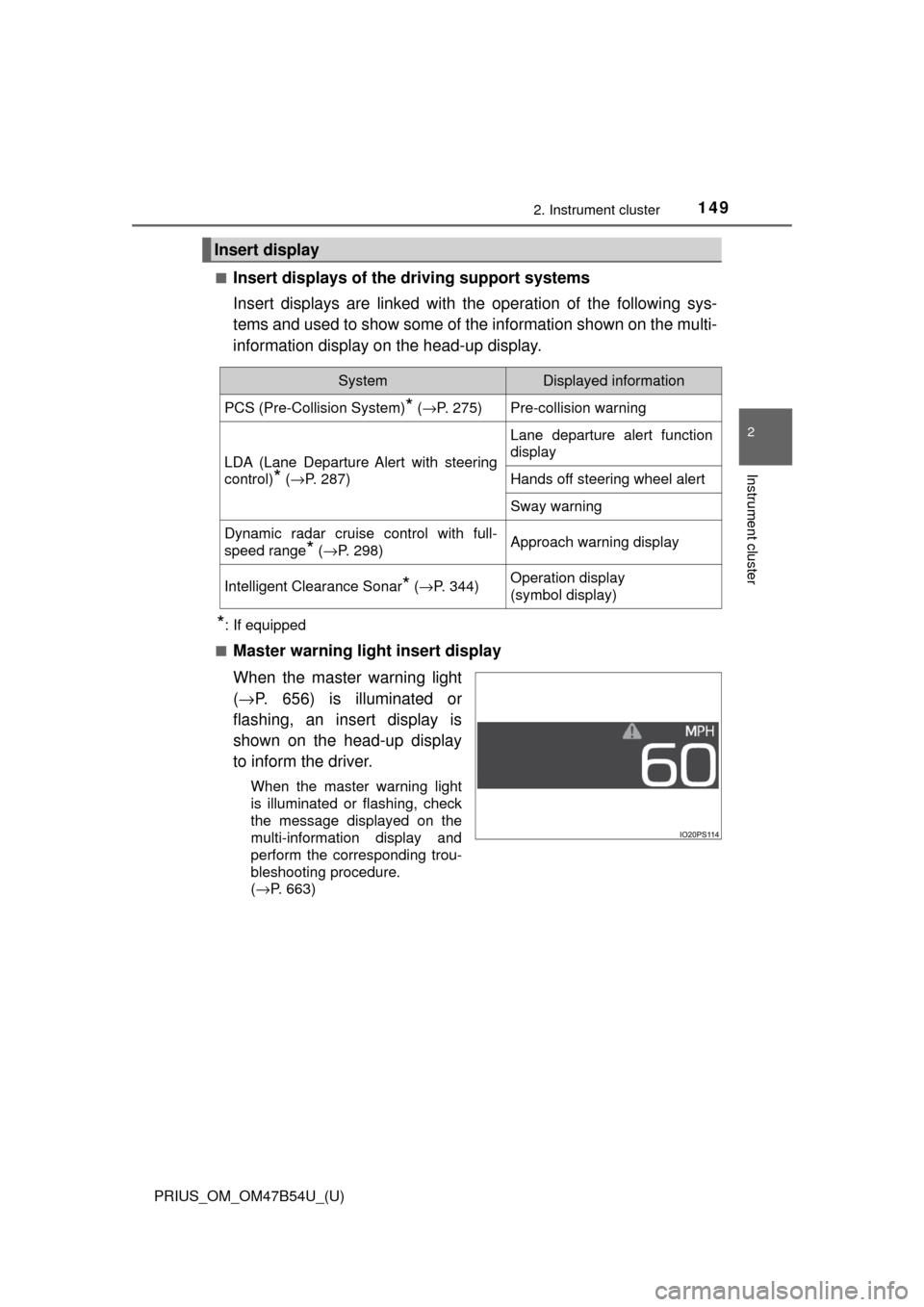
Master warning light insert display
When the master warning light
( → P. 656) is illuminated or
flashing, an insert display is
shown on the head-up display
to inform the driver.
When the master warning light
is illuminated or flashing, check
the message displayed on the
multi-information display and
perform the corresponding trou-
bleshooting procedure.
( →P. 663)
Insert display
SystemDisplayed information
PCS (Pre-Collision System)* ( →P. 275)Pre-collision warning
LDA (Lane Departure Alert with steering
control)
* (→P. 287)
Lane departure alert function
display
Hands off steering wheel alert
Sway warning
Dynamic radar cruise control with full-
speed range
* (→P. 298)Approach warning display
Intelligent Clearance Sonar* (→ P. 344)Operation display
(symbol display)
Page 159 of 796
159
PRIUS_OM_OM47B54U_(U)
3
Operation of
each component
3-1. Key information
Keys .................................. 160
3-2. Opening, closing and locking the doors
Side doors ......................... 165
Back door .......................... 171
Smart key system ............. 176
3-3. Adjusting the seats Front seats ........................ 184
Rear seats......................... 186
Head restraints.................. 189
3-4. Adjusting the steering wheel and mirrors
Steering wheel .................. 192
Inside rear view mirror ...... 194
Outside rear view mirrors ............................. 196
3-5. Opening and closing the windows and moon roof
Power windows ................. 198
Moon roof .......................... 202