Camera TOYOTA PRIUS 2017 4.G Owner's Manual
[x] Cancel search | Manufacturer: TOYOTA, Model Year: 2017, Model line: PRIUS, Model: TOYOTA PRIUS 2017 4.GPages: 796, PDF Size: 20.13 MB
Page 401 of 796
PRIUS_OM_OM47B54U_(U)
4014-5. Using the driving support systems
4
Driving
NOTICE
■How to use the camera
● The rear view monitor system may not operate properly in the following
cases.
• If the back of the vehicle is hit, the position and mounting angle of the
camera may change.
• As the camera has a water proof construction, do not detach, disassem- ble or modify it. This may cause incorrect operation.
• When cleaning the camera lens, flush the camera with a large quantity of water and wipe it with a soft and wet cloth. Strongly rubbing the cam-
era lens may cause the camera lens to be scratched and unable to
transmit a clear image.
• Do not allow organic solvent, car wax, window cleaner or a glass coat- ing to adhere to the camera. If this happens, wipe it off as soon as pos-
sible.
• If the temperature changes rapidly, such as when hot water is poured on the vehicle in cold weather, the system may not operate normally.
• When washing the vehicle, do not apply intensive bursts of water to the camera or camera area. Doing so may result in the camera malfunc-
tioning.
● Do not expose the camera to strong impact as this could cause a malfunc-
tion. If this happens, have the vehicle inspected by your Toyota dealer as
soon as possible.
Page 430 of 796
430
PRIUS_OM_OM47B54U_(U)
5-2. Setup
Display settings
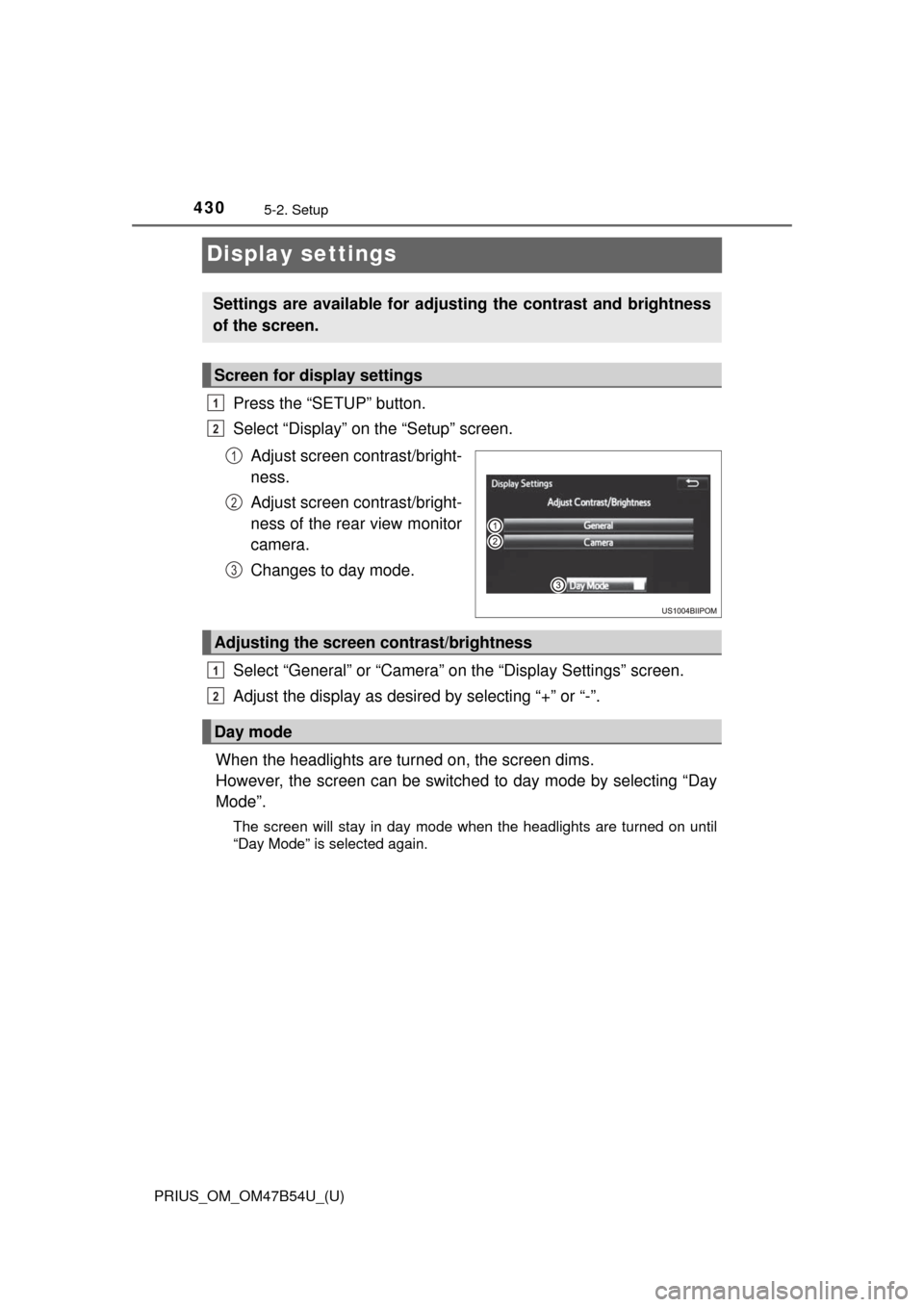
Press the “SETUP” button.
Select “Display” on the “Setup” screen.Adjust screen contrast/bright-
ness.
Adjust screen contrast/bright-
ness of the rear view monitor
camera.
Changes to day mode.
Select “General” or “Camera” on the “Display Settings” screen.
Adjust the display as desired by selecting “+” or “-”.
When the headlights are tur ned on, the screen dims.
However, the screen can be switch ed to day mode by selecting “Day
Mode”.
The screen will stay in day mode when the headlights are turned on until
“Day Mode” is selected again.
Settings are available for adjusting the contrast and brightness
of the screen.
Screen for display settings
1
2
1
2
3
Adjusting the screen contrast/brightness
Day mode
1
2
Page 571 of 796
PRIUS_OM_OM47B54U_(U)
5717-1. Maintenance and care
7
Maintenance and care
NOTICE
■When using a high pressure car wash
● When washing the vehicle, do not let water of the high pressure washer hit
directly or the vicinity of the camera. Due to the shock from the high pres-
sure water, it is possible the device may not operate as normal.
● Do not bring the nozzle tip close to boots (rubber or resin manufactured
cover), connectors or the following parts. The parts may be damaged if
they come into contact with high-pressure water.
• Traction related parts
• Steering parts
• Suspension parts
• Brake parts
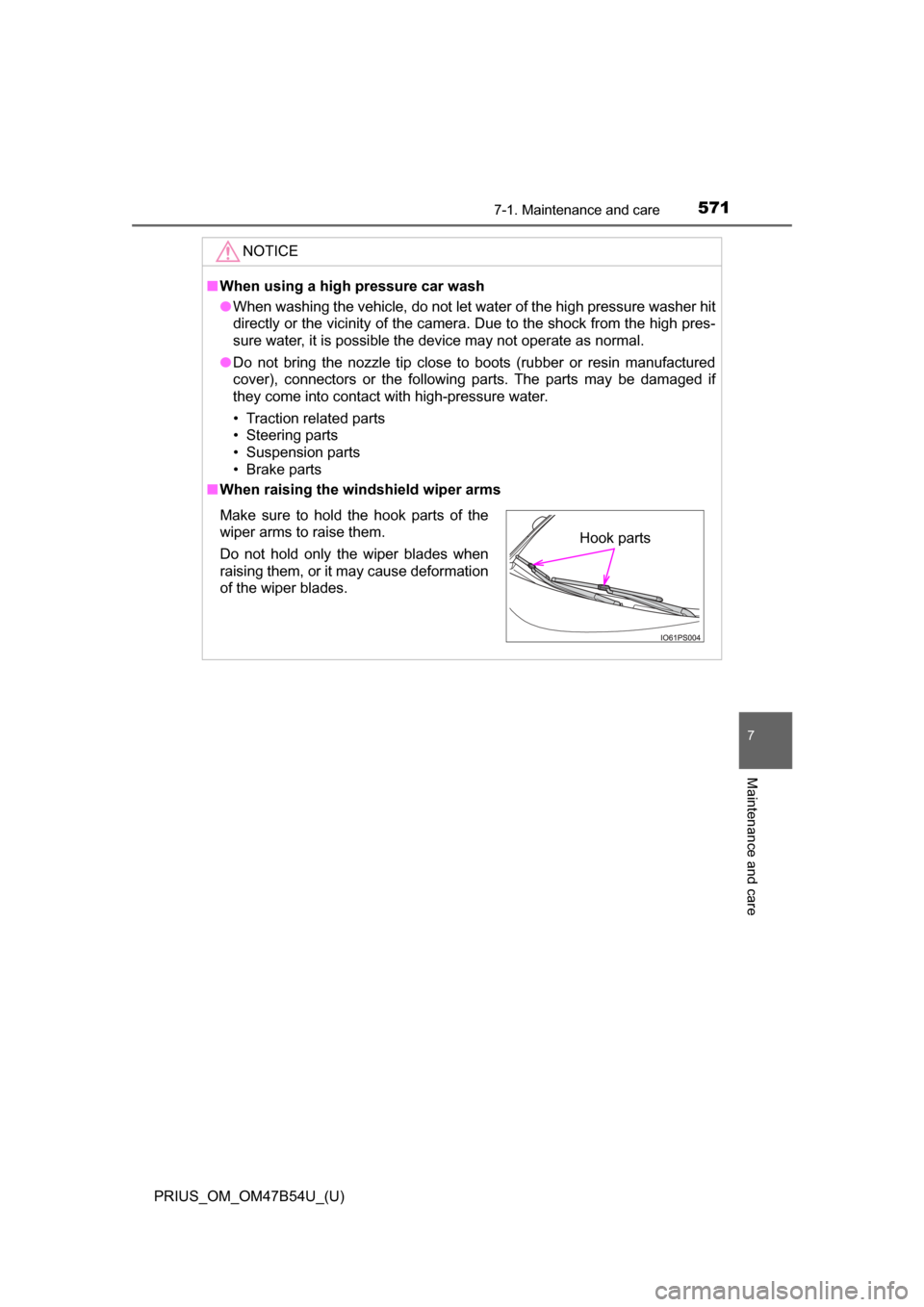
■ When raising the windshield wiper arms
Make sure to hold the hook parts of the
wiper arms to raise them.
Do not hold only the wiper blades when
raising them, or it may cause deformation
of the wiper blades.Hook parts
Page 628 of 796
628
PRIUS_OM_OM47B54U_(U)
7-3. Do-it-yourself maintenance
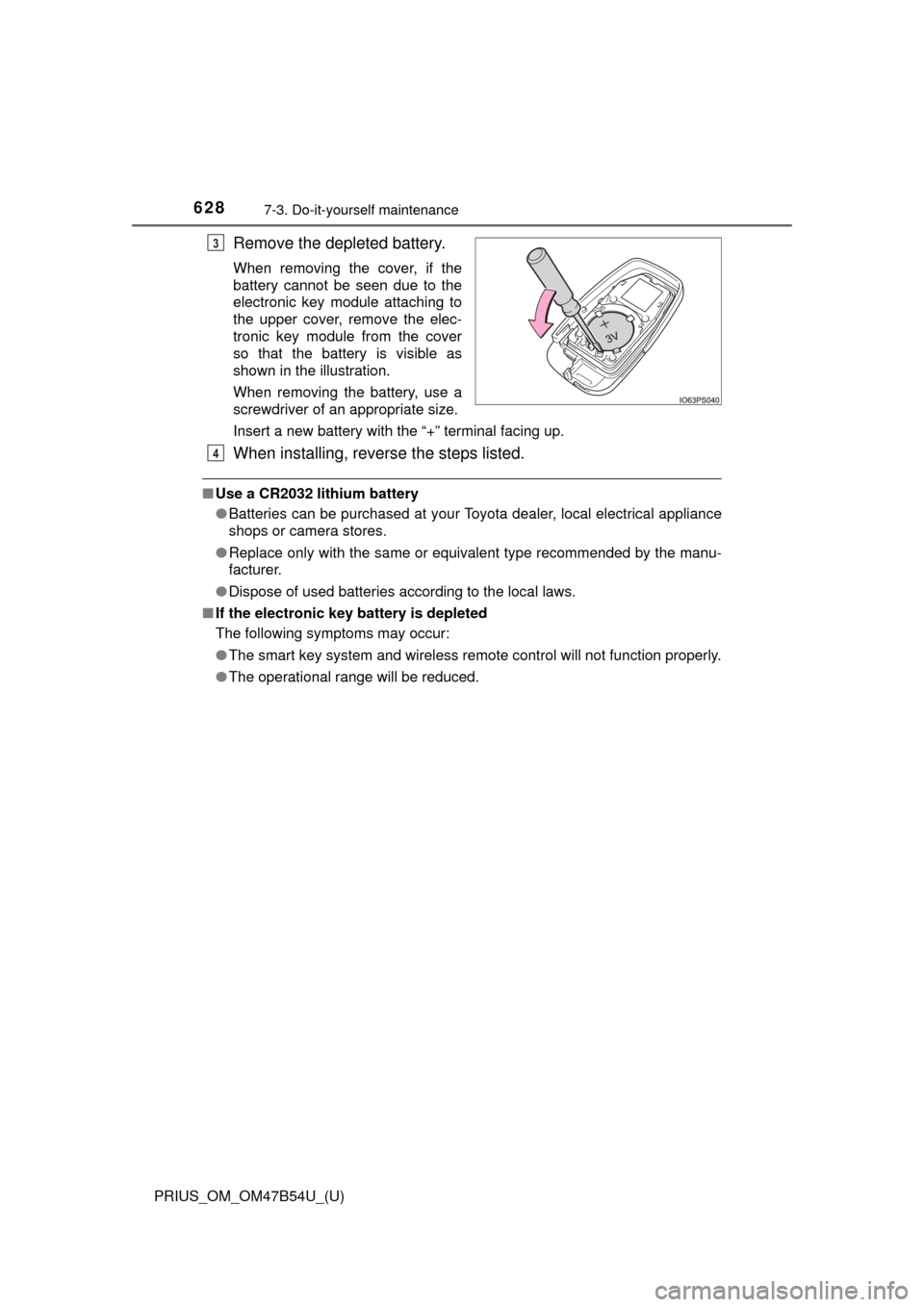
Remove the depleted battery.
When removing the cover, if the
battery cannot be seen due to the
electronic key module attaching to
the upper cover, remove the elec-
tronic key module from the cover
so that the battery is visible as
shown in the illustration.
When removing the battery, use a
screwdriver of an appropriate size.
Insert a new battery with the “+” terminal facing up.
When installing, reverse the steps listed.
■Use a CR2032 lithium battery
●Batteries can be purchased at your Toyota dealer, local electrical appliance
shops or camera stores.
● Replace only with the same or equivalent type recommended by the manu-
facturer.
● Dispose of used batteries according to the local laws.
■ If the electronic key battery is depleted
The following symptoms may occur:
●The smart key system and wireless remote control will not function properly.
● The operational range will be reduced.
3
4
Page 654 of 796
6548-2. Steps to take in an emergency
PRIUS_OM_OM47B54U_(U)
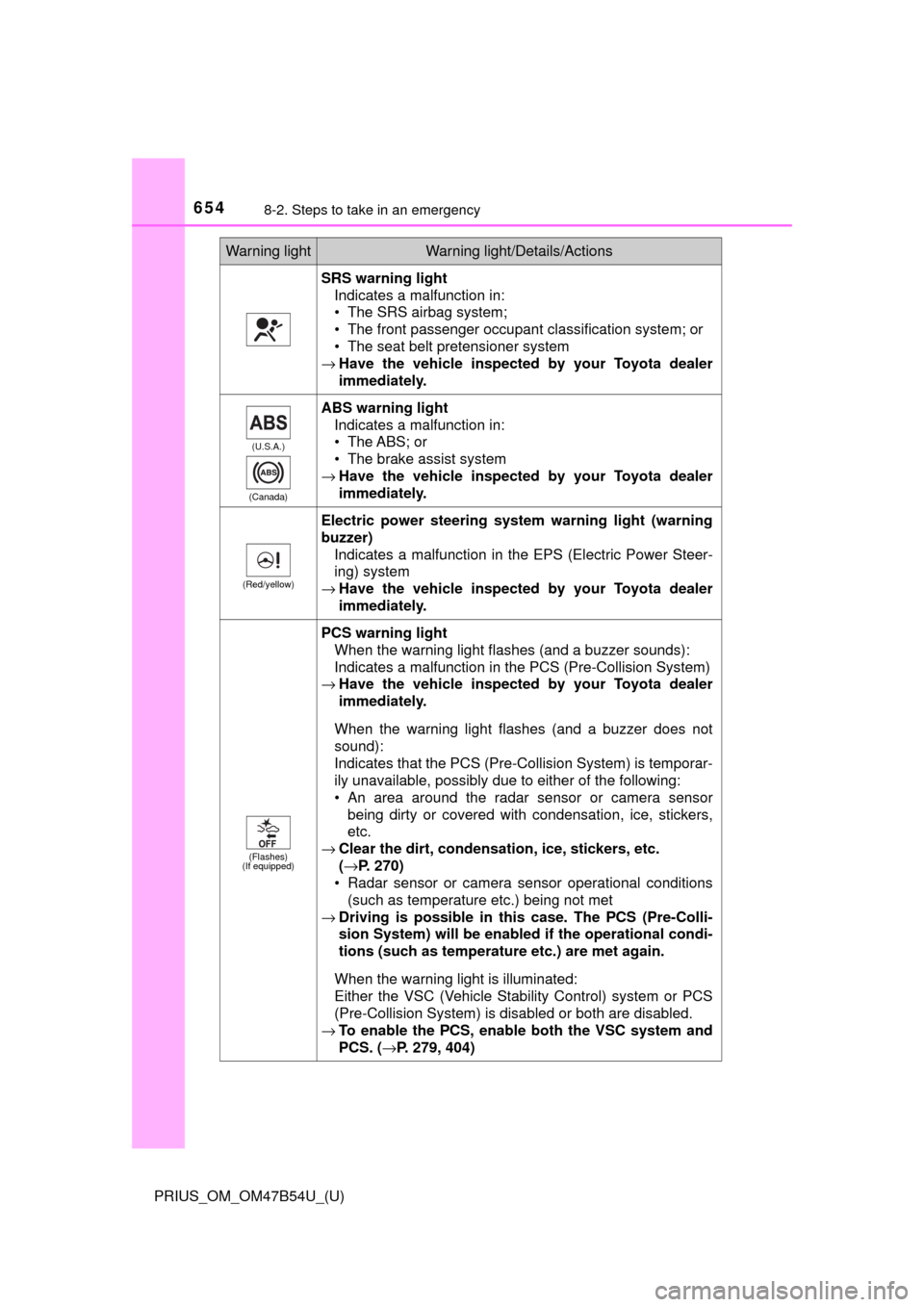
SRS warning lightIndicates a malfunction in:
• The SRS airbag system;
• The front passenger occupant classification system; or
• The seat belt pretensioner system
→ Have the vehicle inspected by your Toyota dealer
immediately.
(U.S.A.)
(Canada)
ABS warning light Indicates a malfunction in:
• The ABS; or
• The brake assist system
→ Have the vehicle inspected by your Toyota dealer
immediately.
(Red/yellow)
Electric power steering system warning light (warning
buzzer)
Indicates a malfunction in the EPS (Electric Power Steer-
ing) system
→ Have the vehicle inspected by your Toyota dealer
immediately.
(Flashes)
(If equipped)
PCS warning light
When the warning light flashes (and a buzzer sounds):
Indicates a malfunction in the PCS (Pre-Collision System)
→ Have the vehicle inspected by your Toyota dealer
immediately.
When the warning light flashes (and a buzzer does not
sound):
Indicates that the PCS (Pre-Collision System) is temporar-
ily unavailable, possibly due to either of the following:
• An area around the radar sensor or camera sensor being dirty or covered with condensation, ice, stickers,
etc.
→ Clear the dirt, condensation, ice, stickers, etc.
(→P. 270)
• Radar sensor or camera sensor operational conditions (such as temperature etc.) being not met
→ Driving is possible in th is case. The PCS (Pre-Colli-
sion System) will be enabled if the operational condi-
tions (such as temperature etc.) are met again.
When the warning light is illuminated:
Either the VSC (Vehicle Stability Control) system or PCS
(Pre-Collision System) is disabled or both are disabled.
→ To enable the PCS, enable both the VSC system and
PCS. ( →P. 279, 404)
Warning lightWarning light/Details/Actions
Page 668 of 796

6688-2. Steps to take in an emergency
PRIUS_OM_OM47B54U_(U)■
If “Shift to Position When Parked” is shown
Message is displayed when the driver’s door is opened without turning the
power switch to off with the shift position in any position other than P.
Shift the shift position to P.
■ If “Shift is in Release Acceler ator Before Shifting” is shown
Message is displayed when the accelerator pedal has been depressed and
the shift position is in N.
Release the accelerator pedal and shift the shift position to D or R.
■ If “Depress Brake When Vehicle is Stopped. Hybrid System may Over-
heat.” is shown
The message may be shown when the accelerator pedal is depressed to hold
the vehicle while the vehicle is stopped on an uphill, etc.
The hybrid system may overheat. Release the accelerator pedal and depress
the brake pedal.
■ If “Auto Power OFF to Conserve Battery” is shown
The power switch has been turned off by the automatic power off function.
When starting the hybrid system next time, operate the hybrid system for
approximately 5 minutes to recharge the 12-volt battery.
■ If “Forward Camera System Unavaila ble” or “Forward Camera System
Unavailable Clean Windshield” is displayed. *
The following systems may be suspended until the problem shown in the
message is resolved.
● PCS (Pre-Collision System)
*
●LDA (Lane Departure Alert with steering control)*
●Dynamic radar cruise control with full-speed range*
●Automatic High Beam*
*
: If equipped
■ If “Maintenance Required Soon” is displayed (U.S.A. only)
Indicates that all maintenance according to the driven distance on the mainte-
nance schedule
* should be performed soon.
Comes on approximately 4500 miles (7200 km) after the message has been
reset.
If necessary, perform maintenance. Please reset the message after the main-
tenance is performed. ( →P. 578)
*: Refer to the separate “Scheduled Maintenance Guide” or “Owner’s Manual
Supplement” for the maintenance interval applicable to your vehicle.
Page 780 of 796
780Alphabetical index
PRIUS_OM_OM47B54U_(U)
Bluetooth® audio ..................... 466
Bluetooth® phone .................... 468
Deleting the call history......... 488
Making a call ......................... 471
Managing the contacts.......... 484
Message function.................. 478
Phone settings ...................... 483
Receiving a call..................... 474
Speaking on the phone ......... 475
Bottle holders .......................... 528
Brake Fluid ...................................... 729
Parking brake........................ 241
Regenerative braking.............. 80
Warning light ......................... 653
Brake assist ............................. 402
Brake Override System ........... 209
Break-in tips ............................. 210
Brightness control Instrument cluster
light control ........................... 94
BSM (Blind Spot Monitor) ....... 320
Care Aluminum wheels.................. 567
Camera sensor ..................... 271
Exterior ................................. 566
Interior................................... 572
Radar sensor ........................ 270
Seat belts .............................. 574
Water-repellent coating......... 567
Cargo capacity ......................... 222
Catch protection function ....... 199
Cargo hooks............................. 532 CD player.................................. 438
Chains ...................................... 413
Child restraint system............... 58
Fixed with a LATCH system .......... ..................... ... 71
Fixed with a seat belt .............. 65
Front passenger occupant classification syst em ............ 50
Points to remember ................ 59
Riding with children ................ 57
Types of child restraint system installation
method ................................. 61
Using an anchor
bracket ................................. 74
Child safety ................................ 57 12-volt battery precautions ... 598
Airbag precautions.................. 39
Back door precautions .......... 173
Child restraint system ............. 58
How your child should
wear the seat belt ................. 31
Installing child restraints ......... 61
Moon roof precautions .......... 205
Power window lock switch .... 198
Power window precautions ... 200
Rear door child-protectors .... 168
Removed key battery
precautions......................... 629
Riding with children ................ 57
Seat belt extender
precautions........................... 35
Seat belt precautions .............. 70
Seat heater precautions ....... 521
C
Page 781 of 796
781Alphabetical index
PRIUS_OM_OM47B54U_(U)
Child-protectors....................... 168
CleaningAluminum wheels.................. 567
Camera sensor ..................... 271
Exterior ................................. 566
Interior................................... 572
Radar sensor ........................ 270
Seat belts .............................. 574
Water-repellent coating......... 567
Coat hooks ............................... 550
Combination meter .................... 92 Clock adjustment .................... 97
Main display .......................... 107
Multi-information display ....... 114
Warning lights and indicators ............................ 100
Condenser ................................ 596
Console box ............................. 527
Coolant Capacity ................................ 728
Checking ............................... 594
Preparing and checking before winter....................... 412
Cooling system ........................ 594 Hybrid system overheating......................... 714
Consumption screen ............... 153
Cruise control
Cruise control........................ 313
Dynamic radar cruise control with full-speed
range .................................. 298
Cup holders.............................. 528
Curtain shield airbags ............... 36
Customizable features ............ 748 Daytime running light
system.................................... 245
Deck board ............................... 531
Defogger Outside rear view mirrors ..... 515
Rear window ......................... 515
Windshield ............................ 515
Dimension ................................ 722
Dinghy towing.......................... 224
Display BSM (Blind Spot Monitor) ..... 320
Drive information .................. 116
Dynamic radar cruise control with full-speed range .......... 298
Energy monitor ............. 117, 153
Head-up display.................... 146
LDA (Lane Departure Alert with steering control) .......... 292
Multi-information display ....... 114
Parking assist system ....... ................. 334, 361
Pre-collision warning ............ 275
Trip information..................... 109
Warning messages ............... 663
Do-it-yourself maintenance .... 584
Door courtesy lights ............... 523 Location ................................ 523
Wattage ................................ 732D
Page 790 of 796

790Alphabetical index
PRIUS_OM_OM47B54U_(U)
S-APGS (Simple Advanced Parking Guidance
System) .................................. 357
Safety Connect ........................ 559
Seat belts.................................... 30 Adjusting the seat belt ............ 31
Automatic Locking Retractor............................... 31
Child restra int system
installation ............................ 61
Cleaning and maintaining
the seat belt ........................ 574
Emergency Locking Retractor............................... 31
How to wear your seat belt ..... 30
How your child should wear the seat belt .......................... 31
Pregnant women, proper seat belt use ......................... 33
Reminder light and buzzer .... 656
Seat belt extender................... 32
Seat belt instructions for Canadian owners ............... 759
Seat belt pretensioners ........... 31
SRS warning light ................. 654
Seat heaters ............................. 521
Seating capacity ...................... 222
Seats Adjustment ............................ 184
Adjustment precautions ........ 185
Child seats/child restraint system installation ................ 61
Cleaning................................ 572
Front seats ............................ 184
Head restraint ....................... 189
Properly sitting in the seat ...... 28
Seat heaters ......................... 521 Sensor
Automatic headlight
system .......... ...................... 245
Automatic High Beam system .......... ...................... 247
Camera sensor ..................... 269
Inside rear view mirror .......... 195
LDA (Lane Departure Alert with steering control) .......... 287
Parking assist sensors............... 333, 346, 387
Radar sensor ........................ 269
Rain-sensing windshield wipers ................................. 258
Service reminder indicators ............................... 100
Shift lever ................................. 234
Shift lever light ........................ 523
Side airbags ............................... 36
Side doors ................................ 165
Side marker lights
Light switch ........................... 242
Replacing light bulbs ............ 641
Side mirrors ............................. 196 Adjustment............................ 196
Blind Spot Monitor ................ 320
Folding .................................. 196
Heaters ................................. 515
Side windows Water-repellent coating ........ 567
Simple Advanced Parking Guidance System .................. 357
S