change time TOYOTA PRIUS 2017 4.G Owner's Manual
[x] Cancel search | Manufacturer: TOYOTA, Model Year: 2017, Model line: PRIUS, Model: TOYOTA PRIUS 2017 4.GPages: 796, PDF Size: 20.13 MB
Page 284 of 796
284
PRIUS_OM_OM47B54U_(U)
4-5. Using the driving support systems
• When driving in inclement weather such as heavy rain, fog, snow or a
sandstorm
• When the vehicle is hit by water, snow, dust, etc. from a vehicle ahead
• When driving through steam or smoke
• When driving in a place where the surrounding brightness changes sud- denly, such as at the entrance or exit of a tunnel
• When a very bright light, such as the sun or the headlights of oncoming
traffic, shines directly into the camera sensor
• When the surrounding area is dim, such as at dawn or dusk, or while at night or in a tunnel
• After the hybrid system has started the vehicle has not been driven for a certain amount of time
• While making a left/right turn and for a few seconds after making a left/
right turn
• While driving on a curve and for a few seconds after driving on a curve
• If your vehicle is skidding
• If the wheels are misaligned
• If a wiper blade is blocking the camera sensor
• The vehicle is wobbling.
• The vehicle is being driven at extremely high speeds.
• When driving on a hill
• If the radar sensor or camera sensor is misaligned
● In some situations such as the following, sufficient braking force may not be
obtained, preventing the system from performing properly:
• If the braking functions cannot operate to their full extent, such as when
the brake parts are extremely cold, extremely hot, or wet
• If the vehicle is not properly maintained (brakes or tires are excessively worn, improper tire inflation pressure, etc.)
• When the vehicle is being driven on a gravel road or other slippery sur- face
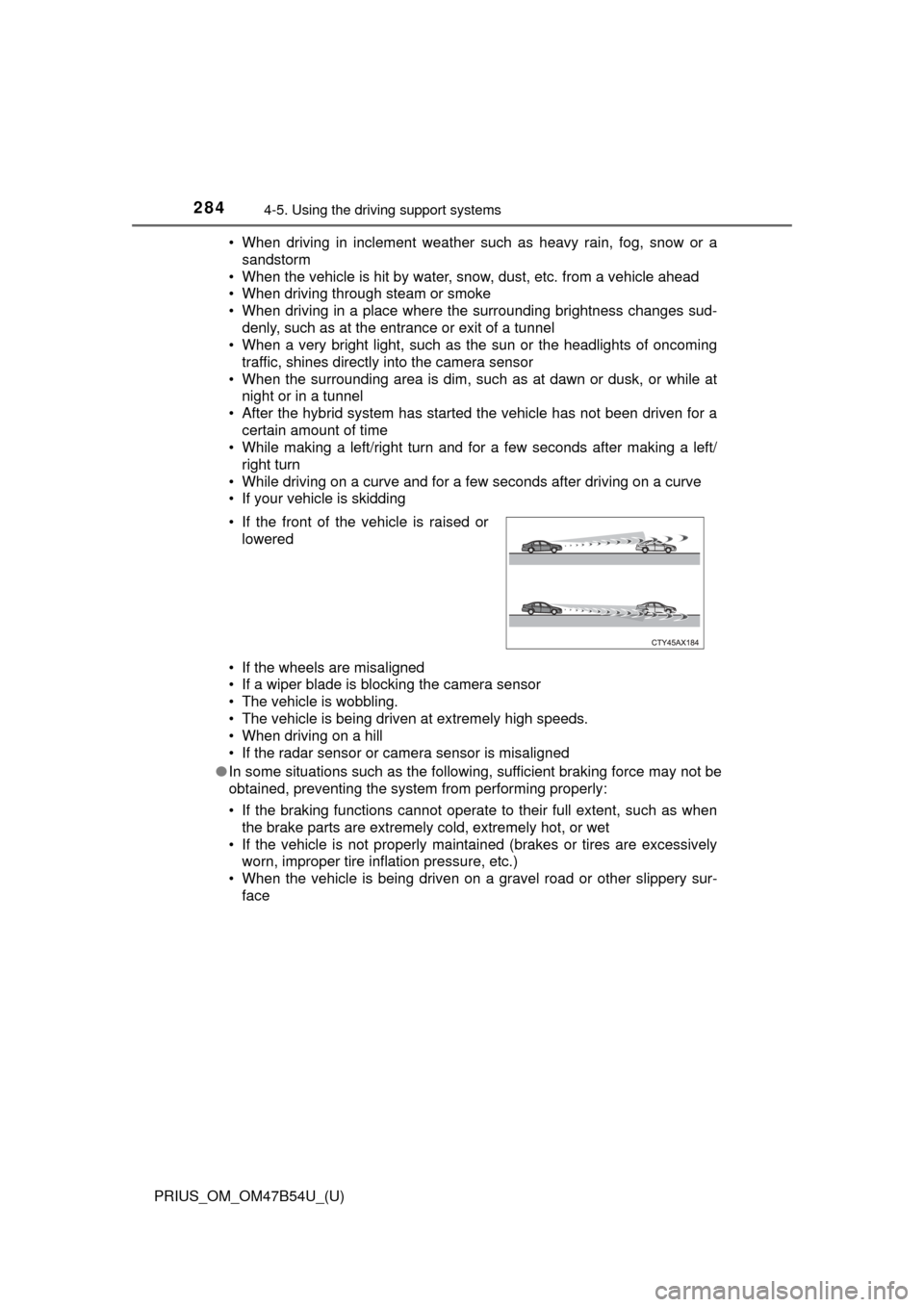
• If the front of the vehicle is raised or
lowered
Page 302 of 796

302
PRIUS_OM_OM47B54U_(U)
4-5. Using the driving support systems
Example of constant speed cruising
When there are no vehicles ahead
The vehicle travels at the speed set by the driver. The desired vehicle-to-
vehicle distance can also be set by operating the vehicle-to-vehicle dis-
tance button.
Example of deceleration cruising and follow-up cruising
When a preceding vehicle driving slower than the set speed
appears
When a vehicle is detected running ahead of you, the system automatically
decelerates your vehicle. When a greater reduction in vehicle speed is
necessary, the system applies the brakes (the stop lights will come on at
this time). The system will respond to changes in the speed of the vehicle
ahead in order to maintain the vehicle-to-vehicle distance set by the driver.
Approach warning warns you when the system cannot decelerate suffi-
ciently to prevent your vehicle from closing in on the vehicle ahead.
When the vehicle ahead of you stops, your vehicle will also stop (vehicle is
stopped by system control). After the vehicle ahead starts off, pushing the
cruise control lever up or depressing the accelerator pedal will resume fol-
low-up cruising.
Example of acceleration
When there are no longer any preceding vehicles driving slower
than the set speed
The system accelerates until the set speed is reached. The system then
returns to constant speed cruising.
1
2
3
Page 304 of 796
304
PRIUS_OM_OM47B54U_(U)
4-5. Using the driving support systems
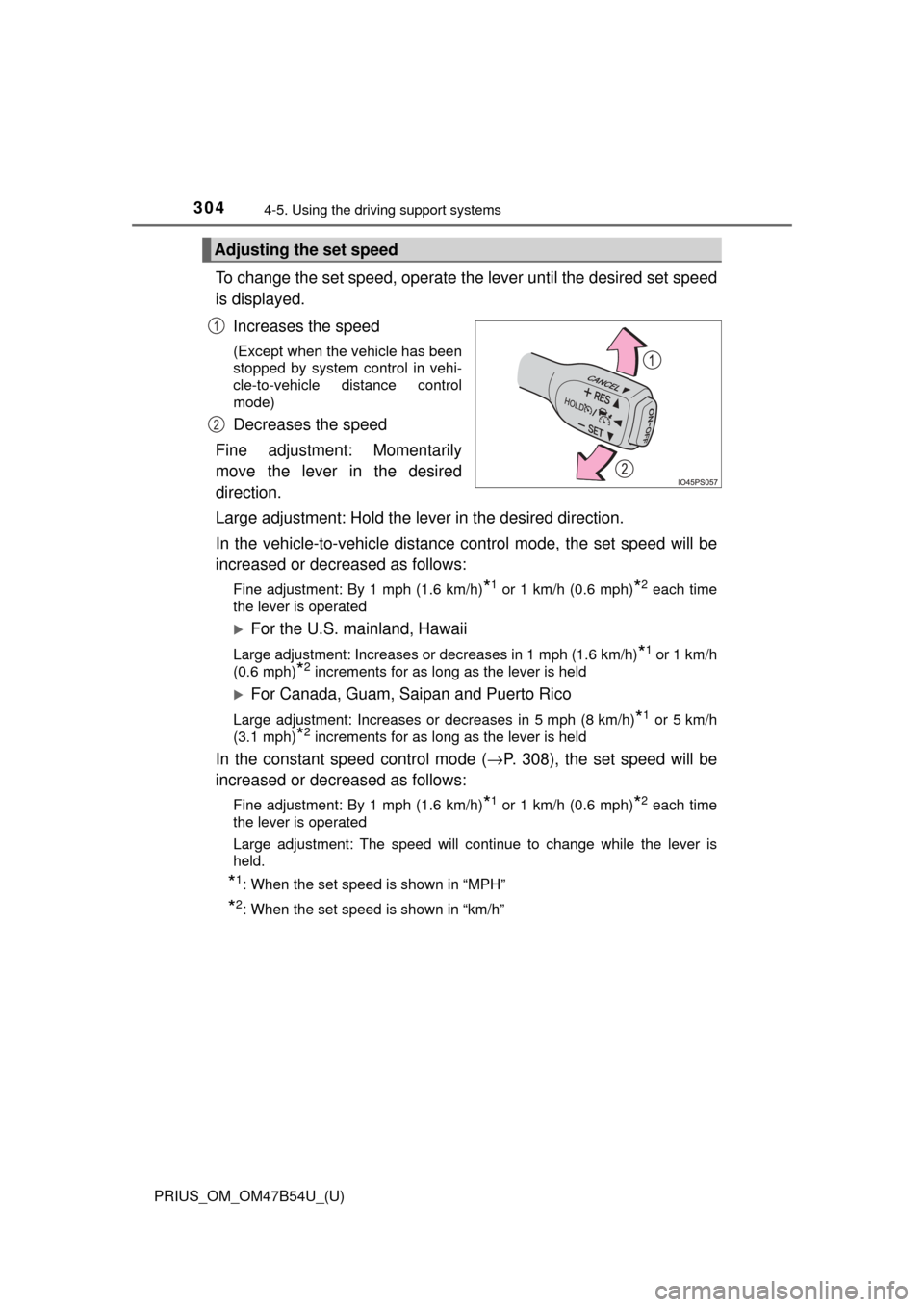
To change the set speed, operate the lever until the desired set speed
is displayed.
Increases the speed
(Except when the vehicle has been
stopped by system control in vehi-
cle-to-vehicle distance control
mode)
Decreases the speed
Fine adjustment: Momentarily
move the lever in the desired
direction.
Large adjustment: Hold the lever in the desired direction.
In the vehicle-to-vehicle distance control mode, the set speed will be
increased or decreased as follows:
Fine adjustment: By 1 mph (1.6 km/h)*1 or 1 km/h (0.6 mph)*2 each time
the lever is operated
For the U.S. mainland, Hawaii
Large adjustment: Increases or decreases in 1 mph (1.6 km/h)*1 or 1 km/h
(0.6 mph)
*2 increments for as long as the lever is held
For Canada, Guam, Saipan and Puerto Rico
Large adjustment: Increases or decreases in 5 mph (8 km/h)*1 or 5 km/h
(3.1 mph)
*2 increments for as long as the lever is held
In the constant speed control mode ( →P. 308), the set speed will be
increased or decreased as follows:
Fine adjustment: By 1 mph (1.6 km/h)*1 or 1 km/h (0.6 mph)*2 each time
the lever is operated
Large adjustment: The speed will continue to change while the lever is
held.
*1: When the set speed is shown in “MPH”
*2: When the set speed is shown in “km/h”
Adjusting the set speed
1
2
Page 315 of 796
PRIUS_OM_OM47B54U_(U)
3154-5. Using the driving support systems
4
Driving
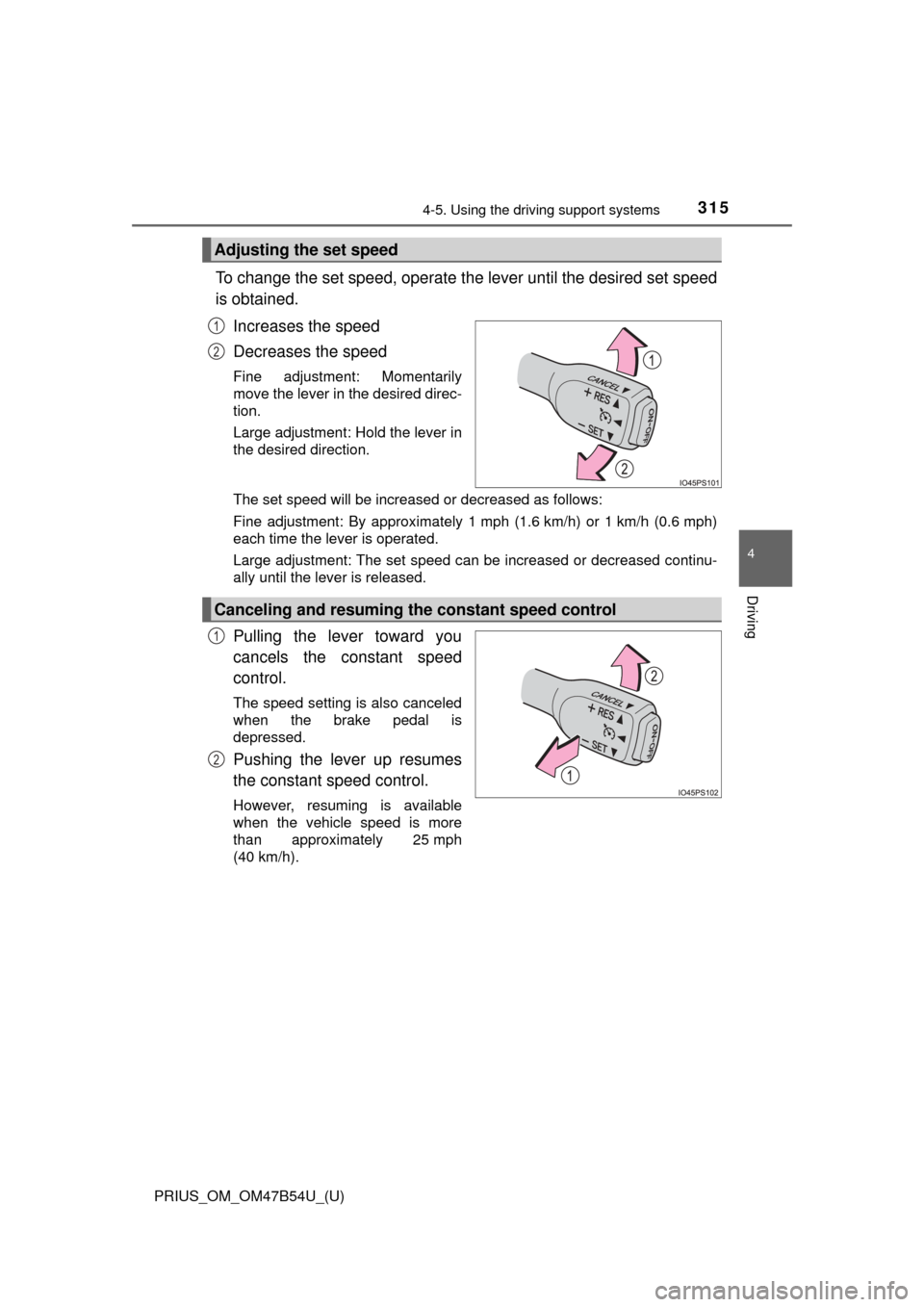
To change the set speed, operate the lever until the desired set speed
is obtained.
Increases the speed
Decreases the speed
Fine adjustment: Momentarily
move the lever in the desired direc-
tion.
Large adjustment: Hold the lever in
the desired direction.
The set speed will be increased or decreased as follows:
Fine adjustment: By approximately 1 mph (1.6 km/h) or 1 km/h (0.6 mph)
each time the lever is operated.
Large adjustment: The set speed can be increased or decreased continu-
ally until the lever is released.
Pulling the lever toward you
cancels the c onstant speed
control.
The speed setting is also canceled
when the brake pedal is
depressed.
Pushing the lever up resumes
the constant speed control.
However, resuming is available
when the vehicle speed is more
than approximately 25 mph
(40 km/h).
Adjusting the set speed
1
2
Canceling and resuming the constant speed control
1
2
Page 318 of 796
318
PRIUS_OM_OM47B54U_(U)
4-5. Using the driving support systems
Driving mode select switch
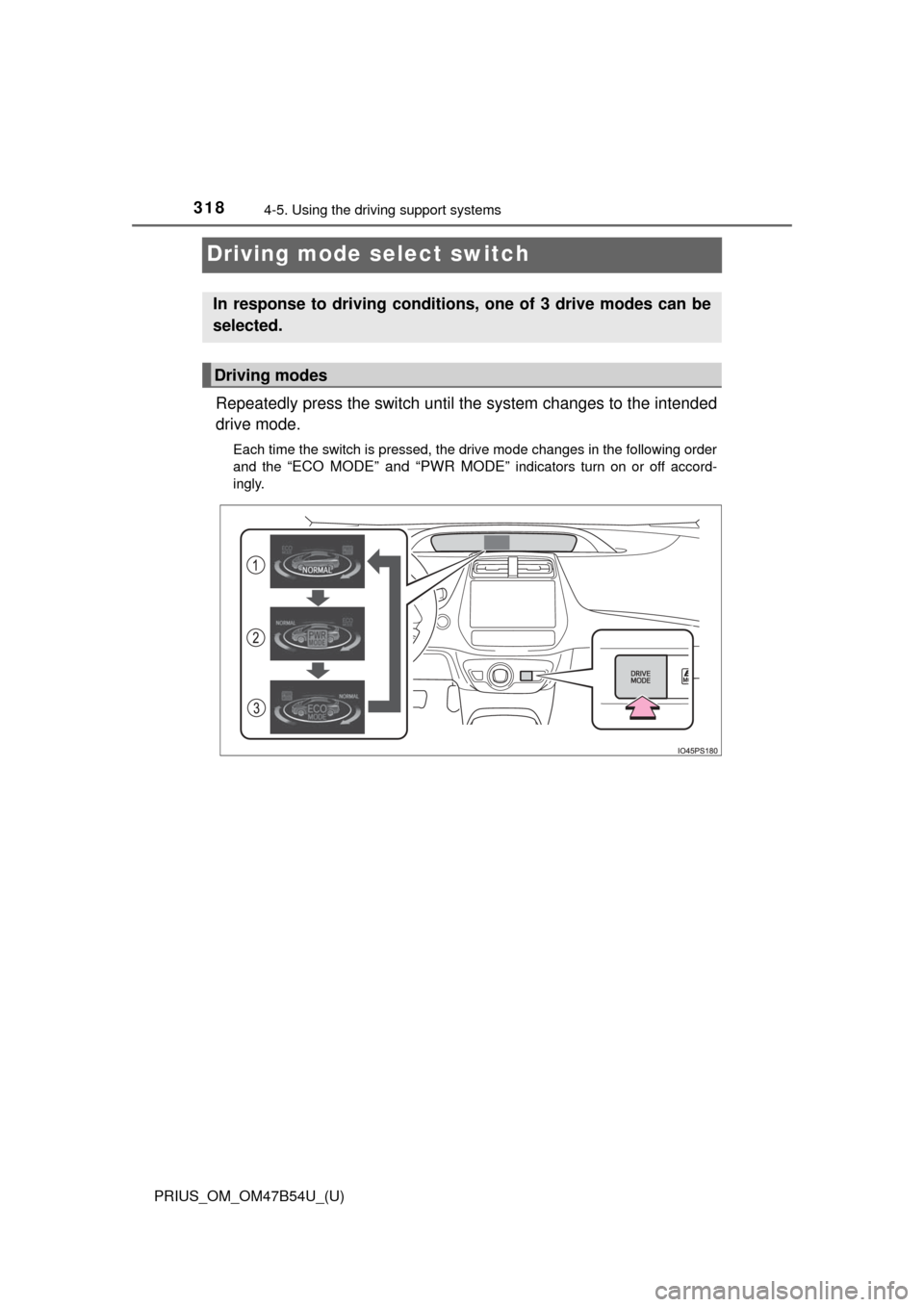
Repeatedly press the switch until t he system changes to the intended
drive mode.
Each time the switch is pressed, the drive mode changes in the following order
and the
“ECO MODE” and “PWR MODE” indicators turn on or off accord-
ingly.
In response to driving conditions, one of 3 drive modes can be
selected.
Driving modes
Page 339 of 796
PRIUS_OM_OM47B54U_(U)
3394-5. Using the driving support systems
4
Driving
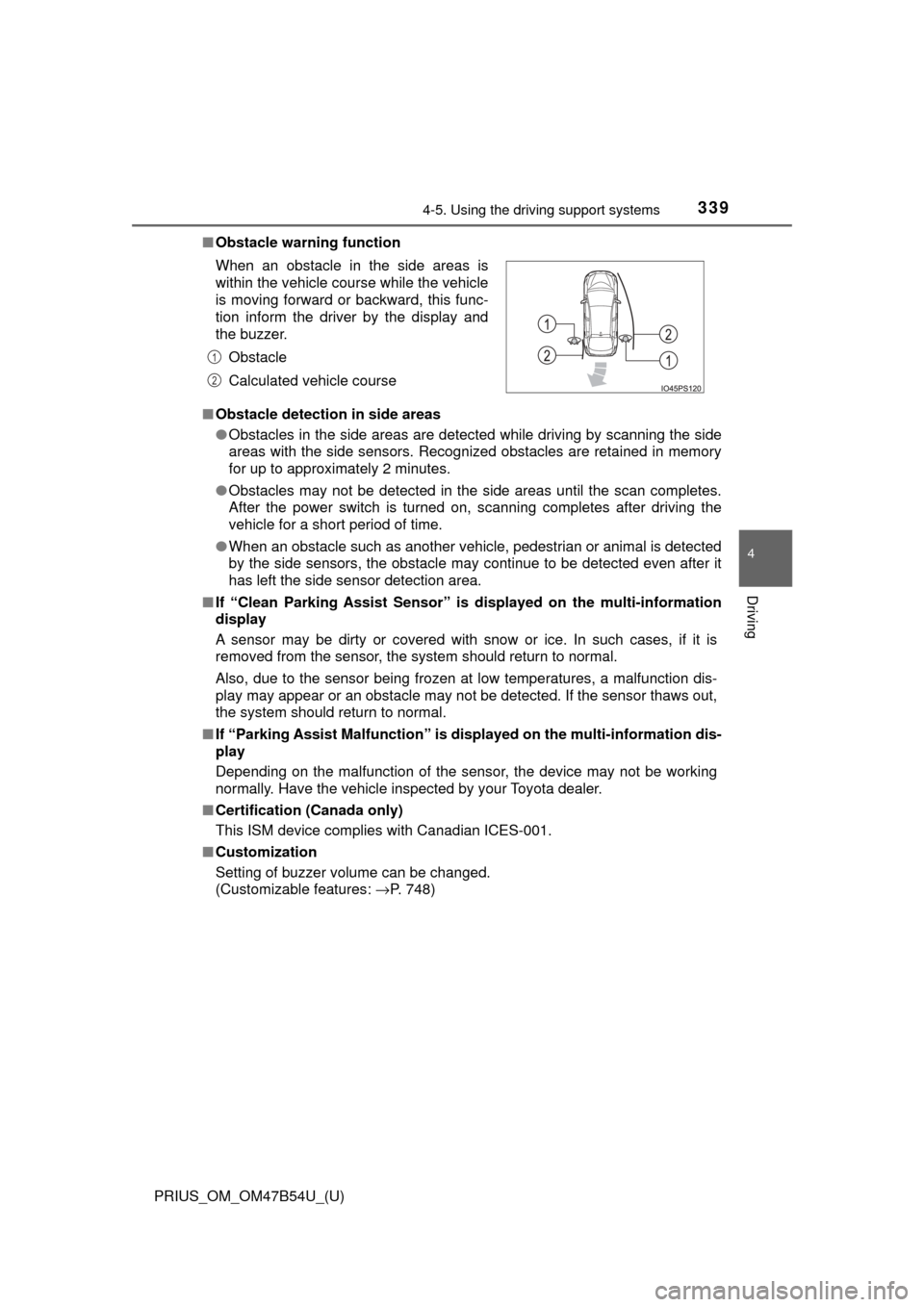
■Obstacle warning function
■ Obstacle detection in side areas
●Obstacles in the side areas are detected while driving by scanning the side
areas with the side sensors. Recognized obstacles are retained in memory
for up to approximately 2 minutes.
● Obstacles may not be detected in the side areas until the scan completes.
After the power switch is turned on, scanning completes after driving the
vehicle for a short period of time.
● When an obstacle such as another vehicle, pedestrian or animal is detected
by the side sensors, the obstacle may continue to be detected even after it
has left the side sensor detection area.
■ If “Clean Parking Assist Sensor” is displayed on the multi-information
display
A sensor may be dirty or covered with snow or ice. In such cases, if it is
removed from the sensor, the system should return to normal.
Also, due to the sensor being frozen at low temperatures, a malfunction dis-
play may appear or an obstacle may not be detected. If the sensor thaws out,
the system should return to normal.
■ If “Parking Assist Malfunction” is di splayed on the multi-information dis-
play
Depending on the malfunction of the sensor, the device may not be working
normally. Have the vehicle inspected by your Toyota dealer.
■ Certification (Canada only)
This ISM device complies with Canadian ICES-001.
■ Customization
Setting of buzzer volume can be changed.
(Customizable features: →P. 748)
When an obstacle in the side areas is
within the vehicle course while the vehicle
is moving forward or backward, this func-
tion inform the driver by the display and
the buzzer.
Obstacle
Calculated vehicle course
1
2
Page 361 of 796
PRIUS_OM_OM47B54U_(U)
3614-5. Using the driving support systems
4
Driving
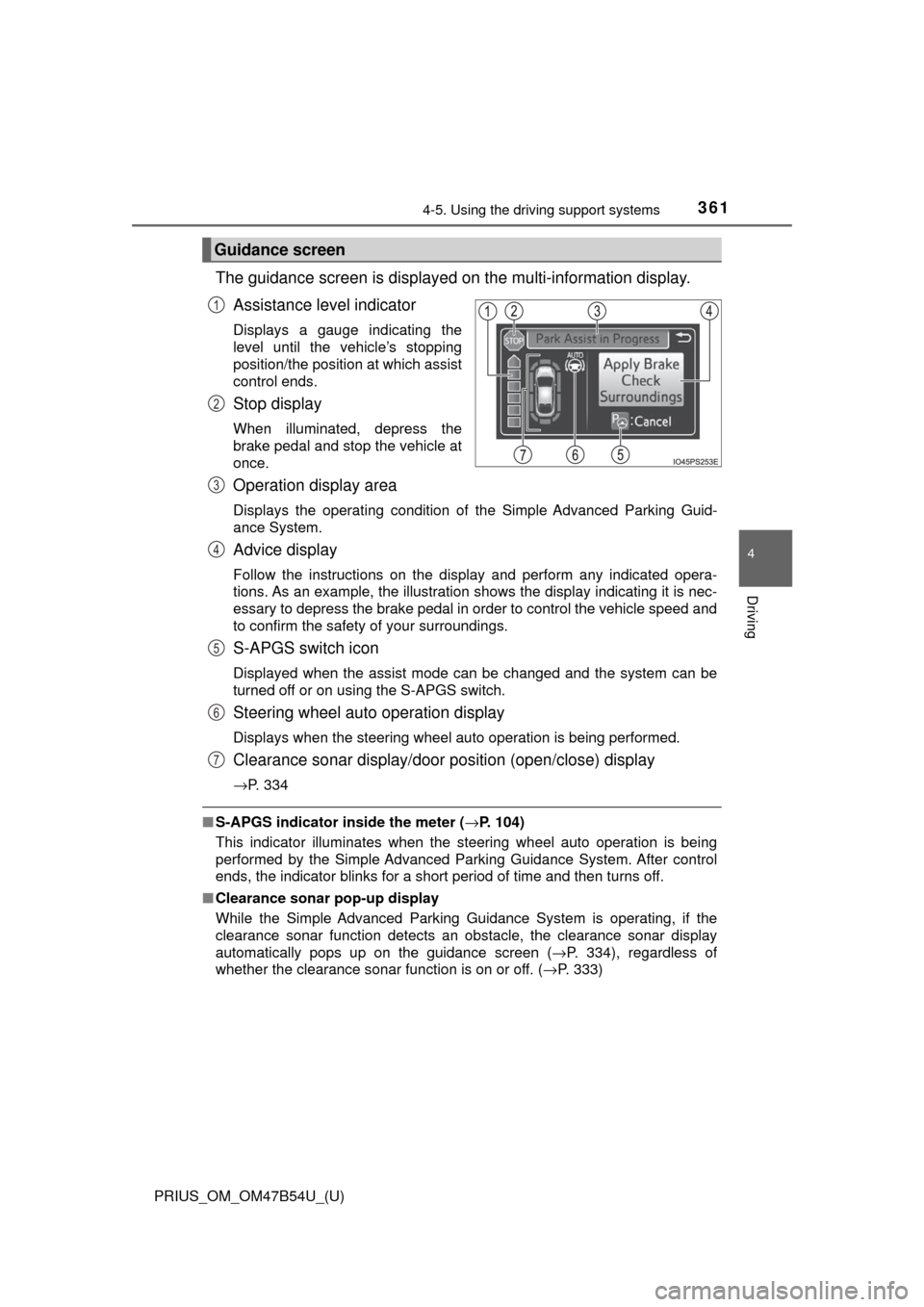
The guidance screen is displayed on the multi-information display.
Assistance level indicator
Displays a gauge indicating the
level until the vehicle’s stopping
position/the position at which assist
control ends.
Stop display
When illuminated, depress the
brake pedal and stop the vehicle at
once.
Operation display area
Displays the operating condition of the Simple Advanced Parking Guid-
ance System.
Advice display
Follow the instructions on the display and perform any indicated opera-
tions. As an example, the illustration shows the display indicating it is nec-
essary to depress the brake pedal in order to control the vehicle speed and
to confirm the safety of your surroundings.
S-APGS switch icon
Displayed when the assist mode can be changed and the system can be
turned off or on using the S-APGS switch.
Steering wheel auto operation display
Displays when the steering wheel auto operation is being performed.
Clearance sonar display/door position (open/close) display
→P. 334
■S-APGS indicator inside the meter ( →P. 104)
This indicator illuminates when the steering wheel auto operation is being
performed by the Simple Advanced Parking Guidance System. After control
ends, the indicator blinks for a short period of time and then turns off.
■ Clearance sonar pop-up display
While the Simple Advanced Parking Guidance System is operating, if the
clearance sonar function detects an obstacle, the clearance sonar display
automatically pops up on the guidance screen ( →P. 334), regardless of
whether the clearance sonar function is on or off. ( →P. 333)
Guidance screen
1
2
3
4
5
6
7
Page 365 of 796
PRIUS_OM_OM47B54U_(U)
3654-5. Using the driving support systems
4
Driving
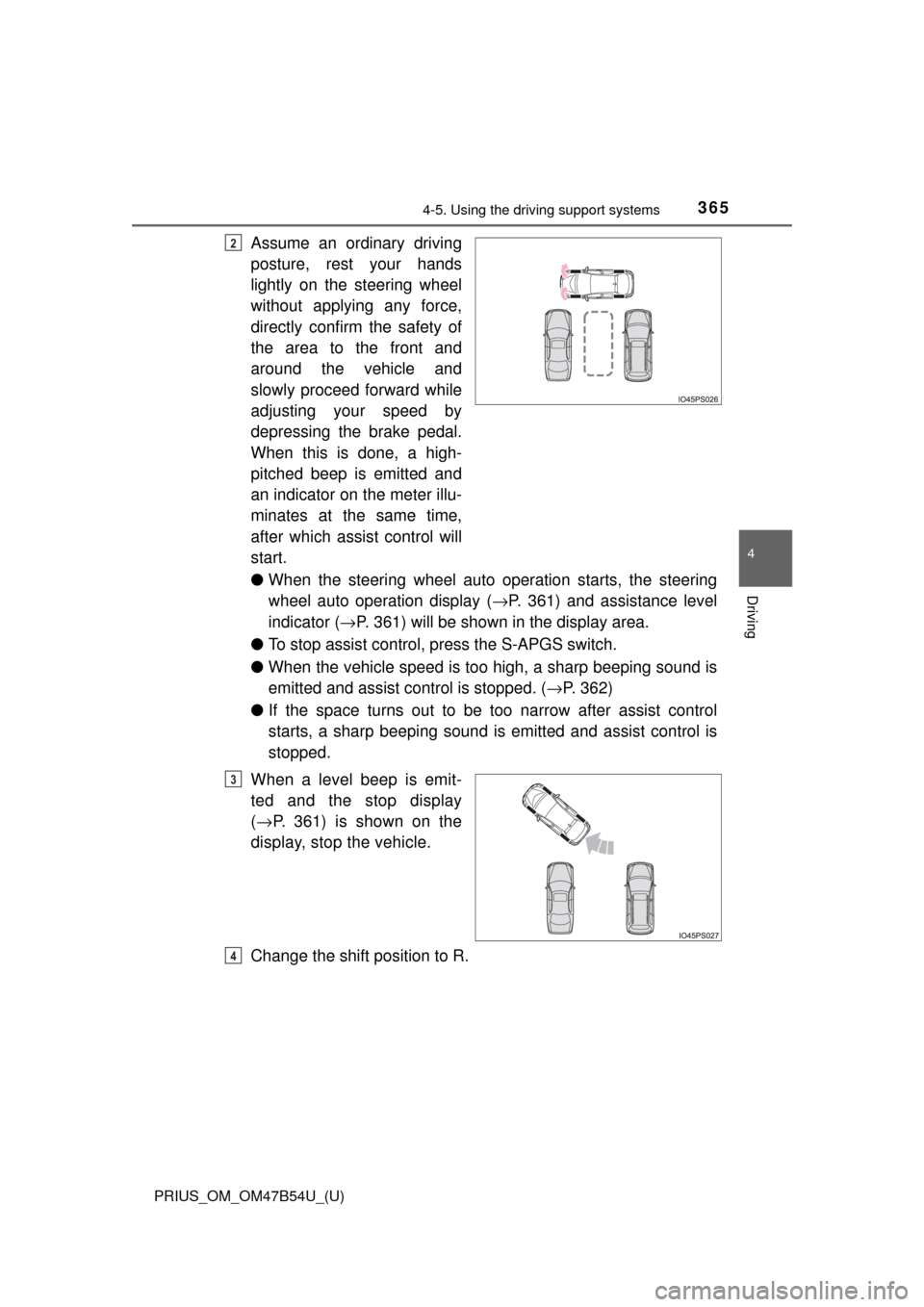
Assume an ordinary driving
posture, rest your hands
lightly on the steering wheel
without applying any force,
directly confirm the safety of
the area to the front and
around the vehicle and
slowly proceed forward while
adjusting your speed by
depressing the brake pedal.
When this is done, a high-
pitched beep is emitted and
an indicator on the meter illu-
minates at the same time,
after which assist control will
start.
●When the steering wheel auto operation starts, the steering
wheel auto operation display ( →P. 361) and assistance level
indicator ( →P. 361) will be shown in the display area.
● To stop assist control, press the S-APGS switch.
● When the vehicle speed is to o high, a sharp beeping sound is
emitted and assist co ntrol is stopped. (→P. 362)
● If the space turns out to be to o narrow after assist control
starts, a sharp beeping sound is emitted and assist control is
stopped.
When a level beep is emit-
ted and the stop display
( → P. 361) is shown on the
display, stop the vehicle.
Change the shift position to R.2
3
4
Page 369 of 796
PRIUS_OM_OM47B54U_(U)
3694-5. Using the driving support systems
4
Driving
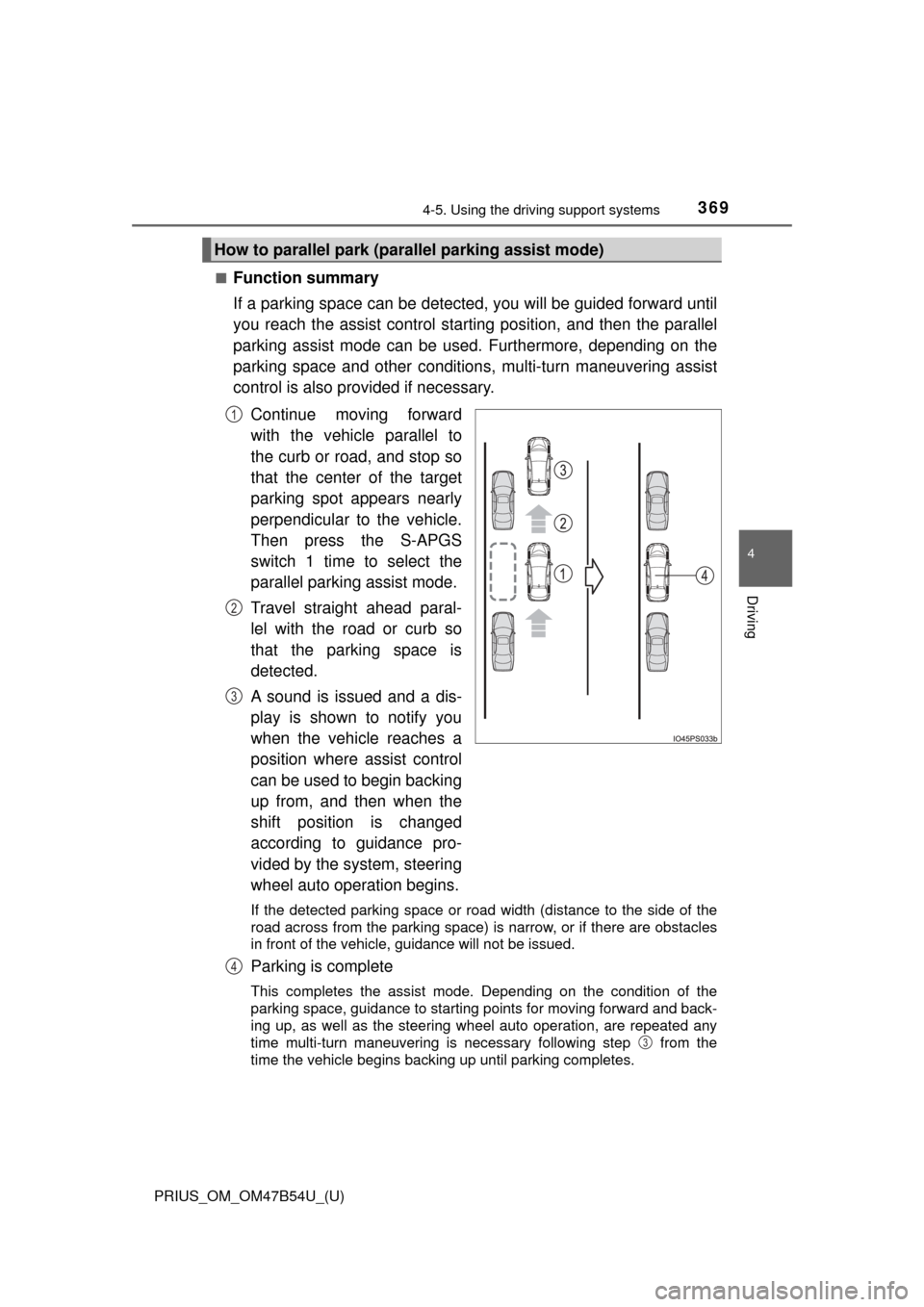
■Function summary
If a parking space can be detected, you will be guided forward until
you reach the assist c ontrol starting position, and then the parallel
parking assist mode can be used. Furthermore, depending on the
parking space and other condition s, multi-turn maneuvering assist
control is also provided if necessary.
Continue moving forward
with the vehicle parallel to
the curb or road, and stop so
that the center of the target
parking spot appears nearly
perpendicular to the vehicle.
Then press the S-APGS
switch 1 time to select the
parallel parking assist mode.
Travel straight ahead paral-
lel with the road or curb so
that the parking space is
detected.
A sound is issued and a dis-
play is shown to notify you
when the vehicle reaches a
position where assist control
can be used to begin backing
up from, and then when the
shift position is changed
according to guidance pro-
vided by the system, steering
wheel auto operation begins.
If the detected parking space or road width (distance to the side of th\
e
road across from the parking space) is narrow, or if there are obstacles
in front of the vehicle, guidance will not be issued.
Parking is complete
This completes the assist mode. Depending on the condition of the
parking space, guidance to starting points for moving forward and back-
ing up, as well as the steering wheel auto operation, are repeated any
time multi-turn maneuvering is necessary following step from the
time the vehicle begins backing up until parking completes.
How to parallel park (parallel parking assist mode)
1
2
3
4
3
Page 374 of 796
374
PRIUS_OM_OM47B54U_(U)
4-5. Using the driving support systems
When the vehicle is almost entirely within the target parking spot,
a high-pitched beep is emitted and the stop display is shown on
the display, stop the vehicle.
This completes the parallel parking assist mode.
● After stopping, feel free to maneuver the vehicle to reach the
desired parking spot.
● Be sure to back up while checking the area to the front and
rear of the vehicle directly and by using the mirrors.
■Parallel parking assist mode operating conditions
●In order to operate the parallel parking assist mode correctly, drive slowly (at
a speed at which the vehicle can be quickly stopped) parallel to the road (or
shoulder) while maintaining a distance of approximately 3 ft. (1 m) to any
parked vehicles.
● The function cannot be used when the vehicle speed is approximately
19 mph (30 km/h) or higher.
● The front side sensors and rear side sensors are used to detect parked
vehicles and determine the parking spot. Therefore, when detection is not
possible ( →P. 391), guidance is not issued.
● If there are no parked vehicles, the parking spot cannot be determined.
Therefore, the parallel parking assist mode cannot be operated.
● If unable to detect the environment surrounding the parking space, the par-
allel parking assist mode may not be able to operate.
● Guidance will continue until the vehicle speed meets or exceeds approxi-
mately 19 mph (30 km/h) or the function is turned off using the S-APGS
switch.
■ Timing for pressing the S-APGS switch
In the following cases, the assist mode may also operate during the steps
taken to park using the parallel parking assist mode. However, in these
cases, conduct parking procedures according to the information on the multi-
information display.
●In step the S-APGS switch is pressed after already passing over the tar-
get parking spot.
If the vehicle is not stopped in step , pressing the S-APGS switch 1 time
while the vehicle is in motion allows you to select “Parallel Parking” and
proceed directly to step .
● The vehicle is moved up to the position in step without the S-APGS
switch being pressed. Then the S-APGS switch is pressed after having
changed the shift position to R.
12
1
1
2
3